Progressive Image Loading: 9 Blur-Up Scenes
Progressive image loading in one line. A blur-up is the math of erasing a blurry picture over a sharp one — 01 measures load progress to cross-fade the two
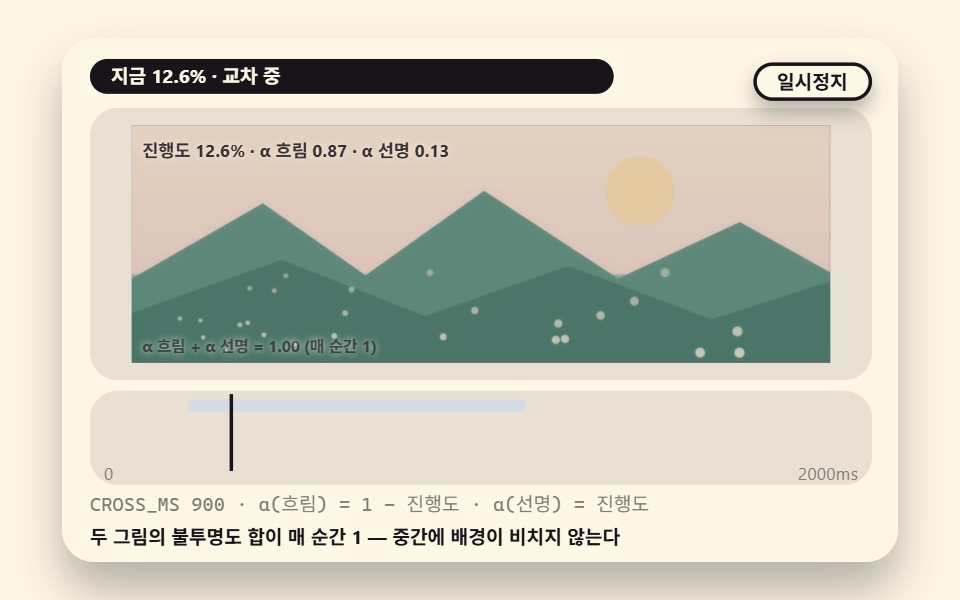 01 bu-crossover-progress
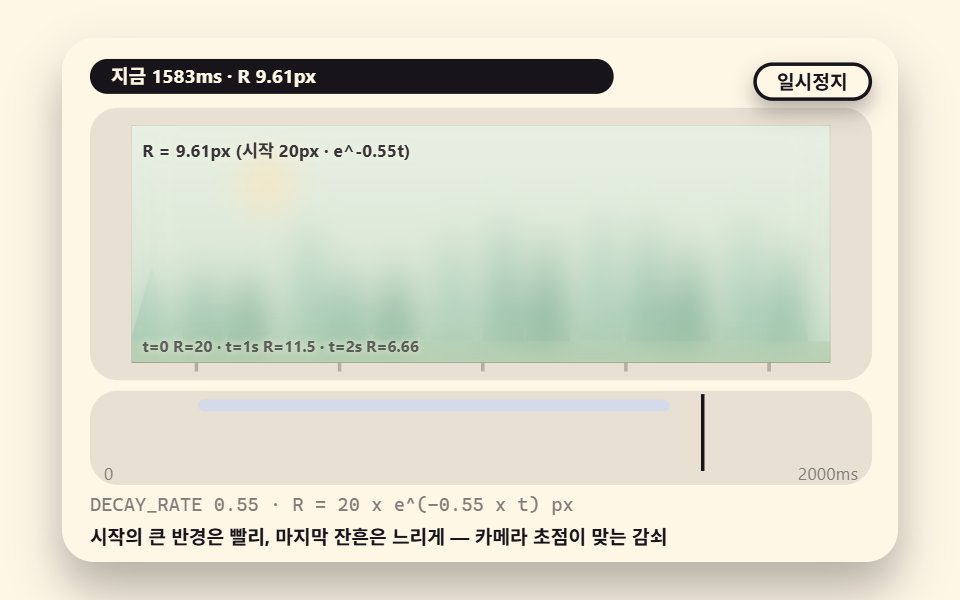 02 bu-radius-decay-curve
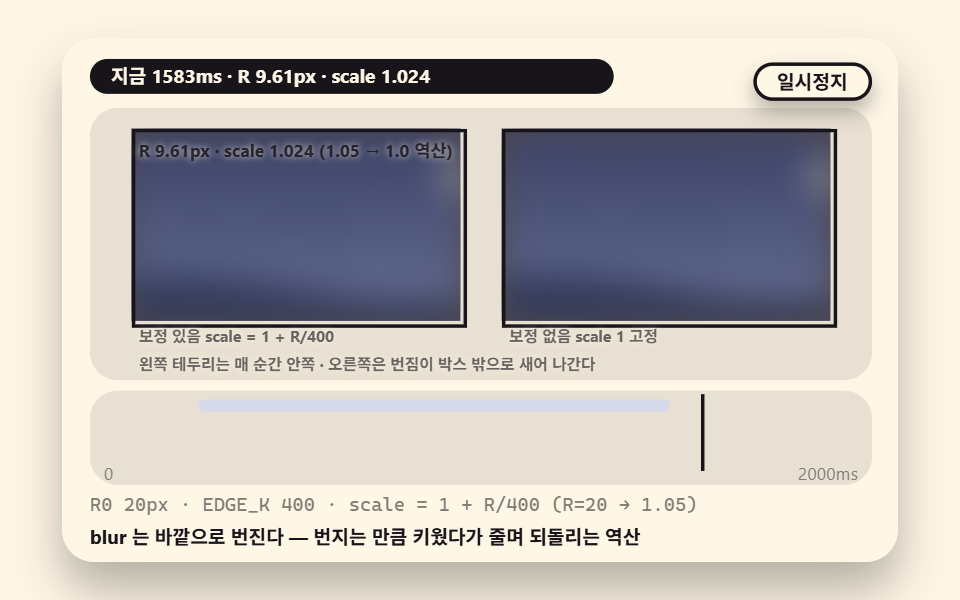 03 bu-blur-scale-compensate
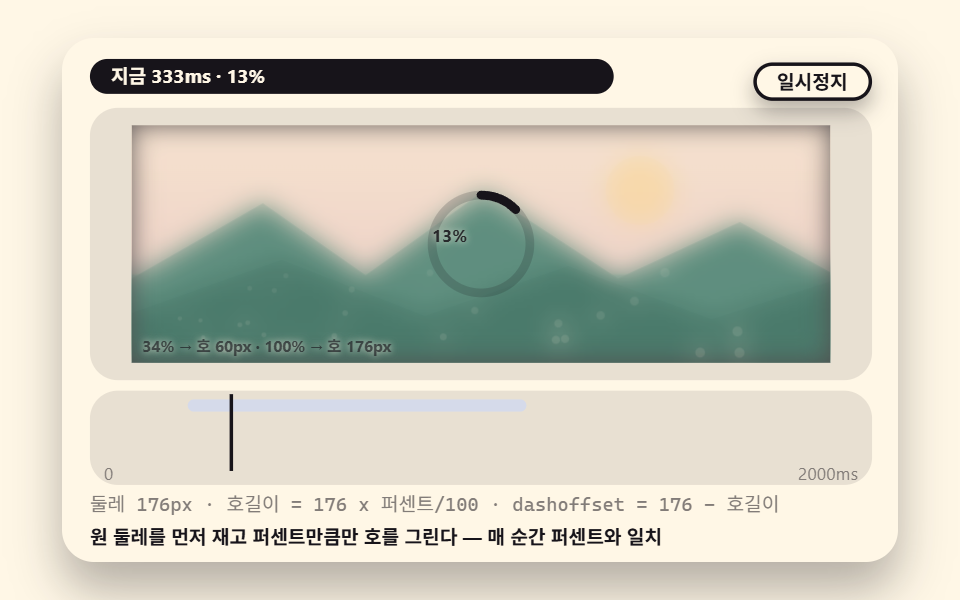 04 bu-progress-ring-overlay
 05 bu-shimmer-blurup-content
 06 bu-avatar-circle-crop
 07 bu-gallery-stagger-wave
 08 bu-timeout-fallback-verdict
 09 bu-reduced-motion-instant
- 01 A Basic Blur-Up Crossing Two Pictures by Load Progress
- 02 Sharpening That Decays the Blur Radius on a Curve
- 03 A Scene That Back-Solves the Scale Against Blur Expansion
- 04 A Progress Ring Overlaying the Load Percent
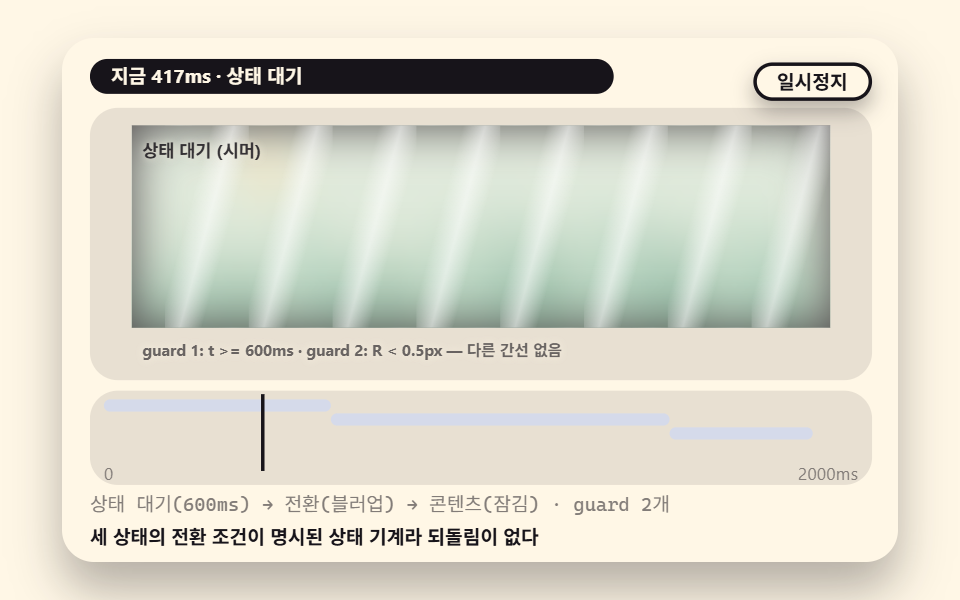
- 05 A Shimmer-to-Blur-Up-to-Content State Machine
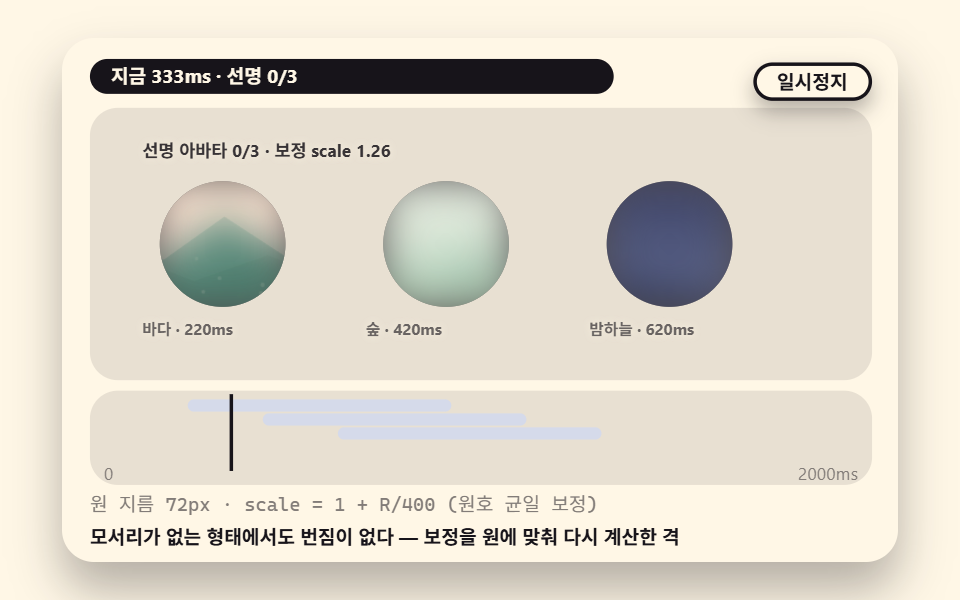
- 06 A Circular Avatar That Lands Blurry Then Sharp
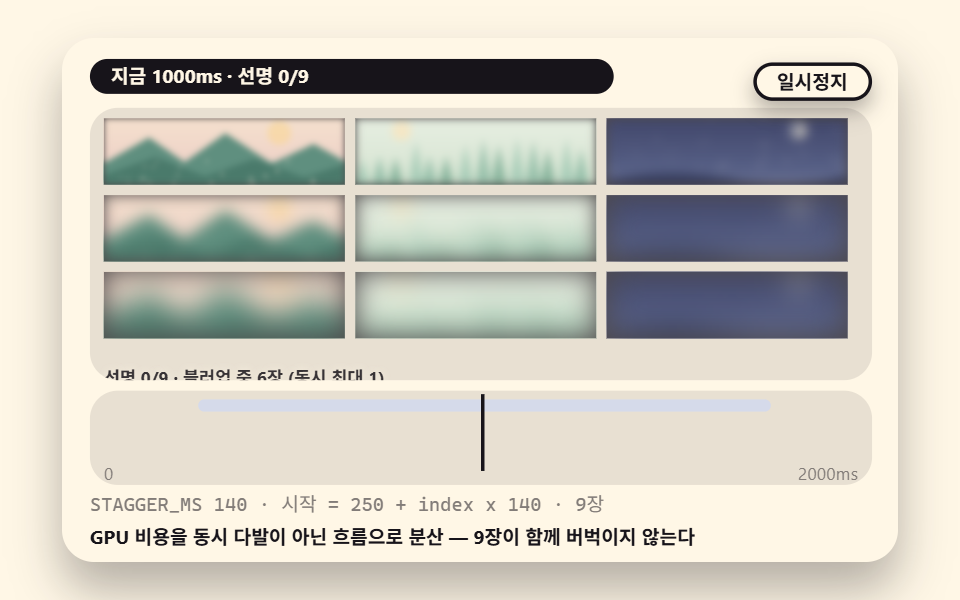
- 07 A Gallery Sharpening in Sequence by Computed Delays
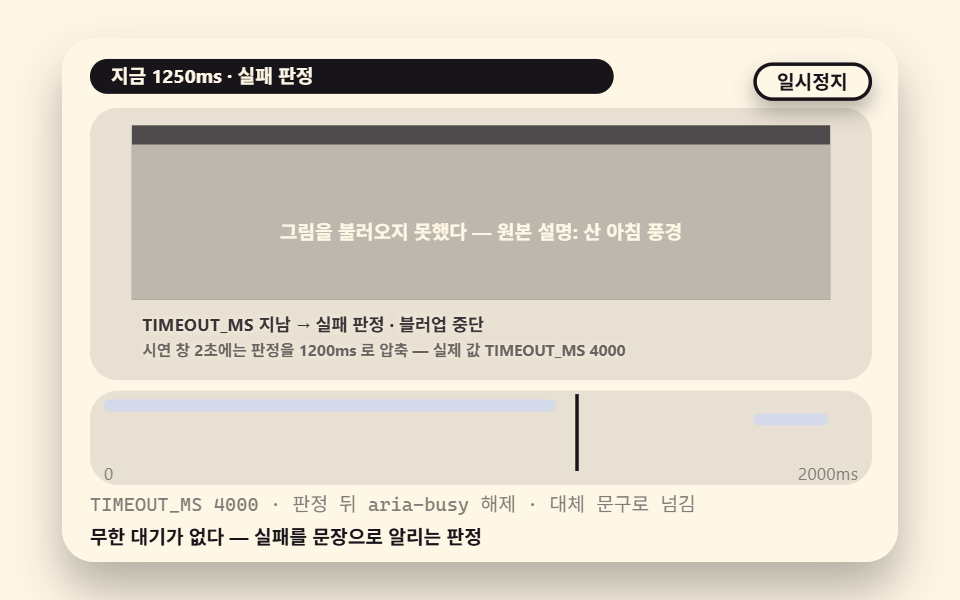
- 08 A Failure Fallback That Stays on the Placeholder by Timeout Verdict
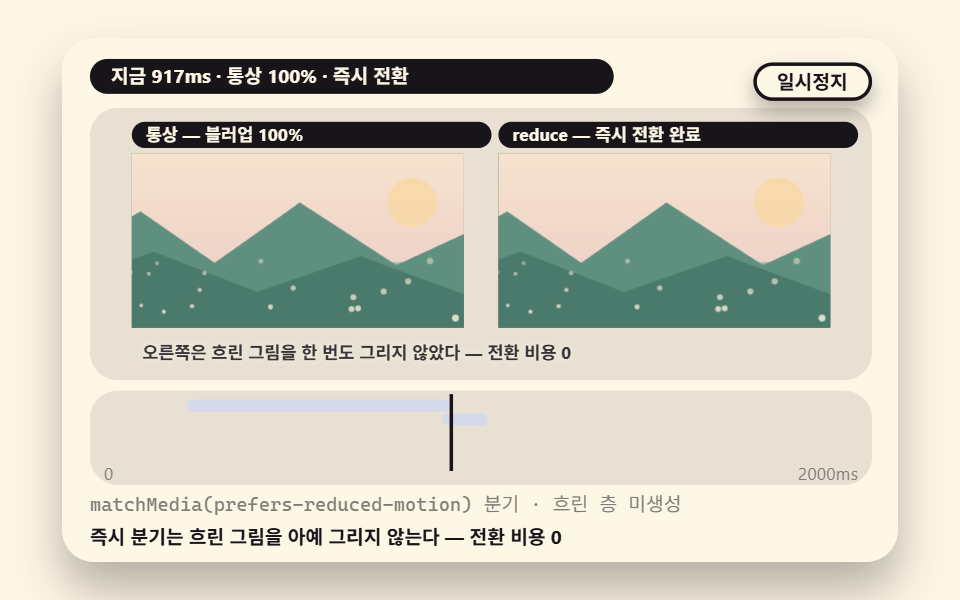
- 09 An Instant Swap With No Blur Under Reduced Motion
The whole idea fits in one sentence: show a cheap blurry layer instantly, wait for the real picture, then swap the two in a calculated way instead of a blank pop-in — that is what "in one line" above means. The nine scenes below each take that swap in a different direction — some move opacity, some move the blur radius itself, some wrap the swap in a progress ring, a state machine, a staggered gallery or a failure verdict — and the last one skips the blur entirely for people who ask for less motion.
Which Numbers Here Are Measured and Which Are Calculated
Every figure in this post splits into two kinds, and the split matters. The radius values on the decay curve, the back-solved scale and the arc lengths are model numbers, computed by hand from the constants in the source. The accumulated area, intensity and moved frames are measured numbers: headless Chromium drew each 480×300 stage for 2 seconds into 24 captures, and motion was judged on the 23 deltas between neighboring captures. Accumulated area is the share of pixels that differ from the first capture at least once across the series, and intensity is the mean color distance of those pixels on a 0 to 255 scale.
The table below is the answer sheet of that measurement. The widest scene is 05's shimmer state machine at 25.6% because a 48px shimmer tile sweeps broad territory during its 600ms wait, and the narrowest is 02's radius decay at 3.4% because the moving pixels shrink as the radius converges toward zero. Intensity peaks at 118.6 in 08, where the fallback sentence lands as a hard cut, and bottoms out at 78.9 in 05. No scene sat still: all nine moved in 23 of 23 frames.
| Scene | Accumulated area | Intensity | Frames moved |
|---|---|---|---|
| 01 Basic cross-fade | 23.7% | 108.2 | 23/23 |
| 02 Radius decay curve | 3.4% | 115.9 | 23/23 |
| 03 Scale correction | 6.3% | 107.8 | 23/23 |
| 04 Progress ring overlay | 12.9% | 109.9 | 23/23 |
| 05 Shimmer state machine | 25.6% | 78.9 | 23/23 |
| 06 Circular avatar | 6.8% | 116.4 | 23/23 |
| 07 Staggered gallery | 19.4% | 111.2 | 23/23 |
| 08 Failure fallback | 24.1% | 118.6 | 23/23 |
| 09 Instant swap | 22.5% | 107.0 | 23/23 |
Scenes 02, 03 and 06 fall under 10% in area because a radius converging to zero naturally narrows the pixels it moves — for these the precision of the calculation is the quality, not the width. What could not be confirmed also goes on record: the converged radius jitters by about ±0.1px between renders, so no digit below that is quoted anywhere in this post.
01A Basic Blur-Up That Crosses Two Pictures by Load Progress
While progress p climbs from 0 to 1, the blurry picture's opacity comes down as 1−p and the sharp picture's rises as p, so the two sum to exactly 1 at every moment and the background never peeks through the middle — the live "alpha blurry + alpha sharp = 1" readout verifies that sum each frame. Loading starts at LOAD_AT 220ms and the crossover spans CROSS_MS 900, from 220 to 1120ms, with the start time guarding against a picture that has not arrived yet; at 1880ms the scene resets to the blurry picture.
<main class="stage">
<div class="ez is-demo" id="ez">
  <div class="ez__in" data-role="inner">
    <div class="ez__pad" data-role="pad" tabindex="0" role="application" aria-label="Demo stage: Space or Enter pauses, R restarts, left and right arrows pick another value">
      <div class="ez__scene" data-role="scene" role="img" aria-label="Load progress from 0 to 1 crosses the two opacities so they always sum to 1"></div>
      <div class="ez__probe" data-role="probe" aria-hidden="true"></div>
      <div class="ez__chart" data-role="chart" aria-hidden="true"></div>
      <p class="ez__status" data-role="status" aria-live="off">Scene ready</p>
      <p class="ez__reada" data-role="reada" aria-hidden="true"></p>
      <p class="ez__readb" data-role="readb" aria-hidden="true"></p>
      <div class="ez__ctrl">
        <button class="ez__pause" data-role="pause" type="button" aria-pressed="false">Pause</button>
… (총 18줄 — 아래 「전체 코드」에서 원문 전체)
// 525 공통 — 이미지 블러업 로딩 (524 base.scss 계승, 잉크 무대 → 밝은 크림 갤러리 톤)
@use "../../../../site/static/demo-tokens" as *;
@include stage($subject-cream);
$panel: mix($subject-cream, $subject-ink, 90%);
$frame: mix($subject-cream, $subject-ink, 24%);
$dim: mix($subject-cream, $subject-ink, 46%);
// 파스텔 액센트 — vivid 토큰 대신 (BD26)
$stroke-blue: #d5daea;
$stroke-rose: #ebd6db;
$stroke-mint: #8fd8bd;
… (총 313줄 — 아래 「전체 코드」에서 원문 전체)html, body {
margin: 0;
overflow: hidden;
}
.stage {
box-sizing: border-box;
min-height: 100vh;
display: grid;
place-items: center;
margin: 0;
background: #fff7e6;
… (총 379줄 — 아래 「전체 코드」에서 원문 전체)(function () {
const rootEl = document.getElementById("ez");
if (!rootEl) return;
main(rootEl);
function cx(s) { return s; }
function main(root) {
// ── 525 블러업 공통 — 무대 좌표·문구 틀·요소 조립·이미지 소재·블러업 엔진 (524 core.ts 계승)
const W = 480;
const CX0 = 8;
const CW = 432;
function clamp(v, lo, hi) { return v < lo ? lo : (v > hi ? hi : v); }
function lerp(a, b, k) { return a + (b - a) * k; }
… (총 374줄 — 아래 「전체 코드」에서 원문 전체)// BuCrossoverProgress - 같은 항목 vanilla index.html 의 React 판. 같은 계산을 useEffect 안에서 돌린다
import { useEffect, useRef } from "react";
import styles from "./BuCrossoverProgress.module.scss";
const cx = (s: string): string => s.split(" ").map((n) => styles[n] ?? n).join(" ");
function main(root: HTMLElement): () => void {
// ── 525 블러업 공통 — 무대 좌표·문구 틀·요소 조립·이미지 소재·블러업 엔진 (524 core.ts 계승)
const W = 480;
const CX0 = 8;
const CW = 432;
function clamp(v: number, lo: number, hi: number): number { return v < lo ? lo : (v > hi ? hi : v); }
… (총 364줄 — 아래 「전체 코드」에서 원문 전체)01 · A Basic Blur-Up Crossing Two Pictures by Load Progress — Measured area 23.722% · moving frames 23/23Original by GODRICH · SCSS and React ship in the zip · See the password
Demo and Explanation
    function applyCross(p) {
        if (lowEl) {
            lowEl.style.opacity = f2(1 - p);
        }
        if (highEl) {
            highEl.style.opacity = f2(p);
        }
Where to Look in the Code
At the 1880ms reset the low layer's opacity snaps back to 1 and the arithmetic starts over, which is the loop returning inside the capture window.
02Sharpening That Decays the Blur Radius on a Curve
The other branch of blur-up moves the blur radius itself instead of opacity, bringing blur(20px) down to blur(0) on the exponential R = R0 × e^(−DECAY_RATE × t) — the big starting radius dies fast while the last faint trace lingers, exactly how a camera finds focus. The check line on stage recomputes t=1s R=11.5 and t=2s R=6.66 on the spot (model values); and because the curve flattens as it converges, the moving pixels narrow to an accumulated area of 3.4%, the smallest of the nine, while staying alive in 23 of 23 frames.
<main class="stage">
<div class="ez is-demo" id="ez">
  <div class="ez__in" data-role="inner">
    <div class="ez__pad" data-role="pad" tabindex="0" role="application" aria-label="Demo stage: Space or Enter pauses, R restarts, left and right arrows pick another value">
      <div class="ez__scene" data-role="scene" role="img" aria-label="The blur radius decays from 20px to 0 on an exponential curve, its last trace lingering like a camera finding focus"></div>
      <div class="ez__probe" data-role="probe" aria-hidden="true"></div>
      <div class="ez__chart" data-role="chart" aria-hidden="true"></div>
      <p class="ez__status" data-role="status" aria-live="off">Scene ready</p>
      <p class="ez__reada" data-role="reada" aria-hidden="true"></p>
      <p class="ez__readb" data-role="readb" aria-hidden="true"></p>
      <div class="ez__ctrl">
        <button class="ez__pause" data-role="pause" type="button" aria-pressed="false">Pause</button>
… (총 18줄 — 아래 「전체 코드」에서 원문 전체)
// 525 공통 — 이미지 블러업 로딩 (524 base.scss 계승, 잉크 무대 → 밝은 크림 갤러리 톤)
@use "../../../../site/static/demo-tokens" as *;
@include stage($subject-cream);
$panel: mix($subject-cream, $subject-ink, 90%);
$frame: mix($subject-cream, $subject-ink, 24%);
$dim: mix($subject-cream, $subject-ink, 46%);
// 파스텔 액센트 — vivid 토큰 대신 (BD26)
$stroke-blue: #d5daea;
$stroke-rose: #ebd6db;
$stroke-mint: #8fd8bd;
… (총 313줄 — 아래 「전체 코드」에서 원문 전체)html, body {
margin: 0;
overflow: hidden;
}
.stage {
box-sizing: border-box;
min-height: 100vh;
display: grid;
place-items: center;
margin: 0;
background: #fff7e6;
… (총 379줄 — 아래 「전체 코드」에서 원문 전체)(function () {
const rootEl = document.getElementById("ez");
if (!rootEl) return;
main(rootEl);
function cx(s) { return s; }
function main(root) {
// ── 525 블러업 공통 — 무대 좌표·문구 틀·요소 조립·이미지 소재·블러업 엔진 (524 core.ts 계승)
const W = 480;
const CX0 = 8;
const CW = 432;
function clamp(v, lo, hi) { return v < lo ? lo : (v > hi ? hi : v); }
function lerp(a, b, k) { return a + (b - a) * k; }
… (총 374줄 — 아래 「전체 코드」에서 원문 전체)// BuRadiusDecayCurve - 같은 항목 vanilla index.html 의 React 판. 같은 계산을 useEffect 안에서 돌린다
import { useEffect, useRef } from "react";
import styles from "./BuRadiusDecayCurve.module.scss";
const cx = (s: string): string => s.split(" ").map((n) => styles[n] ?? n).join(" ");
function main(root: HTMLElement): () => void {
// ── 525 블러업 공통 — 무대 좌표·문구 틀·요소 조립·이미지 소재·블러업 엔진 (524 core.ts 계승)
const W = 480;
const CX0 = 8;
const CW = 432;
function clamp(v: number, lo: number, hi: number): number { return v < lo ? lo : (v > hi ? hi : v); }
… (총 370줄 — 아래 「전체 코드」에서 원문 전체)02 · Sharpening That Decays the Blur Radius on a Curve — Measured area 3.41% · moving frames 23/23Original by GODRICH · SCSS and React ship in the zip · See the password
Demo and Explanation
    const DECAY_RATE = 0.55; // decay speed (variant: 0.28)
    const R0 = 20; // starting blur radius px
    const START_AT = 250; // decay start time (first change t>=200ms)
    function applyRadius(t) {
        const r = blurRadius(R0, DECAY_RATE, Math.max(0, t - START_AT));
        if (lowEl) {
            lowEl.style.filter = 'blur(' + f2(r) + 'px)';
        }
        if (rEl) {
            rEl.textContent = fill('R = {a}px (start {b}px · e^-{c}t)', f2(r), f0(R0), f2(DECAY_RATE));
        }
        if (curveEl) {
            curveEl.textContent = 't=0 R=20 · t=1s R=' + f1(blurRadius(R0, DECAY_RATE, 1000)) + ' · t=2s R=' + f2(blurRadius(R0, DECAY_RATE, 2000));
        }
Where to Look in the Code
The exponent does the prioritizing for free — the first 400ms of radius costs more visual change than the next full second, so nothing needs scheduling by hand.
03A Scene That Back-Solves the Scale Against Blur Expansion
filter: blur(20px) bleeds about 20px past the picture's edge into transparency, and this scene fights that bleed with arithmetic: scale the picture up by exactly as much as the blur expands — scale = 1 + R/400 — then back-solve the scale toward 1.0 as the radius shrinks, caging the bleed inside the box. Two cards sit side by side as the experiment — the left one (corrected) keeps its border clean at every moment while the right one (scale fixed at 1) lets the blur leak outside the card — and at R=20px the correction is 1.05 while at R=10px it is 1.025 (model values).
<main class="stage">
<div class="ez is-demo" id="ez">
  <div class="ez__in" data-role="inner">
    <div class="ez__pad" data-role="pad" tabindex="0" role="application" aria-label="Demo stage: Space or Enter pauses, R restarts, left and right arrows pick another value">
      <div class="ez__scene" data-role="scene" role="img" aria-label="The scale is raised by as much as the blur bleeds and back-solved down, splitting the two cards' edges apart"></div>
      <div class="ez__probe" data-role="probe" aria-hidden="true"></div>
      <div class="ez__chart" data-role="chart" aria-hidden="true"></div>
      <p class="ez__status" data-role="status" aria-live="off">Scene ready</p>
      <p class="ez__reada" data-role="reada" aria-hidden="true"></p>
      <p class="ez__readb" data-role="readb" aria-hidden="true"></p>
      <div class="ez__ctrl">
        <button class="ez__pause" data-role="pause" type="button" aria-pressed="false">Pause</button>
… (총 18줄 — 아래 「전체 코드」에서 원문 전체)
// 525 공통 — 이미지 블러업 로딩 (524 base.scss 계승, 잉크 무대 → 밝은 크림 갤러리 톤)
@use "../../../../site/static/demo-tokens" as *;
@include stage($subject-cream);
$panel: mix($subject-cream, $subject-ink, 90%);
$frame: mix($subject-cream, $subject-ink, 24%);
$dim: mix($subject-cream, $subject-ink, 46%);
// 파스텔 액센트 — vivid 토큰 대신 (BD26)
$stroke-blue: #d5daea;
$stroke-rose: #ebd6db;
$stroke-mint: #8fd8bd;
… (총 313줄 — 아래 「전체 코드」에서 원문 전체)html, body {
margin: 0;
overflow: hidden;
}
.stage {
box-sizing: border-box;
min-height: 100vh;
display: grid;
place-items: center;
margin: 0;
background: #fff7e6;
… (총 379줄 — 아래 「전체 코드」에서 원문 전체)(function () {
const rootEl = document.getElementById("ez");
if (!rootEl) return;
main(rootEl);
function cx(s) { return s; }
function main(root) {
// ── 525 블러업 공통 — 무대 좌표·문구 틀·요소 조립·이미지 소재·블러업 엔진 (524 core.ts 계승)
const W = 480;
const CX0 = 8;
const CW = 432;
function clamp(v, lo, hi) { return v < lo ? lo : (v > hi ? hi : v); }
function lerp(a, b, k) { return a + (b - a) * k; }
… (총 389줄 — 아래 「전체 코드」에서 원문 전체)// BuBlurScaleCompensate - 같은 항목 vanilla index.html 의 React 판. 같은 계산을 useEffect 안에서 돌린다
import { useEffect, useRef } from "react";
import styles from "./BuBlurScaleCompensate.module.scss";
const cx = (s: string): string => s.split(" ").map((n) => styles[n] ?? n).join(" ");
function main(root: HTMLElement): () => void {
// ── 525 블러업 공통 — 무대 좌표·문구 틀·요소 조립·이미지 소재·블러업 엔진 (524 core.ts 계승)
const W = 480;
const CX0 = 8;
const CW = 432;
function clamp(v: number, lo: number, hi: number): number { return v < lo ? lo : (v > hi ? hi : v); }
… (총 385줄 — 아래 「전체 코드」에서 원문 전체)03 · A Scene That Back-Solves the Scale Against Blur Expansion — Measured area 6.313% · moving frames 23/23Original by GODRICH · SCSS and React ship in the zip · See the password
Demo and Explanation
    // backSolve — a reverse correction that scales the picture up by the radius the blur bleeds outward (edge bleed).
    //   EDGE_K=400 so that R=20px gives 1.05: scale = 1 + R/400
    const EDGE_K = 400;
    function backSolve(r) { return 1 + r / EDGE_K; }
    const DECAY_RATE = 0.55; // the same decay curve as 02
    const R0 = 20;
    const START_AT = 250;
    const SHOW_S = 24; // corrected card x
    const SHOW_N = 236; // uncorrected card x — the side where blur leaks
    const CW2 = 188; // card width
Where to Look in the Code
The right card is the control group — it runs the identical decay with scale pinned at 1, so any smudge you see there is the raw edge bleed the left card's one-line correction removes.
04A Progress Ring Overlaying the Load Percent
This scene lays the real load percent on top of the blur-up as arc math — the circumference RING_C is fixed first at 176px (a 56px-diameter circle, 56 × π ≈ 176), the arc length is computed as 176 × percent/100, and the stroke-dashoffset is lowered to 176 − arc. At 34% exactly 59.8px ≈ 60px of the ring is drawn, arithmetic that matches the percent at every moment (hand-checked), and while the ring fills, the blurry picture's blur also comes down as 8 × (1−p) px on the same schedule — LOAD_AT 220ms and CROSS_MS 900 make this the scheduled counterpart of 01.
<main class="stage">
<div class="ez is-demo" id="ez">
  <div class="ez__in" data-role="inner">
    <div class="ez__pad" data-role="pad" tabindex="0" role="application" aria-label="Demo stage: Space or Enter pauses, R restarts, left and right arrows pick another value">
      <div class="ez__scene" data-role="scene" role="img" aria-label="The arc draws exactly as long as the load percent, the ring and the picture sharing one progress"></div>
      <div class="ez__probe" data-role="probe" aria-hidden="true"></div>
      <div class="ez__chart" data-role="chart" aria-hidden="true"></div>
      <p class="ez__status" data-role="status" aria-live="off">Scene ready</p>
      <p class="ez__reada" data-role="reada" aria-hidden="true"></p>
      <p class="ez__readb" data-role="readb" aria-hidden="true"></p>
      <div class="ez__ctrl">
        <button class="ez__pause" data-role="pause" type="button" aria-pressed="false">Pause</button>
… (총 18줄 — 아래 「전체 코드」에서 원문 전체)
// 525 공통 — 이미지 블러업 로딩 (524 base.scss 계승, 잉크 무대 → 밝은 크림 갤러리 톤)
@use "../../../../site/static/demo-tokens" as *;
@include stage($subject-cream);
$panel: mix($subject-cream, $subject-ink, 90%);
$frame: mix($subject-cream, $subject-ink, 24%);
$dim: mix($subject-cream, $subject-ink, 46%);
// 파스텔 액센트 — vivid 토큰 대신 (BD26)
$stroke-blue: #d5daea;
$stroke-rose: #ebd6db;
$stroke-mint: #8fd8bd;
… (총 313줄 — 아래 「전체 코드」에서 원문 전체)html, body {
margin: 0;
overflow: hidden;
}
.stage {
box-sizing: border-box;
min-height: 100vh;
display: grid;
place-items: center;
margin: 0;
background: #fff7e6;
… (총 379줄 — 아래 「전체 코드」에서 원문 전체)(function () {
const rootEl = document.getElementById("ez");
if (!rootEl) return;
main(rootEl);
function cx(s) { return s; }
function main(root) {
// ── 525 블러업 공통 — 무대 좌표·문구 틀·요소 조립·이미지 소재·블러업 엔진 (524 core.ts 계승)
const W = 480;
const CX0 = 8;
const CW = 432;
function clamp(v, lo, hi) { return v < lo ? lo : (v > hi ? hi : v); }
function lerp(a, b, k) { return a + (b - a) * k; }
… (총 403줄 — 아래 「전체 코드」에서 원문 전체)// BuProgressRingOverlay - 같은 항목 vanilla index.html 의 React 판. 같은 계산을 useEffect 안에서 돌린다
import { useEffect, useRef } from "react";
import styles from "./BuProgressRingOverlay.module.scss";
const cx = (s: string): string => s.split(" ").map((n) => styles[n] ?? n).join(" ");
function main(root: HTMLElement): () => void {
// ── 525 블러업 공통 — 무대 좌표·문구 틀·요소 조립·이미지 소재·블러업 엔진 (524 core.ts 계승)
const W = 480;
const CX0 = 8;
const CW = 432;
function clamp(v: number, lo: number, hi: number): number { return v < lo ? lo : (v > hi ? hi : v); }
… (총 395줄 — 아래 「전체 코드」에서 원문 전체)04 · A Progress Ring Overlaying the Load Percent — Measured area 12.94% · moving frames 23/23Original by GODRICH · SCSS and React ship in the zip · See the password
Demo and Explanation
    function frame(t) {
        const p = progress(t, LOAD_AT, CROSS_MS);
        const pct = p * 100;
        const arc = ringArc(RING_C, pct);
        if (fgEl) {
            fgEl.setAttribute('stroke-dashoffset', f2(RING_C - arc));
        }
        if (highEl) {
            highEl.style.opacity = f2(p);
        }
        if (lowEl) {
            lowEl.style.filter = 'blur(' + f2(8 * (1 - p)) + 'px)';
        }
Where to Look in the Code
Because the ring and the opacity share the single progress() value the two can never disagree — that single source is what keeps the overlay honest on a slow connection.
05A Shimmer-to-Blur-Up-to-Content State Machine
Three states — waiting, transition, content — wired by exactly two guards: during the wait (0 to 600ms) a 48px diagonal shimmer tile sweeps across, then guard 1 "t≥600" permits the transition and a blur-up starts with R0 14 converging on the DECAY_FAST 2.2 curve, and when guard 2 "R<0.5" is met the scene locks into content with no reverse edge, so content that has locked never blurs again. The 25.6% accumulated area — the widest of the nine — comes from that 600ms shimmer sweep.
<main class="stage">
<div class="ez is-demo" id="ez">
  <div class="ez__in" data-role="inner">
    <div class="ez__pad" data-role="pad" tabindex="0" role="application" aria-label="Demo stage: Space or Enter pauses, R restarts, left and right arrows pick another value">
      <div class="ez__scene" data-role="scene" role="img" aria-label="The shimmer sweeps, the blur-up runs, and the scene locks into content, three stages in one flow"></div>
      <div class="ez__probe" data-role="probe" aria-hidden="true"></div>
      <div class="ez__chart" data-role="chart" aria-hidden="true"></div>
      <p class="ez__status" data-role="status" aria-live="off">Scene ready</p>
      <p class="ez__reada" data-role="reada" aria-hidden="true"></p>
      <p class="ez__readb" data-role="readb" aria-hidden="true"></p>
      <div class="ez__ctrl">
        <button class="ez__pause" data-role="pause" type="button" aria-pressed="false">Pause</button>
… (총 18줄 — 아래 「전체 코드」에서 원문 전체)
// 525 공통 — 이미지 블러업 로딩 (524 base.scss 계승, 잉크 무대 → 밝은 크림 갤러리 톤)
@use "../../../../site/static/demo-tokens" as *;
@include stage($subject-cream);
$panel: mix($subject-cream, $subject-ink, 90%);
$frame: mix($subject-cream, $subject-ink, 24%);
$dim: mix($subject-cream, $subject-ink, 46%);
// 파스텔 액센트 — vivid 토큰 대신 (BD26)
$stroke-blue: #d5daea;
$stroke-rose: #ebd6db;
$stroke-mint: #8fd8bd;
… (총 313줄 — 아래 「전체 코드」에서 원문 전체)html, body {
margin: 0;
overflow: hidden;
}
.stage {
box-sizing: border-box;
min-height: 100vh;
display: grid;
place-items: center;
margin: 0;
background: #fff7e6;
… (총 379줄 — 아래 「전체 코드」에서 원문 전체)(function () {
const rootEl = document.getElementById("ez");
if (!rootEl) return;
main(rootEl);
function cx(s) { return s; }
function main(root) {
// ── 525 블러업 공통 — 무대 좌표·문구 틀·요소 조립·이미지 소재·블러업 엔진 (524 core.ts 계승)
const W = 480;
const CX0 = 8;
const CW = 432;
function clamp(v, lo, hi) { return v < lo ? lo : (v > hi ? hi : v); }
function lerp(a, b, k) { return a + (b - a) * k; }
… (총 388줄 — 아래 「전체 코드」에서 원문 전체)// BuShimmerBlurupContent - 같은 항목 vanilla index.html 의 React 판. 같은 계산을 useEffect 안에서 돌린다
import { useEffect, useRef } from "react";
import styles from "./BuShimmerBlurupContent.module.scss";
const cx = (s: string): string => s.split(" ").map((n) => styles[n] ?? n).join(" ");
function main(root: HTMLElement): () => void {
// ── 525 블러업 공통 — 무대 좌표·문구 틀·요소 조립·이미지 소재·블러업 엔진 (524 core.ts 계승)
const W = 480;
const CX0 = 8;
const CW = 432;
function clamp(v: number, lo: number, hi: number): number { return v < lo ? lo : (v > hi ? hi : v); }
… (총 381줄 — 아래 「전체 코드」에서 원문 전체)05 · A Shimmer-to-Blur-Up-to-Content State Machine — Measured area 25.569% · moving frames 23/23Original by GODRICH · SCSS and React ship in the zip · See the password
Demo and Explanation
    function step(t) {
        // state transitions — two guards only (t>=WAIT_END · R<0.5px). No reverse edge
        if (state === 'wait' && t >= WAIT_END) {
            state = 'cross';
        }
        const r = state === 'wait' ? R0 : blurRadius(R0, DECAY_FAST, t - WAIT_END);
        if (state === 'cross' && r < 0.5) {
            state = 'content';
        }
Where to Look in the Code
Read the two if statements as the two arrows of the diagram — anything not written there cannot happen, which is what makes this pattern safe to lift into a loading flow with real network events.
06A Circular Avatar That Lands Blurry Then Sharp
The blur-up shape used on profile cards: inside a 72px-diameter circular crop (AV_D), a radius starting at R0 12 decays at rate 1.4, and the scale correction is recomputed for the circle instead of the rectangle, so the bleed stays uniform along the arc — a corner-less shape remains smear-free. Three avatars start at 220, 420 and 620ms in sequence, and the sharp count n/3 climbs one at a time; the staggered starts are the minimal version of the same delay principle the gallery in 07 scales up.
<main class="stage">
<div class="ez is-demo" id="ez">
  <div class="ez__in" data-role="inner">
    <div class="ez__pad" data-role="pad" tabindex="0" role="application" aria-label="Demo stage: Space or Enter pauses, R restarts, left and right arrows pick another value">
      <div class="ez__scene" data-role="scene" role="img" aria-label="Three circular avatars land in turn, sharpening smear-free even without corners"></div>
      <div class="ez__probe" data-role="probe" aria-hidden="true"></div>
      <div class="ez__chart" data-role="chart" aria-hidden="true"></div>
      <p class="ez__status" data-role="status" aria-live="off">Scene ready</p>
      <p class="ez__reada" data-role="reada" aria-hidden="true"></p>
      <p class="ez__readb" data-role="readb" aria-hidden="true"></p>
      <div class="ez__ctrl">
        <button class="ez__pause" data-role="pause" type="button" aria-pressed="false">Pause</button>
… (총 18줄 — 아래 「전체 코드」에서 원문 전체)
// 525 공통 — 이미지 블러업 로딩 (524 base.scss 계승, 잉크 무대 → 밝은 크림 갤러리 톤)
@use "../../../../site/static/demo-tokens" as *;
@include stage($subject-cream);
$panel: mix($subject-cream, $subject-ink, 90%);
$frame: mix($subject-cream, $subject-ink, 24%);
$dim: mix($subject-cream, $subject-ink, 46%);
// 파스텔 액센트 — vivid 토큰 대신 (BD26)
$stroke-blue: #d5daea;
$stroke-rose: #ebd6db;
$stroke-mint: #8fd8bd;
… (총 313줄 — 아래 「전체 코드」에서 원문 전체)html, body {
margin: 0;
overflow: hidden;
}
.stage {
box-sizing: border-box;
min-height: 100vh;
display: grid;
place-items: center;
margin: 0;
background: #fff7e6;
… (총 379줄 — 아래 「전체 코드」에서 원문 전체)(function () {
const rootEl = document.getElementById("ez");
if (!rootEl) return;
main(rootEl);
function cx(s) { return s; }
function main(root) {
// ── 525 블러업 공통 — 무대 좌표·문구 틀·요소 조립·이미지 소재·블러업 엔진 (524 core.ts 계승)
const W = 480;
const CX0 = 8;
const CW = 432;
function clamp(v, lo, hi) { return v < lo ? lo : (v > hi ? hi : v); }
function lerp(a, b, k) { return a + (b - a) * k; }
… (총 387줄 — 아래 「전체 코드」에서 원문 전체)// BuAvatarCircleCrop - 같은 항목 vanilla index.html 의 React 판. 같은 계산을 useEffect 안에서 돌린다
import { useEffect, useRef } from "react";
import styles from "./BuAvatarCircleCrop.module.scss";
const cx = (s: string): string => s.split(" ").map((n) => styles[n] ?? n).join(" ");
function main(root: HTMLElement): () => void {
// ── 525 블러업 공통 — 무대 좌표·문구 틀·요소 조립·이미지 소재·블러업 엔진 (524 core.ts 계승)
const W = 480;
const CX0 = 8;
const CW = 432;
function clamp(v: number, lo: number, hi: number): number { return v < lo ? lo : (v > hi ? hi : v); }
… (총 382줄 — 아래 「전체 코드」에서 원문 전체)06 · A Circular Avatar That Lands Blurry Then Sharp — Measured area 6.786% · moving frames 23/23Original by GODRICH · SCSS and React ship in the zip · See the password
Demo and Explanation
    function frame(t) {
        let sharpCount = 0;
        for (let i = 0; i < 3; i += 1) {
            const r = blurRadius(R0, DECAY_RATE, Math.max(0, t - AV_AT[i]));
            const s = backSolve(r);
            const av = avs[i];
            if (av.low) {
                av.low.style.filter = 'blur(' + f2(r) + 'px)';
                av.low.style.transform = 'scale(' + (Math.round(s * 1000) / 1000) + ')';
            }
Where to Look in the Code
The transform is rounded to three decimals before it hits the style, which keeps the readout stable while the scale drifts down from 1.03 to 1.0.
07A Gallery Sharpening in Sequence by Computed Delays
In a nine-picture grid, each picture's blur-up start is staggered by index × STAGGER_MS (140), so the first card starts at 250ms and the last at 1370ms (250 + 8 × 140) in a wave that sharpens in order — and the point of the stagger is cost before aesthetics: filter: blur() gives each picture its own compositing layer, and offsetting the starts caps the simultaneous blur-ups at one, as the "at most 1 at once" readout shows live.
<main class="stage">
<div class="ez is-demo" id="ez">
  <div class="ez__in" data-role="inner">
    <div class="ez__pad" data-role="pad" tabindex="0" role="application" aria-label="Demo stage: Space or Enter pauses, R restarts, left and right arrows pick another value">
      <div class="ez__scene" data-role="scene" role="img" aria-label="Nine grid cells stagger by their index delays and sharpen in a sweeping wave"></div>
      <div class="ez__probe" data-role="probe" aria-hidden="true"></div>
      <div class="ez__chart" data-role="chart" aria-hidden="true"></div>
      <p class="ez__status" data-role="status" aria-live="off">Scene ready</p>
      <p class="ez__reada" data-role="reada" aria-hidden="true"></p>
      <p class="ez__readb" data-role="readb" aria-hidden="true"></p>
      <div class="ez__ctrl">
        <button class="ez__pause" data-role="pause" type="button" aria-pressed="false">Pause</button>
… (총 18줄 — 아래 「전체 코드」에서 원문 전체)
// 525 공통 — 이미지 블러업 로딩 (524 base.scss 계승, 잉크 무대 → 밝은 크림 갤러리 톤)
@use "../../../../site/static/demo-tokens" as *;
@include stage($subject-cream);
$panel: mix($subject-cream, $subject-ink, 90%);
$frame: mix($subject-cream, $subject-ink, 24%);
$dim: mix($subject-cream, $subject-ink, 46%);
// 파스텔 액센트 — vivid 토큰 대신 (BD26)
$stroke-blue: #d5daea;
$stroke-rose: #ebd6db;
$stroke-mint: #8fd8bd;
… (총 313줄 — 아래 「전체 코드」에서 원문 전체)html, body {
margin: 0;
overflow: hidden;
}
.stage {
box-sizing: border-box;
min-height: 100vh;
display: grid;
place-items: center;
margin: 0;
background: #fff7e6;
… (총 379줄 — 아래 「전체 코드」에서 원문 전체)(function () {
const rootEl = document.getElementById("ez");
if (!rootEl) return;
main(rootEl);
function cx(s) { return s; }
function main(root) {
// ── 525 블러업 공통 — 무대 좌표·문구 틀·요소 조립·이미지 소재·블러업 엔진 (524 core.ts 계승)
const W = 480;
const CX0 = 8;
const CW = 432;
function clamp(v, lo, hi) { return v < lo ? lo : (v > hi ? hi : v); }
function lerp(a, b, k) { return a + (b - a) * k; }
… (총 385줄 — 아래 「전체 코드」에서 원문 전체)// BuGalleryStaggerWave - 같은 항목 vanilla index.html 의 React 판. 같은 계산을 useEffect 안에서 돌린다
import { useEffect, useRef } from "react";
import styles from "./BuGalleryStaggerWave.module.scss";
const cx = (s: string): string => s.split(" ").map((n) => styles[n] ?? n).join(" ");
function main(root: HTMLElement): () => void {
// ── 525 블러업 공통 — 무대 좌표·문구 틀·요소 조립·이미지 소재·블러업 엔진 (524 core.ts 계승)
const W = 480;
const CX0 = 8;
const CW = 432;
function clamp(v: number, lo: number, hi: number): number { return v < lo ? lo : (v > hi ? hi : v); }
… (총 378줄 — 아래 「전체 코드」에서 원문 전체)07 · A Gallery Sharpening in Sequence by Computed Delays — Measured area 19.387% · moving frames 23/23Original by GODRICH · SCSS and React ship in the zip · See the password
Demo and Explanation
    const STAGGER_MS = 140; // delay per grid index (variant: 400)
    const indexDelay = function (i) { const gpuSpread = 1; return BASE_AT + i * STAGGER_MS * gpuSpread; }; // caps simultaneous blur-ups at 1 to spread the GPU cost
            const start = indexDelay(cell.i); // gpuSpread — one picture at a time
            const r = blurRadius(R0, DECAY_RATE, Math.max(0, t - start));
            if (cell.low) {
                cell.low.style.filter = 'blur(' + f2(r) + 'px)';
            }
            if (r < 0.5) {
                done += 1;
            }
            else if (t >= start) {
                active += 1;
            }
Where to Look in the Code
The gpuSpread constant is the knob the variant turns — it multiplies the whole stagger, and at 1 the overlap between neighboring cards' blur-ups never exceeds one card.
08A Failure Fallback That Stays on the Placeholder by Timeout Verdict
If loading does not finish within TIMEOUT_MS (4000), the blur-up is abandoned and a fallback sentence takes the placeholder — a verdict with no infinite wait, which clears aria-busy at the verdict moment, announces the failure as a role=status sentence, and returns to the blurry waiting state at 1720ms. The real threshold of 4000ms does not fit inside a 2-second capture window, so the demo compresses the verdict to 1200ms and states "the real value TIMEOUT_MS 4000" on screen; the 24.1% area and 118.6 intensity come from the fallback sentence landing as a late hard cut.
<main class="stage">
<div class="ez is-demo" id="ez">
  <div class="ez__in" data-role="inner">
    <div class="ez__pad" data-role="pad" tabindex="0" role="application" aria-label="Demo stage: Space or Enter pauses, R restarts, left and right arrows pick another value">
      <div class="ez__scene" data-role="scene" role="img" aria-label="When loading never finishes, the timeout verdict stops the blur-up and a fallback sentence holds the seat"></div>
      <div class="ez__probe" data-role="probe" aria-hidden="true"></div>
      <div class="ez__chart" data-role="chart" aria-hidden="true"></div>
      <p class="ez__status" data-role="status" aria-live="off">Scene ready</p>
      <p class="ez__reada" data-role="reada" aria-hidden="true"></p>
      <p class="ez__readb" data-role="readb" aria-hidden="true"></p>
      <div class="ez__ctrl">
        <button class="ez__pause" data-role="pause" type="button" aria-pressed="false">Pause</button>
… (총 18줄 — 아래 「전체 코드」에서 원문 전체)
// 525 공통 — 이미지 블러업 로딩 (524 base.scss 계승, 잉크 무대 → 밝은 크림 갤러리 톤)
@use "../../../../site/static/demo-tokens" as *;
@include stage($subject-cream);
$panel: mix($subject-cream, $subject-ink, 90%);
$frame: mix($subject-cream, $subject-ink, 24%);
$dim: mix($subject-cream, $subject-ink, 46%);
// 파스텔 액센트 — vivid 토큰 대신 (BD26)
$stroke-blue: #d5daea;
$stroke-rose: #ebd6db;
$stroke-mint: #8fd8bd;
… (총 313줄 — 아래 「전체 코드」에서 원문 전체)html, body {
margin: 0;
overflow: hidden;
}
.stage {
box-sizing: border-box;
min-height: 100vh;
display: grid;
place-items: center;
margin: 0;
background: #fff7e6;
… (총 379줄 — 아래 「전체 코드」에서 원문 전체)(function () {
const rootEl = document.getElementById("ez");
if (!rootEl) return;
main(rootEl);
function cx(s) { return s; }
function main(root) {
// ── 525 블러업 공통 — 무대 좌표·문구 틀·요소 조립·이미지 소재·블러업 엔진 (524 core.ts 계승)
const W = 480;
const CX0 = 8;
const CW = 432;
function clamp(v, lo, hi) { return v < lo ? lo : (v > hi ? hi : v); }
function lerp(a, b, k) { return a + (b - a) * k; }
… (총 406줄 — 아래 「전체 코드」에서 원문 전체)// BuTimeoutFallbackVerdict - 같은 항목 vanilla index.html 의 React 판. 같은 계산을 useEffect 안에서 돌린다
import { useEffect, useRef } from "react";
import styles from "./BuTimeoutFallbackVerdict.module.scss";
const cx = (s: string): string => s.split(" ").map((n) => styles[n] ?? n).join(" ");
function main(root: HTMLElement): () => void {
// ── 525 블러업 공통 — 무대 좌표·문구 틀·요소 조립·이미지 소재·블러업 엔진 (524 core.ts 계승)
const W = 480;
const CX0 = 8;
const CW = 432;
function clamp(v: number, lo: number, hi: number): number { return v < lo ? lo : (v > hi ? hi : v); }
… (총 388줄 — 아래 「전체 코드」에서 원문 전체)08 · A Failure Fallback That Stays on the Placeholder by Timeout Verdict — Measured area 24.058% · moving frames 23/23Original by GODRICH · SCSS and React ship in the zip · See the password
Demo and Explanation
        if (!failed && t >= FAIL_AT) {
            // verdict — blur-up abandoned, aria-busy cleared, fallback sentence
            failed = true;
            if (lowEl) {
                lowEl.style.filter = 'none';
                lowEl.style.opacity = '0';
            }
            if (highEl) {
                highEl.style.opacity = '0';
            }
            if (fbEl) {
                fbEl.style.opacity = '1';
            }
            const cardEl = fbEl ? fbEl.parentElement : null;
            if (cardEl) {
                cardEl.setAttribute('aria-busy', 'false');
            }
            if (doneP) {
                doneP.textContent = 'Picture load failed, the fallback sentence stands in (aria-busy cleared)';
            }
        }
Where to Look in the Code
Note the ordering inside the flip: both pictures go to opacity 0 before the fallback rises to 1, so at no frame do two half-visible layers stack on the failing card.
09An Instant Swap With No Blur Under Reduced Motion
When prefers-reduced-motion is on, the blurry stage is skipped and the sharp picture shows at once — the branch never creates the blurry layer at all, so the transition costs nothing, and two cards compare the paths side by side, with the left one running the normal crossover (220 to 920ms) while the right one's instant branch swaps in a single frame at SWAP_AT 900ms. This scene pulls the reduce branch that runs underneath all nine scenes up onto the screen — in a real reduce environment every scene behaves like the right card, drawing one sharp picture with the status sentence "Reduced motion on: one sharp picture, no blur".
<main class="stage">
<div class="ez is-demo" id="ez">
  <div class="ez__in" data-role="inner">
    <div class="ez__pad" data-role="pad" tabindex="0" role="application" aria-label="Demo stage: Space or Enter pauses, R restarts, left and right arrows pick another value">
      <div class="ez__scene" data-role="scene" role="img" aria-label="The left walks the blur-up while the right never draws the blurry stage and turns sharp at once"></div>
      <div class="ez__probe" data-role="probe" aria-hidden="true"></div>
      <div class="ez__chart" data-role="chart" aria-hidden="true"></div>
      <p class="ez__status" data-role="status" aria-live="off">Scene ready</p>
      <p class="ez__reada" data-role="reada" aria-hidden="true"></p>
      <p class="ez__readb" data-role="readb" aria-hidden="true"></p>
      <div class="ez__ctrl">
        <button class="ez__pause" data-role="pause" type="button" aria-pressed="false">Pause</button>
… (총 18줄 — 아래 「전체 코드」에서 원문 전체)
// 525 공통 — 이미지 블러업 로딩 (524 base.scss 계승, 잉크 무대 → 밝은 크림 갤러리 톤)
@use "../../../../site/static/demo-tokens" as *;
@include stage($subject-cream);
$panel: mix($subject-cream, $subject-ink, 90%);
$frame: mix($subject-cream, $subject-ink, 24%);
$dim: mix($subject-cream, $subject-ink, 46%);
// 파스텔 액센트 — vivid 토큰 대신 (BD26)
$stroke-blue: #d5daea;
$stroke-rose: #ebd6db;
$stroke-mint: #8fd8bd;
… (총 313줄 — 아래 「전체 코드」에서 원문 전체)html, body {
margin: 0;
overflow: hidden;
}
.stage {
box-sizing: border-box;
min-height: 100vh;
display: grid;
place-items: center;
margin: 0;
background: #fff7e6;
… (총 379줄 — 아래 「전체 코드」에서 원문 전체)(function () {
const rootEl = document.getElementById("ez");
if (!rootEl) return;
main(rootEl);
function cx(s) { return s; }
function main(root) {
// ── 525 블러업 공통 — 무대 좌표·문구 틀·요소 조립·이미지 소재·블러업 엔진 (524 core.ts 계승)
const W = 480;
const CX0 = 8;
const CW = 432;
function clamp(v, lo, hi) { return v < lo ? lo : (v > hi ? hi : v); }
function lerp(a, b, k) { return a + (b - a) * k; }
… (총 393줄 — 아래 「전체 코드」에서 원문 전체)// BuReducedMotionInstant - 같은 항목 vanilla index.html 의 React 판. 같은 계산을 useEffect 안에서 돌린다
import { useEffect, useRef } from "react";
import styles from "./BuReducedMotionInstant.module.scss";
const cx = (s: string): string => s.split(" ").map((n) => styles[n] ?? n).join(" ");
function main(root: HTMLElement): () => void {
// ── 525 블러업 공통 — 무대 좌표·문구 틀·요소 조립·이미지 소재·블러업 엔진 (524 core.ts 계승)
const W = 480;
const CX0 = 8;
const CW = 432;
function clamp(v: number, lo: number, hi: number): number { return v < lo ? lo : (v > hi ? hi : v); }
… (총 383줄 — 아래 「전체 코드」에서 원문 전체)09 · An Instant Swap With No Blur Under Reduced Motion — Measured area 22.457% · moving frames 23/23Original by GODRICH · SCSS and React ship in the zip · See the password
Demo and Explanation
        if (reduced) {
            // reduced motion — every animation turns off and the scene is one sharp picture, no blur (per the queue accessibility note)
            statusP.textContent = 'Reduced motion on: one sharp picture, no blur';
            readB.textContent = 'The blurry stage is skipped and the sharp picture shows at once';
            doneP.textContent = readB.textContent;
            cfg.frame(1e9);
        }
Where to Look in the Code
cfg.frame(1e9) runs one frame as if a trillion milliseconds had passed, resolving every schedule instantly — the trick that lets the same code serve both audiences without a separate static build.
What CSS Alone Can Do and Where JS Takes Over — the Border of transition
The border is "who manufactures the progress". A single scheduled crossover is pure CSS territory: stack a blurry img under a sharp img and raise the opacity with a transition, done. That layer is what most people searching for an image loading animation css setup are about to paste — and it is genuinely enough for a hero image with a known timetable.
Three jobs cannot be done without JS. Waiting for the load or decode to finish before starting (the ordering guarantee), computing the radius or back-solved scale every frame (the decay in 02, 03, 05, 06 and 07), and timing the schedule to verdict a failure (08). The progress ring's arc arithmetic and the timeout verdict both fall on the JS side of that line, and on a real site the HTMLImageElement.decode() wait slots in on the same side — that combination is the practical shape of html progressive image loading.
Waiting for decode Before the Opacity Moves — the Order One Picture Turns Sharp
Order is the whole safety of a blur-up. The blurry picture (an inline data URI, rendered instantly) → confirm load or decode finished → only then start the crossover — break that front order and an empty picture sharpens in front of the user. The pictures in these demos are data-URI SVGs that decode immediately, so the ordering here is demonstrated by 01's LOAD_AT guard and 08's timeout verdict structure.
On a real site <img>.decode() takes the confirmation role: its then-callback fires only after the picture has decoded, so raising the opacity inside that callback sharpens only a finished picture. decode() sits at 97.35% global support (checked 2026-11-17), running in Chrome 64+, Edge 79+, Firefox 68+, Safari 11.1+, iOS Safari 11.3+ and Samsung Internet 9.2+; for the unsupported older Safari 11.0 and below, the load event guarantees the same order. One caution worth its own paragraph: loading="lazy" defers the download until the viewport approaches, which can clash with the "blurry first" order — keep the blurry original inline or as a data URI and lazy-load only the full picture, or keep both eager.
Where a Blur-Up Breaks — Bleeding Edges, Jumping Layout and a GPU Pile-Up
blur bleeds outside the card
filter: blur(20px) smears about 20px past the picture's edge into transparency. The right card in 03 (scale fixed at 1) is the live evidence — its border area turns into a dirty halo — and the scale = 1 + R/400 back-solve cages the bleed inside the card. CSS filter blur itself has 97.4% global support (Chrome 18+, Firefox 35+, Safari 6+), but older Safari implementations carry a performance penalty, so avoid very large radii there.
A missing aspect ratio makes the page jump
A picture whose height is 0 before loading shoves everything below it downward the moment it arrives — a jump the smoothness of the blur-up cannot hide. Every card in this post carries explicit width/height attributes, and on a real page aspect-ratio (97.23% global, Chrome 88+, Firefox 89+, Safari 15+) does the same job; in browsers before it, the width and height attributes are the fallback.
Nine simultaneous blurs stall a low-end GPU
Every filter: blur() is its own compositing layer. A gallery that blur-ups all at once concentrates the cost in one moment, and 07's index delays — 140ms apart — cap the simultaneous blur-ups at one so the cost spreads into a flow. When a grid stutters, this is the first fix to try.
A hole in the middle means the arithmetic is wrong
Twin the two opacities independently and the sum breaks in the middle: two eased tweens crossing can dip the combined alpha to a momentary 0.8, and the background shows through the gap. Pairing them as (1−p) and p, as 01 does, keeps the sum at exactly 1 at every moment, and the persistent "sum = 1" readout verifies it live on stage.
Crossing before decode sharpens an empty picture
Raise the opacity without a load guard and a picture that has not arrived yet climbs up, then the blurry layer simply disappears — the exact accident the ordering section describes. The LOAD_AT guard at 220ms in 01 is the demo-scale version of that guard; on a real site the decode() callback sits in that seat instead.
lazy loading delays even the blurry picture
Deferring the download before the viewport applies to the blurry original too if you let it, so the blur-up opens on a blank. Keep the blurry layer eager and defer only the full picture — the rule the ordering section already set, worth its own line here because it fails silently on fast connections where testing happens.
No timeout traps the user in the blur
When a picture fails outright, trusting the blur-up alone leaves the visitor staring at fog forever. Set a timeout verdict as 08 does, then hand the seat to the alt sentence, so even the failure reads as a complete state.
Resets must return inside the demo window
The loop returns — 01 resets at 1880ms and 08 restarts at 1720ms — inside the 2-second window so the capture sees a complete cycle; all nine scenes of this post return inside that boundary. Paste the timing from here into a longer loop, and your own constants, not these, decide the rhythm.
The sources of all nine scenes plus the editable files are gathered in the archive below, and its password is m955vg6u. The variant values — the decay rate, the crossover time and the gallery stagger — are left as comments next to their constants in the source.
What Changes When You Move the Starting Radius, the Decay Speed and the Crossover — Three Values Compared
Each variant moves exactly one value (model arithmetic — on screen the arrow keys swap the value in place).
| Name | Value changed | Effect |
|---|---|---|
| A slower decay | 02 DECAY_RATE 0.55 → 0.28 | The radius lingers twice as long — t=1s R 11.5→15.0, t=2s 6.66→11.3 — a photo rising out of developer fluid, while 0.55 is a camera snapping into focus |
| A shorter crossover | 01 CROSS_MS 900 → 350 | The swap finishes within 220~570ms, a blink of a focus pull — at 900 it clears like lifting fog |
| Wider gallery delays | 07 STAGGER_MS 140 → 400 | The last card starts at 3450ms instead of 1370ms, a wave the eye can read top to bottom — it outruns the 2-second demo window, so on a real page shrink the grid to match the timing |
Raising the decay rate is the opposite direction of the first row, and 0.55 already shows that snap. When you pair this with a skeleton image loading style shimmer, split the shimmer stage and the blur-up stage into states as 05 does so the two never overlap; whether the progress indicator is a ring (04) or a shimmer (05) is the content's call, since a blurry picture already holds the seat the way the placeholder does in a css image placeholder while loading setup.
One Sharp Picture Under Reduced Motion — Accessibility That Announces the Loading State
Every scene loads on its own and plays through without input. The keyboard is real in all nine: Space and Enter pause, R restarts, and the left and right arrows swap values. Each picture keeps its alt text while blurred, so what a screen reader reads never changes during the transition; loading is announced with aria-busy, failure lands as a role=status sentence (08 demonstrates both directly), and the per-frame status line is aria-live off so the changing numbers are never narrated.
Under reduced motion the blurry layer is never created and one sharp picture shows at once — 09 renders that branch side by side on screen. The SCSS reduce block turns every animation and transition off in one place:
@media (prefers-reduced-motion: reduce) {
  .ez * { animation: none !important; transition: none !important; }
  .ez__pause { transition: none !important; }
}
prefers-reduced-motion itself sits at 97.35% global support (Chrome 74+, Edge 79+, Firefox 63+, Safari 10.1+, iOS Safari 10.3+, Samsung Internet 11.1+), a value safe to lean on anywhere in these nine. The adjacent topics live in 9 CSS Skeleton Loading Screens, Copy-Paste Ready and Chart Loading Animation — 9 Computed Patterns, the same waiting-screen family with different placeholders, and the reduce setting in general is covered in prefers-reduced-motion: Adapting Motion, 9 Scenes.
Blur-Up Questions — CSS Alone, Two Files, Stutters and Timing
Can I build a progressive image loading example with CSS alone?
Yes, for one scheduled crossover — stack a blurry img and a sharp img, raise the opacity with a transition, and it works. The ordering guarantee (start only after load), the per-frame radius math and the timeout verdict are the parts that need JS.
Do I need to prepare two picture files?
In principle, yes — a few-dozen-byte low-resolution thumbnail (or, as in this post, a data-URI SVG) plays the blurry layer while the real photo plays the sharp one. With a single file you can put a CSS blur on the photo itself and decay the radius as 02 does, but the bytes of the full photo still have to arrive before anything blurry shows.
What do I fix first when the blur stutters?
Reduce the number of pictures blurring at once — filter: blur() is one compositing layer per picture, so 07's index delays, which spread the concurrency down to one, are the first prescription; then lower the starting radius and add 03's scale back-solve. When a picture should turn sharp is a decision to anchor on the decode (or load) finish, and the crossover time is the content's call — around 350ms reads as a focus pull while around 900ms reads as lifting fog.
Sources: HTMLImageElement.decode() · filter: blur() · aspect-ratio · prefers-reduced-motion
You might also like
 LoadersLazy Loading Images: 9 CSS Placeholder Patterns
 LoadersPage Loading Animation CSS: 9 Route-Change Demos
 LoadersIntro Animation CSS: 9 Website Intro Animations
 Loaders9 Typing Indicator CSS Patterns (Chat UI)
 LoadersInfinite Scroll Loading: 9 Essential UI Patterns
 LoadersPull to Refresh CSS: 9 Loading Patterns
 LoadersDownload Progress Bar: 9 Loading UI Patterns
 LoadersCSS Progress Bar: 9 Game-Style Fill Patterns
 LoadersBuffering Animation CSS — 9 Loading Patterns
 LoadersLoading Button UI — 9 States, Spinner to Success