scroll-driven animations Fallback: 9 Scenes
Scroll-driven animations should run only where supported, with the finished end state elsewhere. Where should a screen rest without scroll-linked animation?
What scroll-driven animations Do in CSS
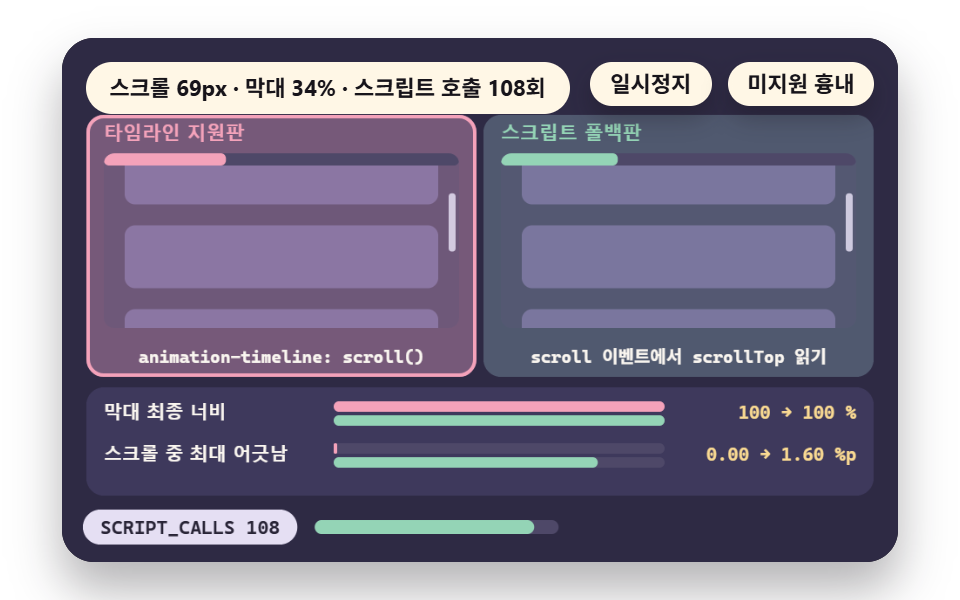 01 sd-scroll-timeline
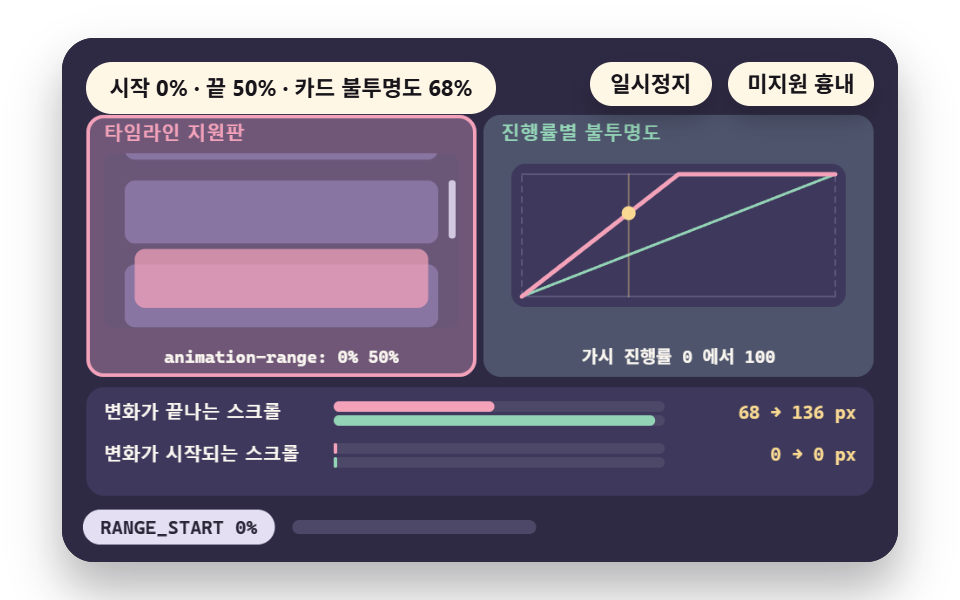 02 sd-view-range
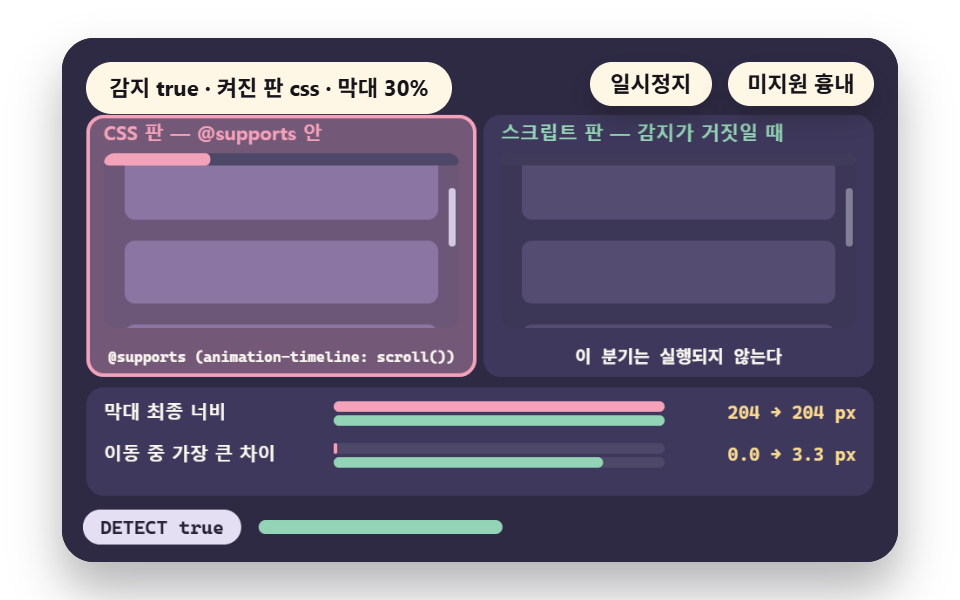 03 sd-detect-switch
 04 sd-static-end
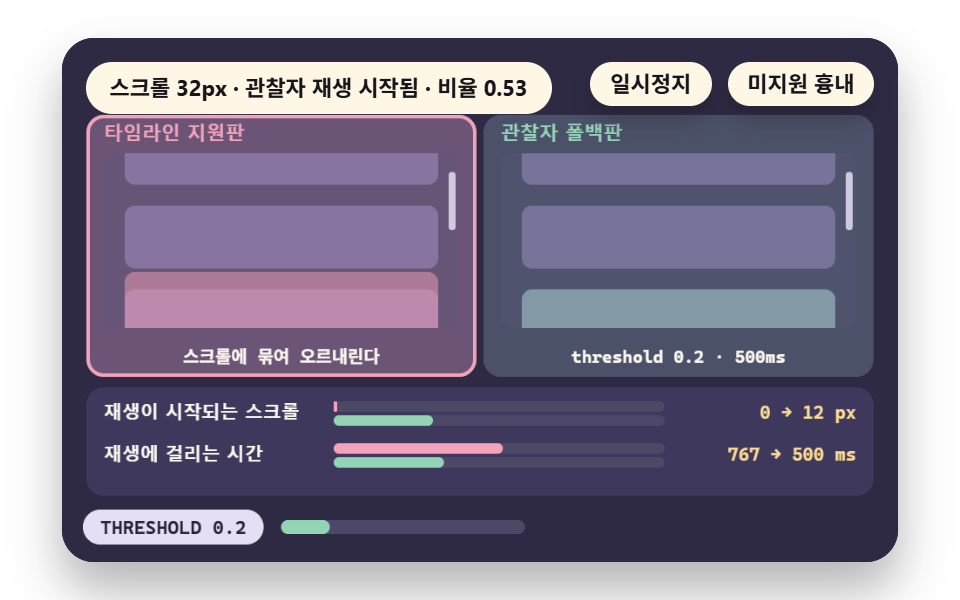 05 sd-transition-fallback
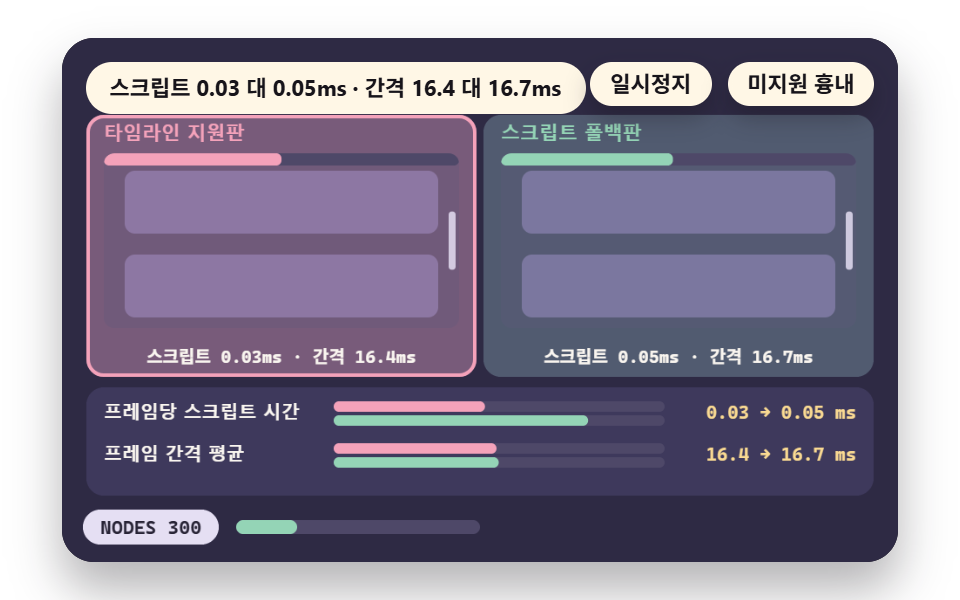 06 sd-frame-cost
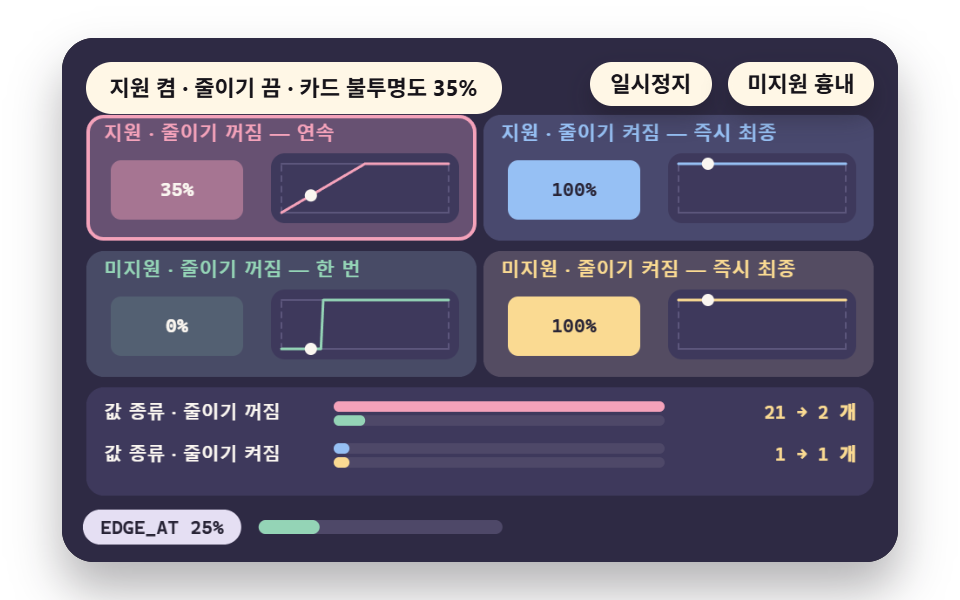 07 sd-reduce-overlap
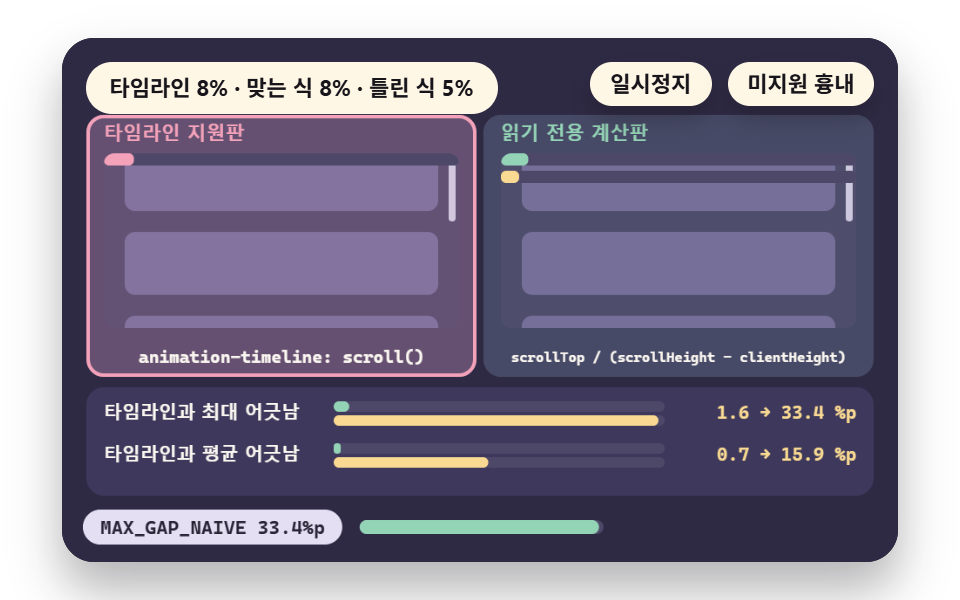 08 sd-scroll-calc
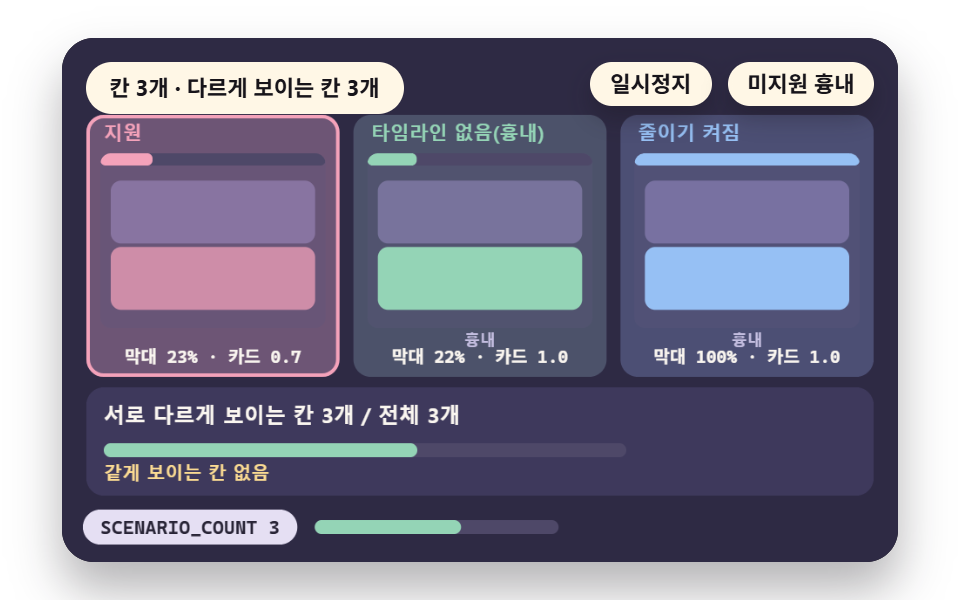 09 sd-browser-matrix
- 01 Scroll Timeline: A Bar Filled by Page Progress
- 02 Element Visibility Range: Play Only While It Crosses
- 03 Support Detection: Conditional Rule and Script Fallback
- 04 Static End State: Leave the Finished Look When Unsupported
- 05 Transition Fallback: Play Once on Entering the Screen
- 06 Frame Comparison: Scroll Events Versus a Timeline
- 07 Reduced Motion Overlap: Timeline and Setting Both On
- 08 Scroll Value Calculation: Progress Read Without Writing
- 09 Browser Scenarios: Full, Partial and No Support
There are two timelines: animation-timeline: scroll() reads a scroll container's progress, and view() reads how far one element has crossed the window.
Demos Are a Canvas Computation Model
The nine demos are canvas calculation models, because the render tool freezes CSS animation, so no animation-timeline rule could run inside them.
Numbers called measured come from real timelines and a real observer in Chrome driven by Playwright; unsupported cells are an emulation that forces the support check to fail.
9 Fallback Scenes, Detection to Matrix
The render tool took 24 captures of a 480×300 canvas over 2 seconds and compared 23 neighboring pairs; the Chrome build was not recorded, so it is unverified.
Cumulative area is the share of pixels that ever differ from the first frame, and intensity is their mean color difference (0 to 255). Moved frames counts captures that differ from the previous one.
| Scene | Cumulative area | Moved frames | Mean intensity |
|---|---|---|---|
| 01 scroll timeline | 35.8% | 20/23 | 46.0 |
| 02 element visibility range | 27.5% | 19/23 | 46.9 |
| 03 support detection | 37.5% | 19/23 | 37.0 |
| 04 static end state | 36.3% | 19/23 | 71.1 |
| 05 transition fallback | 35.8% | 19/23 | 47.4 |
| 06 frame cost | 35.1% | 23/23 | 47.7 |
| 07 reduced-motion overlap | 22.8% | 10/23 | 78.1 |
| 08 scroll value math | 35.5% | 19/23 | 46.8 |
| 09 browser scenario | 33.1% | 20/23 | 46.5 |
01Scroll Timeline: Page Progress Bar
progAt divides the scroll position by MAX_SCROLL, while the script panel reads the lagged scrollLag, LAG_FRAMES 1 frame late.
Per pass it rewrites the bar SCRIPT_CALLS 108 times, and the two bars drift apart by up to 1.6%p.
It fits reading progress; skip it where the timeline exists, since two bars would answer one scroll.
<main class="stage">
<div class="ez is-demo" id="ez">
  <div class="ez__pad" data-role="pad" tabindex="0" role="application" aria-label="Demo stage: Space or Enter pauses, R restarts, U toggles the unsupported simulation">
    <canvas class="ez__canvas" data-role="canvas" width="480" height="300" role="img" aria-label="A bar filled by scroll progress in a timeline version beside a script fallback with the gap measured"></canvas>
  </div>
  <p class="ez__status" data-role="status" aria-live="off">Scene ready</p>
  <div class="ez__ctrl">
    <button class="ez__pause" data-role="pause" type="button" aria-pressed="false">Pause</button>
    <button class="ez__pause" data-role="sim" type="button" aria-pressed="false">Simulate unsupported</button>
  </div>
  <p class="ez__done" data-role="done" role="status" aria-live="polite"></p>
</div>
… (총 13줄 — 아래 「전체 코드」에서 원문 전체)
@use "../../../../site/static/demo-tokens" as *;
@include stage($stage-paper);
.ez {
position: relative;
width: min(92vw, calc(160vh - 12.8vw));
aspect-ratio: 480 / 300;
margin: 0 auto;
border-radius: $r-card;
overflow: hidden;
box-shadow: $shadow-raised;
background: $subject-ink;
… (총 122줄 — 아래 「전체 코드」에서 원문 전체)html, body {
margin: 0;
overflow: hidden;
}
.stage {
box-sizing: border-box;
min-height: 100vh;
display: grid;
place-items: center;
margin: 0;
background: #ffffff;
… (총 134줄 — 아래 「전체 코드」에서 원문 전체)(function () {
const rootEl = document.getElementById("ez");
if (!rootEl) return;
main(rootEl);
function main(root) {
// 무대 좌표 — 캔버스 안 계산은 늘 480×300. 화면에 보이는 크기와 상관없다
const W = 480;
const H = 300;
const TAU = Math.PI * 2;
function clamp(v, lo, hi) { return v < lo ? lo : (v > hi ? hi : v); }
function lerp(a, b, k) { return a + (b - a) * k; }
// 파스텔 팔레트 — 바탕은 짙은 자두색, 상자는 연한 색, 글자는 연한 색 또는 짙은 잉크
… (총 604줄 — 아래 「전체 코드」에서 원문 전체)// ScrollTimeline - 같은 항목 vanilla index.html 의 React 판. 같은 계산을 useEffect 안에서 돌린다
import { useEffect, useRef } from "react";
import styles from "./ScrollTimeline.module.scss";
const cx = (s: string): string => s.split(" ").map((n) => styles[n] ?? n).join(" ");
function main(root: HTMLElement): () => void {
type RGB = [number, number, number];
type Fn = (p: number) => number;
// 무대 좌표 — 캔버스 안 계산은 늘 480×300. 화면에 보이는 크기와 상관없다
const W = 480;
const H = 300;
… (총 569줄 — 아래 「전체 코드」에서 원문 전체)01 · Scroll Timeline: A Bar Filled by Page Progress — Measured area 35.842% · moving frames 20/23Original by GODRICH · SCSS and React ship in the zip · See the password
    function scrollAt(t) {
        if (t < UP_TO + 0.2) {
            return MAX_SCROLL * EASE_IN_OUT(clamp((t - UP_FROM) / (UP_TO - UP_FROM), 0, 1));
        }
        return MAX_SCROLL * (1 - EASE_IN_OUT(clamp((t - DOWN_FROM) / (DOWN_TO - DOWN_FROM), 0, 1)));
    }
    // scroll progress 0 to 1 — the value the timeline uses. scroll position ÷ (document height − window height)
    function progAt(s) { return clamp(s / MAX_SCROLL, 0, 1); }
    // the value the script reads from a scroll event and writes to the bar is a position from LAG_FRAMES frames ago (LAG_FRAMES = 1)
    const LAG_FRAMES = 1;
    function scrollLag(t) { return scrollAt(Math.max(0, t - LAG_FRAMES / FPS)); }
02View Range: Play While Crossing
viewProg is 0 when the card's top meets the window bottom and 1 when its bottom clears the top, and rangeVal refolds it into RANGE_START to RANGE_END.
A span of 0 to 50% ends the change at 68px; a real animation-range: cover 0% 50% also ended at 68px and first changed at 1px (measured).
It fits card and image reveals.
<main class="stage">
<div class="ez is-demo" id="ez">
  <div class="ez__pad" data-role="pad" tabindex="0" role="application" aria-label="Demo stage: Space or Enter pauses, R restarts, U toggles the unsupported simulation, Left and right arrows change the range start">
    <canvas class="ez__canvas" data-role="canvas" width="480" height="300" role="img" aria-label="A card changing only in part of its visible range beside the opacity curve by progress"></canvas>
  </div>
  <p class="ez__status" data-role="status" aria-live="off">Scene ready</p>
  <div class="ez__ctrl">
    <button class="ez__pause" data-role="pause" type="button" aria-pressed="false">Pause</button>
    <button class="ez__pause" data-role="sim" type="button" aria-pressed="false">Simulate unsupported</button>
  </div>
  <p class="ez__done" data-role="done" role="status" aria-live="polite"></p>
</div>
… (총 13줄 — 아래 「전체 코드」에서 원문 전체)
@use "../../../../site/static/demo-tokens" as *;
@include stage($stage-paper);
.ez {
position: relative;
width: min(92vw, calc(160vh - 12.8vw));
aspect-ratio: 480 / 300;
margin: 0 auto;
border-radius: $r-card;
overflow: hidden;
box-shadow: $shadow-raised;
background: $subject-ink;
… (총 122줄 — 아래 「전체 코드」에서 원문 전체)html, body {
margin: 0;
overflow: hidden;
}
.stage {
box-sizing: border-box;
min-height: 100vh;
display: grid;
place-items: center;
margin: 0;
background: #ffffff;
… (총 134줄 — 아래 「전체 코드」에서 원문 전체)(function () {
const rootEl = document.getElementById("ez");
if (!rootEl) return;
main(rootEl);
function main(root) {
// 무대 좌표 — 캔버스 안 계산은 늘 480×300. 화면에 보이는 크기와 상관없다
const W = 480;
const H = 300;
const TAU = Math.PI * 2;
function clamp(v, lo, hi) { return v < lo ? lo : (v > hi ? hi : v); }
function lerp(a, b, k) { return a + (b - a) * k; }
// 파스텔 팔레트 — 바탕은 짙은 자두색, 상자는 연한 색, 글자는 연한 색 또는 짙은 잉크
… (총 605줄 — 아래 「전체 코드」에서 원문 전체)// ViewRange - 같은 항목 vanilla index.html 의 React 판. 같은 계산을 useEffect 안에서 돌린다
import { useEffect, useRef } from "react";
import styles from "./ViewRange.module.scss";
const cx = (s: string): string => s.split(" ").map((n) => styles[n] ?? n).join(" ");
function main(root: HTMLElement): () => void {
type RGB = [number, number, number];
type Fn = (p: number) => number;
// 무대 좌표 — 캔버스 안 계산은 늘 480×300. 화면에 보이는 크기와 상관없다
const W = 480;
const H = 300;
… (총 566줄 — 아래 「전체 코드」에서 원문 전체)02 · Element Visibility Range: Play Only While It Crosses — Measured area 27.504% · moving frames 19/23Original by GODRICH · SCSS and React ship in the zip · See the password
    // 0 when the card's top edge touches the window's bottom edge, 1 when the card's bottom edge clears the window's top
    function viewProg(s) { return clamp((s + VIEW_H - CARD_Y) / (VIEW_H + CARD_H), 0, 1); }
    function rangeVal(v, rs, re) { return clamp((v * 100 - rs) / (re - rs), 0, 1); }
    // the scroll positions (px) where the span starts and ends
    function scrollAtPct(pct) { return CARD_Y - VIEW_H + (pct / 100) * (VIEW_H + CARD_H); }
    function curRange(v) { return rangeVal(v, RANGE_START, RANGE_END); }
03Support Detection: CSS or Script
When detection passes only the CSS panel fills the bar, otherwise only the script panel does, flipping at SWITCH_T 1.2 seconds via unsupportedAt.
It fits an audience that mixes supported and unsupported browsers.
<main class="stage">
<div class="ez is-demo" id="ez">
  <div class="ez__pad" data-role="pad" tabindex="0" role="application" aria-label="Demo stage: Space or Enter pauses, R restarts, U toggles the unsupported simulation">
    <canvas class="ez__canvas" data-role="canvas" width="480" height="300" role="img" aria-label="Only one of a CSS version and a script version fills the bar depending on the detection result"></canvas>
  </div>
  <p class="ez__status" data-role="status" aria-live="off">Scene ready</p>
  <div class="ez__ctrl">
    <button class="ez__pause" data-role="pause" type="button" aria-pressed="false">Pause</button>
    <button class="ez__pause" data-role="sim" type="button" aria-pressed="false">Simulate unsupported</button>
  </div>
  <p class="ez__done" data-role="done" role="status" aria-live="polite"></p>
</div>
… (총 13줄 — 아래 「전체 코드」에서 원문 전체)
@use "../../../../site/static/demo-tokens" as *;
@include stage($stage-paper);
.ez {
position: relative;
width: min(92vw, calc(160vh - 12.8vw));
aspect-ratio: 480 / 300;
margin: 0 auto;
border-radius: $r-card;
overflow: hidden;
box-shadow: $shadow-raised;
background: $subject-ink;
… (총 122줄 — 아래 「전체 코드」에서 원문 전체)html, body {
margin: 0;
overflow: hidden;
}
.stage {
box-sizing: border-box;
min-height: 100vh;
display: grid;
place-items: center;
margin: 0;
background: #ffffff;
… (총 134줄 — 아래 「전체 코드」에서 원문 전체)(function () {
const rootEl = document.getElementById("ez");
if (!rootEl) return;
main(rootEl);
function main(root) {
// 무대 좌표 — 캔버스 안 계산은 늘 480×300. 화면에 보이는 크기와 상관없다
const W = 480;
const H = 300;
const TAU = Math.PI * 2;
function clamp(v, lo, hi) { return v < lo ? lo : (v > hi ? hi : v); }
function lerp(a, b, k) { return a + (b - a) * k; }
// 파스텔 팔레트 — 바탕은 짙은 자두색, 상자는 연한 색, 글자는 연한 색 또는 짙은 잉크
… (총 595줄 — 아래 「전체 코드」에서 원문 전체)// DetectSwitch - 같은 항목 vanilla index.html 의 React 판. 같은 계산을 useEffect 안에서 돌린다
import { useEffect, useRef } from "react";
import styles from "./DetectSwitch.module.scss";
const cx = (s: string): string => s.split(" ").map((n) => styles[n] ?? n).join(" ");
function main(root: HTMLElement): () => void {
type RGB = [number, number, number];
type Fn = (p: number) => number;
// 무대 좌표 — 캔버스 안 계산은 늘 480×300. 화면에 보이는 크기와 상관없다
const W = 480;
const H = 300;
… (총 560줄 — 아래 「전체 코드」에서 원문 전체)03 · Support Detection: Conditional Rule and Script Fallback — Measured area 37.535% · moving frames 19/23Original by GODRICH · SCSS and React ship in the zip · See the password
    const SWITCH_T = 1.2;
    function unsupportedAt(t) { return simOn || t >= SWITCH_T; }
    // the two panels' final widths (px) and the largest gap while moving (px)
    const FINAL_CSS = VW * progAt(scrollAt(UP_TO));
    const FINAL_JS = VW * progAt(scrollLag(UP_TO + 0.2));
    const GAP_PX = (MAX_GAP_PCT() / 100) * VW;
04Static End State: Finished Look
opOf returns 1 for the good panel and 0 for the bad one once unsupported, so after UNSUP_T 0.7 seconds 3 cards show against 0. With support, both panels show 3 cards at the end of the scroll.
It fits adding a new feature step by step; skip a transparent start state as the base value, since unsupported visitors then see 0 of 3 cards.
<main class="stage">
<div class="ez is-demo" id="ez">
  <div class="ez__pad" data-role="pad" tabindex="0" role="application" aria-label="Demo stage: Space or Enter pauses, R restarts, U toggles the unsupported simulation">
    <canvas class="ez__canvas" data-role="canvas" width="480" height="300" role="img" aria-label="A version whose default is the end look beside one whose default is the start look, compared by visible cards when unsupported"></canvas>
  </div>
  <p class="ez__status" data-role="status" aria-live="off">Scene ready</p>
  <div class="ez__ctrl">
    <button class="ez__pause" data-role="pause" type="button" aria-pressed="false">Pause</button>
    <button class="ez__pause" data-role="sim" type="button" aria-pressed="false">Simulate unsupported</button>
  </div>
  <p class="ez__done" data-role="done" role="status" aria-live="polite"></p>
</div>
… (총 13줄 — 아래 「전체 코드」에서 원문 전체)
@use "../../../../site/static/demo-tokens" as *;
@include stage($stage-paper);
.ez {
position: relative;
width: min(92vw, calc(160vh - 12.8vw));
aspect-ratio: 480 / 300;
margin: 0 auto;
border-radius: $r-card;
overflow: hidden;
box-shadow: $shadow-raised;
background: $subject-ink;
… (총 122줄 — 아래 「전체 코드」에서 원문 전체)html, body {
margin: 0;
overflow: hidden;
}
.stage {
box-sizing: border-box;
min-height: 100vh;
display: grid;
place-items: center;
margin: 0;
background: #ffffff;
… (총 134줄 — 아래 「전체 코드」에서 원문 전체)(function () {
const rootEl = document.getElementById("ez");
if (!rootEl) return;
main(rootEl);
function main(root) {
// 무대 좌표 — 캔버스 안 계산은 늘 480×300. 화면에 보이는 크기와 상관없다
const W = 480;
const H = 300;
const TAU = Math.PI * 2;
function clamp(v, lo, hi) { return v < lo ? lo : (v > hi ? hi : v); }
function lerp(a, b, k) { return a + (b - a) * k; }
// 파스텔 팔레트 — 바탕은 짙은 자두색, 상자는 연한 색, 글자는 연한 색 또는 짙은 잉크
… (총 617줄 — 아래 「전체 코드」에서 원문 전체)// StaticEnd - 같은 항목 vanilla index.html 의 React 판. 같은 계산을 useEffect 안에서 돌린다
import { useEffect, useRef } from "react";
import styles from "./StaticEnd.module.scss";
const cx = (s: string): string => s.split(" ").map((n) => styles[n] ?? n).join(" ");
function main(root: HTMLElement): () => void {
type RGB = [number, number, number];
type Fn = (p: number) => number;
// 무대 좌표 — 캔버스 안 계산은 늘 480×300. 화면에 보이는 크기와 상관없다
const W = 480;
const H = 300;
… (총 578줄 — 아래 「전체 코드」에서 원문 전체)04 · Static End State: Leave the Finished Look When Unsupported — Measured area 36.261% · moving frames 19/23Original by GODRICH · SCSS and React ship in the zip · See the password
    function unsupportedAt(t) { return simOn || t >= UNSUP_T; }
    function vOf(i, s) { return clamp((s + VIEW_H - CARDS_Y[i]) / (VIEW_H + CH4), 0, 1); }
    // card i's opacity — with support, the span value; without, the base value (good panel 1, bad panel 0)
    function opOf(i, s, un, good) {
        if (un) {
            return good ? 1 : 0;
        }
        return clamp(vOf(i, s) * 100 / RANGE4_END, 0, 1);
    }
05Transition Fallback: Play Once
visFrac measures the visible fraction, and at trigAt, where it reaches THRESHOLD 0.2, a one-shot transition starts at scroll 12px, matching a real IntersectionObserver (measured).
It fits keeping an entrance effect without support; skip it for a bar that must rewind on scroll up, since one shot cannot play backward.
<main class="stage">
<div class="ez is-demo" id="ez">
  <div class="ez__pad" data-role="pad" tabindex="0" role="application" aria-label="Demo stage: Space or Enter pauses, R restarts, U toggles the unsupported simulation, Left and right arrows change the observer threshold">
    <canvas class="ez__canvas" data-role="canvas" width="480" height="300" role="img" aria-label="A timeline version following the scroll both ways beside an observer version that plays once at the threshold"></canvas>
  </div>
  <p class="ez__status" data-role="status" aria-live="off">Scene ready</p>
  <div class="ez__ctrl">
    <button class="ez__pause" data-role="pause" type="button" aria-pressed="false">Pause</button>
    <button class="ez__pause" data-role="sim" type="button" aria-pressed="false">Simulate unsupported</button>
  </div>
  <p class="ez__done" data-role="done" role="status" aria-live="polite"></p>
</div>
… (총 13줄 — 아래 「전체 코드」에서 원문 전체)
@use "../../../../site/static/demo-tokens" as *;
@include stage($stage-paper);
.ez {
position: relative;
width: min(92vw, calc(160vh - 12.8vw));
aspect-ratio: 480 / 300;
margin: 0 auto;
border-radius: $r-card;
overflow: hidden;
box-shadow: $shadow-raised;
background: $subject-ink;
… (총 122줄 — 아래 「전체 코드」에서 원문 전체)html, body {
margin: 0;
overflow: hidden;
}
.stage {
box-sizing: border-box;
min-height: 100vh;
display: grid;
place-items: center;
margin: 0;
background: #ffffff;
… (총 134줄 — 아래 「전체 코드」에서 원문 전체)(function () {
const rootEl = document.getElementById("ez");
if (!rootEl) return;
main(rootEl);
function main(root) {
// 무대 좌표 — 캔버스 안 계산은 늘 480×300. 화면에 보이는 크기와 상관없다
const W = 480;
const H = 300;
const TAU = Math.PI * 2;
function clamp(v, lo, hi) { return v < lo ? lo : (v > hi ? hi : v); }
function lerp(a, b, k) { return a + (b - a) * k; }
// 파스텔 팔레트 — 바탕은 짙은 자두색, 상자는 연한 색, 글자는 연한 색 또는 짙은 잉크
… (총 632줄 — 아래 「전체 코드」에서 원문 전체)// TransitionFallback - 같은 항목 vanilla index.html 의 React 판. 같은 계산을 useEffect 안에서 돌린다
import { useEffect, useRef } from "react";
import styles from "./TransitionFallback.module.scss";
const cx = (s: string): string => s.split(" ").map((n) => styles[n] ?? n).join(" ");
function main(root: HTMLElement): () => void {
type RGB = [number, number, number];
type Fn = (p: number) => number;
// 무대 좌표 — 캔버스 안 계산은 늘 480×300. 화면에 보이는 크기와 상관없다
const W = 480;
const H = 300;
… (총 585줄 — 아래 「전체 코드」에서 원문 전체)05 · Transition Fallback: Play Once on Entering the Screen — Measured area 35.815% · moving frames 19/23Original by GODRICH · SCSS and React ship in the zip · See the password
    // the fraction of the card visible in the window — height risen above the window's bottom edge ÷ card height
    function visFrac(s) { return clamp((VIEW_H - (CARD_Y - s)) / CARD5_H, 0, 1); }
    function viewV(s) { return clamp((s + VIEW_H - CARD_Y) / (VIEW_H + CARD5_H), 0, 1); }
    function tlVal(s) { return clamp(viewV(s) * 100 / RANGE5_END, 0, 1); }
    // the first time the observer fires — the first moment the visible fraction reaches THRESHOLD
    function trigAt() {
        for (let t = 0; t <= LAP_S; t += 1 / 240) {
            if (visFrac(scrollAt(t)) >= THRESHOLD) {
                return t;
            }
        }
        return LAP_S;
    }
06Frame Cost: Events vs Timeline
handler reads scrollTop, computes progress, writes the bar width and reads a position once more, while bareScroll only sets the position.
Over three real Chrome sessions the mean frame interval was 16.667ms in both modes, a 0% gap.
Handler time here was 0.202 to 0.238ms, under 1.5% of the frame budget, so skip a rewrite done only for speed.
<main class="stage">
<div class="ez is-demo" id="ez">
  <div class="ez__pad" data-role="pad" tabindex="0" role="application" aria-label="Demo stage: Space or Enter pauses, R restarts, U toggles the unsupported simulation, Left and right arrows change the document node count">
    <canvas class="ez__canvas" data-role="canvas" width="480" height="300" role="img" aria-label="The same scroll handled by a timeline way and a script way in turn with script time and frame interval measured"></canvas>
  </div>
  <p class="ez__status" data-role="status" aria-live="off">Scene ready</p>
  <div class="ez__ctrl">
    <button class="ez__pause" data-role="pause" type="button" aria-pressed="false">Pause</button>
    <button class="ez__pause" data-role="sim" type="button" aria-pressed="false">Simulate unsupported</button>
  </div>
  <p class="ez__done" data-role="done" role="status" aria-live="polite"></p>
</div>
… (총 13줄 — 아래 「전체 코드」에서 원문 전체)
@use "../../../../site/static/demo-tokens" as *;
@include stage($stage-paper);
.ez {
position: relative;
width: min(92vw, calc(160vh - 12.8vw));
aspect-ratio: 480 / 300;
margin: 0 auto;
border-radius: $r-card;
overflow: hidden;
box-shadow: $shadow-raised;
background: $subject-ink;
… (총 122줄 — 아래 「전체 코드」에서 원문 전체)html, body {
margin: 0;
overflow: hidden;
}
.stage {
box-sizing: border-box;
min-height: 100vh;
display: grid;
place-items: center;
margin: 0;
background: #ffffff;
… (총 134줄 — 아래 「전체 코드」에서 원문 전체)(function () {
const rootEl = document.getElementById("ez");
if (!rootEl) return;
main(rootEl);
function main(root) {
// 무대 좌표 — 캔버스 안 계산은 늘 480×300. 화면에 보이는 크기와 상관없다
const W = 480;
const H = 300;
const TAU = Math.PI * 2;
function clamp(v, lo, hi) { return v < lo ? lo : (v > hi ? hi : v); }
function lerp(a, b, k) { return a + (b - a) * k; }
// 파스텔 팔레트 — 바탕은 짙은 자두색, 상자는 연한 색, 글자는 연한 색 또는 짙은 잉크
… (총 703줄 — 아래 「전체 코드」에서 원문 전체)// FrameCost - 같은 항목 vanilla index.html 의 React 판. 같은 계산을 useEffect 안에서 돌린다
import { useEffect, useRef } from "react";
import styles from "./FrameCost.module.scss";
const cx = (s: string): string => s.split(" ").map((n) => styles[n] ?? n).join(" ");
function main(root: HTMLElement): () => void {
type RGB = [number, number, number];
type Fn = (p: number) => number;
// 무대 좌표 — 캔버스 안 계산은 늘 480×300. 화면에 보이는 크기와 상관없다
const W = 480;
const H = 300;
… (총 641줄 — 아래 「전체 코드」에서 원문 전체)06 · Frame Comparison: Scroll Events Versus a Timeline — Measured area 35.146% · moving frames 23/23Original by GODRICH · SCSS and React ship in the zip · See the password
    // timeline-panel mode — only the position is set. No value is read, and no bar value exists in script
    function bareScroll(s) { rig.scrollTop = s; }
    // script-panel mode — what the scroll event handler does: read the position, compute progress, write the bar width, read an element position once more
    function handler(s) {
        rig.scrollTop = s;
        const p = rig.scrollTop / (rig.scrollHeight - rig.clientHeight);
        rigBar.style.width = (p * VW) + 'px';
        const last = rigDoc.lastElementChild;
        if (last) {
            void last.getBoundingClientRect().top;
        }
    }
07Reduced Motion Overlap: Two Settings
The four functions in FN7 give 21 distinct opacity values when supported with reduction off, 2 without support (EDGE_AT 0.25), and 1 with reduction on.
It fits screens that honor both scroll linking and the motion setting.
<main class="stage">
<div class="ez is-demo" id="ez">
  <div class="ez__pad" data-role="pad" tabindex="0" role="application" aria-label="Demo stage: Space or Enter pauses, R restarts, U toggles the unsupported simulation">
    <canvas class="ez__canvas" data-role="canvas" width="480" height="300" role="img" aria-label="Curves compare how card opacity changes across four combinations of timeline support and reduced motion"></canvas>
  </div>
  <p class="ez__status" data-role="status" aria-live="off">Scene ready</p>
  <div class="ez__ctrl">
    <button class="ez__pause" data-role="pause" type="button" aria-pressed="false">Pause</button>
    <button class="ez__pause" data-role="sim" type="button" aria-pressed="false">Simulate unsupported</button>
  </div>
  <p class="ez__done" data-role="done" role="status" aria-live="polite"></p>
</div>
… (총 13줄 — 아래 「전체 코드」에서 원문 전체)
@use "../../../../site/static/demo-tokens" as *;
@include stage($stage-paper);
.ez {
position: relative;
width: min(92vw, calc(160vh - 12.8vw));
aspect-ratio: 480 / 300;
margin: 0 auto;
border-radius: $r-card;
overflow: hidden;
box-shadow: $shadow-raised;
background: $subject-ink;
… (총 122줄 — 아래 「전체 코드」에서 원문 전체)html, body {
margin: 0;
overflow: hidden;
}
.stage {
box-sizing: border-box;
min-height: 100vh;
display: grid;
place-items: center;
margin: 0;
background: #ffffff;
… (총 134줄 — 아래 「전체 코드」에서 원문 전체)(function () {
const rootEl = document.getElementById("ez");
if (!rootEl) return;
main(rootEl);
function main(root) {
// 무대 좌표 — 캔버스 안 계산은 늘 480×300. 화면에 보이는 크기와 상관없다
const W = 480;
const H = 300;
const TAU = Math.PI * 2;
function clamp(v, lo, hi) { return v < lo ? lo : (v > hi ? hi : v); }
function lerp(a, b, k) { return a + (b - a) * k; }
// 파스텔 팔레트 — 바탕은 짙은 자두색, 상자는 연한 색, 글자는 연한 색 또는 짙은 잉크
… (총 614줄 — 아래 「전체 코드」에서 원문 전체)// ReduceOverlap - 같은 항목 vanilla index.html 의 React 판. 같은 계산을 useEffect 안에서 돌린다
import { useEffect, useRef } from "react";
import styles from "./ReduceOverlap.module.scss";
const cx = (s: string): string => s.split(" ").map((n) => styles[n] ?? n).join(" ");
function main(root: HTMLElement): () => void {
type RGB = [number, number, number];
type Fn = (p: number) => number;
// 무대 좌표 — 캔버스 안 계산은 늘 480×300. 화면에 보이는 크기와 상관없다
const W = 480;
const H = 300;
… (총 576줄 — 아래 「전체 코드」에서 원문 전체)07 · Reduced Motion Overlap: Timeline and Setting Both On — Measured area 22.837% · moving frames 10/23Original by GODRICH · SCSS and React ship in the zip · See the password
    const EDGE_AT = 0.25;
    function viewV(s) { return clamp((s + VIEW_H - CARD_Y) / (VIEW_H + CARD7_H), 0, 1); }
    const FN7 = [
        function (p) { return clamp(p * 100 / RANGE7_END, 0, 1); },
        function (p) { void p; return 1; },
        function (p) { return p >= EDGE_AT ? 1 : 0; },
        function (p) { void p; return 1; }
    ];
08Scroll Value Math: Read-Only Progress
okProg divides the position by the travelable distance and misses a real timeline bar by at most 0.007%p, while naiveProg divides by document height and misses by up to 33.3%p.
It fits building the same progress value without a timeline; skip the document-height division, whose table is in the trap section.
<main class="stage">
<div class="ez is-demo" id="ez">
  <div class="ez__pad" data-role="pad" tabindex="0" role="application" aria-label="Demo stage: Space or Enter pauses, R restarts, U toggles the unsupported simulation">
    <canvas class="ez__canvas" data-role="canvas" width="480" height="300" role="img" aria-label="Progress calculated only by reading the scroll position compared with the timeline value for a right and a wrong formula"></canvas>
  </div>
  <p class="ez__status" data-role="status" aria-live="off">Scene ready</p>
  <div class="ez__ctrl">
    <button class="ez__pause" data-role="pause" type="button" aria-pressed="false">Pause</button>
    <button class="ez__pause" data-role="sim" type="button" aria-pressed="false">Simulate unsupported</button>
  </div>
  <p class="ez__done" data-role="done" role="status" aria-live="polite"></p>
</div>
… (총 13줄 — 아래 「전체 코드」에서 원문 전체)
@use "../../../../site/static/demo-tokens" as *;
@include stage($stage-paper);
.ez {
position: relative;
width: min(92vw, calc(160vh - 12.8vw));
aspect-ratio: 480 / 300;
margin: 0 auto;
border-radius: $r-card;
overflow: hidden;
box-shadow: $shadow-raised;
background: $subject-ink;
… (총 122줄 — 아래 「전체 코드」에서 원문 전체)html, body {
margin: 0;
overflow: hidden;
}
.stage {
box-sizing: border-box;
min-height: 100vh;
display: grid;
place-items: center;
margin: 0;
background: #ffffff;
… (총 134줄 — 아래 「전체 코드」에서 원문 전체)(function () {
const rootEl = document.getElementById("ez");
if (!rootEl) return;
main(rootEl);
function main(root) {
// 무대 좌표 — 캔버스 안 계산은 늘 480×300. 화면에 보이는 크기와 상관없다
const W = 480;
const H = 300;
const TAU = Math.PI * 2;
function clamp(v, lo, hi) { return v < lo ? lo : (v > hi ? hi : v); }
function lerp(a, b, k) { return a + (b - a) * k; }
// 파스텔 팔레트 — 바탕은 짙은 자두색, 상자는 연한 색, 글자는 연한 색 또는 짙은 잉크
… (총 610줄 — 아래 「전체 코드」에서 원문 전체)// ScrollCalc - 같은 항목 vanilla index.html 의 React 판. 같은 계산을 useEffect 안에서 돌린다
import { useEffect, useRef } from "react";
import styles from "./ScrollCalc.module.scss";
const cx = (s: string): string => s.split(" ").map((n) => styles[n] ?? n).join(" ");
function main(root: HTMLElement): () => void {
type RGB = [number, number, number];
type Fn = (p: number) => number;
// 무대 좌표 — 캔버스 안 계산은 늘 480×300. 화면에 보이는 크기와 상관없다
const W = 480;
const H = 300;
… (총 577줄 — 아래 「전체 코드」에서 원문 전체)08 · Scroll Value Calculation: Progress Read Without Writing — Measured area 35.529% · moving frames 19/23Original by GODRICH · SCSS and React ship in the zip · See the password
    const GAP_OK = gapStats(okProg, true);
    const GAP_NAIVE = gapStats(naiveProg, true);
    const MAX_GAP_OK = GAP_OK[0];
    const MAX_GAP_NAIVE = GAP_NAIVE[0];
    const MEAN_GAP_OK = GAP_OK[1];
    const MEAN_GAP_NAIVE = GAP_NAIVE[1];
    // span gauge — the gap between the timeline value and the wrong formula at every 25% of scroll progress
    function segGap(pct) { return Math.abs(pct / 100 - naiveProg(MAX_SCROLL * pct / 100)) * 100; }
09Browser Scenario: Three Environments
Across the supported, no-timeline (emulated) and reduction-on cells, the signature fingerprints over 11 points all differ, so distinctCells returns 3/3.
It fits ordering browser checks before release; partial support and script off are emulated, not real browsers.
<main class="stage">
<div class="ez is-demo" id="ez">
  <div class="ez__pad" data-role="pad" tabindex="0" role="application" aria-label="Demo stage: Space or Enter pauses, R restarts, U toggles the unsupported simulation, Left and right arrows change the number of environments">
    <canvas class="ez__canvas" data-role="canvas" width="480" height="300" role="img" aria-label="The same page in environments such as supported, no timeline and reduce on, counting the cells that look different"></canvas>
  </div>
  <p class="ez__status" data-role="status" aria-live="off">Scene ready</p>
  <div class="ez__ctrl">
    <button class="ez__pause" data-role="pause" type="button" aria-pressed="false">Pause</button>
    <button class="ez__pause" data-role="sim" type="button" aria-pressed="false">Simulate unsupported</button>
  </div>
  <p class="ez__done" data-role="done" role="status" aria-live="polite"></p>
</div>
… (총 13줄 — 아래 「전체 코드」에서 원문 전체)
@use "../../../../site/static/demo-tokens" as *;
@include stage($stage-paper);
.ez {
position: relative;
width: min(92vw, calc(160vh - 12.8vw));
aspect-ratio: 480 / 300;
margin: 0 auto;
border-radius: $r-card;
overflow: hidden;
box-shadow: $shadow-raised;
background: $subject-ink;
… (총 122줄 — 아래 「전체 코드」에서 원문 전체)html, body {
margin: 0;
overflow: hidden;
}
.stage {
box-sizing: border-box;
min-height: 100vh;
display: grid;
place-items: center;
margin: 0;
background: #ffffff;
… (총 134줄 — 아래 「전체 코드」에서 원문 전체)(function () {
const rootEl = document.getElementById("ez");
if (!rootEl) return;
main(rootEl);
function main(root) {
// 무대 좌표 — 캔버스 안 계산은 늘 480×300. 화면에 보이는 크기와 상관없다
const W = 480;
const H = 300;
const TAU = Math.PI * 2;
function clamp(v, lo, hi) { return v < lo ? lo : (v > hi ? hi : v); }
function lerp(a, b, k) { return a + (b - a) * k; }
// 파스텔 팔레트 — 바탕은 짙은 자두색, 상자는 연한 색, 글자는 연한 색 또는 짙은 잉크
… (총 673줄 — 아래 「전체 코드」에서 원문 전체)// BrowserMatrix - 같은 항목 vanilla index.html 의 React 판. 같은 계산을 useEffect 안에서 돌린다
import { useEffect, useRef } from "react";
import styles from "./BrowserMatrix.module.scss";
const cx = (s: string): string => s.split(" ").map((n) => styles[n] ?? n).join(" ");
function main(root: HTMLElement): () => void {
type RGB = [number, number, number];
type Fn = (p: number) => number;
// 무대 좌표 — 캔버스 안 계산은 늘 480×300. 화면에 보이는 크기와 상관없다
const W = 480;
const H = 300;
… (총 613줄 — 아래 「전체 코드」에서 원문 전체)09 · Browser Scenarios: Full, Partial and No Support — Measured area 33.069% · moving frames 20/23Original by GODRICH · SCSS and React ship in the zip · See the password
    // environment e's [bar value, card opacity] — 0 supported · 1 no timeline · 2 reduction on · 3 partial support · 4 script off
    function envOf(e, s, sl) {
        const v = viewV(s);
        if (e === 0) {
            return simOn ? envOf(1, s, sl) : [progAt(s), clamp(v * 100 / RANGE9_END, 0, 1)];
        }
        if (e === 1) {
            return [progAt(sl), viewV(sl) >= EDGE9 ? 1 : 0];
        }
        if (e === 2) {
            return [1, 1];
        }
        if (e === 3) {
            return [progAt(s), 1];
        }
        return [1, 1];
    }
Which Fallback Should You Pick?
With the timeline present, leave the work to CSS; without it, keep content from vanishing first, then decide how much motion to keep.
| Situation | What to pick | Section |
|---|---|---|
| Support detection is true | timeline rules inside @supports |
03 |
| No support, content must not vanish | end state as the base value | 04 |
| No support, only an entrance effect needed | observer playing once | 05 |
| No support, a progress value needed | read-only computation | 08 |
| Reduced motion is on | instant final state | 07 |
For ranges see Scroll and View Timeline Range Patterns, for observer triggers Scroll Trigger Animation Engine, and for basics CSS Scroll Animations.
How Scroll Progress Reaches the Screen
The Fallback Rebuilds the Same Value
A timeline converts scroll position to 0 through 1. Without one, a script repeats that computation; this code measures how far the two bars in 01 drift apart.
    function gapMax() {
        let m = 0;
        for (let t = 0; t <= LAP_S; t += 1 / FPS) {
            m = Math.max(m, Math.abs(progAt(scrollAt(t)) - progAt(scrollLag(t))) * 100);
        }
        return m;
    }
    const MAX_GAP = gapMax();
Adding a Fallback Without a Library
Keep the End State as Base, Add the Timeline Conditionally
On a real screen it is one block: write the end state in the base rule and declare animation and timeline only inside @supports.
.card {
    opacity: 1;
}

@supports (animation-timeline: view()) {
    .card {
        animation: reveal linear both;
        animation-timeline: view();
        animation-range: cover 0% 50%;
    }
}

@keyframes reveal {
    from { opacity: 0; }
    to { opacity: 1; }
}
This is a reader example, not demo source; the zip has example-scroll-timeline.html with the same code. The animation shorthand resets animation-timeline, so declare the timeline after it.
Fill the Gap With Script When Support Is Missing
Listen to scroll only when CSS.supports('animation-timeline: scroll()') is false, and read scrollTop ÷ (scrollHeight − clientHeight).
Where Fallbacks Break: Trap Cases
Dividing by Document Height Leaves the Bar Short
The table compares the formulas from 08 with a real timeline bar at 277 points.
| Formula | Max drift | Mean drift |
|---|---|---|
| scroll position ÷ 200 (right) | 0.007%p | 0.003%p |
| scroll position ÷ document height 300 (wrong) | 33.3%p | 15.9%p |
| right formula + one frame late | 1.8%p | 0.72%p |
| wrong formula + one frame late | 33.5%p | 15.9%p |
A Named Timeline Needs a Common Ancestor
To read a timeline named scroll-timeline: --s from outside the scroll container, the common ancestor must declare timeline-scope: --s.
In the measurement, the bar stopped moving when its parent declared that same name separately.
.page {
    timeline-scope: --list;
}

.list {
    overflow-y: auto;
    scroll-timeline: --list y;
}

.indicator {
    animation: fill linear;
    animation-timeline: --list;
}
This is also a reader example; put the declaration on the closest ancestor holding both the scroll container and the bar.
Reading Right After Writing Returns the Old Value
In the measurement, getComputedStyle read right after changing scrollTop returned the old bar width.
What Changed When One Value Moved
| Change | Value | Effect |
|---|---|---|
| A later range start | 02 RANGE_START 0 → 25 | In the demo the change ends at 136px instead of 68px and the card turns opaque from 34px instead of 0px. A real view() kept the end at 68px and moved the first change from 1px to 35px |
| A higher observer threshold | 05 THRESHOLD 0.2 → 0.6 | Playback starts at 36px instead of 12px, and the real observer moved the same way |
| More environments to compare | 09 SCENARIO_COUNT 3 → 5 | Distinct looks grow only to 4, and reduction-on and script-off become a look-alike pair |
The zip bundles the HTML, CSS and JS of the nine scenes, the React version and the reader example files; the password is x975kqwb.
Browser Compatibility and Support Table
For css scroll animation browser support on real screens, it lists the first version of each feature, read from mdn/browser-compat-data.
| Feature | Chrome | Safari | Firefox | Edge |
|---|---|---|---|---|
animation-timeline |
115 | 26 | 159 | follows Chrome |
scroll() |
115 | 26 | 159 | follows Chrome |
view() |
115 | 26 | 159 | follows Chrome |
animation-range |
115 | 26 | 159 | follows Chrome |
timeline-scope |
116 | 26 | 159 | follows Chrome |
Note: Edge's "follows Chrome" is a mirror entry in browser-compat-data, which repeats the Chrome value with no separate version.
Source: MDN CSS scroll-driven animations
Source: MDN animation-timeline · MDN @supports
Data: animation-timeline.json, animation-range.json and timeline-scope.json
Which Row to Watch
The latest cell is Firefox 159, so treat older builds as having no timeline and use 03's split with 04's base.
Accessibility With Reduced Motion
This CSS is ready to paste and is not demo source. Turning off only the animation keeps the timeline rules, and the end-state base value becomes the final screen.
@media (prefers-reduced-motion: reduce) {
    .card,
    .progress {
        animation: none;
    }
}
Place this block after the @supports block so the same selectors override each other.
For criteria on the setting, read the prefers-reduced-motion Guide.
With Reduction On, One Frame Is Drawn
The nine scenes play without input. With reduction on, they draw one frame at REST_S 2.2 seconds, and two captures matched under Chrome's reduce emulation.
The Emulation Switch and Screen Readers
The U key or button toggles the unsupported emulation, and arrow keys change the setting in 02, 05, 06 and 09.
The status line is aria-live="off", and a role="status" paragraph speaks only when the mode changes.
Space, Enter and P pause and R restarts; the loop stops in hidden tabs, and flashing stays at 3 per second or fewer.
Fallback FAQ: How Do You Detect Support?
Scroll driven animations safari: which version works?
Per the compatibility table, Safari supports animation-timeline from version 26. Below that, split with 03's detection and show 04's end state or 05's one-shot play.
How do you detect support?
In CSS, an @supports (animation-timeline: scroll()) block asks; in script, CSS.supports('animation-timeline: scroll()') asks the same condition. Scene 03 compared both branches.
What happens to the timeline with reduced motion on?
Turn it off with animation: none inside a prefers-reduced-motion: reduce block and the end-state base value remains. Scene 07 confirmed one look regardless of support.
You might also like
 compatCSS Browser Compatibility: 9 Practical Fallbacks
 Scroll9 CSS Animation on Scroll Effects, No JavaScript
 Scroll9 CSS Marquee Infinite Loop — No JS, Scroll-Driven
 Scroll9 CSS Scroll Progress Bar Ideas, Copy-Paste
 Scroll9 CSS Only Carousels You Can Copy-Paste
 Scroll9 CSS Timeline Animation Ideas, Copy-Paste
 Scroll9 CSS Only Carousel Slider Recipes to Copy-Paste
 Scroll9 Website Scroll Effects — Apple-Style, CSS Only
 ScrollCSS Scroll Animation: 9 View-Timeline Examples
 UX principlesCSS Easing Functions: Choosing a Curve in 9 Scenes