ファーストビュー アニメーション css 9選 — 統計カウンターまで
ファーストビュー アニメーション cssは、9つのうち1つはカードの見える比率の値が基準を超えるたびに順番の値に間隔を掛けて現れる時点を求め直し、1つは開いた質問の回答の高さの値を内容の長さから求め直して広げ、もう1つは目標の数字までの値をフレームごとに計算し、桁が増える瞬間に新しい桁を一緒に描きます。
自動再生 · タイルを押すとその項目へ · すべて1つのzip
- 01 ヒーロー — スクロール値に応じて背景と文字が異なる比率でずれる導入部
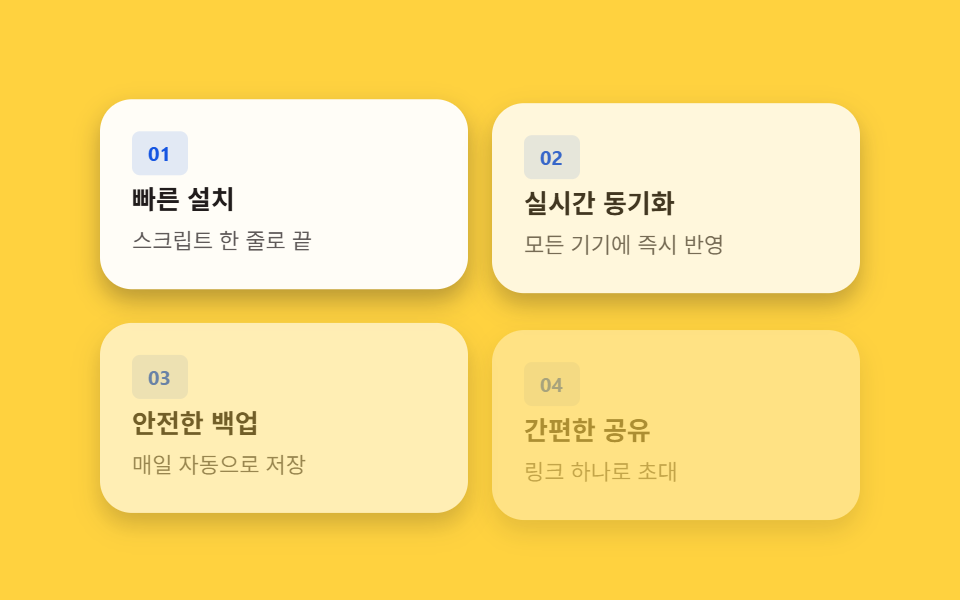
- 02 機能カードグリッド — 見える比率の値で順に現れるカード
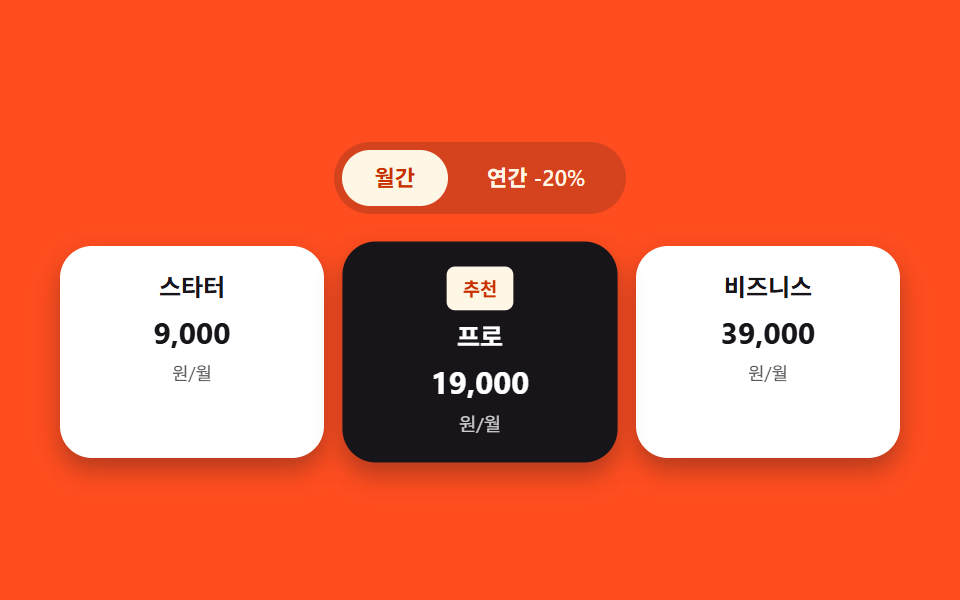
- 03 料金プランカード — おすすめだけ拡大率の値が大きく計算されるリスト
- 04 口コミカルーセル — 自動再生の値がタイマーで増えるカードの列
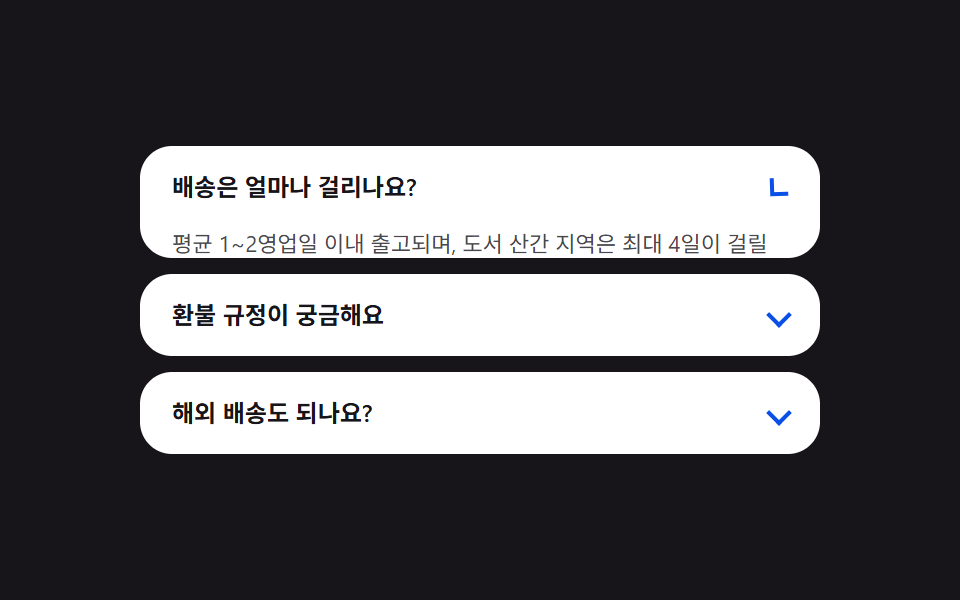
- 05 FAQアコーディオン — 回答の高さの値を内容の長さから求め直すリスト
- 06 強調バナー — 表示状態になると枠の角度の値が増え続ける帯
- 07 フッター — 下線の幅の値を0から文字幅まで求め直すリンク一覧
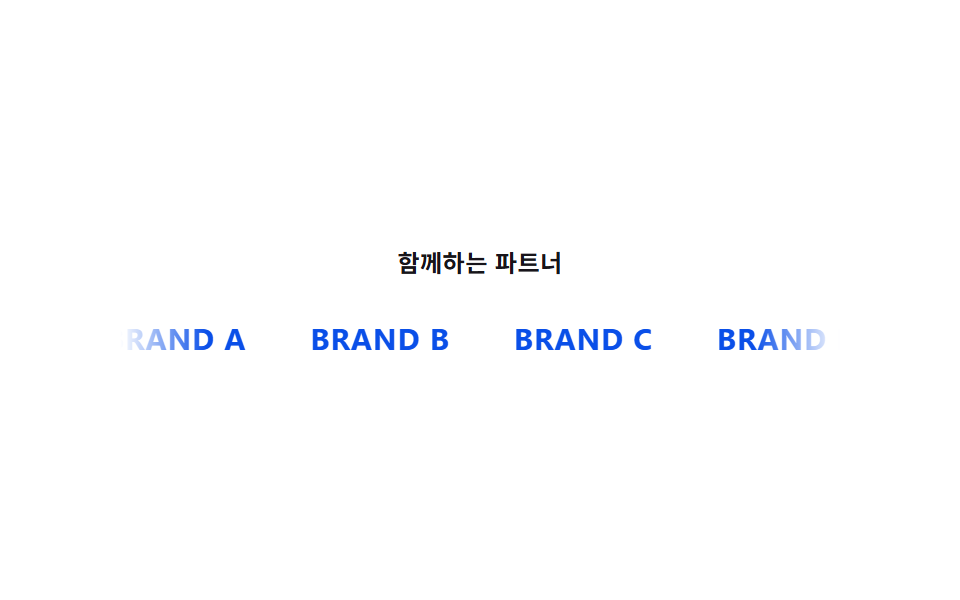
- 08 ロゴバー — 横移動の値が途切れずに増え続ける列
- 09 統計カウンター — 目標値までフレームごとに計算され上がる数字
9つのセクションに表示される価格・口コミ・数値・ロゴはすべて架空のもので、掲載されるブランド名はBRAND A〜BRAND Dのようなプレースホルダーです。実在する企業名も実在する人物の写真も、実際の価格・分析APIへの通信も一切ありません。実際の操作に反応するのは9つのうち4つだけで、03(請求周期の切り替え)と05(FAQの質問)は実際のclickに、04(口コミカルーセル)は実際のpointerenter/pointerleaveで自動再生が止まり、07(フッターのリンク)も同じ2つのポインターイベントで下線の幅を求め直します。残りの01・02・06・08・09の5つは、固定のCSSループか、ページ読み込み時に一度だけ動くrequestAnimationFrameだけで再生され、クリック・ドラッグ・ポインターのリスナーはどこにも付いていません。
ランディングセクションの解剖 — 9つのセクションが計算するもの
9つのセクションは、スクロール位置・状態の切り替わり・経過時間のいずれかをブラウザが動かせる数値に変える3つの方法に分かれます。この計算層を省くと、スマホ ファーストビュー デザインであっても何にも反応しないスライドショーのように見えてしまいます。
なぜ3つのセクションは状態の切り替わりを待たずに値を増やし続けるのか
01・06・08は、スクロールや時間の入力だけで動き続ける値を計算し直します。01の--svカスタムプロパティは疑似的なスクロール比率を追いかけ、背景レイヤーと見出しレイヤーで異なる係数を掛けて位置を求め直し、06の--angleカスタムプロパティはバナーが視界に入ると増え続けて円錐グラデーションの枠が回転しているように見せ、08は横方向のオフセットの値を増やし続けて複製したロゴの列を途切れなくループさせます。
なぜ3つのセクションは真偽の値や順番の値が切り替わるまで計算をしないのか
02・03・05は何かが切り替わるまでじっとしています。02はカードの見える比率の値が基準を超えるまで待ってから、そのカードの順番の値に固定の間隔を掛けて出現時点を求め直し、03は請求周期の状態が切り替わるまで待ってから2つの事前計算済みの価格をクロスフェードしつつ強調カードの拡大率の値を求め直し、05は質問の開閉状態の値が切り替わるまで待ってから回答の実際の高さを求め直します。
なぜ3つのセクションは測定した値をほぼそのまま使うのか
04・07・09は、状態フラグではなく測定や経過時間から数値を取り出します。04はタイマーで自動再生の値を増やしてカルーセルの位置を補間し、実際のポインターが乗ると増加を止め、07はホバーしたリンクの実際の描画幅をgetBoundingClientRect()で測定してから下線をその値まで伸ばし、09は経過時間の比率を毎フレームイージング関数にかけてカウンターの表示数字を目標値まで求め直します。
セクション別コード
01ヒーロー — スクロール値に応じて背景と文字が異なる比率でずれる導入部
ページのスクロール値に応じて背景画像と見出し文字が異なる比率で位置を変え、二つの層のずれから奥行きが生まれます。

<main class="stage" id="stage">
  <div class="hero__bg" aria-hidden="true"></div>
  <div class="hero__head">
    <p class="hero__eyebrow">新製品</p>
    <h1 class="hero__title">軽量なランディングページ</h1>
    <p class="hero__sub">1つのスクロール値で2つの層が異なる比率で動きます。</p>
    <button class="hero__cta" type="button">今すぐ始める</button>
  </div>
</main>
@use "../../../../site/static/demo-tokens" as *;
$duration: $dur-loop;
$easing: $ease-spring;
$color: $subject-cream;
@include stage($stage-ink);
@property --sv {
  syntax: "<number>";
  inherits: true;
  initial-value: 0;
}

.stage {
  --sv: 0;
  position: relative;
  overflow: hidden;
  animation: scroll-sim $duration $easing infinite;
}

.hero__bg {
  position: absolute;
  inset: -10% -10% -30% -10%;
  border-radius: $r-card;
  background: linear-gradient(180deg, rgba($color, .28), rgba($color, 0));
  transform: translateY(calc(var(--sv) * -18px));
}
.hero__head {
position: relative;
z-index: 1;
display: flex;
flex-direction: column;
align-items: flex-start;
gap: $sp-2;
padding: $sp-8 $sp-6;
transform: translateY(calc(var(--sv) * -42px));
}
.hero__eyebrow {
margin: 0;
padding: $sp-1 $sp-3;
border-radius: $r-pill;
background: rgba($color, .16);
color: $color;
font-weight: 600;
font-size: 11px;
line-height: 1.6;
}
.hero__title {
margin: 0;
color: $stage-paper;
font-weight: 700;
font-size: clamp(20px, 6vmin, 28px);
line-height: 1.25;
}
.hero__sub {
margin: 0;
max-width: 34ch;
color: rgba($stage-paper, .78);
font-weight: 400;
font-size: 13px;
line-height: 1.55;
}
.hero__cta {
margin-top: $sp-2;
border: 0;
border-radius: $r-pill;
padding: $sp-3 $sp-6;
font-family: inherit;
font-weight: 600;
font-size: 13px;
line-height: 1;
color: $stage-ink;
background: $color;
cursor: pointer;
}
@keyframes scroll-sim {
0%, 8% { --sv: 0; }
50% { --sv: 1; }
92%, 100% { --sv: 0; }
}
@media (max-width: 340px) {
.hero__head { padding: $sp-3 $sp-4; gap: $sp-1; }
.hero__sub { max-width: 26ch; }
.hero__cta { margin-top: 0; padding: $sp-2 $sp-4; }
}
@media (prefers-reduced-motion: reduce) {
.stage { animation: none; }
.hero__bg, .hero__head { transform: none; }
}html, body {
margin: 0;
overflow: hidden;
}
.stage {
box-sizing: border-box;
min-height: 100vh;
display: grid;
place-items: center;
margin: 0;
background: #17141a;
font-family: -apple-system, "Segoe UI", "Noto Sans KR", sans-serif;
padding: clamp(8px, 4vw, 24px);
}
@property --sv {
syntax: "<number>";
inherits: true;
initial-value: 0;
}
.stage {
--sv: 0;
position: relative;
overflow: hidden;
animation: scroll-sim 2s cubic-bezier(0.2, 0.8, 0.2, 1) infinite;
}
.hero__bg {
position: absolute;
inset: -10% -10% -30% -10%;
border-radius: 16px;
background: linear-gradient(180deg, rgba(255, 247, 230, 0.28), rgba(255, 247, 230, 0));
transform: translateY(calc(var(--sv) * -18px));
}
.hero__head {
position: relative;
z-index: 1;
display: flex;
flex-direction: column;
align-items: flex-start;
gap: 8px;
padding: 32px 24px;
transform: translateY(calc(var(--sv) * -42px));
}
.hero__eyebrow {
margin: 0;
padding: 4px 12px;
border-radius: 999px;
background: rgba(255, 247, 230, 0.16);
color: #fff7e6;
font-weight: 600;
font-size: 11px;
line-height: 1.6;
}
.hero__title {
margin: 0;
color: #ffffff;
font-weight: 700;
font-size: clamp(20px, 6vmin, 28px);
line-height: 1.25;
}
.hero__sub {
margin: 0;
max-width: 34ch;
color: rgba(255, 255, 255, 0.78);
font-weight: 400;
font-size: 13px;
line-height: 1.55;
}
.hero__cta {
margin-top: 8px;
border: 0;
border-radius: 999px;
padding: 12px 24px;
font-family: inherit;
font-weight: 600;
font-size: 13px;
line-height: 1;
color: #17141a;
background: #fff7e6;
cursor: pointer;
}
@keyframes scroll-sim {
0%, 8% {
--sv: 0;
}
50% {
--sv: 1;
}
92%, 100% {
--sv: 0;
}
}
@media (max-width: 340px) {
.hero__head {
padding: 12px 16px;
gap: 4px;
}
.hero__sub {
max-width: 26ch;
}
.hero__cta {
margin-top: 0;
padding: 8px 16px;
}
}
@media (prefers-reduced-motion: reduce) {
.stage {
animation: none;
}
.hero__bg, .hero__head {
transform: none;
}
}import styles from "./Hero.module.scss";
// 스크롤 값 하나(--sv)를 두 층(배경·헤드)이 서로 다른 비율(-18px, -42px)로 받아 시차 효과를 만든다.
// 계산 겹: 스크롤 값(--sv) -> 두 층 각각의 translateY 비율 보간. 리스너 없음(자동 재생).
export default function Hero() {
return (
<main className={styles.stage}>
<div className={styles.hero__bg} aria-hidden="true" />
<div className={styles.hero__head}>
<p className={styles.hero__eyebrow}>신제품</p>
<h1 className={styles.hero__title}>가벼운 랜딩 페이지</h1>
<p className={styles.hero__sub}>스크롤 값 하나로 두 층이 서로 다른 비율로 움직입니다.</p>
<button className={styles.hero__cta} type="button">
지금 시작하기
</button>
</div>
</main>
);
}01 · ヒーロー — スクロール値に応じて背景と文字が異なる比率でずれる導入部 — 計測 累積面積 17.827% · 動いたフレーム 20/23GODRICH オリジナル · SCSS と React は zip に同梱 · パスワードを見る
数値が示すこと
23フレームの計測のうち20フレームでヒーローが変化し、累積面積は17.827%、平均強度は98.9です。背景レイヤーと見出しレイヤーの両方がループの毎段階で動くためです。--svは<number>型のカスタムプロパティなのでcalc()で直接倍率をかけられ、背景は1あたり-18px、見出しはより大きい-42pxを掛けるため、2つのレイヤーが1枚の平面ではなく別々の奥行きとして見えます。
@property --sv {
syntax: "<number>";
inherits: true;
initial-value: 0;
}
.stage {
--sv: 0;
position: relative;
overflow: hidden;
animation: scroll-sim $duration $easing infinite;
}
.hero__bg {
position: absolute;
inset: -10% -10% -30% -10%;
border-radius: $r-card;
background: linear-gradient(180deg, rgba($color, .28), rgba($color, 0));
transform: translateY(calc(var(--sv) * -18px));
}
02機能カードグリッド — 見える比率の値で順に現れるカード
各カードが画面に見える比率の値が基準を超えた状態になると、カードの順番の値に間隔を掛けた時点から順に現れます。
<main class="stage" id="stage">
  <div class="grid is-demo">
    <article class="card" style="--i:0">
      <p class="card__badge">01</p>
      <h3 class="card__title">かんたんインストール</h3>
      <p class="card__desc">スクリプト1行で完了</p>
    </article>
    <article class="card" style="--i:1">
      <p class="card__badge">02</p>
      <h3 class="card__title">リアルタイム同期</h3>
      <p class="card__desc">すべての端末に即時反映</p>
    </article>
    <article class="card" style="--i:2">
      <p class="card__badge">03</p>
      <h3 class="card__title">安全なバックアップ</h3>
      <p class="card__desc">毎日自動で保存</p>
    </article>
    <article class="card" style="--i:3">
      <p class="card__badge">04</p>
      <h3 class="card__title">かんたん共有</h3>
      <p class="card__desc">リンク1つで招待</p>
    </article>
  </div>
</main>
@use "../../../../site/static/demo-tokens" as *;
// 계산 상수: 카드 순서 값(--i) × 간격 상수(스태거 간격)
$stagger-step: 120ms;
$duration: $dur-enter;
$easing: $ease-out;
$color: $subject-blue-deep;
@include stage($stage-yellow);
.grid {
display: grid;
grid-template-columns: repeat(2, 1fr);
gap: $sp-3;
width: 100%;
max-width: 380px;
}
.card {
box-sizing: border-box;
display: flex;
flex-direction: column;
gap: $sp-1;
padding: $sp-4;
border-radius: $r-card;
background: $stage-paper;
box-shadow: $shadow-press;
opacity: 0;
transform: translateY(14px);
}
.card__badge {
margin: 0;
align-self: flex-start;
padding: $sp-1 $sp-2;
border-radius: $r-xs;
background: rgba($color, .12);
color: $color;
font-weight: 700;
font-size: 10px;
line-height: 1.4;
}
.card__title {
margin: 0;
color: $subject-ink;
font-weight: 600;
font-size: 13px;
line-height: 1.3;
}
.card__desc {
margin: 0;
color: rgba($subject-ink, .72);
font-weight: 400;
font-size: 11px;
line-height: 1.5;
}
.is-demo .card {
  animation: card-in $duration $easing both;
  animation-delay: calc(var(--i) * #{$stagger-step});
}

@keyframes card-in {
  0% { opacity: 0; transform: translateY(14px); }
  100% { opacity: 1; transform: translateY(0); }
}
@media (max-width: 340px) {
.grid { gap: $sp-2; max-width: 280px; }
.card { padding: $sp-2 $sp-3; gap: 0; }
.card__title { font-size: 12px; }
.card__desc { font-size: 10px; }
}
@media (prefers-reduced-motion: reduce) {
.is-demo .card { animation: none; opacity: 1; transform: none; }
}html, body {
margin: 0;
overflow: hidden;
}
.stage {
box-sizing: border-box;
min-height: 100vh;
display: grid;
place-items: center;
margin: 0;
background: #ffd23f;
font-family: -apple-system, "Segoe UI", "Noto Sans KR", sans-serif;
padding: clamp(8px, 4vw, 24px);
}
.grid {
display: grid;
grid-template-columns: repeat(2, 1fr);
gap: 12px;
width: 100%;
max-width: 380px;
}
.card {
box-sizing: border-box;
display: flex;
flex-direction: column;
gap: 4px;
padding: 16px;
border-radius: 16px;
background: #ffffff;
box-shadow: 0 6px 12px rgba(23, 20, 26, 0.32);
opacity: 0;
transform: translateY(14px);
}
.card__badge {
margin: 0;
align-self: flex-start;
padding: 4px 8px;
border-radius: 4px;
background: rgba(10, 79, 232, 0.12);
color: #0a4fe8;
font-weight: 700;
font-size: 10px;
line-height: 1.4;
}
.card__title {
margin: 0;
color: #17141a;
font-weight: 600;
font-size: 13px;
line-height: 1.3;
}
.card__desc {
margin: 0;
color: rgba(23, 20, 26, 0.72);
font-weight: 400;
font-size: 11px;
line-height: 1.5;
}
.is-demo .card {
animation: card-in 600ms ease-out both;
animation-delay: calc(var(--i) * 120ms);
}
@keyframes card-in {
0% {
opacity: 0;
transform: translateY(14px);
}
100% {
opacity: 1;
transform: translateY(0);
}
}
@media (max-width: 340px) {
.grid {
gap: 8px;
max-width: 280px;
}
.card {
padding: 8px 12px;
gap: 0;
}
.card__title {
font-size: 12px;
}
.card__desc {
font-size: 10px;
}
}
@media (prefers-reduced-motion: reduce) {
.is-demo .card {
animation: none;
opacity: 1;
transform: none;
}
}import type { CSSProperties } from "react";
import styles from "./FeatureGrid.module.scss";
// 카드 순서 값(--i)에 간격 상수(스태거 간격)를 곱한 값을 animation-delay 로 써서 카드가 순서대로 뜬다.
// 계산 겹: 카드 순서 값(--i) × 간격 상수 -> animation-delay. 리스너 없음(자동 재생).
type Vars = CSSProperties & { "--i"?: number };
const FEATURES = [
{ badge: "01", title: "빠른 설치", desc: "스크립트 한 줄로 끝" },
{ badge: "02", title: "실시간 동기화", desc: "모든 기기에 즉시 반영" },
{ badge: "03", title: "안전한 백업", desc: "매일 자동으로 저장" },
{ badge: "04", title: "간편한 공유", desc: "링크 하나로 초대" },
];
export default function FeatureGrid() {
return (
<main className={styles.stage}>
<div className={`${styles.grid} ${styles["is-demo"]}`}>
{FEATURES.map((item, i) => (
<article
key={item.badge}
className={styles.card}
style={{ "--i": i } as Vars}
>
<p className={styles.card__badge}>{item.badge}</p>
<h3 className={styles.card__title}>{item.title}</h3>
<p className={styles.card__desc}>{item.desc}</p>
</article>
))}
</div>
</main>
);
}02 · 機能カードグリッド — 見える比率の値で順に現れるカード — 計測 累積面積 57.951% · 動いたフレーム 12/23GODRICH オリジナル · SCSS と React は zip に同梱 · パスワードを見る
数値が示すこと
23フレームの計測のうち12フレームでグリッドが変化し、累積面積は57.951%(9項目中最大)、平均強度は37.3です。グリッド全体のカードが揃って動くため、細い要素が1つだけ動く項目より面積が大きくなります。各カードはインラインの--iカスタムプロパティに自分の順番の値を持ち、animation-delay: calc(var(--i) * #{$stagger-step})がその値を1枚あたり120msの遅延に変換します。この定数は今回の1つ目のバリエーションで280msまで広げられます。
.is-demo .card {
animation: card-in $duration $easing both;
animation-delay: calc(var(--i) * #{$stagger-step});
}
@keyframes card-in {
0% { opacity: 0; transform: translateY(14px); }
100% { opacity: 1; transform: translateY(0); }
}
03料金プランカード — おすすめだけ拡大率の値が大きく計算されるリスト
おすすめ料金プランのカードは周囲より拡大率の値が大きく計算されて浮いて見え、請求周期が変わった状態になると表示金額がその値まで再計算されます。
<main class="stage" id="stage">
  <div class="pricing is-demo" id="pricing">
    <div class="toggle" role="group" aria-label="支払い周期">
      <button class="toggle__btn toggle__btn--m is-active" id="btn-monthly" type="button" aria-pressed="true">月払い</button>
      <button class="toggle__btn toggle__btn--y" id="btn-yearly" type="button" aria-pressed="false">年払い -20%</button>
    </div>
    <div class="plans">
      <article class="plan">
        <p class="plan__name">スターター</p>
        <div class="plan__price">
          <span class="plan__amount plan__amount--m">9,000</span>
          <span class="plan__amount plan__amount--y">7,200</span>
        </div>
        <div class="plan__unit-row">
          <span class="plan__unit plan__unit--m">円/月</span>
          <span class="plan__unit plan__unit--y">円/月(年払い)</span>
        </div>
      </article>
      <article class="plan plan--featured">
        <p class="plan__badge">おすすめ</p>
        <p class="plan__name">プロ</p>
        <div class="plan__price">
          <span class="plan__amount plan__amount--m">19,000</span>
          <span class="plan__amount plan__amount--y">15,200</span>
        </div>
        <div class="plan__unit-row">
          <span class="plan__unit plan__unit--m">円/月</span>
          <span class="plan__unit plan__unit--y">円/月(年払い)</span>
        </div>
      </article>
      <article class="plan">
        <p class="plan__name">ビジネス</p>
        <div class="plan__price">
          <span class="plan__amount plan__amount--m">39,000</span>
          <span class="plan__amount plan__amount--y">31,200</span>
        </div>
        <div class="plan__unit-row">
          <span class="plan__unit plan__unit--m">円/月</span>
          <span class="plan__unit plan__unit--y">円/月(年払い)</span>
        </div>
      </article>
    </div>
  </div>
</main>@use "../../../../site/static/demo-tokens" as *;
// 계산 상수: 추천 카드와 주변 카드의 scale 값 차이
$featured-scale: 1.08;
$duration: $dur-loop;
$easing: steps(1, end);
$color: $subject-cream;
@include stage($stage-orange);
.pricing {
display: flex;
flex-direction: column;
align-items: center;
gap: $sp-4;
width: 100%;
}
.toggle {
display: inline-flex;
gap: $sp-1;
padding: $sp-1;
border-radius: $r-pill;
background: rgba($subject-ink, .18);
}
.toggle__btn {
border: 0;
border-radius: $r-pill;
padding: $sp-1 $sp-4;
font-family: inherit;
font-weight: 600;
font-size: 11px;
line-height: 1.8;
cursor: pointer;
transition: background $dur-base $ease-out, color $dur-base $ease-out;
}
.toggle__btn.is-active {
background: $color;
color: $subject-orange-deep;
}
.toggle__btn:not(.is-active) {
background: transparent;
color: $color;
}
.plans {
display: grid;
grid-template-columns: repeat(3, 1fr);
gap: $sp-3;
width: 100%;
max-width: 420px;
}
.plan {
position: relative;
box-sizing: border-box;
display: flex;
flex-direction: column;
align-items: center;
gap: $sp-1;
padding: $sp-3 $sp-2;
border-radius: $r-card;
background: $stage-paper;
box-shadow: $shadow-press;
}
.plan--featured {
z-index: 1;
background: $subject-ink;
transform: scale(#{$featured-scale});
}
.is-demo .plan--featured {
animation: featured-scale-in $dur-enter $ease-spring both;
}
@keyframes featured-scale-in {
0% { transform: scale(1); }
100% { transform: scale(#{$featured-scale}); }
}
.plan__badge {
margin: 0;
padding: $sp-1 $sp-2;
border-radius: $r-xs;
background: $color;
color: $subject-orange-deep;
font-weight: 700;
font-size: 9px;
line-height: 1.4;
}
.plan__name {
margin: 0;
color: $subject-ink;
font-weight: 600;
font-size: 12px;
line-height: 1.4;
}
.plan--featured .plan__name { color: $stage-paper; }
.plan__price {
position: relative;
margin: 0;
min-height: 20px;
width: 100%;
text-align: center;
}
.plan__amount {
position: absolute;
inset: 0;
color: $subject-ink;
font-weight: 700;
font-size: 15px;
line-height: 1.4;
white-space: nowrap;
opacity: 0;
transition: opacity $dur-base $ease-out;
}
.plan--featured .plan__amount { color: $stage-paper; }
.plan__amount--m { opacity: 1; }
.plan__unit-row {
position: relative;
width: 100%;
height: 13px;
text-align: center;
}
.plan__unit {
position: absolute;
inset: 0;
color: rgba($subject-ink, .72);
font-weight: 400;
font-size: 9px;
line-height: 1.4;
white-space: nowrap;
opacity: 0;
transition: opacity $dur-base $ease-out;
}
.plan--featured .plan__unit { color: rgba($stage-paper, .78); }
.plan__unit--m { opacity: 1; }
.pricing.is-yearly .plan__amount--m,
.pricing.is-yearly .plan__unit--m { opacity: 0; }
.pricing.is-yearly .plan__amount--y,
.pricing.is-yearly .plan__unit--y { opacity: 1; }
.is-demo .plans > .plan:nth-child(1) .plan__amount--m,
.is-demo .plans > .plan:nth-child(1) .plan__unit--m {
animation: fade-m-1 $duration $easing infinite;
}
.is-demo .plans > .plan:nth-child(1) .plan__amount--y,
.is-demo .plans > .plan:nth-child(1) .plan__unit--y {
animation: fade-y-1 $duration $easing infinite;
}
.is-demo .plans > .plan:nth-child(2) .plan__amount--m,
.is-demo .plans > .plan:nth-child(2) .plan__unit--m {
animation: fade-m-2 $duration $easing infinite;
}
.is-demo .plans > .plan:nth-child(2) .plan__amount--y,
.is-demo .plans > .plan:nth-child(2) .plan__unit--y {
animation: fade-y-2 $duration $easing infinite;
}
.is-demo .plans > .plan:nth-child(3) .plan__amount--m,
.is-demo .plans > .plan:nth-child(3) .plan__unit--m {
animation: fade-m-3 $duration $easing infinite;
}
.is-demo .plans > .plan:nth-child(3) .plan__amount--y,
.is-demo .plans > .plan:nth-child(3) .plan__unit--y {
animation: fade-y-3 $duration $easing infinite;
}
@keyframes fade-m-1 { 0%, 25% { opacity: 1; } 30%, 100% { opacity: 0; } }
@keyframes fade-y-1 { 0%, 25% { opacity: 0; } 30%, 100% { opacity: 1; } }
@keyframes fade-m-2 { 0%, 45% { opacity: 1; } 50%, 100% { opacity: 0; } }
@keyframes fade-y-2 { 0%, 45% { opacity: 0; } 50%, 100% { opacity: 1; } }
@keyframes fade-m-3 { 0%, 65% { opacity: 1; } 70%, 100% { opacity: 0; } }
@keyframes fade-y-3 { 0%, 65% { opacity: 0; } 70%, 100% { opacity: 1; } }
@media (max-width: 340px) {
.plans { gap: $sp-1; max-width: 300px; }
.plan { padding: $sp-2 $sp-1; }
.plan__amount { font-size: 12px; }
}
@media (prefers-reduced-motion: reduce) {
.is-demo .plans > .plan:nth-child(1) .plan__amount--m,
.is-demo .plans > .plan:nth-child(1) .plan__amount--y,
.is-demo .plans > .plan:nth-child(1) .plan__unit--m,
.is-demo .plans > .plan:nth-child(1) .plan__unit--y,
.is-demo .plans > .plan:nth-child(2) .plan__amount--m,
.is-demo .plans > .plan:nth-child(2) .plan__amount--y,
.is-demo .plans > .plan:nth-child(2) .plan__unit--m,
.is-demo .plans > .plan:nth-child(2) .plan__unit--y,
.is-demo .plans > .plan:nth-child(3) .plan__amount--m,
.is-demo .plans > .plan:nth-child(3) .plan__amount--y,
.is-demo .plans > .plan:nth-child(3) .plan__unit--m,
.is-demo .plans > .plan:nth-child(3) .plan__unit--y,
.is-demo .plan--featured {
animation: none;
}
}html, body {
margin: 0;
overflow: hidden;
}
.stage {
box-sizing: border-box;
min-height: 100vh;
display: grid;
place-items: center;
margin: 0;
background: #ff4d1f;
font-family: -apple-system, "Segoe UI", "Noto Sans KR", sans-serif;
padding: clamp(8px, 4vw, 24px);
}
.pricing {
display: flex;
flex-direction: column;
align-items: center;
gap: 16px;
width: 100%;
}
.toggle {
display: inline-flex;
gap: 4px;
padding: 4px;
border-radius: 999px;
background: rgba(23, 20, 26, 0.18);
}
.toggle__btn {
border: 0;
border-radius: 999px;
padding: 4px 16px;
font-family: inherit;
font-weight: 600;
font-size: 11px;
line-height: 1.8;
cursor: pointer;
transition: background 300ms ease-out, color 300ms ease-out;
}
.toggle__btn.is-active {
background: #fff7e6;
color: #c93000;
}
.toggle__btn:not(.is-active) {
background: transparent;
color: #fff7e6;
}
.plans {
display: grid;
grid-template-columns: repeat(3, 1fr);
gap: 12px;
width: 100%;
max-width: 420px;
}
.plan {
position: relative;
box-sizing: border-box;
display: flex;
flex-direction: column;
align-items: center;
gap: 4px;
padding: 12px 8px;
border-radius: 16px;
background: #ffffff;
box-shadow: 0 6px 12px rgba(23, 20, 26, 0.32);
}
.plan--featured {
z-index: 1;
background: #17141a;
transform: scale(1.08);
}
.is-demo .plan--featured {
animation: featured-scale-in 600ms cubic-bezier(0.2, 0.8, 0.2, 1) both;
}
@keyframes featured-scale-in {
0% {
transform: scale(1);
}
100% {
transform: scale(1.08);
}
}
.plan__badge {
margin: 0;
padding: 4px 8px;
border-radius: 4px;
background: #fff7e6;
color: #c93000;
font-weight: 700;
font-size: 9px;
line-height: 1.4;
}
.plan__name {
margin: 0;
color: #17141a;
font-weight: 600;
font-size: 12px;
line-height: 1.4;
}
.plan--featured .plan__name {
color: #ffffff;
}
.plan__price {
position: relative;
margin: 0;
min-height: 20px;
width: 100%;
text-align: center;
}
.plan__amount {
position: absolute;
inset: 0;
color: #17141a;
font-weight: 700;
font-size: 15px;
line-height: 1.4;
white-space: nowrap;
opacity: 0;
transition: opacity 300ms ease-out;
}
.plan--featured .plan__amount {
color: #ffffff;
}
.plan__amount--m {
opacity: 1;
}
.plan__unit-row {
position: relative;
width: 100%;
height: 13px;
text-align: center;
}
.plan__unit {
position: absolute;
inset: 0;
color: rgba(23, 20, 26, 0.72);
font-weight: 400;
font-size: 9px;
line-height: 1.4;
white-space: nowrap;
opacity: 0;
transition: opacity 300ms ease-out;
}
.plan--featured .plan__unit {
color: rgba(255, 255, 255, 0.78);
}
.plan__unit--m {
opacity: 1;
}
.pricing.is-yearly .plan__amount--m,
.pricing.is-yearly .plan__unit--m {
opacity: 0;
}
.pricing.is-yearly .plan__amount--y,
.pricing.is-yearly .plan__unit--y {
opacity: 1;
}
.is-demo .plans > .plan:nth-child(1) .plan__amount--m,
.is-demo .plans > .plan:nth-child(1) .plan__unit--m {
animation: fade-m-1 2s steps(1, end) infinite;
}
.is-demo .plans > .plan:nth-child(1) .plan__amount--y,
.is-demo .plans > .plan:nth-child(1) .plan__unit--y {
animation: fade-y-1 2s steps(1, end) infinite;
}
.is-demo .plans > .plan:nth-child(2) .plan__amount--m,
.is-demo .plans > .plan:nth-child(2) .plan__unit--m {
animation: fade-m-2 2s steps(1, end) infinite;
}
.is-demo .plans > .plan:nth-child(2) .plan__amount--y,
.is-demo .plans > .plan:nth-child(2) .plan__unit--y {
animation: fade-y-2 2s steps(1, end) infinite;
}
.is-demo .plans > .plan:nth-child(3) .plan__amount--m,
.is-demo .plans > .plan:nth-child(3) .plan__unit--m {
animation: fade-m-3 2s steps(1, end) infinite;
}
.is-demo .plans > .plan:nth-child(3) .plan__amount--y,
.is-demo .plans > .plan:nth-child(3) .plan__unit--y {
animation: fade-y-3 2s steps(1, end) infinite;
}
@keyframes fade-m-1 {
0%, 25% {
opacity: 1;
}
30%, 100% {
opacity: 0;
}
}
@keyframes fade-y-1 {
0%, 25% {
opacity: 0;
}
30%, 100% {
opacity: 1;
}
}
@keyframes fade-m-2 {
0%, 45% {
opacity: 1;
}
50%, 100% {
opacity: 0;
}
}
@keyframes fade-y-2 {
0%, 45% {
opacity: 0;
}
50%, 100% {
opacity: 1;
}
}
@keyframes fade-m-3 {
0%, 65% {
opacity: 1;
}
70%, 100% {
opacity: 0;
}
}
@keyframes fade-y-3 {
0%, 65% {
opacity: 0;
}
70%, 100% {
opacity: 1;
}
}
@media (max-width: 340px) {
.plans {
gap: 4px;
max-width: 300px;
}
.plan {
padding: 8px 4px;
}
.plan__amount {
font-size: 12px;
}
}
@media (prefers-reduced-motion: reduce) {
.is-demo .plans > .plan:nth-child(1) .plan__amount--m,
.is-demo .plans > .plan:nth-child(1) .plan__amount--y,
.is-demo .plans > .plan:nth-child(1) .plan__unit--m,
.is-demo .plans > .plan:nth-child(1) .plan__unit--y,
.is-demo .plans > .plan:nth-child(2) .plan__amount--m,
.is-demo .plans > .plan:nth-child(2) .plan__amount--y,
.is-demo .plans > .plan:nth-child(2) .plan__unit--m,
.is-demo .plans > .plan:nth-child(2) .plan__unit--y,
.is-demo .plans > .plan:nth-child(3) .plan__amount--m,
.is-demo .plans > .plan:nth-child(3) .plan__amount--y,
.is-demo .plans > .plan:nth-child(3) .plan__unit--m,
.is-demo .plans > .plan:nth-child(3) .plan__unit--y,
.is-demo .plan--featured {
animation: none;
}
}// 支払い周期 버튼을 누르면 요금제 상태가 연간 또는 月払い 상태가 되고, 그 상태에 따라 화면에 보이는 금액 값을 다시 계산해 표시한다.
// 계산 겹: 支払い周期 상태 -> 표시 금액 값 재계산. 실사용 클릭 리스너 있음.
(function () {
var root = document.getElementById('pricing');
var mBtn = document.getElementById('btn-monthly');
var yBtn = document.getElementById('btn-yearly');
if (!root || !mBtn || !yBtn) return;
function setYearly(yearly) {
root.classList.remove('is-demo');
root.classList.toggle('is-yearly', yearly);
mBtn.classList.toggle('is-active', !yearly);
yBtn.classList.toggle('is-active', yearly);
mBtn.setAttribute('aria-pressed', String(!yearly));
yBtn.setAttribute('aria-pressed', String(yearly));
}
mBtn.addEventListener('click', function () { setYearly(false); });
yBtn.addEventListener('click', function () { setYearly(true); });
})();import { useEffect, useRef } from "react";
import styles from "./PricingCards.module.scss";
// 결제 주기 버튼을 누르면 요금제 상태가 연간 또는 월간 상태가 되고, 그 상태에 따라 화면에 보이는 금액 값을 다시 계산해 표시한다.
// 계산 겹: 결제 주기 상태 -> 표시 금액 값 재계산. 실사용 클릭 리스너 있음.
const PLANS = [
{ name: "스타터", amountM: "9,000", amountY: "7,200", featured: false },
{ name: "프로", amountM: "19,000", amountY: "15,200", featured: true },
{ name: "비즈니스", amountM: "39,000", amountY: "31,200", featured: false },
];
export default function PricingCards() {
const rootRef = useRef<HTMLDivElement>(null);
const mBtnRef = useRef<HTMLButtonElement>(null);
const yBtnRef = useRef<HTMLButtonElement>(null);
useEffect(() => {
const root = rootRef.current;
const mBtn = mBtnRef.current;
const yBtn = yBtnRef.current;
if (!root || !mBtn || !yBtn) return;
function setYearly(yearly: boolean) {
root!.classList.remove(styles["is-demo"]);
root!.classList.toggle(styles["is-yearly"], yearly);
mBtn!.classList.toggle(styles["is-active"], !yearly);
yBtn!.classList.toggle(styles["is-active"], yearly);
mBtn!.setAttribute("aria-pressed", String(!yearly));
yBtn!.setAttribute("aria-pressed", String(yearly));
}
function onMonthly() { setYearly(false); }
function onYearly() { setYearly(true); }
mBtn.addEventListener("click", onMonthly);
yBtn.addEventListener("click", onYearly);
return () => {
mBtn.removeEventListener("click", onMonthly);
yBtn.removeEventListener("click", onYearly);
};
}, []);
return (
<main className={styles.stage}>
<div ref={rootRef} className={`${styles.pricing} ${styles["is-demo"]}`}>
<div className={styles.toggle} role="group" aria-label="결제 주기">
<button
ref={mBtnRef}
className={`${styles.toggle__btn} ${styles["toggle__btn--m"]} ${styles["is-active"]}`}
type="button"
aria-pressed="true"
>
월간
</button>
<button
ref={yBtnRef}
className={`${styles.toggle__btn} ${styles["toggle__btn--y"]}`}
type="button"
aria-pressed="false"
>
연간 -20%
</button>
</div>
<div className={styles.plans}>
{PLANS.map((plan) => (
<article
key={plan.name}
className={plan.featured ? `${styles.plan} ${styles["plan--featured"]}` : styles.plan}
>
{plan.featured && <p className={styles.plan__badge}>추천</p>}
<p className={styles.plan__name}>{plan.name}</p>
<div className={styles.plan__price}>
<span className={`${styles.plan__amount} ${styles["plan__amount--m"]}`}>{plan.amountM}</span>
<span className={`${styles.plan__amount} ${styles["plan__amount--y"]}`}>{plan.amountY}</span>
</div>
<div className={styles["plan__unit-row"]}>
<span className={`${styles.plan__unit} ${styles["plan__unit--m"]}`}>원/월</span>
<span className={`${styles.plan__unit} ${styles["plan__unit--y"]}`}>원/월(연 결제)</span>
</div>
</article>
))}
</div>
</div>
</main>
);
}03 · 料金プランカード — おすすめだけ拡大率の値が大きく計算されるリスト — 計測 累積面積 5.337% · 動いたフレーム 9/23GODRICH オリジナル · SCSS と React は zip に同梱 · パスワードを見る
数値が示すこと
23フレームの計測のうち9フレームで料金プランのリストが変化し、累積面積は5.337%、平均強度は56.8です。動くのは強調カードの拡大率の値とクロスフェードする価格のペアだけだからです。自動再生ではなく実際のclickリスナーが付いた請求周期ボタンを押すとis-yearlyクラスが切り替わり、表示する価格の値と強調カードの拡大率の値が同時に求め直されます。この拡大率は今回のzipでは1.08を採用しており、1.16はバリエーションの値です。
// 請求周期のボタンを押すと料金プランの状態が年額または月額になり、その状態に応じて画面に表示する金額の値を再計算する。
// 計算レイヤー: 請求周期の状態 -> 表示金額の値を再計算。実際のクリックリスナーあり。
(function () {
  var root = document.getElementById('pricing');
  var mBtn = document.getElementById('btn-monthly');
  var yBtn = document.getElementById('btn-yearly');
  if (!root || !mBtn || !yBtn) return;

  function setYearly(yearly) {
    root.classList.remove('is-demo');
    root.classList.toggle('is-yearly', yearly);
    mBtn.classList.toggle('is-active', !yearly);
    yBtn.classList.toggle('is-active', yearly);
    mBtn.setAttribute('aria-pressed', String(!yearly));
    yBtn.setAttribute('aria-pressed', String(yearly));
  }

  mBtn.addEventListener('click', function () { setYearly(false); });
  yBtn.addEventListener('click', function () { setYearly(true); });
})();
04口コミカルーセル — 自動再生の値がタイマーで増えるカードの列
口コミカードは自動再生の値が一定時間ごとに増え、位置が次のカードまで補間されて移り、ポインターが乗った状態になるとその値の増加が止まります。

<main class="stage" id="stage">
  <div class="carousel" id="carousel">
    <div class="track is-demo" id="track">
      <blockquote class="t-card">
        <p class="t-card__quote">インストールが本当に簡単でした</p>
        <p class="t-card__name">キム・ミンジ</p>
      </blockquote>
      <blockquote class="t-card">
        <p class="t-card__quote">カスタマーサポートが早いです</p>
        <p class="t-card__name">パク・ソジュン</p>
      </blockquote>
      <blockquote class="t-card">
        <p class="t-card__quote">デザインがすっきりしています</p>
        <p class="t-card__name">イ・ハヌル</p>
      </blockquote>
    </div>
  </div>
</main>
@use "../../../../site/static/demo-tokens" as *;
$duration: $dur-loop;
$easing: $ease-spring;
$color: $subject-blue-deep;
@include stage($stage-paper);
.carousel {
width: 100%;
max-width: 320px;
overflow: hidden;
border-radius: $r-card;
}
.track {
display: flex;
width: 100%;
}
.t-card {
box-sizing: border-box;
flex: 0 0 100%;
margin: 0;
padding: $sp-6 $sp-4;
display: flex;
flex-direction: column;
align-items: center;
gap: $sp-2;
background: $color;
text-align: center;
}
.t-card__quote {
margin: 0;
color: $stage-paper;
font-weight: 600;
font-size: 13px;
line-height: 1.5;
}
.t-card__quote::before { content: "\201C"; }
.t-card__quote::after { content: "\201D"; }
.t-card__name {
margin: 0;
color: rgba($stage-paper, .78);
font-weight: 400;
font-size: 11px;
line-height: 1.5;
}
.track.is-demo {
animation: advance $duration $easing infinite;
}
@keyframes advance {
0%, 20% { transform: translateX(0); }
33%, 63% { transform: translateX(-100%); }
76%, 96% { transform: translateX(-200%); }
100% { transform: translateX(0); }
}
@media (max-width: 340px) {
.carousel { max-width: 240px; }
.t-card { padding: $sp-4 $sp-3; }
}
@media (prefers-reduced-motion: reduce) {
.track.is-demo { animation: none; transform: none; }
}@charset "UTF-8";
html, body {
margin: 0;
overflow: hidden;
}
.stage {
box-sizing: border-box;
min-height: 100vh;
display: grid;
place-items: center;
margin: 0;
background: #ffffff;
font-family: -apple-system, "Segoe UI", "Noto Sans KR", sans-serif;
padding: clamp(8px, 4vw, 24px);
}
.carousel {
width: 100%;
max-width: 320px;
overflow: hidden;
border-radius: 16px;
}
.track {
display: flex;
width: 100%;
}
.t-card {
box-sizing: border-box;
flex: 0 0 100%;
margin: 0;
padding: 24px 16px;
display: flex;
flex-direction: column;
align-items: center;
gap: 8px;
background: #0a4fe8;
text-align: center;
}
.t-card__quote {
margin: 0;
color: #ffffff;
font-weight: 600;
font-size: 13px;
line-height: 1.5;
}
.t-card__quote::before {
content: "“";
}
.t-card__quote::after {
content: "”";
}
.t-card__name {
margin: 0;
color: rgba(255, 255, 255, 0.78);
font-weight: 400;
font-size: 11px;
line-height: 1.5;
}
.track.is-demo {
animation: advance 2s cubic-bezier(0.2, 0.8, 0.2, 1) infinite;
}
@keyframes advance {
0%, 20% {
transform: translateX(0);
}
33%, 63% {
transform: translateX(-100%);
}
76%, 96% {
transform: translateX(-200%);
}
100% {
transform: translateX(0);
}
}
@media (max-width: 340px) {
.carousel {
max-width: 240px;
}
.t-card {
padding: 16px 12px;
}
}
@media (prefers-reduced-motion: reduce) {
.track.is-demo {
animation: none;
transform: none;
}
}// 자동 진행 값이 타이머로 계속 늘어나며 카드 위치를 다음 카드로 보간한다. 포인터가 올라와 있는 동안은 그 값이 늘지 않는다.
// 계산 겹: 자동 진행 값(interval) -> translateX 보간. 실사용 포인터 리스너 있음(데모 재생 자체는 고정 시퀀스).
(function () {
var carousel = document.getElementById('carousel');
var track = document.getElementById('track');
if (!carousel || !track) return;
var count = track.children.length;
var index = 0;
var timer = null;
var live = false;
function render() {
  track.style.transform = 'translateX(' + (index * -100) + '%)';
}

function advance() {
  index = (index + 1) % count;
  render();
}

function stop() {
  if (timer !== null) { window.clearInterval(timer); timer = null; }
}

function start() {
  stop();
  timer = window.setInterval(advance, 2600);
}

function goLive() {
  if (live) return;
  live = true;
  track.classList.remove('is-demo');
  render();
  start();
}
carousel.addEventListener('pointerenter', function () {
goLive();
stop();
});
carousel.addEventListener('pointerleave', function () {
if (live) start();
});
})();import { useEffect, useRef } from "react";
import styles from "./TestimonialCarousel.module.scss";
// 자동 진행 값이 타이머로 계속 늘어나며 카드 위치를 다음 카드로 보간한다. 포인터가 올라와 있는 동안은 그 값이 늘지 않는다.
// 계산 겹: 자동 진행 값(interval) -> translateX 보간. 실사용 포인터 리스너 있음(데모 재생 자체는 고정 시퀀스).
const REVIEWS = [
{ quote: "설치가 정말 쉬웠어요", name: "김민지" },
{ quote: "고객 지원이 빨라요", name: "박서준" },
{ quote: "디자인이 깔끔해요", name: "이하늘" },
];
export default function TestimonialCarousel() {
const carouselRef = useRef<HTMLDivElement>(null);
const trackRef = useRef<HTMLDivElement>(null);
useEffect(() => {
const carousel = carouselRef.current;
const track = trackRef.current;
if (!carousel || !track) return;
const count = track.children.length;
let index = 0;
let timer: number | null = null;
let live = false;
function render() {
track!.style.transform = "translateX(" + index * -100 + "%)";
}
function advance() {
index = (index + 1) % count;
render();
}
function stop() {
if (timer !== null) {
window.clearInterval(timer);
timer = null;
}
}
function start() {
stop();
timer = window.setInterval(advance, 2600);
}
function goLive() {
if (live) return;
live = true;
track!.classList.remove(styles["is-demo"]);
render();
start();
}
function onEnter() {
goLive();
stop();
}
function onLeave() {
if (live) start();
}
carousel.addEventListener("pointerenter", onEnter);
carousel.addEventListener("pointerleave", onLeave);
return () => {
stop();
carousel.removeEventListener("pointerenter", onEnter);
carousel.removeEventListener("pointerleave", onLeave);
};
}, []);
return (
<main className={styles.stage}>
<div ref={carouselRef} className={styles.carousel}>
<div ref={trackRef} className={`${styles.track} ${styles["is-demo"]}`}>
{REVIEWS.map((r) => (
<blockquote key={r.name} className={styles["t-card"]}>
<p className={styles["t-card__quote"]}>{r.quote}</p>
<p className={styles["t-card__name"]}>{r.name}</p>
</blockquote>
))}
</div>
</div>
</main>
);
}04 · 口コミカルーセル — 自動再生の値がタイマーで増えるカードの列 — 計測 累積面積 2.61% · 動いたフレーム 8/23GODRICH オリジナル · SCSS と React は zip に同梱 · パスワードを見る
数値が示すこと
23フレームの計測のうち8フレームでカルーセルが変化し、累積面積は2.61%、平均強度は124.2です。セクション全体ではなく、トラックのうちカード1枚分だけが動くためです。window.setInterval(advance, 2600)が2.6秒ごとに順番の値を増やし、render()がその値をtranslateXの位置に変換します。実際のpointerenterリスナーがこのタイマーを止めるので、誰もカードを見ていない間だけ値が増え続けます。
function render() {
track.style.transform = 'translateX(' + (index * -100) + '%)';
}
function advance() {
index = (index + 1) % count;
render();
}
function stop() {
if (timer !== null) { window.clearInterval(timer); timer = null; }
}
function start() {
stop();
timer = window.setInterval(advance, 2600);
}
function goLive() {
if (live) return;
live = true;
track.classList.remove('is-demo');
render();
start();
}
05FAQアコーディオン — 回答の高さの値を内容の長さから求め直すリスト
1つの質問を開いた状態になると、その回答の内容の高さの値を求め直してその値まで広がり、別の質問を開くと前の質問は高さの値が0まで縮んで閉じます。
<main class="stage" id="stage">
  <div class="faq is-demo" id="faq">
    <div class="faq__item" style="--h:64px">
      <button class="faq__q" type="button" aria-expanded="false" aria-controls="a1">
        <span>配送にはどれくらいかかりますか?</span>
        <span class="faq__caret" aria-hidden="true"></span>
      </button>
      <div class="faq__a" id="a1" role="region">
        <p class="faq__a-inner">平均1〜2営業日以内に発送され、離島や山間部は最大4日かかる場合があります。</p>
      </div>
    </div>
    <div class="faq__item" style="--h:52px">
      <button class="faq__q" type="button" aria-expanded="false" aria-controls="a2">
        <span>返金規定について知りたいです</span>
        <span class="faq__caret" aria-hidden="true"></span>
      </button>
      <div class="faq__a" id="a2" role="region">
        <p class="faq__a-inner">受取後7日以内の未開封であれば全額返金されます。</p>
      </div>
    </div>
    <div class="faq__item" style="--h:58px">
      <button class="faq__q" type="button" aria-expanded="false" aria-controls="a3">
        <span>海外配送も可能ですか?</span>
        <span class="faq__caret" aria-hidden="true"></span>
      </button>
      <div class="faq__a" id="a3" role="region">
        <p class="faq__a-inner">一部の国のみ対応しており、決済画面で配送可否が表示されます。</p>
      </div>
    </div>
  </div>
</main>@use "../../../../site/static/demo-tokens" as *;
$duration: $dur-base;
$easing: $ease-out;
$color: $subject-blue-deep;
@include stage($stage-ink);
@property --open {
syntax: "<number>";
inherits: true;
initial-value: 0;
}
.faq {
display: flex;
flex-direction: column;
gap: $sp-2;
width: 100%;
max-width: 340px;
}
.faq__item {
--open: 0;
border-radius: $r-card;
background: $stage-paper;
overflow: hidden;
}
.faq__q {
width: 100%;
box-sizing: border-box;
display: flex;
align-items: center;
justify-content: space-between;
gap: $sp-2;
border: 0;
background: transparent;
padding: $sp-3 $sp-4;
color: $subject-ink;
font-family: inherit;
font-weight: 600;
font-size: 12px;
line-height: 1.4;
text-align: left;
cursor: pointer;
}
.faq__caret {
flex: 0 0 auto;
width: 7px;
height: 7px;
border-right: 2px solid $color;
border-bottom: 2px solid $color;
transform: rotate(calc(45deg + var(--open) * 180deg));
transition: transform $duration $easing;
}
.faq__a {
max-height: calc(var(--open) * var(--h));
overflow: hidden;
transition: max-height $duration $easing;
}
.faq__a-inner {
margin: 0;
padding: 0 $sp-4 $sp-3;
color: rgba($subject-ink, .78);
font-weight: 400;
font-size: 11px;
line-height: 1.5;
}
.is-demo .faq__item:nth-child(1) { animation: open-1 $dur-loop $easing infinite; }
.is-demo .faq__item:nth-child(2) { animation: open-2 $dur-loop $easing infinite; }
.is-demo .faq__item:nth-child(3) { animation: open-3 $dur-loop $easing infinite; }
@keyframes open-1 {
0%, 8% { --open: 0; }
22%, 45% { --open: 1; }
58%, 100% { --open: 0; }
}
@keyframes open-2 {
0%, 45% { --open: 0; }
58%, 78% { --open: 1; }
88%, 100% { --open: 0; }
}
@keyframes open-3 {
0%, 78% { --open: 0; }
88%, 96% { --open: 1; }
100% { --open: 0; }
}
@media (max-width: 340px) {
.faq__q { padding: $sp-2 $sp-3; font-size: 11px; }
.faq__a-inner { padding: 0 $sp-3 $sp-2; }
}
@media (prefers-reduced-motion: reduce) {
.is-demo .faq__item:nth-child(1),
.is-demo .faq__item:nth-child(2),
.is-demo .faq__item:nth-child(3) {
animation: none;
}
.faq__caret, .faq__a { transition: none; }
}html, body {
margin: 0;
overflow: hidden;
}
.stage {
box-sizing: border-box;
min-height: 100vh;
display: grid;
place-items: center;
margin: 0;
background: #17141a;
font-family: -apple-system, "Segoe UI", "Noto Sans KR", sans-serif;
padding: clamp(8px, 4vw, 24px);
}
@property --open {
syntax: "<number>";
inherits: true;
initial-value: 0;
}
.faq {
display: flex;
flex-direction: column;
gap: 8px;
width: 100%;
max-width: 340px;
}
.faq__item {
--open: 0;
border-radius: 16px;
background: #ffffff;
overflow: hidden;
}
.faq__q {
width: 100%;
box-sizing: border-box;
display: flex;
align-items: center;
justify-content: space-between;
gap: 8px;
border: 0;
background: transparent;
padding: 12px 16px;
color: #17141a;
font-family: inherit;
font-weight: 600;
font-size: 12px;
line-height: 1.4;
text-align: left;
cursor: pointer;
}
.faq__caret {
flex: 0 0 auto;
width: 7px;
height: 7px;
border-right: 2px solid #0a4fe8;
border-bottom: 2px solid #0a4fe8;
transform: rotate(calc(45deg + var(--open) * 180deg));
transition: transform 300ms ease-out;
}
.faq__a {
max-height: calc(var(--open) * var(--h));
overflow: hidden;
transition: max-height 300ms ease-out;
}
.faq__a-inner {
margin: 0;
padding: 0 16px 12px;
color: rgba(23, 20, 26, 0.78);
font-weight: 400;
font-size: 11px;
line-height: 1.5;
}
.is-demo .faq__item:nth-child(1) {
animation: open-1 2s ease-out infinite;
}
.is-demo .faq__item:nth-child(2) {
animation: open-2 2s ease-out infinite;
}
.is-demo .faq__item:nth-child(3) {
animation: open-3 2s ease-out infinite;
}
@keyframes open-1 {
0%, 8% {
--open: 0;
}
22%, 45% {
--open: 1;
}
58%, 100% {
--open: 0;
}
}
@keyframes open-2 {
0%, 45% {
--open: 0;
}
58%, 78% {
--open: 1;
}
88%, 100% {
--open: 0;
}
}
@keyframes open-3 {
0%, 78% {
--open: 0;
}
88%, 96% {
--open: 1;
}
100% {
--open: 0;
}
}
@media (max-width: 340px) {
.faq__q {
padding: 8px 12px;
font-size: 11px;
}
.faq__a-inner {
padding: 0 12px 8px;
}
}
@media (prefers-reduced-motion: reduce) {
.is-demo .faq__item:nth-child(1),
.is-demo .faq__item:nth-child(2),
.is-demo .faq__item:nth-child(3) {
animation: none;
}
.faq__caret, .faq__a {
transition: none;
}
}// 질문을 열면 답변의 내용 높이 값을 scrollHeight 로 다시 구해 그 값까지 펼치고, 다른 질문을 열면 이전 답변은 0까지 줄며 접힌다.
// 계산 겹: 클릭 상태 -> scrollHeight 값 -> max-height 보간. 실사용 클릭 리스너 있음(데모 재생 자체는 고정 시퀀스).
(function () {
var faq = document.getElementById('faq');
if (!faq) return;
var items = faq.querySelectorAll('.faq__item');
function closeItem(item) {
var q = item.querySelector('.faq__q');
var a = item.querySelector('.faq__a');
if (!q || !a) return;
q.setAttribute('aria-expanded', 'false');
a.style.maxHeight = '0px';
}
function openItem(item) {
  var q = item.querySelector('.faq__q');
  var a = item.querySelector('.faq__a');
  if (!q || !a) return;
  q.setAttribute('aria-expanded', 'true');
  a.style.maxHeight = a.scrollHeight + 'px';
}

items.forEach(function (item) {
  var q = item.querySelector('.faq__q');
  if (!q) return;
  q.addEventListener('click', function () {
    faq.classList.remove('is-demo');
    var wasOpen = q.getAttribute('aria-expanded') === 'true';
    items.forEach(closeItem);
    if (!wasOpen) openItem(item);
  });
});
})();import { useEffect, useRef } from "react";
import type { CSSProperties } from "react";
import styles from "./FaqAccordion.module.scss";
// 질문을 열면 답변의 내용 높이 값을 scrollHeight 로 다시 구해 그 값까지 펼치고, 다른 질문을 열면 이전 답변은 0까지 줄며 접힌다.
// 계산 겹: 클릭 상태 -> scrollHeight 값 -> max-height 보간. 실사용 클릭 리스너 있음(데모 재생 자체는 고정 시퀀스).
type Vars = CSSProperties & { "--h"?: string };
const ITEMS = [
{
id: "a1",
h: "64px",
q: "배송은 얼마나 걸리나요?",
a: "평균 1~2영업일 이내 출고되며, 도서 산간 지역은 최대 4일이 걸릴 수 있습니다.",
},
{
id: "a2",
h: "52px",
q: "환불 규정이 궁금해요",
a: "수령 후 7일 이내 미개봉 상태면 전액 환불됩니다.",
},
{
id: "a3",
h: "58px",
q: "해외 배송도 되나요?",
a: "일부 국가만 지원하며 결제 단계에서 배송 가능 여부가 표시됩니다.",
},
];
export default function FaqAccordion() {
const faqRef = useRef<HTMLDivElement>(null);
useEffect(() => {
const faq = faqRef.current;
if (!faq) return;
const items = faq.querySelectorAll<HTMLElement>(`.${styles.faq__item}`);
function closeItem(item: HTMLElement) {
const q = item.querySelector<HTMLElement>(`.${styles.faq__q}`);
const a = item.querySelector<HTMLElement>(`.${styles.faq__a}`);
if (!q || !a) return;
q.setAttribute("aria-expanded", "false");
a.style.maxHeight = "0px";
}
function openItem(item: HTMLElement) {
const q = item.querySelector<HTMLElement>(`.${styles.faq__q}`);
const a = item.querySelector<HTMLElement>(`.${styles.faq__a}`);
if (!q || !a) return;
q.setAttribute("aria-expanded", "true");
a.style.maxHeight = a.scrollHeight + "px";
}
const handlers: Array<() => void> = [];
items.forEach((item) => {
const q = item.querySelector<HTMLElement>(`.${styles.faq__q}`);
if (!q) return;
const onClick = () => {
faq!.classList.remove(styles["is-demo"]);
const wasOpen = q.getAttribute("aria-expanded") === "true";
items.forEach(closeItem);
if (!wasOpen) openItem(item);
};
q.addEventListener("click", onClick);
handlers.push(() => q.removeEventListener("click", onClick));
});
return () => handlers.forEach((off) => off());
}, []);
return (
<main className={styles.stage}>
<div ref={faqRef} className={`${styles.faq} ${styles["is-demo"]}`}>
{ITEMS.map((item) => (
<div key={item.id} className={styles.faq__item} style={{ "--h": item.h } as Vars}>
<button className={styles.faq__q} type="button" aria-expanded="false" aria-controls={item.id}>
<span>{item.q}</span>
<span className={styles.faq__caret} aria-hidden="true" />
</button>
<div className={styles.faq__a} id={item.id} role="region">
<p className={styles["faq__a-inner"]}>{item.a}</p>
</div>
</div>
))}
</div>
</main>
);
}05 · FAQアコーディオン — 回答の高さの値を内容の長さから求め直すリスト — 計測 累積面積 39.718% · 動いたフレーム 17/23GODRICH オリジナル · SCSS と React は zip に同梱 · パスワードを見る
数値が示すこと
23フレームの計測のうち17フレームでアコーディオンが変化し、累積面積は39.718%(9項目中2位)、平均強度は160.1です。細い要素がスライドするのではなく、回答のブロック全体が開閉するためです。実際のclickリスナーがopenItem()を呼び出し、回答の実際のscrollHeightを読み取ってmax-heightに書き込むため、短い回答は余白が残らず、長い回答も途中で切れません。
function openItem(item) {
var q = item.querySelector('.faq__q');
var a = item.querySelector('.faq__a');
if (!q || !a) return;
q.setAttribute('aria-expanded', 'true');
a.style.maxHeight = a.scrollHeight + 'px';
}
items.forEach(function (item) {
var q = item.querySelector('.faq__q');
if (!q) return;
q.addEventListener('click', function () {
faq.classList.remove('is-demo');
var wasOpen = q.getAttribute('aria-expanded') === 'true';
items.forEach(closeItem);
if (!wasOpen) openItem(item);
});
});
06強調バナー — 表示状態になると枠の角度の値が増え続ける帯
バナーがビューポートに入った状態になると、ボタンの枠を巡るグラデーション角度の値が一定速度で増え続け、枠が回転しているように見えます。

<main class="stage" id="stage">
  <section class="band">
    <p class="band__text">今すぐ無料で始めましょう</p>
    <div class="band__cta-wrap">
      <div class="band__ring" aria-hidden="true"></div>
      <button class="band__cta" type="button">無料トライアル開始</button>
    </div>
  </section>
</main>
@use "../../../../site/static/demo-tokens" as *;
$duration: $dur-loop;
$easing: linear;
$color: $subject-ink;
@include stage($stage-yellow);
@property --angle {
syntax: "<angle>";
inherits: false;
initial-value: 0deg;
}
.band {
display: flex;
flex-direction: column;
align-items: center;
gap: $sp-6;
text-align: center;
}
.band__text {
margin: 0;
color: $color;
font-weight: 700;
font-size: clamp(16px, 5vmin, 22px);
line-height: 1.35;
}
.band__cta-wrap {
position: relative;
padding: 4px;
border-radius: $r-pill;
}
.band__ring {
  position: absolute;
  inset: 0;
  border-radius: $r-pill;
  background: conic-gradient(from var(--angle), $color, transparent 32%, $color);
  animation: spin $duration $easing infinite;
}

.band__cta {
  position: relative;
  border: 0;
  border-radius: calc(#{$r-pill} - 4px);
  padding: $sp-3 $sp-8;
  font-family: inherit;
  font-weight: 600;
  font-size: 13px;
  line-height: 1;
  color: $stage-yellow;
  background: $color;
  cursor: pointer;
}

@keyframes spin {
  to { --angle: 360deg; }
}
@media (max-width: 340px) {
.band__cta { padding: $sp-2 $sp-6; }
}
@media (prefers-reduced-motion: reduce) {
.band__ring { animation: none; }
}html, body {
margin: 0;
overflow: hidden;
}
.stage {
box-sizing: border-box;
min-height: 100vh;
display: grid;
place-items: center;
margin: 0;
background: #ffd23f;
font-family: -apple-system, "Segoe UI", "Noto Sans KR", sans-serif;
padding: clamp(8px, 4vw, 24px);
}
@property --angle {
syntax: "<angle>";
inherits: false;
initial-value: 0deg;
}
.band {
display: flex;
flex-direction: column;
align-items: center;
gap: 24px;
text-align: center;
}
.band__text {
margin: 0;
color: #17141a;
font-weight: 700;
font-size: clamp(16px, 5vmin, 22px);
line-height: 1.35;
}
.band__cta-wrap {
position: relative;
padding: 4px;
border-radius: 999px;
}
.band__ring {
position: absolute;
inset: 0;
border-radius: 999px;
background: conic-gradient(from var(--angle), #17141a, transparent 32%, #17141a);
animation: spin 2s linear infinite;
}
.band__cta {
position: relative;
border: 0;
border-radius: calc(999px - 4px);
padding: 12px 32px;
font-family: inherit;
font-weight: 600;
font-size: 13px;
line-height: 1;
color: #ffd23f;
background: #17141a;
cursor: pointer;
}
@keyframes spin {
to {
--angle: 360deg;
}
}
@media (max-width: 340px) {
.band__cta {
padding: 8px 24px;
}
}
@media (prefers-reduced-motion: reduce) {
.band__ring {
animation: none;
}
}import styles from "./CtaBand.module.scss";
// 회전하는 테두리의 각도 값(--angle)이 계속 늘어나며 conic-gradient 시작점을 돌린다.
// 계산 겹: 각도 값(--angle) -> conic-gradient 시작점 보간. 리스너 없음(자동 재생).
export default function CtaBand() {
return (
<main className={styles.stage}>
<section className={styles.band}>
<p className={styles.band__text}>지금 무료로 시작해보세요</p>
<div className={styles["band__cta-wrap"]}>
<div className={styles.band__ring} aria-hidden="true" />
<button className={styles.band__cta} type="button">
무료 체험 시작
</button>
</div>
</section>
</main>
);
}06 · 強調バナー — 表示状態になると枠の角度の値が増え続ける帯 — 計測 累積面積 1.011% · 動いたフレーム 23/23GODRICH オリジナル · SCSS と React は zip に同梱 · パスワードを見る
数値が示すこと
23フレームの計測のうち23フレームすべてでバナーが変化し(9項目中最多タイ)、それでも累積面積は1.011%にとどまり、平均強度は19.1(9項目中最小)です。毎フレーム描き直されるのが細いリングの輪郭だけで、広い面が動くわけではないためです。@property --angleは<angle>型なので@keyframes spin { to { --angle: 360deg; } }で直接アニメーションでき、.band__ringを巡る円錐グラデーションがこの1つの増え続ける値を回転する枠に変えています。
.band__ring {
position: absolute;
inset: 0;
border-radius: $r-pill;
background: conic-gradient(from var(--angle), $color, transparent 32%, $color);
animation: spin $duration $easing infinite;
}
.band__cta {
position: relative;
border: 0;
border-radius: calc(#{$r-pill} - 4px);
padding: $sp-3 $sp-8;
font-family: inherit;
font-weight: 600;
font-size: 13px;
line-height: 1;
color: $stage-yellow;
background: $color;
cursor: pointer;
}
@keyframes spin {
to { --angle: 360deg; }
}
07フッター — 下線の幅の値を0から文字幅まで求め直すリンク一覧
リンク項目の上にポインターが乗った状態になると、その項目の下線の幅の値が0から文字幅の値まで求め直され、左から描かれます。

<main class="stage" id="stage">
  <footer class="panel is-demo" id="stage-panel">
    <nav class="links">
      <a class="link" href="#">会社紹介</a>
      <a class="link" href="#">利用規約</a>
      <a class="link" href="#">プライバシーポリシー</a>
      <a class="link" href="#">お問い合わせ</a>
    </nav>
  </footer>
</main>
@use "../../../../site/static/demo-tokens" as *;
$duration: $dur-base;
$easing: $ease-out;
$color: $subject-cream;
@include stage($stage-orange);
.panel {
padding: $sp-6 $sp-5;
border-radius: $r-card;
background: $subject-ink;
}
.links {
display: flex;
flex-wrap: wrap;
gap: $sp-5;
justify-content: center;
}
.link {
position: relative;
padding-bottom: $sp-1;
color: $stage-paper;
font-weight: 500;
font-size: 12px;
line-height: 1.6;
text-decoration: none;
white-space: nowrap;
}
.link::after {
content: "";
position: absolute;
left: 0;
bottom: 0;
height: 2px;
width: var(--tw, 0px);
background: $color;
transition: width $duration $easing;
}
.is-demo .link:nth-child(1)::after { animation: underline-1 $dur-loop steps(1, end) infinite; }
.is-demo .link:nth-child(2)::after { animation: underline-2 $dur-loop steps(1, end) infinite; }
.is-demo .link:nth-child(3)::after { animation: underline-3 $dur-loop steps(1, end) infinite; }
.is-demo .link:nth-child(4)::after { animation: underline-4 $dur-loop steps(1, end) infinite; }
@keyframes underline-1 { 0%, 4% { width: 0; } 12%, 22% { width: 34px; } 30%, 100% { width: 0; } }
@keyframes underline-2 { 0%, 26% { width: 0; } 34%, 44% { width: 52px; } 52%, 100% { width: 0; } }
@keyframes underline-3 { 0%, 48% { width: 0; } 56%, 66% { width: 76px; } 74%, 100% { width: 0; } }
@keyframes underline-4 { 0%, 70% { width: 0; } 78%, 88% { width: 40px; } 96%, 100% { width: 0; } }
@media (max-width: 340px) {
.links { gap: $sp-3; }
.link { font-size: 11px; }
}
@media (prefers-reduced-motion: reduce) {
.is-demo .link:nth-child(1)::after,
.is-demo .link:nth-child(2)::after,
.is-demo .link:nth-child(3)::after,
.is-demo .link:nth-child(4)::after {
animation: none;
width: 0;
}
}html, body {
margin: 0;
overflow: hidden;
}
.stage {
box-sizing: border-box;
min-height: 100vh;
display: grid;
place-items: center;
margin: 0;
background: #ff4d1f;
font-family: -apple-system, "Segoe UI", "Noto Sans KR", sans-serif;
padding: clamp(8px, 4vw, 24px);
}
.panel {
padding: 24px 20px;
border-radius: 16px;
background: #17141a;
}
.links {
display: flex;
flex-wrap: wrap;
gap: 20px;
justify-content: center;
}
.link {
position: relative;
padding-bottom: 4px;
color: #ffffff;
font-weight: 500;
font-size: 12px;
line-height: 1.6;
text-decoration: none;
white-space: nowrap;
}
.link::after {
content: "";
position: absolute;
left: 0;
bottom: 0;
height: 2px;
width: var(--tw, 0px);
background: #fff7e6;
transition: width 300ms ease-out;
}
.is-demo .link:nth-child(1)::after {
animation: underline-1 2s steps(1, end) infinite;
}
.is-demo .link:nth-child(2)::after {
animation: underline-2 2s steps(1, end) infinite;
}
.is-demo .link:nth-child(3)::after {
animation: underline-3 2s steps(1, end) infinite;
}
.is-demo .link:nth-child(4)::after {
animation: underline-4 2s steps(1, end) infinite;
}
@keyframes underline-1 {
0%, 4% {
width: 0;
}
12%, 22% {
width: 34px;
}
30%, 100% {
width: 0;
}
}
@keyframes underline-2 {
0%, 26% {
width: 0;
}
34%, 44% {
width: 52px;
}
52%, 100% {
width: 0;
}
}
@keyframes underline-3 {
0%, 48% {
width: 0;
}
56%, 66% {
width: 76px;
}
74%, 100% {
width: 0;
}
}
@keyframes underline-4 {
0%, 70% {
width: 0;
}
78%, 88% {
width: 40px;
}
96%, 100% {
width: 0;
}
}
@media (max-width: 340px) {
.links {
gap: 12px;
}
.link {
font-size: 11px;
}
}
@media (prefers-reduced-motion: reduce) {
.is-demo .link:nth-child(1)::after,
.is-demo .link:nth-child(2)::after,
.is-demo .link:nth-child(3)::after,
.is-demo .link:nth-child(4)::after {
animation: none;
width: 0;
}
}// 포인터가 링크 위로 올라오면 그 글자의 실제 폭 값을 다시 구해 밑줄 너비 값을 0에서 그 값까지 늘린다.
// 계산 겹: 포인터 진입 -> 글자 폭 값(getBoundingClientRect) -> 밑줄 너비 보간. 실사용 포인터 리스너 있음(데모 재생 자체는 고정 시퀀스).
(function () {
var panel = document.getElementById('stage-panel');
if (!panel) return;
var links = panel.querySelectorAll('.link');
links.forEach(function (link) {
link.addEventListener('pointerenter', function () {
panel.classList.remove('is-demo');
var w = link.getBoundingClientRect().width;
link.style.setProperty('--tw', w + 'px');
});
link.addEventListener('pointerleave', function () {
link.style.setProperty('--tw', '0px');
});
});
})();import { useEffect, useRef } from "react";
import styles from "./FooterLinks.module.scss";
// 포인터가 링크 위로 올라오면 그 글자의 실제 폭 값을 다시 구해 밑줄 너비 값을 0에서 그 값까지 늘린다.
// 계산 겹: 포인터 진입 -> 글자 폭 값(getBoundingClientRect) -> 밑줄 너비 보간. 실사용 포인터 리스너 있음(데모 재생 자체는 고정 시퀀스).
const LINKS = ["회사소개", "이용약관", "개인정보처리방침", "문의하기"];
export default function FooterLinks() {
const panelRef = useRef<HTMLElement>(null);
useEffect(() => {
const panel = panelRef.current;
if (!panel) return;
const links = panel.querySelectorAll<HTMLAnchorElement>(`.${styles.link}`);
const handlers: Array<() => void> = [];
links.forEach((link) => {
const onEnter = () => {
panel!.classList.remove(styles["is-demo"]);
const w = link.getBoundingClientRect().width;
link.style.setProperty("--tw", w + "px");
};
const onLeave = () => {
link.style.setProperty("--tw", "0px");
};
link.addEventListener("pointerenter", onEnter);
link.addEventListener("pointerleave", onLeave);
handlers.push(() => {
link.removeEventListener("pointerenter", onEnter);
link.removeEventListener("pointerleave", onLeave);
});
});
return () => handlers.forEach((off) => off());
}, []);
return (
<main className={styles.stage}>
<footer ref={panelRef} className={`${styles.panel} ${styles["is-demo"]}`}>
<nav className={styles.links}>
{LINKS.map((label) => (
<a key={label} className={styles.link} href="#">
{label}
</a>
))}
</nav>
</footer>
</main>
);
}07 · フッター — 下線の幅の値を0から文字幅まで求め直すリンク一覧 — 計測 累積面積 0.281% · 動いたフレーム 7/23GODRICH オリジナル · SCSS と React は zip に同梱 · パスワードを見る
数値が示すこと
23フレームの計測のうち7フレームだけフッターが変化し(9項目中最少)、累積面積も9項目中最小の0.281%ですが、平均強度は232.0(9項目中最大)です。動く画素が少ない分、細い下線1本に集中しているためです。実際のpointerenterリスナーがホバーしたリンクの実際の描画幅を測定してカスタムプロパティに書き込み、下線の幅がその値を読むため、短いリンクの下線が伸びすぎることも、長いリンクの下線が足りなくなることもありません。
// ポインターがリンクの上に乗ると、その文字の実際の幅の値を求め直し、下線の幅の値を0からその値まで伸ばす。
// 計算レイヤー: ポインター進入 -> 文字幅の値(getBoundingClientRect) -> 下線幅の補間。実際のポインターリスナーあり(デモ再生自体は固定シーケンス)。
(function () {
  var panel = document.getElementById('stage-panel');
  if (!panel) return;
  var links = panel.querySelectorAll('.link');

  links.forEach(function (link) {
    link.addEventListener('pointerenter', function () {
      panel.classList.remove('is-demo');
      var w = link.getBoundingClientRect().width;
      link.style.setProperty('--tw', w + 'px');
    });
    link.addEventListener('pointerleave', function () {
      link.style.setProperty('--tw', '0px');
    });
  });
})();
08ロゴバー — 横移動の値が途切れずに増え続ける列
ロゴ列全体の横移動の値が時間とともに増え続け、右端のロゴが消えた分だけ左側に同じロゴが再び現れ、列が途切れません。
<main class="stage" id="stage">
  <section class="marquee-wrap">
    <p class="marquee__caption">パートナー企業</p>
    <div class="marquee">
      <div class="marquee__track is-demo">
        <span class="logo logo--a">BRAND A</span>
        <span class="logo logo--b">BRAND B</span>
        <span class="logo logo--c">BRAND C</span>
        <span class="logo logo--d">BRAND D</span>
        <span class="logo logo--a" aria-hidden="true">BRAND A</span>
        <span class="logo logo--b" aria-hidden="true">BRAND B</span>
        <span class="logo logo--c" aria-hidden="true">BRAND C</span>
        <span class="logo logo--d" aria-hidden="true">BRAND D</span>
      </div>
    </div>
  </section>
</main>
@use "../../../../site/static/demo-tokens" as *;
$duration: 9s;
$easing: linear;
$color: $subject-blue-deep;
@include stage($stage-paper);
.marquee-wrap {
display: flex;
flex-direction: column;
align-items: center;
gap: $sp-5;
width: 100%;
}
.marquee__caption {
margin: 0;
color: $subject-ink;
font-weight: 600;
font-size: 12px;
letter-spacing: 0.02em;
}
.marquee {
overflow: hidden;
width: min(92vw, 360px);
-webkit-mask-image: linear-gradient(to right, transparent, #000 12%, #000 88%, transparent);
mask-image: linear-gradient(to right, transparent, #000 12%, #000 88%, transparent);
}
.marquee__track {
  display: flex;
  width: max-content;
  will-change: transform;
}

.marquee__track.is-demo {
  animation: scroll $duration $easing infinite;
}

.logo {
  margin-right: $sp-8;
  color: $color;
  font-weight: 700;
  font-size: 15px;
  letter-spacing: 0.03em;
  white-space: nowrap;
}

@keyframes scroll {
  from { transform: translateX(0); }
  to { transform: translateX(-50%); }
}
@media (max-width: 340px) {
.logo { font-size: 13px; margin-right: $sp-6; }
}
@media (prefers-reduced-motion: reduce) {
.marquee__track.is-demo { animation: none; }
}html, body {
margin: 0;
overflow: hidden;
}
.stage {
box-sizing: border-box;
min-height: 100vh;
display: grid;
place-items: center;
margin: 0;
background: #ffffff;
font-family: -apple-system, "Segoe UI", "Noto Sans KR", sans-serif;
padding: clamp(8px, 4vw, 24px);
}
.marquee-wrap {
display: flex;
flex-direction: column;
align-items: center;
gap: 20px;
width: 100%;
}
.marquee__caption {
margin: 0;
color: #17141a;
font-weight: 600;
font-size: 12px;
letter-spacing: 0.02em;
}
.marquee {
overflow: hidden;
width: min(92vw, 360px);
-webkit-mask-image: linear-gradient(to right, transparent, #000 12%, #000 88%, transparent);
mask-image: linear-gradient(to right, transparent, #000 12%, #000 88%, transparent);
}
.marquee__track {
display: flex;
width: max-content;
will-change: transform;
}
.marquee__track.is-demo {
animation: scroll 9s linear infinite;
}
.logo {
margin-right: 32px;
color: #0a4fe8;
font-weight: 700;
font-size: 15px;
letter-spacing: 0.03em;
white-space: nowrap;
}
@keyframes scroll {
from {
transform: translateX(0);
}
to {
transform: translateX(-50%);
}
}
@media (max-width: 340px) {
.logo {
font-size: 13px;
margin-right: 24px;
}
}
@media (prefers-reduced-motion: reduce) {
.marquee__track.is-demo {
animation: none;
}
}import styles from "./LogoBar.module.scss";
// 트랙을 통째로 복제해 이어 붙이고, 가로 이동 값(translateX)이 계속 늘어나다 -50% 지점에서 이음매 없이 되돌아간다.
// 계산 겹: 가로 이동 값 -> translateX 보간(무한 반복). 리스너 없음(자동 재생).
const LOGOS = ["BRAND A", "BRAND B", "BRAND C", "BRAND D"];
export default function LogoBar() {
const track = [...LOGOS, ...LOGOS];
return (
<main className={styles.stage}>
<section className={styles["marquee-wrap"]}>
<p className={styles.marquee__caption}>함께하는 파트너</p>
<div className={styles.marquee}>
<div className={`${styles.marquee__track} ${styles["is-demo"]}`}>
{track.map((name, i) => (
<span key={`${name}-${i}`} className={styles.logo} aria-hidden={i >= LOGOS.length}>
{name}
</span>
))}
</div>
</div>
</section>
</main>
);
}08 · ロゴバー — 横移動の値が途切れずに増え続ける列 — 計測 累積面積 2.711% · 動いたフレーム 23/23GODRICH オリジナル · SCSS と React は zip に同梱 · パスワードを見る
数値が示すこと
23フレームの計測のうち23フレームすべてでマーキーが変化し(06と並び9項目中最多)、累積面積は2.711%、平均強度は132.9です。1つの要素ではなく列全体のロゴが毎フレーム動くためです。ロゴの並びは1回複製されて複製側にaria-hiddenが付き、トラックは複製後のトラック全体の幅のちょうど半分だけ移動してループするため、最後のロゴと最初のロゴの継ぎ目が見えずに済みます。
.marquee__track {
display: flex;
width: max-content;
will-change: transform;
}
.marquee__track.is-demo {
animation: scroll $duration $easing infinite;
}
.logo {
margin-right: $sp-8;
color: $color;
font-weight: 700;
font-size: 15px;
letter-spacing: 0.03em;
white-space: nowrap;
}
@keyframes scroll {
from { transform: translateX(0); }
to { transform: translateX(-50%); }
}
09統計カウンター — 目標値までフレームごとに計算され上がる数字
セクションがビューポートに入った状態になると、数字は0から目標値までフレームごとに計算され上がり、桁が増える値では新しい桁も一緒に現れます。
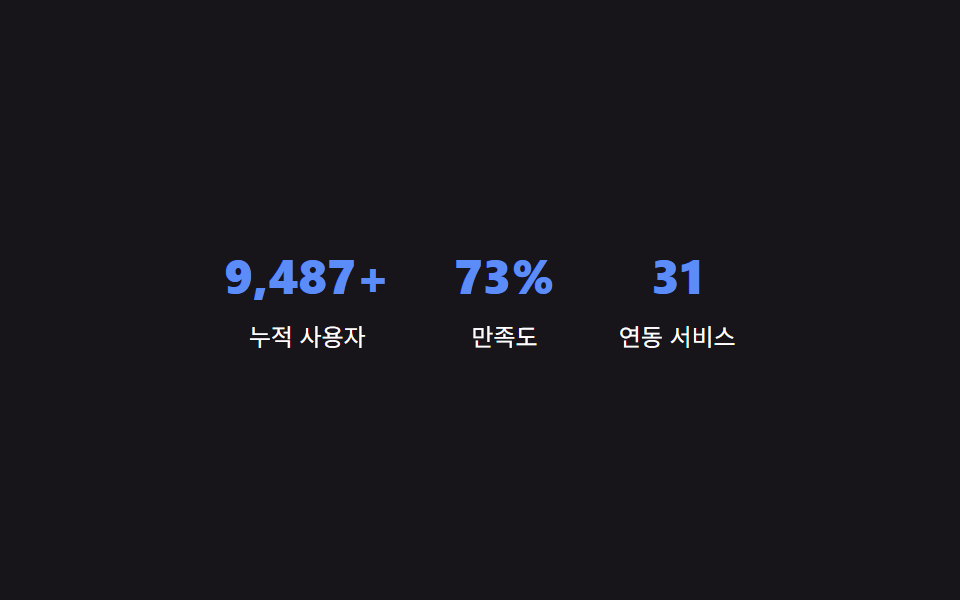
<main class="stage" id="stage">
  <section class="stats" id="stats">
    <div class="stat">
      <p class="stat__num" id="stat-1" data-target="12800" data-suffix="+">0</p>
      <p class="stat__label">累計ユーザー数</p>
    </div>
    <div class="stat">
      <p class="stat__num" id="stat-2" data-target="98" data-suffix="%">0</p>
      <p class="stat__label">満足度</p>
    </div>
    <div class="stat">
      <p class="stat__num" id="stat-3" data-target="42">0</p>
      <p class="stat__label">連携サービス</p>
    </div>
  </section>
</main>
@use "../../../../site/static/demo-tokens" as *;
$color: $subject-blue-light;
@include stage($stage-ink);
.stats {
display: flex;
gap: $sp-8;
flex-wrap: wrap;
justify-content: center;
text-align: center;
}
.stat__num {
margin: 0;
color: $color;
font-weight: 800;
font-size: clamp(24px, 8vmin, 34px);
line-height: 1.2;
font-variant-numeric: tabular-nums;
}
.stat__label {
margin: $sp-2 0 0;
color: $stage-paper;
font-size: 12px;
line-height: 1.5;
}
@media (max-width: 340px) {
.stats { gap: $sp-5; }
}
// 카운트업 자체는 JS(rAF)가 matchMedia 로 직접 분기 — 여기는 CSS 트랜지션이 없어 no-op.
@media (prefers-reduced-motion: reduce) {
.stat__num { animation: none; transition: none; }
}html, body {
margin: 0;
overflow: hidden;
}
.stage {
box-sizing: border-box;
min-height: 100vh;
display: grid;
place-items: center;
margin: 0;
background: #17141a;
font-family: -apple-system, "Segoe UI", "Noto Sans KR", sans-serif;
padding: clamp(8px, 4vw, 24px);
}
.stats {
display: flex;
gap: 32px;
flex-wrap: wrap;
justify-content: center;
text-align: center;
}
.stat__num {
margin: 0;
color: #5b8cf8;
font-weight: 800;
font-size: clamp(24px, 8vmin, 34px);
line-height: 1.2;
font-variant-numeric: tabular-nums;
}
.stat__label {
margin: 8px 0 0;
color: #ffffff;
font-size: 12px;
line-height: 1.5;
}
@media (max-width: 340px) {
.stats {
gap: 20px;
}
}
@media (prefers-reduced-motion: reduce) {
.stat__num {
animation: none;
transition: none;
}
}// 화면에 보이는 순간부터 0에서 목표 값까지, 매 프레임(rAF) 다시 계산해 textContent 를 갱신한다.
// 계산 겹: 경과 시간 비율 -> 완화 함수 -> 현재 값(0~목표) -> 문자열 표시. 자동 재생(리스너 없음).
(function () {
var COUNT_DURATION_MS = 1700;
var nums = document.querySelectorAll('.stat__num');
var reduceMotion = window.matchMedia && window.matchMedia('(prefers-reduced-motion: reduce)').matches;
function easeOutCubic(t) {
return 1 - Math.pow(1 - t, 3);
}
function format(n) {
return Math.round(n).toLocaleString('ko-KR');
}
function run(el) {
  var target = Number(el.getAttribute('data-target')) || 0;
  var suffix = el.getAttribute('data-suffix') || '';
  if (reduceMotion) {
    el.textContent = format(target) + suffix;
    return;
  }
  var start = null;
  function step(ts) {
    if (start === null) start = ts;
    var elapsed = ts - start;
    var t = Math.min(1, elapsed / COUNT_DURATION_MS);
    var value = target * easeOutCubic(t);
    el.textContent = format(value) + suffix;
    if (t < 1) {
      window.requestAnimationFrame(step);
    }
  }
  window.requestAnimationFrame(step);
}
nums.forEach(run);
})();import { useEffect, useRef } from "react";
import styles from "./StatsCounter.module.scss";
// 화면에 보이는 순간부터 0에서 목표 값까지, 매 프레임(rAF) 다시 계산해 textContent 를 갱신한다.
// 계산 겹: 경과 시간 비율 -> 완화 함수 -> 현재 값(0~목표) -> 문자열 표시. 자동 재생(리스너 없음).
const COUNT_DURATION_MS = 1700;
const STATS = [
{ id: "stat-1", target: 12800, suffix: "+", label: "누적 사용자" },
{ id: "stat-2", target: 98, suffix: "%", label: "만족도" },
{ id: "stat-3", target: 42, suffix: "", label: "연동 서비스" },
];
function easeOutCubic(t: number) {
return 1 - Math.pow(1 - t, 3);
}
function format(n: number) {
return Math.round(n).toLocaleString("ko-KR");
}
export default function StatsCounter() {
const numRefs = useRef<Array<HTMLParagraphElement | null>>([]);
useEffect(() => {
const reduceMotion =
window.matchMedia && window.matchMedia("(prefers-reduced-motion: reduce)").matches;
const rafIds: number[] = [];
const refs = numRefs.current!;
STATS.forEach((stat, i) => {
const el = refs[i];
if (!el) return;
if (reduceMotion) {
el.textContent = format(stat.target) + stat.suffix;
return;
}
let start: number | null = null;
function step(ts: number) {
if (start === null) start = ts;
const elapsed = ts - start;
const t = Math.min(1, elapsed / COUNT_DURATION_MS);
const value = stat.target * easeOutCubic(t);
el!.textContent = format(value) + stat.suffix;
if (t < 1) {
rafIds[i] = window.requestAnimationFrame(step);
}
}
rafIds[i] = window.requestAnimationFrame(step);
});
return () => rafIds.forEach((id) => window.cancelAnimationFrame(id));
}, []);
return (
<main className={styles.stage}>
<section className={styles.stats}>
{STATS.map((stat, i) => (
<div key={stat.id} className={styles.stat}>
<p
className={styles.stat__num}
ref={(node: HTMLParagraphElement | null) => {
numRefs.current![i] = node;
}}
>
0
</p>
<p className={styles.stat__label}>{stat.label}</p>
</div>
))}
</section>
</main>
);
}09 · 統計カウンター — 目標値までフレームごとに計算され上がる数字 — 計測 累積面積 3.044% · 動いたフレーム 13/23GODRICH オリジナル · SCSS と React は zip に同梱 · パスワードを見る
数値が示すこと
23フレームの計測のうち13フレームでカウンターが変化し、累積面積は3.044%、平均強度は134.4です。周囲のレイアウトではなく、桁の文字そのものだけが描き直されるためです。requestAnimationFrameの毎ステップが経過時間を固定の時間定数(今回のzipでは1700ms、3つ目のバリエーションでは3200ms)で割り、その比率をイージング関数にかけてから目標値に掛け、画面に書き戻します。目標値が大きくても同じ速さで計算されるだけで、かかる時間そのものは変わりません。
function run(el) {
var target = Number(el.getAttribute('data-target')) || 0;
var suffix = el.getAttribute('data-suffix') || '';
if (reduceMotion) {
el.textContent = format(target) + suffix;
return;
}
var start = null;
function step(ts) {
if (start === null) start = ts;
var elapsed = ts - start;
var t = Math.min(1, elapsed / COUNT_DURATION_MS);
var value = target * easeOutCubic(t);
el.textContent = format(value) + suffix;
if (t < 1) {
window.requestAnimationFrame(step);
}
}
window.requestAnimationFrame(step);
}
数値がセクションを変える場所 — スクロール比率・順番の値・目標の数字
上に挙げた9つの値のうち3つは、見た目を飾るだけでなく、間違えるとセクションが壊れて見えたり誤解を招いたりします。
なぜヒーローのスクロール比率は1つではなく2つの係数を必要とするのか
01の背景と見出しは同じスクロール比率の値を読み取りますが、背景には-18px、見出しにはより大きい-42pxを掛けています。もし同じ係数を使うと2つのレイヤーは1枚の平面のように一緒に動いてしまい、このパターンの名前の由来であるパララックスの奥行きが消えてしまいます。
なぜスタガー出現の順番の値は表示状態のしきい値を必要とするのか
02はページ読み込み時にすべてのカードの順番の値へ固定の間隔をただ掛けるわけではありません。カード自身の見える比率の値が基準を超えて初めて、その遅延の計算が始まります。こうすることで、ページの下の方にあるカードが訪問者のスクロールが届く前に表示を終えてしまうことを防いでいます。
なぜカウンターの目標の数字は一度だけでなく毎フレーム求め直す必要があるのか
09はCSSプロパティを0から目標値へ単純にアニメーションさせることはできません。表示する数字はイージング関数を通り、毎フレーム改めて整形し直す必要があるためです。経過時間の比率から数字全体を毎回求め直すことで、桁が増える瞬間にありえない中間の桁数を一瞬見せることなく、新しい桁がきれいに現れます。
どこで壊れるか — 長いテキスト・低スペック端末・ダークモード
このセットが同じセクション単位のレイアウトで組んだ9セクションのチームページセットや9セクションの事例ページセットと異なるのは、それぞれが動きへ変換する計算軸です。あちらのセットはチーム名簿のレイアウトや事例の本文ブロックに紐づいた値を求め直しますが、こちらの9セクションはスクロール比率・順番の値・測定した幅・経過時間を求め直します。このセット9セクション分の実装(バニラ・React両方)は、この記事のzip内で67e9abq3の先にあります。
長いテキストがファーストビュー デザイン 参考ページに与える影響
01の見出しはデモでは短い固定文字列ですが、実際のファーストビュー デザイン 参考ページの多くは、この動く背景に長めのコピーを組み合わせることになります。見出しの-42pxという係数は文字数と関係なく一定なので、長い見出しも短い見出しと同じ距離しか動きません。とはいえ、本番では見出しの行数を制限しておかないと、狭いビューポートで下のセクションと重なる可能性があります。
低スペック端末が複数の常時アニメーションセクションに与える影響
06の円錐グラデーションのリング・08のマーキー・01の背景レイヤーはどれも一度きりではなく継続的にアニメーションするため、これらのセクションを同じページに複数並べた低スペック端末では、パララックスのレイヤーよりも先にリングとマーキーでコマ落ちが起きやすくなります。円錐グラデーションの再描画はtransformだけのアニメーションよりも1フレームあたりのコストが高いためで、リングの周期を2秒より短くしないことと、マーキーのトラックをコンポジット対象にしておくことがフレーム予算を現実的に保つ助けになります。
ダークモードがlp デザイン 参考サイトと違うこの構成に与える影響
多くのlp デザイン 参考サイトのように単一のライトパレットを直接書き込むのではなく、このセットの色はすべて生のhex値ではなく名前付きトークンから読み取られているため、ダークモード版はトークン層だけを上書きすれば足ります。CTAバナー自身の文字色だけは手動での再確認が必要な値で、ライトな帯の背景では基準を満たす色でも、帯自身のトークンがダークに切り替わるとコントラストが不足することがあります。
3つのバリエーションとアクセシビリティ
以下の数値は、プレースホルダーのブランド・価格・見出しをすべて実際のコンテンツに置き換えて初めて、lp ファーストビュー デザインのテンプレートとして扱えます。計算軸は変わらず、定数だけが変わります。
| バリエーション | 変わる値 | トレードオフ |
|---|---|---|
| 機能カードのスタガー間隔 | 項目02のスタガー定数を120msから280msへ | 120msだとカードがほぼ同時に現れ一体感が出る一方、280msだと1枚ずつ順番が明確に見えるがカード枚数が多いほど全体の出現に時間がかかる |
| 料金プラン強調カードの拡大率 | 項目03の拡大率定数を1.08から1.16へ | 1.08だと強調カードが周囲から目立ちにくく、1.16だとはっきり浮いて見えるがカード間隔が詰まっていると隣のカードと視覚的に重なることがある |
| 統計カウンターの進行時間 | 項目09の進行時間定数を1700msから3200msへ | 1700msなら大きな目標値でもほとんどの訪問者が見ている間にカウントし終わるが、3200msだと読み方はより落ち着く一方、非常に大きな目標値では訪問者がスクロールし終えてもまだカウント中のことがある |
このzipには120ms・1.08・1700msの値が入っています。
reduced motionとスクリーンリーダーが同じ計算値からたどり着く場所
9つすべてがreduced motionの設定を確認し、該当する場合は補間を省いて同じ最終値へ瞬時に切り替えます。reduced motionの読者もヒーローが静止位置に落ち着いた状態・強調された料金プランカードが最終的な拡大率になった状態・カウンターがすでに目標の数字になった状態を見ることになり、違いは途中の補間があるかないかだけです。料金プランの切り替えボタンとFAQの質問見出しは押した状態・開いた状態が常に一致し、ヒーローの背景・CTAバナーのリング・ロゴマーキーの複製側はすべて装飾として扱われ、スクリーンリーダーが重複したり見た目だけの層を内容として読み上げることはありません。
FAQ
9つのセクションには実在する企業名や価格、写真が使われていますか
いいえ。表示されるブランド名はすべてBRAND A〜BRAND Dのようなプレースホルダーで、価格や数値もすべてデモのマークアップやdata属性に直接書き込まれた架空の固定値です。実在する人物の写真も、実際に呼び出すAPIもどこにもありません。
9つのうち実際のクリックやポインターに反応するのはどれですか
4つです。03の請求周期の切り替えと05の質問見出しは実際のclickに、04のカルーセルは実際のpointerenter/pointerleaveで自動再生が止まり、07のフッターのリンクも同じ2つのポインターイベントで下線の幅を求め直します。残りの01・02・06・08・09の5つは、固定のCSSループか、ページ読み込み時に一度だけ動くrequestAnimationFrameだけで再生され、クリック・ドラッグ・ポインターのリスナーはどこにも付いていません。
このセクションセットはそのまま実際の製品ページに使えますか
はい、プレースホルダーのブランド・価格・見出しをすべて実際のコンテンツに置き換えれば使えます。計算の層そのもの — スクロール比率・順番の値・測定した幅・イージングをかけたカウンター — はプレースホルダーを参照していないため、画面上の文字と色を差し替えるだけでデモから本番へ移行できます。
Sources: MDN — CSS custom properties · MDN — IntersectionObserver · MDN — Element.getBoundingClientRect · MDN — prefers-reduced-motion
こんな記事もどうぞ
 LPセクションチーム紹介 デザイン9選 — 人数・自己紹介の長さ・時差まで計算して見せる
 LPセクション導入事例 web デザイン9選 — 成果数値まで計算して見せる
 LPセクションファーストビュー デザイン 9パターン、コピペで置ける
 LPセクション引用 デザイン CSS 9選 — コピペで決まる引用ブロック
 LPセクションcss カード デザイン 9種 — 街・チーム・ショートカット
 LPセクション価格表 デザイン9選 — 年払い切替・割引率まで計算して見せる
 LPセクションプロフィールカード デザイン 9選 — コピペOKのスタイル集
 LPセクション料金表 デザイン 実装9選 — 切り替えも計算も動く
 LPセクションランディングページ 改善に直結するセクション9選
 LPセクションフッター デザイン コピペで終わるパターン9選