Sortable List JavaScript 9 Ways, No Library
Sortable list javascript: The dragged item's center crosses a neighbor's midpoint and the rest shift; on release a FLIP pass measures each moved
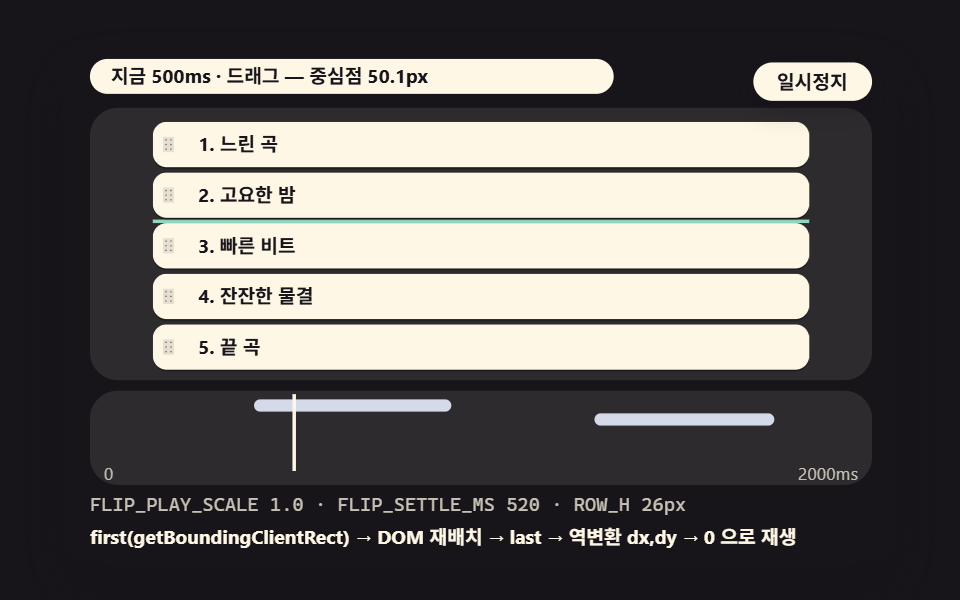 01 dsl-flip-vertical-list
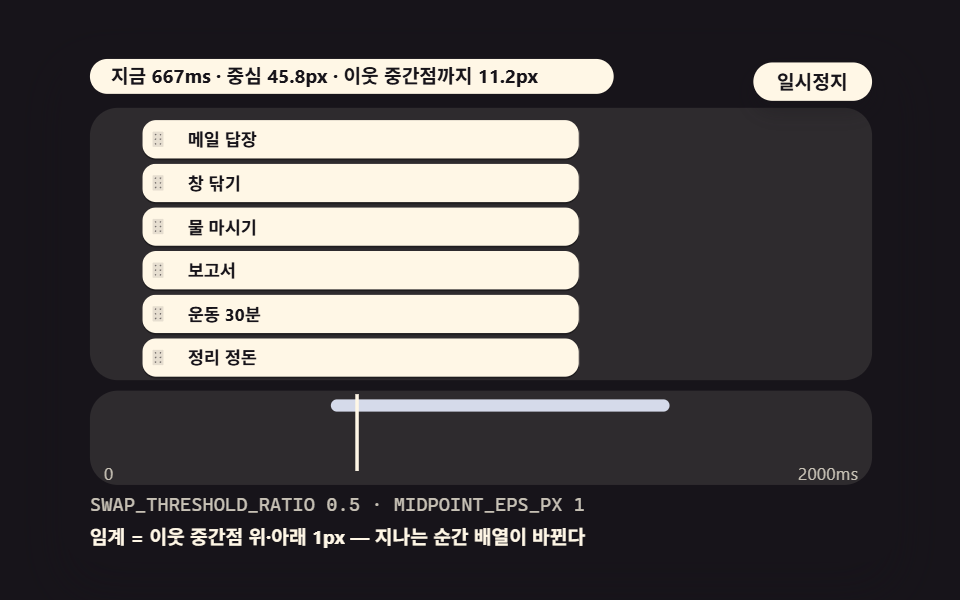 02 dsl-swap-midpoint-threshold
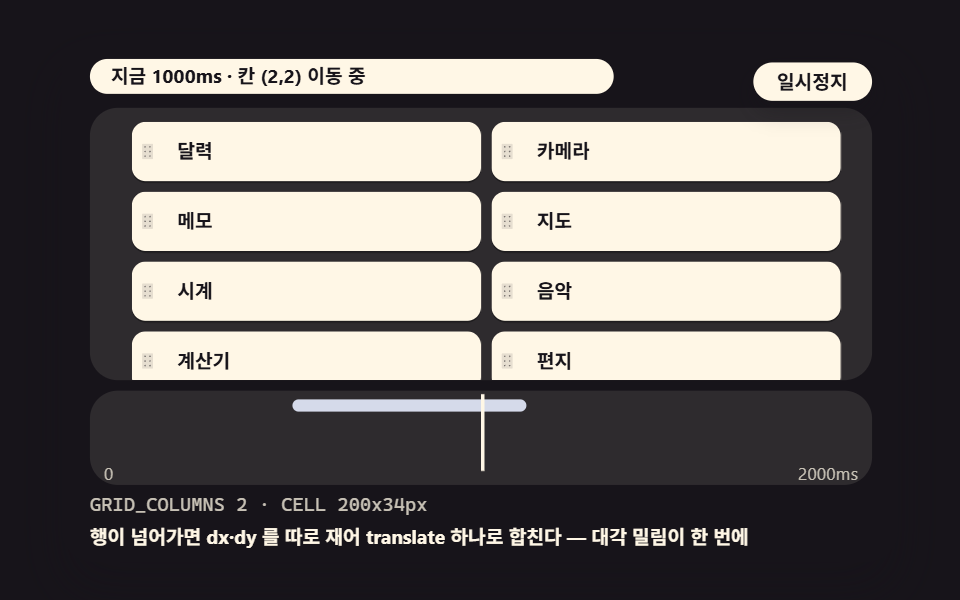 03 dsl-flip-grid-columns
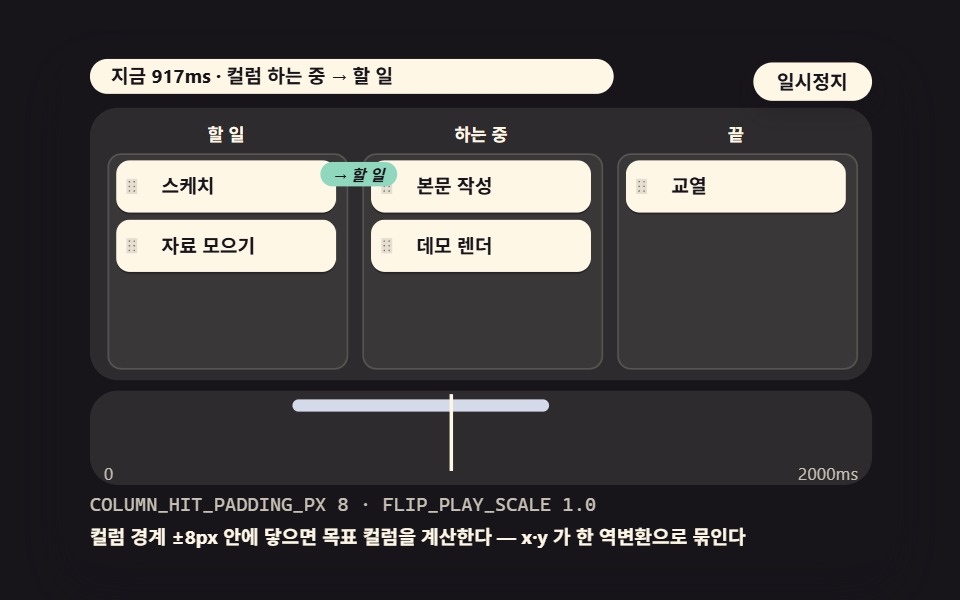 04 dsl-kanban-axis-flip
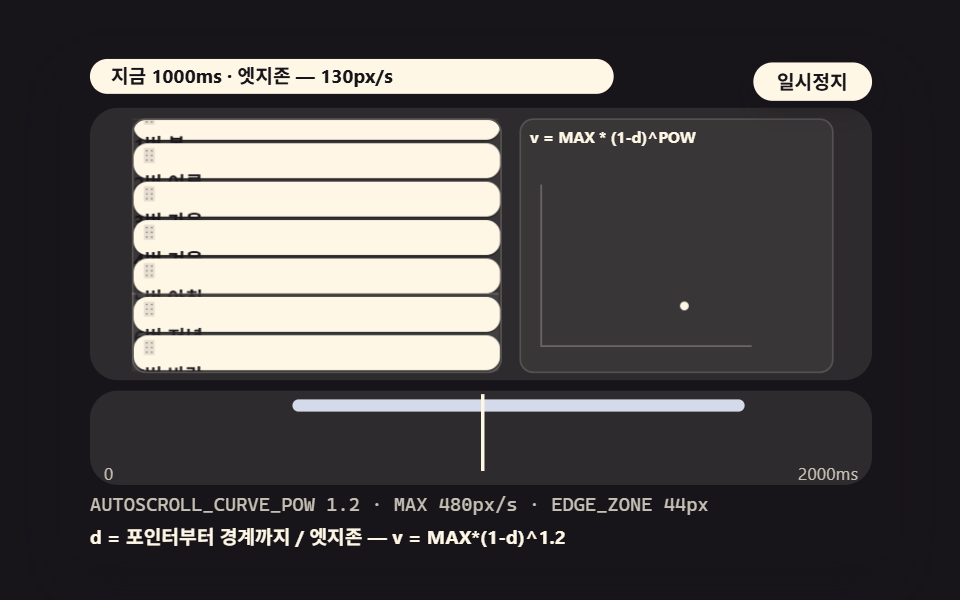 05 dsl-autoscroll-velocity-curve
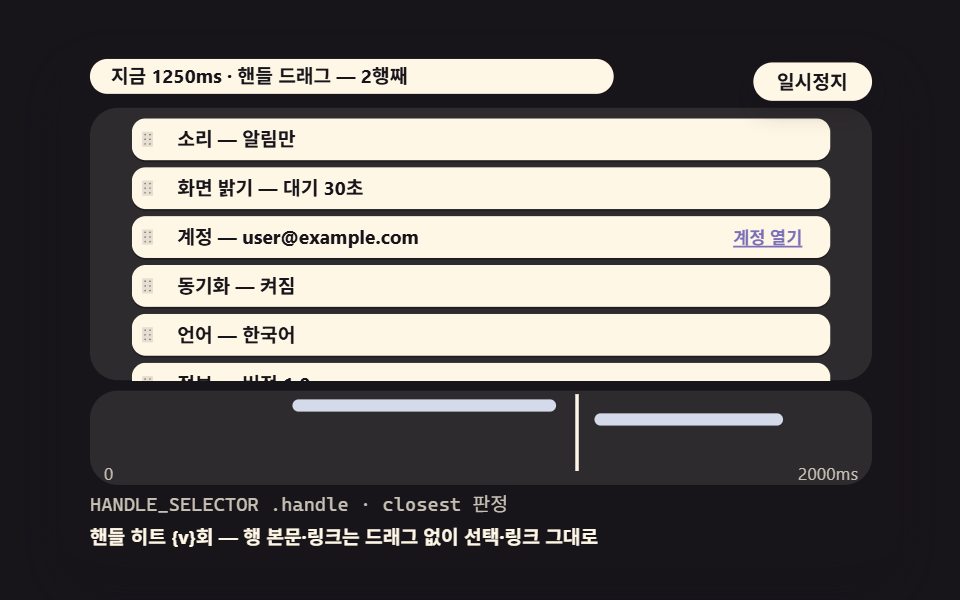 06 dsl-handle-target-drag
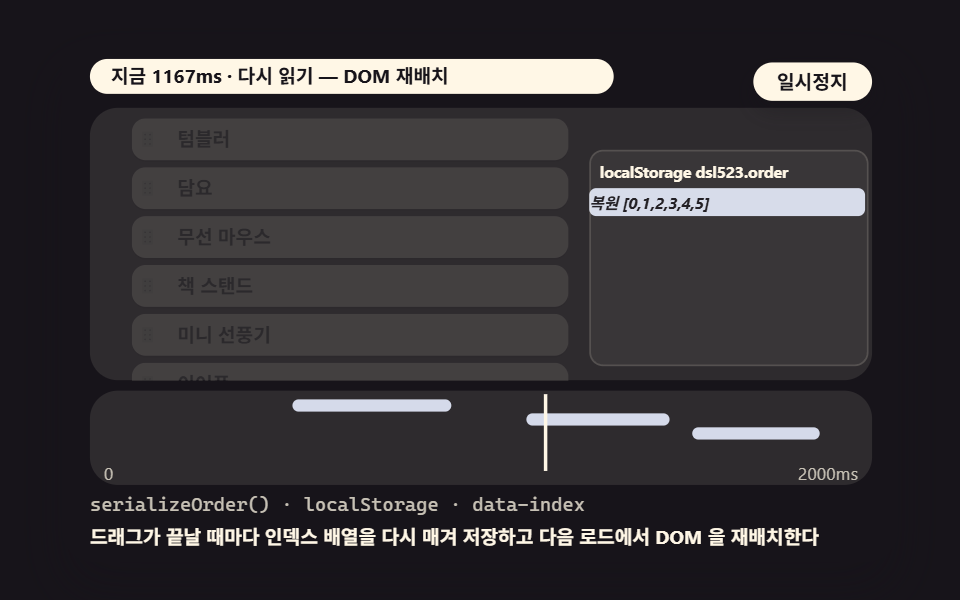 07 dsl-order-persist-index
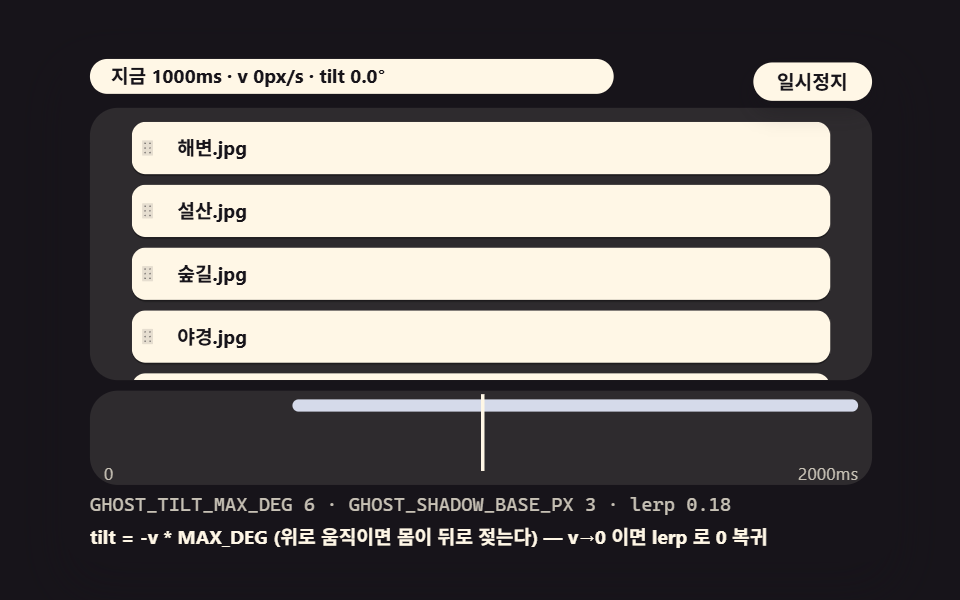 08 dsl-ghost-inertia-tilt
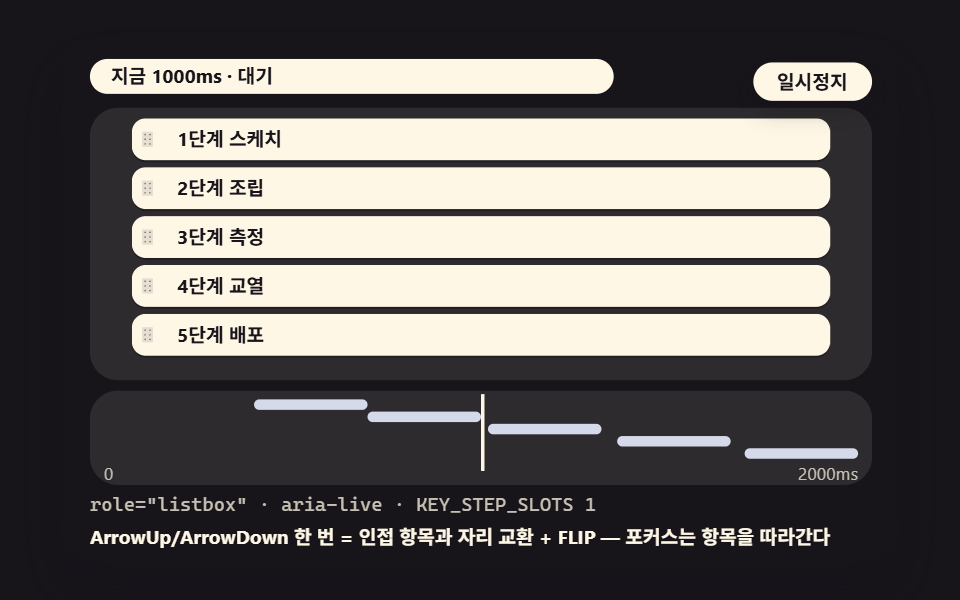 09 dsl-keyboard-step-reorder
- 01 Basic Vertical FLIP List That Measures Moved Distance and Plays It in Reverse
- 02 Threshold Swap That Yields the Slot When the Center Crosses a Neighbor's Midpoint
- 03 2-Column Grid FLIP That Computes Moves Crossing Rows
- 04 Kanban Column Move Where the Axis Flips From Vertical to Horizontal
- 05 Autoscroll That Turns Edge Distance Into a Velocity Curve
- 06 Handle-Only Drag That Only Starts When the Grip Is Held
- 07 Order Persistence That Serializes the New Order Into Indexes
- 08 Inertia Tilt Where Drag Velocity Tilts the Ghost
- 09 Keyboard Alternative Reorder Moving One Slot per Arrow Key
The nine scenes stack in the order the calculations pile up. Scene 01 lays down the base engine that measures every card's position before and after a reorder, scene 02 turns the moment a swap counts into a number you can tune, and scenes 03 and 04 stretch that same test across a two-column grid and kanban columns. Scene 05 covers the moment a list outgrows the viewport, 06 narrows the grab zone down to a handle, 07 carries the order into the next visit, 08 puts inertia into the feel, and 09 repeats the entire interaction with arrow keys and no pointer at all.
Every javascript sortable list drag and drop scene below is played back by a deterministic injected path — scripted coordinates and key events dispatched through the same pointerdown, pointermove, and pointerup handlers a real hand drives, so the replay you watch and the drag your user performs share one code path. The captures are demonstrations rather than hand-measured traces, and every number in the table that follows comes from those injected runs.
What the nine scenes measured
The figures come from a headless Chrome render of each 480×300 stage: 24 frames captured, movement counted over the 23 gaps between them, recorded 2026-11-16 between 00:38 and 00:39. Cumulative area is the share of the stage that changed, intensity is the average per-frame change, and each scene's motion is the injected demonstration described above.
| Scene | What it shows | Cumulative area | Intensity | Frames moved |
|---|---|---|---|---|
| 01 | Basic vertical FLIP | 31.6% | 116.0 | 23/23 |
| 02 | Threshold swap | 14.6% | 118.4 | 23/23 |
| 03 | Two-column grid | 16.7% | 110.1 | 23/23 |
| 04 | Kanban axis switch | 15.4% | 112.0 | 23/23 |
| 05 | Autoscroll curve | 13.0% | 118.9 | 23/23 |
| 06 | Handle-only drag | 22.5% | 110.1 | 23/23 |
| 07 | Order persistence | 21.6% | 112.5 | 23/23 |
| 08 | Ghost tilt | 28.6% | 107.2 | 23/23 |
| 09 | Keyboard alternative | 3.5% | 116.2 | 23/23 |
Scene 01 tops the area column at 31.6% because all five rows shift in a single pass, and scene 08 follows at 28.6% with a ghost that tilts and drops a shadow in proportion to drag speed. Scene 09 sits lowest at 3.5% — a quiet component where one slot trades places at a time, and the screen-reader sentence and focus ring carry the feedback instead of moving pixels. All nine scenes moved in 23 of 23 frames, with intensity averages spanning 107.2 to 118.9.
When does the swap happen — the midpoint crossing is the threshold, and the number decides the feel
While your hand moves, the browser answers one question on every frame: which slot does the grabbed card's center y occupy right now. The slot number falls out of a single division: divide the dragged card's center y by the slot height and you get a fractional slot index — 1.4, 1.6, and so on. Round that fraction to pick the target slot, and whenever it differs from the current one, splice the array to match. The feel lives inside that rounding. Should the card swap once its center passes half a slot, or only after it covers 0.85 of one? Scene 02 exists to make that single constant visible in your hand.
How the rest shift — FLIP is a four-step calculation of first, last, invert, and play
Once the array changes, the remaining cards slide into their new slots, and that slide is the FLIP calculation. Measure every card's position as First, mutate the DOM order, measure again as Last, apply the difference to each card as an inverted transform so it still appears at its old spot, then Play that transform down to zero. The card has in fact been in its new place since the mutation — the eye is the only thing being rewound.
The rewind follows easeOutCubic, fast at the start and settling at the end, over FLIP_SETTLE_MS 520ms. Keeping playback deterministic without a library means reading the clock from a CSS animation's currentTime rather than reaching for Date or Math.random, so re-rendering the stage reproduces the same frames in the same order.
One coordinate correction rides along. The demo stage scales itself with scale(k) to fit the page width, so every getBoundingClientRect value comes back k times too large. Dividing the measured deltas by k = rootEl.clientWidth / 480 returns them to stage coordinates, and multiplying by FLIP_PLAY_SCALE decides how far past the measured distance each card should fly before coming back.
01Basic Vertical FLIP List That Measures Moved Distance and Plays It in Reverse
The shortest case: a playlist or bookmarks list where a handful of rows trade places. The grabbed card floats as a ghost while only the array changes during the drag, then on release the remaining rows slide in through the inverted transform.
Demo and Explanation
<main class="stage">
<div class="ez is-demo" id="ez">
  <div class="ez__in" data-role="inner">
    <div class="ez__pad" data-role="pad" tabindex="0" role="application" aria-label="Demo stage: Space or Enter pauses, R restarts, left and right arrows pick another value">
      <div class="ez__scene" data-role="scene" role="img" aria-label="In a five-row playlist the second track is dragged to the bottom and the rest shift back as an inverted transform replays the move"></div>
      <div class="ez__probe" data-role="probe" aria-hidden="true"></div>
      <div class="ez__chart" data-role="chart" aria-hidden="true"></div>
      <p class="ez__status" data-role="status" aria-live="off">Scene ready</p>
      <p class="ez__reada" data-role="reada" aria-hidden="true"></p>
      <p class="ez__readb" data-role="readb" aria-hidden="true"></p>
      <div class="ez__ctrl">
        <button class="ez__pause" data-role="pause" type="button" aria-pressed="false">Pause</button>
… (총 18줄 — 아래 「전체 코드」에서 원문 전체)
// 523 공통 — 드래그 정렬 리스트 (520 base.scss 계승, gooey 계층 제거·카드 팔레트로)
@use "../../../../site/static/demo-tokens" as *;
@include stage($stage-ink);
$panel: mix($subject-cream, $subject-ink, 10%);
$dim: mix($subject-cream, $subject-ink, 76%);
// 파스텔 액센트 — vivid 토큰 대신 (BD26)
$stroke-blue: #d5daea;
$stroke-rose: #ebd6db;
$stroke-mint: #8fd8bd;
$stroke-lilac: #c9b8f2;
… (총 407줄 — 아래 「전체 코드」에서 원문 전체)html, body {
margin: 0;
overflow: hidden;
}
.stage {
box-sizing: border-box;
min-height: 100vh;
display: grid;
place-items: center;
margin: 0;
background: #17141a;
… (총 474줄 — 아래 「전체 코드」에서 원문 전체)(function () {
const rootEl = document.getElementById("ez");
if (!rootEl) return;
main(rootEl);
function cx(s) { return s; }
function main(root) {
// ── 523 드래그 정렬 공통 — 무대 좌표·문구 틀·요소 조립 (520 core.ts 계승)
const W = 480;
const CX0 = 8;
const CW = 432;
function clamp(v, lo, hi) { return v < lo ? lo : (v > hi ? hi : v); }
function lerp(a, b, k) { return a + (b - a) * k; }
… (총 509줄 — 아래 「전체 코드」에서 원문 전체)// DslFlipVerticalList - 같은 항목 vanilla index.html 의 React 판. 같은 계산을 useEffect 안에서 돌린다
import { useEffect, useRef } from "react";
import styles from "./DslFlipVerticalList.module.scss";
const cx = (s: string): string => s.split(" ").map((n) => styles[n] ?? n).join(" ");
function main(root: HTMLElement): () => void {
// ── 523 드래그 정렬 공통 — 무대 좌표·문구 틀·요소 조립 (520 core.ts 계승)
const W = 480;
const CX0 = 8;
const CW = 432;
function clamp(v: number, lo: number, hi: number): number { return v < lo ? lo : (v > hi ? hi : v); }
… (총 460줄 — 아래 「전체 코드」에서 원문 전체)01 · Basic Vertical FLIP List That Measures Moved Distance and Plays It in Reverse — Measured area 31.638% · moving frames 23/23Original by GODRICH · SCSS and React ship in the zip · See the password
Where to Look in the Code
Inside flipCommit, cards that moved less than half a pixel skip the transform entirely and only cards that genuinely moved receive a vector.
        // Last + Invert — store the inverted vector for the distance moved
        for (const f of first) {
            const r = f.el.getBoundingClientRect();
            const dx = (f.x - r.left) / k * playScale;
            const dy = (f.y - r.top) / k * playScale;
            if (Math.abs(dx) < 0.5 && Math.abs(dy) < 0.5) {
                f.el.style.transform = '';
                continue;
            }
            moved += 1;
            if (reduced) {
                f.el.style.transform = '';
                continue;
            }
            flipJobs.push({ el: f.el, dx: dx, dy: dy });
        }
        return moved;
02Threshold Swap That Yields the Slot When the Center Crosses a Neighbor's Midpoint
A to-do list where dragging a task up raises its priority. The card's center is measured against each neighbor's midpoint in real time, the reference line flashes on the crossing, and the array turns over at that instant.
Demo and Explanation
<main class="stage">
<div class="ez is-demo" id="ez">
  <div class="ez__in" data-role="inner">
    <div class="ez__pad" data-role="pad" tabindex="0" role="application" aria-label="Demo stage: Space or Enter pauses, R restarts, left and right arrows pick another value">
      <div class="ez__scene" data-role="scene" role="img" aria-label="In a six-row to-do list the slot swaps only at the instant the dragged center crosses a neighbor's midpoint line"></div>
      <div class="ez__probe" data-role="probe" aria-hidden="true"></div>
      <div class="ez__chart" data-role="chart" aria-hidden="true"></div>
      <p class="ez__status" data-role="status" aria-live="off">Scene ready</p>
      <p class="ez__reada" data-role="reada" aria-hidden="true"></p>
      <p class="ez__readb" data-role="readb" aria-hidden="true"></p>
      <div class="ez__ctrl">
        <button class="ez__pause" data-role="pause" type="button" aria-pressed="false">Pause</button>
… (총 18줄 — 아래 「전체 코드」에서 원문 전체)
// 523 공통 — 드래그 정렬 리스트 (520 base.scss 계승, gooey 계층 제거·카드 팔레트로)
@use "../../../../site/static/demo-tokens" as *;
@include stage($stage-ink);
$panel: mix($subject-cream, $subject-ink, 10%);
$dim: mix($subject-cream, $subject-ink, 76%);
// 파스텔 액센트 — vivid 토큰 대신 (BD26)
$stroke-blue: #d5daea;
$stroke-rose: #ebd6db;
$stroke-mint: #8fd8bd;
$stroke-lilac: #c9b8f2;
… (총 407줄 — 아래 「전체 코드」에서 원문 전체)html, body {
margin: 0;
overflow: hidden;
}
.stage {
box-sizing: border-box;
min-height: 100vh;
display: grid;
place-items: center;
margin: 0;
background: #17141a;
… (총 474줄 — 아래 「전체 코드」에서 원문 전체)(function () {
const rootEl = document.getElementById("ez");
if (!rootEl) return;
main(rootEl);
function cx(s) { return s; }
function main(root) {
// ── 523 드래그 정렬 공통 — 무대 좌표·문구 틀·요소 조립 (520 core.ts 계승)
const W = 480;
const CX0 = 8;
const CW = 432;
function clamp(v, lo, hi) { return v < lo ? lo : (v > hi ? hi : v); }
function lerp(a, b, k) { return a + (b - a) * k; }
… (총 535줄 — 아래 「전체 코드」에서 원문 전체)// DslSwapMidpoint - 같은 항목 vanilla index.html 의 React 판. 같은 계산을 useEffect 안에서 돌린다
import { useEffect, useRef } from "react";
import styles from "./DslSwapMidpoint.module.scss";
const cx = (s: string): string => s.split(" ").map((n) => styles[n] ?? n).join(" ");
function main(root: HTMLElement): () => void {
// ── 523 드래그 정렬 공통 — 무대 좌표·문구 틀·요소 조립 (520 core.ts 계승)
const W = 480;
const CX0 = 8;
const CW = 432;
function clamp(v: number, lo: number, hi: number): number { return v < lo ? lo : (v > hi ? hi : v); }
… (총 479줄 — 아래 「전체 코드」에서 원문 전체)02 · Threshold Swap That Yields the Slot When the Center Crosses a Neighbor's Midpoint — Measured area 14.581% · moving frames 23/23Original by GODRICH · SCSS and React ship in the zip · See the password
Where to Look in the Code
Four lines of distance testing carry the entire feel of the swap — the injected path crosses the midpoint back and forth and the swap counter climbs.
            // Test — which slot midpoint the center is crossing
            const slotF = (cy - 7) / (ROW_H + GAP);
            const to = clamp(Math.round(slotF), 0, 5);
            const cur = order.indexOf(0);
            // Whether the distance from the neighbor center passes the threshold (0.5 slot) — it must, to swap
            const dist = Math.abs(slotF - cur);
            const crossed = dist > SWAP_THRESHOLD_RATIO * 1;
            if (crossed && to !== cur) {
                order.splice(cur, 1);
                order.splice(to, 0, 0);
                layoutRows();
                swaps += 1;
                lastCross = f1(t) + 'ms';
            }
03Two-Column Grid FLIP That Computes Moves Crossing Rows
An app launcher grid where icons reorder across two columns. A move that lands on the next row changes x and y at once, so the column and row are computed separately and merged into a single inverted translate.
Demo and Explanation
<main class="stage">
<div class="ez is-demo" id="ez">
  <div class="ez__in" data-role="inner">
    <div class="ez__pad" data-role="pad" tabindex="0" role="application" aria-label="Demo stage: Space or Enter pauses, R restarts, left and right arrows pick another value">
      <div class="ez__scene" data-role="scene" role="img" aria-label="An icon dragged diagonally to the next row of a 2-column grid has its x and y moves measured separately and inverted in one pass"></div>
      <div class="ez__probe" data-role="probe" aria-hidden="true"></div>
      <div class="ez__chart" data-role="chart" aria-hidden="true"></div>
      <p class="ez__status" data-role="status" aria-live="off">Scene ready</p>
      <p class="ez__reada" data-role="reada" aria-hidden="true"></p>
      <p class="ez__readb" data-role="readb" aria-hidden="true"></p>
      <div class="ez__ctrl">
        <button class="ez__pause" data-role="pause" type="button" aria-pressed="false">Pause</button>
… (총 18줄 — 아래 「전체 코드」에서 원문 전체)
// 523 공통 — 드래그 정렬 리스트 (520 base.scss 계승, gooey 계층 제거·카드 팔레트로)
@use "../../../../site/static/demo-tokens" as *;
@include stage($stage-ink);
$panel: mix($subject-cream, $subject-ink, 10%);
$dim: mix($subject-cream, $subject-ink, 76%);
// 파스텔 액센트 — vivid 토큰 대신 (BD26)
$stroke-blue: #d5daea;
$stroke-rose: #ebd6db;
$stroke-mint: #8fd8bd;
$stroke-lilac: #c9b8f2;
… (총 407줄 — 아래 「전체 코드」에서 원문 전체)html, body {
margin: 0;
overflow: hidden;
}
.stage {
box-sizing: border-box;
min-height: 100vh;
display: grid;
place-items: center;
margin: 0;
background: #17141a;
… (총 474줄 — 아래 「전체 코드」에서 원문 전체)(function () {
const rootEl = document.getElementById("ez");
if (!rootEl) return;
main(rootEl);
function cx(s) { return s; }
function main(root) {
// ── 523 드래그 정렬 공통 — 무대 좌표·문구 틀·요소 조립 (520 core.ts 계승)
const W = 480;
const CX0 = 8;
const CW = 432;
function clamp(v, lo, hi) { return v < lo ? lo : (v > hi ? hi : v); }
function lerp(a, b, k) { return a + (b - a) * k; }
… (총 512줄 — 아래 「전체 코드」에서 원문 전체)// DslFlipGrid - 같은 항목 vanilla index.html 의 React 판. 같은 계산을 useEffect 안에서 돌린다
import { useEffect, useRef } from "react";
import styles from "./DslFlipGrid.module.scss";
const cx = (s: string): string => s.split(" ").map((n) => styles[n] ?? n).join(" ");
function main(root: HTMLElement): () => void {
// ── 523 드래그 정렬 공통 — 무대 좌표·문구 틀·요소 조립 (520 core.ts 계승)
const W = 480;
const CX0 = 8;
const CW = 432;
function clamp(v: number, lo: number, hi: number): number { return v < lo ? lo : (v > hi ? hi : v); }
… (총 457줄 — 아래 「전체 코드」에서 원문 전체)03 · 2-Column Grid FLIP That Computes Moves Crossing Rows — Measured area 16.731% · moving frames 23/23Original by GODRICH · SCSS and React ship in the zip · See the password
Where to Look in the Code
Division plus rounding finds the nearest cell — with two columns, col is 0 or 1 and row takes four values.
            // Grid test — which cell the center is closest to
            const cxg = x + CELL_W / 2 - GX;
            const cyg = y + CELL_H / 2 - GY;
            const col = clamp(Math.round(cxg / (CELL_W + GAP) - 0.5), 0, 1);
            const row = clamp(Math.round(cyg / (CELL_H + GAP) - 0.5), 0, 3);
            const to2 = row * GRID_COLUMNS + col;
            const cur = order.indexOf(0);
            if (to2 !== cur) {
                order.splice(cur, 1);
                order.splice(to2, 0, 0);
                layoutCells();
            }
04Kanban Column Move Where the Axis Flips From Vertical to Horizontal
A kanban board where a card moves between states, from To-do into Doing. The vertical shift inside a list and the horizontal jump between columns are bound into one FLIP pass, so the axis change never interrupts the motion.
Demo and Explanation
<main class="stage">
<div class="ez is-demo" id="ez">
  <div class="ez__in" data-role="inner">
    <div class="ez__pad" data-role="pad" tabindex="0" role="application" aria-label="Demo stage: Space or Enter pauses, R restarts, left and right arrows pick another value">
      <div class="ez__scene" data-role="scene" role="img" aria-label="A kanban card crossing the column boundary into To-do binds its horizontal move and vertical shift into one FLIP pass"></div>
      <div class="ez__probe" data-role="probe" aria-hidden="true"></div>
      <div class="ez__chart" data-role="chart" aria-hidden="true"></div>
      <p class="ez__status" data-role="status" aria-live="off">Scene ready</p>
      <p class="ez__reada" data-role="reada" aria-hidden="true"></p>
      <p class="ez__readb" data-role="readb" aria-hidden="true"></p>
      <div class="ez__ctrl">
        <button class="ez__pause" data-role="pause" type="button" aria-pressed="false">Pause</button>
… (총 18줄 — 아래 「전체 코드」에서 원문 전체)
// 523 공통 — 드래그 정렬 리스트 (520 base.scss 계승, gooey 계층 제거·카드 팔레트로)
@use "../../../../site/static/demo-tokens" as *;
@include stage($stage-ink);
$panel: mix($subject-cream, $subject-ink, 10%);
$dim: mix($subject-cream, $subject-ink, 76%);
// 파스텔 액센트 — vivid 토큰 대신 (BD26)
$stroke-blue: #d5daea;
$stroke-rose: #ebd6db;
$stroke-mint: #8fd8bd;
$stroke-lilac: #c9b8f2;
… (총 407줄 — 아래 「전체 코드」에서 원문 전체)html, body {
margin: 0;
overflow: hidden;
}
.stage {
box-sizing: border-box;
min-height: 100vh;
display: grid;
place-items: center;
margin: 0;
background: #17141a;
… (총 474줄 — 아래 「전체 코드」에서 원문 전체)(function () {
const rootEl = document.getElementById("ez");
if (!rootEl) return;
main(rootEl);
function cx(s) { return s; }
function main(root) {
// ── 523 드래그 정렬 공통 — 무대 좌표·문구 틀·요소 조립 (520 core.ts 계승)
const W = 480;
const CX0 = 8;
const CW = 432;
function clamp(v, lo, hi) { return v < lo ? lo : (v > hi ? hi : v); }
function lerp(a, b, k) { return a + (b - a) * k; }
… (총 550줄 — 아래 「전체 코드」에서 원문 전체)// DslKanbanAxis - 같은 항목 vanilla index.html 의 React 판. 같은 계산을 useEffect 안에서 돌린다
import { useEffect, useRef } from "react";
import styles from "./DslKanbanAxis.module.scss";
const cx = (s: string): string => s.split(" ").map((n) => styles[n] ?? n).join(" ");
function main(root: HTMLElement): () => void {
// ── 523 드래그 정렬 공통 — 무대 좌표·문구 틀·요소 조립 (520 core.ts 계승)
const W = 480;
const CX0 = 8;
const CW = 432;
function clamp(v: number, lo: number, hi: number): number { return v < lo ? lo : (v > hi ? hi : v); }
… (총 486줄 — 아래 「전체 코드」에서 원문 전체)04 · Kanban Column Move Where the Axis Flips From Vertical to Horizontal — Measured area 15.421% · moving frames 23/23Original by GODRICH · SCSS and React ship in the zip · See the password
Where to Look in the Code
The column test spans a band slightly wider than the column itself — without that slack a card near the boundary would ping-pong between columns.
            const cxg = x0 + (x1 - x0) * u + (COL_W - 10) / 2;
            // Target column — boundary ± padding test
            let tc = 0;
            for (let c = 0; c < 3; c += 1) {
                if (cxg >= COL_X[c] - COLUMN_HIT_PADDING_PX && cxg <= COL_X[c] + COL_W + COLUMN_HIT_PADDING_PX) {
                    tc = c;
                    break;
                }
            }
            if (tc !== curCol || t < 500) {
                if (tc !== curCol) {
                    const card = dragCard;
                    if (card) {
                        const from = cols[curCol].cards;
                        const at = from.indexOf(card);
                        if (at >= 0) {
                            from.splice(at, 1);
                        }
                        cols[tc].cards.splice(1, 0, card);
                        layoutKanban();
How it settles on release — damping the FLIP distance down to zero
Two constants decide how far a card travels after you let go: the settle time and the playback scale. A longer settle time eases the card home, a shorter one snaps it. The playback scale multiplies the inverted vector itself — at 1.0 each card moves exactly the measured distance, while at 1.6 it overshoots past the real distance and returns, which the eye reads as springiness.
Because the curve is easeOutCubic, the value drops fast at first and nearly stalls at the end, so the back half of the settle window mostly holds still. The felt response is built in the first 30 to 40 percent of the settle time, and pausing the demo mid-Play shows how short that front segment really is.
05Autoscroll That Turns Edge Distance Into a Velocity Curve
Drag through a list of dozens of rows and the target eventually sits outside the viewport. Hold the pointer near the container boundary and the list rolls by itself, its speed computed by feeding the normalized boundary distance through a power curve.
Demo and Explanation
<main class="stage">
<div class="ez is-demo" id="ez">
  <div class="ez__in" data-role="inner">
    <div class="ez__pad" data-role="pad" tabindex="0" role="application" aria-label="Demo stage: Space or Enter pauses, R restarts, left and right arrows pick another value">
      <div class="ez__scene" data-role="scene" role="img" aria-label="When the pointer lingers in the bottom edge zone of a long list, the scroll accelerates hard along a power curve"></div>
      <div class="ez__probe" data-role="probe" aria-hidden="true"></div>
      <div class="ez__chart" data-role="chart" aria-hidden="true"></div>
      <p class="ez__status" data-role="status" aria-live="off">Scene ready</p>
      <p class="ez__reada" data-role="reada" aria-hidden="true"></p>
      <p class="ez__readb" data-role="readb" aria-hidden="true"></p>
      <div class="ez__ctrl">
        <button class="ez__pause" data-role="pause" type="button" aria-pressed="false">Pause</button>
… (총 18줄 — 아래 「전체 코드」에서 원문 전체)
// 523 공통 — 드래그 정렬 리스트 (520 base.scss 계승, gooey 계층 제거·카드 팔레트로)
@use "../../../../site/static/demo-tokens" as *;
@include stage($stage-ink);
$panel: mix($subject-cream, $subject-ink, 10%);
$dim: mix($subject-cream, $subject-ink, 76%);
// 파스텔 액센트 — vivid 토큰 대신 (BD26)
$stroke-blue: #d5daea;
$stroke-rose: #ebd6db;
$stroke-mint: #8fd8bd;
$stroke-lilac: #c9b8f2;
… (총 407줄 — 아래 「전체 코드」에서 원문 전체)html, body {
margin: 0;
overflow: hidden;
}
.stage {
box-sizing: border-box;
min-height: 100vh;
display: grid;
place-items: center;
margin: 0;
background: #17141a;
… (총 474줄 — 아래 「전체 코드」에서 원문 전체)(function () {
const rootEl = document.getElementById("ez");
if (!rootEl) return;
main(rootEl);
function cx(s) { return s; }
function main(root) {
// ── 523 드래그 정렬 공통 — 무대 좌표·문구 틀·요소 조립 (520 core.ts 계승)
const W = 480;
const CX0 = 8;
const CW = 432;
function clamp(v, lo, hi) { return v < lo ? lo : (v > hi ? hi : v); }
function lerp(a, b, k) { return a + (b - a) * k; }
… (총 497줄 — 아래 「전체 코드」에서 원문 전체)// DslAutoscrollCurve - 같은 항목 vanilla index.html 의 React 판. 같은 계산을 useEffect 안에서 돌린다
import { useEffect, useRef } from "react";
import styles from "./DslAutoscrollCurve.module.scss";
const cx = (s: string): string => s.split(" ").map((n) => styles[n] ?? n).join(" ");
function main(root: HTMLElement): () => void {
// ── 523 드래그 정렬 공통 — 무대 좌표·문구 틀·요소 조립 (520 core.ts 계승)
const W = 480;
const CX0 = 8;
const CW = 432;
function clamp(v: number, lo: number, hi: number): number { return v < lo ? lo : (v > hi ? hi : v); }
… (총 462줄 — 아래 「전체 코드」에서 원문 전체)05 · Autoscroll That Turns Edge Distance Into a Velocity Curve — Measured area 12.953% · moving frames 23/23Original by GODRICH · SCSS and React ship in the zip · See the password
Where to Look in the Code
The velocity formula is two lines — measure the ratio d of distance remaining to the edge zone, then multiply the maximum speed by (1 - d) raised to the power.
            // Edge-zone entry — normalize the distance to the boundary
            const inEdge = ptrY > VIEW_Y + VIEW_H - EDGE_ZONE_PX;
            d = inEdge ? clamp((VIEW_Y + VIEW_H - ptrY) / EDGE_ZONE_PX, 0, 1) : 1;
            if (inEdge) {
                const v = AUTOSCROLL_MAX_PX_S * Math.pow(1 - d, AUTOSCROLL_CURVE_POW);
                lastV = v;
                scrollTop = clamp(scrollTop + v * (1 / 60), 0, scrollMax);
            }
            else {
                lastV = 0;
            }
06Handle-Only Drag That Only Starts When the Grip Is Held
A settings list whose rows contain links and checkboxes needs the drag start narrowed to a grip. Whether the pointerdown target sits inside the handle is checked with closest, and every other region keeps its text selection and touch scrolling untouched.
Demo and Explanation
<main class="stage">
<div class="ez is-demo" id="ez">
  <div class="ez__in" data-role="inner">
    <div class="ez__pad" data-role="pad" tabindex="0" role="application" aria-label="Demo stage: Space or Enter pauses, R restarts, left and right arrows pick another value">
      <div class="ez__scene" data-role="scene" role="img" aria-label="Pressing the row body only shows a deny mark, and dragging starts only from the grip handle"></div>
      <div class="ez__probe" data-role="probe" aria-hidden="true"></div>
      <div class="ez__chart" data-role="chart" aria-hidden="true"></div>
      <p class="ez__status" data-role="status" aria-live="off">Scene ready</p>
      <p class="ez__reada" data-role="reada" aria-hidden="true"></p>
      <p class="ez__readb" data-role="readb" aria-hidden="true"></p>
      <div class="ez__ctrl">
        <button class="ez__pause" data-role="pause" type="button" aria-pressed="false">Pause</button>
… (총 18줄 — 아래 「전체 코드」에서 원문 전체)
// 523 공통 — 드래그 정렬 리스트 (520 base.scss 계승, gooey 계층 제거·카드 팔레트로)
@use "../../../../site/static/demo-tokens" as *;
@include stage($stage-ink);
$panel: mix($subject-cream, $subject-ink, 10%);
$dim: mix($subject-cream, $subject-ink, 76%);
// 파스텔 액센트 — vivid 토큰 대신 (BD26)
$stroke-blue: #d5daea;
$stroke-rose: #ebd6db;
$stroke-mint: #8fd8bd;
$stroke-lilac: #c9b8f2;
… (총 407줄 — 아래 「전체 코드」에서 원문 전체)html, body {
margin: 0;
overflow: hidden;
}
.stage {
box-sizing: border-box;
min-height: 100vh;
display: grid;
place-items: center;
margin: 0;
background: #17141a;
… (총 474줄 — 아래 「전체 코드」에서 원문 전체)(function () {
const rootEl = document.getElementById("ez");
if (!rootEl) return;
main(rootEl);
function cx(s) { return s; }
function main(root) {
// ── 523 드래그 정렬 공통 — 무대 좌표·문구 틀·요소 조립 (520 core.ts 계승)
const W = 480;
const CX0 = 8;
const CW = 432;
function clamp(v, lo, hi) { return v < lo ? lo : (v > hi ? hi : v); }
function lerp(a, b, k) { return a + (b - a) * k; }
… (총 511줄 — 아래 「전체 코드」에서 원문 전체)// DslHandleTarget - 같은 항목 vanilla index.html 의 React 판. 같은 계산을 useEffect 안에서 돌린다
import { useEffect, useRef } from "react";
import styles from "./DslHandleTarget.module.scss";
const cx = (s: string): string => s.split(" ").map((n) => styles[n] ?? n).join(" ");
function main(root: HTMLElement): () => void {
// ── 523 드래그 정렬 공통 — 무대 좌표·문구 틀·요소 조립 (520 core.ts 계승)
const W = 480;
const CX0 = 8;
const CW = 432;
function clamp(v: number, lo: number, hi: number): number { return v < lo ? lo : (v > hi ? hi : v); }
… (총 455줄 — 아래 「전체 코드」에서 원문 전체)06 · Handle-Only Drag That Only Starts When the Grip Is Held — Measured area 22.527% · moving frames 23/23Original by GODRICH · SCSS and React ship in the zip · See the password
Where to Look in the Code
The start gate for a real pointer path lives here — two separate closest failures refuse the drag.
    scWrap.addEventListener('pointerdown', function (ev) {
        const tgt = ev.target;
        // Handle targeting — start only when the grip is pressed; the row body and links stay untouched
        if (!tgt.closest || !tgt.closest(HANDLE_SELECTOR)) {
            return;
        }
        const card = tgt.closest('.' + cx('card'));
        if (!card) {
            return;
        }
        ev.preventDefault();
        dragIdx = Number(card.getAttribute('data-index'));
        card.setPointerCapture(ev.pointerId);
        card.style.opacity = '0.18';
        gEl = makeGhost(card, LIST_X, parseFloat(card.style.top) || slotTop(0));
    });
What happens at the edge of a long list — pointer-to-boundary distance becomes a velocity curve
It is worth pausing on why the exponent exists at all. Make the speed a plain linear function of how close the pointer is to the boundary — an exponent of 1 — and the list picks up respectable speed well before the pointer gets near the boundary, which startles the user. A power curve keeps the far side of the zone almost still and accelerates sharply only near the boundary, and the larger the exponent, the more the acceleration crowds toward the edge. The exponent sets where the acceleration concentrates, not how high the speed ceiling sits.
In production this curve usually pairs with one more threshold — a short hold of zero velocity for the first few frames after entering the zone, which keeps a fly-by from launching the scroll. The injected path in scene 05 dwells in the edge zone from 0.5s to 1.7s to expose the curve plainly, and the same formula runs on a real hand path once the hold is attached.
How the order is remembered — sort list javascript state, not the DOM
To carry an order across visits you store data, never DOM structure. Scene 07 is the minimal shape: each time a drag ends, the displayed data-index sequence is serialized into an array, pushed into localStorage, and the next load reorders the DOM from that array. The storage key is dsl523.order and a stored value looks like [5,0,1,2,3,4].
localStorage throws in Safari private mode, and one unguarded call would take the whole list down with it. When you later sort list javascript data by property instead of by position, the same rule holds — keep the stable id as the property key and rebuild the array from it, so a renamed label never orphans a saved order.
    // localStorage throws in Safari private mode — try/catch is mandatory
    function serializeOrder() {
        return rows.slice().sort(function (a, b) {
            return order.indexOf(Number(a.getAttribute('data-index'))) - order.indexOf(Number(b.getAttribute('data-index')));
        }).map(function (r) { return Number(r.getAttribute('data-index')); });
    }
    function saveOrder() {
        // reassign data-index and serialize
        const seq = serializeOrder();
        try {
            localStorage.setItem(KEY, JSON.stringify(seq));
        }
        catch (e) {
            void e;
        }
    }
    function loadOrder() {
        try {
            const raw = localStorage.getItem(KEY);
            if (!raw) {
                return null;
            }
            const v = JSON.parse(raw);
            if (Object.prototype.toString.call(v) === '[object Array]' && v.length === WISH.length) {
                return v;
            }
        }
        catch (e) {
            void e;
        }
The load path checks that the stored array length still equals the item count, because a list that gained or lost items would otherwise be laid out against a sequence that no longer matches it.
07Order Persistence That Serializes the New Order Into Indexes
Drag the last row up three slots, watch the save marker, and the reload fade that follows restores the list from the stored array.
Demo and Explanation
<main class="stage">
<div class="ez is-demo" id="ez">
  <div class="ez__in" data-role="inner">
    <div class="ez__pad" data-role="pad" tabindex="0" role="application" aria-label="Demo stage: Space or Enter pauses, R restarts, left and right arrows pick another value">
      <div class="ez__scene" data-role="scene" role="img" aria-label="Each time a drag ends the order array is serialized into storage, and a reload restores the list from that array"></div>
      <div class="ez__probe" data-role="probe" aria-hidden="true"></div>
      <div class="ez__chart" data-role="chart" aria-hidden="true"></div>
      <p class="ez__status" data-role="status" aria-live="off">Scene ready</p>
      <p class="ez__reada" data-role="reada" aria-hidden="true"></p>
      <p class="ez__readb" data-role="readb" aria-hidden="true"></p>
      <div class="ez__ctrl">
        <button class="ez__pause" data-role="pause" type="button" aria-pressed="false">Pause</button>
… (총 18줄 — 아래 「전체 코드」에서 원문 전체)
// 523 공통 — 드래그 정렬 리스트 (520 base.scss 계승, gooey 계층 제거·카드 팔레트로)
@use "../../../../site/static/demo-tokens" as *;
@include stage($stage-ink);
$panel: mix($subject-cream, $subject-ink, 10%);
$dim: mix($subject-cream, $subject-ink, 76%);
// 파스텔 액센트 — vivid 토큰 대신 (BD26)
$stroke-blue: #d5daea;
$stroke-rose: #ebd6db;
$stroke-mint: #8fd8bd;
$stroke-lilac: #c9b8f2;
… (총 407줄 — 아래 「전체 코드」에서 원문 전체)html, body {
margin: 0;
overflow: hidden;
}
.stage {
box-sizing: border-box;
min-height: 100vh;
display: grid;
place-items: center;
margin: 0;
background: #17141a;
… (총 474줄 — 아래 「전체 코드」에서 원문 전체)(function () {
const rootEl = document.getElementById("ez");
if (!rootEl) return;
main(rootEl);
function cx(s) { return s; }
function main(root) {
// ── 523 드래그 정렬 공통 — 무대 좌표·문구 틀·요소 조립 (520 core.ts 계승)
const W = 480;
const CX0 = 8;
const CW = 432;
function clamp(v, lo, hi) { return v < lo ? lo : (v > hi ? hi : v); }
function lerp(a, b, k) { return a + (b - a) * k; }
… (총 549줄 — 아래 「전체 코드」에서 원문 전체)// DslOrderPersist - 같은 항목 vanilla index.html 의 React 판. 같은 계산을 useEffect 안에서 돌린다
import { useEffect, useRef } from "react";
import styles from "./DslOrderPersist.module.scss";
const cx = (s: string): string => s.split(" ").map((n) => styles[n] ?? n).join(" ");
function main(root: HTMLElement): () => void {
// ── 523 드래그 정렬 공통 — 무대 좌표·문구 틀·요소 조립 (520 core.ts 계승)
const W = 480;
const CX0 = 8;
const CW = 432;
function clamp(v: number, lo: number, hi: number): number { return v < lo ? lo : (v > hi ? hi : v); }
… (총 481줄 — 아래 「전체 코드」에서 원문 전체)07 · Order Persistence That Serializes the New Order Into Indexes — Measured area 21.61% · moving frames 23/23Original by GODRICH · SCSS and React ship in the zip · See the password
Where to Look in the Code
Saving fires at the end of the release cleanup, after flipCommit finishes the rearrangement and the chip prints the stored value.
        flipCommit(scWrap, function applyHand7() {
            const sorted = rows.slice().sort(function (a, b) {
                return order.indexOf(Number(a.getAttribute('data-index'))) - order.indexOf(Number(b.getAttribute('data-index')));
            });
            for (const s of sorted) {
                scWrap.appendChild(s);
            }
            layoutRows();
        }, 1.0, performance.now(), 380);
        saveOrder();
        if (chipEl) {
            chipEl.textContent = 'Saved ' + JSON.stringify(serializeOrder());
        }
        dragIdx = -1;
    }
A pointercancel enters the same cleanup path, so a touch gesture the system cancels still leaves the array consistent and saved.
08Inertia Tilt Where Drag Velocity Tilts the Ghost
Demo and Explanation
<main class="stage">
<div class="ez is-demo" id="ez">
  <div class="ez__in" data-role="inner">
    <div class="ez__pad" data-role="pad" tabindex="0" role="application" aria-label="Demo stage: Space or Enter pauses, R restarts, left and right arrows pick another value">
      <div class="ez__scene" data-role="scene" role="img" aria-label="The ghost tilts and its shadow deepens in proportion to drag speed, then lerps back as the speed vanishes"></div>
      <div class="ez__probe" data-role="probe" aria-hidden="true"></div>
      <div class="ez__chart" data-role="chart" aria-hidden="true"></div>
      <p class="ez__status" data-role="status" aria-live="off">Scene ready</p>
      <p class="ez__reada" data-role="reada" aria-hidden="true"></p>
      <p class="ez__readb" data-role="readb" aria-hidden="true"></p>
      <div class="ez__ctrl">
        <button class="ez__pause" data-role="pause" type="button" aria-pressed="false">Pause</button>
… (총 18줄 — 아래 「전체 코드」에서 원문 전체)
// 523 공통 — 드래그 정렬 리스트 (520 base.scss 계승, gooey 계층 제거·카드 팔레트로)
@use "../../../../site/static/demo-tokens" as *;
@include stage($stage-ink);
$panel: mix($subject-cream, $subject-ink, 10%);
$dim: mix($subject-cream, $subject-ink, 76%);
// 파스텔 액센트 — vivid 토큰 대신 (BD26)
$stroke-blue: #d5daea;
$stroke-rose: #ebd6db;
$stroke-mint: #8fd8bd;
$stroke-lilac: #c9b8f2;
… (총 407줄 — 아래 「전체 코드」에서 원문 전체)html, body {
margin: 0;
overflow: hidden;
}
.stage {
box-sizing: border-box;
min-height: 100vh;
display: grid;
place-items: center;
margin: 0;
background: #17141a;
… (총 474줄 — 아래 「전체 코드」에서 원문 전체)(function () {
const rootEl = document.getElementById("ez");
if (!rootEl) return;
main(rootEl);
function cx(s) { return s; }
function main(root) {
// ── 523 드래그 정렬 공통 — 무대 좌표·문구 틀·요소 조립 (520 core.ts 계승)
const W = 480;
const CX0 = 8;
const CW = 432;
function clamp(v, lo, hi) { return v < lo ? lo : (v > hi ? hi : v); }
function lerp(a, b, k) { return a + (b - a) * k; }
… (총 523줄 — 아래 「전체 코드」에서 원문 전체)// DslGhostTilt - 같은 항목 vanilla index.html 의 React 판. 같은 계산을 useEffect 안에서 돌린다
import { useEffect, useRef } from "react";
import styles from "./DslGhostTilt.module.scss";
const cx = (s: string): string => s.split(" ").map((n) => styles[n] ?? n).join(" ");
function main(root: HTMLElement): () => void {
// ── 523 드래그 정렬 공통 — 무대 좌표·문구 틀·요소 조립 (520 core.ts 계승)
const W = 480;
const CX0 = 8;
const CW = 432;
function clamp(v: number, lo: number, hi: number): number { return v < lo ? lo : (v > hi ? hi : v); }
… (총 479줄 — 아래 「전체 코드」에서 원문 전체)08 · Inertia Tilt Where Drag Velocity Tilts the Ghost — Measured area 28.586% · moving frames 23/23Original by GODRICH · SCSS and React ship in the zip · See the password
Where to Look in the Code
Velocity from recent frames maps onto the ghost's rotation and shadow height, and the injected replay and a real hand call the same function.
    // Velocity to tilt and shadow — the injected replay and a real hand share this function
    function applyTilt(v, dt) {
        const tilt = clamp(-v * GHOST_TILT_MAX_DEG / 600, -GHOST_TILT_MAX_DEG, GHOST_TILT_MAX_DEG);
        // As v goes to 0 it lerps back (no velocity means no tilt)
        const back = Math.abs(v) < 40 ? 0.18 : 1;
        tiltNow = lerp(tiltNow, tilt, back);
        shadowNow = lerp(shadowNow, GHOST_SHADOW_BASE_PX + Math.abs(v) * 0.012, 0.2);
        velLast = v;
        if (gEl) {
            gEl.style.transform = 'rotate(' + f1(tiltNow) + 'deg)';
            gEl.style.boxShadow = '0 ' + f1(shadowNow + 4) + 'px ' + f1(shadowNow * 3) + 'px rgba(0,0,0,.45)';
        }
An image gallery gets its drag feedback from exactly this layer — the card leans against its own motion and settles flat as the hand stops.
09Keyboard Alternative Reorder Moving One Slot per Arrow Key
On a focused item, each arrow keypress swaps it with the adjacent item, plays the swap through FLIP, and announces the new order as one sentence.
Demo and Explanation
<main class="stage">
<div class="ez is-demo" id="ez">
  <div class="ez__in" data-role="inner">
    <div class="ez__pad" data-role="pad" tabindex="0" role="application" aria-label="Demo stage: Space or Enter pauses, R restarts, left and right arrows pick another value">
      <div class="ez__scene" data-role="scene" role="img" aria-label="Each arrow keypress swaps the focused item with its neighbor, the shift plays through FLIP, and the new order is announced"></div>
      <div class="ez__probe" data-role="probe" aria-hidden="true"></div>
      <div class="ez__chart" data-role="chart" aria-hidden="true"></div>
      <p class="ez__status" data-role="status" aria-live="off">Scene ready</p>
      <p class="ez__reada" data-role="reada" aria-hidden="true"></p>
      <p class="ez__readb" data-role="readb" aria-hidden="true"></p>
      <div class="ez__ctrl">
        <button class="ez__pause" data-role="pause" type="button" aria-pressed="false">Pause</button>
… (총 18줄 — 아래 「전체 코드」에서 원문 전체)
// 523 공통 — 드래그 정렬 리스트 (520 base.scss 계승, gooey 계층 제거·카드 팔레트로)
@use "../../../../site/static/demo-tokens" as *;
@include stage($stage-ink);
$panel: mix($subject-cream, $subject-ink, 10%);
$dim: mix($subject-cream, $subject-ink, 76%);
// 파스텔 액센트 — vivid 토큰 대신 (BD26)
$stroke-blue: #d5daea;
$stroke-rose: #ebd6db;
$stroke-mint: #8fd8bd;
$stroke-lilac: #c9b8f2;
… (총 407줄 — 아래 「전체 코드」에서 원문 전체)html, body {
margin: 0;
overflow: hidden;
}
.stage {
box-sizing: border-box;
min-height: 100vh;
display: grid;
place-items: center;
margin: 0;
background: #17141a;
… (총 474줄 — 아래 「전체 코드」에서 원문 전체)(function () {
const rootEl = document.getElementById("ez");
if (!rootEl) return;
main(rootEl);
function cx(s) { return s; }
function main(root) {
// ── 523 드래그 정렬 공통 — 무대 좌표·문구 틀·요소 조립 (520 core.ts 계승)
const W = 480;
const CX0 = 8;
const CW = 432;
function clamp(v, lo, hi) { return v < lo ? lo : (v > hi ? hi : v); }
function lerp(a, b, k) { return a + (b - a) * k; }
… (총 503줄 — 아래 「전체 코드」에서 원문 전체)// DslKeyboardReorder - 같은 항목 vanilla index.html 의 React 판. 같은 계산을 useEffect 안에서 돌린다
import { useEffect, useRef } from "react";
import styles from "./DslKeyboardReorder.module.scss";
const cx = (s: string): string => s.split(" ").map((n) => styles[n] ?? n).join(" ");
function main(root: HTMLElement): () => void {
// ── 523 드래그 정렬 공통 — 무대 좌표·문구 틀·요소 조립 (520 core.ts 계승)
const W = 480;
const CX0 = 8;
const CW = 432;
function clamp(v: number, lo: number, hi: number): number { return v < lo ? lo : (v > hi ? hi : v); }
… (총 449줄 — 아래 「전체 코드」에서 원문 전체)09 · Keyboard Alternative Reorder Moving One Slot per Arrow Key — Measured area 3.505% · moving frames 23/23Original by GODRICH · SCSS and React ship in the zip · See the password
Where to Look in the Code
The swap target is one clamped line — the current position plus direction times KEY_STEP_SLOTS 1, held inside 0 to 4.
    function swap(dir, t) {
        const cur = order.indexOf(focusIdx);
        const to = clamp(cur + dir * KEY_STEP_SLOTS, 0, 4);
        if (to === cur) {
            return;
        }
        keyCount += 1;
        movedN = flipCommit(scWrap, function applyKey() {
            order.splice(cur, 1);
            order.splice(to, 0, focusIdx);
            const sorted = rows.slice().sort(function (a, b) {
                return order.indexOf(Number(a.getAttribute('data-index'))) - order.indexOf(Number(b.getAttribute('data-index')));
            });
            const lb = scWrap.querySelector('.lbwrap');
            if (lb) {
                for (const s of sorted) {
                    lb.appendChild(s);
                }
            }
            layoutRows();
            announce();
        }, 1.0, t, 320);
Focus retention is this scene's accessibility layer — the focus follows the item it belongs to.
        // Focus retention — focus stays on the item as it moves (forced scrolling disabled)
        const fe = rows[focusIdx];
        if (fe && document.activeElement === fe) {
            fe.focus({ preventScroll: true });
        }
    function announce() {
        // Screen-reader sentence — refresh only when the order or mode changes (never per-frame numbers)
        const seq = rows.slice().sort(function (a, b) {
            return order.indexOf(Number(a.getAttribute('data-index'))) - order.indexOf(Number(b.getAttribute('data-index')));
        }).map(function (r) { return r.querySelector('.card__tx').textContent; }).join(', ');
        doneP.textContent = 'New order: ' + seq;
    }
Where these lists actually live
Real drag-reorder surfaces gather into three clusters. Short lists where the user owns the order — playlists, bookmarks, wishlists — take scenes 01, 02, and 07; work boards with state columns take 04; grid arrangement surfaces like launchers, galleries, and widget editors take 03 and 08. The moment a list outgrows the screen add 05, the moment a row carries its own controls narrow it with 06, and wherever keyboard access is required bolt on 09.
Avoid the over-reach of stacking curve-based autoscroll onto a list that fits on one screen — scene 05 becomes dead code the day no item sits below the fold. None of the nine is a checklist item; each is a calculation with a specific moment to be added. The two most commonly skipped in production are 09's keyboard path and 07's persistence, and both are painful to retrofit because they assume the array, not the DOM, is the source of truth — a decision that belongs to the moment you build scene 01.
Where it breaks — first-measure timing, reflow, pointercancel, selection fights, touch-action, midpoint chatter
Six failures were hit directly while building this episode, each with the condition and the repair.
First, FLIP first-measure timing. First is measured, the DOM is mutated, then Last is measured — and any forced reflow wedged between them, such as an offscreen measurement or a display toggle, skews the First values and cards fly in from the wrong direction. The fix is measuring both inside the same frame and dividing the rect deltas by k = rootEl.clientWidth / 480, because the stage sits under scale(k) and raw rects overstate every distance by that factor.
Second, reflow during the drag. Stand in for the ghost with the real card's motion and layout recalculates on every pointermove. The fix is the structure itself: a position: absolute clone carries the ghost while the original stays in document flow with only its opacity changed, so the other cards move only when the array changes.
Third, a pointercancel that never releases. When a finger leaves the screen edge or the system steals the gesture, pointerup never arrives, and unless pointercancel is bound into the same release path the ghost stays on screen. All nine scenes here route pointercancel through release, and a scene with a live rAF scroll loop like 05 tears the loop down in the same place — scene 07's save rides the release path too, so persistence survives a cancelled gesture for free.
Fourth, the text-selection fight. Left unchecked, selection beats dragging — the card stays put while its label turns blue. user-select: none on the card settles it, and combined with scene 06's design the rows keep their links selectable while only the draggable region is locked.
Fifth, the touch-scroll collision. The dragged card needs touch-action: none so a finger drag is not confiscated by page scroll, but painting none over a scrollable list container kills the list's own scrolling. The repair splits by region — cards take none while scene 05's scroll container keeps pan-y so vertical scrolling survives. The denied row-body press in scene 06's replay is what a finger experiences when that split is missing.
Sixth, midpoint chatter from plain rounding (scene 02). A slot test built on Math.round((cy-7)/(ROW_H+GAP)) alone flips the array every time the center wobbles across a slot midpoint, and the row visibly trembles. The extra threshold — the distance from the original slot must exceed SWAP_THRESHOLD_RATIO — adds the hysteresis that stops it, and without that one line the same code behaves on a desktop mouse and shivers on touch.
What changing one value does
Each variant flips a single constant and the scene shows the before and after.
| Name | Value changed | Feel |
|---|---|---|
| Swap threshold to 0.85 of a slot | 02 SWAP_THRESHOLD_RATIO 0.5 → 0.85 | 0.5 swaps the instant the midpoint is crossed, so a light sweep is enough; 0.85 demands the neighbor be nearly covered, which shrugs off accidental swaps at the cost of a longer drag |
| FLIP playback scale | 01 FLIP_PLAY_SCALE 1.0 → 1.6 | The inverted vector starts at 1.6 times the measured distance, so rows overshoot and return with visible spring; 1.0 moves them exactly as measured, plain and exact |
| Autoscroll curve steepness | 05 AUTOSCROLL_CURVE_POW 1.2 → 2.4 | 1.2 accelerates fairly evenly through the edge zone; 2.4 stays slow until the pointer is almost at the boundary and then lunges — same maximum speed, different temper |
The zip below bundles every scene's source plus the React build of each, and the password that opens it is g3zfh9gy. The threshold test, the FLIP inversion, and the curve acceleration each turn out to be a handful of lines, and you can read them in the code rather than taking my word for it.
The pointer-free path — keyboard reordering, screen-reader sentences, and prefers-reduced-motion
Scene 09 is a production-ready skeleton, not a garnish. Inside a role="listbox" each row is an option under a roving tabindex — exactly one item holds tabindex 0, the rest hold -1, and when the order changes focus follows its item through fe.focus({ preventScroll: true }), because without preventScroll a single keypress jumps the page. The status line beneath the list keeps aria-live off, and only the finished sentence is swapped in through role="status", announced politely — reading out numbers on every frame would bury the screen reader in chatter.
When prefers-reduced-motion is on, the FLIP replay is skipped and the final state lands immediately — the reduced branch inside flipCommit clears the transform, so only the two states on either side of the drop are shown. Key presses and drops still update the screen the moment the target changes, so nothing about the interaction dies with the motion off.
Compatibility figures below were read from caniuse on 2026-11-16. The Pointer Events API stands at 97.49% global support, Chrome 55+, Firefox 59+, Safari 13+ — it is the base of all nine scenes here. HTML5 draggable posts 97.57%, nominally higher, but mobile browsers do not fire native drag-and-drop events, so a single code path that covers touch has to sit on Pointer Events anyway. touch-action reaches Chrome 36+, Firefox 52+, Safari 13+, and prefers-reduced-motion Chrome 74+, Firefox 63+, Safari 10.1+. With JavaScript off the list remains a plain static list — drag reordering is progressive enhancement, and even when storage throws, the list itself keeps working.
The minimal reduce guard to carry alongside this code:
@media (prefers-reduced-motion: reduce) {
  .card { transition: none; }
}
This continues drag reorder UI patterns, drag and drop physics patterns, and list expand checklist UI. Sources: MDN Pointer events · MDN transform · MDN touch-action · MDN getBoundingClientRect
Sortable list questions people actually ask — mobile, saving order, libraries, long lists
Does drag reordering work on a mobile touchscreen
Yes. All nine scenes are built on Pointer Events, so mouse, touch, and pen arrive through the same handlers. The one condition is the touch-action split — the card takes none so the finger drag is not confiscated by page scroll, and a scrollable list container keeps pan-y. On caniuse as of 2026-11-16, iOS Safari supports the full API from 13.2.
Is the new order saved between visits
Scene 07 is the complete persistence layer. At every drag end the data-index array is serialized into localStorage and restored on load, with the try/catch that survives Safari private mode and the length check that catches a list whose items changed since the save. Moving the storage to a server means sending that same array through fetch and nothing more.
Can this replace a sortable js example that leans on a library
It can — every scene on this page runs without one. The core is a midpoint-crossing test in one place and the four FLIP steps in another, and the remaining seven scenes are variations of those two calculations. Copy each scene's source straight from this page instead of hunting down another sortable js example, and the zip carries the complete files so nothing is truncated.
You might also like
 dragDrag and Drop File Upload UI: 9 Computed Dropzones
 dragDrag to Reorder UI: 9 Lists, One Drop Index
 dragCSS Resize Handle: 9 Demos That Follow Your Grip
 dragDrag and Drop Animation CSS: 9 Physics Patterns
 dragJigsaw Puzzle JavaScript: 9 Snapping Tab Boards
 Creative UINode Based UI Design: 9 Patterns, No Library
 Creative UIResize Handle UI — 9 Free-Transform Patterns
 InputsCSS Calculator Design: 9 Inputs, Unit Converter UI
 Lists & tables9 Swipe to Delete List UI Patterns (Copy-Paste)
 Lists & tables9 Accordion List UI Patterns (Copy-Paste)