Magnetic Button Hover Effect: 9 Pull Scenes
Magnetic button hover is radius math. A magnetic button calculates from the moment the cursor enters the radius: 01 pulls weaker with distance, 04 sends the
A Magnetic Button Is a Radius and an Attraction Model, Not a CSS One-Liner
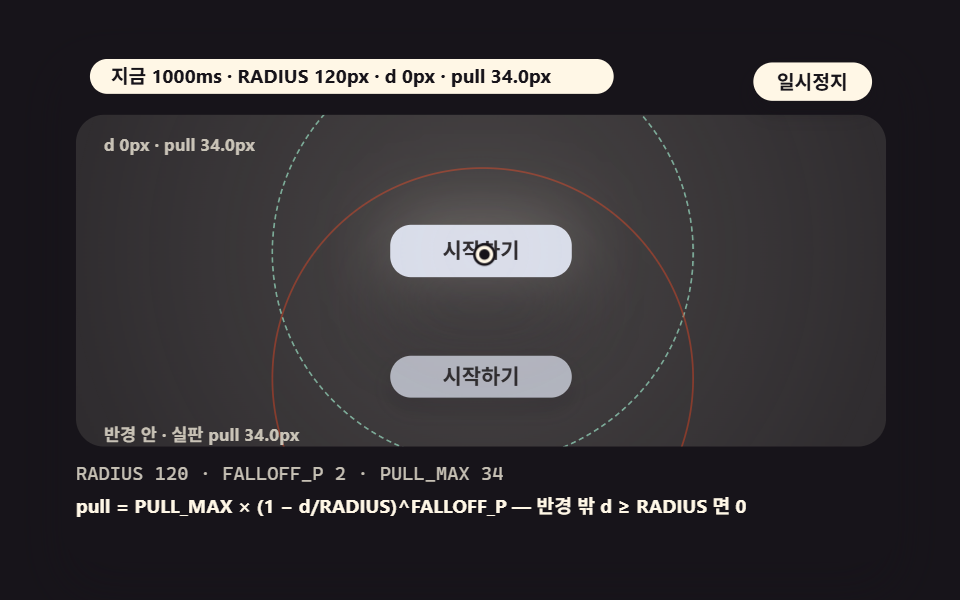 01 mag-cta-distance-falloff
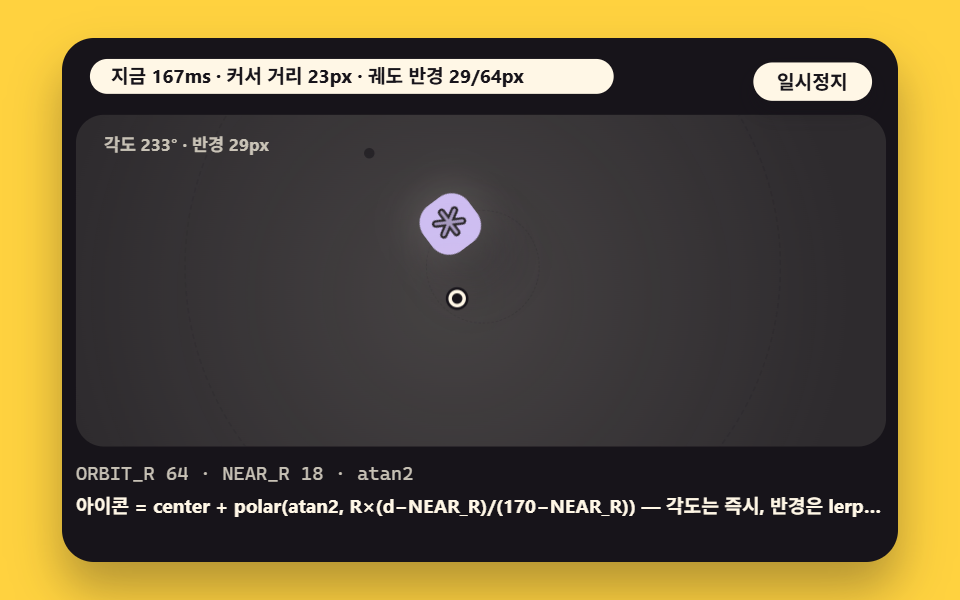 02 mag-icon-orbit-angle
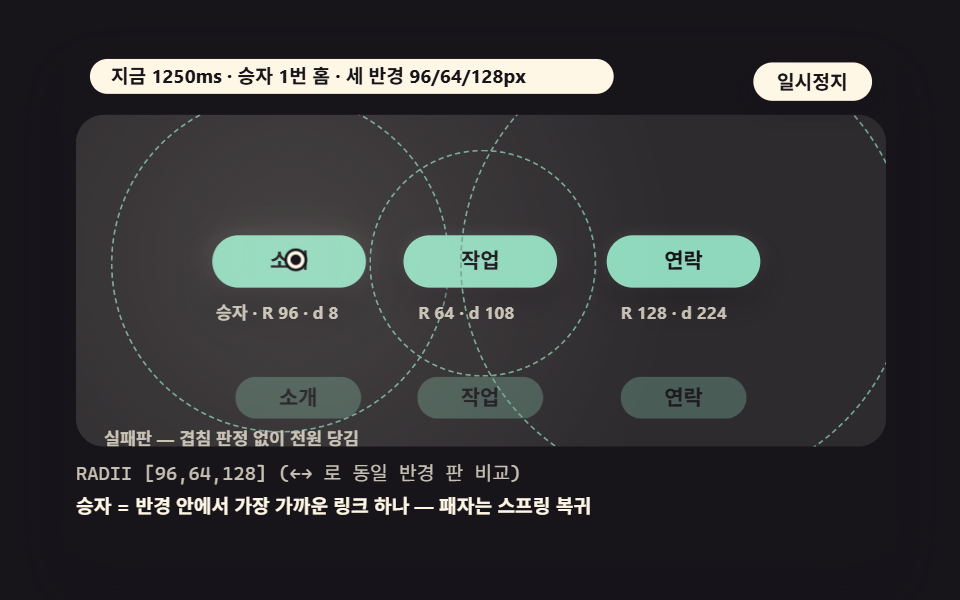 03 mag-nav-link-radii
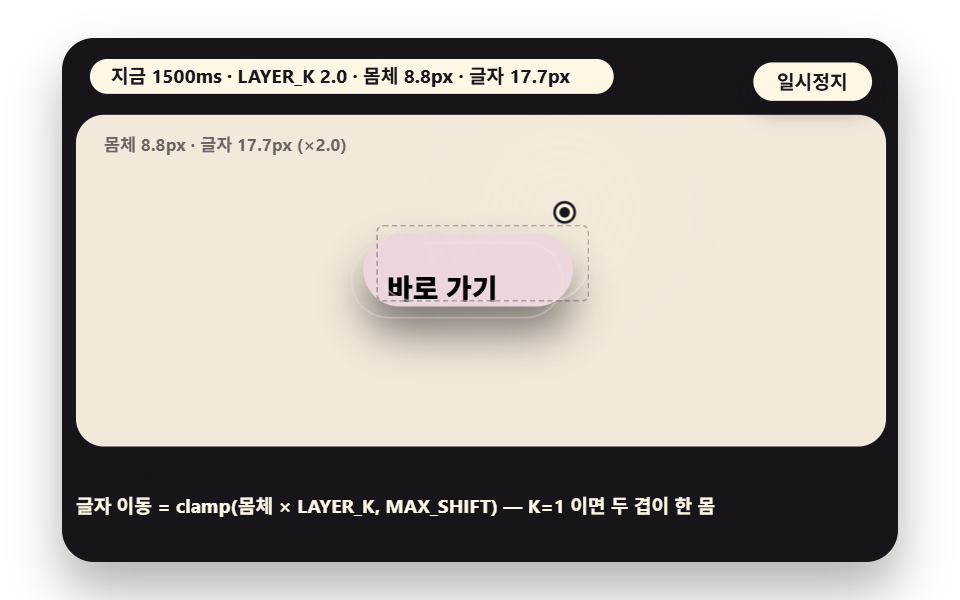 04 mag-text-layer-parallax
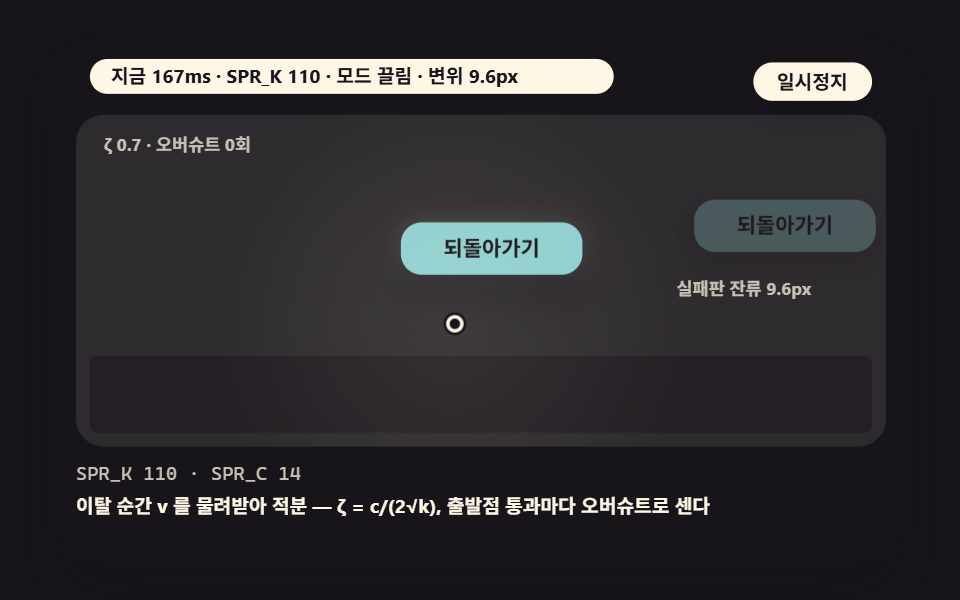 05 mag-spring-return-overshoot
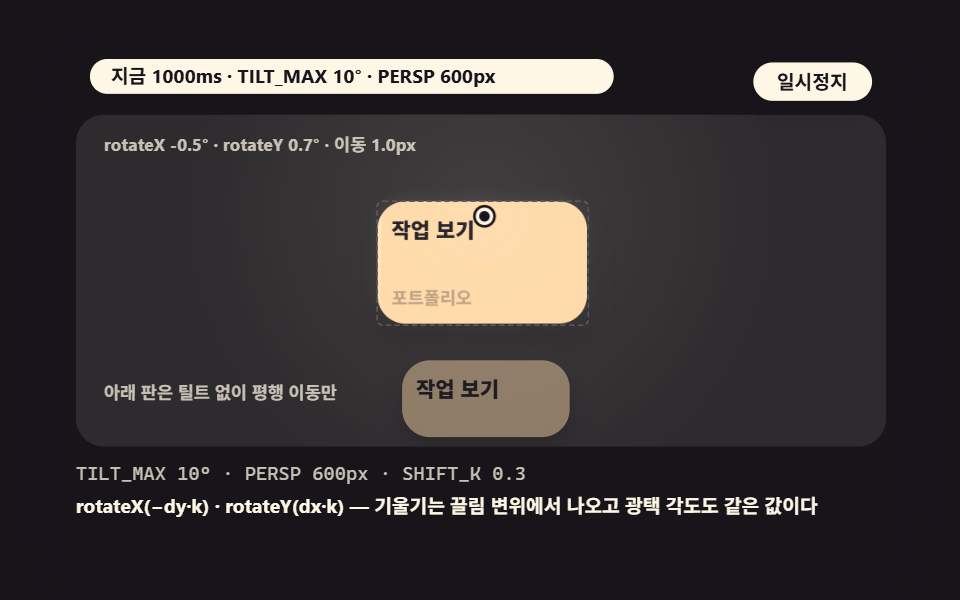 06 mag-card-tilt-pull
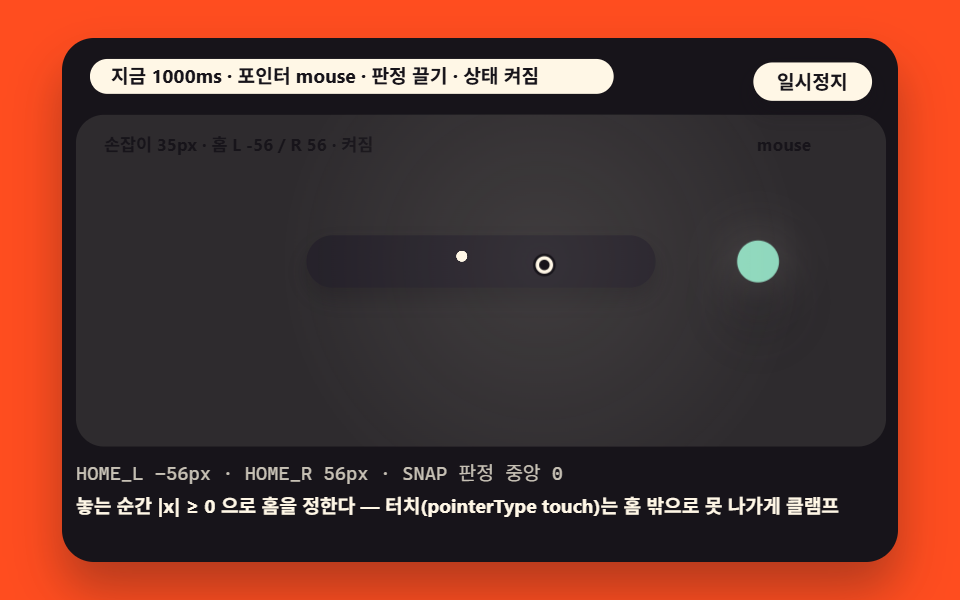 07 mag-switch-snap-verdict
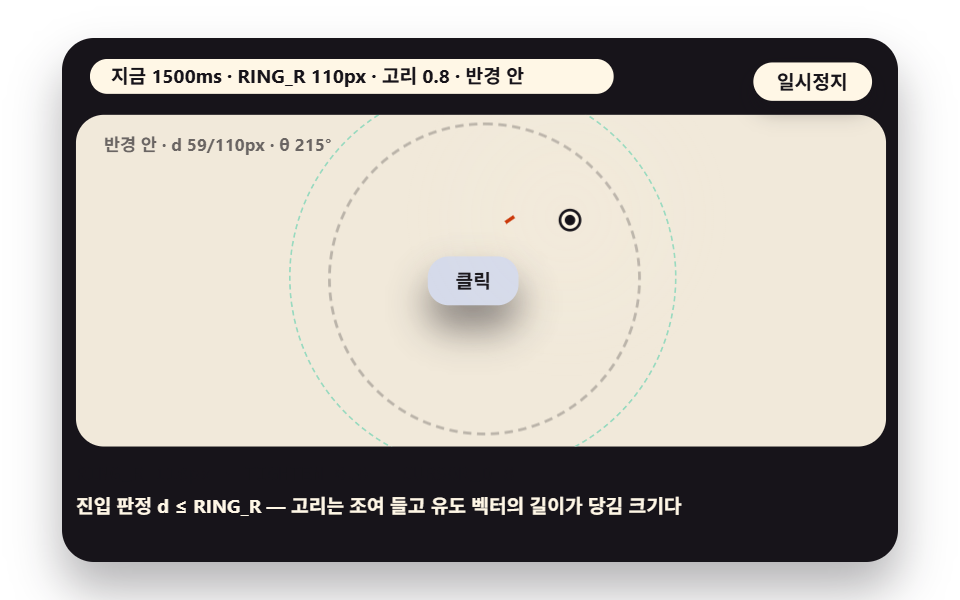 08 mag-ring-hit-visualize
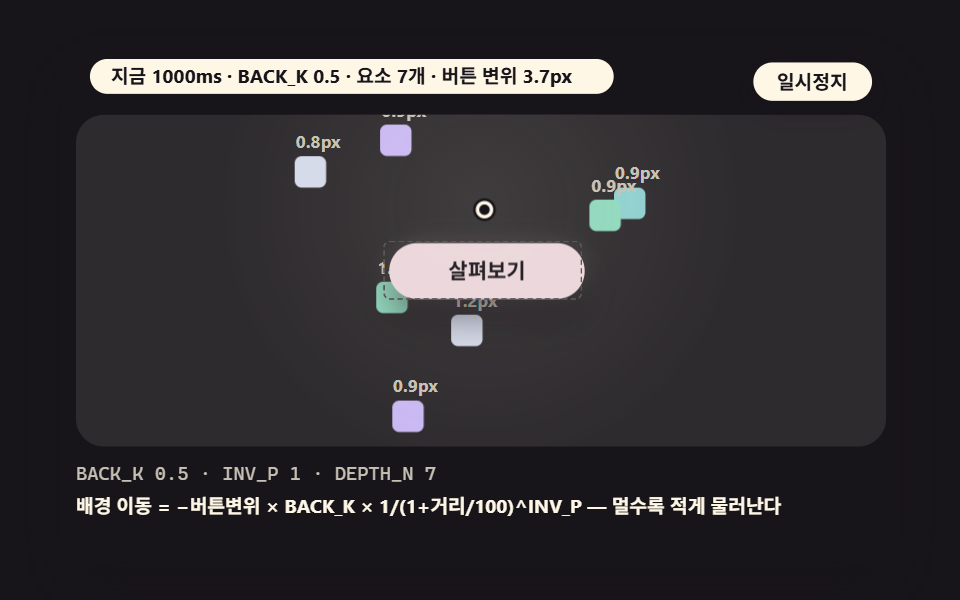 09 mag-backdrop-counter-parallax
- 01 A Base CTA That Pulls With a Distance Falloff Inside the Radius
- 02 An Icon Button Orbit That Follows the Cursor Angle on a Circle
- 03 Three Nav Links With Different Radii Each
- 04 A Two-Layer Parallax Where the Inner Label Travels Farther Than the Shell
- 05 A Spring Return That Overshoots Past the Origin on Release
- 06 A Card That Tilts in 3D While It Gets Pulled
- 07 A Magnetic Switch That Snaps to the Nearer Home
- 08 A Circular Hit Area That Shows Its Radius With a Tightening Ring
- 09 A Backdrop Whose Elements Retreat the Other Way
A magnetic button names one piece of processing: re-measuring the distance d between the cursor and the button's center every frame, and whenever d sits inside a radius R, sliding the button toward the cursor by an amount that the distance itself decides. A pure CSS transition never sees the cursor position, so it cannot produce a distance-proportional pull, and that is why the per-frame measurement belongs to JavaScript — every scene in this post is that single calculation wearing nine different coats.
The whole model fits in four values. The radius R is the border where the pull begins, the falloff exponent p decides how quickly the pull weakens with distance, the maximum displacement caps how far the button may slide, and the return trip splits into two flavors — lerp inertia or a damped spring. The nine scenes below differ only in how these four values are combined and dressed.
How the Numbers Were Measured
Two kinds of numbers appear in this post, and each is labeled as such. Accumulated area, mean intensity and moving frames are measurements: the render tool captured the 480×300 inner stage as 24 frames over 2 seconds and compared the 23 deltas between neighboring frames — accumulated area is the share of pixels that differed from the first frame at least once, mean intensity is the average color distance of those pixels on a 0 to 255 scale, and moving frames counts the frames that differed from the one right before.
The other kind is model arithmetic. Figures such as the pull at d=100px or the damping ratio ζ = c/(2√k) come from substituting the source constants into the formulas, and the screen those formulas produce was read back and compared against them. Whatever was not confirmed is on record as unconfirmed — the render environment is the single one stamped at the measurement time, and no other browser was re-measured for this post.
What the Nine Scenes Measured
| Scene | Accumulated area | Moving frames | Mean intensity |
|---|---|---|---|
| 01 Base CTA falloff | 25.5% | 23/23 | 77.3 |
| 02 Icon orbit | 19.8% | 23/23 | 108.6 |
| 03 Nav link radii | 23.8% | 23/23 | 60.1 |
| 04 Two-layer parallax | 10.5% | 23/23 | 84.1 |
| 05 Spring overshoot | 11.8% | 23/23 | 82.1 |
| 06 Card 3D tilt | 9.5% | 23/23 | 60.2 |
| 07 Switch snap | 10.3% | 23/23 | 89.4 |
| 08 Hit ring | 7.5% | 23/23 | 66.7 |
| 09 Reverse backdrop | 9.9% | 23/23 | 75.7 |
One line of reading: the widest accumulated area belongs to 01 at 25.5% and the narrowest to 08 at 7.5%, the highest mean intensity to 02 at 108.6 and the lowest to 03 at 60.1, and every one of the nine scenes moved in all 23 delta frames. These figures describe change inside the render box, not the performance of a live page.
Why the Pull Weakens With Distance — the Falloff Function Every Scene Shares
Four values set the pull: the distance d, the radius R, the falloff exponent p and the maximum displacement. Scene 01 carries RADIUS at 120, 200 and 120 pixels across its three arrow-key presets, FALLOFF_P at 2, 2 and 4, and PULL_MAX at 34. Drop the d ≥ R verdict and the pull survives outside the radius — that slip is exactly what the failing panel under the main button in 01 reproduces, ringed in red.
Two expressions of the same calculation ride along in every scene. A 192px field ring follows the cursor, scaling as 0.5 plus 2.2 times the normalized pull and fading in as 0.28 plus half the pull, so it vanishes the instant the cursor leaves the radius. The displacement-proportional shadow deepens from 8 to 32px with its alpha climbing from 0.45 to 0.80, drawn from the same pull value — the shadow's depth and halo are the pull wearing a different costume. The demo cursor rides a figure-eight path of ±155, ±34px that crosses the radius boundary over and over, so the exact cutoff at the border is on display every cycle.
01A Base CTA That Pulls With a Distance Falloff Inside the Radius
Demo and Explanation
This is the primary action button of a landing hero in its plainest form. Once the cursor enters the radius the button follows the cursor by the distance falloff, pulling weaker with distance and stopping dead outside the radius, while the small panel below is the failing one where the pull lingers past the border.
<main class="stage">
<div class="ez is-demo" id="ez">
  <div class="ez__in" data-role="inner">
    <div class="ez__pad" data-role="pad" tabindex="0" role="application" aria-label="Demo stage: Space or Enter pauses, R restarts, left and right arrows pick another value">
      <div class="ez__scene" data-role="scene" role="img" aria-label="Inside the hit radius the button follows by a distance falloff, while the failing version below keeps pulling outside the radius"></div>
      <p class="ez__status" data-role="status" aria-live="off">Scene ready</p>
      <p class="ez__reada" data-role="reada" aria-hidden="true"></p>
      <p class="ez__readb" data-role="readb" aria-hidden="true"></p>
      <div class="ez__ctrl">
        <button class="ez__pause" data-role="pause" type="button" aria-pressed="false">Pause</button>
      </div>
      <p class="ez__done" data-role="done" role="status" aria-live="polite"></p>
… (총 16줄 — 아래 「전체 코드」에서 원문 전체)
@use "../../../../site/static/demo-tokens" as *;
// 마그네틱 버튼 장면 공통 — 무대 4색 순환은 항목 scss 에서 @include stage 로 정한다
$panel: mix($subject-cream, $subject-ink, 10%);
$grid: mix($subject-cream, $subject-ink, 7%);
$line: mix($subject-cream, $subject-ink, 26%);
$dim: mix($subject-cream, $subject-ink, 76%);
// 파스텔 팔레트 — vivid 토큰(채도 .55+) 대신 이 값들을 쓴다 (BD26)
$pastel-blue: #d5daea; // $subject-blue 계열 파스텔
$pastel-rose: #ebd6db;
$pastel-mint: #8fd8bd;
… (총 283줄 — 아래 「전체 코드」에서 원문 전체).ez {
position: relative;
width: min(92vw, 160vh - 12.8vw);
aspect-ratio: 480/300;
margin: 0 auto;
border-radius: 16px;
overflow: hidden;
box-shadow: 0 14px 24px rgba(23, 20, 26, 0.32);
background: #17141a;
}
.ez__in {
… (총 310줄 — 아래 「전체 코드」에서 원문 전체)(function () {
const rootEl = document.getElementById("ez");
if (!rootEl) return;
main(rootEl);
function cx(s) { return s; }
function main(root) {
// 무대 좌표 — 안쪽 상자는 늘 480x300 이고 화면 크기에 맞춰 통째로 줄인다 (왼쪽 위 모서리 기준)
const W = 480;
const SW = 464; // 장면 폭 (480 - 좌우 8px)
const SH = 190; // 장면 높이
function clamp(v, lo, hi) { return v < lo ? lo : (v > hi ? hi : v); }
function lerp(a, b, k) { return a + (b - a) * k; }
… (총 370줄 — 아래 「전체 코드」에서 원문 전체)// CtaFalloff - 같은 항목 vanilla index.html 의 React 판. 같은 계산을 useEffect 안에서 돌린다
import { useEffect, useRef } from "react";
import styles from "./CtaFalloff.module.scss";
const cx = (s: string): string => s.split(" ").map((n) => styles[n] ?? n).join(" ");
function main(root: HTMLElement): (() => void) | undefined {
// 무대 좌표 — 안쪽 상자는 늘 480x300 이고 화면 크기에 맞춰 통째로 줄인다 (왼쪽 위 모서리 기준)
const W = 480;
const SW = 464; // 장면 폭 (480 - 좌우 8px)
const SH = 190; // 장면 높이
function clamp(v: number, lo: number, hi: number): number { return v < lo ? lo : (v > hi ? hi : v); }
… (총 355줄 — 아래 「전체 코드」에서 원문 전체)01 · A Base CTA That Pulls With a Distance Falloff Inside the Radius — Measured area 25.542% · moving frames 23/23Original by GODRICH · SCSS and React ship in the zip · See the password
Where to Look in the Code
This function is the base under all nine scenes, so it ships whole.
// distance falloff pull — valid only while d stays inside RADIUS, weakening with distance by the power p
    function pullAmt(d, radius, pullMax, p) {
        if (d >= radius) {
            return 0;
        }
        return pullMax * Math.pow(1 - d / radius, p);
    }
How Inertia Survives Any Frame Rate — lerp Multiplied by the Frame Delta
The trick behind inertia is multiplying the lerp ratio by the frame interval: Math.min(1, k*6) closes 6/60 of the remaining gap per frame on a 60Hz screen and 6/144 on a 144Hz screen, so the button chases at the same speed no matter the refresh rate. The demo cursor in this scene rides a Lissajous curve of ±120, ±52px, exercising the orbit from every direction.
In 02 the two governing values run separately. The icon's angle takes its atan2 direction around the shortest arc at once, while the orbit radius closes on a lerp — so when the cursor pulls away, the angle swings with it immediately and the orbit radius widens late. The two while loops folding the angle difference into the −π to π range are the shortest-arc core of the whole scene.
02An Icon Button Orbit That Follows the Cursor Angle on a Circle
Demo and Explanation
Floating action buttons and tool rings take this shape. The icon follows the cursor angle (atan2) around a circle, the orbit radius shrinks as the cursor nears and bottoms out at NEAR_R 18px, and the angle snaps along the shortest arc while the radius closes late with lerp inertia.
<main class="stage">
<div class="ez is-demo" id="ez">
  <div class="ez__in" data-role="inner">
    <div class="ez__pad" data-role="pad" tabindex="0" role="application" aria-label="Demo stage: Space or Enter pauses, R restarts, left and right arrows pick another value">
      <div class="ez__scene" data-role="scene" role="img" aria-label="An icon follows the cursor angle around a circle and the orbit radius shrinks as the cursor nears"></div>
      <p class="ez__status" data-role="status" aria-live="off">Scene ready</p>
      <p class="ez__reada" data-role="reada" aria-hidden="true"></p>
      <p class="ez__readb" data-role="readb" aria-hidden="true"></p>
      <div class="ez__ctrl">
        <button class="ez__pause" data-role="pause" type="button" aria-pressed="false">Pause</button>
      </div>
      <p class="ez__done" data-role="done" role="status" aria-live="polite"></p>
… (총 16줄 — 아래 「전체 코드」에서 원문 전체)
@use "../../../../site/static/demo-tokens" as *;
// 마그네틱 버튼 장면 공통 — 무대 4색 순환은 항목 scss 에서 @include stage 로 정한다
$panel: mix($subject-cream, $subject-ink, 10%);
$grid: mix($subject-cream, $subject-ink, 7%);
$line: mix($subject-cream, $subject-ink, 26%);
$dim: mix($subject-cream, $subject-ink, 76%);
// 파스텔 팔레트 — vivid 토큰(채도 .55+) 대신 이 값들을 쓴다 (BD26)
$pastel-blue: #d5daea; // $subject-blue 계열 파스텔
$pastel-rose: #ebd6db;
$pastel-mint: #8fd8bd;
… (총 290줄 — 아래 「전체 코드」에서 원문 전체).ez {
position: relative;
width: min(92vw, 160vh - 12.8vw);
aspect-ratio: 480/300;
margin: 0 auto;
border-radius: 16px;
overflow: hidden;
box-shadow: 0 14px 24px rgba(23, 20, 26, 0.32);
background: #17141a;
}
.ez__in {
… (총 312줄 — 아래 「전체 코드」에서 원문 전체)(function () {
const rootEl = document.getElementById("ez");
if (!rootEl) return;
main(rootEl);
function cx(s) { return s; }
function main(root) {
// 무대 좌표 — 안쪽 상자는 늘 480x300 이고 화면 크기에 맞춰 통째로 줄인다 (왼쪽 위 모서리 기준)
const W = 480;
const SW = 464; // 장면 폭 (480 - 좌우 8px)
const SH = 190; // 장면 높이
function clamp(v, lo, hi) { return v < lo ? lo : (v > hi ? hi : v); }
function lerp(a, b, k) { return a + (b - a) * k; }
… (총 366줄 — 아래 「전체 코드」에서 원문 전체)// IconOrbit - 같은 항목 vanilla index.html 의 React 판. 같은 계산을 useEffect 안에서 돌린다
import { useEffect, useRef } from "react";
import styles from "./IconOrbit.module.scss";
const cx = (s: string): string => s.split(" ").map((n) => styles[n] ?? n).join(" ");
function main(root: HTMLElement): (() => void) | undefined {
// 무대 좌표 — 안쪽 상자는 늘 480x300 이고 화면 크기에 맞춰 통째로 줄인다 (왼쪽 위 모서리 기준)
const W = 480;
const SW = 464; // 장면 폭 (480 - 좌우 8px)
const SH = 190; // 장면 높이
function clamp(v: number, lo: number, hi: number): number { return v < lo ? lo : (v > hi ? hi : v); }
… (총 352줄 — 아래 「전체 코드」에서 원문 전체)02 · An Icon Button Orbit That Follows the Cursor Angle on a Circle — Measured area 19.818% · moving frames 23/23Original by GODRICH · SCSS and React ship in the zip · See the password
Where to Look in the Code
The angle is instant while the radius keeps its lerp inertia, and the two coefficients are three lines apart.
        const ang = Math.atan2(dy, dx);
        // the angle is instant (shortest arc) — the radius keeps lerp inertia
        let da = ang - angC;
        while (da > Math.PI) {
            da -= Math.PI * 2;
        }
        while (da < -Math.PI) {
            da += Math.PI * 2;
        }
        angC += da * Math.min(1, k * 3);
        const target = ORBIT_R[pi2] * clamp((d - NEAR_R) / (170 - NEAR_R), 0, 1);
        radC = lerp(radC, target, Math.min(1, k * 6));
On Release It Springs Past the Origin — Overshoot, Ringing and Settle
Two constants carry the return trip of this post: SPR_K at 110, 240 and 110 across the presets, and SPR_C fixed at 14. The damping ratio ζ = c/(2√k) lands at 0.67 for k 110 and 0.45 for k 240 — the stiffer spring overshoots wider past the origin and rings faster, at ωd = √k·√(1−ζ²), roughly 7.9 versus 13.9 rad/s.
Below the stage in 05, a displacement strip 448px wide plots x(t) as the oscillation happens, and the failing panel keeps its drag residue on screen for seconds. Overshoot counts each crossing of the origin — every sign flip adds one — and settle is stamped at the last moment the position came to rest inside ±0.5px, not the first moment it arrived. The failing version only moves its target to 0 on exit and crawls home on a slow lerp of k 2.2 per frame, which is why its pull hangs around so long.
05A Spring Return That Overshoots Past the Origin on Release
Demo and Explanation
This is the standard plate for interactions that must settle home without a miss. When the cursor leaves the radius the button returns on a damped spring, crossing the origin once or twice, with the ringing frequency and the damping ratio visible on screen.
<main class="stage">
<div class="ez is-demo" id="ez">
  <div class="ez__in" data-role="inner">
    <div class="ez__pad" data-role="pad" tabindex="0" role="application" aria-label="Demo stage: Space or Enter pauses, R restarts, left and right arrows pick another value">
      <div class="ez__scene" data-role="scene" role="img" aria-label="When the cursor leaves the radius the button springs back past the origin, the ringing drawn in a plot beside it"></div>
      <p class="ez__status" data-role="status" aria-live="off">Scene ready</p>
      <p class="ez__reada" data-role="reada" aria-hidden="true"></p>
      <p class="ez__readb" data-role="readb" aria-hidden="true"></p>
      <div class="ez__ctrl">
        <button class="ez__pause" data-role="pause" type="button" aria-pressed="false">Pause</button>
      </div>
      <p class="ez__done" data-role="done" role="status" aria-live="polite"></p>
… (총 16줄 — 아래 「전체 코드」에서 원문 전체)
@use "../../../../site/static/demo-tokens" as *;
// 마그네틱 버튼 장면 공통 — 무대 4색 순환은 항목 scss 에서 @include stage 로 정한다
$panel: mix($subject-cream, $subject-ink, 10%);
$grid: mix($subject-cream, $subject-ink, 7%);
$line: mix($subject-cream, $subject-ink, 26%);
$dim: mix($subject-cream, $subject-ink, 76%);
// 파스텔 팔레트 — vivid 토큰(채도 .55+) 대신 이 값들을 쓴다 (BD26)
$pastel-blue: #d5daea; // $subject-blue 계열 파스텔
$pastel-rose: #ebd6db;
$pastel-mint: #8fd8bd;
… (총 298줄 — 아래 「전체 코드」에서 원문 전체).ez {
position: relative;
width: min(92vw, 160vh - 12.8vw);
aspect-ratio: 480/300;
margin: 0 auto;
border-radius: 16px;
overflow: hidden;
box-shadow: 0 14px 24px rgba(23, 20, 26, 0.32);
background: #17141a;
}
.ez__in {
… (총 328줄 — 아래 「전체 코드」에서 원문 전체)(function () {
const rootEl = document.getElementById("ez");
if (!rootEl) return;
main(rootEl);
function cx(s) { return s; }
function main(root) {
// 무대 좌표 — 안쪽 상자는 늘 480x300 이고 화면 크기에 맞춰 통째로 줄인다 (왼쪽 위 모서리 기준)
const W = 480;
const SW = 464; // 장면 폭 (480 - 좌우 8px)
const SH = 190; // 장면 높이
function clamp(v, lo, hi) { return v < lo ? lo : (v > hi ? hi : v); }
function lerp(a, b, k) { return a + (b - a) * k; }
… (총 429줄 — 아래 「전체 코드」에서 원문 전체)// SpringOvershoot - 같은 항목 vanilla index.html 의 React 판. 같은 계산을 useEffect 안에서 돌린다
import { useEffect, useRef } from "react";
import styles from "./SpringOvershoot.module.scss";
const cx = (s: string): string => s.split(" ").map((n) => styles[n] ?? n).join(" ");
function main(root: HTMLElement): (() => void) | undefined {
// 무대 좌표 — 안쪽 상자는 늘 480x300 이고 화면 크기에 맞춰 통째로 줄인다 (왼쪽 위 모서리 기준)
const W = 480;
const SW = 464; // 장면 폭 (480 - 좌우 8px)
const SH = 190; // 장면 높이
function clamp(v: number, lo: number, hi: number): number { return v < lo ? lo : (v > hi ? hi : v); }
… (총 405줄 — 아래 「전체 코드」에서 원문 전체)05 · A Spring Return That Overshoots Past the Origin on Release — Measured area 11.829% · moving frames 23/23Original by GODRICH · SCSS and React ship in the zip · See the password
Where to Look in the Code
A spring is integration, not a property tween — one step derives velocity from acceleration and position from velocity, and the exit branch hands position and velocity to the integrator in the same breath.
// one damped-spring step (semi-implicit Euler) — integration, not a property tween
// k: stiffness (proportional to N/m) · c: damping coefficient · dt: fixed time step (seconds)
    function spring(x, v, tx, k, c, dt) {
        const a = -k * (x - tx) - c * v;
        const v2 = v + a * dt;
        return [x + v2 * dt, v2];
    }
                pos5[0] = lerp(pos5[0], tx, Math.min(1, dt * 14));
                pos5[1] = lerp(pos5[1], ty, Math.min(1, dt * 14));
                // the failing version shares the same lerp pull
                pos5f[0] = pos5[0];
                pos5f[1] = pos5[1];
            else {
                // exit moment — the healthy version hands off to the spring integrator
                mode5 = 'spring';
                leaveT = t5;
                settleT = -1;
                osc = 0;
                vel5 = [(pos5[0] / Math.max(0.001, dt)) * 0.02, (pos5[1] / Math.max(0.001, dt)) * 0.02];
    }
        if (mode5 === 'spring') {
            const r0 = spring(pos5[0], vel5[0], 0, SPR_K[pi5], SPR_C, dt);
            const r1 = spring(pos5[1], vel5[1], 0, SPR_K[pi5], SPR_C, dt);
            const px = pos5[0];
            const py = pos5[1];
            pos5 = [r0[0], r1[0]];
            vel5 = [r0[1], r1[1]];
            // a sign flip means the origin was crossed (overshoot)
            if (px * pos5[0] < 0 || py * pos5[1] < 0) {
                osc += 1;
            }
            const mag = Math.hypot(pos5[0], pos5[1]);
            if (mag <= 0.5) {
                settleT = t5;
            }
The Label Travels Farther Than the Shell — Layer Ratios and Ghost Trails
Five ghosts trail the label at 3-frame intervals, fading from alpha 0.34 down to 0.10, so when the shell has already stopped but the label is still traveling, the ghosts hold that difference on screen as a visible streak. Switching the arrow keys to the K=1 preset — where the ratio collapses both layers into a single body — shows the exact moment the parallax disappears, because the ghosts and the label suddenly share one position.
04A Two-Layer Parallax Where the Inner Label Travels Farther Than the Shell
Demo and Explanation
Accent CTAs and portfolio links suit this plate. The button body and its label move at different ratios, the label pushed up to twice as far as the shell, and the trail of ghosts makes the label's route legible.
<main class="stage">
<div class="ez is-demo" id="ez">
  <div class="ez__in" data-role="inner">
    <div class="ez__pad" data-role="pad" tabindex="0" role="application" aria-label="Demo stage: Space or Enter pauses, R restarts, left and right arrows pick another value">
      <div class="ez__scene" data-role="scene" role="img" aria-label="A two-layer parallax where the inner label travels farther than the shell, its trail shown as ghosts"></div>
      <p class="ez__status" data-role="status" aria-live="off">Scene ready</p>
      <p class="ez__reada" data-role="reada" aria-hidden="true"></p>
      <p class="ez__readb" data-role="readb" aria-hidden="true"></p>
      <div class="ez__ctrl">
        <button class="ez__pause" data-role="pause" type="button" aria-pressed="false">Pause</button>
      </div>
      <p class="ez__done" data-role="done" role="status" aria-live="polite"></p>
… (총 16줄 — 아래 「전체 코드」에서 원문 전체)
@use "../../../../site/static/demo-tokens" as *;
// 마그네틱 버튼 장면 공통 — 무대 4색 순환은 항목 scss 에서 @include stage 로 정한다
$panel: mix($subject-cream, $subject-ink, 10%);
$grid: mix($subject-cream, $subject-ink, 7%);
$line: mix($subject-cream, $subject-ink, 26%);
$dim: mix($subject-cream, $subject-ink, 76%);
// 파스텔 팔레트 — vivid 토큰(채도 .55+) 대신 이 값들을 쓴다 (BD26)
$pastel-blue: #d5daea; // $subject-blue 계열 파스텔
$pastel-rose: #ebd6db;
$pastel-mint: #8fd8bd;
… (총 300줄 — 아래 「전체 코드」에서 원문 전체).ez {
position: relative;
width: min(92vw, 160vh - 12.8vw);
aspect-ratio: 480/300;
margin: 0 auto;
border-radius: 16px;
overflow: hidden;
box-shadow: 0 14px 24px rgba(23, 20, 26, 0.32);
background: #17141a;
}
.ez__in {
… (총 328줄 — 아래 「전체 코드」에서 원문 전체)(function () {
const rootEl = document.getElementById("ez");
if (!rootEl) return;
main(rootEl);
function cx(s) { return s; }
function main(root) {
// 무대 좌표 — 안쪽 상자는 늘 480x300 이고 화면 크기에 맞춰 통째로 줄인다 (왼쪽 위 모서리 기준)
const W = 480;
const SW = 464; // 장면 폭 (480 - 좌우 8px)
const SH = 190; // 장면 높이
function clamp(v, lo, hi) { return v < lo ? lo : (v > hi ? hi : v); }
function lerp(a, b, k) { return a + (b - a) * k; }
… (총 375줄 — 아래 「전체 코드」에서 원문 전체)// TextParallax - 같은 항목 vanilla index.html 의 React 판. 같은 계산을 useEffect 안에서 돌린다
import { useEffect, useRef } from "react";
import styles from "./TextParallax.module.scss";
const cx = (s: string): string => s.split(" ").map((n) => styles[n] ?? n).join(" ");
function main(root: HTMLElement): (() => void) | undefined {
// 무대 좌표 — 안쪽 상자는 늘 480x300 이고 화면 크기에 맞춰 통째로 줄인다 (왼쪽 위 모서리 기준)
const W = 480;
const SW = 464; // 장면 폭 (480 - 좌우 8px)
const SH = 190; // 장면 높이
function clamp(v: number, lo: number, hi: number): number { return v < lo ? lo : (v > hi ? hi : v); }
… (총 362줄 — 아래 「전체 코드」에서 원문 전체)04 · A Two-Layer Parallax Where the Inner Label Travels Farther Than the Shell — Measured area 10.531% · moving frames 23/23Original by GODRICH · SCSS and React ship in the zip · See the password
Where to Look in the Code
The shell keeps a plain 30px falloff pull while the label rides that value times LAYER_K (2, 1, 2.6) clamped inside MAX_SHIFT 40px.
        const bx = a * mx;
        const by = a * my;
        const lx = clamp(bx * K, -MAX_SHIFT, MAX_SHIFT);
        const ly = clamp(by * K, -MAX_SHIFT, MAX_SHIFT);
        shell.style.transform = 'translate(' + f1(bx) + 'px,' + f1(by) + 'px)';
        shadowAt(shell, Math.hypot(bx, by), 30);
        txt.style.transform = 'translate(' + f1(lx) + 'px,' + f1(ly) + 'px)';
// trail ghosts — recent frames of the label position kept as fading alpha
        ghostV.unshift([lx, ly]);
        ghostV.length = Math.min(ghostV.length, GHOST_N * 3);
        for (let i = 0; i < ghost.length; i += 1) {
            const g = ghostV[(i + 1) * 3];
            if (g) {
                ghost[i].style.transform = 'translate(' + f1(g[0]) + 'px,' + f1(g[1]) + 'px)';
    }
Outside the Radius Nothing Should Happen — Designing the Hit Area
The first question of hit-area design is how wide the radius should be, and scene 08 exists to put the radius itself on screen, walking RING_R through 110, 88 and 132 pixels on the arrow keys. The wider the radius, the larger the region that reacts — and the higher the risk of overlapping a neighbor, which is exactly why a navigation row like 03 needs its overlap verdict alongside.
Because 08 demonstrates that an invisible radius hides the moment the pull begins, a device that announces the hit area pays for itself. The orange guide vector points from the cursor toward the center with its length set to the pull on a 30px scale, so the shortening bar is the falloff read by eye, and the entry verdict with the live d and θ sits in the read line under the stage.
08A Circular Hit Area That Shows Its Radius With a Tightening Ring
Demo and Explanation
Onboarding screens and any UI explaining the radius idea fit here. The hit radius always shows as a faint ring, and when the cursor enters, the ring tightens and the cursor dot leans toward the button center.
<main class="stage">
<div class="ez is-demo" id="ez">
  <div class="ez__in" data-role="inner">
    <div class="ez__pad" data-role="pad" tabindex="0" role="application" aria-label="Demo stage: Space or Enter pauses, R restarts, left and right arrows pick another value">
      <div class="ez__scene" data-role="scene" role="img" aria-label="The hit radius always shows as a faint ring; when the cursor enters it tightens and a guide vector points to the center"></div>
      <p class="ez__status" data-role="status" aria-live="off">Scene ready</p>
      <p class="ez__reada" data-role="reada" aria-hidden="true"></p>
      <p class="ez__readb" data-role="readb" aria-hidden="true"></p>
      <div class="ez__ctrl">
        <button class="ez__pause" data-role="pause" type="button" aria-pressed="false">Pause</button>
      </div>
      <p class="ez__done" data-role="done" role="status" aria-live="polite"></p>
… (총 16줄 — 아래 「전체 코드」에서 원문 전체)
@use "../../../../site/static/demo-tokens" as *;
// 마그네틱 버튼 장면 공통 — 무대 4색 순환은 항목 scss 에서 @include stage 로 정한다
$panel: mix($subject-cream, $subject-ink, 10%);
$grid: mix($subject-cream, $subject-ink, 7%);
$line: mix($subject-cream, $subject-ink, 26%);
$dim: mix($subject-cream, $subject-ink, 76%);
// 파스텔 팔레트 — vivid 토큰(채도 .55+) 대신 이 값들을 쓴다 (BD26)
$pastel-blue: #d5daea; // $subject-blue 계열 파스텔
$pastel-rose: #ebd6db;
$pastel-mint: #8fd8bd;
… (총 305줄 — 아래 「전체 코드」에서 원문 전체).ez {
position: relative;
width: min(92vw, 160vh - 12.8vw);
aspect-ratio: 480/300;
margin: 0 auto;
border-radius: 16px;
overflow: hidden;
box-shadow: 0 14px 24px rgba(23, 20, 26, 0.32);
background: #17141a;
}
.ez__in {
… (총 333줄 — 아래 「전체 코드」에서 원문 전체)(function () {
const rootEl = document.getElementById("ez");
if (!rootEl) return;
main(rootEl);
function cx(s) { return s; }
function main(root) {
// 무대 좌표 — 안쪽 상자는 늘 480x300 이고 화면 크기에 맞춰 통째로 줄인다 (왼쪽 위 모서리 기준)
const W = 480;
const SW = 464; // 장면 폭 (480 - 좌우 8px)
const SH = 190; // 장면 높이
function clamp(v, lo, hi) { return v < lo ? lo : (v > hi ? hi : v); }
function lerp(a, b, k) { return a + (b - a) * k; }
… (총 374줄 — 아래 「전체 코드」에서 원문 전체)// RingHitVisualize - 같은 항목 vanilla index.html 의 React 판. 같은 계산을 useEffect 안에서 돌린다
import { useEffect, useRef } from "react";
import styles from "./RingHitVisualize.module.scss";
const cx = (s: string): string => s.split(" ").map((n) => styles[n] ?? n).join(" ");
function main(root: HTMLElement): (() => void) | undefined {
// 무대 좌표 — 안쪽 상자는 늘 480x300 이고 화면 크기에 맞춰 통째로 줄인다 (왼쪽 위 모서리 기준)
const W = 480;
const SW = 464; // 장면 폭 (480 - 좌우 8px)
const SH = 190; // 장면 높이
function clamp(v: number, lo: number, hi: number): number { return v < lo ? lo : (v > hi ? hi : v); }
… (총 361줄 — 아래 「전체 코드」에서 원문 전체)08 · A Circular Hit Area That Shows Its Radius With a Tightening Ring — Measured area 7.5% · moving frames 23/23Original by GODRICH · SCSS and React ship in the zip · See the password
Where to Look in the Code
The entry verdict itself is a single comparison, d ≤ RING_R, and everything else in the block follows from it.
        const was = inside8;
        inside8 = d <= R;
        if (inside8 !== was) { }
        rC = lerp(rC, inside8 ? TIGHTEN : 1, Math.min(1, dt * 8));
        ring2.style.transform = 'scale(' + f1(rC) + ')';
        const a = pullAmt(d, R, 26, 2);
        let mx = 0;
        let my = 0;
        if (d > 0.001) {
            mx = dx / d;
            my = dy / d;
        }
        btn8.style.transform = 'translate(' + f1(a * mx) + 'px,' + f1(a * my) + 'px)';
        shadowAt(btn8, a, 26);
        // guide vector — from the cursor dot toward the center; length = pull magnitude
        if (vec) {
What Happens on Touch — Branching on the Pointer Type
Touch devices have no cursor, so the hover-radius form of the effect loses its meaning there. Two replacement paths exist: switching to drag with a snap verdict the way 07 does, or emphasizing the moment of press with a tap highlight — and when 07's handle is dragged by touch, the target is clamped inside the homes so the knob cannot stray outside them.
A live tag at the top right of the stage reports whether the input currently arrives as mouse, touch or pen, and a real touch overwrites the tag and the clamp on the spot even on a page opened with a mouse. The timetable drags the handle left to right and back twice per cycle, so two snap verdicts happen on schedule.
07A Magnetic Switch That Snaps to the Nearer Home
Demo and Explanation
Settings switches and two-state picks live on this plate. Between two homes the handle follows the cursor, and on release a snap verdict pulls it onto the nearer home with no value resting in between.
<main class="stage">
<div class="ez is-demo" id="ez">
  <div class="ez__in" data-role="inner">
    <div class="ez__pad" data-role="pad" tabindex="0" role="application" aria-label="Demo stage: Space or Enter pauses, R restarts, left and right arrows pick another value">
      <div class="ez__scene" data-role="scene" role="img" aria-label="Between two homes the handle follows the cursor, and on release it snaps onto the nearer home"></div>
      <p class="ez__status" data-role="status" aria-live="off">Scene ready</p>
      <p class="ez__reada" data-role="reada" aria-hidden="true"></p>
      <p class="ez__readb" data-role="readb" aria-hidden="true"></p>
      <div class="ez__ctrl">
        <button class="ez__pause" data-role="pause" type="button" aria-pressed="false">Pause</button>
      </div>
      <p class="ez__done" data-role="done" role="status" aria-live="polite"></p>
… (총 16줄 — 아래 「전체 코드」에서 원문 전체)
@use "../../../../site/static/demo-tokens" as *;
// 마그네틱 버튼 장면 공통 — 무대 4색 순환은 항목 scss 에서 @include stage 로 정한다
$panel: mix($subject-cream, $subject-ink, 10%);
$grid: mix($subject-cream, $subject-ink, 7%);
$line: mix($subject-cream, $subject-ink, 26%);
$dim: mix($subject-cream, $subject-ink, 76%);
// 파스텔 팔레트 — vivid 토큰(채도 .55+) 대신 이 값들을 쓴다 (BD26)
$pastel-blue: #d5daea; // $subject-blue 계열 파스텔
$pastel-rose: #ebd6db;
$pastel-mint: #8fd8bd;
… (총 297줄 — 아래 「전체 코드」에서 원문 전체).ez {
position: relative;
width: min(92vw, 160vh - 12.8vw);
aspect-ratio: 480/300;
margin: 0 auto;
border-radius: 16px;
overflow: hidden;
box-shadow: 0 14px 24px rgba(23, 20, 26, 0.32);
background: #17141a;
}
.ez__in {
… (총 310줄 — 아래 「전체 코드」에서 원문 전체)(function () {
const rootEl = document.getElementById("ez");
if (!rootEl) return;
main(rootEl);
function cx(s) { return s; }
function main(root) {
// 무대 좌표 — 안쪽 상자는 늘 480x300 이고 화면 크기에 맞춰 통째로 줄인다 (왼쪽 위 모서리 기준)
const W = 480;
const SW = 464; // 장면 폭 (480 - 좌우 8px)
const SH = 190; // 장면 높이
function clamp(v, lo, hi) { return v < lo ? lo : (v > hi ? hi : v); }
function lerp(a, b, k) { return a + (b - a) * k; }
… (총 417줄 — 아래 「전체 코드」에서 원문 전체)// SwitchSnap - 같은 항목 vanilla index.html 의 React 판. 같은 계산을 useEffect 안에서 돌린다
import { useEffect, useRef } from "react";
import styles from "./SwitchSnap.module.scss";
const cx = (s: string): string => s.split(" ").map((n) => styles[n] ?? n).join(" ");
function main(root: HTMLElement): (() => void) | undefined {
// 무대 좌표 — 안쪽 상자는 늘 480x300 이고 화면 크기에 맞춰 통째로 줄인다 (왼쪽 위 모서리 기준)
const W = 480;
const SW = 464; // 장면 폭 (480 - 좌우 8px)
const SH = 190; // 장면 높이
function clamp(v: number, lo: number, hi: number): number { return v < lo ? lo : (v > hi ? hi : v); }
… (총 385줄 — 아래 「전체 코드」에서 원문 전체)07 · A Magnetic Switch That Snaps to the Nearer Home — Measured area 10.319% · moving frames 23/23Original by GODRICH · SCSS and React ship in the zip · See the password
Where to Look in the Code
During the drag an lerp of k 16 per frame tracks the target; on release a spring of k 320 and c 18 snaps home, and touch input additionally clamps the target inside the two homes at HOME_L −56 and HOME_R +56.
        if (dragging) {
            x7 = lerp(x7, target7, Math.min(1, dt * 16));
        }
        else {
            const r = spring(x7, v7, target7, 320, 18, dt);
            x7 = r[0];
            v7 = r[1];
            if (snapT < 0 && Math.abs(x7 - target7) <= 0.5) {
                snapT = t7;
            }
        }
    function release7() {
        // snap verdict — the nearer side of center (0); no value rests in between
        target7 = x7 >= 0 ? HOME_R : HOME_L;
        dragging = false;
        snapT = -1;
    }
            else if (down7) {
                dragging = true;
                target7 = clamp(ptr7[0] - 232, HOME_L - 10, HOME_R + 10);
                if (ptrType7 === 'touch') {
                    target7 = clamp(target7, HOME_L, HOME_R);
    }
Where These Scenes Break — Three Failing Panels and the Habits Behind Them
A failing panel is not decoration; it is the shortest possible reproduction of one trap, placed beside the healthy version so both play in the same frame, and three of the nine scenes carry one.
The first break drops the outside-radius verdict. Scene 01's failing panel applies (1−d/R)^p beyond the radius with no cutoff, and because the exponent is even — 2 in two presets, 4 in the third — the absolute value grows again as the cursor moves farther away, so the pull survives past the border while the healthy version reads exactly 0 there and lets the field ring vanish with it.
The second break hands nothing to the spring on exit. Scene 05's failing version only moves its target to 0 and crawls on a lerp of k 2.2 per frame, so the drag residue lingers for seconds after the cursor is gone; the healthy version converts position into velocity at the exit moment and lets the integrator carry the button home with a natural throw.
The third break is the missing overlap verdict in 03 below. Without the nearest-link verdict, every link inside its own radius pulls at once, and in the middle of the row the two overlapping links end up sitting on top of each other — where the healthy version crowns one winner for the 22px pull and sends the rest home.
Two habits from the source round the section out. Every scene ties its listeners and its frame loop to one AbortController and tears them down together, the same shape as a React useEffect cleanup, so leaving a screen clears the loop with it. And the demo clock reads the currentTime of a single CSS animation rather than wall time, with no Date.now() or Math.random() anywhere, so the same timestamp always draws the same picture — reader code should do the same work with the rAF callback timestamp and clamp dt at 50ms, because the first frame after a hidden tab returns can stretch to hundreds of milliseconds and send an unclamped spring into a runaway.
03Three Nav Links With Different Radii Each
Demo and Explanation
Header navigation and footer link groups take this plate. Three links each pull the cursor with their own radius (96, 64, 128), and where the radii overlap, the nearer one wins.
<main class="stage">
<div class="ez is-demo" id="ez">
  <div class="ez__in" data-role="inner">
    <div class="ez__pad" data-role="pad" tabindex="0" role="application" aria-label="Demo stage: Space or Enter pauses, R restarts, left and right arrows pick another value">
      <div class="ez__scene" data-role="scene" role="img" aria-label="Three nav links with different radii pull the cursor, and where they overlap the nearer one wins"></div>
      <p class="ez__status" data-role="status" aria-live="off">Scene ready</p>
      <p class="ez__reada" data-role="reada" aria-hidden="true"></p>
      <p class="ez__readb" data-role="readb" aria-hidden="true"></p>
      <div class="ez__ctrl">
        <button class="ez__pause" data-role="pause" type="button" aria-pressed="false">Pause</button>
      </div>
      <p class="ez__done" data-role="done" role="status" aria-live="polite"></p>
… (총 16줄 — 아래 「전체 코드」에서 원문 전체)
@use "../../../../site/static/demo-tokens" as *;
// 마그네틱 버튼 장면 공통 — 무대 4색 순환은 항목 scss 에서 @include stage 로 정한다
$panel: mix($subject-cream, $subject-ink, 10%);
$grid: mix($subject-cream, $subject-ink, 7%);
$line: mix($subject-cream, $subject-ink, 26%);
$dim: mix($subject-cream, $subject-ink, 76%);
// 파스텔 팔레트 — vivid 토큰(채도 .55+) 대신 이 값들을 쓴다 (BD26)
$pastel-blue: #d5daea; // $subject-blue 계열 파스텔
$pastel-rose: #ebd6db;
$pastel-mint: #8fd8bd;
… (총 278줄 — 아래 「전체 코드」에서 원문 전체).ez {
position: relative;
width: min(92vw, 160vh - 12.8vw);
aspect-ratio: 480/300;
margin: 0 auto;
border-radius: 16px;
overflow: hidden;
box-shadow: 0 14px 24px rgba(23, 20, 26, 0.32);
background: #17141a;
}
.ez__in {
… (총 298줄 — 아래 「전체 코드」에서 원문 전체)(function () {
const rootEl = document.getElementById("ez");
if (!rootEl) return;
main(rootEl);
function cx(s) { return s; }
function main(root) {
// 무대 좌표 — 안쪽 상자는 늘 480x300 이고 화면 크기에 맞춰 통째로 줄인다 (왼쪽 위 모서리 기준)
const W = 480;
const SW = 464; // 장면 폭 (480 - 좌우 8px)
const SH = 190; // 장면 높이
function clamp(v, lo, hi) { return v < lo ? lo : (v > hi ? hi : v); }
function lerp(a, b, k) { return a + (b - a) * k; }
… (총 386줄 — 아래 「전체 코드」에서 원문 전체)// NavRadii - 같은 항목 vanilla index.html 의 React 판. 같은 계산을 useEffect 안에서 돌린다
import { useEffect, useRef } from "react";
import styles from "./NavRadii.module.scss";
const cx = (s: string): string => s.split(" ").map((n) => styles[n] ?? n).join(" ");
function main(root: HTMLElement): (() => void) | undefined {
// 무대 좌표 — 안쪽 상자는 늘 480x300 이고 화면 크기에 맞춰 통째로 줄인다 (왼쪽 위 모서리 기준)
const W = 480;
const SW = 464; // 장면 폭 (480 - 좌우 8px)
const SH = 190; // 장면 높이
function clamp(v: number, lo: number, hi: number): number { return v < lo ? lo : (v > hi ? hi : v); }
… (총 371줄 — 아래 「전체 코드」에서 원문 전체)03 · Three Nav Links With Different Radii Each — Measured area 23.836% · moving frames 23/23Original by GODRICH · SCSS and React ship in the zip · See the password
Where to Look in the Code
The healthy version re-crowns one nearest winner inside the radii every frame and sends the losers home on a spring of k 110 and c 14.
        let best = -1;
        let bd = 1e9;
        const ds = [];
        for (let i = 0; i < 3; i += 1) {
            const d = Math.hypot(x - LINK_X[i], y - CY3);
            ds.push(d);
            if (d <= rs[i] && d < bd) {
                bd = d;
                best = i;
            }
        }
        winner = best;
        for (let i = 0; i < 3; i += 1) {
            // the winner takes a cursor-facing falloff pull, the losers spring home
            const d = ds[i];
            let tx = 0;
            if (best === i && d > 0.001) {
                tx = clamp(pullAmt(d, rs[i], 22, 2) * (x - LINK_X[i]) / d, -26, 26);
            }
06A Card That Tilts in 3D While It Gets Pulled
Demo and Explanation
Card-style CTAs and work thumbnails suit this one. The card tilts with rotateX and rotateY toward the pull as it follows, the tilt deepening in proportion to the pull displacement while the perspective stays fixed at 600px, next to a flat parallel-shift version for comparison.
<main class="stage">
<div class="ez is-demo" id="ez">
  <div class="ez__in" data-role="inner">
    <div class="ez__pad" data-role="pad" tabindex="0" role="application" aria-label="Demo stage: Space or Enter pauses, R restarts, left and right arrows pick another value">
      <div class="ez__scene" data-role="scene" role="img" aria-label="A card tilts in 3D toward the pull while the version below only shifts in parallel"></div>
      <p class="ez__status" data-role="status" aria-live="off">Scene ready</p>
      <p class="ez__reada" data-role="reada" aria-hidden="true"></p>
      <p class="ez__readb" data-role="readb" aria-hidden="true"></p>
      <div class="ez__ctrl">
        <button class="ez__pause" data-role="pause" type="button" aria-pressed="false">Pause</button>
      </div>
      <p class="ez__done" data-role="done" role="status" aria-live="polite"></p>
… (총 16줄 — 아래 「전체 코드」에서 원문 전체)
@use "../../../../site/static/demo-tokens" as *;
// 마그네틱 버튼 장면 공통 — 무대 4색 순환은 항목 scss 에서 @include stage 로 정한다
$panel: mix($subject-cream, $subject-ink, 10%);
$grid: mix($subject-cream, $subject-ink, 7%);
$line: mix($subject-cream, $subject-ink, 26%);
$dim: mix($subject-cream, $subject-ink, 76%);
// 파스텔 팔레트 — vivid 토큰(채도 .55+) 대신 이 값들을 쓴다 (BD26)
$pastel-blue: #d5daea; // $subject-blue 계열 파스텔
$pastel-rose: #ebd6db;
$pastel-mint: #8fd8bd;
… (총 309줄 — 아래 「전체 코드」에서 원문 전체).ez {
position: relative;
width: min(92vw, 160vh - 12.8vw);
aspect-ratio: 480/300;
margin: 0 auto;
border-radius: 16px;
overflow: hidden;
box-shadow: 0 14px 24px rgba(23, 20, 26, 0.32);
background: #17141a;
}
.ez__in {
… (총 322줄 — 아래 「전체 코드」에서 원문 전체)(function () {
const rootEl = document.getElementById("ez");
if (!rootEl) return;
main(rootEl);
function cx(s) { return s; }
function main(root) {
// 무대 좌표 — 안쪽 상자는 늘 480x300 이고 화면 크기에 맞춰 통째로 줄인다 (왼쪽 위 모서리 기준)
const W = 480;
const SW = 464; // 장면 폭 (480 - 좌우 8px)
const SH = 190; // 장면 높이
function clamp(v, lo, hi) { return v < lo ? lo : (v > hi ? hi : v); }
function lerp(a, b, k) { return a + (b - a) * k; }
… (총 374줄 — 아래 「전체 코드」에서 원문 전체)// CardTiltPull - 같은 항목 vanilla index.html 의 React 판. 같은 계산을 useEffect 안에서 돌린다
import { useEffect, useRef } from "react";
import styles from "./CardTiltPull.module.scss";
const cx = (s: string): string => s.split(" ").map((n) => styles[n] ?? n).join(" ");
function main(root: HTMLElement): (() => void) | undefined {
// 무대 좌표 — 안쪽 상자는 늘 480x300 이고 화면 크기에 맞춰 통째로 줄인다 (왼쪽 위 모서리 기준)
const W = 480;
const SW = 464; // 장면 폭 (480 - 좌우 8px)
const SH = 190; // 장면 높이
function clamp(v: number, lo: number, hi: number): number { return v < lo ? lo : (v > hi ? hi : v); }
… (총 361줄 — 아래 「전체 코드」에서 원문 전체)06 · A Card That Tilts in 3D While It Gets Pulled — Measured area 9.522% · moving frames 23/23Original by GODRICH · SCSS and React ship in the zip · See the password
Where to Look in the Code
The tilt is the displacement times 0.9 clamped inside TILT_MAX (10, 10, 16 degrees), and the shine band's x coordinate is the tilt angle ry times 3.4 — a computed value, not a decoration.
// spring tracking — the card trails its target slightly late so the tilt feels natural
        const r0 = spring(x6[0], v6[0], tx, 90, 13, dt);
        const r1 = spring(x6[1], v6[1], ty, 90, 13, dt);
        x6 = [r0[0], r1[0]];
        v6 = [r0[1], r1[1]];
        const deg = TILT_MAX[pi6];
        const rx = clamp(-x6[1] * 0.9, -deg, deg);
        const ry = clamp(x6[0] * 0.9, -deg, deg);
        card6.style.transform = 'translate(' + f1(x6[0]) + 'px,' + f1(x6[1]) + 'px) perspective(' + PERSP + 'px) rotateX(' + f1(rx) + 'deg) rotateY(' + f1(ry) + 'deg)';
// shine band — its coordinate comes from the tilt angle ry (a computed value, not a decoration)
        shine.style.transform = 'translateX(' + f1(ry * 3.4) + 'px)';
09A Backdrop Whose Elements Retreat the Other Way
Demo and Explanation
Hero headers and intro-screen backdrops take this placement. Seven backdrop shapes around the button — placed by a seed hash, not Math.random — drift slightly the other way to build depth, and their travel shrinks as their distance from the button grows.
<main class="stage">
<div class="ez is-demo" id="ez">
  <div class="ez__in" data-role="inner">
    <div class="ez__pad" data-role="pad" tabindex="0" role="application" aria-label="Demo stage: Space or Enter pauses, R restarts, left and right arrows pick another value">
      <div class="ez__scene" data-role="scene" role="img" aria-label="Backdrop shapes around the button drift slightly the other way to build depth"></div>
      <p class="ez__status" data-role="status" aria-live="off">Scene ready</p>
      <p class="ez__reada" data-role="reada" aria-hidden="true"></p>
      <p class="ez__readb" data-role="readb" aria-hidden="true"></p>
      <div class="ez__ctrl">
        <button class="ez__pause" data-role="pause" type="button" aria-pressed="false">Pause</button>
      </div>
      <p class="ez__done" data-role="done" role="status" aria-live="polite"></p>
… (총 16줄 — 아래 「전체 코드」에서 원문 전체)
@use "../../../../site/static/demo-tokens" as *;
// 마그네틱 버튼 장면 공통 — 무대 4색 순환은 항목 scss 에서 @include stage 로 정한다
$panel: mix($subject-cream, $subject-ink, 10%);
$grid: mix($subject-cream, $subject-ink, 7%);
$line: mix($subject-cream, $subject-ink, 26%);
$dim: mix($subject-cream, $subject-ink, 76%);
// 파스텔 팔레트 — vivid 토큰(채도 .55+) 대신 이 값들을 쓴다 (BD26)
$pastel-blue: #d5daea; // $subject-blue 계열 파스텔
$pastel-rose: #ebd6db;
$pastel-mint: #8fd8bd;
… (총 293줄 — 아래 「전체 코드」에서 원문 전체).ez {
position: relative;
width: min(92vw, 160vh - 12.8vw);
aspect-ratio: 480/300;
margin: 0 auto;
border-radius: 16px;
overflow: hidden;
box-shadow: 0 14px 24px rgba(23, 20, 26, 0.32);
background: #17141a;
}
.ez__in {
… (총 316줄 — 아래 「전체 코드」에서 원문 전체)(function () {
const rootEl = document.getElementById("ez");
if (!rootEl) return;
main(rootEl);
function cx(s) { return s; }
function main(root) {
// 무대 좌표 — 안쪽 상자는 늘 480x300 이고 화면 크기에 맞춰 통째로 줄인다 (왼쪽 위 모서리 기준)
const W = 480;
const SW = 464; // 장면 폭 (480 - 좌우 8px)
const SH = 190; // 장면 높이
function clamp(v, lo, hi) { return v < lo ? lo : (v > hi ? hi : v); }
function lerp(a, b, k) { return a + (b - a) * k; }
… (총 376줄 — 아래 「전체 코드」에서 원문 전체)// BackdropCounter - 같은 항목 vanilla index.html 의 React 판. 같은 계산을 useEffect 안에서 돌린다
import { useEffect, useRef } from "react";
import styles from "./BackdropCounter.module.scss";
const cx = (s: string): string => s.split(" ").map((n) => styles[n] ?? n).join(" ");
function main(root: HTMLElement): (() => void) | undefined {
// 무대 좌표 — 안쪽 상자는 늘 480x300 이고 화면 크기에 맞춰 통째로 줄인다 (왼쪽 위 모서리 기준)
const W = 480;
const SW = 464; // 장면 폭 (480 - 좌우 8px)
const SH = 190; // 장면 높이
function clamp(v: number, lo: number, hi: number): number { return v < lo ? lo : (v > hi ? hi : v); }
… (총 361줄 — 아래 「전체 코드」에서 원문 전체)09 · A Backdrop Whose Elements Retreat the Other Way — Measured area 9.945% · moving frames 23/23Original by GODRICH · SCSS and React ship in the zip · See the password
Where to Look in the Code
The button itself is a 28px magnetic on a spring of k 100 and c 13, and each backdrop shape moves by minus the button displacement times BACK_K times a distance falloff of 1/(1+dist/100).
        for (let i = 0; i < bits.length; i += 1) {
            const bx = bits[i].offsetLeft + 0;
            const by = bits[i].offsetTop + 0;
            const dist = Math.hypot((bx + 9) - CX9, (by + 9) - CY9);
            const w = 1 / Math.pow(1 + dist / 100, INV_P);
            const ox = -x9[0] * BACK_K[pi9] * w;
            const oy = -x9[1] * BACK_K[pi9] * w;
            bits[i].style.transform = 'translate(' + f1(ox) + 'px,' + f1(oy) + 'px)';
            if (labs9[i]) {
                labs9[i].textContent = f1(Math.hypot(ox, oy)) + 'px';
    }
    }
How Far Should You Push It — the Overuse Trap and the One CTA Rule
The depth plate's fun reads out in numbers: every shape in 09 carries a live px label, so the near shapes retreat far and the far ones barely move — straight from the calculation. Labels like these hand the reader an eye for the math that carries over to the other scenes.
The effect is loud, and overuse shakes the whole screen. Most hover button examples stop at a single radius and a single curve, but even so the rule holds — keep the radius within about 1.5 to 2 times the button's own size, and allow one magnetic button per screen, the primary action; a navigation where every link pulls collides with itself exactly the way 03's failing panel shows.
Framer Motion's useSpring or GSAP can produce the same settling curves, but the magnetic button js core in these scenes is a few dozen lines of vanilla, so it runs the moment it lands in a file — and once the constants make sense without a library, they keep their meaning inside any tool you meet later. The same button family continues in the button press physics patterns, the slide-to-unlock scenes and the mouse cursor effects.
What Changing One Value Does
Each variant flips exactly one constant, before and after, on the arrow keys in place.
| Name | Value changed | What changes |
|---|---|---|
| A wider radius | 01 RADIUS 120 → 200 | The pull starts from farther out, so the cursor is drawn in before it touches the button; at d=100px the pull doubles from 9.4px to 19.1px (computed from the source constants) |
| A steeper falloff | 01 FALLOFF_P 2 → 4 | At the same d=100px with radius 120 the pull drops from 8.5px to 2.1px, the zone that pulls meaningfully shrinks to the inner half of the radius, and the outer half barely responds (computed) |
| A stiffer spring | 05 SPR_K 110 → 240 | The damping ratio ζ falls from 0.67 to 0.45, the overshoot past the origin widens and the ringing speeds up from ωd ≈ 7.9 to 13.9 rad/s, while the same damping coefficient 14 keeps the settle time similar (computed) |
The archive below holds the nine scenes as plain HTML, CSS and JavaScript together with the React versions and the editing files, and it opens with the password qyq8yrxc. Reading the cutoff verdict straight in the source settles the radius question faster than any prose around it.
Two more pointers inside the archive. Every scene keeps its constants in one array per preset at the top of its script — RADIUS, FALLOFF_P, SPR_K and friends — so a preset is one array entry, and the react folder under each number carries the same scene as a strict-TypeScript component with the identical arithmetic, which makes the second half of the copy-paste story for anyone assembling a page from a framework rather than plain files.
Browser Support and Accessibility — Where reduced-motion Fits In
These are the first unprefixed versions, read directly from caniuse-lite. A magnetic button measures distance every frame, so Pointer Events and requestAnimationFrame form the practical floor.
| Feature | Chrome | Firefox | Safari | Edge |
|---|---|---|---|---|
Pointer Events (pointermove) |
55 | 59 | 13 | 79 |
prefers-reduced-motion |
74 | 63 | 11 | 79 |
Web Animations API (currentTime) |
84 | 75 | 14 | 84 |
On iOS Safari the same three rows start at 13, 10.3 and 14 — and because these demos read the currentTime of one CSS animation as their clock, the last row is the measurement floor for this post.
Reference links: MDN Pointer events · MDN requestAnimationFrame · MDN prefers-reduced-motion
Under Reduced Motion the Demo Freezes One Pulled Frame
All nine scenes run on a timetable, so they play through with no input at all; with prefers-reduced-motion on, the rAF loop never starts, a single frame of the pulled state (t=1200ms) stays drawn, and every pointer input or preset switch redraws exactly one frame in response.
Announcements are spent sparingly — the status line keeps aria-live off, the spoken sentence in the status region changes only on pause and preset switches, Space and Enter pause, R restarts, the arrow keys step presets, and a hidden tab stops the stage until it returns. For reader code the paste-ready base is three lines:
@media (prefers-reduced-motion: reduce) {
  .magnetic { transition: none; }
}
On the JavaScript side, read the media query once and branch on whether the rAF loop starts at all — all nine scenes carry that branch, and the frozen frame is redrawn per input instead of per frame.
Magnetic Button FAQ — Radius, Spring Constants and Touch
Can magnetic button css alone create the pull effect?
Not the distance-proportional pull — at best a tilt. A CSS transition never sees the cursor position, so it cannot aim a transform target at an approaching pointer; anything that re-measures distance inside a radius needs JavaScript, and scene 01 is the minimal shape of that calculation.
How do I pick the spring constants?
Fix the damping ratio first, ζ = c/(2√k) — at 1 the motion stops in one pass with no ring, and between 0.4 and 0.7 it crosses the origin once or twice for a natural snap. The arrow keys in 05 switch k between 110 and 240 with the same c of 14 and drop ζ from 0.67 to 0.45 — the whole lesson in one keystroke.
Does the magnetic effect work on touch devices?
The hover-radius form does not, because touch has no cursor — replace it with drag plus a snap verdict as in 07, or with a press emphasis; when the pointerType reads touch, the demo clamps the target inside the homes so the switch still works under a finger.
You might also like
 Buttons9 CSS 3D Button Effects — Copy-paste Ready
 ButtonsSlide to Unlock Button: 9 Slider Scenes
 Buttons9 CSS Button Animations (SCSS + React, copy-paste)
 Buttons9 button hover effects css that award sites reuse
 ButtonsCTA Button Design: 9 Interaction Patterns
 ButtonsButton Press Animation UI: 9 Calculation Patterns
 ButtonsCSS Button Hover Effects — 9 Proximity Patterns
 ButtonsCSS Button Color Transition: 9 Hover Demos
 Buttons9 css button design ideas — candy, push, loading
 Buttons9 button state css patterns, loading to done