Text Scramble Effect in 9 Scenes
A text scramble effect: scramble text fills only the unlocked cells from a character set, then locks each to its final letter as the progression fills — nine
What a Scramble Actually Computes Before Any Letter Moves
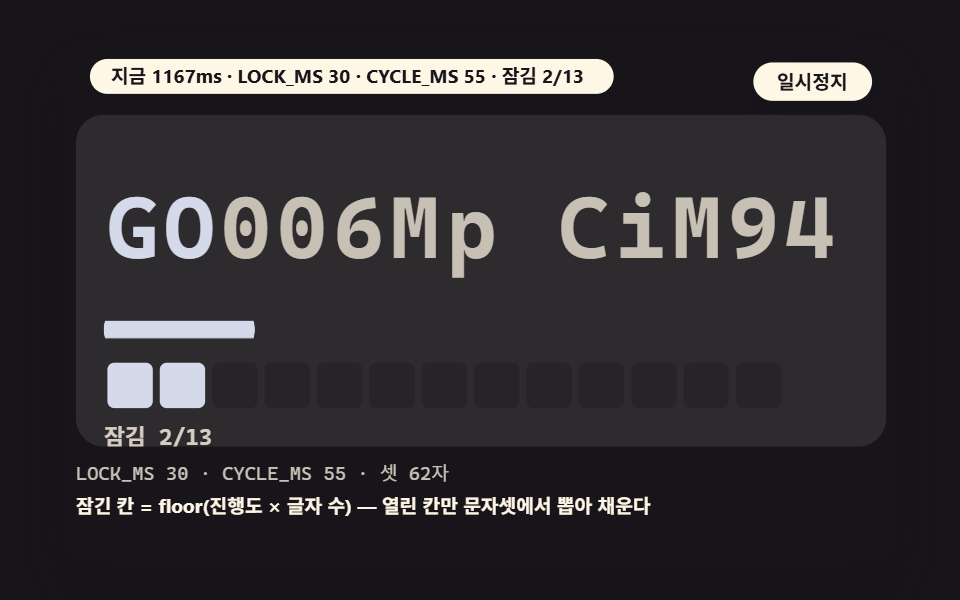 01 ts-hero-decode-progression
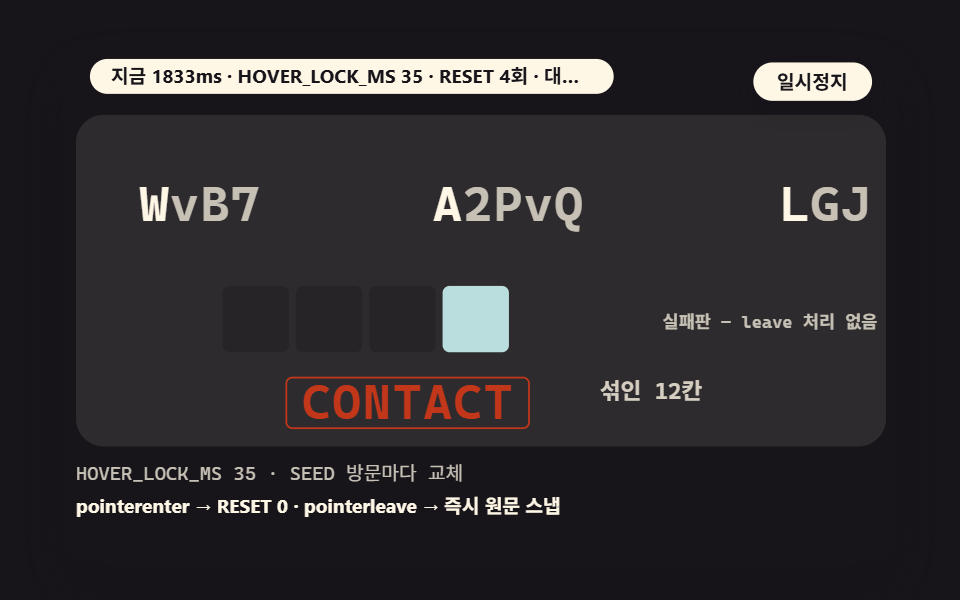 02 ts-hover-link-scramble
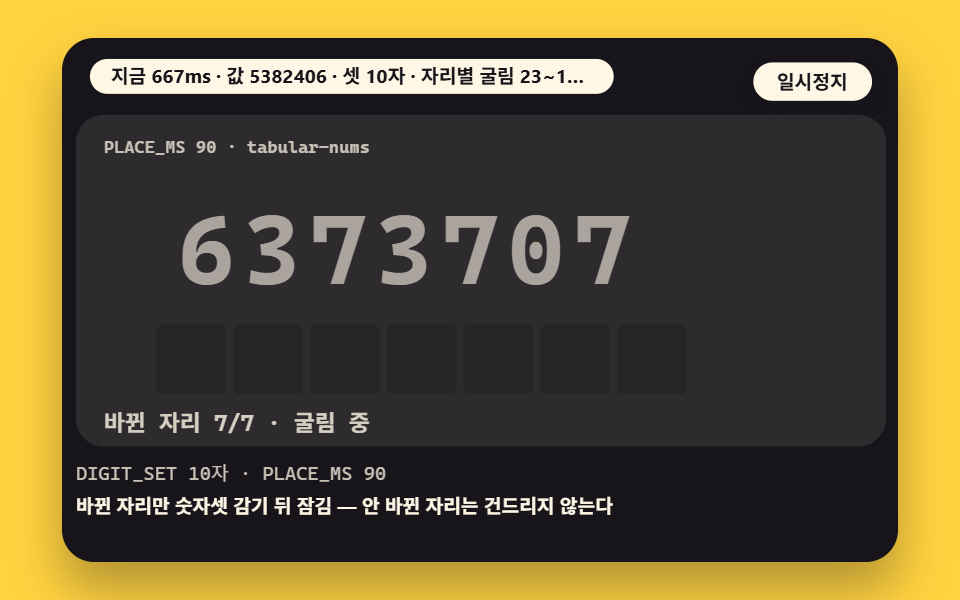 03 ts-digit-counter-mix
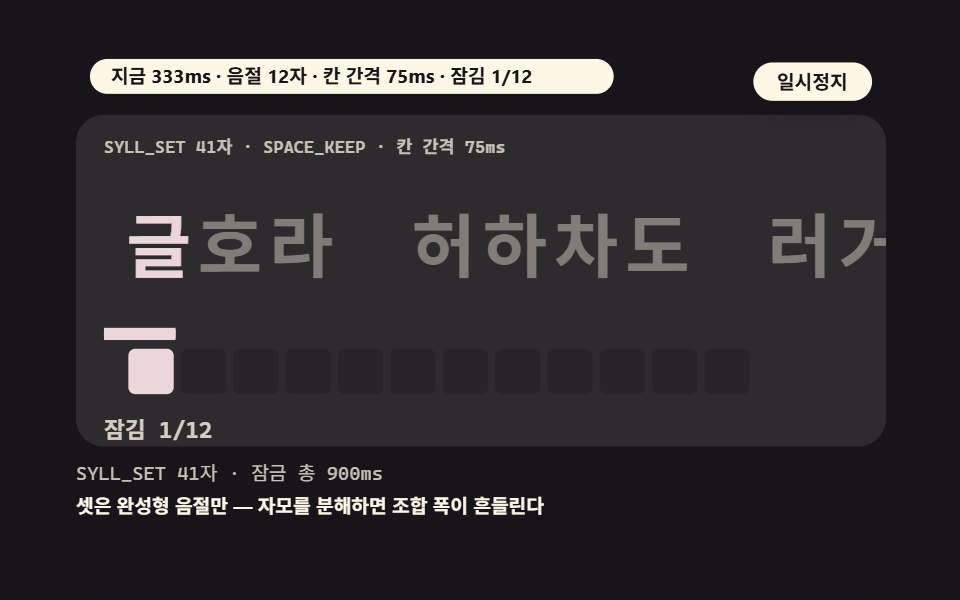 04 ts-hangul-sequential-lock
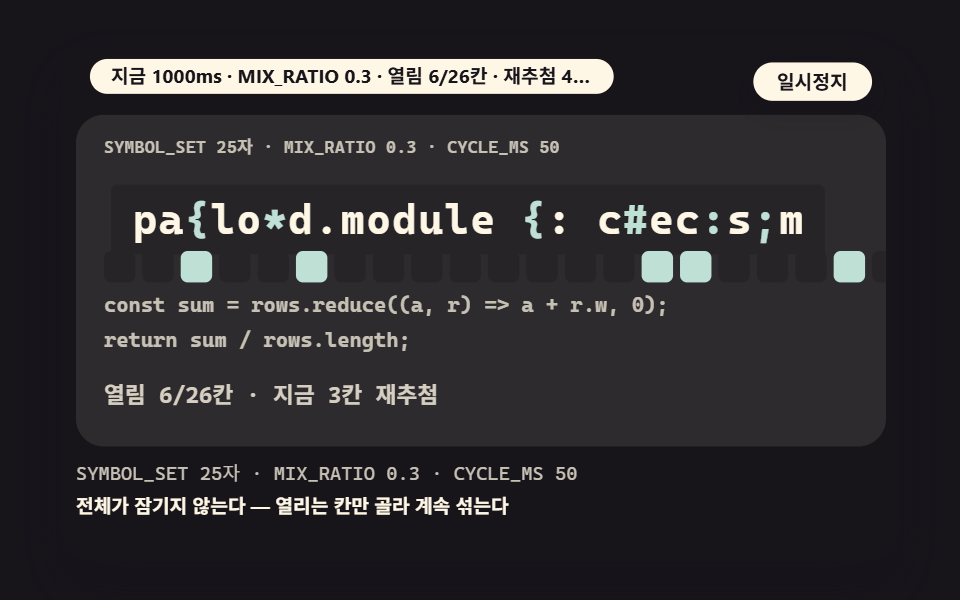 05 ts-code-symbol-decor
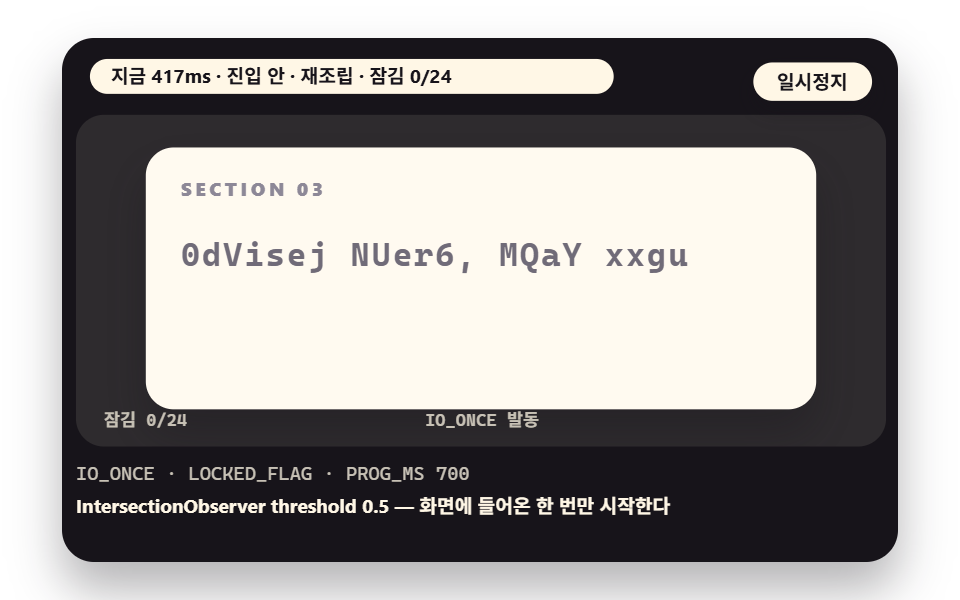 06 ts-section-enter-reassemble
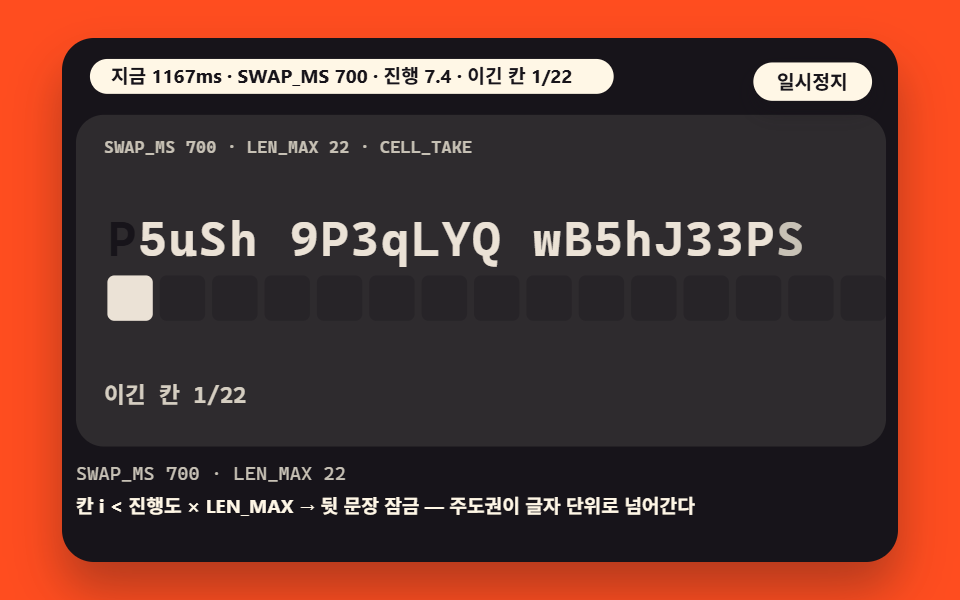 07 ts-two-text-swap
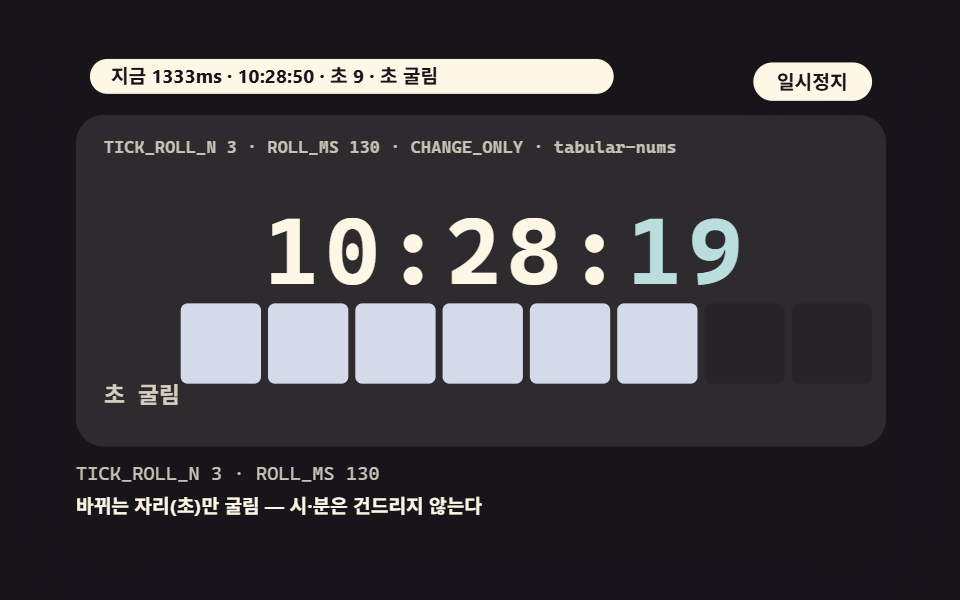 08 ts-clock-tick-roll
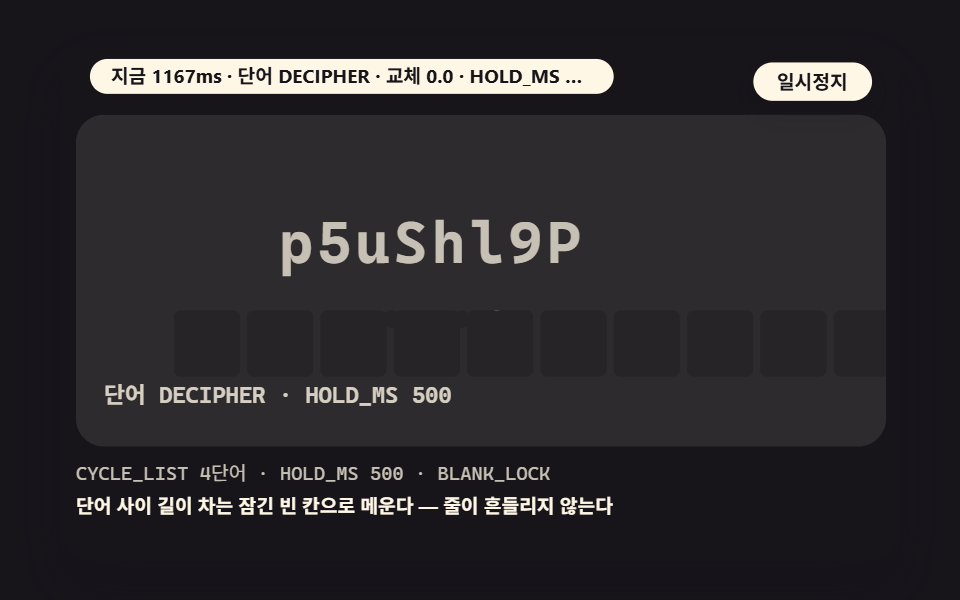 09 ts-word-carousel-cycle
- 01 A Hero Title That Locks From the Front
- 02 A Link That Scrambles and Locks on Hover
- 03 A Counter Whose Digits Roll in a Digits-Only Set
- 04 A Korean Title Locking by Syllables, Not Jamos
- 05 Code-Block Headers Rippling in a Symbol Set
- 06 A Sentence Reassembling as You Enter the Section
- 07 Two Sentences Mixing Into Each Other in a Swap
- 08 A Clock Whose Seconds Roll Every Tick
- 09 Words Cycling Through a Scramble Into the Next
The letter stream people call a hacking screen runs on two values. One is the character set, the box the mixed letters are drawn from; these scenes use four kinds — 62 Latin letters and digits, a digits-only set of 10, a 25-symbol code set, and 41 whole Korean syllables. The other is the progression, a value filling from 0 to 1 that decides how many cells from the front have locked.
When the progression sits at 0.4 on a 13-cell sentence, the first 5 cells hold their original letters and the remaining 8 draw a fresh character from the set every cycle. That makes the effect closer to a state machine — the locked border marching from front to back — than to an erasing animation. Locked cells never change again, and the sense that the sentence is almost finished comes from exactly that.
The nine scenes point one engine in nine directions. The engine fixes each cell as a span node and swaps only two things per frame: the character and a locked flag. What differs per scene is what drives the progression — time, a pointer entering a link, per-digit roll timers, or two sentences fighting for the same cells. Every scene runs on a timetable with no input required, and the arrow keys cycle three preset values.
The Nine Scenes in Measured Numbers — Area, Frames and Intensity
How the numbers were measured
The figures come from 도구/demo.py capturing each 480×300 stage for 2 seconds in 24 frames and comparing the 23 deltas between adjacent frames. Cumulative area counts the pixels that differ from the first frame at least once, intensity is the mean color distance of those pixels (0–255), and frames moved counts frames that differ from the previous one. The render is deterministic in one browser, so figures from other browsers are unconfirmed.
Because a scene changes only a handful of letter cells, its area is naturally small. Each scene therefore carries a cell map — the lock state drawn as a row of squares, the same calculation rendered a second way — plus a progress bar and labels that share the same progression, which is why the area figures hold up. The numbers describe changes inside the demo box, not page performance.
| Scene | Cumulative area | Frames moved | Mean intensity |
|---|---|---|---|
| 01 hero decode | 15.3% | 23/23 | 121.1 |
| 02 hover link | 6.8% | 23/23 | 114.2 |
| 03 digit counter | 11.0% | 23/23 | 108.8 |
| 04 Korean syllable lock | 11.2% | 23/23 | 102.6 |
| 05 code symbol decor | 7.0% | 23/23 | 132.9 |
| 06 section entry reassembly | 26.4% | 23/23 | 105.5 |
| 07 two-sentence swap | 11.0% | 23/23 | 142.1 |
| 08 clock seconds tick | 11.0% | 23/23 | 89.8 |
| 09 word carousel | 10.9% | 23/23 | 129.4 |
The widest scene is 06 at 26.4% — a whole section panel slides into view before the sentence reassembles — and the narrowest is 02 at 6.8%, where only four short nav words scramble. All nine moved in 23/23 frames. Intensity peaks at 07 with 142.1, where the winning cells flip color as the lead changes, and bottoms out at 08 with 89.8, because the clock spends 870ms of every second at rest after a 130ms roll.
They read faster in three groups. Scenes 01, 02 and 04 are the base form — one sentence locking front to back. Scenes 03, 05 and 08 narrow the set to digits or symbols. Scenes 06, 07 and 09 extend the same machine with an entry trigger, a takeover swap and a word cycle.
How Many Values Does It Take to Turn One Cell Solid?
Four values decide when one cell turns solid: the cell's original character, the set it draws substitute letters from, a cycle counter k, and the progression. The source pick function binds three of them into one call.
    // draw one character for cell i from the set — each k step yields a new letter (index cycling)
    function pick(set, i, k) {
        return set.charAt(Math.floor(hash(i + 1, k * 0.1731 + 3.7) * set.length));
    }
hash is a fixed sine-based hash, so the same input always returns the same value. Increment k by one and that cell lands on a new letter; reload the page and the sentence scrambles in the same order again. Math.random is avoided on purpose — with it, every capture would show a different scene and neither the measurements nor this article's comparisons could be reproduced.
Drawing a cell is the simpler half. A locked cell shows its original character, an open cell shows what pick drew, and a data-on attribute flips the color.
    // draw one cell — on means the original letter in its locked color, else a letter drawn from the set
    function setCell(t, i, ch, on) {
        const c = t.cells[i];
        if (c.textContent !== ch) {
            c.textContent = ch;
        }
        const want = on ? '1' : '0';
        if (c.getAttribute('data-on') !== want) {
            c.setAttribute('data-on', want);
        }
    }
The two guard lines that skip an already-matching write are what keep reflow proportional to open cells. A locked cell never changes, so it triggers no write at all frame after frame — only the open cells touch the DOM. Why this structure is mandatory rather than a mere optimization is measured in the trap section below.
01A Hero Title That Locks From the Front
Demo and Explanation
The base form a landing hero title enters with: LOCK_MS decides how many cells have locked, and the 2-second window runs the decode twice with a different seed the second time, so the same 13-cell sentence mixes differently each pass. A progress bar and the 13-square cell map fill from the same progression.
<main class="stage">
<div class="ez is-demo" id="ez">
  <div class="ez__in" data-role="inner">
    <div class="ez__pad" data-role="pad" tabindex="0" role="application" aria-label="Demo stage: Space or Enter pauses, R restarts, left and right arrows pick another value">
      <div class="ez__scene" data-role="scene" role="img" aria-label="Cells lock to the original from the front and the hero sentence hardens"></div>
      <p class="ez__status" data-role="status" aria-live="off">Scene ready</p>
      <p class="ez__reada" data-role="reada" aria-hidden="true"></p>
      <p class="ez__readb" data-role="readb" aria-hidden="true"></p>
      <div class="ez__ctrl">
        <button class="ez__pause" data-role="pause" type="button" aria-pressed="false">Pause</button>
      </div>
      <p class="ez__done" data-role="done" role="status" aria-live="polite"></p>
… (총 16줄 — 아래 「전체 코드」에서 원문 전체)
// 519 — 텍스트 스크램블 9종 공통 무대 (518 base.scss 계승, 스크램블 칸·진행 바 추가)
@use "../../../../site/static/demo-tokens" as *;
$panel: mix($subject-cream, $subject-ink, 10%);
$grid: mix($subject-cream, $subject-ink, 7%);
$line: mix($subject-cream, $subject-ink, 26%);
$dim: mix($subject-cream, $subject-ink, 76%);
// 파스텔 팔레트 — vivid 토큰(채도 .55+) 대신 이 값들을 쓴다 (BD26)
$pastel-blue: #d5daea;
$pastel-rose: #ebd6db;
$pastel-mint: #bfe0d4;
… (총 306줄 — 아래 「전체 코드」에서 원문 전체).ez {
position: relative;
width: min(92vw, 160vh - 12.8vw);
aspect-ratio: 480/300;
margin: 0 auto;
border-radius: 16px;
overflow: hidden;
box-shadow: 0 14px 24px rgba(23, 20, 26, 0.32);
background: #17141a;
}
.ez__in {
… (총 320줄 — 아래 「전체 코드」에서 원문 전체)(function () {
const rootEl = document.getElementById("ez");
if (!rootEl) return;
main(rootEl);
function cx(s) { return s; }
function main(root) {
// 무대 좌표 — 안쪽 상자는 늘 480x300 이고 화면 크기에 맞춰 통째로 줄인다 (왼쪽 위 모서리 기준)
const W = 480;
const SW = 464; // 장면 폭 (480 - 좌우 8px)
const SH = 190; // 장면 높이
function clamp(v, lo, hi) { return v < lo ? lo : (v > hi ? hi : v); }
function lerp(a, b, k) { return a + (b - a) * k; }
… (총 422줄 — 아래 「전체 코드」에서 원문 전체)// HeroDecode - 같은 항목 vanilla index.html 의 React 판. 같은 계산을 useEffect 안에서 돌린다
import { useEffect, useRef } from "react";
import styles from "./HeroDecode.module.scss";
const cx = (s: string): string => s.split(" ").map((n) => styles[n] ?? n).join(" ");
function main(root: HTMLElement): (() => void) | undefined {
// 무대 좌표 — 안쪽 상자는 늘 480x300 이고 화면 크기에 맞춰 통째로 줄인다 (왼쪽 위 모서리 기준)
const W = 480;
const SW = 464; // 장면 폭 (480 - 좌우 8px)
const SH = 190; // 장면 높이
function clamp(v: number, lo: number, hi: number): number { return v < lo ? lo : (v > hi ? hi : v); }
… (총 390줄 — 아래 「전체 코드」에서 원문 전체)01 · A Hero Title That Locks From the Front — Measured area 15.331% · moving frames 23/23Original by GODRICH · SCSS and React ship in the zip · See the password
Where to Look in the Code
decodeAt is the whole scene — divide time by LOCK_MS for the locked count, then fill.
    function decodeAt(t1, seed) {
        // locked cell count at t1 ms; t1 of -1 draws one plain frame with everything locked
        if (!hero) {
            return 0;
        }
        const L = LOCK_MS[pi519];
        const C = CYCLE_MS[pi519];
        const k = t1 < 0 ? -1 : Math.floor(t1 / C);
        const lockedN = clamp(Math.floor(t1 / L), 0, hero.n);
        for (let i = 0; i < hero.n; i += 1) {
            const ch = hero.chars[i];
            if (i < lockedN || k < 0) {
                setCell(hero, i, ch, true);
            }
            else if (ch === ' ') {
                setCell(hero, i, ch, false); // spaces are never substituted
            }
            else {
                setCell(hero, i, pick(SET62, i, k + i + seed * 97), false);
            }
        }
        return lockedN;
    }
02A Link That Scrambles and Locks on Hover
Demo and Explanation
For nav link emphasis, the progression's source is the pointer, not a clock: every pointerenter resets the seed so each visit mixes differently, and pointerleave snaps straight back to the original. A failing version below keeps climbing after release because it has no leave handler, and its label counts the mixed cells live.
<main class="stage">
<div class="ez is-demo" id="ez">
  <div class="ez__in" data-role="inner">
    <div class="ez__pad" data-role="pad" tabindex="0" role="application" aria-label="Demo stage: Space or Enter pauses, R restarts, left and right arrows pick another value">
      <div class="ez__scene" data-role="scene" role="img" aria-label="Nav links scramble and lock under the cursor, while the failing version below keeps mixing after release"></div>
      <p class="ez__status" data-role="status" aria-live="off">Scene ready</p>
      <p class="ez__reada" data-role="reada" aria-hidden="true"></p>
      <p class="ez__readb" data-role="readb" aria-hidden="true"></p>
      <div class="ez__ctrl">
        <button class="ez__pause" data-role="pause" type="button" aria-pressed="false">Pause</button>
      </div>
      <p class="ez__done" data-role="done" role="status" aria-live="polite"></p>
… (총 16줄 — 아래 「전체 코드」에서 원문 전체)
// 519 — 텍스트 스크램블 9종 공통 무대 (518 base.scss 계승, 스크램블 칸·진행 바 추가)
@use "../../../../site/static/demo-tokens" as *;
$panel: mix($subject-cream, $subject-ink, 10%);
$grid: mix($subject-cream, $subject-ink, 7%);
$line: mix($subject-cream, $subject-ink, 26%);
$dim: mix($subject-cream, $subject-ink, 76%);
// 파스텔 팔레트 — vivid 토큰(채도 .55+) 대신 이 값들을 쓴다 (BD26)
$pastel-blue: #d5daea;
$pastel-rose: #ebd6db;
$pastel-mint: #bfe0d4;
… (총 307줄 — 아래 「전체 코드」에서 원문 전체).ez {
position: relative;
width: min(92vw, 160vh - 12.8vw);
aspect-ratio: 480/300;
margin: 0 auto;
border-radius: 16px;
overflow: hidden;
box-shadow: 0 14px 24px rgba(23, 20, 26, 0.32);
background: #17141a;
}
.ez__in {
… (총 327줄 — 아래 「전체 코드」에서 원문 전체)(function () {
const rootEl = document.getElementById("ez");
if (!rootEl) return;
main(rootEl);
function cx(s) { return s; }
function main(root) {
// 무대 좌표 — 안쪽 상자는 늘 480x300 이고 화면 크기에 맞춰 통째로 줄인다 (왼쪽 위 모서리 기준)
const W = 480;
const SW = 464; // 장면 폭 (480 - 좌우 8px)
const SH = 190; // 장면 높이
function clamp(v, lo, hi) { return v < lo ? lo : (v > hi ? hi : v); }
function lerp(a, b, k) { return a + (b - a) * k; }
… (총 476줄 — 아래 「전체 코드」에서 원문 전체)// HoverLink - 같은 항목 vanilla index.html 의 React 판. 같은 계산을 useEffect 안에서 돌린다
import { useEffect, useRef } from "react";
import styles from "./HoverLink.module.scss";
const cx = (s: string): string => s.split(" ").map((n) => styles[n] ?? n).join(" ");
function main(root: HTMLElement): (() => void) | undefined {
// 무대 좌표 — 안쪽 상자는 늘 480x300 이고 화면 크기에 맞춰 통째로 줄인다 (왼쪽 위 모서리 기준)
const W = 480;
const SW = 464; // 장면 폭 (480 - 좌우 8px)
const SH = 190; // 장면 높이
function clamp(v: number, lo: number, hi: number): number { return v < lo ? lo : (v > hi ? hi : v); }
… (총 437줄 — 아래 「전체 코드」에서 원문 전체)02 · A Link That Scrambles and Locks on Hover — Measured area 6.792% · moving frames 23/23Original by GODRICH · SCSS and React ship in the zip · See the password
Where to Look in the Code
One function serves both the working links and the failing one — only the target list changes.
    function drawLink(t1, seed, fail) {
        const tgt = fail ? [linkF] : links;
        const L = HOVER_LOCK_MS[pi519];
        const k = t1 < 0 ? -1 : Math.floor(t1 / HOVER_CYCLE_MS);
        const n = tgt[0].n;
        const lockedN = clamp(Math.floor(t1 / L), 0, n);
        let mixN = 0;
        for (let b = 0; b < tgt.length; b += 1) {
            const tx = tgt[b];
            for (let i = 0; i < tx.n; i += 1) {
                const ch = tx.chars[i];
                if (i < lockedN || k < 0) {
                    setCell(tx, i, ch, true);
                }
                else if (ch === ' ') {
                    setCell(tx, i, ch, false);
                }
                else {
                    setCell(tx, i, pick(SET62, i, k + i + seed * 131 + b * 7), false);
                    mixN += 1;
                }
            }
        }
        return mixN;
    }
03A Counter Whose Digits Roll in a Digits-Only Set
Demo and Explanation
A special form that fits statistics and view counters: the set is restricted to 0-9, only the digits that actually change roll while untouched places stay locked, and each place gets its own roll time — PLACE_MS × (7−i)/4, longer toward the left (the high places). tabular-nums holds the digit widths fixed, and the 7-square map blinks whatever place is rolling.
<main class="stage">
<div class="ez is-demo" id="ez">
  <div class="ez__in" data-role="inner">
    <div class="ez__pad" data-role="pad" tabindex="0" role="application" aria-label="Demo stage: Space or Enter pauses, R restarts, left and right arrows pick another value">
      <div class="ez__scene" data-role="scene" role="img" aria-label="Only the changed digits roll in a digits-only set and lock to the value"></div>
      <p class="ez__status" data-role="status" aria-live="off">Scene ready</p>
      <p class="ez__reada" data-role="reada" aria-hidden="true"></p>
      <p class="ez__readb" data-role="readb" aria-hidden="true"></p>
      <div class="ez__ctrl">
        <button class="ez__pause" data-role="pause" type="button" aria-pressed="false">Pause</button>
      </div>
      <p class="ez__done" data-role="done" role="status" aria-live="polite"></p>
… (총 16줄 — 아래 「전체 코드」에서 원문 전체)
// 519 — 텍스트 스크램블 9종 공통 무대 (518 base.scss 계승, 스크램블 칸·진행 바 추가)
@use "../../../../site/static/demo-tokens" as *;
$panel: mix($subject-cream, $subject-ink, 10%);
$grid: mix($subject-cream, $subject-ink, 7%);
$line: mix($subject-cream, $subject-ink, 26%);
$dim: mix($subject-cream, $subject-ink, 76%);
// 파스텔 팔레트 — vivid 토큰(채도 .55+) 대신 이 값들을 쓴다 (BD26)
$pastel-blue: #d5daea;
$pastel-rose: #ebd6db;
$pastel-mint: #bfe0d4;
… (총 302줄 — 아래 「전체 코드」에서 원문 전체).ez {
position: relative;
width: min(92vw, 160vh - 12.8vw);
aspect-ratio: 480/300;
margin: 0 auto;
border-radius: 16px;
overflow: hidden;
box-shadow: 0 14px 24px rgba(23, 20, 26, 0.32);
background: #17141a;
}
.ez__in {
… (총 318줄 — 아래 「전체 코드」에서 원문 전체)(function () {
const rootEl = document.getElementById("ez");
if (!rootEl) return;
main(rootEl);
function cx(s) { return s; }
function main(root) {
// 무대 좌표 — 안쪽 상자는 늘 480x300 이고 화면 크기에 맞춰 통째로 줄인다 (왼쪽 위 모서리 기준)
const W = 480;
const SW = 464; // 장면 폭 (480 - 좌우 8px)
const SH = 190; // 장면 높이
function clamp(v, lo, hi) { return v < lo ? lo : (v > hi ? hi : v); }
function lerp(a, b, k) { return a + (b - a) * k; }
… (총 407줄 — 아래 「전체 코드」에서 원문 전체)// DigitCounter - 같은 항목 vanilla index.html 의 React 판. 같은 계산을 useEffect 안에서 돌린다
import { useEffect, useRef } from "react";
import styles from "./DigitCounter.module.scss";
const cx = (s: string): string => s.split(" ").map((n) => styles[n] ?? n).join(" ");
function main(root: HTMLElement): (() => void) | undefined {
// 무대 좌표 — 안쪽 상자는 늘 480x300 이고 화면 크기에 맞춰 통째로 줄인다 (왼쪽 위 모서리 기준)
const W = 480;
const SW = 464; // 장면 폭 (480 - 좌우 8px)
const SH = 190; // 장면 높이
function clamp(v: number, lo: number, hi: number): number { return v < lo ? lo : (v > hi ? hi : v); }
… (총 391줄 — 아래 「전체 코드」에서 원문 전체)03 · A Counter Whose Digits Roll in a Digits-Only Set — Measured area 10.997% · moving frames 23/23Original by GODRICH · SCSS and React ship in the zip · See the password
Where to Look in the Code
The roll is a countdown through the set toward the new digit, place by place.
        const set = DIGIT_SET[pi519];
        const k = t1 < 0 ? -1 : Math.floor(t1 / 45);
        for (let i = 0; i < cnt.n; i += 1) {
            const same = va.charAt(i) === vb.charAt(i);
            let rolling = false;
            if (same || t1 < 0) {
                setCell(cnt, i, vb.charAt(i), true); // unchanged places stay locked as-is
            }
            else if (hold) {
                setCell(cnt, i, vb.charAt(i), true);
            }
            else {
                // roll time for place i — longer toward the left (high places): PLACE_MS x (7-i)/4
                const myMs = PLACE_MS[pi519] * (7 - i) / 4;
                if (t1 >= myMs) {
                    setCell(cnt, i, vb.charAt(i), true); // roll finished, locked
                }
                else {
                    // wind down — pass through the set in reverse, narrowing toward the new place value (cycling counter)
                    const spin = pick(set, i, k + i * 3);
                    setCell(cnt, i, spin, false);
                    rolling = true;
                }
            }
        }
04A Korean Title Locking by Syllables, Not Jamos
Demo and Explanation
Korean titles and section heads need this shape: the set holds only 41 whole syllables, so one cell is always exactly one syllable wide and the combined-width jitter of jamo mixing never appears. Spaces stay unsubstituted, and the 900ms lock total divided by 12 syllables locks one cell every 75ms — a gap taken from the syllable count, never a hardcoded constant.
<main class="stage">
<div class="ez is-demo" id="ez">
  <div class="ez__in" data-role="inner">
    <div class="ez__pad" data-role="pad" tabindex="0" role="application" aria-label="Demo stage: Space or Enter pauses, R restarts, left and right arrows pick another value">
      <div class="ez__scene" data-role="scene" role="img" aria-label="A Korean title mixes only in whole syllables, without jamo decomposition, and locks syllable by syllable"></div>
      <p class="ez__status" data-role="status" aria-live="off">Scene ready</p>
      <p class="ez__reada" data-role="reada" aria-hidden="true"></p>
      <p class="ez__readb" data-role="readb" aria-hidden="true"></p>
      <div class="ez__ctrl">
        <button class="ez__pause" data-role="pause" type="button" aria-pressed="false">Pause</button>
      </div>
      <p class="ez__done" data-role="done" role="status" aria-live="polite"></p>
… (총 16줄 — 아래 「전체 코드」에서 원문 전체)
// 519 — 텍스트 스크램블 9종 공통 무대 (518 base.scss 계승, 스크램블 칸·진행 바 추가)
@use "../../../../site/static/demo-tokens" as *;
$panel: mix($subject-cream, $subject-ink, 10%);
$grid: mix($subject-cream, $subject-ink, 7%);
$line: mix($subject-cream, $subject-ink, 26%);
$dim: mix($subject-cream, $subject-ink, 76%);
// 파스텔 팔레트 — vivid 토큰(채도 .55+) 대신 이 값들을 쓴다 (BD26)
$pastel-blue: #d5daea;
$pastel-rose: #ebd6db;
$pastel-mint: #bfe0d4;
… (총 310줄 — 아래 「전체 코드」에서 원문 전체).ez {
position: relative;
width: min(92vw, 160vh - 12.8vw);
aspect-ratio: 480/300;
margin: 0 auto;
border-radius: 16px;
overflow: hidden;
box-shadow: 0 14px 24px rgba(23, 20, 26, 0.32);
background: #17141a;
}
.ez__in {
… (총 329줄 — 아래 「전체 코드」에서 원문 전체)(function () {
const rootEl = document.getElementById("ez");
if (!rootEl) return;
main(rootEl);
function cx(s) { return s; }
function main(root) {
// 무대 좌표 — 안쪽 상자는 늘 480x300 이고 화면 크기에 맞춰 통째로 줄인다 (왼쪽 위 모서리 기준)
const W = 480;
const SW = 464; // 장면 폭 (480 - 좌우 8px)
const SH = 190; // 장면 높이
function clamp(v, lo, hi) { return v < lo ? lo : (v > hi ? hi : v); }
function lerp(a, b, k) { return a + (b - a) * k; }
… (총 405줄 — 아래 「전체 코드」에서 원문 전체)// HangulLock - 같은 항목 vanilla index.html 의 React 판. 같은 계산을 useEffect 안에서 돌린다
import { useEffect, useRef } from "react";
import styles from "./HangulLock.module.scss";
const cx = (s: string): string => s.split(" ").map((n) => styles[n] ?? n).join(" ");
function main(root: HTMLElement): (() => void) | undefined {
// 무대 좌표 — 안쪽 상자는 늘 480x300 이고 화면 크기에 맞춰 통째로 줄인다 (왼쪽 위 모서리 기준)
const W = 480;
const SW = 464; // 장면 폭 (480 - 좌우 8px)
const SH = 190; // 장면 높이
function clamp(v: number, lo: number, hi: number): number { return v < lo ? lo : (v > hi ? hi : v); }
… (총 386줄 — 아래 「전체 코드」에서 원문 전체)04 · A Korean Title Locking by Syllables, Not Jamos — Measured area 11.238% · moving frames 23/23Original by GODRICH · SCSS and React ship in the zip · See the password
Where to Look in the Code
The gap is computed from the syllable count, not hardcoded.
        const set = SYLL_SET;
        const n = ttl.n;
        const per = n > 0 ? LOCK_MS / n : LOCK_MS; // lock gap divided by the syllable count
        const k = t1 < 0 ? -1 : Math.floor(t1 / 60);
        const lockedN = clamp(Math.floor(t1 / per), 0, n);
        for (let i = 0; i < n; i += 1) {
            const ch = ttl.chars[i];
            const on = i < lockedN || k < 0;
            if (on) {
                setCell(ttl, i, ch, true);
            }
            else if (ch === ' ') {
                setCell(ttl, i, ch, false);
            } // SPACE_KEEP — spaces stay as-is
            else {
                setCell(ttl, i, pick(set, i, k + i + seed * 61), false);
            }
            states.push(on);
        }
        return states;
    }
05Code-Block Headers Rippling in a Symbol Set
Demo and Explanation
A decor layer for code blocks and terminals that trades locking for opening: no cell ever fully settles — a MIX_RATIO share of the cells is re-picked by hash rank every 400ms and keeps mixing from the 25-symbol set, while the rest hold the original line untouched. The 26-square map marks which cells are open right now.
<main class="stage">
<div class="ez is-demo" id="ez">
  <div class="ez__in" data-role="inner">
    <div class="ez__pad" data-role="pad" tabindex="0" role="application" aria-label="Demo stage: Space or Enter pauses, R restarts, left and right arrows pick another value">
      <div class="ez__scene" data-role="scene" role="img" aria-label="A code-block header never fully locks; a chosen share of the cells keeps rippling in a symbol set"></div>
      <p class="ez__status" data-role="status" aria-live="off">Scene ready</p>
      <p class="ez__reada" data-role="reada" aria-hidden="true"></p>
      <p class="ez__readb" data-role="readb" aria-hidden="true"></p>
      <div class="ez__ctrl">
        <button class="ez__pause" data-role="pause" type="button" aria-pressed="false">Pause</button>
      </div>
      <p class="ez__done" data-role="done" role="status" aria-live="polite"></p>
… (총 16줄 — 아래 「전체 코드」에서 원문 전체)
// 519 — 텍스트 스크램블 9종 공통 무대 (518 base.scss 계승, 스크램블 칸·진행 바 추가)
@use "../../../../site/static/demo-tokens" as *;
$panel: mix($subject-cream, $subject-ink, 10%);
$grid: mix($subject-cream, $subject-ink, 7%);
$line: mix($subject-cream, $subject-ink, 26%);
$dim: mix($subject-cream, $subject-ink, 76%);
// 파스텔 팔레트 — vivid 토큰(채도 .55+) 대신 이 값들을 쓴다 (BD26)
$pastel-blue: #d5daea;
$pastel-rose: #ebd6db;
$pastel-mint: #bfe0d4;
… (총 310줄 — 아래 「전체 코드」에서 원문 전체).ez {
position: relative;
width: min(92vw, 160vh - 12.8vw);
aspect-ratio: 480/300;
margin: 0 auto;
border-radius: 16px;
overflow: hidden;
box-shadow: 0 14px 24px rgba(23, 20, 26, 0.32);
background: #17141a;
}
.ez__in {
… (총 325줄 — 아래 「전체 코드」에서 원문 전체)(function () {
const rootEl = document.getElementById("ez");
if (!rootEl) return;
main(rootEl);
function cx(s) { return s; }
function main(root) {
// 무대 좌표 — 안쪽 상자는 늘 480x300 이고 화면 크기에 맞춰 통째로 줄인다 (왼쪽 위 모서리 기준)
const W = 480;
const SW = 464; // 장면 폭 (480 - 좌우 8px)
const SH = 190; // 장면 높이
function clamp(v, lo, hi) { return v < lo ? lo : (v > hi ? hi : v); }
function lerp(a, b, k) { return a + (b - a) * k; }
… (총 414줄 — 아래 「전체 코드」에서 원문 전체)// CodeSymbol - 같은 항목 vanilla index.html 의 React 판. 같은 계산을 useEffect 안에서 돌린다
import { useEffect, useRef } from "react";
import styles from "./CodeSymbol.module.scss";
const cx = (s: string): string => s.split(" ").map((n) => styles[n] ?? n).join(" ");
function main(root: HTMLElement): (() => void) | undefined {
// 무대 좌표 — 안쪽 상자는 늘 480x300 이고 화면 크기에 맞춰 통째로 줄인다 (왼쪽 위 모서리 기준)
const W = 480;
const SW = 464; // 장면 폭 (480 - 좌우 8px)
const SH = 190; // 장면 높이
function clamp(v: number, lo: number, hi: number): number { return v < lo ? lo : (v > hi ? hi : v); }
… (총 390줄 — 아래 「전체 코드」에서 원문 전체)05 · Code-Block Headers Rippling in a Symbol Set — Measured area 6.99% · moving frames 23/23Original by GODRICH · SCSS and React ship in the zip · See the password
Where to Look in the Code
repick sorts the cells by hash and opens exactly want of them, so the ratio holds precisely.
    function repick(slot) {
        // per-cell hash openness test — expected value matches MIX_RATIO
        openMask = [];
        let cnt = 0;
        const want = Math.floor(head.n * MIX_RATIO[pi519]);
        // open exactly want cells: the top want hash ranks open (the ratio holds exactly)
        const rank = [];
        for (let i = 0; i < head.n; i += 1) {
            rank.push([hash(i + 1, slot * 0.371 + 11.3), i]);
        }
        rank.sort(function (a, b) { return a[0] - b[0]; });
        for (let i = 0; i < head.n; i += 1) {
            openMask.push(false);
        }
        for (let j = 0; j < want; j += 1) {
            openMask[rank[j][1]] = true;
            cnt += 1;
        }
    }
06A Sentence Reassembling as You Enter the Section
Demo and Explanation
For scroll section headlines, an IntersectionObserver at threshold 0.5 decides when the progression starts — exactly once on entry, never replayed on scroll-back because the locked state is remembered. Before entry the cells sit in a fully jumbled state, and this scene posts the widest cumulative area of the nine, 26.4%, because the whole section panel slides down into view first.
<main class="stage">
<div class="ez is-demo" id="ez">
  <div class="ez__in" data-role="inner">
    <div class="ez__pad" data-role="pad" tabindex="0" role="application" aria-label="Demo stage: Space or Enter pauses, R restarts, left and right arrows pick another value">
      <div class="ez__scene" data-role="scene" role="img" aria-label="The sentence reassembles exactly once as the section enters view and does not replay on scroll-back"></div>
      <p class="ez__status" data-role="status" aria-live="off">Scene ready</p>
      <p class="ez__reada" data-role="reada" aria-hidden="true"></p>
      <p class="ez__readb" data-role="readb" aria-hidden="true"></p>
      <div class="ez__ctrl">
        <button class="ez__pause" data-role="pause" type="button" aria-pressed="false">Pause</button>
      </div>
      <p class="ez__done" data-role="done" role="status" aria-live="polite"></p>
… (총 16줄 — 아래 「전체 코드」에서 원문 전체)
// 519 — 텍스트 스크램블 9종 공통 무대 (518 base.scss 계승, 스크램블 칸·진행 바 추가)
@use "../../../../site/static/demo-tokens" as *;
$panel: mix($subject-cream, $subject-ink, 10%);
$grid: mix($subject-cream, $subject-ink, 7%);
$line: mix($subject-cream, $subject-ink, 26%);
$dim: mix($subject-cream, $subject-ink, 76%);
// 파스텔 팔레트 — vivid 토큰(채도 .55+) 대신 이 값들을 쓴다 (BD26)
$pastel-blue: #d5daea;
$pastel-rose: #ebd6db;
$pastel-mint: #bfe0d4;
… (총 321줄 — 아래 「전체 코드」에서 원문 전체).ez {
position: relative;
width: min(92vw, 160vh - 12.8vw);
aspect-ratio: 480/300;
margin: 0 auto;
border-radius: 16px;
overflow: hidden;
box-shadow: 0 14px 24px rgba(23, 20, 26, 0.32);
background: #17141a;
}
.ez__in {
… (총 343줄 — 아래 「전체 코드」에서 원문 전체)(function () {
const rootEl = document.getElementById("ez");
if (!rootEl) return;
main(rootEl);
function cx(s) { return s; }
function main(root) {
// 무대 좌표 — 안쪽 상자는 늘 480x300 이고 화면 크기에 맞춰 통째로 줄인다 (왼쪽 위 모서리 기준)
const W = 480;
const SW = 464; // 장면 폭 (480 - 좌우 8px)
const SH = 190; // 장면 높이
function clamp(v, lo, hi) { return v < lo ? lo : (v > hi ? hi : v); }
function lerp(a, b, k) { return a + (b - a) * k; }
… (총 425줄 — 아래 「전체 코드」에서 원문 전체)// SectionEnter - 같은 항목 vanilla index.html 의 React 판. 같은 계산을 useEffect 안에서 돌린다
import { useEffect, useRef } from "react";
import styles from "./SectionEnter.module.scss";
const cx = (s: string): string => s.split(" ").map((n) => styles[n] ?? n).join(" ");
function main(root: HTMLElement): (() => void) | undefined {
// 무대 좌표 — 안쪽 상자는 늘 480x300 이고 화면 크기에 맞춰 통째로 줄인다 (왼쪽 위 모서리 기준)
const W = 480;
const SW = 464; // 장면 폭 (480 - 좌우 8px)
const SH = 190; // 장면 높이
function clamp(v: number, lo: number, hi: number): number { return v < lo ? lo : (v > hi ? hi : v); }
… (총 400줄 — 아래 「전체 코드」에서 원문 전체)06 · A Sentence Reassembling as You Enter the Section — Measured area 26.391% · moving frames 23/23Original by GODRICH · SCSS and React ship in the zip · See the password
Where to Look in the Code
drawSen is the same lock machine as 01, fed by the observer's start time.
    function drawSen(t1, seed) {
        if (!sen) {
            return 0;
        }
        const per = sen.n > 0 ? PROG_MS6 / sen.n : PROG_MS6;
        const k = t1 < 0 ? -1 : Math.floor(t1 / 50);
        const lockedN = clamp(Math.floor(t1 / per), 0, sen.n);
        for (let i = 0; i < sen.n; i += 1) {
            const ch = sen.chars[i];
            if (i < lockedN || k < 0) {
                setCell(sen, i, ch, true);
            }
            else if (ch === ' ' || ch === ',') {
                setCell(sen, i, ch, false);
            }
            else {
                setCell(sen, i, pick(SET62, i, k + i + seed * 43), false);
            }
        }
        return lockedN;
    }
07Two Sentences Mixing Into Each Other in a Swap
Demo and Explanation
Slogan swaps and language switching without a fade: two sentences of different lengths are overlaid cell for cell, and as phase fills, the back sentence's cells take the front's over one at a time. The shorter sentence's tail locks as blanks, and the 22-square map lights each cell the back sentence has won — which is also why this scene posts the highest intensity of the nine, 142.1.
<main class="stage">
<div class="ez is-demo" id="ez">
  <div class="ez__in" data-role="inner">
    <div class="ez__pad" data-role="pad" tabindex="0" role="application" aria-label="Demo stage: Space or Enter pauses, R restarts, left and right arrows pick another value">
      <div class="ez__scene" data-role="scene" role="img" aria-label="Two sentences trade the lead cell by cell with no fade"></div>
      <p class="ez__status" data-role="status" aria-live="off">Scene ready</p>
      <p class="ez__reada" data-role="reada" aria-hidden="true"></p>
      <p class="ez__readb" data-role="readb" aria-hidden="true"></p>
      <div class="ez__ctrl">
        <button class="ez__pause" data-role="pause" type="button" aria-pressed="false">Pause</button>
      </div>
      <p class="ez__done" data-role="done" role="status" aria-live="polite"></p>
… (총 16줄 — 아래 「전체 코드」에서 원문 전체)
// 519 — 텍스트 스크램블 9종 공통 무대 (518 base.scss 계승, 스크램블 칸·진행 바 추가)
@use "../../../../site/static/demo-tokens" as *;
$panel: mix($subject-cream, $subject-ink, 10%);
$grid: mix($subject-cream, $subject-ink, 7%);
$line: mix($subject-cream, $subject-ink, 26%);
$dim: mix($subject-cream, $subject-ink, 76%);
// 파스텔 팔레트 — vivid 토큰(채도 .55+) 대신 이 값들을 쓴다 (BD26)
$pastel-blue: #d5daea;
$pastel-rose: #ebd6db;
$pastel-mint: #bfe0d4;
… (총 302줄 — 아래 「전체 코드」에서 원문 전체).ez {
position: relative;
width: min(92vw, 160vh - 12.8vw);
aspect-ratio: 480/300;
margin: 0 auto;
border-radius: 16px;
overflow: hidden;
box-shadow: 0 14px 24px rgba(23, 20, 26, 0.32);
background: #17141a;
}
.ez__in {
… (총 321줄 — 아래 「전체 코드」에서 원문 전체)(function () {
const rootEl = document.getElementById("ez");
if (!rootEl) return;
main(rootEl);
function cx(s) { return s; }
function main(root) {
// 무대 좌표 — 안쪽 상자는 늘 480x300 이고 화면 크기에 맞춰 통째로 줄인다 (왼쪽 위 모서리 기준)
const W = 480;
const SW = 464; // 장면 폭 (480 - 좌우 8px)
const SH = 190; // 장면 높이
function clamp(v, lo, hi) { return v < lo ? lo : (v > hi ? hi : v); }
function lerp(a, b, k) { return a + (b - a) * k; }
… (총 409줄 — 아래 「전체 코드」에서 원문 전체)// TwoTextSwap - 같은 항목 vanilla index.html 의 React 판. 같은 계산을 useEffect 안에서 돌린다
import { useEffect, useRef } from "react";
import styles from "./TwoTextSwap.module.scss";
const cx = (s: string): string => s.split(" ").map((n) => styles[n] ?? n).join(" ");
function main(root: HTMLElement): (() => void) | undefined {
// 무대 좌표 — 안쪽 상자는 늘 480x300 이고 화면 크기에 맞춰 통째로 줄인다 (왼쪽 위 모서리 기준)
const W = 480;
const SW = 464; // 장면 폭 (480 - 좌우 8px)
const SH = 190; // 장면 높이
function clamp(v: number, lo: number, hi: number): number { return v < lo ? lo : (v > hi ? hi : v); }
… (총 382줄 — 아래 「전체 코드」에서 원문 전체)07 · Two Sentences Mixing Into Each Other in a Swap — Measured area 10.953% · moving frames 23/23Original by GODRICH · SCSS and React ship in the zip · See the password
Where to Look in the Code
drawSwap writes whichever sentence owns cell i under the current phase.
    function drawSwap(phase, k) {
        if (!tA) {
            return 0;
        }
        const takeN = clamp(Math.floor(phase * LEN_MAX), 0, LEN_MAX);
        for (let i = 0; i < LEN_MAX; i += 1) {
            const bc = i < B7.length ? B7.charAt(i) : ' ';
            const ac = A7.charAt(i);
            if (i < takeN || k < 0) {
                setCell(tA, i, bc, true); // a cell B won — the shorter tail locks as blanks
            }
            else if (ac === ' ') {
                setCell(tA, i, ac, false);
            }
            else {
                setCell(tA, i, pick(SET62, i, k + i + Math.floor(phase * 10) * 17), false);
            }
        }
        return takeN;
    }
08A Clock Whose Seconds Roll Every Tick
Demo and Explanation
A restrained tick for dashboards and countdowns: only the two seconds cells roll — a few ticks in the digit set before locking to the new value — while hours and minutes hold still as locked cells. The demo runs at 8× speed to fit eight seconds of ticks into the 2-second window, so each second reads as a 130ms roll followed by 870ms of rest, which is why its mean intensity is the lowest of the nine at 89.8.
<main class="stage">
<div class="ez is-demo" id="ez">
  <div class="ez__in" data-role="inner">
    <div class="ez__pad" data-role="pad" tabindex="0" role="application" aria-label="Demo stage: Space or Enter pauses, R restarts, left and right arrows pick another value">
      <div class="ez__scene" data-role="scene" role="img" aria-label="Only the clock's seconds roll a few ticks each second before locking to the new value"></div>
      <p class="ez__status" data-role="status" aria-live="off">Scene ready</p>
      <p class="ez__reada" data-role="reada" aria-hidden="true"></p>
      <p class="ez__readb" data-role="readb" aria-hidden="true"></p>
      <div class="ez__ctrl">
        <button class="ez__pause" data-role="pause" type="button" aria-pressed="false">Pause</button>
      </div>
      <p class="ez__done" data-role="done" role="status" aria-live="polite"></p>
… (총 16줄 — 아래 「전체 코드」에서 원문 전체)
// 519 — 텍스트 스크램블 9종 공통 무대 (518 base.scss 계승, 스크램블 칸·진행 바 추가)
@use "../../../../site/static/demo-tokens" as *;
$panel: mix($subject-cream, $subject-ink, 10%);
$grid: mix($subject-cream, $subject-ink, 7%);
$line: mix($subject-cream, $subject-ink, 26%);
$dim: mix($subject-cream, $subject-ink, 76%);
// 파스텔 팔레트 — vivid 토큰(채도 .55+) 대신 이 값들을 쓴다 (BD26)
$pastel-blue: #d5daea;
$pastel-rose: #ebd6db;
$pastel-mint: #bfe0d4;
… (총 303줄 — 아래 「전체 코드」에서 원문 전체).ez {
position: relative;
width: min(92vw, 160vh - 12.8vw);
aspect-ratio: 480/300;
margin: 0 auto;
border-radius: 16px;
overflow: hidden;
box-shadow: 0 14px 24px rgba(23, 20, 26, 0.32);
background: #17141a;
}
.ez__in {
… (총 322줄 — 아래 「전체 코드」에서 원문 전체)(function () {
const rootEl = document.getElementById("ez");
if (!rootEl) return;
main(rootEl);
function cx(s) { return s; }
function main(root) {
// 무대 좌표 — 안쪽 상자는 늘 480x300 이고 화면 크기에 맞춰 통째로 줄인다 (왼쪽 위 모서리 기준)
const W = 480;
const SW = 464; // 장면 폭 (480 - 좌우 8px)
const SH = 190; // 장면 높이
function clamp(v, lo, hi) { return v < lo ? lo : (v > hi ? hi : v); }
function lerp(a, b, k) { return a + (b - a) * k; }
… (총 408줄 — 아래 「전체 코드」에서 원문 전체)// ClockTick - 같은 항목 vanilla index.html 의 React 판. 같은 계산을 useEffect 안에서 돌린다
import { useEffect, useRef } from "react";
import styles from "./ClockTick.module.scss";
const cx = (s: string): string => s.split(" ").map((n) => styles[n] ?? n).join(" ");
function main(root: HTMLElement): (() => void) | undefined {
// 무대 좌표 — 안쪽 상자는 늘 480x300 이고 화면 크기에 맞춰 통째로 줄인다 (왼쪽 위 모서리 기준)
const W = 480;
const SW = 464; // 장면 폭 (480 - 좌우 8px)
const SH = 190; // 장면 높이
function clamp(v: number, lo: number, hi: number): number { return v < lo ? lo : (v > hi ? hi : v); }
… (총 393줄 — 아래 「전체 코드」에서 원문 전체)08 · A Clock Whose Seconds Roll Every Tick — Measured area 11.042% · moving frames 23/23Original by GODRICH · SCSS and React ship in the zip · See the password
Where to Look in the Code
CHANGE_ONLY in one line: cells outside the seconds slots write locked and never move.
        const roll = TICK_ROLL_N[pi519];
        const k = Math.floor(t1 / (ROLL_MS / roll)); // roll tick counter — the digit changes N times within N ticks
        const base = hms(T0 + Math.floor(t1 * TIME_SCALE / 1000) * 1000);
        const prev = hms(T0 + (Math.floor(t1 * TIME_SCALE / 1000) - 1) * 1000);
        for (let i = 0; i < face.n; i += 1) {
            const ch = base.charAt(i);
            const isDigit = ch >= '0' && ch <= '9';
            const secSlot = i >= 6 && isDigit; // the two seconds cells (HH:MM:SS)
            const changed = secSlot && prev.charAt(i) !== ch;
            const tickT = t1 * TIME_SCALE % 1000;
            let rolling = false;
            if (!secSlot || t1 < 0) {
                setCell(face, i, ch, true); // hours and minutes stay locked as-is (CHANGE_ONLY)
            }
            else if (tickT >= ROLL_MS || !changed) {
                setCell(face, i, ch, true); // roll finished — locked to the new value
            }
            else {
                const spin = pick('0123456789', i, k + i * 5);
                setCell(face, i, spin, false); // rolling — a few ticks in the digit set
                rolling = true;
            }
            states.push(!rolling);
        }
09Words Cycling Through a Scramble Into the Next
Demo and Explanation
The finished form of a hero subtitle carousel: a four-word list cycles, each handoff uses the cell swap of 07, and the length gap between words is filled by locked blank cells so the line never shrinks or shakes. A four-dot indicator tracks the current word, and the 2-second window passes through two of them.
<main class="stage">
<div class="ez is-demo" id="ez">
  <div class="ez__in" data-role="inner">
    <div class="ez__pad" data-role="pad" tabindex="0" role="application" aria-label="Demo stage: Space or Enter pauses, R restarts, left and right arrows pick another value">
      <div class="ez__scene" data-role="scene" role="img" aria-label="Words cycle through a scramble into the next, length gaps filled by locked blanks"></div>
      <p class="ez__status" data-role="status" aria-live="off">Scene ready</p>
      <p class="ez__reada" data-role="reada" aria-hidden="true"></p>
      <p class="ez__readb" data-role="readb" aria-hidden="true"></p>
      <div class="ez__ctrl">
        <button class="ez__pause" data-role="pause" type="button" aria-pressed="false">Pause</button>
      </div>
      <p class="ez__done" data-role="done" role="status" aria-live="polite"></p>
… (총 16줄 — 아래 「전체 코드」에서 원문 전체)
// 519 — 텍스트 스크램블 9종 공통 무대 (518 base.scss 계승, 스크램블 칸·진행 바 추가)
@use "../../../../site/static/demo-tokens" as *;
$panel: mix($subject-cream, $subject-ink, 10%);
$grid: mix($subject-cream, $subject-ink, 7%);
$line: mix($subject-cream, $subject-ink, 26%);
$dim: mix($subject-cream, $subject-ink, 76%);
// 파스텔 팔레트 — vivid 토큰(채도 .55+) 대신 이 값들을 쓴다 (BD26)
$pastel-blue: #d5daea;
$pastel-rose: #ebd6db;
$pastel-mint: #bfe0d4;
… (총 314줄 — 아래 「전체 코드」에서 원문 전체).ez {
position: relative;
width: min(92vw, 160vh - 12.8vw);
aspect-ratio: 480/300;
margin: 0 auto;
border-radius: 16px;
overflow: hidden;
box-shadow: 0 14px 24px rgba(23, 20, 26, 0.32);
background: #17141a;
}
.ez__in {
… (총 340줄 — 아래 「전체 코드」에서 원문 전체)(function () {
const rootEl = document.getElementById("ez");
if (!rootEl) return;
main(rootEl);
function cx(s) { return s; }
function main(root) {
// 무대 좌표 — 안쪽 상자는 늘 480x300 이고 화면 크기에 맞춰 통째로 줄인다 (왼쪽 위 모서리 기준)
const W = 480;
const SW = 464; // 장면 폭 (480 - 좌우 8px)
const SH = 190; // 장면 높이
function clamp(v, lo, hi) { return v < lo ? lo : (v > hi ? hi : v); }
function lerp(a, b, k) { return a + (b - a) * k; }
… (총 394줄 — 아래 「전체 코드」에서 원문 전체)// WordCarousel - 같은 항목 vanilla index.html 의 React 판. 같은 계산을 useEffect 안에서 돌린다
import { useEffect, useRef } from "react";
import styles from "./WordCarousel.module.scss";
const cx = (s: string): string => s.split(" ").map((n) => styles[n] ?? n).join(" ");
function main(root: HTMLElement): (() => void) | undefined {
// 무대 좌표 — 안쪽 상자는 늘 480x300 이고 화면 크기에 맞춰 통째로 줄인다 (왼쪽 위 모서리 기준)
const W = 480;
const SW = 464; // 장면 폭 (480 - 좌우 8px)
const SH = 190; // 장면 높이
function clamp(v: number, lo: number, hi: number): number { return v < lo ? lo : (v > hi ? hi : v); }
… (총 376줄 — 아래 「전체 코드」에서 원문 전체)09 · Words Cycling Through a Scramble Into the Next — Measured area 10.94% · moving frames 23/23Original by GODRICH · SCSS and React ship in the zip · See the password
Where to Look in the Code
The blank-cell fill is the one line that keeps the layout still — an NBSP-width blank, locked.
    function drawWord(a, b, phase, k) {
        if (!word) {
            return;
        }
        const takeN = clamp(Math.floor(phase * S9MAX), 0, S9MAX);
        for (let i = 0; i < S9MAX; i += 1) {
            const bc = i < b.length ? b.charAt(i) : ' ';
            const ac = i < a.length ? a.charAt(i) : ' ';
            if (i < takeN || k < 0) {
                setCell(word, i, bc, true); // BLANK_LOCK — the shorter word's tail locks as blanks
            }
            else if (ac === ' ') {
                setCell(word, i, ' ', false); // keep the blank cell's width — the line never shakes
            }
            else {
                setCell(word, i, pick(SET62, i, k + i + Math.floor(phase * 8) * 23), false);
            }
        }
    }
Keep the Cell Nodes and Swap Only the Characters — the Order One Scene Fills In
Every scene fills in the same four steps. First, take the sentence and create one span cell per character. Second, read the time t from a clock kept offscreen and compute the progression. Third, turn the progression into a locked-cell count. Fourth, refill only the open cells through setCell. All nine scenes walk this exact order.
The clock is a CSS animation's currentTime. The on-screen animations are only the background grid and the demo cursor; the letter side is a requestAnimationFrame loop that reads the clock each frame and refills the cells. When the tab hides, the loop pauses and picks up again on return.
Only two of the nine differ at heart. Scene 05 opens cells instead of locking them — it keeps choosing which cells stay drawable. Scene 07 overlays two sentences on the same cells and lets ownership decide the value. The other seven are the same lock machine fed by a different progression source, which is the practical takeaway: once the engine exists, a new scene is nothing more than a new source for one number.
Putting It on a Real Screen — No Library, One Title Line, and a Width That Holds Still
When you take a text scramble effect css recipe onto a real page, width management turns out to be more work than the script. These scenes are built with plain DOM calls — document.createElement, textContent and requestAnimationFrame are the whole list — so the effect drops into one file with no bundler. A single title line is enough surface; read the sentence from the text node instead of hardcoding it, and the script survives a locale change untouched.
Fix the width before anything else. In a non-monospace font every letter has its own width, so the line shakes sideways while mixing and shoves neighboring elements around. The defense here is two layers: a per-cell min-width of 0.62em, 0.34em for space cells, and font-variant-numeric: tabular-nums on the digit scenes.
.cell {
  display: inline-block;
  min-width: 0.62em;         // blanks and stray glyphs still hold the cell width
  text-align: center;
  color: $dim;
  font-family: ui-monospace, "Cascadia Mono", Consolas, "Noto Sans KR", monospace;
  font-weight: 700;
  transition: none;          // no transition on the first state (keeps the render harness deterministic)
}
On a server-rendered page, the safe order is to ship the original text as-is and let the script rebuild that node into cells. With JavaScript off, the title still reads straight; with it on, the same sentence starts mixing. Keeping the original only inside the script would leave an empty heading behind in the off case.
Where a Text Scramble Breaks — Reflow, Substituted Spaces, Korean Width Jitter and a Runaway Clock
Replacing the whole innerText every tick causes a reflow every frame
The shortest implementation joins the sentence into one string and assigns it to a node's innerText — but a change to one letter forces the whole node to re-parse, so layout runs every frame. With 13 cells that is 13 cells rebuilt per frame, every frame.
The answer here is structural, not a tuning pass. Cells are fixed span nodes and only changed cells get a textContent write. Thanks to the guards in setCell, locked cells cause zero writes, so DOM traffic stays proportional to the open-cell count. Anyone browsing text scramble effect js snippets should check for this pattern before pasting — the fixed-node version is the difference between a smooth hero and a stuttering one on long sentences.
Substituting newline and space cells with set characters collapses the line
When the set has no space and a space cell gets substituted anyway, the gap fills with a letter and words slam together; if a newline character gets drawn, the sentence splits into two lines. The code in 01, 04, 05 and 06 leaves space and comma cells out of the substitution entirely.
            else if (ch === ' ') {
                setCell(hero, i, ch, false); // spaces are never substituted
            }
The blank cells that pad the length gap in 09 are the same problem wearing a different hat. Left alone, the line jumps shorter the moment a shorter word lands. This scene keeps them as locked cells so the width holds.
            if (i < takeN || k < 0) {
                setCell(word, i, bc, true); // BLANK_LOCK — the shorter word's tail locks as blanks
            }
Decomposing Korean into jamos makes the combined width jitter
Korean is a combining script — a syllable's width shifts slightly with its jamo composition. Mix jamos individually and the cell width wobbles frame by frame, shaking the whole line. The set in 04 holds only 41 whole syllables, so one cell is always one syllable.
There is a second Korean-specific detail worth copying: keeping syllable literals in the source invites the phrase collector to mistake them for screen text, so the set is assembled from code points through String.fromCharCode instead of a literal string.
A fixed lock gap on a long sentence makes the total time run away
At 90ms per cell, a 12-character title locks in 1.08s but a 60-character sentence takes 5.4s — and the rhythm a page needs has nothing to do with sentence length. Scenes 04 and 06 fix the total time first and divide by the cell count.
const per = sen.n > 0 ? PROG_MS6 / sen.n : PROG_MS6;
Scene 04 divides its 900ms lock total by 12 syllables for 75ms per cell, and 06 divides its 700ms progression by 24 cells for about 29ms each. Swap the sentence and the total time stays put with the same code.
What the failing link shows — without leave handling there is no way back
Scene 02's lower row is a failing board with no leave handler. The working row mixes only while the pointer stays on the link; the failing one keeps climbing after release and never returns to the original. Any scramble text on hover implementation needs pointerenter and pointerleave as a pair, and this board is the shortest way to see why.
The sources of all nine scenes and the React versions are bundled into one zip downloadable from the card below, and the password you type to open it is qrjtz46a.
How Much Does the Feel Shift When the Lock Gap, the Cycle Speed and the Set Size Change?
The three variants each change one preset constant and record before and after; the arrow keys cycle them live.
| Name | Value changed | The feel |
|---|---|---|
| A wider lock gap | 01 LOCK_MS 30 → 90 | Raising LOCK_MS from 30 to 90 triples the lock completion on the 13-cell sentence, 390ms to 1,170ms; up to all 13 cells stay mixed at once, deepening the scramble and stretching the total time proportionally |
| A faster cycle | 05 CYCLE_MS 50 → 20 | Cutting CYCLE_MS from 50 to 20 raises per-cell character swaps 2.5 times at the same MIX_RATIO; repeats become a coarse visible flicker and every capture frame shows different letters |
| A smaller character set | 03 DIGIT_SET 10 → 4 | Shrinking the digit set from 10 to 4 characters (0123) makes the repeats visible at the same roll speed, like a mechanical board, while a larger set reads as statistical noise |
The three touch different axes. LOCK_MS sets the total length of the lock, CYCLE_MS sets the density of the mixing, and the set size sets the variety of the mixing. If changing one does not move the feel, the answer is a different axis — not more of the same value.
One Plain Frame Under Reduced Motion — Accessibility That Keeps Screen Readers Off the Scrambled Letters
The original sits in aria and the cells are hidden
The sharpest accessibility risk in a scramble is a screen reader trying to announce letters that change every frame. These scenes keep the original text straight inside a visually hidden srorg span and hide the mixing cell box with aria-hidden="true", so the reader skips the scrambled letters and announces the original only — never a frame of mixed characters.
.srorg {
  position: absolute;
  width: 1px;
  height: 1px;
  margin: 0;
  overflow: hidden;
  clip-path: inset(50%);
  white-space: nowrap;
}
Announcements split along the same line. The per-frame status line is set to aria-live="off" so the reader stays quiet, while a sentence that changes only on pause and preset switches carries role="status" with aria-live="polite". Each scene box is named through role="img" with an aria-label describing what it shows — this split follows the 504 rule measured there: live regions announce state changes, never per-frame text.
Under the reduce setting it draws one plain frame, with no mixing
When prefers-reduced-motion is on, the rAF loop never starts and one plain frame of the original is drawn. The CSS side is this whole block.
@media (prefers-reduced-motion: reduce) {
  .ez * { animation: none !important; }
  .ez__pause { transition: none !important; }
  .cur { transition: none !important; }
}
The script side does not end there. In reduce mode, a preset switch or a pointer input still calls frame once — no loop — so the screen reflects the change. A static screen does not have to be a dead one; reducing motion is not the same as reducing response.
Every scene answers the keyboard
Space and Enter pause, R restarts, and the arrow keys switch presets. All nine scenes share the same keys, the pause button sits on screen with aria-pressed announcing its state, and a hidden tab pauses the demo until focus returns.
Which browser versions does it need?
Read directly from caniuse. Everything this post uses is old stock, so the real floor is IntersectionObserver's Safari 12.1.
| Feature | Chrome | Firefox | Safari | Edge |
|---|---|---|---|---|
| requestAnimationFrame | 22 | 11 | 6 | 12 |
| IntersectionObserver | 51 | 52 | 12.1 | 15 |
prefers-reduced-motion |
74 | 63 | 10.1 | 79 |
font-variant-numeric (tabular-nums) |
52 | 34 | 9.1 | 79 |
IntersectionObserver shipped partially at first — Chrome is complete from 58 and Edge from 16. Global usage sits at 97.57% for requestAnimationFrame, 97.36% for IntersectionObserver, 97.35% for prefers-reduced-motion and 97.38% for font-variant-numeric, so all four hold effectively the whole audience. Where the observer is missing, the safe fallback for 06 is to show the straight sentence with no reassembly.
Reference links: MDN requestAnimationFrame · MDN IntersectionObserver · MDN font-variant-numeric · MDN prefers-reduced-motion
Text Scramble FAQ — Korean, Long Sentences, Fonts and Auto-Repeat
Does the text scramble effect work with Korean?
Yes — with the shape 04 uses: a set of whole completed syllables only, never jamo decomposition. Mixing jamos jitters the combined width frame by frame, while a syllable set keeps one cell exactly one syllable wide. Spaces stay unsubstituted.
What should I do when the sentence is long?
Divide the lock time by the cell count. Scenes 04 and 06 fix the lock total first (900ms and 700ms) and derive the per-cell gap from the syllable or cell count, so the total survives any sentence swap. A fixed per-cell gap runs away past 5 seconds on a 60-character line.
Can it react on hover only, like a scramble text on hover menu effect?
Scene 02 is exactly that form. Each pointerenter resets the seed so every visit mixes differently, and pointerleave snaps back to the original — keep both handlers as a pair, or the failing board below the links shows what happens: the progression keeps climbing after release with no way back. Fonts are free as long as the fixed cell widths hold, and auto-repeat follows the timetable approach of 01, 08 and 09. For more on the same axis, the CSS text reveal collection and the number rolling collection cover decoding and digit rolls, and the glitch text collection handles the destructive side.
You might also like
 Creative UI3D Globe Website: 9 Canvas Orbit Scenes
 Creative UI9 Ray Marching Scenes in Canvas (No WebGL)
 Creative UI9 Metaball Effect Scenes, Marching Squares Canvas
 Creative UIAurora Background CSS: 9 Living Night-Sky Scenes
 Creative UICSS Background Pattern Generator: 9 Seeded Scenes
 Creative UICanvas Particle Animation: 9 Engine Patterns
 Creative UIHTML5 Canvas Animation: 9 Warp & Droplet Effects
 Creative UIVerlet Physics 9 Demos: No Library, Just Canvas
 Creative UI9 Text Particle Effect CSS Ideas From Pixels
 Creative UI9 Reaction Diffusion Simulations, No Library