9 css glassmorphism — dán một file là chạy
Glassmorphism là đặt một tấm kính mờ lên màn hình: nền phía sau hiện lên mờ mềm còn chữ phía trên vẫn rõ nét.
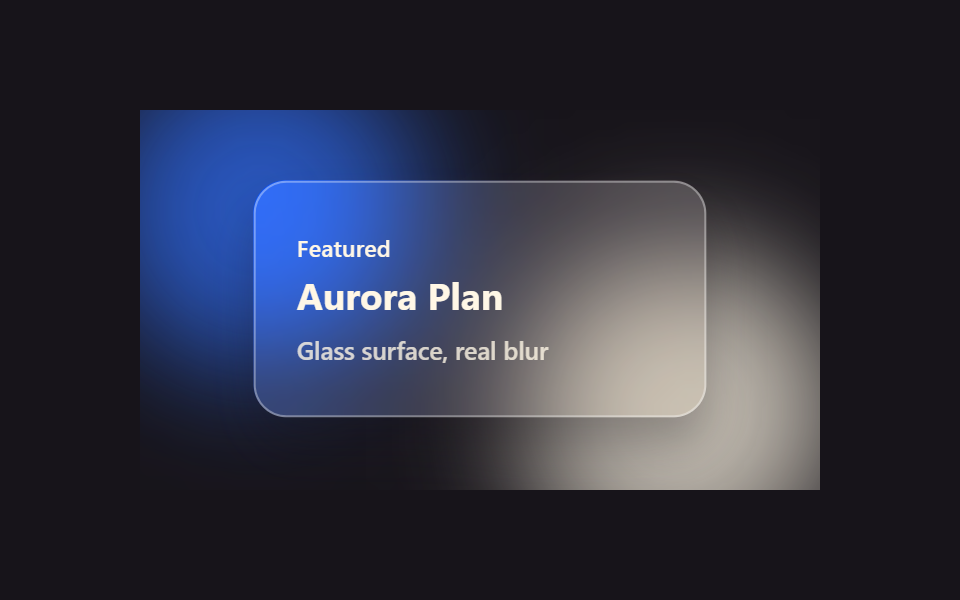 01 glassmorphism-effects-frosted-card
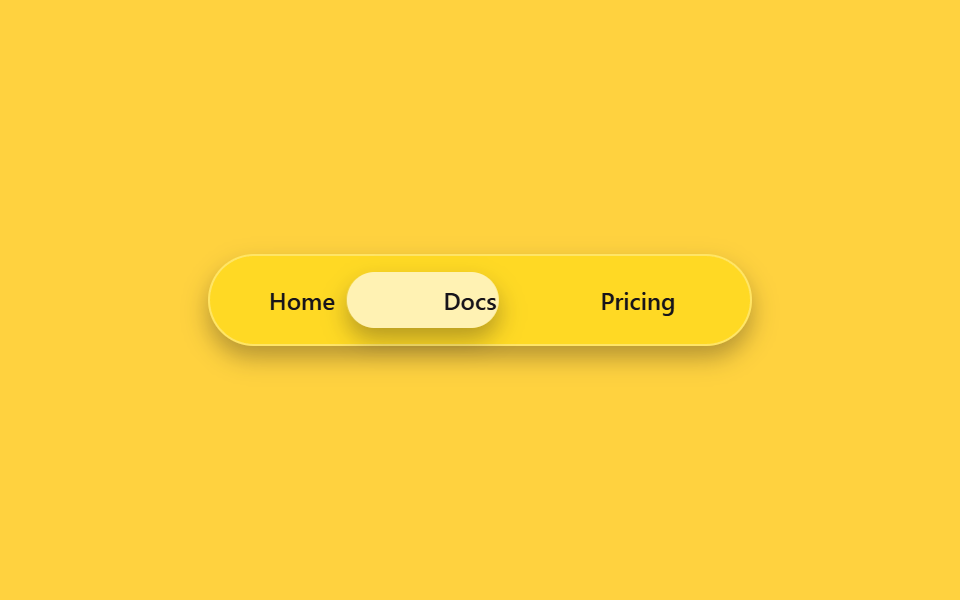 02 glassmorphism-effects-glass-nav
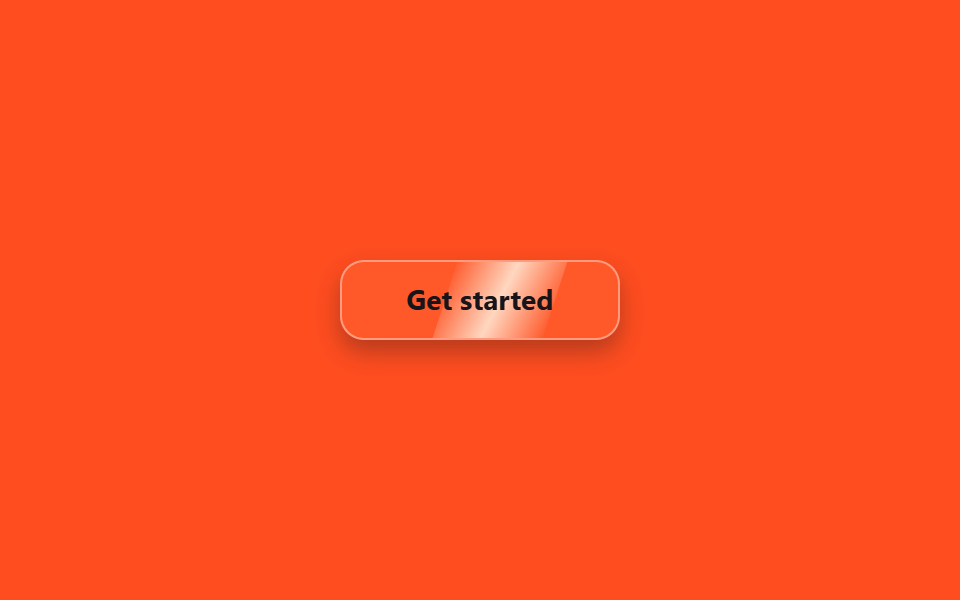 03 glassmorphism-effects-liquid-glass-btn
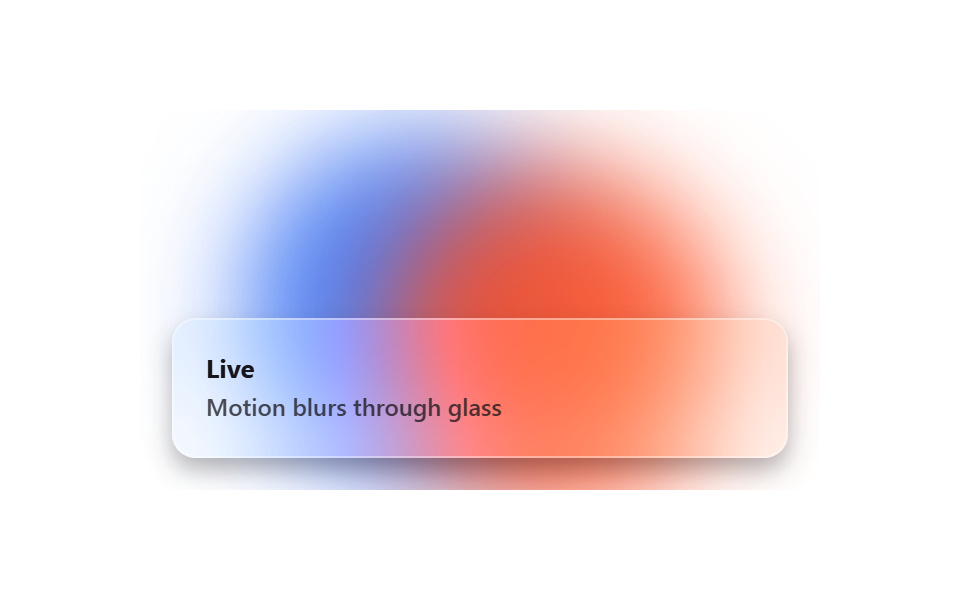 04 glassmorphism-effects-glass-blob-bg
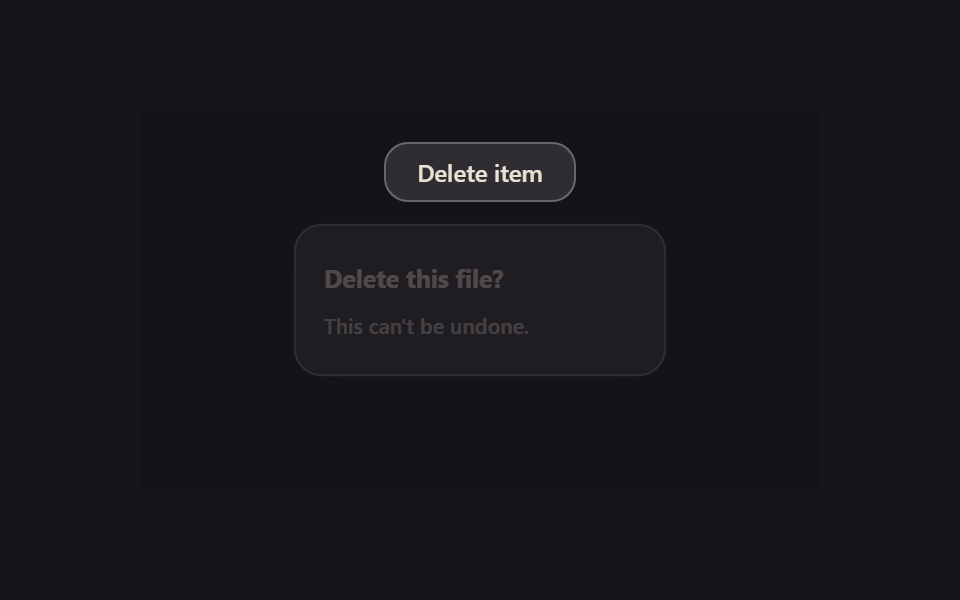 05 glassmorphism-effects-glass-modal
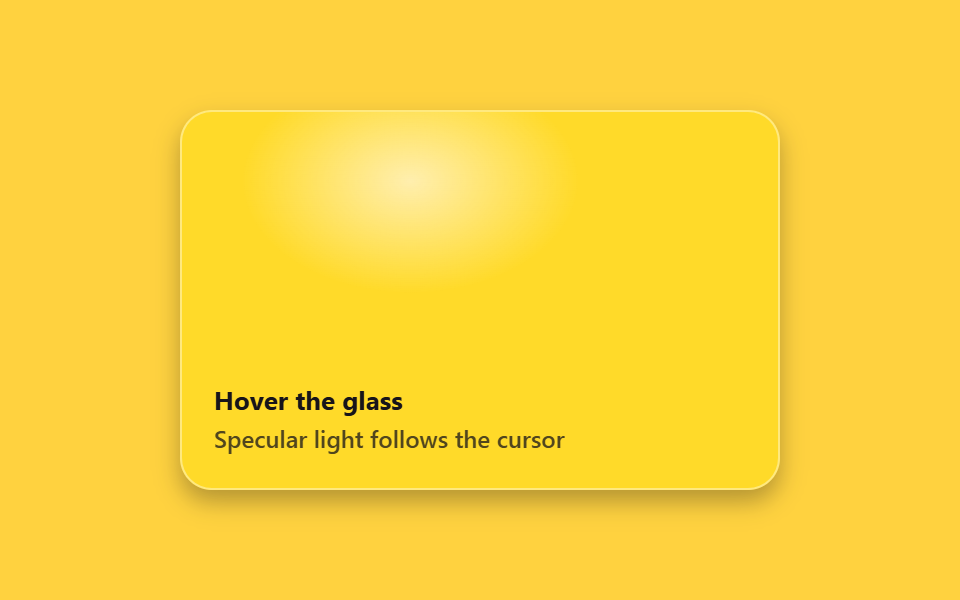 06 glassmorphism-effects-refraction-hover
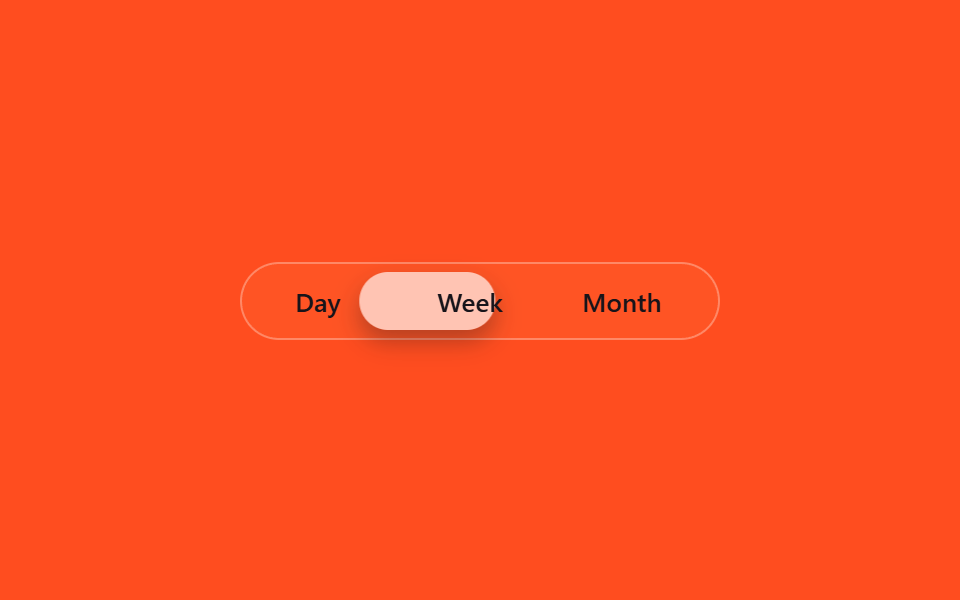 07 glassmorphism-effects-glass-tab
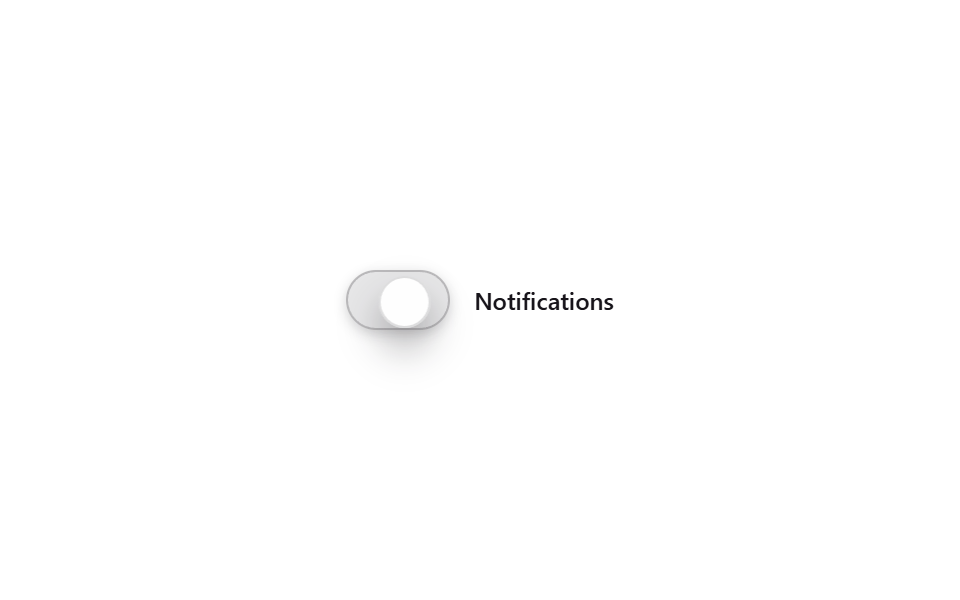 08 glassmorphism-effects-glass-toggle
 09 glassmorphism-effects-glass-input
Tự chạy · bấm ô để tới mục đó · cả 9 trong một zip
- 01 Thẻ frosted kính mờ
- 02 Thanh nav kính
- 03 Nút kính khúc xạ
- 04 Nền blob kính di chuyển
- 05 Modal kính
- 06 Vệt sáng bám theo chuột
- 07 Tab kính
- 08 Công tắc kính
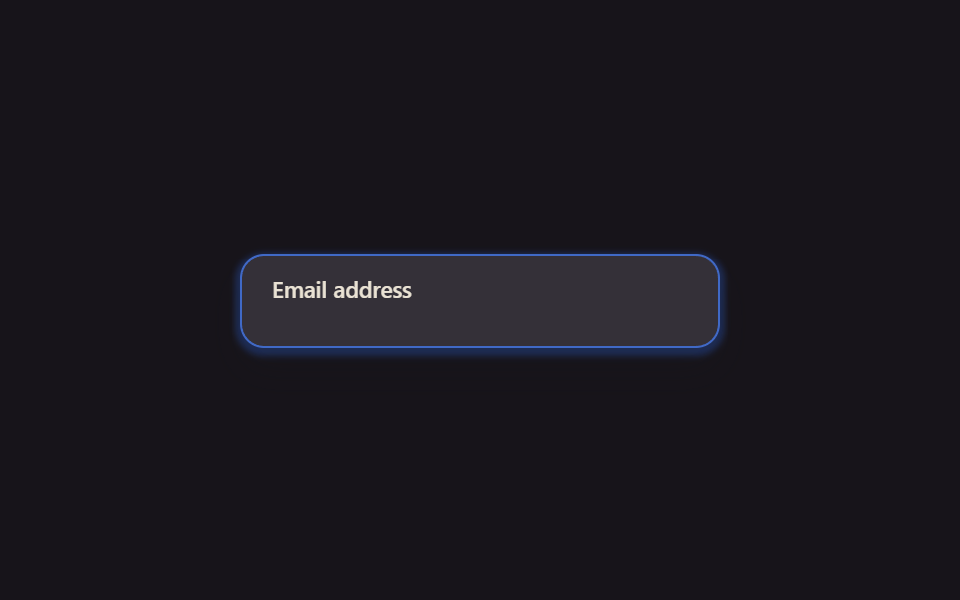
- 09 Ô nhập liệu kính
Chín mục không xếp theo độ hot mà theo thứ tự bạn gặp chất kính trên một màn hình. Mở đầu là nhóm đứng yên cũng trông ra kính (01 card, 02 navbar), tiếp đến nhóm phải chạm mới phản hồi (03 nút bấm, 04 nền động), rồi nhóm mở ra bằng cú nhấn (05 modal) và nhóm chỉ sống khi có chuột (06 vệt sáng bám con trỏ), khép lại bằng nhóm để chọn, bật, nhập (07 tab, 08 toggle, 09 ô nhập).
01Card kính mờ
Thiết kế kính mờ hợp với trang nào
Card giới thiệu của landing page hay portfolio chỉ cần thêm backdrop-filter: blur() cùng nền bán trong suốt là màu phía sau loang ra mờ mềm, tấm card nổi lên như một tấm kính.
<main class="stage">
  <div class="fc-scene is-demo">
    <span class="fc-blob fc-blob--a"></span>
    <span class="fc-blob fc-blob--b"></span>
    <div class="fc-card fc-focal">
      <span class="fc-card__eyebrow">Featured</span>
      <span class="fc-card__title">Aurora Plan</span>
      <span class="fc-card__desc">Glass surface, real blur</span>
    </div>
  </div>
</main>
@use "../../../../site/static/demo-tokens" as *;
// ── 변수 3개 ──────────────────────────────────────────
$duration: $dur-base;
$easing: $ease-spring;
$color: $subject-blue;
@include stage($stage-ink);
.fc-scene {
position: relative;
width: min(340px, 90vw);
aspect-ratio: 340 / 190;
display: grid;
place-items: center;
overflow: hidden; // 320px 에서 아래 블러 얼룩이 음수 offset 으로 장면 밖까지 번져 body.scrollHeight 를 넘겼다 (실측 2026-09-10)
}
// 유리 카드 뒤에서 블러될 색 얼룩 — .stage 배경은 그대로 단색, 이 레이어만 그라디언트 역할을 한다
.fc-blob {
position: absolute;
width: 160px;
height: 160px;
border-radius: 50%;
filter: blur(30px);
opacity: .75;
}
.fc-blob--a { background: $color; top: -30px; left: -20px; }
.fc-blob--b { background: $subject-cream; bottom: -40px; right: -10px; }
.fc-card {
position: relative;
z-index: 1;
box-sizing: border-box;
width: min(220px, 80%);
padding: $sp-6 $sp-5;
border-radius: $r-card;
background: rgba(255, 255, 255, .14);
border: 1px solid rgba(255, 255, 255, .35);
backdrop-filter: blur(16px) saturate(160%);
-webkit-backdrop-filter: blur(16px) saturate(160%);
box-shadow: $shadow-press;
display: flex;
flex-direction: column;
gap: $sp-1;
color: $subject-cream;
font: 600 13px/1.4 -apple-system, "Segoe UI", sans-serif;
transition: transform $duration $easing, box-shadow $duration $easing;
}
.fc-card__eyebrow { font-size: 11px; letter-spacing: .02em; } // opacity .75 는 파란 얼룩 위 3.31:1 이라 뺐다 — AA 4.5
.fc-card__title { font-size: 18px; font-weight: 700; }
.fc-card__desc { font-size: 12px; opacity: .8; font-weight: 500; }
// 실사용: 진짜 마우스 호버로 트랜지션
.fc-focal:hover {
transform: scale(1.03);
box-shadow: $shadow-raised;
}
// 데모 루프: is-demo 는 같은 모양을 keyframes 로 무한 재생 (헤드리스는 :hover 를 못 건다)
@keyframes fc-breathe {
0%, 100% { transform: scale(1); box-shadow: $shadow-press; }
50% { transform: scale(1.03); box-shadow: $shadow-raised; }
}
.fc-scene.is-demo .fc-focal { animation: fc-breathe $duration $easing infinite; }
@media (prefers-reduced-motion: reduce) {
.fc-focal:hover,
.fc-scene.is-demo .fc-focal { animation: none !important; transform: none !important; box-shadow: $shadow-press !important; }
}html, body {
margin: 0;
overflow: hidden;
}
.stage {
box-sizing: border-box;
min-height: 100vh;
display: grid;
place-items: center;
margin: 0;
background: #17141a;
font-family: -apple-system, "Segoe UI", "Noto Sans KR", sans-serif;
padding: clamp(8px, 4vw, 24px);
}
.fc-scene {
position: relative;
width: min(340px, 90vw);
aspect-ratio: 340/190;
display: grid;
place-items: center;
overflow: hidden;
}
.fc-blob {
position: absolute;
width: 160px;
height: 160px;
border-radius: 50%;
filter: blur(30px);
opacity: 0.75;
}
.fc-blob--a {
background: #2f6df6;
top: -30px;
left: -20px;
}
.fc-blob--b {
background: #fff7e6;
bottom: -40px;
right: -10px;
}
.fc-card {
position: relative;
z-index: 1;
box-sizing: border-box;
width: min(220px, 80%);
padding: 24px 20px;
border-radius: 16px;
background: rgba(255, 255, 255, 0.14);
border: 1px solid rgba(255, 255, 255, 0.35);
backdrop-filter: blur(16px) saturate(160%);
-webkit-backdrop-filter: blur(16px) saturate(160%);
box-shadow: 0 6px 12px rgba(23, 20, 26, 0.32);
display: flex;
flex-direction: column;
gap: 4px;
color: #fff7e6;
font: 600 13px/1.4 -apple-system, "Segoe UI", sans-serif;
transition: transform 300ms cubic-bezier(0.2, 0.8, 0.2, 1), box-shadow 300ms cubic-bezier(0.2, 0.8, 0.2, 1);
}
.fc-card__eyebrow {
font-size: 11px;
letter-spacing: 0.02em;
}
.fc-card__title {
font-size: 18px;
font-weight: 700;
}
.fc-card__desc {
font-size: 12px;
opacity: 0.8;
font-weight: 500;
}
.fc-focal:hover {
transform: scale(1.03);
box-shadow: 0 14px 24px rgba(23, 20, 26, 0.32);
}
@keyframes fc-breathe {
0%, 100% {
transform: scale(1);
box-shadow: 0 6px 12px rgba(23, 20, 26, 0.32);
}
50% {
transform: scale(1.03);
box-shadow: 0 14px 24px rgba(23, 20, 26, 0.32);
}
}
.fc-scene.is-demo .fc-focal {
animation: fc-breathe 300ms cubic-bezier(0.2, 0.8, 0.2, 1) infinite;
}
@media (prefers-reduced-motion: reduce) {
.fc-focal:hover,
.fc-scene.is-demo .fc-focal {
animation: none !important;
transform: none !important;
box-shadow: 0 6px 12px rgba(23, 20, 26, 0.32) !important;
}
}import { CSSProperties } from "react";
import styles from "./FrostedCard.module.scss";
type Vars = CSSProperties & {
"--duration"?: string;
"--easing"?: string;
"--color"?: string;
};
export interface FrostedCardProps {
duration?: string;
easing?: string;
color?: string;
}
export default function FrostedCard({
duration = "300ms",
easing = "cubic-bezier(.2, .8, .2, 1)",
color = "#2f6df6",
}: FrostedCardProps) {
const style: Vars = {
"--duration": duration,
"--easing": easing,
"--color": color,
};
return (
<div className={styles.scene} style={style}>
<span className={styles.blobA} />
<span className={styles.blobB} />
<div className={styles.card}>
<span className={styles.eyebrow}>Featured</span>
<span className={styles.title}>Aurora Plan</span>
<span className={styles.desc}>Glass surface, real blur</span>
</div>
</div>
);
}01 · Thẻ frosted kính mờ — Diện tích đo được 4.222% · khung hình chuyển động 23/23Nguyên tác GODRICH · SCSS và React nằm trong tệp zip · Xem mật khẩu
Cốt lõi nằm ở đâu
Đưa chuột lên là card phồng nhẹ và đổ bóng sâu hơn.
.fc-card {
  background: rgba(255, 255, 255, .14);
  border: 1px solid rgba(255, 255, 255, .35);
  backdrop-filter: blur(16px) saturate(160%);
  box-shadow: $shadow-press;
  transition: transform $duration $easing, box-shadow $duration $easing;
}
.fc-focal:hover {
  transform: scale(1.03);
  box-shadow: $shadow-raised;
}
02Navbar kính
Khi nào nên dùng
Trong thanh navbar bán trong suốt, viên thuốc kính mờ trượt đến sau mục đang chọn bằng translateX.
<main class="stage">
  <nav class="gn-nav is-demo" aria-label="demo">
    <span class="gn-pill" aria-hidden="true"></span>
    <a class="gn-link" href="#">Home</a>
    <a class="gn-link" href="#">Docs</a>
    <a class="gn-link" href="#">Pricing</a>
  </nav>
</main>
@use "../../../../site/static/demo-tokens" as *;
// ── 변수 3개 ──────────────────────────────────────────
$duration: $dur-quick;
$easing: $ease-pop;
$color: $subject-blue;
@include stage($stage-yellow);
// 라벨 폭을 고정값으로 둔다 — translateX 만 쓰고 scaleX 는 안 쓰므로 BD19(flex 분배) 대상은 아니지만,
// 실제 폭이 흔들리면 필이 라벨 밖으로 걸리는 건 매한가지라 flex:0 0 auto + 고정 width 로 고정한다
$w: 76px;
.gn-nav {
position: relative;
box-sizing: border-box;
width: min(272px, 86vw);
display: flex;
gap: $sp-2;
padding: $sp-2;
border-radius: $r-pill;
background: rgba(255, 255, 255, .14);
border: 1px solid rgba(255, 255, 255, .3);
backdrop-filter: blur(14px) saturate(160%);
-webkit-backdrop-filter: blur(14px) saturate(160%);
box-shadow: $shadow-press;
}
.gn-link {
position: relative;
z-index: 1;
flex: 0 0 auto;
box-sizing: border-box;
width: $w;
text-align: center;
padding: $sp-2 0;
border-radius: $r-pill;
font: 600 12px/1 -apple-system, "Segoe UI", sans-serif;
color: $subject-ink;
text-decoration: none;
}
.gn-pill {
position: absolute;
top: $sp-2; left: $sp-2; bottom: $sp-2;
box-sizing: border-box;
width: $w;
border-radius: $r-pill;
background: rgba(255, 255, 255, .6);
backdrop-filter: blur(6px);
box-shadow: $shadow-press;
transform: translateX(0);
transition: transform $duration $easing;
}
// 실사용: 진짜 호버로 필이 그 링크 아래로 이동 (:has 로 형제 상태를 읽는다)
.gn-nav:has(.gn-link:nth-child(3):hover) .gn-pill { transform: translateX(calc(#{$w} + #{$sp-2})); }
.gn-nav:has(.gn-link:nth-child(4):hover) .gn-pill { transform: translateX(calc((#{$w} + #{$sp-2}) * 2)); }
// 데모 루프: is-demo 는 세 자리를 keyframes 로 오간다 (헤드리스는 :has(:hover) 를 못 건다)
@keyframes gn-loop {
0%, 15% { transform: translateX(0); }
33%, 48% { transform: translateX(calc(#{$w} + #{$sp-2})); }
66%, 81% { transform: translateX(calc((#{$w} + #{$sp-2}) * 2)); }
100% { transform: translateX(0); }
}
.gn-nav.is-demo .gn-pill { animation: gn-loop $dur-loop $easing infinite; }
@media (prefers-reduced-motion: reduce) {
.gn-pill { transition: none; }
.gn-nav.is-demo .gn-pill { animation: none !important; }
}html, body {
margin: 0;
overflow: hidden;
}
.stage {
box-sizing: border-box;
min-height: 100vh;
display: grid;
place-items: center;
margin: 0;
background: #ffd23f;
font-family: -apple-system, "Segoe UI", "Noto Sans KR", sans-serif;
padding: clamp(8px, 4vw, 24px);
}
.gn-nav {
position: relative;
box-sizing: border-box;
width: min(272px, 86vw);
display: flex;
gap: 8px;
padding: 8px;
border-radius: 999px;
background: rgba(255, 255, 255, 0.14);
border: 1px solid rgba(255, 255, 255, 0.3);
backdrop-filter: blur(14px) saturate(160%);
-webkit-backdrop-filter: blur(14px) saturate(160%);
box-shadow: 0 6px 12px rgba(23, 20, 26, 0.32);
}
.gn-link {
position: relative;
z-index: 1;
flex: 0 0 auto;
box-sizing: border-box;
width: 76px;
text-align: center;
padding: 8px 0;
border-radius: 999px;
font: 600 12px/1 -apple-system, "Segoe UI", sans-serif;
color: #17141a;
text-decoration: none;
}
.gn-pill {
position: absolute;
top: 8px;
left: 8px;
bottom: 8px;
box-sizing: border-box;
width: 76px;
border-radius: 999px;
background: rgba(255, 255, 255, 0.6);
backdrop-filter: blur(6px);
box-shadow: 0 6px 12px rgba(23, 20, 26, 0.32);
transform: translateX(0);
transition: transform 220ms cubic-bezier(0.2, 1.4, 0.4, 1);
}
.gn-nav:has(.gn-link:nth-child(3):hover) .gn-pill {
transform: translateX(calc(76px + 8px));
}
.gn-nav:has(.gn-link:nth-child(4):hover) .gn-pill {
transform: translateX(calc((76px + 8px) * 2));
}
@keyframes gn-loop {
0%, 15% {
transform: translateX(0);
}
33%, 48% {
transform: translateX(calc(76px + 8px));
}
66%, 81% {
transform: translateX(calc((76px + 8px) * 2));
}
100% {
transform: translateX(0);
}
}
.gn-nav.is-demo .gn-pill {
animation: gn-loop 2s cubic-bezier(0.2, 1.4, 0.4, 1) infinite;
}
@media (prefers-reduced-motion: reduce) {
.gn-pill {
transition: none;
}
.gn-nav.is-demo .gn-pill {
animation: none !important;
}
}import { CSSProperties } from "react";
import styles from "./GlassNavbar.module.scss";
type Vars = CSSProperties & {
"--duration"?: string;
"--easing"?: string;
};
export interface GlassNavbarProps {
duration?: string;
easing?: string;
}
const LINKS = ["Home", "Docs", "Pricing"];
export default function GlassNavbar({
duration = "220ms",
easing = "cubic-bezier(.2, 1.4, .4, 1)",
}: GlassNavbarProps) {
const style: Vars = { "--duration": duration, "--easing": easing };
return (
<nav className={styles.nav} style={style} aria-label="glass nav">
<span className={styles.pill} aria-hidden="true" />
{LINKS.map((label) => (
<a key={label} className={styles.link} href="#">
{label}
</a>
))}
</nav>
);
}02 · Thanh nav kính — Diện tích đo được 6.783% · khung hình chuyển động 14/23Nguyên tác GODRICH · SCSS và React nằm trong tệp zip · Xem mật khẩu
Chi tiết đáng ghi nhớ
Tab giữ độ rộng cố định nên viên thuốc luôn dừng đúng chỗ.
.gn-link { flex: 0 0 auto; width: $w; }
.gn-pill {
  position: absolute;
  width: $w;
  background: rgba(255, 255, 255, .6);
  transform: translateX(0);
  transition: transform $duration $easing;
}
.gn-nav:has(.gn-link:nth-child(3):hover) .gn-pill {
  transform: translateX(calc(#{$w} + #{$sp-2}));
}
03Nút bấm khúc xạ ánh sáng
Màn hình như thế nào
Trên mặt nút nằm sẵn một dải sáng hẹp; đưa chuột lên là dải sáng quét ngang nút đúng một lần bằng translateX, tựa như ánh sáng khúc xạ trên kính lỏng.
<main class="stage">
  <button class="lb-btn lb-focal is-demo" type="button">
    <span class="lb-btn__label">Get started</span>
  </button>
</main>
@use "../../../../site/static/demo-tokens" as *;
// ── 변수 3개 ──────────────────────────────────────────
$duration: $dur-enter;
$easing: $ease-out;
$color: $subject-cream;
@include stage($stage-orange);
.lb-btn {
position: relative;
overflow: hidden;
box-sizing: border-box;
padding: $sp-3 $sp-8;
border: 1px solid rgba(255, 255, 255, .4);
border-radius: $r-control;
background: rgba(255, 255, 255, .16);
backdrop-filter: blur(12px) saturate(160%);
-webkit-backdrop-filter: blur(12px) saturate(160%);
box-shadow: $shadow-press;
color: $subject-ink;
font: 700 14px/1 -apple-system, "Segoe UI", sans-serif;
cursor: pointer;
}
.lb-btn__label { position: relative; z-index: 1; }
// 굴절 하이라이트 — 좁은 빛줄기 레이어. transform 만 움직인다 (top/left 는 고정)
.lb-btn::before {
content: "";
position: absolute;
top: -20%; left: -40%;
width: 40%; height: 140%;
background: linear-gradient(100deg, transparent, $color, transparent);
opacity: .8;
transform: translateX(-40%) skewX(-18deg);
transition: transform $duration $easing;
}
// 실사용: 진짜 마우스 호버로 빛줄기가 한 번 지나간다
.lb-focal:hover::before { transform: translateX(340%) skewX(-18deg); }
// 데모 루프: is-demo 는 같은 이동을 keyframes 로 반복
@keyframes lb-sweep {
0%, 20% { transform: translateX(-40%) skewX(-18deg); }
60%, 100% { transform: translateX(340%) skewX(-18deg); }
}
.lb-btn.is-demo::before { animation: lb-sweep $dur-loop $easing infinite; }
@media (prefers-reduced-motion: reduce) {
.lb-focal:hover::before,
.lb-btn.is-demo::before { animation: none !important; transition: none !important; transform: translateX(-40%) skewX(-18deg) !important; }
}html, body {
margin: 0;
overflow: hidden;
}
.stage {
box-sizing: border-box;
min-height: 100vh;
display: grid;
place-items: center;
margin: 0;
background: #ff4d1f;
font-family: -apple-system, "Segoe UI", "Noto Sans KR", sans-serif;
padding: clamp(8px, 4vw, 24px);
}
.lb-btn {
position: relative;
overflow: hidden;
box-sizing: border-box;
padding: 12px 32px;
border: 1px solid rgba(255, 255, 255, 0.4);
border-radius: 12px;
background: rgba(255, 255, 255, 0.16);
backdrop-filter: blur(12px) saturate(160%);
-webkit-backdrop-filter: blur(12px) saturate(160%);
box-shadow: 0 6px 12px rgba(23, 20, 26, 0.32);
color: #17141a;
font: 700 14px/1 -apple-system, "Segoe UI", sans-serif;
cursor: pointer;
}
.lb-btn__label {
position: relative;
z-index: 1;
}
.lb-btn::before {
content: "";
position: absolute;
top: -20%;
left: -40%;
width: 40%;
height: 140%;
background: linear-gradient(100deg, transparent, #fff7e6, transparent);
opacity: 0.8;
transform: translateX(-40%) skewX(-18deg);
transition: transform 600ms ease-out;
}
.lb-focal:hover::before {
transform: translateX(340%) skewX(-18deg);
}
@keyframes lb-sweep {
0%, 20% {
transform: translateX(-40%) skewX(-18deg);
}
60%, 100% {
transform: translateX(340%) skewX(-18deg);
}
}
.lb-btn.is-demo::before {
animation: lb-sweep 2s ease-out infinite;
}
@media (prefers-reduced-motion: reduce) {
.lb-focal:hover::before,
.lb-btn.is-demo::before {
animation: none !important;
transition: none !important;
transform: translateX(-40%) skewX(-18deg) !important;
}
}import { CSSProperties } from "react";
import styles from "./LiquidGlassButton.module.scss";
type Vars = CSSProperties & {
"--duration"?: string;
"--easing"?: string;
"--color"?: string;
};
export interface LiquidGlassButtonProps {
duration?: string;
easing?: string;
color?: string;
}
export default function LiquidGlassButton({
duration = "600ms",
easing = "ease-out",
color = "#fff7e6",
}: LiquidGlassButtonProps) {
const style: Vars = {
"--duration": duration,
"--easing": easing,
"--color": color,
};
return (
<button className={styles.btn} style={style} type="button">
<span className={styles.label}>Get started</span>
</button>
);
}03 · Nút kính khúc xạ — Diện tích đo được 3.422% · khung hình chuyển động 10/23Nguyên tác GODRICH · SCSS và React nằm trong tệp zip · Xem mật khẩu
Cách dựng nên nó
.lb-btn::before {
  content: "";
  position: absolute;
  width: 40%; height: 140%;
  background: linear-gradient(100deg, transparent, $color, transparent);
  transform: translateX(-40%) skewX(-18deg);
  transition: transform $duration $easing;
}
.lb-focal:hover::before {
  transform: translateX(340%) skewX(-18deg);
}
04Nền blob chuyển động
Cái gì đang chuyển động
Sau tấm kính, hai khối blob mờ hai màu đổi chỗ chậm rãi bằng transform, backdrop-filter của panel chiếu chuyển động ấy thành vệt mờ trôi.
<main class="stage">
  <div class="bb-scene">
    <span class="bb-blob bb-blob--a"></span>
    <span class="bb-blob bb-blob--b"></span>
    <div class="bb-panel">
      <span class="bb-panel__title">Live</span>
      <span class="bb-panel__desc">Motion blurs through glass</span>
    </div>
  </div>
</main>
@use "../../../../site/static/demo-tokens" as *;
// ── 변수 3개 ──────────────────────────────────────────
$duration: $dur-loop;
$easing: linear;
$color: $subject-blue;
@include stage($stage-paper);
.bb-scene {
position: relative;
width: min(340px, 90vw);
aspect-ratio: 340 / 190;
overflow: hidden;
border-radius: $r-card;
}
// 블롭 두 개는 배경(무대)이 아니라 이 안의 장식 레이어다 — .stage 자체 배경은 여전히 단색
// blur(40px) 는 인접 프레임 간 픽셀차를 문턱(12) 바로 아래로 뭉갰다(실측: 모든 프레임 쌍이 11~12) —
// 블러를 26px 로 낮추고 이동 폭을 키워 프레임마다 확실히 문턱을 넘게 했다
.bb-blob {
position: absolute;
width: 170px;
height: 170px;
border-radius: 50%;
filter: blur(26px);
opacity: .88;
}
.bb-blob--a { background: $color; top: -40px; left: -30px; animation: bb-drift-a $duration $easing infinite; }
.bb-blob--b { background: $stage-orange; bottom: -50px; right: -20px; animation: bb-drift-b $duration $easing infinite; }
@keyframes bb-drift-a {
0%, 100% { transform: translate(0, 0); }
50% { transform: translate(110px, 70px); }
}
@keyframes bb-drift-b {
0%, 100% { transform: translate(0, 0); }
50% { transform: translate(-90px, -55px); }
}
.bb-panel {
position: absolute;
inset: auto $sp-4 $sp-4 $sp-4;
box-sizing: border-box;
padding: $sp-4;
border-radius: $r-control;
background: rgba(255, 255, 255, .22);
border: 1px solid rgba(255, 255, 255, .4);
backdrop-filter: blur(18px) saturate(160%);
-webkit-backdrop-filter: blur(18px) saturate(160%);
box-shadow: $shadow-press;
display: flex;
flex-direction: column;
gap: $sp-1;
color: $subject-ink;
font: 600 12px/1.3 -apple-system, "Segoe UI", sans-serif;
}
.bb-panel__title { font-weight: 700; font-size: 13px; }
.bb-panel__desc { opacity: .75; }
@media (prefers-reduced-motion: reduce) {
.bb-blob { animation: none !important; }
}html, body {
margin: 0;
overflow: hidden;
}
.stage {
box-sizing: border-box;
min-height: 100vh;
display: grid;
place-items: center;
margin: 0;
background: #ffffff;
font-family: -apple-system, "Segoe UI", "Noto Sans KR", sans-serif;
padding: clamp(8px, 4vw, 24px);
}
.bb-scene {
position: relative;
width: min(340px, 90vw);
aspect-ratio: 340/190;
overflow: hidden;
border-radius: 16px;
}
.bb-blob {
position: absolute;
width: 170px;
height: 170px;
border-radius: 50%;
filter: blur(26px);
opacity: 0.88;
}
.bb-blob--a {
background: #2f6df6;
top: -40px;
left: -30px;
animation: bb-drift-a 2s linear infinite;
}
.bb-blob--b {
background: #ff4d1f;
bottom: -50px;
right: -20px;
animation: bb-drift-b 2s linear infinite;
}
@keyframes bb-drift-a {
0%, 100% {
transform: translate(0, 0);
}
50% {
transform: translate(110px, 70px);
}
}
@keyframes bb-drift-b {
0%, 100% {
transform: translate(0, 0);
}
50% {
transform: translate(-90px, -55px);
}
}
.bb-panel {
position: absolute;
inset: auto 16px 16px 16px;
box-sizing: border-box;
padding: 16px;
border-radius: 12px;
background: rgba(255, 255, 255, 0.22);
border: 1px solid rgba(255, 255, 255, 0.4);
backdrop-filter: blur(18px) saturate(160%);
-webkit-backdrop-filter: blur(18px) saturate(160%);
box-shadow: 0 6px 12px rgba(23, 20, 26, 0.32);
display: flex;
flex-direction: column;
gap: 4px;
color: #17141a;
font: 600 12px/1.3 -apple-system, "Segoe UI", sans-serif;
}
.bb-panel__title {
font-weight: 700;
font-size: 13px;
}
.bb-panel__desc {
opacity: 0.75;
}
@media (prefers-reduced-motion: reduce) {
.bb-blob {
animation: none !important;
}
}import { CSSProperties } from "react";
import styles from "./GlassBlobBackground.module.scss";
type Vars = CSSProperties & {
"--duration"?: string;
"--color"?: string;
};
export interface GlassBlobBackgroundProps {
duration?: string;
color?: string;
}
export default function GlassBlobBackground({
duration = "2000ms",
color = "#2f6df6",
}: GlassBlobBackgroundProps) {
const style: Vars = { "--duration": duration, "--color": color };
return (
<div className={styles.scene} style={style}>
<span className={`${styles.blob} ${styles.blobA}`} />
<span className={`${styles.blob} ${styles.blobB}`} />
<div className={styles.panel}>
<span className={styles.panelTitle}>Live</span>
<span className={styles.panelDesc}>Motion blurs through glass</span>
</div>
</div>
);
}04 · Nền blob kính di chuyển — Diện tích đo được 41.944% · khung hình chuyển động 23/23Nguyên tác GODRICH · SCSS và React nằm trong tệp zip · Xem mật khẩu
Đọc code theo hướng nào
.bb-blob { border-radius: 50%; filter: blur(26px); }
.bb-blob--a { animation: bb-drift-a $duration $easing infinite; }
@keyframes bb-drift-a {
  0%, 100% { transform: translate(0, 0); }
  50%      { transform: translate(110px, 70px); }
}
05Modal kính
Dùng chỗ nào
Bấm nút xác nhận, panel modal kính bung ra từ trạng thái thu nhỏ bằng opacity và scale, trang phía sau vẫn thấy được nhưng mờ đi.
<main class="stage">
  <div class="gm-scene is-demo">
    <input type="checkbox" id="gm-open" class="gm-check">
    <label class="gm-trigger" for="gm-open">Delete item</label>
    <div class="gm-overlay"></div>
    <div class="gm-modal gm-focal">
      <span class="gm-modal__title">Delete this file?</span>
      <span class="gm-modal__desc">This can't be undone.</span>
    </div>
  </div>
</main>
@use "../../../../site/static/demo-tokens" as *;
// ── 변수 3개 ──────────────────────────────────────────
$duration: $dur-enter;
$easing: $ease-spring;
$color: $subject-blue;
@include stage($stage-ink);
// 트리거는 위쪽에, 모달은 장면 전체를 덮는 오버레이 안에서 따로 중앙 정렬한다 —
// 처음엔 둘 다 grid place-items:center 로 같은 자리에 겹쳐 렌더됐다 (실측: poster.png 에서 글자가 포개짐)
.gm-scene {
position: relative;
box-sizing: border-box;
width: min(340px, 90vw);
aspect-ratio: 340 / 190;
display: flex;
justify-content: center;
padding-top: $sp-4;
}
.gm-check { position: absolute; opacity: 0; pointer-events: none; }
.gm-trigger {
position: relative;
z-index: 0;
align-self: flex-start;
box-sizing: border-box;
padding: $sp-2 $sp-4;
border-radius: $r-control;
background: rgba(255, 255, 255, .12);
border: 1px solid rgba(255, 255, 255, .3);
color: $subject-cream;
font: 600 12px/1 -apple-system, "Segoe UI", sans-serif;
cursor: pointer;
}
.gm-overlay {
position: absolute;
inset: 0;
background: rgba(0, 0, 0, .35);
opacity: 0;
transition: opacity $duration $easing;
pointer-events: none;
}
.gm-modal {
position: absolute;
inset: 0;
margin: auto;
z-index: 2;
box-sizing: border-box;
width: min(210px, 74%);
height: fit-content;
padding: $sp-5 $sp-4;
border-radius: $r-card;
background: rgba(255, 255, 255, .18);
border: 1px solid rgba(255, 255, 255, .38);
backdrop-filter: blur(18px) saturate(160%);
-webkit-backdrop-filter: blur(18px) saturate(160%);
box-shadow: $shadow-raised;
display: flex;
flex-direction: column;
gap: $sp-2;
color: $subject-cream;
font: 600 12px/1.4 -apple-system, "Segoe UI", sans-serif;
opacity: 0;
transform: scale(.85);
transition: opacity $duration $easing, transform $duration $easing;
pointer-events: none;
}
.gm-modal__title { font-size: 14px; font-weight: 700; }
.gm-modal__desc { opacity: .8; font-weight: 500; }
// 실사용: 체크박스 상태만으로 오버레이 + 모달이 열린다
.gm-check:checked ~ .gm-overlay { opacity: 1; }
.gm-check:checked ~ .gm-modal { opacity: 1; transform: scale(1); }
// 데모 루프: is-demo 는 열림·닫힘을 keyframes 로 반복 (체크박스 상태와 무관한 별도 경로)
@keyframes gm-overlay-loop {
0%, 12% { opacity: 0; }
35%, 78% { opacity: 1; }
100% { opacity: 0; }
}
@keyframes gm-modal-loop {
0%, 12% { opacity: 0; transform: scale(.85); }
35%, 78% { opacity: 1; transform: scale(1); }
100% { opacity: 0; transform: scale(.85); }
}
.gm-scene.is-demo .gm-overlay { animation: gm-overlay-loop $dur-loop $easing infinite; }
.gm-scene.is-demo .gm-modal { animation: gm-modal-loop $dur-loop $easing infinite; }
@media (prefers-reduced-motion: reduce) {
.gm-overlay, .gm-modal { transition: none; }
.gm-scene.is-demo .gm-overlay,
.gm-scene.is-demo .gm-modal { animation: none !important; }
}html, body {
margin: 0;
overflow: hidden;
}
.stage {
box-sizing: border-box;
min-height: 100vh;
display: grid;
place-items: center;
margin: 0;
background: #17141a;
font-family: -apple-system, "Segoe UI", "Noto Sans KR", sans-serif;
padding: clamp(8px, 4vw, 24px);
}
.gm-scene {
position: relative;
box-sizing: border-box;
width: min(340px, 90vw);
aspect-ratio: 340/190;
display: flex;
justify-content: center;
padding-top: 16px;
}
.gm-check {
position: absolute;
opacity: 0;
pointer-events: none;
}
.gm-trigger {
position: relative;
z-index: 0;
align-self: flex-start;
box-sizing: border-box;
padding: 8px 16px;
border-radius: 12px;
background: rgba(255, 255, 255, 0.12);
border: 1px solid rgba(255, 255, 255, 0.3);
color: #fff7e6;
font: 600 12px/1 -apple-system, "Segoe UI", sans-serif;
cursor: pointer;
}
.gm-overlay {
position: absolute;
inset: 0;
background: rgba(0, 0, 0, 0.35);
opacity: 0;
transition: opacity 600ms cubic-bezier(0.2, 0.8, 0.2, 1);
pointer-events: none;
}
.gm-modal {
position: absolute;
inset: 0;
margin: auto;
z-index: 2;
box-sizing: border-box;
width: min(210px, 74%);
height: fit-content;
padding: 20px 16px;
border-radius: 16px;
background: rgba(255, 255, 255, 0.18);
border: 1px solid rgba(255, 255, 255, 0.38);
backdrop-filter: blur(18px) saturate(160%);
-webkit-backdrop-filter: blur(18px) saturate(160%);
box-shadow: 0 14px 24px rgba(23, 20, 26, 0.32);
display: flex;
flex-direction: column;
gap: 8px;
color: #fff7e6;
font: 600 12px/1.4 -apple-system, "Segoe UI", sans-serif;
opacity: 0;
transform: scale(0.85);
transition: opacity 600ms cubic-bezier(0.2, 0.8, 0.2, 1), transform 600ms cubic-bezier(0.2, 0.8, 0.2, 1);
pointer-events: none;
}
.gm-modal__title {
font-size: 14px;
font-weight: 700;
}
.gm-modal__desc {
opacity: 0.8;
font-weight: 500;
}
.gm-check:checked ~ .gm-overlay {
opacity: 1;
}
.gm-check:checked ~ .gm-modal {
opacity: 1;
transform: scale(1);
}
@keyframes gm-overlay-loop {
0%, 12% {
opacity: 0;
}
35%, 78% {
opacity: 1;
}
100% {
opacity: 0;
}
}
@keyframes gm-modal-loop {
0%, 12% {
opacity: 0;
transform: scale(0.85);
}
35%, 78% {
opacity: 1;
transform: scale(1);
}
100% {
opacity: 0;
transform: scale(0.85);
}
}
.gm-scene.is-demo .gm-overlay {
animation: gm-overlay-loop 2s cubic-bezier(0.2, 0.8, 0.2, 1) infinite;
}
.gm-scene.is-demo .gm-modal {
animation: gm-modal-loop 2s cubic-bezier(0.2, 0.8, 0.2, 1) infinite;
}
@media (prefers-reduced-motion: reduce) {
.gm-overlay, .gm-modal {
transition: none;
}
.gm-scene.is-demo .gm-overlay,
.gm-scene.is-demo .gm-modal {
animation: none !important;
}
}// 체크박스가 진짜 열림·닫힘을 낸다. 실제로 누르면 데모 루프(.is-demo)만 뗀다.
document.querySelector('.gm-check').addEventListener('change', function () {
document.querySelector('.gm-scene').classList.remove('is-demo');
});import { CSSProperties, useState } from "react";
import styles from "./GlassModal.module.scss";
type Vars = CSSProperties & {
"--duration"?: string;
"--easing"?: string;
};
export interface GlassModalProps {
duration?: string;
easing?: string;
}
export default function GlassModal({
duration = "600ms",
easing = "cubic-bezier(.2, .8, .2, 1)",
}: GlassModalProps) {
const [open, setOpen] = useState(false);
const style: Vars = { "--duration": duration, "--easing": easing };
return (
<div className={styles.scene} style={style}>
<button className={styles.trigger} type="button" onClick={() => setOpen(true)}>
Delete item
</button>
<div
className={`${styles.overlay} ${open ? styles.isOpen : ""}`}
onClick={() => setOpen(false)}
/>
<div className={`${styles.modal} ${open ? styles.isOpen : ""}`}>
<span className={styles.title}>Delete this file?</span>
<span className={styles.desc}>This can't be undone.</span>
</div>
</div>
);
}05 · Modal kính — Diện tích đo được 14.35% · khung hình chuyển động 10/23Nguyên tác GODRICH · SCSS và React nằm trong tệp zip · Xem mật khẩu
Điểm chính của code
.gm-modal {
  opacity: 0;
  transform: scale(.85);
  transition: opacity $duration $easing, transform $duration $easing;
}
.gm-check:checked ~ .gm-modal {
  opacity: 1;
  transform: scale(1);
}
06Vệt sáng bám theo con trỏ
Mắt nhìn thấy gì
Rê chuột trên tấm kính lớn, hai custom property --mx và --my ghi lại tọa độ, vệt sáng hình elip bám theo thời gian thực như ngón tay lau trên mặt kính.
<main class="stage">
  <div class="rh-panel rh-focal is-demo">
    <span class="rh-panel__title">Hover the glass</span>
    <span class="rh-panel__desc">Specular light follows the cursor</span>
  </div>
</main>
@use "../../../../site/static/demo-tokens" as *;
// ── 변수 3개 ──────────────────────────────────────────
$duration: $dur-loop;
$easing: linear;
$color: $subject-cream;
// 커서 좌표 — 퍼센트로 등록해야 is-demo 의 키프레임이 값을 보간한다
@property --mx { syntax: '<percentage>'; inherits: true; initial-value: 50%; }
@property --my { syntax: '<percentage>'; inherits: true; initial-value: 50%; }
@include stage($stage-yellow);
.rh-panel {
position: relative;
overflow: hidden;
box-sizing: border-box;
width: min(300px, 86vw);
aspect-ratio: 300 / 190;
border-radius: $r-card;
background: rgba(255, 255, 255, .16);
border: 1px solid rgba(255, 255, 255, .4);
backdrop-filter: blur(14px) saturate(160%);
-webkit-backdrop-filter: blur(14px) saturate(160%);
box-shadow: $shadow-press;
display: flex;
flex-direction: column;
justify-content: flex-end;
gap: $sp-1;
padding: $sp-4;
color: $subject-ink;
font: 600 12px/1.3 -apple-system, "Segoe UI", sans-serif;
--mx: 50%;
--my: 35%;
}
.rh-panel__title { position: relative; z-index: 1; font-size: 13px; font-weight: 700; }
.rh-panel__desc { position: relative; z-index: 1; opacity: .75; font-weight: 500; }
// 실사용: 진짜 pointermove 가 --mx·--my 를 갱신한다(위 <script>)
.rh-panel::before {
content: "";
position: absolute;
inset: 0;
background: radial-gradient(120px 80px at var(--mx) var(--my), $color 0%, transparent 70%);
opacity: .7;
pointer-events: none;
}
// 데모 루프: is-demo 는 --mx·--my 를 keyframes 로 원을 그리며 돌려 캡처 (실 JS 와 별개 경로, 공존 가능)
@keyframes rh-drift {
0% { --mx: 15%; --my: 20%; }
25% { --mx: 85%; --my: 15%; }
50% { --mx: 85%; --my: 85%; }
75% { --mx: 15%; --my: 80%; }
100% { --mx: 15%; --my: 20%; }
}
.rh-panel.is-demo { animation: rh-drift $duration $easing infinite; }
@media (prefers-reduced-motion: reduce) {
.rh-panel.is-demo { animation: none !important; }
}@property --mx {
syntax: "<percentage>";
inherits: true;
initial-value: 50%;
}
@property --my {
syntax: "<percentage>";
inherits: true;
initial-value: 50%;
}
html, body {
margin: 0;
overflow: hidden;
}
.stage {
box-sizing: border-box;
min-height: 100vh;
display: grid;
place-items: center;
margin: 0;
background: #ffd23f;
font-family: -apple-system, "Segoe UI", "Noto Sans KR", sans-serif;
padding: clamp(8px, 4vw, 24px);
}
.rh-panel {
position: relative;
overflow: hidden;
box-sizing: border-box;
width: min(300px, 86vw);
aspect-ratio: 300/190;
border-radius: 16px;
background: rgba(255, 255, 255, 0.16);
border: 1px solid rgba(255, 255, 255, 0.4);
backdrop-filter: blur(14px) saturate(160%);
-webkit-backdrop-filter: blur(14px) saturate(160%);
box-shadow: 0 6px 12px rgba(23, 20, 26, 0.32);
display: flex;
flex-direction: column;
justify-content: flex-end;
gap: 4px;
padding: 16px;
color: #17141a;
font: 600 12px/1.3 -apple-system, "Segoe UI", sans-serif;
--mx: 50%;
--my: 35%;
}
.rh-panel__title {
position: relative;
z-index: 1;
font-size: 13px;
font-weight: 700;
}
.rh-panel__desc {
position: relative;
z-index: 1;
opacity: 0.75;
font-weight: 500;
}
.rh-panel::before {
content: "";
position: absolute;
inset: 0;
background: radial-gradient(120px 80px at var(--mx) var(--my), #fff7e6 0%, transparent 70%);
opacity: 0.7;
pointer-events: none;
}
@keyframes rh-drift {
0% {
--mx: 15%;
--my: 20%;
}
25% {
--mx: 85%;
--my: 15%;
}
50% {
--mx: 85%;
--my: 85%;
}
75% {
--mx: 15%;
--my: 80%;
}
100% {
--mx: 15%;
--my: 20%;
}
}
.rh-panel.is-demo {
animation: rh-drift 2s linear infinite;
}
@media (prefers-reduced-motion: reduce) {
.rh-panel.is-demo {
animation: none !important;
}
}var panel = document.querySelector('.rh-panel');
panel.addEventListener('pointermove', function (e) {
var r = panel.getBoundingClientRect();
var x = ((e.clientX - r.left) / r.width * 100).toFixed(1) + '%';
var y = ((e.clientY - r.top) / r.height * 100).toFixed(1) + '%';
panel.style.setProperty('--mx', x);
panel.style.setProperty('--my', y);
});import { CSSProperties, PointerEvent, useCallback, useRef } from "react";
import styles from "./RefractionHover.module.scss";
type Vars = CSSProperties & {
"--color"?: string;
"--mx"?: string;
"--my"?: string;
};
export interface RefractionHoverProps {
color?: string;
}
// 실사용: 진짜 pointermove 가 --mx·--my 를 갱신한다. 하이라이트는 CSS 만으로 그 좌표를 그린다
export default function RefractionHover({ color = "#fff7e6" }: RefractionHoverProps) {
const panelRef = useRef<HTMLDivElement>(null);
const handleMove = useCallback((e: PointerEvent<HTMLDivElement>) => {
const el = panelRef.current;
if (!el) return;
const r = el.getBoundingClientRect();
const x = (((e.clientX - r.left) / r.width) * 100).toFixed(1) + "%";
const y = (((e.clientY - r.top) / r.height) * 100).toFixed(1) + "%";
el.style.setProperty("--mx", x);
el.style.setProperty("--my", y);
}, []);
const style: Vars = { "--color": color };
return (
<div className={styles.panel} style={style} ref={panelRef} onPointerMove={handleMove}>
<span className={styles.title}>Hover the glass</span>
<span className={styles.desc}>Specular light follows the cursor</span>
</div>
);
}06 · Vệt sáng bám theo chuột — Diện tích đo được 37.717% · khung hình chuyển động 23/23Nguyên tác GODRICH · SCSS và React nằm trong tệp zip · Xem mật khẩu
Nguyên lý chạy thế nào
panel.addEventListener('pointermove', function (e) {
  var r = panel.getBoundingClientRect();
  var x = ((e.clientX - r.left) / r.width * 100) + '%';
  var y = ((e.clientY - r.top) / r.height * 100) + '%';
  panel.style.setProperty('--mx', x);
  panel.style.setProperty('--my', y);
});
.rh-panel::before {
  background: radial-gradient(120px 80px at var(--mx) var(--my), $color 0%, transparent 70%);
}
07Tab kính
Dùng trong tình huống nào
Chọn tab nào trong nhóm tab kính, thanh chỉ thị bán trong suốt giữ nguyên độ rộng và trượt đến dưới tab đó bằng translateX.
<main class="stage">
  <div class="gt is-demo">
    <input type="radio" name="gt-tab" id="gt-1" class="gt__radio" checked>
    <input type="radio" name="gt-tab" id="gt-2" class="gt__radio">
    <input type="radio" name="gt-tab" id="gt-3" class="gt__radio">
    <div class="gt__nav">
      <span class="gt__pill" aria-hidden="true"></span>
      <label class="gt__tab" for="gt-1">Day</label>
      <label class="gt__tab" for="gt-2">Week</label>
      <label class="gt__tab" for="gt-3">Month</label>
    </div>
  </div>
</main>
@use "../../../../site/static/demo-tokens" as *;
// ── 변수 3개 ──────────────────────────────────────────
$duration: $dur-quick;
$easing: $ease-pop;
$color: $subject-blue;
@include stage($stage-orange);
// 탭 폭을 고정값으로 둔다 — flex:0 0 auto(내용 폭)와 같이 써야 translateX 상수와 어긋나지 않는다 (BD19)
$w: 68px;
.gt { width: min(240px, 82vw); }
.gt__radio { position: absolute; opacity: 0; pointer-events: none; }
.gt__nav {
position: relative;
display: flex;
gap: $sp-2;
padding: $sp-1;
border-radius: $r-pill;
background: rgba(255, 255, 255, .14);
border: 1px solid rgba(255, 255, 255, .3);
backdrop-filter: blur(12px) saturate(160%);
-webkit-backdrop-filter: blur(12px) saturate(160%);
}
.gt__tab {
position: relative;
z-index: 1;
flex: 0 0 auto;
box-sizing: border-box;
width: $w;
text-align: center;
padding: $sp-2 0;
font: 600 clamp(11px, 3.2vw, 13px)/1 -apple-system, "Segoe UI", sans-serif;
color: $subject-ink;
cursor: pointer;
-webkit-tap-highlight-color: transparent;
}
.gt__pill {
position: absolute;
top: $sp-1; left: $sp-1; bottom: $sp-1;
box-sizing: border-box;
width: $w;
border-radius: $r-pill;
background: rgba(255, 255, 255, .6);
backdrop-filter: blur(6px);
box-shadow: $shadow-press;
transform: translateX(0);
transition: transform $duration $easing;
}
// 실사용: :checked 만으로 인디케이터가 이동한다
#gt-1:checked ~ .gt__nav .gt__pill { transform: translateX(0); }
#gt-2:checked ~ .gt__nav .gt__pill { transform: translateX(calc(#{$w} + #{$sp-2})); }
#gt-3:checked ~ .gt__nav .gt__pill { transform: translateX(calc((#{$w} + #{$sp-2}) * 2)); }
// 데모 루프: 클릭 전까지 세 자리를 스스로 오간다
.gt.is-demo .gt__pill { animation: gt-loop $dur-loop $easing infinite; }
@keyframes gt-loop {
0%, 15% { transform: translateX(0); }
33%, 48% { transform: translateX(calc(#{$w} + #{$sp-2})); }
66%, 81% { transform: translateX(calc((#{$w} + #{$sp-2}) * 2)); }
100% { transform: translateX(0); }
}
@media (prefers-reduced-motion: reduce) {
.gt__pill { transition: none; }
.gt.is-demo .gt__pill { animation: none !important; }
}html, body {
margin: 0;
overflow: hidden;
}
.stage {
box-sizing: border-box;
min-height: 100vh;
display: grid;
place-items: center;
margin: 0;
background: #ff4d1f;
font-family: -apple-system, "Segoe UI", "Noto Sans KR", sans-serif;
padding: clamp(8px, 4vw, 24px);
}
.gt {
width: min(240px, 82vw);
}
.gt__radio {
position: absolute;
opacity: 0;
pointer-events: none;
}
.gt__nav {
position: relative;
display: flex;
gap: 8px;
padding: 4px;
border-radius: 999px;
background: rgba(255, 255, 255, 0.14);
border: 1px solid rgba(255, 255, 255, 0.3);
backdrop-filter: blur(12px) saturate(160%);
-webkit-backdrop-filter: blur(12px) saturate(160%);
}
.gt__tab {
position: relative;
z-index: 1;
flex: 0 0 auto;
box-sizing: border-box;
width: 68px;
text-align: center;
padding: 8px 0;
font: 600 clamp(11px, 3.2vw, 13px)/1 -apple-system, "Segoe UI", sans-serif;
color: #17141a;
cursor: pointer;
-webkit-tap-highlight-color: transparent;
}
.gt__pill {
position: absolute;
top: 4px;
left: 4px;
bottom: 4px;
box-sizing: border-box;
width: 68px;
border-radius: 999px;
background: rgba(255, 255, 255, 0.6);
backdrop-filter: blur(6px);
box-shadow: 0 6px 12px rgba(23, 20, 26, 0.32);
transform: translateX(0);
transition: transform 220ms cubic-bezier(0.2, 1.4, 0.4, 1);
}
#gt-1:checked ~ .gt__nav .gt__pill {
transform: translateX(0);
}
#gt-2:checked ~ .gt__nav .gt__pill {
transform: translateX(calc(68px + 8px));
}
#gt-3:checked ~ .gt__nav .gt__pill {
transform: translateX(calc((68px + 8px) * 2));
}
.gt.is-demo .gt__pill {
animation: gt-loop 2s cubic-bezier(0.2, 1.4, 0.4, 1) infinite;
}
@keyframes gt-loop {
0%, 15% {
transform: translateX(0);
}
33%, 48% {
transform: translateX(calc(68px + 8px));
}
66%, 81% {
transform: translateX(calc((68px + 8px) * 2));
}
100% {
transform: translateX(0);
}
}
@media (prefers-reduced-motion: reduce) {
.gt__pill {
transition: none;
}
.gt.is-demo .gt__pill {
animation: none !important;
}
}// 인디케이터는 :checked 만으로 이동한다. 실제 클릭이 오면 데모 루프(.is-demo)만 뗀다.
document.querySelectorAll('.gt__radio').forEach(function (r) {
r.addEventListener('pointerdown', function () { document.querySelector('.gt').classList.remove('is-demo'); });
});import { CSSProperties, useState } from "react";
import styles from "./GlassTab.module.scss";
type Vars = CSSProperties & {
"--duration"?: string;
"--easing"?: string;
"--x"?: string;
};
export interface GlassTabProps {
duration?: string;
easing?: string;
}
const TABS = ["Day", "Week", "Month"];
const TAB_WIDTH = 68;
const GAP = 8;
export default function GlassTab({
duration = "220ms",
easing = "cubic-bezier(.2, 1.4, .4, 1)",
}: GlassTabProps) {
const [active, setActive] = useState(0);
const style: Vars = {
"--duration": duration,
"--easing": easing,
"--x": `${active * (TAB_WIDTH + GAP)}px`,
};
return (
<div className={styles.wrap} style={style}>
<div className={styles.nav}>
<span className={styles.pill} aria-hidden="true" />
{TABS.map((label, i) => (
<button
key={label}
type="button"
className={styles.tab}
aria-pressed={active === i}
onClick={() => setActive(i)}
>
{label}
</button>
))}
</div>
</div>
);
}07 · Tab kính — Diện tích đo được 6.422% · khung hình chuyển động 14/23Nguyên tác GODRICH · SCSS và React nằm trong tệp zip · Xem mật khẩu
Cách tạo ra nó
.gt__tab { flex: 0 0 auto; width: $w; }
.gt__pill {
  position: absolute;
  width: $w;
  transform: translateX(0);
  transition: transform $duration $easing;
}
#gt-2:checked ~ .gt__nav .gt__pill {
  transform: translateX(calc(#{$w} + #{$sp-2}));
}
08Toggle kính
Chuyện gì diễn ra
Trong rãnh kính, núm gạt trượt giữa bật và tắt bằng translateX, màu rãnh cũng đổi nhạt theo trạng thái.
<main class="stage">
  <label class="sw is-demo">
    <input type="checkbox" class="sw__input">
    <span class="sw__track"><span class="sw__knob"></span></span>
    <span class="sw__label">Notifications</span>
  </label>
</main>
@use "../../../../site/static/demo-tokens" as *;
// ── 변수 3개 ──────────────────────────────────────────
$duration: $dur-base;
$easing: $ease-spring;
$color: $subject-blue;
@include stage($stage-paper);
.sw {
display: inline-flex;
align-items: center;
gap: $sp-3;
cursor: pointer;
}
.sw__input { position: absolute; opacity: 0; pointer-events: none; }
// 무대(paper, 흰색) 위에서 흰 유리 트랙은 대비가 거의 사라졌다 (실측: poster.png 가 거의 빈 화면으로 보임) —
// 트랙 색조를 잉크 쪽으로 옮기고 테두리·그림자를 짙게 해 흰 무대에서도 윤곽이 읽히게 했다
.sw__track {
position: relative;
flex: 0 0 auto;
width: 52px;
height: 30px;
box-sizing: border-box;
border-radius: $r-pill;
background: rgba($subject-ink, .1);
border: 1px solid rgba($subject-ink, .22);
backdrop-filter: blur(10px) saturate(160%);
-webkit-backdrop-filter: blur(10px) saturate(160%);
box-shadow: 0 2px 6px rgba($subject-ink, .18);
}
.sw__knob {
position: absolute;
top: 2px; left: 2px;
width: 24px; height: 24px;
border-radius: 50%;
background: rgba(255, 255, 255, .96);
border: 1px solid rgba($subject-ink, .14);
box-shadow: $shadow-press;
transform: translateX(0);
transition: transform $duration $easing, box-shadow $duration $easing;
}
.sw__label { color: $subject-ink; font: 600 12px/1 -apple-system, "Segoe UI", sans-serif; }
// 실사용: 체크박스 상태만으로 손잡이가 이동한다
.sw__input:checked ~ .sw__track .sw__knob {
transform: translateX(22px);
box-shadow: $shadow-raised;
}
.sw__input:checked ~ .sw__track { background: rgba($color, .55); }
// 데모 루프: 클릭 전까지 켜짐·꺼짐을 스스로 오간다
@keyframes sw-knob-loop {
0%, 20% { transform: translateX(0); box-shadow: $shadow-press; }
50%, 70% { transform: translateX(22px); box-shadow: $shadow-raised; }
100% { transform: translateX(0); box-shadow: $shadow-press; }
}
.sw.is-demo .sw__knob { animation: sw-knob-loop $dur-loop $easing infinite; }
@media (prefers-reduced-motion: reduce) {
.sw__knob { transition: none; }
.sw.is-demo .sw__knob { animation: none !important; }
}html, body {
margin: 0;
overflow: hidden;
}
.stage {
box-sizing: border-box;
min-height: 100vh;
display: grid;
place-items: center;
margin: 0;
background: #ffffff;
font-family: -apple-system, "Segoe UI", "Noto Sans KR", sans-serif;
padding: clamp(8px, 4vw, 24px);
}
.sw {
display: inline-flex;
align-items: center;
gap: 12px;
cursor: pointer;
}
.sw__input {
position: absolute;
opacity: 0;
pointer-events: none;
}
.sw__track {
position: relative;
flex: 0 0 auto;
width: 52px;
height: 30px;
box-sizing: border-box;
border-radius: 999px;
background: rgba(23, 20, 26, 0.1);
border: 1px solid rgba(23, 20, 26, 0.22);
backdrop-filter: blur(10px) saturate(160%);
-webkit-backdrop-filter: blur(10px) saturate(160%);
box-shadow: 0 2px 6px rgba(23, 20, 26, 0.18);
}
.sw__knob {
position: absolute;
top: 2px;
left: 2px;
width: 24px;
height: 24px;
border-radius: 50%;
background: rgba(255, 255, 255, 0.96);
border: 1px solid rgba(23, 20, 26, 0.14);
box-shadow: 0 6px 12px rgba(23, 20, 26, 0.32);
transform: translateX(0);
transition: transform 300ms cubic-bezier(0.2, 0.8, 0.2, 1), box-shadow 300ms cubic-bezier(0.2, 0.8, 0.2, 1);
}
.sw__label {
color: #17141a;
font: 600 12px/1 -apple-system, "Segoe UI", sans-serif;
}
.sw__input:checked ~ .sw__track .sw__knob {
transform: translateX(22px);
box-shadow: 0 14px 24px rgba(23, 20, 26, 0.32);
}
.sw__input:checked ~ .sw__track {
background: rgba(47, 109, 246, 0.55);
}
@keyframes sw-knob-loop {
0%, 20% {
transform: translateX(0);
box-shadow: 0 6px 12px rgba(23, 20, 26, 0.32);
}
50%, 70% {
transform: translateX(22px);
box-shadow: 0 14px 24px rgba(23, 20, 26, 0.32);
}
100% {
transform: translateX(0);
box-shadow: 0 6px 12px rgba(23, 20, 26, 0.32);
}
}
.sw.is-demo .sw__knob {
animation: sw-knob-loop 2s cubic-bezier(0.2, 0.8, 0.2, 1) infinite;
}
@media (prefers-reduced-motion: reduce) {
.sw__knob {
transition: none;
}
.sw.is-demo .sw__knob {
animation: none !important;
}
}// 체크박스가 진짜 켜짐·꺼짐을 낸다. 실제로 누르면 데모 루프(.is-demo)만 뗀다.
document.querySelector('.sw__input').addEventListener('pointerdown', function () {
document.querySelector('.sw').classList.remove('is-demo');
});import { CSSProperties, useState } from "react";
import styles from "./GlassToggle.module.scss";
type Vars = CSSProperties & {
"--duration"?: string;
"--easing"?: string;
"--color"?: string;
};
export interface GlassToggleProps {
duration?: string;
easing?: string;
color?: string;
}
export default function GlassToggle({
duration = "300ms",
easing = "cubic-bezier(.2, .8, .2, 1)",
color = "#2f6df6",
}: GlassToggleProps) {
const [on, setOn] = useState(false);
const style: Vars = { "--duration": duration, "--easing": easing, "--color": color };
return (
<button
type="button"
className={styles.sw}
style={style}
role="switch"
aria-checked={on}
onClick={() => setOn((v) => !v)}
>
<span className={`${styles.track} ${on ? styles.on : ""}`}>
<span className={`${styles.knob} ${on ? styles.on : ""}`} />
</span>
<span className={styles.label}>Notifications</span>
</button>
);
}08 · Công tắc kính — Diện tích đo được 1.328% · khung hình chuyển động 12/23Nguyên tác GODRICH · SCSS và React nằm trong tệp zip · Xem mật khẩu
Vì sao dựng theo cách này
.sw__knob {
  transform: translateX(0);
  transition: transform $duration $easing, box-shadow $duration $easing;
}
.sw__input:checked ~ .sw__track .sw__knob {
  transform: translateX(22px);
  box-shadow: $shadow-raised;
}
.sw__input:checked ~ .sw__track { background: rgba($color, .55); }
09Ô nhập liệu kính
Trên màn hình việc gì xảy ra
Ô nhập kính nhận tiêu điểm thì viền sáng lên, label phía trên nhấc nhẹ bằng translateY và đứng vào vị trí mới.
<main class="stage">
  <div class="gi-field is-demo">
    <input class="gi-field__input gi-focal" type="email" placeholder=" ">
    <label class="gi-field__label">Email address</label>
  </div>
</main>
@use "../../../../site/static/demo-tokens" as *;
// ── 변수 3개 ──────────────────────────────────────────
$duration: $dur-quick;
$easing: $ease-out;
$color: $subject-blue;
@include stage($stage-ink);
.gi-field {
position: relative;
width: min(240px, 84vw);
}
.gi-field__input {
width: 100%;
box-sizing: border-box;
padding: $sp-5 $sp-4 $sp-2;
border-radius: $r-control;
background: rgba(255, 255, 255, .12);
border: 1px solid rgba(255, 255, 255, .3);
backdrop-filter: blur(14px) saturate(160%);
-webkit-backdrop-filter: blur(14px) saturate(160%);
box-shadow: $shadow-press;
color: $subject-cream;
font: 600 13px/1 -apple-system, "Segoe UI", sans-serif;
outline: none;
transition: border-color $duration $easing, box-shadow $duration $easing;
}
.gi-field__input::placeholder { color: transparent; }
// top·left 는 고정, 뜨는 움직임은 transform 만
.gi-field__label {
position: absolute;
left: $sp-4;
top: 50%;
transform: translateY(-50%) scale(1);
transform-origin: left center; // 규칙8: 좌측 패딩 붙은 라벨 뜸
color: rgba($subject-cream, .6);
font: 600 13px/1 -apple-system, "Segoe UI", sans-serif;
pointer-events: none;
transition: transform $duration $easing, color $duration $easing;
}
// 실사용: 진짜 포커스로 라벨이 뜨고 테두리 빛이 밝아진다
.gi-field:focus-within .gi-field__label { transform: translateY(-14px) scale(.82); color: $subject-cream; }
.gi-field:focus-within .gi-focal { border-color: rgba($color, .9); box-shadow: 0 0 0 3px rgba($color, .35), $shadow-raised; }
// 데모 루프: is-demo 는 같은 상태를 keyframes 로 반복 (헤드리스는 :focus-within 을 못 건다, .focus() 는 안 쓴다 — BD18)
@keyframes gi-label-loop {
0%, 20% { transform: translateY(-50%) scale(1); color: rgba($subject-cream, .6); }
50%, 70% { transform: translateY(-14px) scale(.82); color: $subject-cream; }
100% { transform: translateY(-50%) scale(1); color: rgba($subject-cream, .6); }
}
@keyframes gi-input-loop {
0%, 20% { border-color: rgba(255, 255, 255, .3); box-shadow: $shadow-press; }
50%, 70% { border-color: rgba($color, .9); box-shadow: 0 0 0 3px rgba($color, .35), $shadow-raised; }
100% { border-color: rgba(255, 255, 255, .3); box-shadow: $shadow-press; }
}
.gi-field.is-demo .gi-field__label { animation: gi-label-loop $dur-loop $easing infinite; }
.gi-field.is-demo .gi-focal { animation: gi-input-loop $dur-loop $easing infinite; }
@media (prefers-reduced-motion: reduce) {
.gi-field__label, .gi-focal { transition: none; }
.gi-field.is-demo .gi-field__label,
.gi-field.is-demo .gi-focal { animation: none !important; }
}html, body {
margin: 0;
overflow: hidden;
}
.stage {
box-sizing: border-box;
min-height: 100vh;
display: grid;
place-items: center;
margin: 0;
background: #17141a;
font-family: -apple-system, "Segoe UI", "Noto Sans KR", sans-serif;
padding: clamp(8px, 4vw, 24px);
}
.gi-field {
position: relative;
width: min(240px, 84vw);
}
.gi-field__input {
width: 100%;
box-sizing: border-box;
padding: 20px 16px 8px;
border-radius: 12px;
background: rgba(255, 255, 255, 0.12);
border: 1px solid rgba(255, 255, 255, 0.3);
backdrop-filter: blur(14px) saturate(160%);
-webkit-backdrop-filter: blur(14px) saturate(160%);
box-shadow: 0 6px 12px rgba(23, 20, 26, 0.32);
color: #fff7e6;
font: 600 13px/1 -apple-system, "Segoe UI", sans-serif;
outline: none;
transition: border-color 220ms ease-out, box-shadow 220ms ease-out;
}
.gi-field__input::placeholder {
color: transparent;
}
.gi-field__label {
position: absolute;
left: 16px;
top: 50%;
transform: translateY(-50%) scale(1);
transform-origin: left center;
color: rgba(255, 247, 230, 0.6);
font: 600 13px/1 -apple-system, "Segoe UI", sans-serif;
pointer-events: none;
transition: transform 220ms ease-out, color 220ms ease-out;
}
.gi-field:focus-within .gi-field__label {
transform: translateY(-14px) scale(0.82);
color: #fff7e6;
}
.gi-field:focus-within .gi-focal {
border-color: rgba(47, 109, 246, 0.9);
box-shadow: 0 0 0 3px rgba(47, 109, 246, 0.35), 0 14px 24px rgba(23, 20, 26, 0.32);
}
@keyframes gi-label-loop {
0%, 20% {
transform: translateY(-50%) scale(1);
color: rgba(255, 247, 230, 0.6);
}
50%, 70% {
transform: translateY(-14px) scale(0.82);
color: #fff7e6;
}
100% {
transform: translateY(-50%) scale(1);
color: rgba(255, 247, 230, 0.6);
}
}
@keyframes gi-input-loop {
0%, 20% {
border-color: rgba(255, 255, 255, 0.3);
box-shadow: 0 6px 12px rgba(23, 20, 26, 0.32);
}
50%, 70% {
border-color: rgba(47, 109, 246, 0.9);
box-shadow: 0 0 0 3px rgba(47, 109, 246, 0.35), 0 14px 24px rgba(23, 20, 26, 0.32);
}
100% {
border-color: rgba(255, 255, 255, 0.3);
box-shadow: 0 6px 12px rgba(23, 20, 26, 0.32);
}
}
.gi-field.is-demo .gi-field__label {
animation: gi-label-loop 2s ease-out infinite;
}
.gi-field.is-demo .gi-focal {
animation: gi-input-loop 2s ease-out infinite;
}
@media (prefers-reduced-motion: reduce) {
.gi-field__label, .gi-focal {
transition: none;
}
.gi-field.is-demo .gi-field__label,
.gi-field.is-demo .gi-focal {
animation: none !important;
}
}import { CSSProperties } from "react";
import styles from "./GlassInput.module.scss";
type Vars = CSSProperties & {
"--duration"?: string;
"--easing"?: string;
"--color"?: string;
};
export interface GlassInputProps {
duration?: string;
easing?: string;
color?: string;
}
export default function GlassInput({
duration = "220ms",
easing = "ease-out",
color = "#2f6df6",
}: GlassInputProps) {
const style: Vars = { "--duration": duration, "--easing": easing, "--color": color };
return (
<div className={styles.field} style={style}>
<input id="gi-email" className={styles.input} type="email" placeholder=" " />
<label className={styles.label} htmlFor="gi-email">Email address</label>
</div>
);
}09 · Ô nhập liệu kính — Diện tích đo được 2.953% · khung hình chuyển động 15/23Nguyên tác GODRICH · SCSS và React nằm trong tệp zip · Xem mật khẩu
Cốt lõi của phần dựng
.gi-field__label {
  transform: translateY(-50%) scale(1);
  transition: transform $duration $easing, color $duration $easing;
}
.gi-field:focus-within .gi-field__label {
  transform: translateY(-14px) scale(.82);
}
.gi-field:focus-within .gi-focal {
  border-color: rgba($color, .9);
  box-shadow: 0 0 0 3px rgba($color, .35), $shadow-raised;
}
Glassmorphism dễ vỡ ở đâu
Vấn đề nằm ở đâu
Kể cả khi bạn bắt chước liquid glass của iPhone, chỗ vấp nhiều nhất trong chín mục vẫn là backdrop-filter. Thuộc tính này làm mờ nội dung thật nằm sau nó, nên sau tấm kính không có gì hoặc nền chỉ là một màu đặc thì tăng giá trị đến mấy bạn cũng chỉ nhận được một hộp bán trong suốt. Hãy trải sẵn blob mờ như mục 04, hoặc ở trang thật thì để hình ảnh và gradient đi ngang sau card. Blur quá đà cũng hỏng: lần đầu dựng mục 04 tôi đặt blur(40px), chênh màu giữa hai khung hình cạnh nhau nhỏ đến mức công cụ đo animation báo nhầm là khung đứng yên.
| Thành phần | Dải an toàn | Khi nào tăng |
|---|---|---|
| blur() | 12–20px | nền sau nhiều chi tiết |
| Nền trắng rgba | .10–.18 | chữ cần nổi hơn |
| Viền trắng rgba | .30–.40 | khung dễ tan vào nền |
Tránh thế nào
Tra css glassmorphism card hay lục glassmorphism css codepen cũng tiện, nhưng chín mục ở đây cho bạn copy nguyên mã mà không cần rời trang. Sân khấu và tấm kính cùng sáng, kiểu nền trắng kèm kính trắng ở mục 08, thì phải đậm viền và bóng hơn khung mới sống sót, không thì chỉ còn là hộp vô hình. Muốn mở tệp nén chứa chín hiệu ứng này bạn cần một chuỗi khóa, vn8q8tgw phần cuối đoạn này giấu nguyên văn chuỗi đó trong câu chữ. backdrop-filter chạy tốt trên bản mới của Safari, Chrome, Edge, Firefox, còn trình duyệt cũ chỉ còn nền bán trong suốt, nên đừng trông cậy thông tin quan trọng vào một hiệu ứng mờ.
Khả năng tiếp cận — chín hiệu ứng giữ lại gì khi bật reduced-motion
Bật reduced-motion còn lại gì
Khi hệ thống bật giảm chuyển động, cả chín hiệu ứng đều tắt animation và transition qua prefers-reduced-motion: reduce rồi đứng yên. Trang trí phản hồi hover hay cú nhấn như 01, 02, 03, 07, 08, 09 nhảy thẳng tới trạng thái cuối là đủ; blob trôi của 04 và vệt sáng bám chuột của 06 không mang nội dung nên đứng im cũng không mất thông tin. backdrop-filter tốn chi phí vẽ trên máy yếu, trang thật nhiều mục thì nên giới hạn số panel kính chạy cùng lúc.
Bài nên đọc tiếp
Muốn xem cùng chất kính ấy trong bố cục lưới thay vì card, bạn đọc tiếp 9 hiệu ứng hover bento grid CSS; danh mục đầy đủ nằm ở CSS animation.
FAQ — câu hỏi thường gặp
Glassmorphism có bắt buộc dùng backdrop-filter không?
Có, phần lõi làm mờ nền phía sau là backdrop-filter: blur(). Chỉ có background: rgba(255,255,255,.14) thì bạn mới được một tấm bán trong suốt, phía sau không mờ nên không ra chất kính. Hai thuộc tính này luôn đi cặp.
Trên trình duyệt cũ liquid glass hiện thế nào?
Trình duyệt thiếu backdrop-filter bỏ phần mờ, chỉ còn nền bán trong suốt kiểu rgba(255,255,255,.14). Đọc nội dung không vướng nhưng chất kính mất, nên tránh màu chữ tương phản quá thấp.
Code vanilla và react trong zip khác nhau ra sao?
Cách hoạt động như nhau. Bản vanilla diễn tả trạng thái mở, chọn bằng HTML thuần như checkbox và radio; bản React chuyển cùng trạng thái đó sang useState. Mục 05, 07, 08 là chỗ khác biệt rõ nhất.
Có thể bạn cũng thích
 Phản hồi9 CSS Image Hover Effects — dán 1 dòng là chạy
 Phản hồi9 CSS Card Hover Effects — dán 1 dòng là chạy
 Phản hồi9 Tailwind v4 Animations — dán 1 dòng là chạy
 Phản hồi9 CSS Text Highlight Animation: dán 1 dòng là chạy
 Phản hồi9 cubic bezier css — đường cong copy-paste
 Phản hồi9 hiệu ứng css dark mode toggle 1 dòng CSS
 Phản hồi9 micro interactions css — dán 1 dòng chạy ngay
 Phản hồi9 CSS tooltip examples — copy dán một dòng là chạy
 Phản hồi9 hiệu ứng custom cursor css — copy dán một dòng
 Phản hồi9 kiểu css typing animation, copy dán là chạy