css calendar ui design: 9 date-grid scenes
A css calendar is math at heart. A calendar is math, not a drawn table — 01 measures the first weekday to fill 42 cells, 05 fills a range by testing between
A calendar UI is not a pre-drawn table but the arithmetic of measuring the first weekday and the month's length to fill 42 cells — css calendar design starts with how smoothly that arithmetic is shown
 01 cal-ui-basic-month-grid
 02 cal-ui-month-slide-direction
 03 cal-ui-row-phase-ripple
 04 cal-ui-single-pick-radial
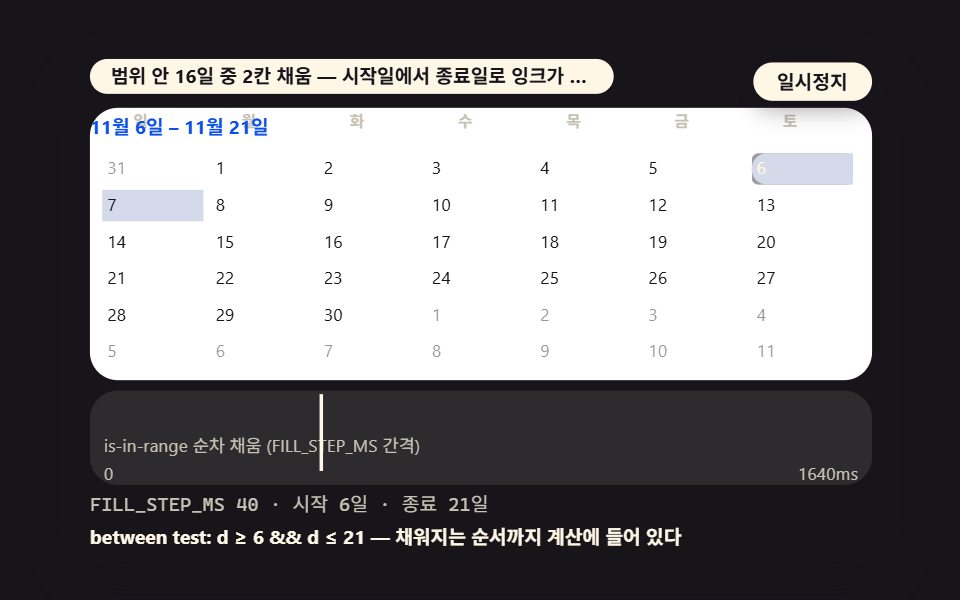 05 cal-ui-range-between-fill
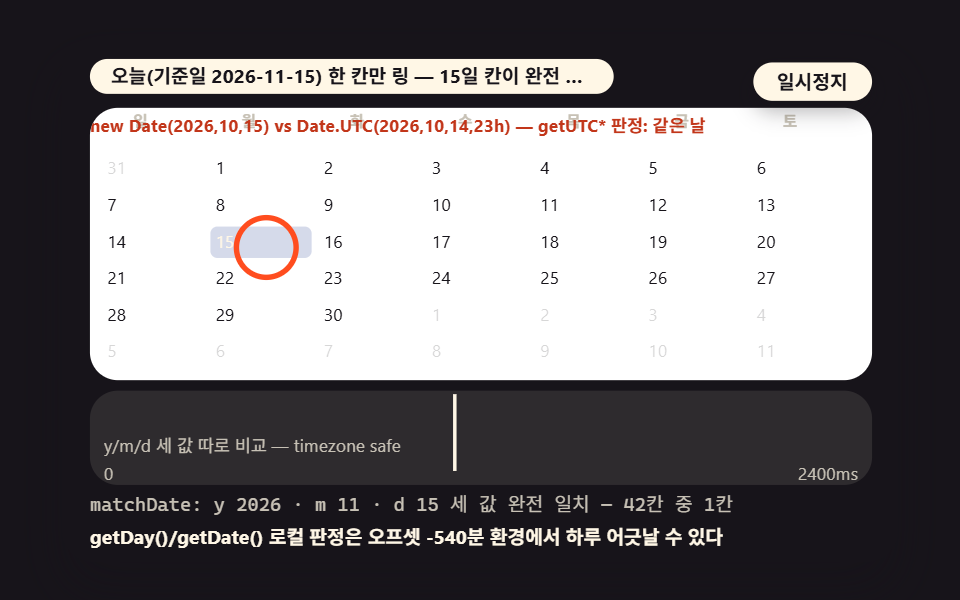 06 cal-ui-today-ring-match
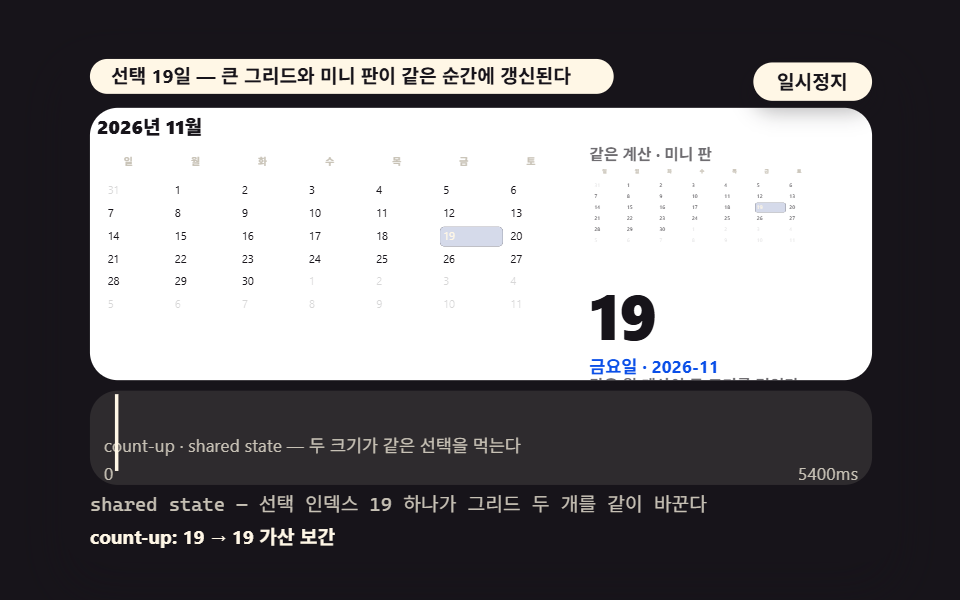 07 cal-ui-mini-side-panel
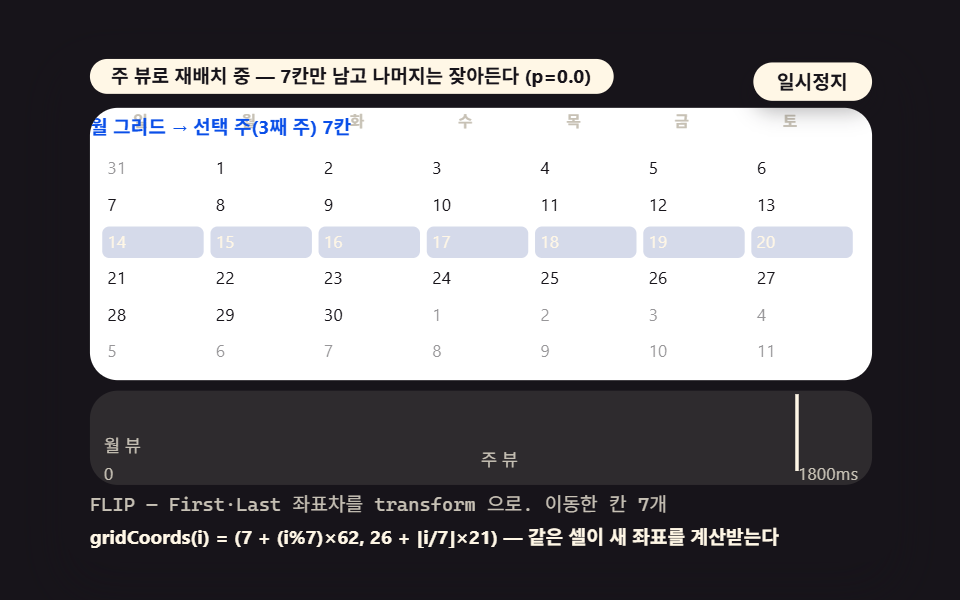 08 cal-ui-week-view-relayout
 09 cal-ui-event-dots-mapping
- 01 A Basic Month Grid That Measures the First Weekday and Fills 42 Cells
- 02 A Month Switch That Decides Its Direction Before Sliding
- 03 A Date Hover Ripple Phased Row by Row
- 04 A Single Pick Spreading Radially From the Chosen Cell
- 05 A Range Fill That Tests Between Start and End
- 06 A Today Ring Drawn by Matching the Reference Date
- 07 A Mini Side Panel Reading the Picked Day Aloud
- 08 The Month Grid Relaying Itself Into Week Columns
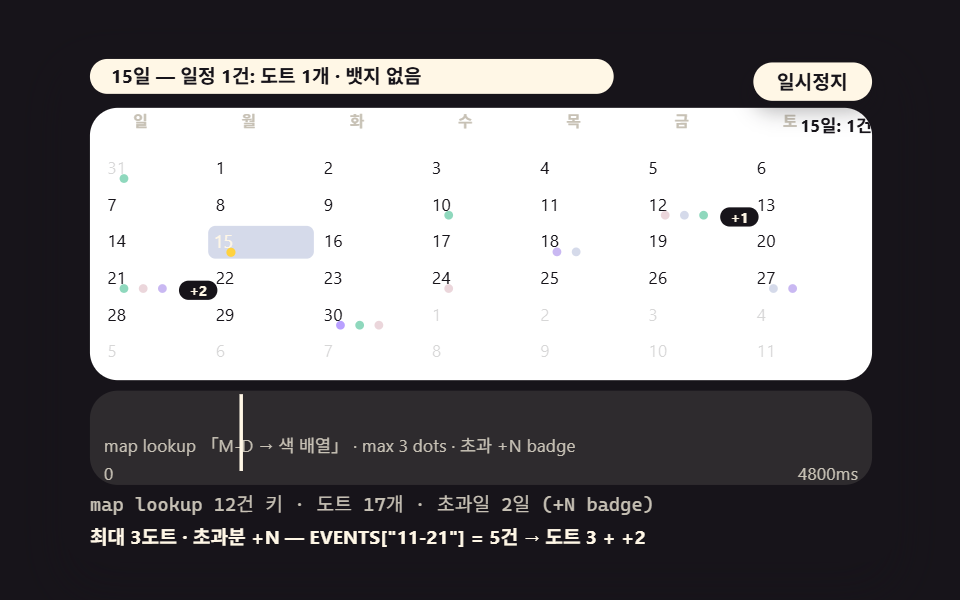
- 09 Multi Event Dots Lined Up by Date Mapping
All nine scenes run on the same stage. The inner box measures 480×300, holding a date grid of 448×156 plus a timeline chart and two read lines. There are zero libraries, zero WebGL and zero CDN requests, and the reference date is a fixed seed (2026-11-15), so every replay draws the very same calendar — reaching for new Date() at the current moment would paint a different month on every recording, measurement and review pass.
Presets change per scene with the arrow keys. Scene 01 alternates between 2026-11 (lead 0) and 2027-02 (lead 1), scene 02 cycles the switch path November → December → January → rollback, and scene 08 moves the surviving week between the third, fifth and second rows. Space and Enter pause, and R restarts.
Nine calendar UI scenes — a basic month grid, a sliding month switch, a row-phased hover ripple, a single-pick radial spread, a range fill between endpoints, a today ring, a mini side panel, a week-view relay and multi event dots
Which numbers are measured and which are modeled
Separate the quoted values first. The lead 0, trail 12 and 42-cell split, and the damped frequency of ω_d ≈ 20.62, are models — arithmetic worked out from the constants in the source. The accumulated area, intensity and moving frames in the table are measurements from the render, and the −540-minute timezone offset is a value the scene 06 code read off the machine it ran on.
The measurement board is the 2026-11-15 22:34 render. Headless Chromium captured the 480×300 stage as 24 frames over 2 seconds, motion was judged on the 23 deltas between neighboring frames, accumulated area is the share of pixels that changed at least once across the series, and intensity is the mean color distance of those pixels on a 0–255 scale.
| Scene | Accumulated area | Intensity | Moving frames |
|---|---|---|---|
| 01 Basic month grid | 20.3% | 52.8 | 23/23 |
| 02 Sliding month switch | 39.4% | 121.5 | 23/23 |
| 03 Hover ripple | 15.8% | 58.7 | 23/23 |
| 04 Single-pick radial spread | 38.2% | 105.3 | 23/23 |
| 05 Range fill | 38.9% | 105.3 | 23/23 |
| 06 Today ring | 37.2% | 94.8 | 23/23 |
| 07 Mini side panel | 39.4% | 132.4 | 23/23 |
| 08 Week-view FLIP | 36.8% | 48.5 | 23/23 |
| 09 Multi event dots | 38.5% | 91.3 | 23/23 |
The widest accumulated area belongs to 07 at 39.4% and the narrowest to 03 at 15.8% — 03 is a ripple over the cells of one pressed row, so its moving area is small to begin with, which is exactly why the phase calculation was spread across the whole row. The mean intensity peaks at 07 with 132.4 and bottoms at 08 with 48.5, and all nine scenes moved in every one of the 23 delta frames.
What was not confirmed goes on record too. An environment with JS switched off was not tested — the script draws the grid itself, so this structure has no single static fallback sheet. No physical phone render is in this measurement pass either.
01A Basic Month Grid That Measures the First Weekday and Fills 42 Cells
Demo and Explanation
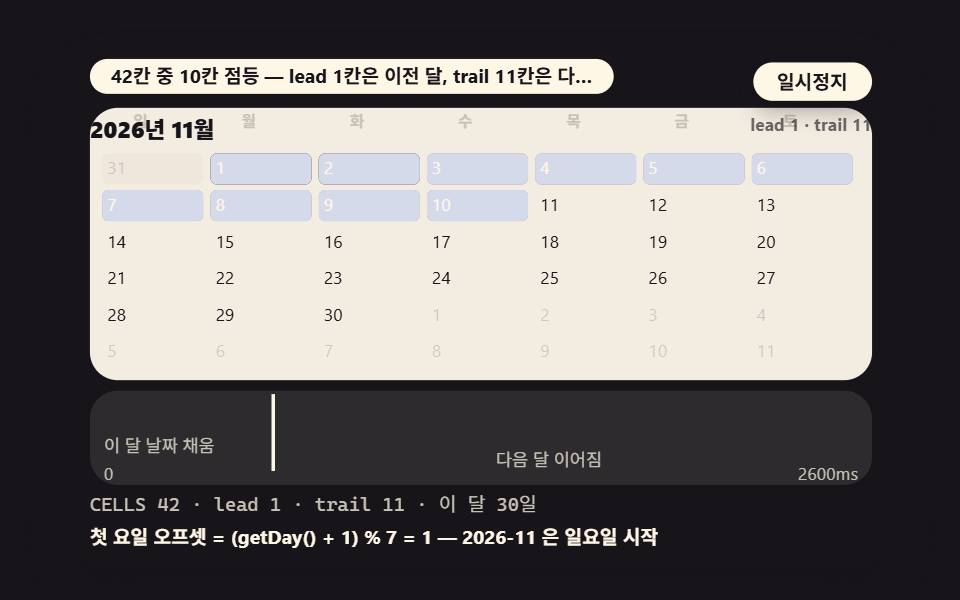
Measuring the empty cells before day one with the weekday of the month's 1st, then laying the blanks plus the month's length into 42 cells, is the skeleton under all nine scenes. November 2026 starts on a Sunday over 30 days, so lead 0 means the grid opens on the 1st of the month itself while trail 12 borrows the twelve days after the 30th from December; the 2027-02 preset is lead 1, 28 days and trail 13 — setting the two splits side by side shows the whole arithmetic.
<main class="stage">
<div class="ez is-demo" id="ez">
  <div class="ez__in" data-role="inner">
    <div class="ez__pad" data-role="pad" tabindex="0" role="application" aria-label="Demo stage: Space or Enter pauses, R restarts, left and right arrows pick another value">
      <div class="ez__scene" data-role="scene" role="img" aria-label="The first-weekday offset is measured and 42 cells light up in order, filling in dates borrowed from the neighboring months"></div>
      <div class="ez__probe" data-role="probe" aria-hidden="true"></div>
      <div class="ez__chart" data-role="chart" aria-hidden="true"></div>
      <p class="ez__status" data-role="status" aria-live="off">Scene ready</p>
      <p class="ez__reada" data-role="reada" aria-hidden="true"></p>
      <p class="ez__readb" data-role="readb" aria-hidden="true"></p>
      <div class="ez__ctrl">
        <button class="ez__pause" data-role="pause" type="button" aria-pressed="false">Pause</button>
… (총 18줄 — 아래 「전체 코드」에서 원문 전체)
@use "../../../../site/static/demo-tokens" as *;
@include stage($stage-ink);
// 캘린더 장면 공통 — 먹 무대 위 크림 패널 + 파스텔 장식
$panel: mix($subject-cream, $subject-ink, 10%);
$dim: mix($subject-cream, $subject-ink, 76%);
// 파스텔 장식 팔레트 — vivid 토큰(채도 .55+) 대신 이 값들을 쓴다 (BD26)
$stroke-blue: #d5daea; // $subject-blue 의 파스텔
$stroke-rose: #ebd6db; // 핑크 계열 파스텔
$stroke-mint: #8fd8bd; // 민트 계열 파스텔
$stroke-lilac: #c9b8f2; // 라일락 계열 파스텔
… (총 312줄 — 아래 「전체 코드」에서 원문 전체)html, body {
margin: 0;
overflow: hidden;
}
.stage {
box-sizing: border-box;
min-height: 100vh;
display: grid;
place-items: center;
margin: 0;
background: #17141a;
… (총 351줄 — 아래 「전체 코드」에서 원문 전체)(function () {
const rootEl = document.getElementById("ez");
if (!rootEl) return;
main(rootEl);
function cx(s) { return s; }
function main(root) {
// 무대 좌표 — 안쪽 상자는 늘 480x300 이고 화면 폭에 맞춰 통체로 줄인다
const W = 480;
const CX0 = 8;
const CW = 432;
const SVGW = 448;
const SVGH = 156;
… (총 451줄 — 아래 「전체 코드」에서 원문 전체)// CalBasicGrid - 같은 항목 vanilla index.html 의 React 판. 같은 계산을 useEffect 안에서 돌린다
import { useEffect, useRef } from "react";
import styles from "./CalBasicGrid.module.scss";
const cx = (s: string): string => s.split(" ").map((n) => styles[n] ?? n).join(" ");
function main(root: HTMLElement): () => void {
// 무대 좌표 — 안쪽 상자는 늘 480x300 이고 화면 폭에 맞춰 통체로 줄인다
const W = 480;
const CX0 = 8;
const CW = 432;
const SVGW = 448;
… (총 444줄 — 아래 「전체 코드」에서 원문 전체)01 · A Basic Month Grid That Measures the First Weekday and Fills 42 Cells — Measured area 20.283% · moving frames 23/23Original by GODRICH · SCSS and React ship in the zip · See the password
Where to Look in the Code
    // ── shared calendar math — a calendar is not a pre-drawn table but this arithmetic
    const CELLS = 42; // fixed at six weeks — the grid height never jumps between months
    const TODAY = { y: 2026, m: 10, d: 15 }; // m: 0-based (10 = November)
    // days in the month — day 0 of next month = the last day of this one (the UTC constructor strips timezone effects)
    function daysInMonth(y, m) {
        return new Date(Date.UTC(y, m + 1, 0)).getUTCDate();
    }
    // first-weekday offset (Sunday start) — measured with getUTCDay. A local getDay() can slip a day through the timezone offset (the scene 06 trap)
    function firstWeekday(y, m) {
        return (new Date(Date.UTC(y, m, 1)).getUTCDay() + 1) % 7;
    }
The frame function lights cells up to a scanning index, but a neighboring-month cell (c.d.out) only warms a faint background and is left out of the counts, so the read lines refresh the 42-cell count, lead, trail and this month's day count on every frame, with the scan crossing the whole grid in 2600ms.
02A Month Switch That Decides Its Direction Before Sliding
Demo and Explanation
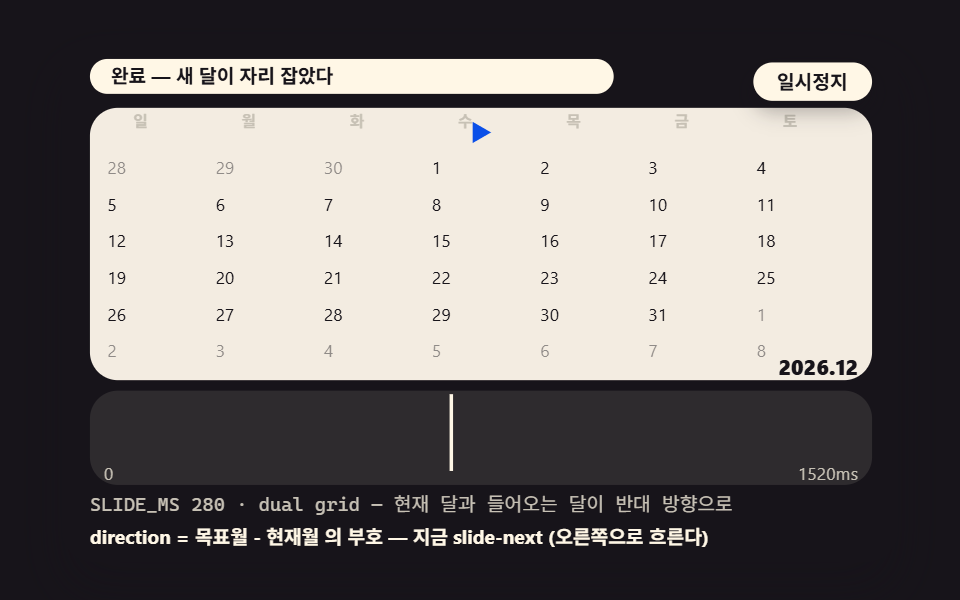
If the target month is greater than the current one the flow goes right, if smaller it goes left — the direction is settled by one sign, and the outgoing and incoming grids travel 448px in opposite directions over SLIDE_MS 280. The switch stays smooth because the grid is always 42 cells tall: crossing from a 30-day month into a 31-day one never jumps the vertical size.
<main class="stage">
<div class="ez is-demo" id="ez">
  <div class="ez__in" data-role="inner">
    <div class="ez__pad" data-role="pad" tabindex="0" role="application" aria-label="Demo stage: Space or Enter pauses, R restarts, left and right arrows pick another value">
      <div class="ez__scene" data-role="scene" role="img" aria-label="The next month's grid enters from the far side and pushes the current month out in this direction-detecting slide"></div>
      <div class="ez__probe" data-role="probe" aria-hidden="true"></div>
      <div class="ez__chart" data-role="chart" aria-hidden="true"></div>
      <p class="ez__status" data-role="status" aria-live="off">Scene ready</p>
      <p class="ez__reada" data-role="reada" aria-hidden="true"></p>
      <p class="ez__readb" data-role="readb" aria-hidden="true"></p>
      <div class="ez__ctrl">
        <button class="ez__pause" data-role="pause" type="button" aria-pressed="false">Pause</button>
… (총 18줄 — 아래 「전체 코드」에서 원문 전체)
@use "../../../../site/static/demo-tokens" as *;
@include stage($stage-ink);
// 캘린더 장면 공통 — 먹 무대 위 크림 패널 + 파스텔 장식
$panel: mix($subject-cream, $subject-ink, 10%);
$dim: mix($subject-cream, $subject-ink, 76%);
// 파스텔 장식 팔레트 — vivid 토큰(채도 .55+) 대신 이 값들을 쓴다 (BD26)
$stroke-blue: #d5daea; // $subject-blue 의 파스텔
$stroke-rose: #ebd6db; // 핑크 계열 파스텔
$stroke-mint: #8fd8bd; // 민트 계열 파스텔
$stroke-lilac: #c9b8f2; // 라일락 계열 파스텔
… (총 312줄 — 아래 「전체 코드」에서 원문 전체)html, body {
margin: 0;
overflow: hidden;
}
.stage {
box-sizing: border-box;
min-height: 100vh;
display: grid;
place-items: center;
margin: 0;
background: #17141a;
… (총 351줄 — 아래 「전체 코드」에서 원문 전체)(function () {
const rootEl = document.getElementById("ez");
if (!rootEl) return;
main(rootEl);
function cx(s) { return s; }
function main(root) {
// 무대 좌표 — 안쪽 상자는 늘 480x300 이고 화면 폭에 맞춰 통체로 줄인다
const W = 480;
const CX0 = 8;
const CW = 432;
const SVGW = 448;
const SVGH = 156;
… (총 469줄 — 아래 「전체 코드」에서 원문 전체)// CalMonthSlide - 같은 항목 vanilla index.html 의 React 판. 같은 계산을 useEffect 안에서 돌린다
import { useEffect, useRef } from "react";
import styles from "./CalMonthSlide.module.scss";
const cx = (s: string): string => s.split(" ").map((n) => styles[n] ?? n).join(" ");
function main(root: HTMLElement): () => void {
// 무대 좌표 — 안쪽 상자는 늘 480x300 이고 화면 폭에 맞춰 통체로 줄인다
const W = 480;
const CX0 = 8;
const CW = 432;
const SVGW = 448;
… (총 461줄 — 아래 「전체 코드」에서 원문 전체)02 · A Month Switch That Decides Its Direction Before Sliding — Measured area 39.402% · moving frames 23/23Original by GODRICH · SCSS and React ship in the zip · See the password
Where to Look in the Code
        const wrapEl = make('div', 's2__wrap', scWrap);
        gridA = makeGrid(from.y, from.m, wrapEl);
        gridB = makeGrid(to.y, to.m, wrapEl);
        put(gridA.board, 0, 0, 448, 156);
        put(gridB.board, 0, 0, 448, 156);
        wrapEl.style.overflow = 'hidden';
        put(wrapEl, 0, 0, 448, 156);
        // start positions — each grid enters from its own side and exits through the other
        gridA.board.style.transform = 'translateX(0px)';
        gridB.board.style.transform = 'translateX(' + (dir * 448) + 'px)';
Frame by frame the two boards' translateX values close in with easing and opposite signs, and the single line direction = sign(target month − current month) is the entire grammar of the switch.
03A Date Hover Ripple Phased Row by Row
Demo and Explanation
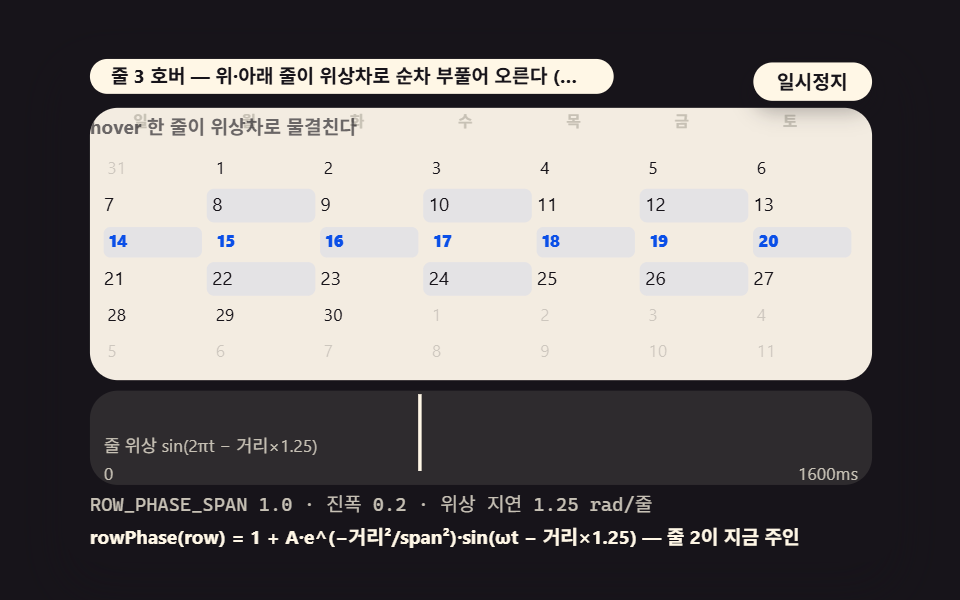
The hover ripples a whole row, not one cell — a row-phase function pushes the phase back by distance from the pressed row and shrinks the size, so the rows above and below swell and settle in turn. With amplitude AMP 0.22 and decay span ROW_PHASE_SPAN 1, the amplitude multiplier at a distance of 2 rows is 0.018, meaning practically only the touched row moves; that value is the baseline the variant experiment widens.
<main class="stage">
<div class="ez is-demo" id="ez">
  <div class="ez__in" data-role="inner">
    <div class="ez__pad" data-role="pad" tabindex="0" role="application" aria-label="Demo stage: Space or Enter pauses, R restarts, left and right arrows pick another value">
      <div class="ez__scene" data-role="scene" role="img" aria-label="Centered on the hovered row, the rows above and below swell in turn, phased apart"></div>
      <div class="ez__probe" data-role="probe" aria-hidden="true"></div>
      <div class="ez__chart" data-role="chart" aria-hidden="true"></div>
      <p class="ez__status" data-role="status" aria-live="off">Scene ready</p>
      <p class="ez__reada" data-role="reada" aria-hidden="true"></p>
      <p class="ez__readb" data-role="readb" aria-hidden="true"></p>
      <div class="ez__ctrl">
        <button class="ez__pause" data-role="pause" type="button" aria-pressed="false">Pause</button>
… (총 18줄 — 아래 「전체 코드」에서 원문 전체)
@use "../../../../site/static/demo-tokens" as *;
@include stage($stage-ink);
// 캘린더 장면 공통 — 먹 무대 위 크림 패널 + 파스텔 장식
$panel: mix($subject-cream, $subject-ink, 10%);
$dim: mix($subject-cream, $subject-ink, 76%);
// 파스텔 장식 팔레트 — vivid 토큰(채도 .55+) 대신 이 값들을 쓴다 (BD26)
$stroke-blue: #d5daea; // $subject-blue 의 파스텔
$stroke-rose: #ebd6db; // 핑크 계열 파스텔
$stroke-mint: #8fd8bd; // 민트 계열 파스텔
$stroke-lilac: #c9b8f2; // 라일락 계열 파스텔
… (총 312줄 — 아래 「전체 코드」에서 원문 전체)html, body {
margin: 0;
overflow: hidden;
}
.stage {
box-sizing: border-box;
min-height: 100vh;
display: grid;
place-items: center;
margin: 0;
background: #17141a;
… (총 351줄 — 아래 「전체 코드」에서 원문 전체)(function () {
const rootEl = document.getElementById("ez");
if (!rootEl) return;
main(rootEl);
function cx(s) { return s; }
function main(root) {
// 무대 좌표 — 안쪽 상자는 늘 480x300 이고 화면 폭에 맞춰 통체로 줄인다
const W = 480;
const CX0 = 8;
const CW = 432;
const SVGW = 448;
const SVGH = 156;
… (총 444줄 — 아래 「전체 코드」에서 원문 전체)// CalRowRipple - 같은 항목 vanilla index.html 의 React 판. 같은 계산을 useEffect 안에서 돌린다
import { useEffect, useRef } from "react";
import styles from "./CalRowRipple.module.scss";
const cx = (s: string): string => s.split(" ").map((n) => styles[n] ?? n).join(" ");
function main(root: HTMLElement): () => void {
// 무대 좌표 — 안쪽 상자는 늘 480x300 이고 화면 폭에 맞춰 통체로 줄인다
const W = 480;
const CX0 = 8;
const CW = 432;
const SVGW = 448;
… (총 440줄 — 아래 「전체 코드」에서 원문 전체)03 · A Date Hover Ripple Phased Row by Row — Measured area 15.753% · moving frames 23/23Original by GODRICH · SCSS and React ship in the zip · See the password
Where to Look in the Code
    const ROW_PHASE_SPAN = 1; // variant 2: 1 → 2.5 (the ripple spills into neighboring rows)
    const RIPPLE_MS = 1600;
    const AMP = 0.22;
    let g3 = null;
    let cap3 = null;
    let focusI = 0;
    // row phase — the phase shifts and the size shrinks with distance from the pressed row (r0)
    function rowPhase(row, r0, tt) {
        const dist = Math.abs(row - r0);
        const fall = Math.exp(-(dist * dist) / (ROW_PHASE_SPAN * ROW_PHASE_SPAN));
        return 1 + AMP * fall * Math.sin(tt * 2 * Math.PI - dist * 1.25);
    }
The return value becomes the scale of every cell in the row directly, and raising the span to 2.5 revives a distance-2 row to a 0.47 multiplier so the ripple spills over.
04A Single Pick Spreading Radially From the Chosen Cell
Demo and Explanation
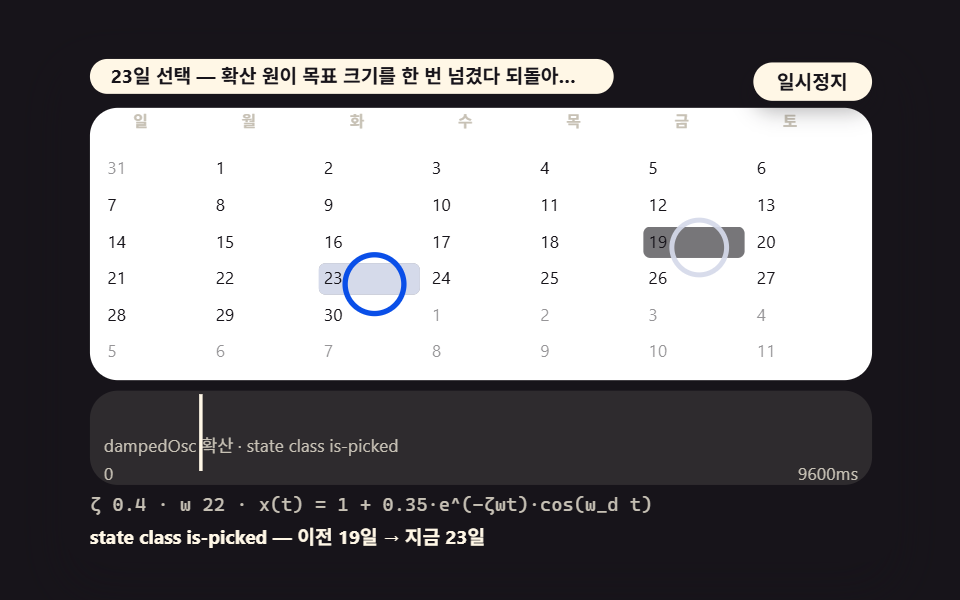
Picking a date grows a spread circle from the cell's center that overshoots the target size once and settles back — a damped oscillation with damping ratio ζ 0.35 and natural frequency ω 22, whose damped frequency is ω_d = ω√(1−ζ²) ≈ 20.62. The previous pick shrinks away on the same wave, so the choices read as walking across the month in the order November 6 → 10 → 18 → 26.
<main class="stage">
<div class="ez is-demo" id="ez">
  <div class="ez__in" data-role="inner">
    <div class="ez__pad" data-role="pad" tabindex="0" role="application" aria-label="Demo stage: Space or Enter pauses, R restarts, left and right arrows pick another value">
      <div class="ez__scene" data-role="scene" role="img" aria-label="From the picked cell a spread circle overshoots its target once on a damped swing and comes back"></div>
      <div class="ez__probe" data-role="probe" aria-hidden="true"></div>
      <div class="ez__chart" data-role="chart" aria-hidden="true"></div>
      <p class="ez__status" data-role="status" aria-live="off">Scene ready</p>
      <p class="ez__reada" data-role="reada" aria-hidden="true"></p>
      <p class="ez__readb" data-role="readb" aria-hidden="true"></p>
      <div class="ez__ctrl">
        <button class="ez__pause" data-role="pause" type="button" aria-pressed="false">Pause</button>
… (총 18줄 — 아래 「전체 코드」에서 원문 전체)
@use "../../../../site/static/demo-tokens" as *;
@include stage($stage-ink);
// 캘린더 장면 공통 — 먹 무대 위 크림 패널 + 파스텔 장식
$panel: mix($subject-cream, $subject-ink, 10%);
$dim: mix($subject-cream, $subject-ink, 76%);
// 파스텔 장식 팔레트 — vivid 토큰(채도 .55+) 대신 이 값들을 쓴다 (BD26)
$stroke-blue: #d5daea; // $subject-blue 의 파스텔
$stroke-rose: #ebd6db; // 핑크 계열 파스텔
$stroke-mint: #8fd8bd; // 민트 계열 파스텔
$stroke-lilac: #c9b8f2; // 라일락 계열 파스텔
… (총 312줄 — 아래 「전체 코드」에서 원문 전체)html, body {
margin: 0;
overflow: hidden;
}
.stage {
box-sizing: border-box;
min-height: 100vh;
display: grid;
place-items: center;
margin: 0;
background: #17141a;
… (총 351줄 — 아래 「전체 코드」에서 원문 전체)(function () {
const rootEl = document.getElementById("ez");
if (!rootEl) return;
main(rootEl);
function cx(s) { return s; }
function main(root) {
// 무대 좌표 — 안쪽 상자는 늘 480x300 이고 화면 폭에 맞춰 통체로 줄인다
const W = 480;
const CX0 = 8;
const CW = 432;
const SVGW = 448;
const SVGH = 156;
… (총 455줄 — 아래 「전체 코드」에서 원문 전체)// CalPickRadial - 같은 항목 vanilla index.html 의 React 판. 같은 계산을 useEffect 안에서 돌린다
import { useEffect, useRef } from "react";
import styles from "./CalPickRadial.module.scss";
const cx = (s: string): string => s.split(" ").map((n) => styles[n] ?? n).join(" ");
function main(root: HTMLElement): () => void {
// 무대 좌표 — 안쪽 상자는 늘 480x300 이고 화면 폭에 맞춰 통체로 줄인다
const W = 480;
const CX0 = 8;
const CW = 432;
const SVGW = 448;
… (총 451줄 — 아래 「전체 코드」에서 원문 전체)04 · A Single Pick Spreading Radially From the Chosen Cell — Measured area 38.183% · moving frames 23/23Original by GODRICH · SCSS and React ship in the zip · See the password
Where to Look in the Code
    // damped oscillation — x(t) = 1 + e^(−ζωt)·cos(ω_d t) (ω_d = ω√(1−ζ²))
    function dampedOsc(tt) {
        const wd = DW * Math.sqrt(1 - DZ * DZ);
        return 1 + 0.35 * Math.exp(-DZ * DW * tt) * Math.cos(wd * tt);
    }
    function ringAt(i) {
        const p = cellXY(i);
        return { x: p.x + (CW2 - 4) / 2, y: p.y + (CH2 - 3) / 2 };
    }
The return value becomes the spread circle's scale, and the is-picked state class flips the cell background in the same frame, pairing the animation with the state.
05A Range Fill That Tests Between Start and End
Demo and Explanation
Each cell's date is tested by inequality — on or after the start, on or before the end — and the cells that pass receive is-in-range in turn, spaced FILL_STEP_MS 40 apart, so the 16 days from November 6 through 21 fill like spreading ink. The start day renders as a pill rounded on the left and the end day as a pill rounded on the right, so both endpoints read at a glance.
<main class="stage">
<div class="ez is-demo" id="ez">
  <div class="ez__in" data-role="inner">
    <div class="ez__pad" data-role="pad" tabindex="0" role="application" aria-label="Demo stage: Space or Enter pauses, R restarts, left and right arrows pick another value">
      <div class="ez__scene" data-role="scene" role="img" aria-label="Only the cells that pass the between-endpoints test fill in turn, like ink spreading"></div>
      <div class="ez__probe" data-role="probe" aria-hidden="true"></div>
      <div class="ez__chart" data-role="chart" aria-hidden="true"></div>
      <p class="ez__status" data-role="status" aria-live="off">Scene ready</p>
      <p class="ez__reada" data-role="reada" aria-hidden="true"></p>
      <p class="ez__readb" data-role="readb" aria-hidden="true"></p>
      <div class="ez__ctrl">
        <button class="ez__pause" data-role="pause" type="button" aria-pressed="false">Pause</button>
… (총 18줄 — 아래 「전체 코드」에서 원문 전체)
@use "../../../../site/static/demo-tokens" as *;
@include stage($stage-ink);
// 캘린더 장면 공통 — 먹 무대 위 크림 패널 + 파스텔 장식
$panel: mix($subject-cream, $subject-ink, 10%);
$dim: mix($subject-cream, $subject-ink, 76%);
// 파스텔 장식 팔레트 — vivid 토큰(채도 .55+) 대신 이 값들을 쓴다 (BD26)
$stroke-blue: #d5daea; // $subject-blue 의 파스텔
$stroke-rose: #ebd6db; // 핑크 계열 파스텔
$stroke-mint: #8fd8bd; // 민트 계열 파스텔
$stroke-lilac: #c9b8f2; // 라일락 계열 파스텔
… (총 312줄 — 아래 「전체 코드」에서 원문 전체)html, body {
margin: 0;
overflow: hidden;
}
.stage {
box-sizing: border-box;
min-height: 100vh;
display: grid;
place-items: center;
margin: 0;
background: #17141a;
… (총 351줄 — 아래 「전체 코드」에서 원문 전체)(function () {
const rootEl = document.getElementById("ez");
if (!rootEl) return;
main(rootEl);
function cx(s) { return s; }
function main(root) {
// 무대 좌표 — 안쪽 상자는 늘 480x300 이고 화면 폭에 맞춰 통체로 줄인다
const W = 480;
const CX0 = 8;
const CW = 432;
const SVGW = 448;
const SVGH = 156;
… (총 456줄 — 아래 「전체 코드」에서 원문 전체)// CalRangeFill - 같은 항목 vanilla index.html 의 React 판. 같은 계산을 useEffect 안에서 돌린다
import { useEffect, useRef } from "react";
import styles from "./CalRangeFill.module.scss";
const cx = (s: string): string => s.split(" ").map((n) => styles[n] ?? n).join(" ");
function main(root: HTMLElement): () => void {
// 무대 좌표 — 안쪽 상자는 늘 480x300 이고 화면 폭에 맞춰 통체로 줄인다
const W = 480;
const CX0 = 8;
const CW = 432;
const SVGW = 448;
… (총 444줄 — 아래 「전체 코드」에서 원문 전체)05 · A Range Fill That Tests Between Start and End — Measured area 38.858% · moving frames 23/23Original by GODRICH · SCSS and React ship in the zip · See the password
Where to Look in the Code
    // 05 range fill between endpoints — each cell's date is tested by inequality (between test) and is-in-range lands in turn
    const FILL_STEP_MS = 40; // variant 3: 40 → 16 (frame-by-frame ink spread)
    const RANGE_START = 6; // 2026-11-06
    const RANGE_END = 21; // 2026-11-21
    const HOLD5 = 500;
    let g5 = null;
    let cap5 = null;
    let daysInRange = 0;
    // between test — start ≤ d ≤ end (the endpoints themselves count as inside). Neighboring-month dates drop out automatically because their m differs
    function betweenTest(d, s, e) {
        return d >= s && d <= e;
    }
Which cells fall inside is settled by arithmetic, and even the filling order belongs to the math — the interval is the fill animation.
06A Today Ring Drawn by Matching the Reference Date
Demo and Explanation
Each of the 42 cells has its year, month and day compared in full against the reference date, and exactly one match — 2026-11-15, the reference day — receives the ring, which swells and shrinks on a PULSE_MS 1200 cycle. The red strip above the stage prints the two-constructor comparison live at every moment, and the verdict follows the timezone of the machine watching it.
<main class="stage">
<div class="ez is-demo" id="ez">
  <div class="ez__in" data-role="inner">
    <div class="ez__pad" data-role="pad" tabindex="0" role="application" aria-label="Demo stage: Space or Enter pauses, R restarts, left and right arrows pick another value">
      <div class="ez__scene" data-role="scene" role="img" aria-label="Each cell's year, month and day is compared in full, and only the one match gets the today ring"></div>
      <div class="ez__probe" data-role="probe" aria-hidden="true"></div>
      <div class="ez__chart" data-role="chart" aria-hidden="true"></div>
      <p class="ez__status" data-role="status" aria-live="off">Scene ready</p>
      <p class="ez__reada" data-role="reada" aria-hidden="true"></p>
      <p class="ez__readb" data-role="readb" aria-hidden="true"></p>
      <div class="ez__ctrl">
        <button class="ez__pause" data-role="pause" type="button" aria-pressed="false">Pause</button>
… (총 18줄 — 아래 「전체 코드」에서 원문 전체)
@use "../../../../site/static/demo-tokens" as *;
@include stage($stage-ink);
// 캘린더 장면 공통 — 먹 무대 위 크림 패널 + 파스텔 장식
$panel: mix($subject-cream, $subject-ink, 10%);
$dim: mix($subject-cream, $subject-ink, 76%);
// 파스텔 장식 팔레트 — vivid 토큰(채도 .55+) 대신 이 값들을 쓴다 (BD26)
$stroke-blue: #d5daea; // $subject-blue 의 파스텔
$stroke-rose: #ebd6db; // 핑크 계열 파스텔
$stroke-mint: #8fd8bd; // 민트 계열 파스텔
$stroke-lilac: #c9b8f2; // 라일락 계열 파스텔
… (총 312줄 — 아래 「전체 코드」에서 원문 전체)html, body {
margin: 0;
overflow: hidden;
}
.stage {
box-sizing: border-box;
min-height: 100vh;
display: grid;
place-items: center;
margin: 0;
background: #17141a;
… (총 351줄 — 아래 「전체 코드」에서 원문 전체)(function () {
const rootEl = document.getElementById("ez");
if (!rootEl) return;
main(rootEl);
function cx(s) { return s; }
function main(root) {
// 무대 좌표 — 안쪽 상자는 늘 480x300 이고 화면 폭에 맞춰 통체로 줄인다
const W = 480;
const CX0 = 8;
const CW = 432;
const SVGW = 448;
const SVGH = 156;
… (총 448줄 — 아래 「전체 코드」에서 원문 전체)// CalTodayRing - 같은 항목 vanilla index.html 의 React 판. 같은 계산을 useEffect 안에서 돌린다
import { useEffect, useRef } from "react";
import styles from "./CalTodayRing.module.scss";
const cx = (s: string): string => s.split(" ").map((n) => styles[n] ?? n).join(" ");
function main(root: HTMLElement): () => void {
// 무대 좌표 — 안쪽 상자는 늘 480x300 이고 화면 폭에 맞춰 통체로 줄인다
const W = 480;
const CX0 = 8;
const CW = 432;
const SVGW = 448;
… (총 440줄 — 아래 「전체 코드」에서 원문 전체)06 · A Today Ring Drawn by Matching the Reference Date — Measured area 37.25% · moving frames 23/23Original by GODRICH · SCSS and React ship in the zip · See the password
Where to Look in the Code
        // timezone trap — the same day built by two constructors and compared (a timezone-safe contrast)
        const localD = new Date(2026, 10, 15); // built at local midnight — follows the viewing environment's timezone
        const utcD = new Date(Date.UTC(2026, 10, 14, 23, 0, 0)); // UTC 11-14 23:00 = midnight of 11-15 at UTC+9
        const sameByUTC = localD.getUTCFullYear() === utcD.getUTCFullYear() && localD.getUTCMonth() === utcD.getUTCMonth() && localD.getUTCDate() === utcD.getUTCDate();
        if (trapEl) {
            trapEl.textContent = 'new Date(2026,10,15) vs Date.UTC(2026,10,14,23h) — ' + (sameByUTC ? 'getUTC* verdict: the same day' : 'getUTC* verdict: a different day');
        }
The ring side is the full match of matchDate, and the offset minutes on the read line come from printing localD.getTimezoneOffset(), which read −540 — UTC+9 — on the machine that rendered this measurement.
07A Mini Side Panel Reading the Picked Day Aloud
Demo and Explanation
One month computation draws two calendar sizes at once — the big board at scale 0.62 and the mini board at scale 0.30 share the same pick state, and when the pick moves, the same cell changes on both boards in the same frame. The big number beside them flows from the previous date to the next through a count-up interpolation, so the number never jumps in one swap, and the weekday sentence refreshes with it.
<main class="stage">
<div class="ez is-demo" id="ez">
  <div class="ez__in" data-role="inner">
    <div class="ez__pad" data-role="pad" tabindex="0" role="application" aria-label="Demo stage: Space or Enter pauses, R restarts, left and right arrows pick another value">
      <div class="ez__scene" data-role="scene" role="img" aria-label="One month computation refreshes the big grid and the mini panel at once as the number counts up"></div>
      <div class="ez__probe" data-role="probe" aria-hidden="true"></div>
      <div class="ez__chart" data-role="chart" aria-hidden="true"></div>
      <p class="ez__status" data-role="status" aria-live="off">Scene ready</p>
      <p class="ez__reada" data-role="reada" aria-hidden="true"></p>
      <p class="ez__readb" data-role="readb" aria-hidden="true"></p>
      <div class="ez__ctrl">
        <button class="ez__pause" data-role="pause" type="button" aria-pressed="false">Pause</button>
… (총 18줄 — 아래 「전체 코드」에서 원문 전체)
@use "../../../../site/static/demo-tokens" as *;
@include stage($stage-ink);
// 캘린더 장면 공통 — 먹 무대 위 크림 패널 + 파스텔 장식
$panel: mix($subject-cream, $subject-ink, 10%);
$dim: mix($subject-cream, $subject-ink, 76%);
// 파스텔 장식 팔레트 — vivid 토큰(채도 .55+) 대신 이 값들을 쓴다 (BD26)
$stroke-blue: #d5daea; // $subject-blue 의 파스텔
$stroke-rose: #ebd6db; // 핑크 계열 파스텔
$stroke-mint: #8fd8bd; // 민트 계열 파스텔
$stroke-lilac: #c9b8f2; // 라일락 계열 파스텔
… (총 312줄 — 아래 「전체 코드」에서 원문 전체)html, body {
margin: 0;
overflow: hidden;
}
.stage {
box-sizing: border-box;
min-height: 100vh;
display: grid;
place-items: center;
margin: 0;
background: #17141a;
… (총 351줄 — 아래 「전체 코드」에서 원문 전체)(function () {
const rootEl = document.getElementById("ez");
if (!rootEl) return;
main(rootEl);
function cx(s) { return s; }
function main(root) {
// 무대 좌표 — 안쪽 상자는 늘 480x300 이고 화면 폭에 맞춰 통체로 줄인다
const W = 480;
const CX0 = 8;
const CW = 432;
const SVGW = 448;
const SVGH = 156;
… (총 476줄 — 아래 「전체 코드」에서 원문 전체)// CalMiniPanel - 같은 항목 vanilla index.html 의 React 판. 같은 계산을 useEffect 안에서 돌린다
import { useEffect, useRef } from "react";
import styles from "./CalMiniPanel.module.scss";
const cx = (s: string): string => s.split(" ").map((n) => styles[n] ?? n).join(" ");
function main(root: HTMLElement): () => void {
// 무대 좌표 — 안쪽 상자는 늘 480x300 이고 화면 폭에 맞춰 통체로 줄인다
const W = 480;
const CX0 = 8;
const CW = 432;
const SVGW = 448;
… (총 472줄 — 아래 「전체 코드」에서 원문 전체)07 · A Mini Side Panel Reading the Picked Day Aloud — Measured area 39.439% · moving frames 23/23Original by GODRICH · SCSS and React ship in the zip · See the password
Where to Look in the Code
    const PICK7_MS = 900;
    const SEQ7 = [19, 26, 33, 12, 5, 19]; // 11-06 → 13 → 20 → 12 → 31(prev month) → 06
    const BIG = 0.62;
    const SMALL = 0.30;
    let big7 = null;
    let mini7 = null;
    let numEl7 = null;
    let senEl7 = null;
    let dowEl7 = null;
    // count-up — additive interpolation from the previous number to the next (no wholesale digit swap)
    function countUp(from, to, p01) {
        return from + (to - from) * p01;
    }
Its mean intensity of 132.4 is the highest in this post — two boards move at once, so the changed pixels add up, and the mini board is a transform: scale(0.30) copy that never rebuilds its DOM, so duplicating the state costs nothing.
08The Month Grid Relaying Itself Into Week Columns
Demo and Explanation
In the week view only the chosen week's 7 cells survive while the other 35 fade away, and the survivors gather into a single center row — the move is FLIP, so each cell travels only the before-after coordinate gap in transform and no layout is recomputed. The seats come from constant arithmetic, column 7 + (i%7)×62 and row 26 + ⌊i/7⌋×21, fixed in advance, and the presets walk the third, fifth and second weeks.
<main class="stage">
<div class="ez is-demo" id="ez">
  <div class="ez__in" data-role="inner">
    <div class="ez__pad" data-role="pad" tabindex="0" role="application" aria-label="Demo stage: Space or Enter pauses, R restarts, left and right arrows pick another value">
      <div class="ez__scene" data-role="scene" role="img" aria-label="Of the month grid's 42 cells, only the chosen week's seven remain, each moving by its before-after coordinate gap"></div>
      <div class="ez__probe" data-role="probe" aria-hidden="true"></div>
      <div class="ez__chart" data-role="chart" aria-hidden="true"></div>
      <p class="ez__status" data-role="status" aria-live="off">Scene ready</p>
      <p class="ez__reada" data-role="reada" aria-hidden="true"></p>
      <p class="ez__readb" data-role="readb" aria-hidden="true"></p>
      <div class="ez__ctrl">
        <button class="ez__pause" data-role="pause" type="button" aria-pressed="false">Pause</button>
… (총 18줄 — 아래 「전체 코드」에서 원문 전체)
@use "../../../../site/static/demo-tokens" as *;
@include stage($stage-ink);
// 캘린더 장면 공통 — 먹 무대 위 크림 패널 + 파스텔 장식
$panel: mix($subject-cream, $subject-ink, 10%);
$dim: mix($subject-cream, $subject-ink, 76%);
// 파스텔 장식 팔레트 — vivid 토큰(채도 .55+) 대신 이 값들을 쓴다 (BD26)
$stroke-blue: #d5daea; // $subject-blue 의 파스텔
$stroke-rose: #ebd6db; // 핑크 계열 파스텔
$stroke-mint: #8fd8bd; // 민트 계열 파스텔
$stroke-lilac: #c9b8f2; // 라일락 계열 파스텔
… (총 312줄 — 아래 「전체 코드」에서 원문 전체)html, body {
margin: 0;
overflow: hidden;
}
.stage {
box-sizing: border-box;
min-height: 100vh;
display: grid;
place-items: center;
margin: 0;
background: #17141a;
… (총 351줄 — 아래 「전체 코드」에서 원문 전체)(function () {
const rootEl = document.getElementById("ez");
if (!rootEl) return;
main(rootEl);
function cx(s) { return s; }
function main(root) {
// 무대 좌표 — 안쪽 상자는 늘 480x300 이고 화면 폭에 맞춰 통체로 줄인다
const W = 480;
const CX0 = 8;
const CW = 432;
const SVGW = 448;
const SVGH = 156;
… (총 469줄 — 아래 「전체 코드」에서 원문 전체)// CalWeekRelayout - 같은 항목 vanilla index.html 의 React 판. 같은 계산을 useEffect 안에서 돌린다
import { useEffect, useRef } from "react";
import styles from "./CalWeekRelayout.module.scss";
const cx = (s: string): string => s.split(" ").map((n) => styles[n] ?? n).join(" ");
function main(root: HTMLElement): () => void {
// 무대 좌표 — 안쪽 상자는 늘 480x300 이고 화면 폭에 맞춰 통체로 줄인다
const W = 480;
const CX0 = 8;
const CW = 432;
const SVGW = 448;
… (총 461줄 — 아래 「전체 코드」에서 원문 전체)08 · The Month Grid Relaying Itself Into Week Columns — Measured area 36.769% · moving frames 23/23Original by GODRICH · SCSS and React ship in the zip · See the password
Where to Look in the Code
    // grid coords — the month-view seat of cell i
    function gridCoords(i) {
        return cellXY(i);
    }
    // FLIP — First (month coords) Last (week coords) Invert (transform) Play (interpolate). Only transform moves, so no layout recalculation
    function flipTo(i, fx, fy, lx, ly, p01) {
        void i;
        const dx = fx + (lx - fx) * p01;
        const dy = fy + (ly - fy) * p01;
        tgt8[i].style.transform = 'translate(' + dx.toFixed(1) + 'px,' + dy.toFixed(1) + 'px) scale(' + (1 + 0.55 * p01).toFixed(3) + ')';
    }
In the frame, the chosen week's cells take the week coordinates lx = 26 + col×56 and ly = 62 as their Last, the rest dwindle through scale and opacity, and the way back runs the same interpolation in reverse until all 42 cells return to their own coordinates.
09Multi Event Dots Lined Up by Date Mapping
Demo and Explanation
Events sit in a month-day to color-array map, and each cell looks up its own key to lay up to three dots in order — 12 keys and 23 dots in total, and a day holding more than three shows a badge counting the overflow (November 12 holds 4 events → +1, November 21 holds 5 → +2). A focus walks the days that have events every FOCUS_MS 800, and the label at the top right carries summaries like "day 21: 5 events · +2".
<main class="stage">
<div class="ez is-demo" id="ez">
  <div class="ez__in" data-role="inner">
    <div class="ez__pad" data-role="pad" tabindex="0" role="application" aria-label="Demo stage: Space or Enter pauses, R restarts, left and right arrows pick another value">
      <div class="ez__scene" data-role="scene" role="img" aria-label="Each cell that finds its key in the event map lays up to three dots, and the overflow becomes a +N badge"></div>
      <div class="ez__probe" data-role="probe" aria-hidden="true"></div>
      <div class="ez__chart" data-role="chart" aria-hidden="true"></div>
      <p class="ez__status" data-role="status" aria-live="off">Scene ready</p>
      <p class="ez__reada" data-role="reada" aria-hidden="true"></p>
      <p class="ez__readb" data-role="readb" aria-hidden="true"></p>
      <div class="ez__ctrl">
        <button class="ez__pause" data-role="pause" type="button" aria-pressed="false">Pause</button>
… (총 18줄 — 아래 「전체 코드」에서 원문 전체)
@use "../../../../site/static/demo-tokens" as *;
@include stage($stage-ink);
// 캘린더 장면 공통 — 먹 무대 위 크림 패널 + 파스텔 장식
$panel: mix($subject-cream, $subject-ink, 10%);
$dim: mix($subject-cream, $subject-ink, 76%);
// 파스텔 장식 팔레트 — vivid 토큰(채도 .55+) 대신 이 값들을 쓴다 (BD26)
$stroke-blue: #d5daea; // $subject-blue 의 파스텔
$stroke-rose: #ebd6db; // 핑크 계열 파스텔
$stroke-mint: #8fd8bd; // 민트 계열 파스텔
$stroke-lilac: #c9b8f2; // 라일락 계열 파스텔
… (총 312줄 — 아래 「전체 코드」에서 원문 전체)html, body {
margin: 0;
overflow: hidden;
}
.stage {
box-sizing: border-box;
min-height: 100vh;
display: grid;
place-items: center;
margin: 0;
background: #17141a;
… (총 351줄 — 아래 「전체 코드」에서 원문 전체)(function () {
const rootEl = document.getElementById("ez");
if (!rootEl) return;
main(rootEl);
function cx(s) { return s; }
function main(root) {
// 무대 좌표 — 안쪽 상자는 늘 480x300 이고 화면 폭에 맞춰 통체로 줄인다
const W = 480;
const CX0 = 8;
const CW = 432;
const SVGW = 448;
const SVGH = 156;
… (총 479줄 — 아래 「전체 코드」에서 원문 전체)// CalEventDots - 같은 항목 vanilla index.html 의 React 판. 같은 계산을 useEffect 안에서 돌린다
import { useEffect, useRef } from "react";
import styles from "./CalEventDots.module.scss";
const cx = (s: string): string => s.split(" ").map((n) => styles[n] ?? n).join(" ");
function main(root: HTMLElement): () => void {
// 무대 좌표 — 안쪽 상자는 늘 480x300 이고 화면 폭에 맞춰 통체로 줄인다
const W = 480;
const CX0 = 8;
const CW = 432;
const SVGW = 448;
… (총 473줄 — 아래 「전체 코드」에서 원문 전체)09 · Multi Event Dots Lined Up by Date Mapping — Measured area 38.478% · moving frames 23/23Original by GODRICH · SCSS and React ship in the zip · See the password
Where to Look in the Code
    // map lookup — the cell's key finds its event array. No key, empty array
    function eventsOf(d) {
        const k = f0(d.m + 1) + '-' + f0(d.d);
        return EVENTS[k] || [];
    }
        // max 3 dots — every dot is created up front per cell and shown as needed
        for (let i2 = 0; i2 < CELLS; i2 += 1) {
            const c = g9.cells[i2];
            const evs = eventsOf(c.d);
            const n = Math.min(evs.length, 3);
            for (let k = 0; k < n; k += 1) {
                const dot = make('i', 's9__dot', c.el);
                put(dot, 10 + k * 11, CH2 - 9, DOT_R * 2, DOT_R * 2);
                dot.style.background = evs[k];
            }
            if (evs.length > 3) {
                const b = make('b', 's9__more', c.el);
                put(b, 44, CH2 - 11, 14, 11);
                b.textContent = '+N'.replace('N', f0(evs.length - 3)); // +N badge — the overflow count
            }
        }
Even the overflow count falls out of the one-line mapping — the Math.min cutoff and the '+N'.replace string assembly.
Where a Calendar Lives on a Real Screen — booking forms, dashboards and trip plans
A lodging booking form comes first. Instead of picking a checkout one day at a time, a guest presses a start date and sweeps to the end the way 05 fills its range, so two clicks settle a multi-night stay, and the shape of the filled middle days is itself the length of the booking. The date fields of flight and hotel search forms almost all run this between-endpoints test.
In an admin dashboard the structure of 07 — a big grid with a mini calendar and a summary number beside it — is everywhere, binding the two gazes of sweeping a period on the left and reading the selected day's detail on the right into one screen. How heavily events pile onto a day is exactly what 09's dot notation carries, and a team screen that reports by week takes 08's month-to-week switch.
On screens where every day holds different items — trip plans, shift rosters — these computations stack and run together. A today ring, a pick state and event dots all ride on top of the fixed six-week grid, and the nine scenes of this post are that stack taken apart one layer at a time.
Why fix the grid at six weeks — a calendar whose height never jumps between months
The true number of weeks in a month varies from 4 to 6. Sizing the grid to the day count makes the vertical size jump between a 28-day and a 31-day month, shoving the summary panel and buttons below it out of place every turn of the month, and it also breaks the condition 02 needs — both grids must be the same height to slide over one another.
So CELLS is fixed at 42, six weeks, and the leftover cells borrow dates from the neighboring months — 2026-11 is lead 0 + 30 days + trail 12, 2027-02 is lead 1 + 28 days + trail 13, and both sums equal 42. A "13th of next month" showing at the edge of the grid is not a bug but the check value of the fixed six weeks, and borrowed cells carry the cal__cell--leading-trailing class so their numbers fade and "not this month" reads at a glance.
In real use those faded cells usually jump to their month when clicked — reaching into the margin to turn the month takes fewer steps than hunting a separate button. This post's demo stops short of that, being a staged scene.
How today and the picked day are emphasized — where state classes meet the range test
One day's emphasis is one state class. is-picked flips the background to ink and the number to cream, and scenes 04 and 07 both use it. Today gets its own marker, the s6__today ring, so today and a pick landing on the same day still both read.
A range differs only in the emphasis growing from one cell to many. The between test decides which cells are inside (see scene 05), the endpoints take pill-shaped corners and the middle days take a background fill, so the shapes split by role. The three states use different visual devices because piling them on one background color would make the state unreadable.
The SCSS below is the core of this state grammar — the fading of neighboring-month numbers, the inverted pick background and the fill's background element are the three pieces that fix the grid's reading rules.
// leading-trailing — dates borrowed from neighboring months. Their numbers fade so "not this month" reads at a glance
.cal__cell--leading-trailing .cal__num { opacity: .45; }

.cal__cell.is-picked {
  background: $subject-ink;
}

.cal__bg {
  position: absolute;
  left: 0;
  top: 0;
  display: block;
  width: 100%;
  height: 100%;
  border-radius: $r-xs;
  background: $stroke-blue;
  opacity: 0;
}
Does it work on the keyboard — grid walking with role=grid and aria-selected
Every scene has a focusable stage pad, and Space and Enter pause, R restarts and the arrow keys step presets. The pause button announces its pressed state through aria-pressed, and the scene box carries role="img" with an aria-label describing what is visible in a sentence — scene 01's label reads "cells light up in order as the first-weekday offset is measured, filling in dates from the neighboring months".
In a production calendar the right pattern is date cells as gridcells inside role=grid, arrow keys moving between cells and aria-selected announcing the pick, which is the WAI-ARIA 1.1 convention. Announcing 05's is-in-range through aria-selected as well hands the range to screen reader users, and role=grid and aria-selected are supported across all four browsers' screen readers (checked against caniuse on 2026-11-15).
Live-region speech is rationed. The status line, which changes every frame, is set to aria-live="off" and never read, and only the completion sentence goes out once through role="status" with aria-live="polite" — a calendar read aloud every second would be unusable.
Where the calendar breaks — the new Date() timezone offset and the locale gap in getDay() first weekdays
The today ring lands on yesterday — the timezone offset
new Date(2026, 10, 15) is local midnight and new Date(Date.UTC(2026, 10, 14, 23)) is a UTC instant, so comparing the two with local getDay() and getDate() slips a day in a UTC±N environment and draws the today ring on yesterday's cell. A calendar whose today is off by one loses the user's trust on the spot; in the scene 06 measurement, localD.getTimezoneOffset() read −540 minutes (UTC+9) on this machine, and the getUTC* comparison returned "the same day". The fix is comparing year, month and day as three separate values, or judging through the UTC constructor and getUTC*.
The first weekday drifts across locale and timezone
Measuring the first-weekday offset with local new Date(y, m, 1).getDay() can push the first-of-month midnight into the previous day depending on the timezone, skewing the weekday. This post measures it with getUTCDay and keeps a local getDay contrast panel (localDow) beside scene 01, and a Sunday versus Monday start collapses into the single constant of (getDay()+1) % 7.
A month-boundary date fills in by mistake on a shared number
Testing a range by day number alone lets a neighboring-month cell pass on the same number — this month's 21st and next month's 21st. The demo drops out-of-month cells before the test, but in production the safe route is comparing (y, m, d) tuples or timestamps.
FLIP needs the before-coordinates recorded first
FLIP moves only transform, but swapping the classes first and moving second erases the "before" coordinates. Scene 08 removes that premise entirely by fixing coordinates as grid-constants arithmetic instead of getBoundingClientRect — on a fixed grid, the computation is the coordinate.
The source of all nine scenes, plus the editable files, comes down as the zip in the card below, and the password that opens it is wkyppue8.
How much does the feel shift when the slide speed, the ripple width and the fill pace change — three constants compared
| Name | Value changed | Feel |
|---|---|---|
| A longer month transition | 02 SLIDE_MS 280 → 600 | The 448px travel stays put while the duration grows, slowing the slide by a factor of 2.14 — the acceleration and deceleration become readable, like turning a paper page, while 280 snaps into place at once |
| A wider hover ripple | 03 ROW_PHASE_SPAN 1 → 2.5 | The decay flattens to e^(−dist²/6.25), lifting the amplitude multiplier of a distance-2 row from 0.018 to 0.47 — the ripple sweeps into neighboring rows like a finger dragged across |
| A different range-fill pace | 05 FILL_STEP_MS 40 → 16 | The 16-cell fill ends in 256ms instead of 640ms, an ink spread resolved frame by frame — at 40 the fill reads as a staircase, cell by cell |
All three come down to changing one constant line in the source. Knowing what the value means lets you tune the shipped default straight into your own tone, and the demo stage shows the difference on the spot through its preset switch.
What to watch while tuning is fixed too. Raising SLIDE_MS lengthens the window that locks input mid-switch, so pushing past 600 starts to feel like a hand stalled between flips; dropping FILL_STEP_MS under 16 crowds the fill into a single frame and the sequence feel is gone. Either way, every one of these motions ends at once under reduced motion, so the value experiments are safe to run.
One finished frame under reduced motion — accessibility that keeps the date arithmetic legible
When reduced motion turns on, the reduce block in the SCSS switches every .ez animation off and the JS draws a single finished frame — the grid with all 42 cells lit, the range with its selection complete, the cell with the today ring around it. For a calendar the computed result is the content itself, so one static frame still delivers the whole of the information.
prefers-reduced-motion is supported from Safari 10.1+, Chrome 74+ and Firefox 63+, and where it is unknown the animations simply keep running, so no functionality is lost (checked against caniuse on 2026-11-15). The status sentence splits as "Reduced motion on · one finished frame" so the reader knows what is on screen.
Calendar UI questions — does CSS alone work, how to start the week on Monday, how a range selection works
Can I build a css calendar with html and css alone, without any JS?
Laying out the 42 seats is html and css territory — a 7-column, 6-row grid finishes the placement. Which cell holds which day number, though, is date arithmetic and needs js; in the calendar ui css scenes of this post the styles own the grid coordinates while the math owns the dates. Baking the numbers into static html means hand-editing it every month.
How do I start the week on Monday instead of Sunday?
Change one constant in the offset formula — a Sunday start is (getDay() + 1) % 7, so a Monday start is (getDay() + 0) % 7, and the weekday header row rotates with it. Only the number of leading blanks (lead) shifts by a day; the 42-cell arithmetic stays as it is.
How does a range selection work?
The between-endpoints test — checking each cell's date against "on or after the start, on or before the end" by inequality is the whole of it (scene 05). Compare (y, m, d) values rather than bare day numbers so neighboring-month cells drop out, and the fill animation rides on top as a sequential interval.
For the other axis of date arithmetic, the calendar grid collection works the same 42 cells into different scenes, date picker UI patterns covers the focus and keyboard axis, and the seat selection UI treats a neighboring pattern where ranges and grouped picks overlap.
Sources: Date.prototype.getDay · Date.prototype.getTimezoneOffset · ARIA grid role · prefers-reduced-motion
You might also like
 Pickers9 time picker ui patterns, from a point to a span
 PickersCustom Color Picker: 9 JS Parts, No Library
 PickersDate Picker UI: 9 Popover & Calendar Patterns
 Pickers9 Segmented Control UI Patterns — Copy-Paste
 Pickers9 Date Range Picker UI Patterns — Copy-Paste
 PickersCSS Range Slider: 9 Physics-Grade Custom Sliders
 PickersDifficulty Selector UI — 9 Computed Patterns
 Pickers9 CSS Tab Panel Transition Patterns to Copy
 PickersCSS Waveform: 9 Peak Columns and Trim Pickers
 Pickers9 Select Dropdown Design Patterns That Really Open