9 css shake animation — hiệu ứng rung báo lỗi form
Bạn từng thấy ô mật khẩu rung qua rung lại khi gõ sai chưa? Đó là css shake animation — vài dòng CSS, không cần JS, đủ báo rằng form đang sai.
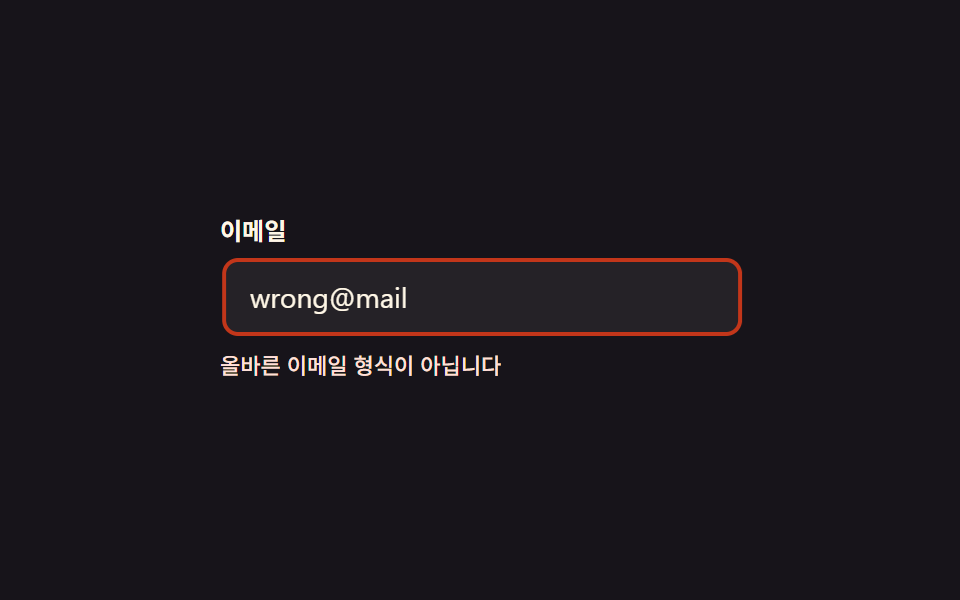 01 shake-error-animation-shake-horizontal
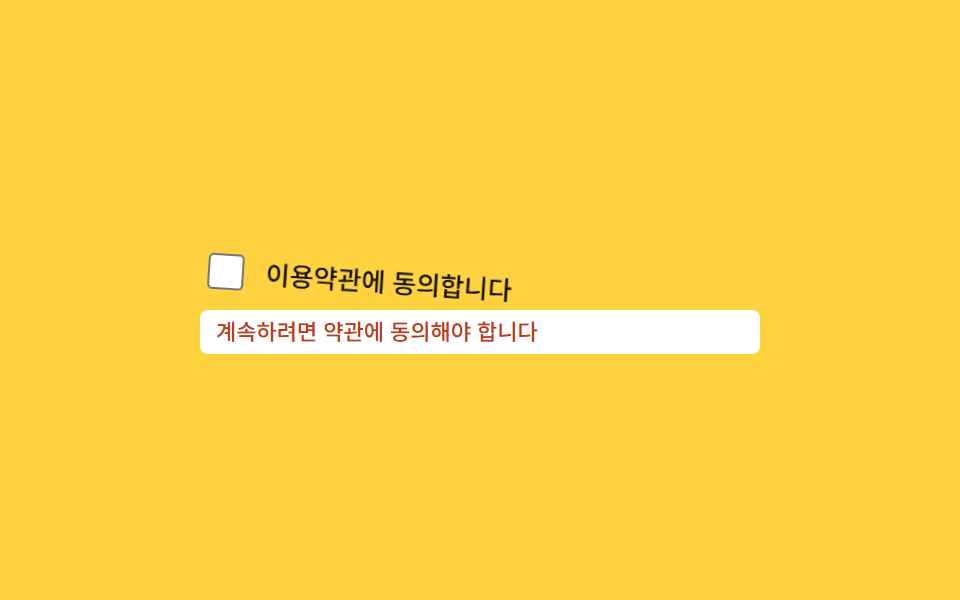 02 shake-error-animation-wiggle-rotate
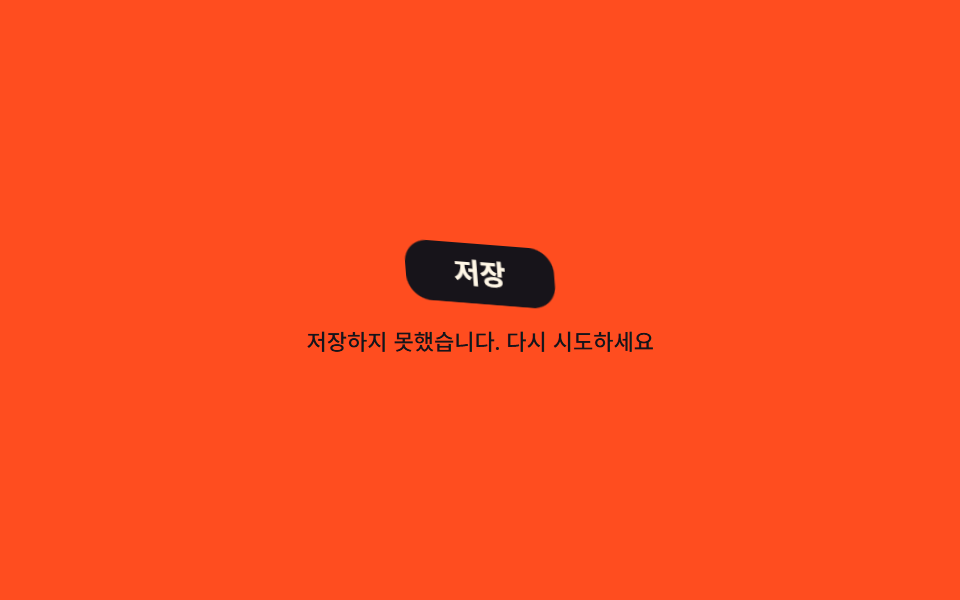 03 shake-error-animation-jello
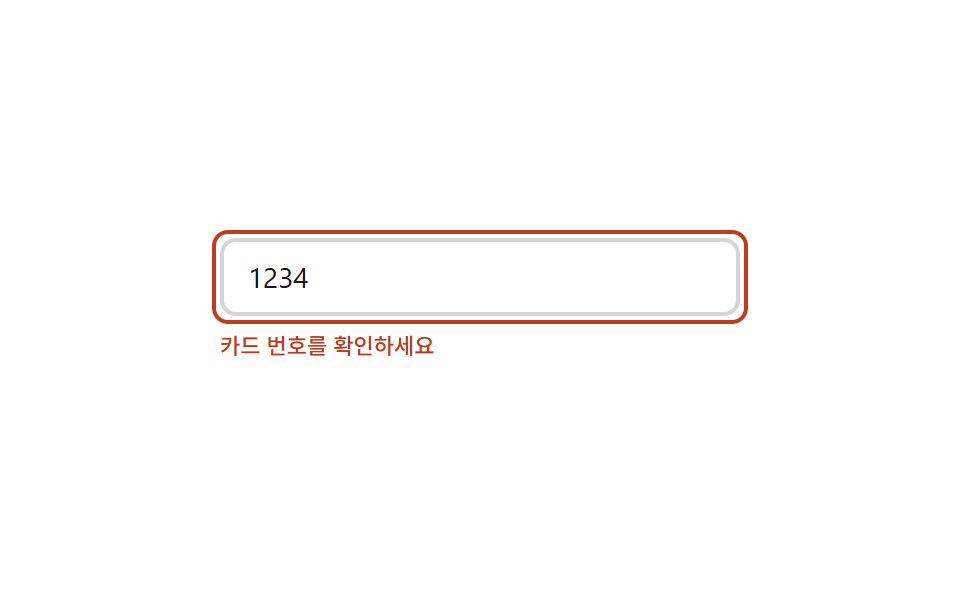 04 shake-error-animation-error-border-flash
 05 shake-error-animation-head-shake-input
 06 shake-error-animation-icon-attention-bounce
 07 shake-error-animation-user-invalid-shake
 08 shake-error-animation-shake-once-reset
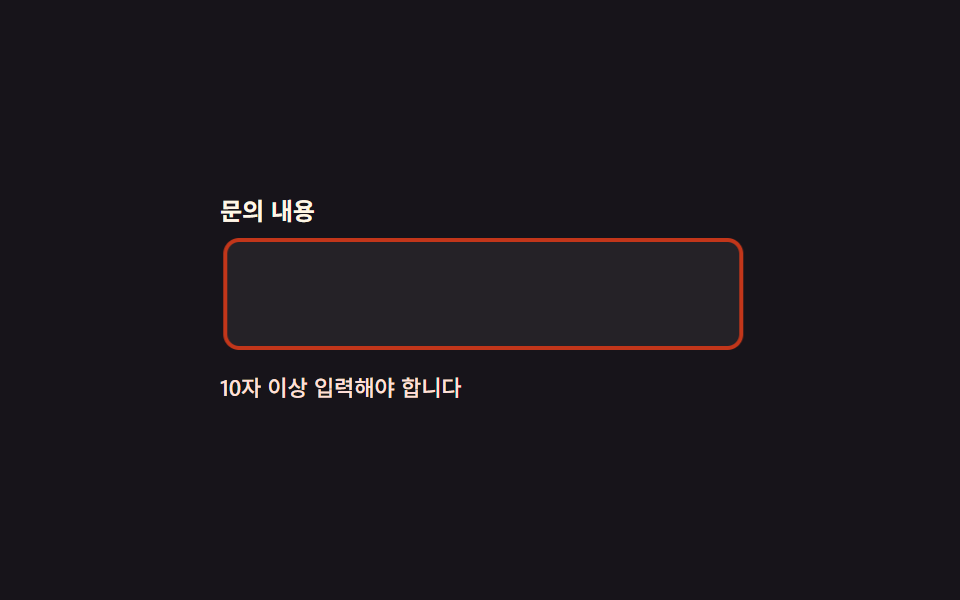 09 shake-error-animation-reduced-motion-outline
Tự chạy · bấm ô để tới mục đó · cả 9 trong một zip
- 01 Rung trái phải
- 02 Wiggle xoay nghiêng
- 03 Lắc lư như jello
- 04 Viền lỗi nhấp nháy
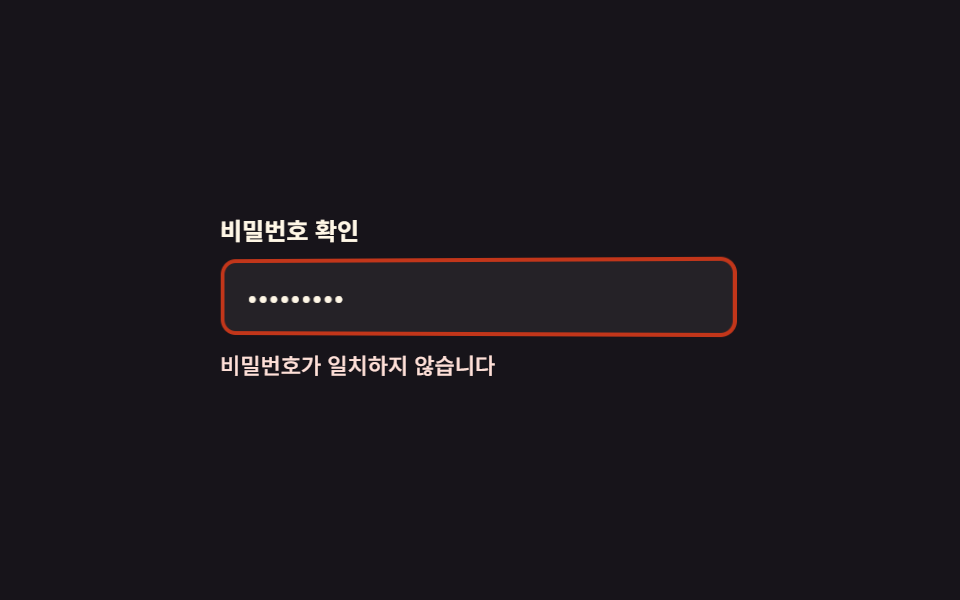
- 05 Ô nhập lắc đầu
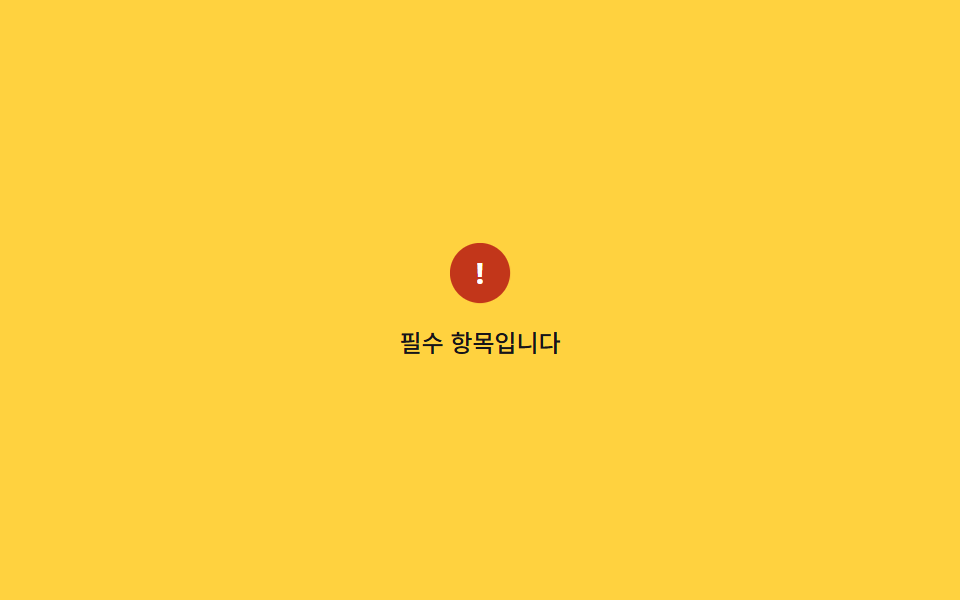
- 06 Icon cảnh báo nảy lên
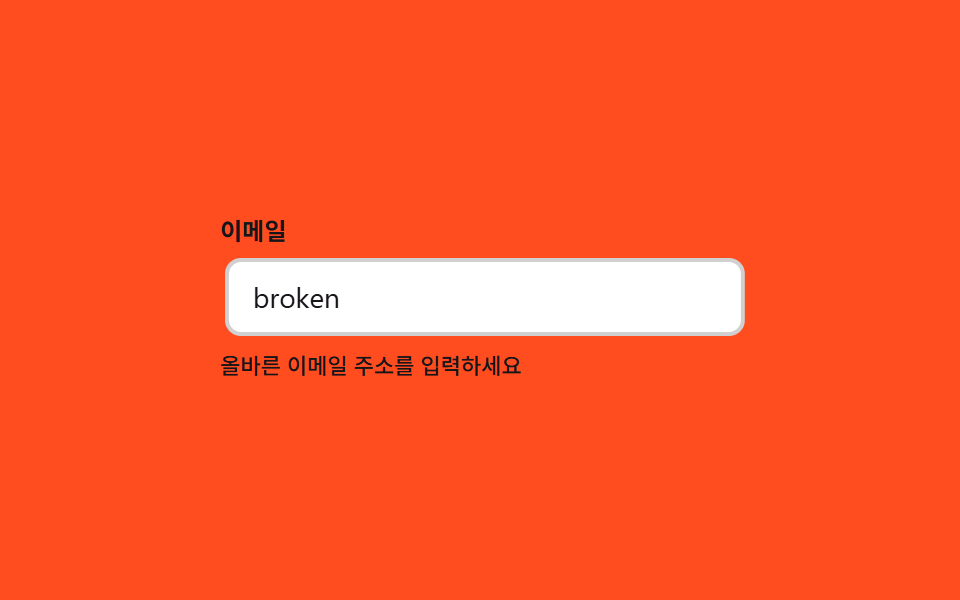
- 07 Rung tự động bằng :user-invalid
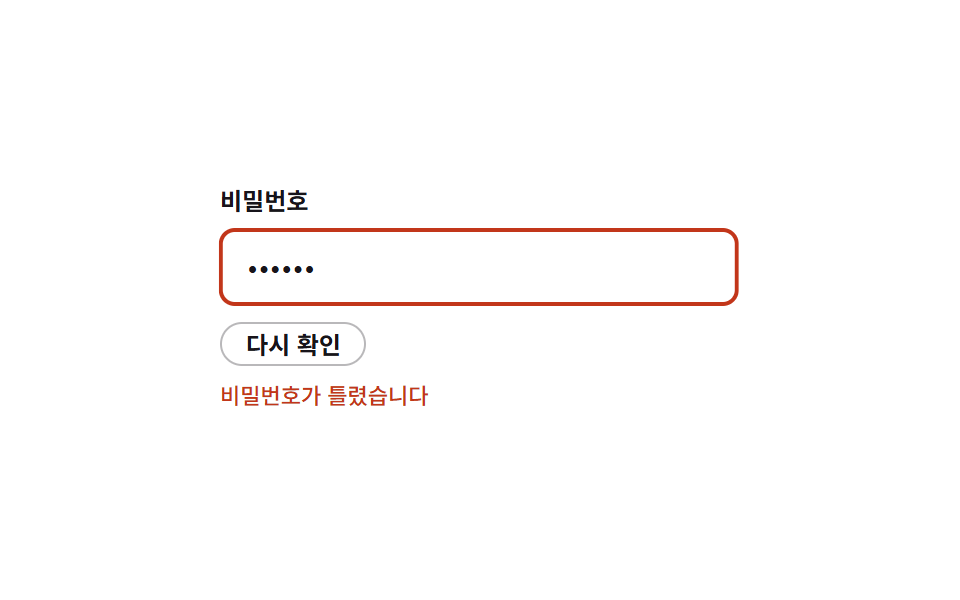
- 08 Mẫu reset chạy lại từ đầu
- 09 Đổi outline khi giảm chuyển động
Chín mục xếp theo lỗi phát sinh ở đâu chứ không theo độ nổi tiếng. Bắt đầu từ chính giá trị nhập vào bị sai (01~03), sang tín hiệu tiết chế chỉ nháy phần tử trên màn (04), rồi qua những thất bại nặng hơn như mật khẩu (05~06), tới trường hợp trình duyệt tự lo (07) và khi cùng một lỗi lặp lại (08), cuối cùng là bài toán giữ tín hiệu cho người đã giảm chuyển động (09).
01Rung ngang
css shake div làm rung cái gì
Nhập sai định dạng vào ô email rồi bấm ra chỗ khác, cả ô nhập rung ngang một nhịp ngắn rồi đứng lại.
<main class="stage">
  <div class="sh is-demo">
    <label class="sh__label" for="sh-email">Email</label>
    <input class="sh__input" id="sh-email" type="email" value="wrong@mail" aria-invalid="true" readonly>
    <p class="sh__msg">Định dạng email không hợp lệ</p>
  </div>
</main>
@use "../../../../site/static/demo-tokens" as *;
// ── 변수 3개 ──────────────────────────────────────────
$duration: 500ms; // 흔들림 한 번의 길이
$easing: $ease-out;
$color: $error; // 오류 테두리·문구 색
@include stage($stage-ink);
.sh { width: min(260px, 86vw); display: flex; flex-direction: column; gap: $sp-2; }
.sh__label { font-weight: 600; font-size: 12px; line-height: 1; font-family: inherit; color: $subject-cream; }
.sh__input {
box-sizing: border-box;
width: 100%;
padding: $sp-2 $sp-3;
border-radius: $r-sm;
border: 2px solid $color;
background: rgba(255, 255, 255, .06);
color: $subject-cream;
font-weight: 400;
font-size: 14px;
line-height: 1;
font-family: inherit;
}
.sh__msg { margin: 0; color: $error-soft; font-weight: 500; font-size: 11px; line-height: 1.3; font-family: inherit; }
// 실제 동작: 폼 검증에 실패해 .sh--invalid 가 붙으면 한 번만 흔들린다 (JS 없이 클래스 하나로 충분)
@keyframes sh-shake {
0%, 22%, 100% { transform: translateX(0); }
2% { transform: translateX(-7px); }
4% { transform: translateX(7px); }
6% { transform: translateX(-7px); }
8% { transform: translateX(7px); }
10% { transform: translateX(-5px); }
12% { transform: translateX(5px); }
14% { transform: translateX(-3px); }
16% { transform: translateX(3px); }
18% { transform: translateX(-1px); }
20% { transform: translateX(1px); }
}
.sh__input.sh--invalid { animation: sh-shake $duration $easing; }
// 데모 루프: 클릭 전까지 계속 흔들려 무엇이 움직이는지 보여준다
.sh.is-demo .sh__input { animation: sh-shake $duration $easing infinite; }
// ── 접근성 ──────────────────────────────────────────
@media (prefers-reduced-motion: reduce) {
.sh__input.sh--invalid,
.sh.is-demo .sh__input { animation: none !important; }
}html, body {
margin: 0;
overflow: hidden;
}
.stage {
box-sizing: border-box;
min-height: 100vh;
display: grid;
place-items: center;
margin: 0;
background: #17141a;
font-family: -apple-system, "Segoe UI", "Noto Sans KR", sans-serif;
padding: clamp(8px, 4vw, 24px);
}
.sh {
width: min(260px, 86vw);
display: flex;
flex-direction: column;
gap: 8px;
}
.sh__label {
font-weight: 600;
font-size: 12px;
line-height: 1;
font-family: inherit;
color: #fff7e6;
}
.sh__input {
box-sizing: border-box;
width: 100%;
padding: 8px 12px;
border-radius: 8px;
border: 2px solid #c2361a;
background: rgba(255, 255, 255, 0.06);
color: #fff7e6;
font-weight: 400;
font-size: 14px;
line-height: 1;
font-family: inherit;
}
.sh__msg {
margin: 0;
color: #ffe0d8;
font-weight: 500;
font-size: 11px;
line-height: 1.3;
font-family: inherit;
}
@keyframes sh-shake {
0%, 22%, 100% {
transform: translateX(0);
}
2% {
transform: translateX(-7px);
}
4% {
transform: translateX(7px);
}
6% {
transform: translateX(-7px);
}
8% {
transform: translateX(7px);
}
10% {
transform: translateX(-5px);
}
12% {
transform: translateX(5px);
}
14% {
transform: translateX(-3px);
}
16% {
transform: translateX(3px);
}
18% {
transform: translateX(-1px);
}
20% {
transform: translateX(1px);
}
}
.sh__input.sh--invalid {
animation: sh-shake 500ms ease-out;
}
.sh.is-demo .sh__input {
animation: sh-shake 500ms ease-out infinite;
}
@media (prefers-reduced-motion: reduce) {
.sh__input.sh--invalid,
.sh.is-demo .sh__input {
animation: none !important;
}
}import { useState } from "react";
import type { CSSProperties } from "react";
import styles from "./ShakeHorizontal.module.scss";
export type ShakeHorizontalProps = {
duration?: number;
easing?: string;
color?: string;
};
type Vars = CSSProperties & { "--duration"?: string; "--easing"?: string; "--color"?: string };
export default function ShakeHorizontal({ duration = 500, easing = "ease-out", color = "#c2361a" }: ShakeHorizontalProps) {
const [invalid, setInvalid] = useState(true);
const [run, setRun] = useState(0);
const vars: Vars = { "--duration": `${duration}ms`, "--easing": easing, "--color": color };
return (
<div className={styles.sh} style={vars}>
<label className={styles.label} htmlFor="sh-email">이메일</label>
<input
key={run}
id="sh-email"
className={`${styles.input} ${invalid ? styles.shake : ""}`}
type="email"
defaultValue="wrong@mail"
readOnly
onBlur={() => { setInvalid(true); setRun((n) => n + 1); }}
/>
<p className={styles.msg}>올바른 이메일 형식이 아닙니다</p>
</div>
);
}01 · Rung trái phải — Diện tích đo được 0.494% · khung hình chuyển động 8/23Nguyên tác GODRICH · SCSS và React nằm trong tệp zip · Xem mật khẩu
Dựng bằng cách nào
Toàn bộ chỉ là một @keyframes xếp giá trị translateX theo thứ tự -7px, 7px, -5px, 3px, 0px, biên độ hẹp dần nên trông đúng như một cơn rung thật.
@keyframes sh-shake {
  0%, 22%, 100% { transform: translateX(0); }
  2%  { transform: translateX(-7px); }
  4%  { transform: translateX(7px); }
  6%  { transform: translateX(-7px); }
  8%  { transform: translateX(7px); }
  10% { transform: translateX(-5px); }
  12% { transform: translateX(5px); }
  14% { transform: translateX(-3px); }
  16% { transform: translateX(3px); }
}
.sh__input.sh--invalid { animation: sh-shake $duration $easing; }
02Lắc nghiêng
Trông ra sao
Bấm gửi mà chưa tick checkbox điều khoản, cả dòng chứa checkbox lẫn câu chữ nghiêng qua nghiêng lại.
<main class="stage">
  <div class="wg is-demo">
    <label class="wg__row" for="wg-agree">
      <input class="wg__checkbox" type="checkbox" id="wg-agree">
      <span class="wg__text">Tôi đồng ý với điều khoản dịch vụ</span>
    </label>
    <p class="wg__msg">Bạn phải đồng ý để tiếp tục</p>
  </div>
</main>
@use "../../../../site/static/demo-tokens" as *;
$duration: 600ms; // 비틀거림 한 번의 길이
$easing: $ease-out;
$color: $error;
@include stage($stage-yellow);
.wg { width: min(280px, 86vw); display: flex; flex-direction: column; gap: $sp-2; }
.wg__row {
display: flex;
align-items: center;
gap: $sp-2;
transform-origin: left center; // 규칙8: 왼쪽 끝축 흔들림 회전
cursor: pointer;
}
.wg__checkbox { width: 18px; height: 18px; accent-color: $color; }
.wg__text { font-weight: 500; font-size: 13px; line-height: 1.3; font-family: inherit; color: $subject-ink; }
.wg__msg { margin: 0; display: inline-block; padding: $sp-1 $sp-2; border-radius: $r-xs; background: $stage-paper; color: $color; font-weight: 500; font-size: 11px; line-height: 1.3; font-family: inherit; }
@keyframes wg-wiggle {
0%, 100% { transform: rotate(0); }
15% { transform: rotate(-4deg); }
30% { transform: rotate(4deg); }
45% { transform: rotate(-3deg); }
60% { transform: rotate(3deg); }
75% { transform: rotate(-1.5deg); }
90% { transform: rotate(1.5deg); }
}
// 실제 동작: 체크 없이 제출하면 .wg--wiggle 이 한 번 붙는다
.wg__row.wg--wiggle { animation: wg-wiggle $duration $easing; }
// 데모 루프
.wg.is-demo .wg__row { animation: wg-wiggle $duration $easing infinite; }
@media (prefers-reduced-motion: reduce) {
.wg__row.wg--wiggle,
.wg.is-demo .wg__row { animation: none !important; }
}html, body {
margin: 0;
overflow: hidden;
}
.stage {
box-sizing: border-box;
min-height: 100vh;
display: grid;
place-items: center;
margin: 0;
background: #ffd23f;
font-family: -apple-system, "Segoe UI", "Noto Sans KR", sans-serif;
padding: clamp(8px, 4vw, 24px);
}
.wg {
width: min(280px, 86vw);
display: flex;
flex-direction: column;
gap: 8px;
}
.wg__row {
display: flex;
align-items: center;
gap: 8px;
transform-origin: left center;
cursor: pointer;
}
.wg__checkbox {
width: 18px;
height: 18px;
accent-color: #c2361a;
}
.wg__text {
font-weight: 500;
font-size: 13px;
line-height: 1.3;
font-family: inherit;
color: #17141a;
}
.wg__msg {
margin: 0;
display: inline-block;
padding: 4px 8px;
border-radius: 4px;
background: #ffffff;
color: #c2361a;
font-weight: 500;
font-size: 11px;
line-height: 1.3;
font-family: inherit;
}
@keyframes wg-wiggle {
0%, 100% {
transform: rotate(0);
}
15% {
transform: rotate(-4deg);
}
30% {
transform: rotate(4deg);
}
45% {
transform: rotate(-3deg);
}
60% {
transform: rotate(3deg);
}
75% {
transform: rotate(-1.5deg);
}
90% {
transform: rotate(1.5deg);
}
}
.wg__row.wg--wiggle {
animation: wg-wiggle 600ms ease-out;
}
.wg.is-demo .wg__row {
animation: wg-wiggle 600ms ease-out infinite;
}
@media (prefers-reduced-motion: reduce) {
.wg__row.wg--wiggle,
.wg.is-demo .wg__row {
animation: none !important;
}
}import { useState } from "react";
import type { CSSProperties, ChangeEvent } from "react";
import styles from "./WiggleRotate.module.scss";
export type WiggleRotateProps = {
duration?: number;
easing?: string;
color?: string;
};
type Vars = CSSProperties & { "--duration"?: string; "--easing"?: string; "--color"?: string };
export default function WiggleRotate({ duration = 600, easing = "ease-out", color = "#c2361a" }: WiggleRotateProps) {
const [checked, setChecked] = useState(false);
const [run, setRun] = useState(0);
const vars: Vars = { "--duration": `${duration}ms`, "--easing": easing, "--color": color };
const submit = () => {
if (!checked) setRun((n) => n + 1);
};
return (
<div className={styles.wg} style={vars}>
<label key={run} className={`${styles.row} ${!checked ? styles.wiggle : ""}`} htmlFor="wg-agree">
<input id="wg-agree" type="checkbox" checked={checked} onChange={(e: ChangeEvent<HTMLInputElement>) => setChecked(e.target.checked)} />
<span className={styles.text}>이용약관에 동의합니다</span>
</label>
<button type="button" className={styles.btn} onClick={submit}>제출</button>
<p className={styles.msg}>계속하려면 약관에 동의해야 합니다</p>
</div>
);
}02 · Wiggle xoay nghiêng — Diện tích đo được 1.942% · khung hình chuyển động 22/23Nguyên tác GODRICH · SCSS và React nằm trong tệp zip · Xem mật khẩu
Đọc code thế nào
@keyframes này chỉ đổi mỗi góc rotate, hình dáng checkbox không bị đụng tới một chút nào.
@keyframes wg-wiggle {
  0%, 100% { transform: rotate(0); }
  15% { transform: rotate(-4deg); }
  30% { transform: rotate(4deg); }
  45% { transform: rotate(-3deg); }
  60% { transform: rotate(3deg); }
  75% { transform: rotate(-1.5deg); }
  90% { transform: rotate(1.5deg); }
}
.wg__row.wg--wiggle { animation: wg-wiggle $duration $easing; }
03Dập dềnh như thạch
Dùng khi nào
Bấm nút lưu mà thất bại thì nút dập dềnh như miếng thạch rồi lắng xuống.
<main class="stage">
  <div class="je is-demo">
    <button class="je__btn" type="button">Lưu</button>
    <p class="je__msg">Không lưu được. Vui lòng thử lại</p>
  </div>
</main>
@use "../../../../site/static/demo-tokens" as *;
$duration: 800ms; // 출렁임이 잦아드는 데 걸리는 시간
$easing: $ease-out;
$color: $error;
@include stage($stage-orange);
.je { width: min(240px, 86vw); display: flex; flex-direction: column; align-items: center; gap: $sp-3; }
.je__btn {
box-sizing: border-box;
padding: $sp-2 $sp-6;
border: 0;
border-radius: $r-control;
background: $subject-ink;
color: $subject-cream;
font-weight: 600;
font-size: 14px;
line-height: 1;
font-family: inherit;
transform-origin: center;
}
.je__msg { margin: 0; color: $subject-ink; font-weight: 500; font-size: 11px; line-height: 1.3; font-family: inherit; text-align: center; }
@keyframes je-jello {
0%, 100% { transform: none; }
15% { transform: skewX(-9deg) skewY(-9deg); }
30% { transform: skewX(7deg) skewY(7deg); }
45% { transform: skewX(-5deg) skewY(-5deg); }
60% { transform: skewX(3deg) skewY(3deg); }
75% { transform: skewX(-2deg) skewY(-2deg); }
90% { transform: skewX(1deg) skewY(1deg); }
}
// 실제 동작: 저장 실패 응답을 받으면 .je--jello 가 한 번 붙는다
.je__btn.je--jello { animation: je-jello $duration $easing; }
// 데모 루프
.je.is-demo .je__btn { animation: je-jello $duration $easing infinite; }
@media (prefers-reduced-motion: reduce) {
.je__btn.je--jello,
.je.is-demo .je__btn { animation: none !important; }
}html, body {
margin: 0;
overflow: hidden;
}
.stage {
box-sizing: border-box;
min-height: 100vh;
display: grid;
place-items: center;
margin: 0;
background: #ff4d1f;
font-family: -apple-system, "Segoe UI", "Noto Sans KR", sans-serif;
padding: clamp(8px, 4vw, 24px);
}
.je {
width: min(240px, 86vw);
display: flex;
flex-direction: column;
align-items: center;
gap: 12px;
}
.je__btn {
box-sizing: border-box;
padding: 8px 24px;
border: 0;
border-radius: 12px;
background: #17141a;
color: #fff7e6;
font-weight: 600;
font-size: 14px;
line-height: 1;
font-family: inherit;
transform-origin: center;
}
.je__msg {
margin: 0;
color: #17141a;
font-weight: 500;
font-size: 11px;
line-height: 1.3;
font-family: inherit;
text-align: center;
}
@keyframes je-jello {
0%, 100% {
transform: none;
}
15% {
transform: skewX(-9deg) skewY(-9deg);
}
30% {
transform: skewX(7deg) skewY(7deg);
}
45% {
transform: skewX(-5deg) skewY(-5deg);
}
60% {
transform: skewX(3deg) skewY(3deg);
}
75% {
transform: skewX(-2deg) skewY(-2deg);
}
90% {
transform: skewX(1deg) skewY(1deg);
}
}
.je__btn.je--jello {
animation: je-jello 800ms ease-out;
}
.je.is-demo .je__btn {
animation: je-jello 800ms ease-out infinite;
}
@media (prefers-reduced-motion: reduce) {
.je__btn.je--jello,
.je.is-demo .je__btn {
animation: none !important;
}
}import { useState } from "react";
import type { CSSProperties } from "react";
import styles from "./JelloWobble.module.scss";
export type JelloWobbleProps = {
duration?: number;
easing?: string;
color?: string;
};
type Vars = CSSProperties & { "--duration"?: string; "--easing"?: string; "--color"?: string };
export default function JelloWobble({ duration = 800, easing = "ease-out", color = "#c2361a" }: JelloWobbleProps) {
const [run, setRun] = useState(0);
const vars: Vars = { "--duration": `${duration}ms`, "--easing": easing, "--color": color };
return (
<div className={styles.je} style={vars}>
<button key={run} type="button" className={`${styles.btn} ${styles.jello}`} onClick={() => setRun((n) => n + 1)}>
저장
</button>
<p className={styles.msg}>저장하지 못했습니다. 다시 시도하세요</p>
</div>
);
}03 · Lắc lư như jello — Diện tích đo được 1.069% · khung hình chuyển động 23/23Nguyên tác GODRICH · SCSS và React nằm trong tệp zip · Xem mật khẩu
Điểm mấu chốt của code
Cái lõi nằm ở chỗ bẻ skewX cùng skewY trong chung một keyframe, để nút méo đồng thời theo hai hướng chéo.
@keyframes je-jello {
  0%, 100% { transform: none; }
  15% { transform: skewX(-9deg) skewY(-9deg); }
  30% { transform: skewX(7deg) skewY(7deg); }
  45% { transform: skewX(-5deg) skewY(-5deg); }
  60% { transform: skewX(3deg) skewY(3deg); }
  75% { transform: skewX(-2deg) skewY(-2deg); }
  90% { transform: skewX(1deg) skewY(1deg); }
}
.je__btn.je--jello { animation: je-jello $duration $easing; }
04Nháy viền báo lỗi
Màn hình ra sao
Ô số thẻ đứng yên không nhúc nhích, chỉ lớp viền đỏ xếp chồng phía sau nháy lên đúng hai lần.
<main class="stage">
  <div class="bf is-demo">
    <div class="bf__field">
      <input class="bf__input" type="text" placeholder="Số thẻ" value="1234">
      <span class="bf__ring" aria-hidden="true"></span>
    </div>
    <p class="bf__msg">Vui lòng kiểm tra số thẻ</p>
  </div>
</main>
@use "../../../../site/static/demo-tokens" as *;
$duration: 500ms; // 링이 두 번 깜빡이는 시간
$easing: ease-in-out;
$color: $error;
@include stage($stage-paper);
.bf { width: min(260px, 86vw); display: flex; flex-direction: column; gap: $sp-2; }
.bf__field { position: relative; }
.bf__input {
box-sizing: border-box;
width: 100%;
padding: $sp-2 $sp-3;
border-radius: $r-sm;
border: 2px solid rgba(23, 20, 26, .18);
background: #fff;
color: $subject-ink;
font-weight: 400;
font-size: 14px;
line-height: 1;
font-family: inherit;
}
.bf__ring {
position: absolute;
inset: -$sp-1;
border: 2px solid $color;
border-radius: $r-sm;
opacity: 0;
pointer-events: none;
}
.bf__msg { margin: 0; color: $color; font-weight: 500; font-size: 11px; line-height: 1.3; font-family: inherit; }
@keyframes bf-flash {
0%, 100% { opacity: 0; }
15% { opacity: 1; }
30% { opacity: 0; }
45% { opacity: 1; }
60% { opacity: 0; }
}
// 실제 동작: 요청이 실패하면 .bf--flash 가 한 번 붙어 두 번 깜빡인다
.bf__ring.bf--flash { animation: bf-flash $duration $easing; }
// 데모 루프
.bf.is-demo .bf__ring { animation: bf-flash $duration $easing infinite; }
@media (prefers-reduced-motion: reduce) {
.bf__ring.bf--flash,
.bf.is-demo .bf__ring { animation: none !important; }
}html, body {
margin: 0;
overflow: hidden;
}
.stage {
box-sizing: border-box;
min-height: 100vh;
display: grid;
place-items: center;
margin: 0;
background: #ffffff;
font-family: -apple-system, "Segoe UI", "Noto Sans KR", sans-serif;
padding: clamp(8px, 4vw, 24px);
}
.bf {
width: min(260px, 86vw);
display: flex;
flex-direction: column;
gap: 8px;
}
.bf__field {
position: relative;
}
.bf__input {
box-sizing: border-box;
width: 100%;
padding: 8px 12px;
border-radius: 8px;
border: 2px solid rgba(23, 20, 26, 0.18);
background: #fff;
color: #17141a;
font-weight: 400;
font-size: 14px;
line-height: 1;
font-family: inherit;
}
.bf__ring {
position: absolute;
inset: -4px;
border: 2px solid #c2361a;
border-radius: 8px;
opacity: 0;
pointer-events: none;
}
.bf__msg {
margin: 0;
color: #c2361a;
font-weight: 500;
font-size: 11px;
line-height: 1.3;
font-family: inherit;
}
@keyframes bf-flash {
0%, 100% {
opacity: 0;
}
15% {
opacity: 1;
}
30% {
opacity: 0;
}
45% {
opacity: 1;
}
60% {
opacity: 0;
}
}
.bf__ring.bf--flash {
animation: bf-flash 500ms ease-in-out;
}
.bf.is-demo .bf__ring {
animation: bf-flash 500ms ease-in-out infinite;
}
@media (prefers-reduced-motion: reduce) {
.bf__ring.bf--flash,
.bf.is-demo .bf__ring {
animation: none !important;
}
}import { useState } from "react";
import type { CSSProperties } from "react";
import styles from "./ErrorBorderFlash.module.scss";
export type ErrorBorderFlashProps = {
duration?: number;
easing?: string;
color?: string;
};
type Vars = CSSProperties & { "--duration"?: string; "--easing"?: string; "--color"?: string };
export default function ErrorBorderFlash({ duration = 500, easing = "ease-in-out", color = "#c2361a" }: ErrorBorderFlashProps) {
const [run, setRun] = useState(0);
const vars: Vars = { "--duration": `${duration}ms`, "--easing": easing, "--color": color };
return (
<div className={styles.bf} style={vars}>
<div className={styles.field}>
<input className={styles.input} type="text" placeholder="카드 번호" defaultValue="1234" onFocus={() => setRun((n) => n + 1)} />
<span key={run} className={`${styles.ring} ${styles.flash}`} aria-hidden="true" />
</div>
<p className={styles.msg}>카드 번호를 확인하세요</p>
</div>
);
}04 · Viền lỗi nhấp nháy — Diện tích đo được 0.869% · khung hình chuyển động 16/23Nguyên tác GODRICH · SCSS và React nằm trong tệp zip · Xem mật khẩu
Nguyên lý hoạt động
Rung cả ô nhập dễ làm mấy ô nằm kề bên trông như cũng rung theo, nên ở đây chỉ đổi opacity và giữ nguyên layout.
.bf__ring {
  position: absolute;
  inset: -$sp-1;
  border: 2px solid $color;
  border-radius: $r-sm;
  opacity: 0;
}
@keyframes bf-flash {
  0%, 100% { opacity: 0; }
  15% { opacity: 1; }
  30% { opacity: 0; }
  45% { opacity: 1; }
  60% { opacity: 0; }
}
.bf__ring.bf--flash { animation: bf-flash $duration $easing; }
05Ô nhập lắc đầu
Cái gì chuyển động
Khi ô xác nhận mật khẩu không khớp, nó xoay nhẹ có chiều sâu, y như đang lắc đầu từ chối.
<main class="stage">
  <div class="hs is-demo">
    <label class="hs__label" for="hs-pw">Xác nhận mật khẩu</label>
    <input class="hs__input" id="hs-pw" type="password" value="wrongpass" readonly>
    <p class="hs__msg">Mật khẩu không khớp</p>
  </div>
</main>
@use "../../../../site/static/demo-tokens" as *;
$duration: 900ms; // 고개를 젓는 전체 길이
$easing: $ease-out;
$color: $error;
@include stage($stage-ink);
.hs { width: min(260px, 86vw); display: flex; flex-direction: column; gap: $sp-2; perspective: 500px; }
.hs__label { font-weight: 600; font-size: 12px; line-height: 1; font-family: inherit; color: $subject-cream; }
.hs__input {
box-sizing: border-box;
width: 100%;
padding: $sp-2 $sp-3;
border-radius: $r-sm;
border: 2px solid $color;
background: rgba(255, 255, 255, .06);
color: $subject-cream;
font-weight: 400;
font-size: 14px;
line-height: 1;
font-family: inherit;
}
.hs__msg { margin: 0; color: $error-soft; font-weight: 500; font-size: 11px; line-height: 1.3; font-family: inherit; }
@keyframes hs-shake {
0% { transform: translateX(0); }
6.5% { transform: translateX(-6px) rotateY(-9deg); }
18.5% { transform: translateX(5px) rotateY(7deg); }
31.5% { transform: translateX(-3px) rotateY(-5deg); }
43.5% { transform: translateX(2px) rotateY(3deg); }
50%, 100% { transform: translateX(0); }
}
// 실제 동작: 비밀번호 확인이 어긋나면 .hs--shake 가 한 번 붙는다
.hs__input.hs--shake { animation: hs-shake $duration $easing; }
// 데모 루프
.hs.is-demo .hs__input { animation: hs-shake $duration $easing infinite; }
@media (prefers-reduced-motion: reduce) {
.hs__input.hs--shake,
.hs.is-demo .hs__input { animation: none !important; }
}html, body {
margin: 0;
overflow: hidden;
}
.stage {
box-sizing: border-box;
min-height: 100vh;
display: grid;
place-items: center;
margin: 0;
background: #17141a;
font-family: -apple-system, "Segoe UI", "Noto Sans KR", sans-serif;
padding: clamp(8px, 4vw, 24px);
}
.hs {
width: min(260px, 86vw);
display: flex;
flex-direction: column;
gap: 8px;
perspective: 500px;
}
.hs__label {
font-weight: 600;
font-size: 12px;
line-height: 1;
font-family: inherit;
color: #fff7e6;
}
.hs__input {
box-sizing: border-box;
width: 100%;
padding: 8px 12px;
border-radius: 8px;
border: 2px solid #c2361a;
background: rgba(255, 255, 255, 0.06);
color: #fff7e6;
font-weight: 400;
font-size: 14px;
line-height: 1;
font-family: inherit;
}
.hs__msg {
margin: 0;
color: #ffe0d8;
font-weight: 500;
font-size: 11px;
line-height: 1.3;
font-family: inherit;
}
@keyframes hs-shake {
0% {
transform: translateX(0);
}
6.5% {
transform: translateX(-6px) rotateY(-9deg);
}
18.5% {
transform: translateX(5px) rotateY(7deg);
}
31.5% {
transform: translateX(-3px) rotateY(-5deg);
}
43.5% {
transform: translateX(2px) rotateY(3deg);
}
50%, 100% {
transform: translateX(0);
}
}
.hs__input.hs--shake {
animation: hs-shake 900ms ease-out;
}
.hs.is-demo .hs__input {
animation: hs-shake 900ms ease-out infinite;
}
@media (prefers-reduced-motion: reduce) {
.hs__input.hs--shake,
.hs.is-demo .hs__input {
animation: none !important;
}
}import { useState } from "react";
import type { CSSProperties } from "react";
import styles from "./HeadShakeInput.module.scss";
export type HeadShakeInputProps = {
duration?: number;
easing?: string;
color?: string;
};
type Vars = CSSProperties & { "--duration"?: string; "--easing"?: string; "--color"?: string };
export default function HeadShakeInput({ duration = 900, easing = "ease-out", color = "#c2361a" }: HeadShakeInputProps) {
const [run, setRun] = useState(0);
const vars: Vars = { "--duration": `${duration}ms`, "--easing": easing, "--color": color };
return (
<div className={styles.hs} style={vars}>
<label className={styles.label} htmlFor="hs-pw">비밀번호 확인</label>
<input
key={run}
id="hs-pw"
className={`${styles.input} ${styles.shake}`}
type="password"
defaultValue="wrongpass"
readOnly
onFocus={() => setRun((n) => n + 1)}
/>
<p className={styles.msg}>비밀번호가 일치하지 않습니다</p>
</div>
);
}05 · Ô nhập lắc đầu — Diện tích đo được 2.372% · khung hình chuyển động 15/23Nguyên tác GODRICH · SCSS và React nằm trong tệp zip · Xem mật khẩu
Cách dựng
Dùng chung translateX với rotateY trong một keyframe, và phải cho phần tử cha một perspective thì cảm giác nổi khối mới sống.
.hs { perspective: 500px; }
@keyframes hs-shake {
  0% { transform: translateX(0); }
  6.5% { transform: translateX(-6px) rotateY(-9deg); }
  18.5% { transform: translateX(5px) rotateY(7deg); }
  31.5% { transform: translateX(-3px) rotateY(-5deg); }
  43.5% { transform: translateX(2px) rotateY(3deg); }
  50%, 100% { transform: translateX(0); }
}
.hs__input.hs--shake { animation: hs-shake $duration $easing; }
06Icon cảnh báo nảy lên
Dùng ở đâu
Icon tròn vẽ dấu chấm than nảy vọt lên rồi tiếp đất, kéo ánh nhìn về phía câu báo lỗi.
<main class="stage">
  <div class="ib is-demo">
    <span class="ib__icon" aria-hidden="true">!</span>
    <p class="ib__msg">Trường bắt buộc</p>
  </div>
</main>
@use "../../../../site/static/demo-tokens" as *;
$duration: 700ms; // 아이콘이 튀어 올랐다 착지하는 시간
$easing: $ease-pop;
$color: $error;
@include stage($stage-yellow);
.ib { display: flex; flex-direction: column; align-items: center; gap: $sp-3; }
.ib__icon {
width: $sp-8; height: $sp-8;
border-radius: 50%;
background: $color;
color: #fff;
display: grid; place-items: center;
font-weight: 700;
font-size: 16px;
line-height: 1;
font-family: inherit;
transform-origin: center;
}
.ib__msg { margin: 0; color: $subject-ink; font-weight: 500; font-size: 12px; line-height: 1.3; font-family: inherit; }
@keyframes ib-bounce {
0%, 100% { transform: translateY(0) scale(1); }
20% { transform: translateY(-10px) scale(1.15); }
40% { transform: translateY(0) scale(.95); }
55% { transform: translateY(-4px) scale(1.05); }
70% { transform: translateY(0) scale(1); }
}
// 실제 동작: 오류가 뜨면 .ib--bounce 가 한 번 붙는다
.ib__icon.ib--bounce { animation: ib-bounce $duration $easing; }
// 데모 루프
.ib.is-demo .ib__icon { animation: ib-bounce $duration $easing infinite; }
@media (prefers-reduced-motion: reduce) {
.ib__icon.ib--bounce,
.ib.is-demo .ib__icon { animation: none !important; }
}html, body {
margin: 0;
overflow: hidden;
}
.stage {
box-sizing: border-box;
min-height: 100vh;
display: grid;
place-items: center;
margin: 0;
background: #ffd23f;
font-family: -apple-system, "Segoe UI", "Noto Sans KR", sans-serif;
padding: clamp(8px, 4vw, 24px);
}
.ib {
display: flex;
flex-direction: column;
align-items: center;
gap: 12px;
}
.ib__icon {
width: 32px;
height: 32px;
border-radius: 50%;
background: #c2361a;
color: #fff;
display: grid;
place-items: center;
font-weight: 700;
font-size: 16px;
line-height: 1;
font-family: inherit;
transform-origin: center;
}
.ib__msg {
margin: 0;
color: #17141a;
font-weight: 500;
font-size: 12px;
line-height: 1.3;
font-family: inherit;
}
@keyframes ib-bounce {
0%, 100% {
transform: translateY(0) scale(1);
}
20% {
transform: translateY(-10px) scale(1.15);
}
40% {
transform: translateY(0) scale(0.95);
}
55% {
transform: translateY(-4px) scale(1.05);
}
70% {
transform: translateY(0) scale(1);
}
}
.ib__icon.ib--bounce {
animation: ib-bounce 700ms cubic-bezier(0.2, 1.4, 0.4, 1);
}
.ib.is-demo .ib__icon {
animation: ib-bounce 700ms cubic-bezier(0.2, 1.4, 0.4, 1) infinite;
}
@media (prefers-reduced-motion: reduce) {
.ib__icon.ib--bounce,
.ib.is-demo .ib__icon {
animation: none !important;
}
}import { useState } from "react";
import type { CSSProperties } from "react";
import styles from "./AttentionIconBounce.module.scss";
export type AttentionIconBounceProps = {
duration?: number;
easing?: string;
color?: string;
};
type Vars = CSSProperties & { "--duration"?: string; "--easing"?: string; "--color"?: string };
export default function AttentionIconBounce({ duration = 700, easing = "cubic-bezier(.2,1.4,.4,1)", color = "#c2361a" }: AttentionIconBounceProps) {
const [run, setRun] = useState(0);
const vars: Vars = { "--duration": `${duration}ms`, "--easing": easing, "--color": color };
return (
<div className={styles.ib} style={vars} onClick={() => setRun((n) => n + 1)}>
<span key={run} className={`${styles.icon} ${styles.bounce}`} aria-hidden="true">!</span>
<p className={styles.msg}>필수 항목입니다</p>
</div>
);
}06 · Icon cảnh báo nảy lên — Diện tích đo được 0.726% · khung hình chuyển động 18/23Nguyên tác GODRICH · SCSS và React nằm trong tệp zip · Xem mật khẩu
Vì sao dựng kiểu này
Gắn cùng lúc scale với translateY cho ra cảm giác nảy tưng tưng, còn icon chỉ là trang trí nên được gắn aria-hidden.
@keyframes ib-bounce {
  0%, 100% { transform: translateY(0) scale(1); }
  20% { transform: translateY(-10px) scale(1.15); }
  40% { transform: translateY(0) scale(.95); }
  55% { transform: translateY(-4px) scale(1.05); }
  70% { transform: translateY(0) scale(1); }
}
.ib__icon.ib--bounce { animation: ib-bounce $duration $easing; }
07Tự rung bằng :user-invalid
Thứ đập vào mắt
Phần CSS không viết lấy một dòng JS mà trình duyệt tự rung giúp, và chỉ rung khi người dùng đã nhập vào ô email rồi rời đi mà định dạng vẫn sai.
<main class="stage">
  <div class="ui is-demo">
    <label class="ui__label" for="ui-email">Email</label>
    <input class="ui__input" id="ui-email" type="email" required pattern=".+@.+\..+" value="broken">
    <p class="ui__msg">Vui lòng nhập email hợp lệ</p>
  </div>
</main>
@use "../../../../site/static/demo-tokens" as *;
$duration: 500ms; // 흔들림 한 번의 길이
$easing: $ease-out;
$color: $error;
@include stage($stage-orange);
.ui { width: min(260px, 86vw); display: flex; flex-direction: column; gap: $sp-2; }
.ui__label { font-weight: 600; font-size: 12px; line-height: 1; font-family: inherit; color: $subject-ink; }
.ui__input {
box-sizing: border-box;
width: 100%;
padding: $sp-2 $sp-3;
border-radius: $r-sm;
border: 2px solid rgba(23, 20, 26, .2);
background: #fff;
color: $subject-ink;
font-weight: 400;
font-size: 14px;
line-height: 1;
font-family: inherit;
}
.ui__msg { margin: 0; color: $subject-ink; font-weight: 500; font-size: 11px; line-height: 1.3; font-family: inherit; }
@keyframes ui-shake {
0%, 22%, 100% { transform: translateX(0); }
2% { transform: translateX(-7px); }
4% { transform: translateX(7px); }
6% { transform: translateX(-7px); }
8% { transform: translateX(7px); }
10% { transform: translateX(-5px); }
12% { transform: translateX(5px); }
14% { transform: translateX(-3px); }
16% { transform: translateX(3px); }
}
// 실제 동작: JS 없이 :user-invalid 만으로 흔들린다. 값을 만지고 벗어난 뒤에만 켜진다
.ui__input:user-invalid { border-color: $color; animation: ui-shake $duration $easing; }
// 데모 루프: :user-invalid 활성화 타이밍이 브라우저마다 달라 .is-demo 로 강제한다
.ui.is-demo .ui__input { animation: ui-shake $duration $easing infinite; }
@media (prefers-reduced-motion: reduce) {
.ui__input:user-invalid,
.ui.is-demo .ui__input { animation: none !important; }
}html, body {
margin: 0;
overflow: hidden;
}
.stage {
box-sizing: border-box;
min-height: 100vh;
display: grid;
place-items: center;
margin: 0;
background: #ff4d1f;
font-family: -apple-system, "Segoe UI", "Noto Sans KR", sans-serif;
padding: clamp(8px, 4vw, 24px);
}
.ui {
width: min(260px, 86vw);
display: flex;
flex-direction: column;
gap: 8px;
}
.ui__label {
font-weight: 600;
font-size: 12px;
line-height: 1;
font-family: inherit;
color: #17141a;
}
.ui__input {
box-sizing: border-box;
width: 100%;
padding: 8px 12px;
border-radius: 8px;
border: 2px solid rgba(23, 20, 26, 0.2);
background: #fff;
color: #17141a;
font-weight: 400;
font-size: 14px;
line-height: 1;
font-family: inherit;
}
.ui__msg {
margin: 0;
color: #17141a;
font-weight: 500;
font-size: 11px;
line-height: 1.3;
font-family: inherit;
}
@keyframes ui-shake {
0%, 22%, 100% {
transform: translateX(0);
}
2% {
transform: translateX(-7px);
}
4% {
transform: translateX(7px);
}
6% {
transform: translateX(-7px);
}
8% {
transform: translateX(7px);
}
10% {
transform: translateX(-5px);
}
12% {
transform: translateX(5px);
}
14% {
transform: translateX(-3px);
}
16% {
transform: translateX(3px);
}
}
.ui__input:user-invalid {
border-color: #c2361a;
animation: ui-shake 500ms ease-out;
}
.ui.is-demo .ui__input {
animation: ui-shake 500ms ease-out infinite;
}
@media (prefers-reduced-motion: reduce) {
.ui__input:user-invalid,
.ui.is-demo .ui__input {
animation: none !important;
}
}// CSS 만으로는 :user-invalid 가 "사용자가 값을 만지고 벗어난 뒤" 에만 켜진다.
// 데모에서 그 상태를 보여주려고 포커스·입력·블러를 흉내만 낸다 (JS 4줄).
var el = document.getElementById('ui-email');
el.focus({ preventScroll: true });
el.dispatchEvent(new Event('input'));
el.blur();import { useState } from "react";
import type { CSSProperties, ChangeEvent } from "react";
import styles from "./UserInvalidShake.module.scss";
export type UserInvalidShakeProps = {
duration?: number;
easing?: string;
color?: string;
};
type Vars = CSSProperties & { "--duration"?: string; "--easing"?: string; "--color"?: string };
// React 는 :user-invalid 를 직접 읽지 못해, onBlur 에서 checkValidity() 로 같은 순간을 흉내 낸다.
// 실제 zip 의 vanilla 판은 JS 없이 CSS 의사 클래스 하나로 끝난다 — 이 파일은 React 이식일 뿐이다.
export default function UserInvalidShake({ duration = 500, easing = "ease-out", color = "#c2361a" }: UserInvalidShakeProps) {
const [touched, setTouched] = useState(true);
const [run, setRun] = useState(0);
const vars: Vars = { "--duration": `${duration}ms`, "--easing": easing, "--color": color };
const onBlur = (e: ChangeEvent<HTMLInputElement>) => {
setTouched(!e.target.checkValidity());
setRun((n) => n + 1);
};
return (
<div className={styles.ui} style={vars}>
<label className={styles.label} htmlFor="ui-email">이메일</label>
<input
key={run}
id="ui-email"
className={`${styles.input} ${touched ? styles.shake : ""}`}
type="email"
required
pattern=".+@.+\..+"
defaultValue="broken"
onBlur={onBlur}
/>
<p className={styles.msg}>올바른 이메일 주소를 입력하세요</p>
</div>
);
}07 · Rung tự động bằng :user-invalid — Diện tích đo được 0.507% · khung hình chuyển động 8/23Nguyên tác GODRICH · SCSS và React nằm trong tệp zip · Xem mật khẩu
Lõi của cách làm
Gắn animation vào đúng một pseudo-class input:user-invalid là xong, còn lúc chưa ai đụng vào giá trị hay trang vừa mở thì nó im lặng.
.ui__input:user-invalid {
  border-color: $color;
  animation: ui-shake $duration $easing;
}
@keyframes ui-shake {
  0%, 22%, 100% { transform: translateX(0); }
  2%  { transform: translateX(-7px); }
  4%  { transform: translateX(7px); }
  6%  { transform: translateX(-7px); }
  8%  { transform: translateX(7px); }
  10% { transform: translateX(-5px); }
  12% { transform: translateX(5px); }
  14% { transform: translateX(-3px); }
  16% { transform: translateX(3px); }
}
08Mẫu reset để phát lại một lần
Tình huống nào
Bấm "Kiểm tra lại" liên tiếp bao nhiêu lần thì mỗi lần vẫn rung mới từ đầu.
<main class="stage">
  <div class="rs is-demo">
    <label class="rs__label" for="rs-pw">Mật khẩu</label>
    <input class="rs__input" id="rs-pw" type="password" value="wrong1" readonly>
    <button class="rs__btn" type="button" id="rs-check">Kiểm tra lại</button>
    <p class="rs__msg">Sai mật khẩu</p>
  </div>
</main>
@use "../../../../site/static/demo-tokens" as *;
$duration: 500ms; // 흔들림 한 번의 길이
$easing: $ease-out;
$color: $error;
@include stage($stage-paper);
.rs { width: min(260px, 86vw); display: flex; flex-direction: column; gap: $sp-2; }
.rs__label { font-weight: 600; font-size: 12px; line-height: 1; font-family: inherit; color: $subject-ink; }
.rs__input {
box-sizing: border-box;
width: 100%;
padding: $sp-2 $sp-3;
border-radius: $r-sm;
border: 2px solid $color;
background: #fff;
color: $subject-ink;
font-weight: 400;
font-size: 14px;
line-height: 1;
font-family: inherit;
}
.rs__btn {
align-self: flex-start;
padding: $sp-1 $sp-3;
border: 1px solid rgba(23, 20, 26, .3);
border-radius: $r-control;
background: none;
color: $subject-ink;
font-weight: 600;
font-size: 12px;
line-height: 1;
font-family: inherit;
}
.rs__msg { margin: 0; color: $color; font-weight: 500; font-size: 11px; line-height: 1.3; font-family: inherit; }
@keyframes rs-shake {
0%, 100% { transform: translateX(0); }
10% { transform: translateX(-7px); }
20% { transform: translateX(6px); }
30% { transform: translateX(-5px); }
40% { transform: translateX(4px); }
50% { transform: translateX(-3px); }
60% { transform: translateX(2px); }
70% { transform: translateX(-1px); }
80% { transform: translateX(1px); }
}
// 실제 동작: "다시 확인" 을 연속으로 눌러도 리플로우 트릭 덕분에 매번 새로 흔들린다
.rs__input.rs--shake { animation: rs-shake $duration $easing; }
// 데모 루프: 같은 흔들림을 반복해 "매번 처음부터" 를 보여준다
.rs.is-demo .rs__input { animation: rs-shake $duration $easing infinite; }
@media (prefers-reduced-motion: reduce) {
.rs__input.rs--shake,
.rs.is-demo .rs__input { animation: none !important; }
}html, body {
margin: 0;
overflow: hidden;
}
.stage {
box-sizing: border-box;
min-height: 100vh;
display: grid;
place-items: center;
margin: 0;
background: #ffffff;
font-family: -apple-system, "Segoe UI", "Noto Sans KR", sans-serif;
padding: clamp(8px, 4vw, 24px);
}
.rs {
width: min(260px, 86vw);
display: flex;
flex-direction: column;
gap: 8px;
}
.rs__label {
font-weight: 600;
font-size: 12px;
line-height: 1;
font-family: inherit;
color: #17141a;
}
.rs__input {
box-sizing: border-box;
width: 100%;
padding: 8px 12px;
border-radius: 8px;
border: 2px solid #c2361a;
background: #fff;
color: #17141a;
font-weight: 400;
font-size: 14px;
line-height: 1;
font-family: inherit;
}
.rs__btn {
align-self: flex-start;
padding: 4px 12px;
border: 1px solid rgba(23, 20, 26, 0.3);
border-radius: 12px;
background: none;
color: #17141a;
font-weight: 600;
font-size: 12px;
line-height: 1;
font-family: inherit;
}
.rs__msg {
margin: 0;
color: #c2361a;
font-weight: 500;
font-size: 11px;
line-height: 1.3;
font-family: inherit;
}
@keyframes rs-shake {
0%, 100% {
transform: translateX(0);
}
10% {
transform: translateX(-7px);
}
20% {
transform: translateX(6px);
}
30% {
transform: translateX(-5px);
}
40% {
transform: translateX(4px);
}
50% {
transform: translateX(-3px);
}
60% {
transform: translateX(2px);
}
70% {
transform: translateX(-1px);
}
80% {
transform: translateX(1px);
}
}
.rs__input.rs--shake {
animation: rs-shake 500ms ease-out;
}
.rs.is-demo .rs__input {
animation: rs-shake 500ms ease-out infinite;
}
@media (prefers-reduced-motion: reduce) {
.rs__input.rs--shake,
.rs.is-demo .rs__input {
animation: none !important;
}
}// 같은 클래스를 다시 붙이기만 하면 애니메이션이 재생되지 않는다.
// 지우고 → 강제 리플로우(offsetWidth) → 다시 붙이면 매번 처음부터 흔들린다 (JS 6줄).
var input = document.getElementById('rs-pw');
document.getElementById('rs-check').addEventListener('pointerdown', function () {
  input.classList.remove('rs--shake');
  void input.offsetWidth;
  input.classList.add('rs--shake');
});import { useState } from "react";
import type { CSSProperties } from "react";
import styles from "./ShakeOnceReset.module.scss";
export type ShakeOnceResetProps = {
duration?: number;
easing?: string;
color?: string;
};
type Vars = CSSProperties & { "--duration"?: string; "--easing"?: string; "--color"?: string };
// DOM 판의 리플로우 트릭 대신, React 는 key 를 바꿔 요소를 통째로 새로 마운트한다 —
// 같은 효과(매번 처음부터 재생)를 React 답게 낸다.
export default function ShakeOnceReset({ duration = 500, easing = "ease-out", color = "#c2361a" }: ShakeOnceResetProps) {
const [run, setRun] = useState(0);
const vars: Vars = { "--duration": `${duration}ms`, "--easing": easing, "--color": color };
return (
<div className={styles.rs} style={vars}>
<label className={styles.label} htmlFor="rs-pw">비밀번호</label>
<input key={run} id="rs-pw" className={`${styles.input} ${styles.shake}`} type="password" defaultValue="wrong1" readOnly />
<button type="button" className={styles.btn} onClick={() => setRun((n) => n + 1)}>다시 확인</button>
<p className={styles.msg}>비밀번호가 틀렸습니다</p>
</div>
);
}08 · Mẫu reset chạy lại từ đầu — Diện tích đo được 0.56% · khung hình chuyển động 23/23Nguyên tác GODRICH · SCSS và React nằm trong tệp zip · Xem mật khẩu
Cái gì là mấu chốt
Gỡ class rồi gắn lại ngay lập tức thì trình duyệt tưởng animation vẫn đang chạy nên bỏ qua, vì vậy phải đọc offsetWidth một lần sau khi gỡ để ép reflow rồi mới gắn lại.
var input = document.getElementById('rs-pw');
document.getElementById('rs-check').addEventListener('pointerdown', function () {
input.classList.remove('rs--shake');
void input.offsetWidth;
input.classList.add('rs--shake');
});
09Thay bằng outline khi giảm chuyển động
Chuyện gì xảy ra
Bình thường nó rung y như mục 01, nhưng bật giảm chuyển động trong hệ thống thì rung được thay bằng vòng viền đỏ nháy đúng hai lần.
<main class="stage">
  <div class="rm is-demo">
    <label class="rm__label" for="rm-msg">Nội dung liên hệ</label>
    <div class="rm__field">
      <textarea class="rm__textarea" id="rm-msg" rows="2"></textarea>
      <span class="rm__ring" aria-hidden="true"></span>
    </div>
    <p class="rm__msg">Phải nhập ít nhất 10 ký tự</p>
  </div>
</main>
@use "../../../../site/static/demo-tokens" as *;
$duration: 500ms; // 평소 흔들림 한 번의 길이
$easing: $ease-out;
$color: $error;
@include stage($stage-ink);
.rm { width: min(260px, 86vw); display: flex; flex-direction: column; gap: $sp-2; }
.rm__label { font-weight: 600; font-size: 12px; line-height: 1; font-family: inherit; color: $subject-cream; }
.rm__field { position: relative; }
.rm__textarea {
box-sizing: border-box;
width: 100%;
resize: none;
padding: $sp-2 $sp-3;
border-radius: $r-sm;
border: 2px solid $color;
background: rgba(255, 255, 255, .06);
color: $subject-cream;
font-weight: 400;
font-size: 13px;
line-height: 1.4;
font-family: inherit;
}
.rm__ring {
position: absolute;
inset: -$sp-1;
border: 2px solid $color;
border-radius: $r-sm;
opacity: 0;
pointer-events: none;
}
.rm__msg { margin: 0; color: $error-soft; font-weight: 500; font-size: 11px; line-height: 1.3; font-family: inherit; }
// 평소: translateX 로 흔든다
@keyframes rm-shake {
0%, 22%, 100% { transform: translateX(0); }
2% { transform: translateX(-6px); }
4% { transform: translateX(6px); }
6% { transform: translateX(-6px); }
8% { transform: translateX(6px); }
10% { transform: translateX(-4px); }
12% { transform: translateX(4px); }
14% { transform: translateX(-2px); }
16% { transform: translateX(2px); }
}
.rm__textarea.rm--invalid { animation: rm-shake $duration $easing; }
.rm.is-demo .rm__textarea { animation: rm-shake $duration $easing infinite; }
// 모션 축소: 흔들림 대신 opacity 로 링만 두 번 깜빡인다 — 움직임은 없지만 오류는 여전히 보인다
@keyframes rm-ring-pulse {
0%, 100% { opacity: 0; }
25% { opacity: 1; }
50% { opacity: 0; }
75% { opacity: 1; }
}
@media (prefers-reduced-motion: reduce) {
.rm__textarea.rm--invalid,
.rm.is-demo .rm__textarea { animation: none !important; }
.rm__ring.rm--invalid { animation: rm-ring-pulse $dur-loop ease-in-out; }
.rm.is-demo .rm__ring { animation: rm-ring-pulse $dur-loop ease-in-out infinite; }
}html, body {
margin: 0;
overflow: hidden;
}
.stage {
box-sizing: border-box;
min-height: 100vh;
display: grid;
place-items: center;
margin: 0;
background: #17141a;
font-family: -apple-system, "Segoe UI", "Noto Sans KR", sans-serif;
padding: clamp(8px, 4vw, 24px);
}
.rm {
width: min(260px, 86vw);
display: flex;
flex-direction: column;
gap: 8px;
}
.rm__label {
font-weight: 600;
font-size: 12px;
line-height: 1;
font-family: inherit;
color: #fff7e6;
}
.rm__field {
position: relative;
}
.rm__textarea {
box-sizing: border-box;
width: 100%;
resize: none;
padding: 8px 12px;
border-radius: 8px;
border: 2px solid #c2361a;
background: rgba(255, 255, 255, 0.06);
color: #fff7e6;
font-weight: 400;
font-size: 13px;
line-height: 1.4;
font-family: inherit;
}
.rm__ring {
position: absolute;
inset: -4px;
border: 2px solid #c2361a;
border-radius: 8px;
opacity: 0;
pointer-events: none;
}
.rm__msg {
margin: 0;
color: #ffe0d8;
font-weight: 500;
font-size: 11px;
line-height: 1.3;
font-family: inherit;
}
@keyframes rm-shake {
0%, 22%, 100% {
transform: translateX(0);
}
2% {
transform: translateX(-6px);
}
4% {
transform: translateX(6px);
}
6% {
transform: translateX(-6px);
}
8% {
transform: translateX(6px);
}
10% {
transform: translateX(-4px);
}
12% {
transform: translateX(4px);
}
14% {
transform: translateX(-2px);
}
16% {
transform: translateX(2px);
}
}
.rm__textarea.rm--invalid {
animation: rm-shake 500ms ease-out;
}
.rm.is-demo .rm__textarea {
animation: rm-shake 500ms ease-out infinite;
}
@keyframes rm-ring-pulse {
0%, 100% {
opacity: 0;
}
25% {
opacity: 1;
}
50% {
opacity: 0;
}
75% {
opacity: 1;
}
}
@media (prefers-reduced-motion: reduce) {
.rm__textarea.rm--invalid,
.rm.is-demo .rm__textarea {
animation: none !important;
}
.rm__ring.rm--invalid {
animation: rm-ring-pulse 2s ease-in-out;
}
.rm.is-demo .rm__ring {
animation: rm-ring-pulse 2s ease-in-out infinite;
}
}import { useState } from "react";
import type { CSSProperties } from "react";
import styles from "./ReducedMotionOutline.module.scss";
export type ReducedMotionOutlineProps = {
duration?: number;
easing?: string;
color?: string;
};
type Vars = CSSProperties & { "--duration"?: string; "--easing"?: string; "--color"?: string };
export default function ReducedMotionOutline({ duration = 500, easing = "ease-out", color = "#c2361a" }: ReducedMotionOutlineProps) {
const [run, setRun] = useState(0);
const vars: Vars = { "--duration": `${duration}ms`, "--easing": easing, "--color": color };
return (
<div className={styles.rm} style={vars}>
<label className={styles.label} htmlFor="rm-msg">문의 내용</label>
<div className={styles.field}>
<textarea key={run} id="rm-msg" rows={2} className={`${styles.textarea} ${styles.invalid}`} onFocus={() => setRun((n) => n + 1)} />
<span key={`ring-${run}`} className={`${styles.ring} ${styles.invalid}`} aria-hidden="true" />
</div>
<p className={styles.msg}>10자 이상 입력해야 합니다</p>
</div>
);
}09 · Đổi outline khi giảm chuyển động — Diện tích đo được 0.336% · khung hình chuyển động 8/23Nguyên tác GODRICH · SCSS và React nằm trong tệp zip · Xem mật khẩu
Điểm cần nhớ
Mục đích là tắt chuyển động mà không tắt luôn tín hiệu cho biết đang có lỗi.
@media (prefers-reduced-motion: reduce) {
  .rm__textarea.rm--invalid { animation: none !important; }
  .rm__ring.rm--invalid { animation: rm-ring-pulse $dur-loop ease-in-out; }
}
@keyframes rm-ring-pulse {
  0%, 100% { opacity: 0; }
  25% { opacity: 1; }
  50% { opacity: 0; }
  75% { opacity: 1; }
}
Hiệu ứng rung dễ hỏng ở đâu — một cái bẫy
Vấn đề nằm ở chỗ nào
Dù bạn rung nguyên ô nhập hay chỉ rung chữ kiểu css shake text, tám mục (01~07 và 09) đều dính chung một cái bẫy: animation của CSS chạy một lần là hết. Người dùng có nhập sai lại đúng giá trị cũ thì class vẫn nằm sẵn trên phần tử, trình duyệt coi đó là "animation đang chạy dở" nên không phát lại nữa. Mục 08 chứa đoạn code chữa bệnh này bằng ba bước classList.remove() rồi ép đọc offsetWidth rồi classList.add(), và bạn chép nguyên mẫu đó sang các mục còn lại đều được. Cách này cũng là nền của mọi css error shake animation gắn bằng class.
Tránh bằng cách nào
Nếu bạn dùng :user-invalid (mục 07) thì vấn đề này không tồn tại — mỗi lần giá trị đổi, trình duyệt tính lại trạng thái và tự phát. File nén chứa toàn bộ code vanilla lẫn React của chín mục mở bằng 3v34eb5k.
Khả năng tiếp cận
Cái gì còn lại khi reduced-motion
Cả chín mục đều tắt chuyển động bằng animation: none !important dưới prefers-reduced-motion: reduce. Có điều mấy mục mà chuyển động là tín hiệu lỗi duy nhất như 04 và 09, tắt animation xong là lỗi biến mất luôn, nên 09 bật vòng viền nháy bằng opacity thay cho rung, còn các mục khác luôn để câu chữ hiện cùng. Các pseudo-class kiểm tra gốc như :user-invalid, theo tài liệu MDN, chạy trên Chrome/Edge 119+, Firefox 88+, Safari 16.4+, còn bản cũ hơn thì lặng lẽ bỏ qua, nên form quan trọng như thanh toán hay đăng ký vẫn nên lấy cách gắn class như 01 và 05 làm nền.
Bài đọc tiếp
Muốn xem chỉ báo trượt mượt lúc đổi tab thì có 9 hiệu ứng CSS tab menu transition, còn trang này ngoài tín hiệu lỗi ra còn bàn gì nữa thì xem mục CSS animation.
FAQ
Tại sao hiệu ứng rung chỉ nên dùng opacity hay transform?
Rung bằng margin hay left thì mỗi khung hình trình duyệt phải tính lại layout nên vừa giật vừa đẩy luôn mấy ô nằm kề. transform với opacity không tính lại layout, chỉ dời hoặc làm mờ đúng những pixel đã vẽ sẵn, nhờ vậy mượt hơn hẳn.
:user-invalid với :invalid khác nhau thế nào?
:invalid khớp ngay từ lúc trang vừa mở nếu giá trị trống hoặc sai định dạng. :user-invalid chỉ khớp sau khi người dùng thật sự đụng vào giá trị rồi rời focus, nhờ đó tránh được cái lỗi ngớ ngẩn là rung đỏ một ô trống mà chưa ai nhập gì.
Làm sao cho hiệu ứng rung chỉ phát đúng một lần?
Làm như mục 08: gỡ class, đọc offsetWidth một lần để ép reflow, rồi gắn class lại thì dù vẫn là class cũ nó vẫn phát từ đầu mỗi lần. Với React thì đổi key của phần tử để mount mới hoàn toàn sẽ tự nhiên hơn cách này.
Có thể bạn cũng thích
 Phản hồi9 CSS tooltip examples — copy dán một dòng là chạy
 Phản hồi9 CSS Toggle Switches — dán 1 dòng là chạy
 Phản hồi9 CSS Checkbox Radio — dán 1 dòng là chạy
 Phản hồi9 CSS Input Focus Animation — dán 1 dòng là chạy
 Phản hồi9 hiệu ứng css dark mode toggle 1 dòng CSS
 Phản hồi9 micro interactions css — dán 1 dòng chạy ngay
 Phản hồi9 hiệu ứng custom cursor css — copy dán một dòng
 Phản hồi9 kiểu css typing animation, copy dán là chạy
 Phản hồi9 CSS Text Animation Effects — dán 1 dòng là chạy
 Phản hồi9 hiệu ứng css background animation dán là chạy