Voronoi Diagram Generator — 9 Patterns
A voronoi diagram isn't lines drawn by hand — it's every point finding its nearest seed value.
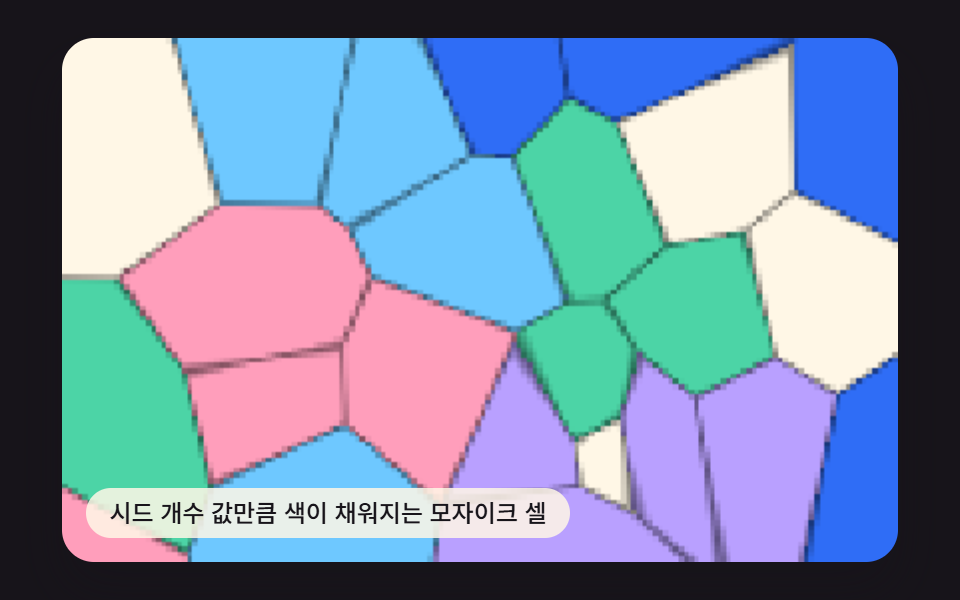 01 voronoi-cell-mosaic-fill
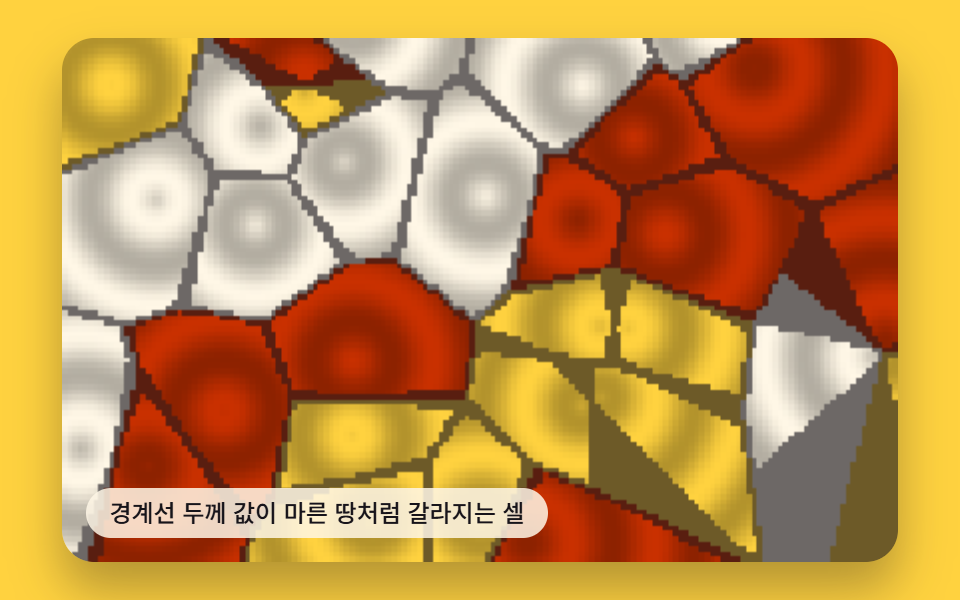 02 voronoi-cracked-earth-texture
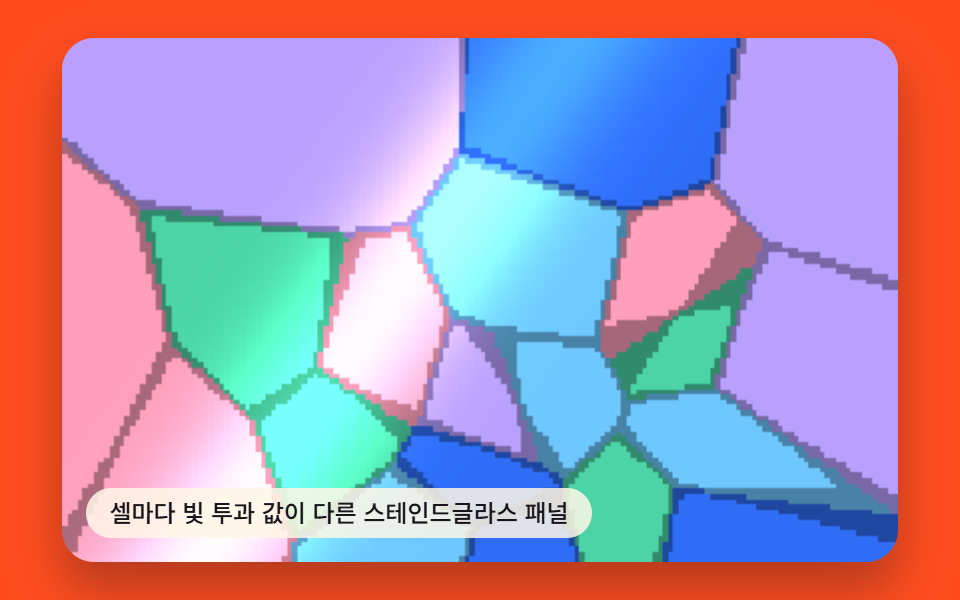 03 voronoi-stained-glass-panel
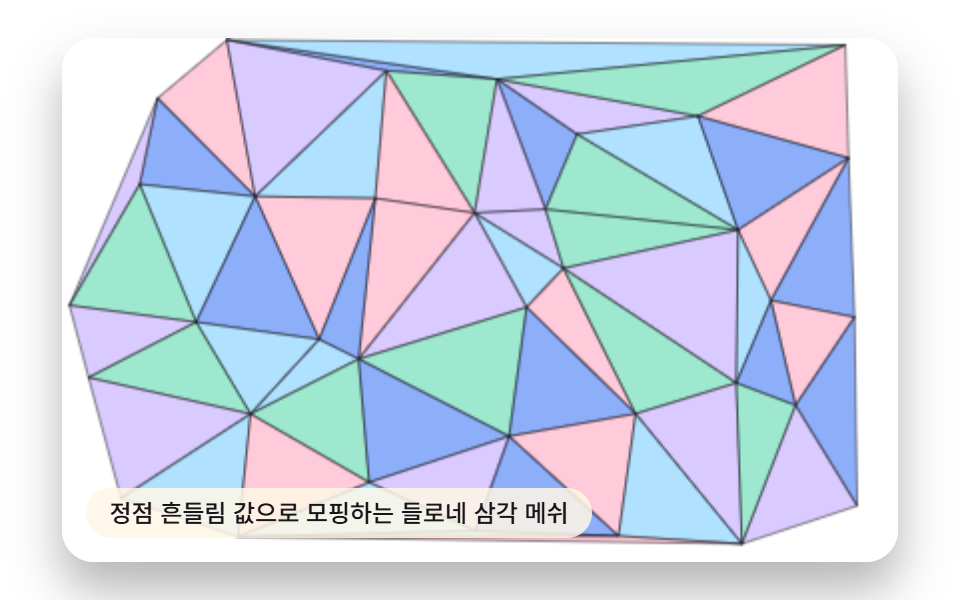 04 delaunay-triangle-mesh-morph
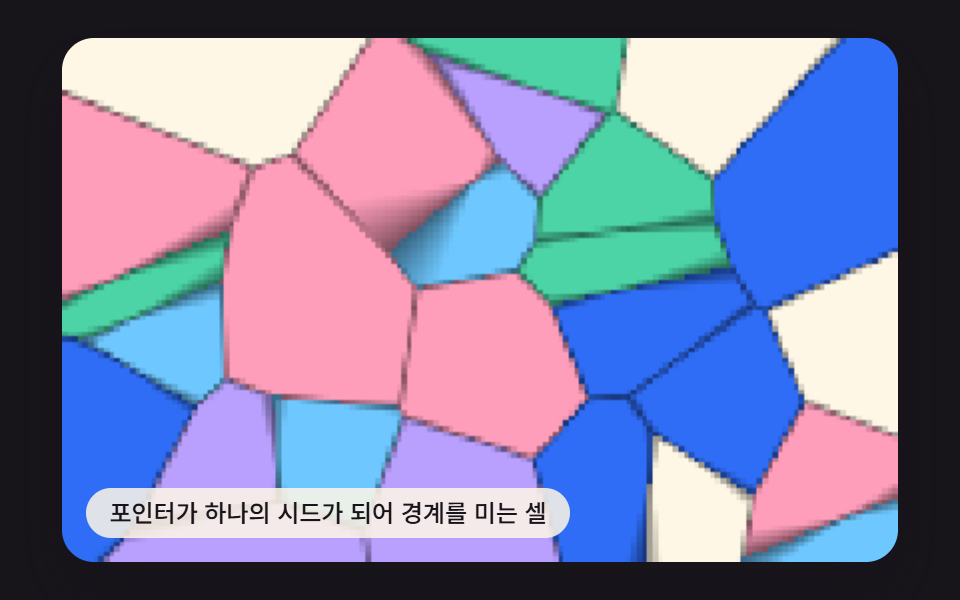 05 voronoi-pointer-seed-repel
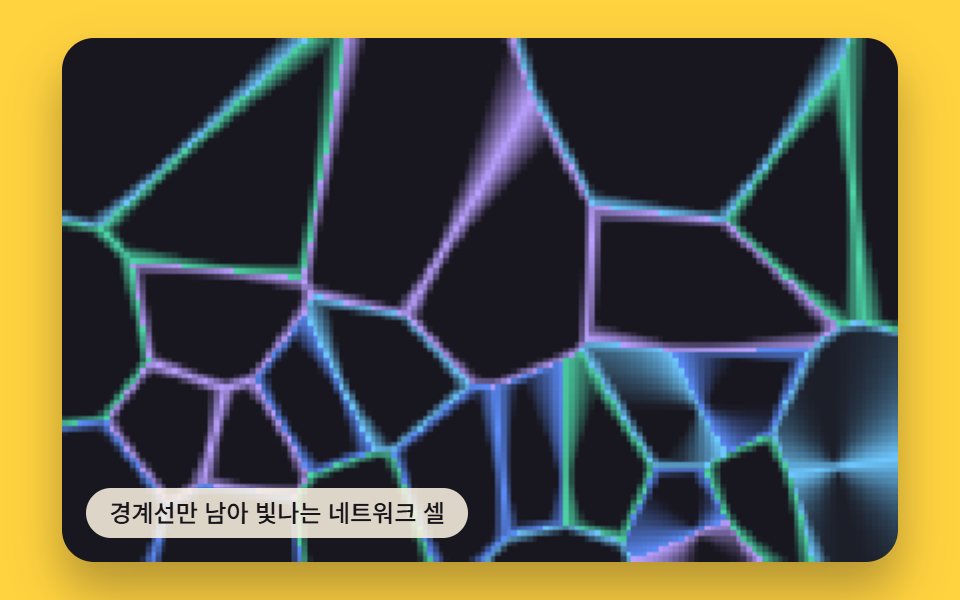 06 voronoi-edge-network-glow
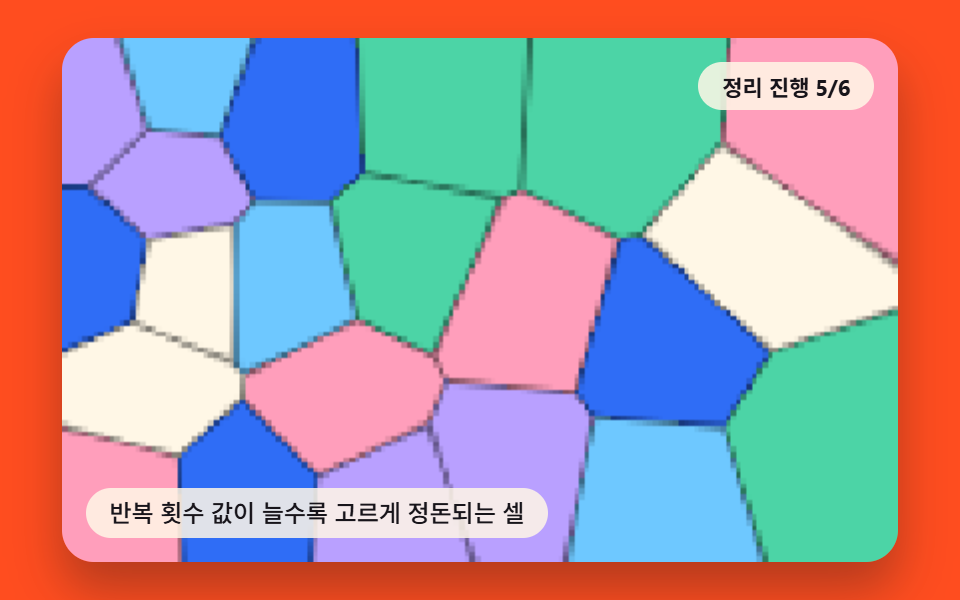 07 voronoi-lloyd-relaxation-converge
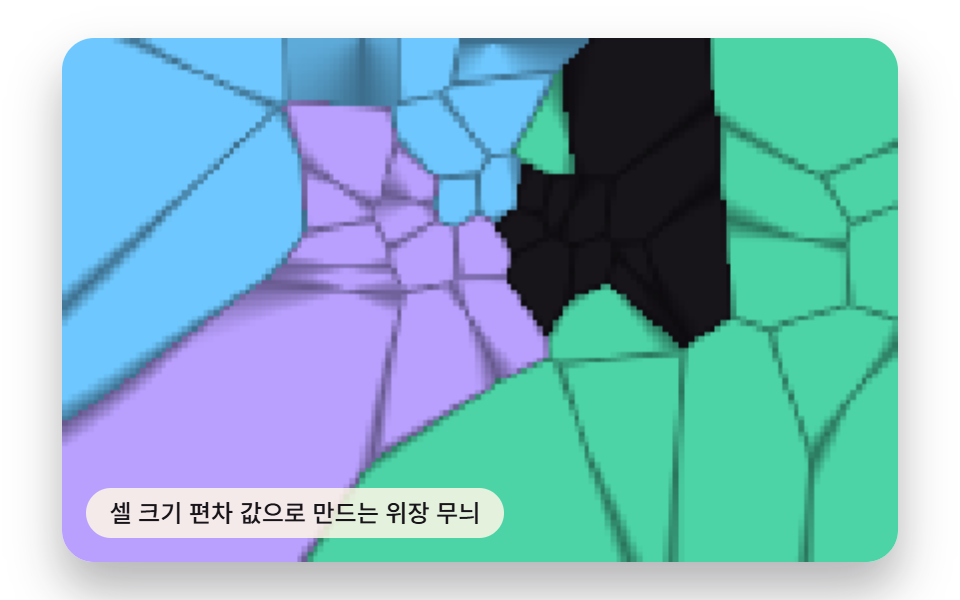 08 voronoi-organic-camouflage-pattern
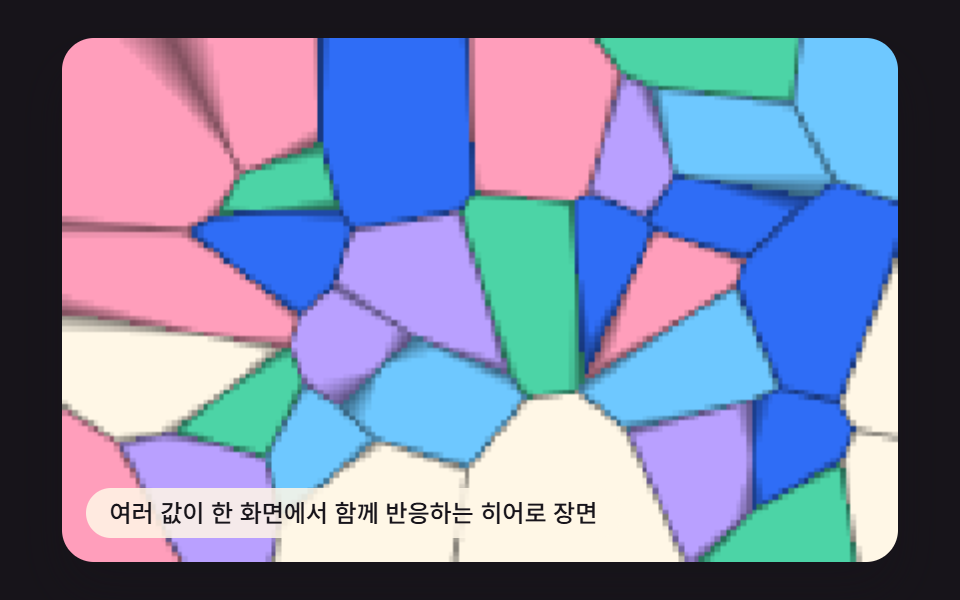 09 voronoi-hero-scene
Auto-plays · click a tile to jump to its section · all nine in one zip
- 01 Mosaic Cells Filled by the Seed-count Value
- 02 Cells Whose Boundary-width Value Cracks Like Dry Earth
- 03 Stained-glass Panel Where Each Cell Carries Its Own Light-transmission Value
- 04 Delaunay Triangle Mesh That Morphs by a Vertex-jitter Value
- 05 Cells Whose Boundary the Pointer Pushes as an Extra Seed
- 06 Cells Reduced to Glowing Network Edges
- 07 Cells That Even Out as the Iteration-count Value Grows
- 08 Camouflage Pattern Built From a Cell-size Variance Value
- 09 Hero Scene Where Several Values React Together
These nine aren't nine unrelated demos — they're one nearest-seed calculation wearing nine different outputs. Items 1 through 3 keep the seeds still and only change what happens to the same edge gap (a flat mosaic, an inked crack, a swept glass panel). Item 4 swaps the cell shape itself for the dual triangle mesh. Item 5 adds a moving seed under the pointer, item 6 strips the fill down to bare edges, item 7 trades per-frame recomputation for a precomputed relaxation sequence, item 8 warps the sample space with noise before anything is measured, and item 9 stacks three of those computations into one hero scene.
What Turns a Random Scatter Into Nine Voronoi Cell Patterns
Every pattern below runs its math on a hidden 160×100 canvas, not the full display size — nearestTwo() walks every seed for a given pixel, keeps the squared distance to the closest one and the runner-up, and only that small buffer gets scaled up to fill the visible box (imageSmoothingEnabled = false, so the upscale stays crisp rather than blurred). Nothing here reads a clock, a click count, or a real dataset: each item seeds its own tiny random-number generator with a fixed integer (409011 through 409091), so the same mosaic, the same cracks, and the same triangle mesh render identically on every reload. For the pixel buffer these nine write into, MDN's Canvas API overview covers the 2D context these renderField() functions all draw through.
01Mosaic Cells Filled by the Seed-count Value
Each seed coordinate value claims its nearest region as a polygon cell, and every cell fills with its own color to form a background mosaic. That fill comes from nearestTwo(), which checks every seed's squared distance to a pixel and keeps the closest one (ND) and the runner-up (ND2); wherever the gap edge = ND2 - ND drops under 1.5, the cell darkens toward its neighbor's border.
<main class="stage">
<div class="vd is-demo" id="vdRoot">
  <canvas class="vd__canvas" id="vdCanvas" width="480" height="300"></canvas>
  <p class="vd__caption">Mosaic Cells Filled by the Seed-count Value</p>
</div>
</main>
@use "../../../../site/static/demo-tokens" as *;
@include stage($stage-ink);
.vd {
position: relative;
width: min(92vw, calc(160vh - 12.8vw));
aspect-ratio: 480 / 300;
margin: 0 auto;
border-radius: $r-card;
overflow: hidden;
box-shadow: $shadow-raised;
}
.vd__canvas {
display: block;
width: 100%;
height: 100%;
}
.vd__caption {
position: absolute;
left: $sp-3;
bottom: $sp-3;
max-width: 72%;
margin: 0;
padding: $sp-1 $sp-3;
border-radius: $r-pill;
background: rgba(255, 247, 230, .85);
color: $subject-ink;
font-weight: 500;
font-size: 12px;
line-height: 1.4;
pointer-events: none;
}
.vd__step {
position: absolute;
right: $sp-3;
top: $sp-3;
margin: 0;
padding: $sp-1 $sp-3;
border-radius: $r-pill;
background: rgba(255, 247, 230, .85);
color: $subject-ink;
font-weight: 700;
font-size: 11px;
font-variant-numeric: tabular-nums;
pointer-events: none;
}
@media (max-width: 340px) {
.vd__caption, .vd__step { font-size: 10px; padding: $sp-1 $sp-2; }
}
@media (prefers-reduced-motion: reduce) {
.vd { cursor: default; }
}html, body {
margin: 0;
overflow: hidden;
}
.stage {
box-sizing: border-box;
min-height: 100vh;
display: grid;
place-items: center;
margin: 0;
background: #17141a;
font-family: -apple-system, "Segoe UI", "Noto Sans KR", sans-serif;
padding: clamp(8px, 4vw, 24px);
}
.vd {
position: relative;
width: min(92vw, 160vh - 12.8vw);
aspect-ratio: 480/300;
margin: 0 auto;
border-radius: 16px;
overflow: hidden;
box-shadow: 0 14px 24px rgba(23, 20, 26, 0.32);
}
.vd__canvas {
display: block;
width: 100%;
height: 100%;
}
.vd__caption {
position: absolute;
left: 12px;
bottom: 12px;
max-width: 72%;
margin: 0;
padding: 4px 12px;
border-radius: 999px;
background: rgba(255, 247, 230, 0.85);
color: #17141a;
font-weight: 500;
font-size: 12px;
line-height: 1.4;
pointer-events: none;
}
.vd__step {
position: absolute;
right: 12px;
top: 12px;
margin: 0;
padding: 4px 12px;
border-radius: 999px;
background: rgba(255, 247, 230, 0.85);
color: #17141a;
font-weight: 700;
font-size: 11px;
font-variant-numeric: tabular-nums;
pointer-events: none;
}
@media (max-width: 340px) {
.vd__caption, .vd__step {
font-size: 10px;
padding: 4px 8px;
}
}
@media (prefers-reduced-motion: reduce) {
.vd {
cursor: default;
}
}(function () {
var root = document.getElementById('vdRoot');
var canvas = document.getElementById('vdCanvas');
var ctx = canvas.getContext('2d');
var wrap = canvas.parentElement;
var CALC_W = 160, CALC_H = 100;
var LOOP_MS = 2000;
var VORONOI_SEED_COUNT = 24;
var DRIFT_AMP = 9;
var DRIFT_FREQ = Math.PI * 2 / LOOP_MS;
function seedRand(seed) {
var s = seed >>> 0;
return function () { s = (s * 1664525 + 1013904223) >>> 0; return s / 4294967296; };
}
var rand = seedRand(409011);
var off = document.createElement('canvas');
off.width = CALC_W; off.height = CALC_H;
var octx = off.getContext('2d');
var offImg = octx.createImageData(CALC_W, CALC_H);
var offBuf = offImg.data;
function hexToRgb(hex) {
var v = parseInt(hex.slice(1), 16);
return [(v >> 16) & 255, (v >> 8) & 255, v & 255];
}
var NEI = -1, ND = 0, ND2 = 0;
function nearestTwo(px, py, arr) {
var bd = Infinity, bd2 = Infinity, bi = -1;
for (var i = 0; i < arr.length; i += 1) {
var dx = px - arr[i].x, dy = py - arr[i].y, d = dx * dx + dy * dy;
if (d < bd) { bd2 = bd; bd = d; bi = i; } else if (d < bd2) { bd2 = d; }
}
NEI = bi; ND = Math.sqrt(bd); ND2 = Math.sqrt(bd2);
}
var mosaicPalette = ['#2f6df6', '#ff9ebb', '#4cd4a6', '#b9a0ff', '#6ec8ff', '#fff7e6'];
var paletteRgb = {};
mosaicPalette.forEach(function (h) { paletteRgb[h] = hexToRgb(h); });
var seeds = [];
for (var i0 = 0; i0 < VORONOI_SEED_COUNT; i0 += 1) {
seeds.push({
bx: rand() * CALC_W, by: rand() * CALC_H, x: 0, y: 0,
phaseX: rand() * Math.PI * 2, phaseY: rand() * Math.PI * 2,
c: mosaicPalette[i0 % mosaicPalette.length]
});
}
function driftSeeds(t) {
seeds.forEach(function (s) {
s.x = s.bx + Math.sin(t * DRIFT_FREQ + s.phaseX) * DRIFT_AMP;
s.y = s.by + Math.cos(t * DRIFT_FREQ * 0.8 + s.phaseY) * DRIFT_AMP;
});
}
  function renderField(t) {
    driftSeeds(t);
    var idx = 0;
    for (var y = 0; y < CALC_H; y += 1) {
      for (var x = 0; x < CALC_W; x += 1) {
        nearestTwo(x + 0.5, y + 0.5, seeds);
        var rgb = paletteRgb[seeds[NEI].c];
        var edge = ND2 - ND;
        var dark = edge < 1.5 ? 0.5 + edge / 3 : 1;
        offBuf[idx] = rgb[0] * dark;
        offBuf[idx + 1] = rgb[1] * dark;
        offBuf[idx + 2] = rgb[2] * dark;
        offBuf[idx + 3] = 255;
        idx += 4;
      }
    }
  }
var cw = 480, ch = 300;
function fit() {
var r = wrap.getBoundingClientRect();
cw = Math.max(1, Math.round(r.width));
ch = Math.max(1, Math.round(r.height));
canvas.width = cw; canvas.height = ch;
draw(lastElapsed);
}
var lastElapsed = 0;
function draw(elapsed) {
lastElapsed = elapsed;
renderField(elapsed);
octx.putImageData(offImg, 0, 0);
ctx.imageSmoothingEnabled = false;
ctx.clearRect(0, 0, cw, ch);
ctx.drawImage(off, 0, 0, CALC_W, CALC_H, 0, 0, cw, ch);
}
var reduce = window.matchMedia('(prefers-reduced-motion: reduce)').matches;
var playing = !reduce;
var elapsed = reduce ? LOOP_MS * 0.5 : 0;
if (reduce) { root.classList.remove('is-demo'); }
var lastTs = null;
function tick(ts) {
if (lastTs === null) lastTs = ts;
var dt = ts - lastTs;
lastTs = ts;
if (playing) {
elapsed += dt;
if (elapsed >= LOOP_MS) elapsed -= LOOP_MS;
}
draw(elapsed);
requestAnimationFrame(tick);
}
fit();
window.addEventListener('resize', fit);
draw(elapsed);
requestAnimationFrame(tick);
})();import { useEffect, useRef } from "react";
import styles from "./VoronoiCellMosaicFill.module.scss";
export default function VoronoiCellMosaicFill() {
const rootRef = useRef<HTMLDivElement>(null);
const canvasRef = useRef<HTMLCanvasElement>(null);
useEffect(() => {
const root = rootRef.current;
const canvas = canvasRef.current;
if (!root || !canvas) return;
const ctx = canvas.getContext("2d");
if (!ctx) return;
const wrap = canvas.parentElement as HTMLElement;
const CALC_W = 160, CALC_H = 100;
const LOOP_MS = 2000;
const VORONOI_SEED_COUNT = 24;
const DRIFT_AMP = 9;
const DRIFT_FREQ = (Math.PI * 2) / LOOP_MS;
function seedRand(seed: number) {
let s = seed >>> 0;
return function () { s = (s * 1664525 + 1013904223) >>> 0; return s / 4294967296; };
}
const rand = seedRand(409011);
const off = document.createElement("canvas");
off.width = CALC_W; off.height = CALC_H;
const octx = off.getContext("2d") as CanvasRenderingContext2D;
const offImg = octx.createImageData(CALC_W, CALC_H);
const offBuf = offImg.data;
function hexToRgb(hex: string): [number, number, number] {
const v = parseInt(hex.slice(1), 16);
return [(v >> 16) & 255, (v >> 8) & 255, v & 255];
}
type Vec = { x: number; y: number };
let NEI = -1, ND = 0, ND2 = 0;
function nearestTwo<T extends Vec>(px: number, py: number, arr: T[]): void {
let bd = Infinity, bd2 = Infinity, bi = -1;
for (let i = 0; i < arr.length; i += 1) {
const dx = px - arr[i].x, dy = py - arr[i].y, d = dx * dx + dy * dy;
if (d < bd) { bd2 = bd; bd = d; bi = i; } else if (d < bd2) { bd2 = d; }
}
NEI = bi; ND = Math.sqrt(bd); ND2 = Math.sqrt(bd2);
}
type Seed = { bx: number; by: number; x: number; y: number; phaseX: number; phaseY: number; c: string };
const mosaicPalette = ["#2f6df6", "#ff9ebb", "#4cd4a6", "#b9a0ff", "#6ec8ff", "#fff7e6"];
const paletteRgb: Record<string, [number, number, number]> = {};
mosaicPalette.forEach((h) => { paletteRgb[h] = hexToRgb(h); });
const seeds: Seed[] = [];
for (let i0 = 0; i0 < VORONOI_SEED_COUNT; i0 += 1) {
seeds.push({
bx: rand() * CALC_W, by: rand() * CALC_H, x: 0, y: 0,
phaseX: rand() * Math.PI * 2, phaseY: rand() * Math.PI * 2,
c: mosaicPalette[i0 % mosaicPalette.length]
});
}
function driftSeeds(t: number) {
seeds.forEach((s) => {
s.x = s.bx + Math.sin(t * DRIFT_FREQ + s.phaseX) * DRIFT_AMP;
s.y = s.by + Math.cos(t * DRIFT_FREQ * 0.8 + s.phaseY) * DRIFT_AMP;
});
}
function renderField(t: number) {
driftSeeds(t);
let idx = 0;
for (let y = 0; y < CALC_H; y += 1) {
for (let x = 0; x < CALC_W; x += 1) {
nearestTwo(x + 0.5, y + 0.5, seeds);
const rgb = paletteRgb[seeds[NEI].c];
const edge = ND2 - ND;
const dark = edge < 1.5 ? 0.5 + edge / 3 : 1;
offBuf[idx] = rgb[0] * dark;
offBuf[idx + 1] = rgb[1] * dark;
offBuf[idx + 2] = rgb[2] * dark;
offBuf[idx + 3] = 255;
idx += 4;
}
}
}
let cw = 480, ch = 300;
function fit() {
const r = wrap.getBoundingClientRect();
cw = Math.max(1, Math.round(r.width));
ch = Math.max(1, Math.round(r.height));
canvas!.width = cw; canvas!.height = ch;
draw(lastElapsed);
}
let lastElapsed = 0;
function draw(elapsed: number) {
lastElapsed = elapsed;
renderField(elapsed);
octx.putImageData(offImg, 0, 0);
ctx!.imageSmoothingEnabled = false;
ctx!.clearRect(0, 0, cw, ch);
ctx!.drawImage(off, 0, 0, CALC_W, CALC_H, 0, 0, cw, ch);
}
const reduce = window.matchMedia("(prefers-reduced-motion: reduce)").matches;
let playing = !reduce;
let elapsed = reduce ? LOOP_MS * 0.5 : 0;
if (reduce) { root.classList.remove("is-demo"); }
let lastTs: number | null = null;
let raf = 0;
function tick(ts: number) {
if (lastTs === null) lastTs = ts;
const dt = ts - lastTs;
lastTs = ts;
if (playing) {
elapsed += dt;
if (elapsed >= LOOP_MS) elapsed -= LOOP_MS;
}
draw(elapsed);
raf = requestAnimationFrame(tick);
}
fit();
window.addEventListener("resize", fit);
draw(elapsed);
raf = requestAnimationFrame(tick);
return () => {
cancelAnimationFrame(raf);
window.removeEventListener("resize", fit);
};
}, []);
return (
<main className={styles.stage}>
<div className={`${styles.vd} is-demo`} ref={rootRef}>
<canvas className={styles.vd__canvas} ref={canvasRef} width={480} height={300} />
<p className={styles.vd__caption}>시드 개수 값만큼 색이 채워지는 모자이크 셀</p>
</div>
</main>
);
}01 · Mosaic Cells Filled by the Seed-count Value — Measured area 60.149% · moving frames 23/23Original by GODRICH · SCSS and React ship in the zip · See the password
function renderField(t) {
driftSeeds(t);
var idx = 0;
for (var y = 0; y < CALC_H; y += 1) {
for (var x = 0; x < CALC_W; x += 1) {
nearestTwo(x + 0.5, y + 0.5, seeds);
var rgb = paletteRgb[seeds[NEI].c];
var edge = ND2 - ND;
var dark = edge < 1.5 ? 0.5 + edge / 3 : 1;
offBuf[idx] = rgb[0] * dark;
offBuf[idx + 1] = rgb[1] * dark;
offBuf[idx + 2] = rgb[2] * dark;
offBuf[idx + 3] = 255;
idx += 4;
}
}
}
Across the captured frames this canvas repaints a 60.1% cumulative area at an 84.0 average intensity, moving on 23/23 tracked frames.
02Cells Whose Boundary-width Value Cracks Like Dry Earth
Combining a boundary thickness value with a brightness value along each edge produces a texture that reads like dry, cracked ground. The same nearestTwo() gap decides the crack here: once edge falls under CRACK_WIDTH_VALUE, the pixel blends toward an ink color by crackPulsePhase, a sine wave that makes the cracks visibly darken and lighten instead of sitting flat.
<main class="stage">
<div class="vd is-demo" id="vdRoot">
  <canvas class="vd__canvas" id="vdCanvas" width="480" height="300"></canvas>
  <p class="vd__caption">Cells Whose Boundary-width Value Cracks Like Dry Earth</p>
</div>
</main>
@use "../../../../site/static/demo-tokens" as *;
@include stage($stage-yellow);
.vd {
position: relative;
width: min(92vw, calc(160vh - 12.8vw));
aspect-ratio: 480 / 300;
margin: 0 auto;
border-radius: $r-card;
overflow: hidden;
box-shadow: $shadow-raised;
}
.vd__canvas {
display: block;
width: 100%;
height: 100%;
}
.vd__caption {
position: absolute;
left: $sp-3;
bottom: $sp-3;
max-width: 72%;
margin: 0;
padding: $sp-1 $sp-3;
border-radius: $r-pill;
background: rgba(255, 247, 230, .85);
color: $subject-ink;
font-weight: 500;
font-size: 12px;
line-height: 1.4;
pointer-events: none;
}
.vd__step {
position: absolute;
right: $sp-3;
top: $sp-3;
margin: 0;
padding: $sp-1 $sp-3;
border-radius: $r-pill;
background: rgba(255, 247, 230, .85);
color: $subject-ink;
font-weight: 700;
font-size: 11px;
font-variant-numeric: tabular-nums;
pointer-events: none;
}
@media (max-width: 340px) {
.vd__caption, .vd__step { font-size: 10px; padding: $sp-1 $sp-2; }
}
@media (prefers-reduced-motion: reduce) {
.vd { cursor: default; }
}html, body {
margin: 0;
overflow: hidden;
}
.stage {
box-sizing: border-box;
min-height: 100vh;
display: grid;
place-items: center;
margin: 0;
background: #ffd23f;
font-family: -apple-system, "Segoe UI", "Noto Sans KR", sans-serif;
padding: clamp(8px, 4vw, 24px);
}
.vd {
position: relative;
width: min(92vw, 160vh - 12.8vw);
aspect-ratio: 480/300;
margin: 0 auto;
border-radius: 16px;
overflow: hidden;
box-shadow: 0 14px 24px rgba(23, 20, 26, 0.32);
}
.vd__canvas {
display: block;
width: 100%;
height: 100%;
}
.vd__caption {
position: absolute;
left: 12px;
bottom: 12px;
max-width: 72%;
margin: 0;
padding: 4px 12px;
border-radius: 999px;
background: rgba(255, 247, 230, 0.85);
color: #17141a;
font-weight: 500;
font-size: 12px;
line-height: 1.4;
pointer-events: none;
}
.vd__step {
position: absolute;
right: 12px;
top: 12px;
margin: 0;
padding: 4px 12px;
border-radius: 999px;
background: rgba(255, 247, 230, 0.85);
color: #17141a;
font-weight: 700;
font-size: 11px;
font-variant-numeric: tabular-nums;
pointer-events: none;
}
@media (max-width: 340px) {
.vd__caption, .vd__step {
font-size: 10px;
padding: 4px 8px;
}
}
@media (prefers-reduced-motion: reduce) {
.vd {
cursor: default;
}
}(function () {
var root = document.getElementById('vdRoot');
var canvas = document.getElementById('vdCanvas');
var ctx = canvas.getContext('2d');
var wrap = canvas.parentElement;
var CALC_W = 160, CALC_H = 100;
var LOOP_MS = 2000;
var CRACK_WIDTH_VALUE = 1.6;
var DRIFT_AMP = 6;
var DRIFT_FREQ = Math.PI * 2 / LOOP_MS;
var PULSE_FREQ = Math.PI * 2 / LOOP_MS;
function seedRand(seed) {
var s = seed >>> 0;
return function () { s = (s * 1664525 + 1013904223) >>> 0; return s / 4294967296; };
}
var rand = seedRand(409021);
var off = document.createElement('canvas');
off.width = CALC_W; off.height = CALC_H;
var octx = off.getContext('2d');
var offImg = octx.createImageData(CALC_W, CALC_H);
var offBuf = offImg.data;
function hexToRgb(hex) {
var v = parseInt(hex.slice(1), 16);
return [(v >> 16) & 255, (v >> 8) & 255, v & 255];
}
var NEI = -1, ND = 0, ND2 = 0;
function nearestTwo(px, py, arr) {
var bd = Infinity, bd2 = Infinity, bi = -1;
for (var i = 0; i < arr.length; i += 1) {
var dx = px - arr[i].x, dy = py - arr[i].y, d = dx * dx + dy * dy;
if (d < bd) { bd2 = bd; bd = d; bi = i; } else if (d < bd2) { bd2 = d; }
}
NEI = bi; ND = Math.sqrt(bd); ND2 = Math.sqrt(bd2);
}
var earthPalette = ['#fff7e6', '#ffd23f', '#c93000'];
var paletteRgb = {};
earthPalette.forEach(function (h) { paletteRgb[h] = hexToRgb(h); });
var SEED_COUNT02 = 30;
var seeds = [];
for (var i1 = 0; i1 < SEED_COUNT02; i1 += 1) {
seeds.push({
bx: rand() * CALC_W, by: rand() * CALC_H, x: 0, y: 0,
phaseX: rand() * Math.PI * 2, phaseY: rand() * Math.PI * 2,
c: earthPalette[i1 % earthPalette.length]
});
}
function driftSeeds(t) {
seeds.forEach(function (s) {
s.x = s.bx + Math.sin(t * DRIFT_FREQ + s.phaseX) * DRIFT_AMP;
s.y = s.by + Math.cos(t * DRIFT_FREQ + s.phaseY) * DRIFT_AMP;
});
}
var INK_RGB = [23, 20, 26];
  function renderField(t) {
    driftSeeds(t);
    var crackPulsePhase = 0.5 + 0.5 * Math.sin(t * PULSE_FREQ);
    var idx = 0;
    for (var y = 0; y < CALC_H; y += 1) {
      for (var x = 0; x < CALC_W; x += 1) {
        nearestTwo(x + 0.5, y + 0.5, seeds);
        var rgb = paletteRgb[seeds[NEI].c];
        var band = 0.85 + 0.15 * Math.sin(ND * 0.4 + NEI);
        var edge = ND2 - ND;
        var r, g, b;
        if (edge < CRACK_WIDTH_VALUE) {
          var m = 0.15 + 0.55 * crackPulsePhase;
          r = rgb[0] + (INK_RGB[0] - rgb[0]) * m;
          g = rgb[1] + (INK_RGB[1] - rgb[1]) * m;
          b = rgb[2] + (INK_RGB[2] - rgb[2]) * m;
        } else {
          r = rgb[0] * band; g = rgb[1] * band; b = rgb[2] * band;
        }
        offBuf[idx] = r; offBuf[idx + 1] = g; offBuf[idx + 2] = b; offBuf[idx + 3] = 255;
        idx += 4;
      }
    }
  }
var cw = 480, ch = 300;
function fit() {
var r = wrap.getBoundingClientRect();
cw = Math.max(1, Math.round(r.width));
ch = Math.max(1, Math.round(r.height));
canvas.width = cw; canvas.height = ch;
draw(lastElapsed);
}
var lastElapsed = 0;
function draw(elapsed) {
lastElapsed = elapsed;
renderField(elapsed);
octx.putImageData(offImg, 0, 0);
ctx.imageSmoothingEnabled = false;
ctx.clearRect(0, 0, cw, ch);
ctx.drawImage(off, 0, 0, CALC_W, CALC_H, 0, 0, cw, ch);
}
var reduce = window.matchMedia('(prefers-reduced-motion: reduce)').matches;
var playing = !reduce;
var elapsed = reduce ? LOOP_MS * 0.25 : 0;
if (reduce) { root.classList.remove('is-demo'); }
var lastTs = null;
function tick(ts) {
if (lastTs === null) lastTs = ts;
var dt = ts - lastTs;
lastTs = ts;
if (playing) {
elapsed += dt;
if (elapsed >= LOOP_MS) elapsed -= LOOP_MS;
}
draw(elapsed);
requestAnimationFrame(tick);
}
fit();
window.addEventListener('resize', fit);
draw(elapsed);
requestAnimationFrame(tick);
})();import { useEffect, useRef } from "react";
import styles from "./VoronoiCrackedEarthTexture.module.scss";
export default function VoronoiCrackedEarthTexture() {
const rootRef = useRef<HTMLDivElement>(null);
const canvasRef = useRef<HTMLCanvasElement>(null);
useEffect(() => {
const root = rootRef.current;
const canvas = canvasRef.current;
if (!root || !canvas) return;
const ctx = canvas.getContext("2d");
if (!ctx) return;
const wrap = canvas.parentElement as HTMLElement;
const CALC_W = 160, CALC_H = 100;
const LOOP_MS = 2000;
const CRACK_WIDTH_VALUE = 1.6;
const DRIFT_AMP = 6;
const DRIFT_FREQ = (Math.PI * 2) / LOOP_MS;
const PULSE_FREQ = (Math.PI * 2) / LOOP_MS;
function seedRand(seed: number) {
let s = seed >>> 0;
return function () { s = (s * 1664525 + 1013904223) >>> 0; return s / 4294967296; };
}
const rand = seedRand(409021);
const off = document.createElement("canvas");
off.width = CALC_W; off.height = CALC_H;
const octx = off.getContext("2d") as CanvasRenderingContext2D;
const offImg = octx.createImageData(CALC_W, CALC_H);
const offBuf = offImg.data;
function hexToRgb(hex: string): [number, number, number] {
const v = parseInt(hex.slice(1), 16);
return [(v >> 16) & 255, (v >> 8) & 255, v & 255];
}
type Vec = { x: number; y: number };
let NEI = -1, ND = 0, ND2 = 0;
function nearestTwo<T extends Vec>(px: number, py: number, arr: T[]): void {
let bd = Infinity, bd2 = Infinity, bi = -1;
for (let i = 0; i < arr.length; i += 1) {
const dx = px - arr[i].x, dy = py - arr[i].y, d = dx * dx + dy * dy;
if (d < bd) { bd2 = bd; bd = d; bi = i; } else if (d < bd2) { bd2 = d; }
}
NEI = bi; ND = Math.sqrt(bd); ND2 = Math.sqrt(bd2);
}
type Seed = { bx: number; by: number; x: number; y: number; phaseX: number; phaseY: number; c: string };
const earthPalette = ["#fff7e6", "#ffd23f", "#c93000"];
const paletteRgb: Record<string, [number, number, number]> = {};
earthPalette.forEach((h) => { paletteRgb[h] = hexToRgb(h); });
const SEED_COUNT02 = 30;
const seeds: Seed[] = [];
for (let i1 = 0; i1 < SEED_COUNT02; i1 += 1) {
seeds.push({
bx: rand() * CALC_W, by: rand() * CALC_H, x: 0, y: 0,
phaseX: rand() * Math.PI * 2, phaseY: rand() * Math.PI * 2,
c: earthPalette[i1 % earthPalette.length]
});
}
function driftSeeds(t: number) {
seeds.forEach((s) => {
s.x = s.bx + Math.sin(t * DRIFT_FREQ + s.phaseX) * DRIFT_AMP;
s.y = s.by + Math.cos(t * DRIFT_FREQ + s.phaseY) * DRIFT_AMP;
});
}
const INK_RGB: [number, number, number] = [23, 20, 26];
function renderField(t: number) {
driftSeeds(t);
const crackPulsePhase = 0.5 + 0.5 * Math.sin(t * PULSE_FREQ);
let idx = 0;
for (let y = 0; y < CALC_H; y += 1) {
for (let x = 0; x < CALC_W; x += 1) {
nearestTwo(x + 0.5, y + 0.5, seeds);
const rgb = paletteRgb[seeds[NEI].c];
const band = 0.85 + 0.15 * Math.sin(ND * 0.4 + NEI);
const edge = ND2 - ND;
let r: number, g: number, b: number;
if (edge < CRACK_WIDTH_VALUE) {
const m = 0.15 + 0.55 * crackPulsePhase;
r = rgb[0] + (INK_RGB[0] - rgb[0]) * m;
g = rgb[1] + (INK_RGB[1] - rgb[1]) * m;
b = rgb[2] + (INK_RGB[2] - rgb[2]) * m;
} else {
r = rgb[0] * band; g = rgb[1] * band; b = rgb[2] * band;
}
offBuf[idx] = r; offBuf[idx + 1] = g; offBuf[idx + 2] = b; offBuf[idx + 3] = 255;
idx += 4;
}
}
}
let cw = 480, ch = 300;
function fit() {
const r = wrap.getBoundingClientRect();
cw = Math.max(1, Math.round(r.width));
ch = Math.max(1, Math.round(r.height));
canvas!.width = cw; canvas!.height = ch;
draw(lastElapsed);
}
let lastElapsed = 0;
function draw(elapsed: number) {
lastElapsed = elapsed;
renderField(elapsed);
octx.putImageData(offImg, 0, 0);
ctx!.imageSmoothingEnabled = false;
ctx!.clearRect(0, 0, cw, ch);
ctx!.drawImage(off, 0, 0, CALC_W, CALC_H, 0, 0, cw, ch);
}
const reduce = window.matchMedia("(prefers-reduced-motion: reduce)").matches;
let playing = !reduce;
let elapsed = reduce ? LOOP_MS * 0.25 : 0;
if (reduce) { root.classList.remove("is-demo"); }
let lastTs: number | null = null;
let raf = 0;
function tick(ts: number) {
if (lastTs === null) lastTs = ts;
const dt = ts - lastTs;
lastTs = ts;
if (playing) {
elapsed += dt;
if (elapsed >= LOOP_MS) elapsed -= LOOP_MS;
}
draw(elapsed);
raf = requestAnimationFrame(tick);
}
fit();
window.addEventListener("resize", fit);
draw(elapsed);
raf = requestAnimationFrame(tick);
return () => {
cancelAnimationFrame(raf);
window.removeEventListener("resize", fit);
};
}, []);
return (
<main className={styles.stage}>
<div className={`${styles.vd} is-demo`} ref={rootRef}>
<canvas className={styles.vd__canvas} ref={canvasRef} width={480} height={300} />
<p className={styles.vd__caption}>경계선 두께 값이 마른 땅처럼 갈라지는 셀</p>
</div>
</main>
);
}02 · Cells Whose Boundary-width Value Cracks Like Dry Earth — Measured area 73.787% · moving frames 23/23Original by GODRICH · SCSS and React ship in the zip · See the password
function renderField(t) {
driftSeeds(t);
var crackPulsePhase = 0.5 + 0.5 * Math.sin(t * PULSE_FREQ);
var idx = 0;
for (var y = 0; y < CALC_H; y += 1) {
for (var x = 0; x < CALC_W; x += 1) {
nearestTwo(x + 0.5, y + 0.5, seeds);
var rgb = paletteRgb[seeds[NEI].c];
var band = 0.85 + 0.15 * Math.sin(ND * 0.4 + NEI);
var edge = ND2 - ND;
var r, g, b;
if (edge < CRACK_WIDTH_VALUE) {
var m = 0.15 + 0.55 * crackPulsePhase;
r = rgb[0] + (INK_RGB[0] - rgb[0]) * m;
g = rgb[1] + (INK_RGB[1] - rgb[1]) * m;
b = rgb[2] + (INK_RGB[2] - rgb[2]) * m;
} else {
r = rgb[0] * band; g = rgb[1] * band; b = rgb[2] * band;
}
offBuf[idx] = r; offBuf[idx + 1] = g; offBuf[idx + 2] = b; offBuf[idx + 3] = 255;
idx += 4;
}
}
}
Its measured pass shows a 73.8% cumulative area at 47.9 intensity, again moving on 23/23 frames.
03Stained-glass Panel Where Each Cell Carries Its Own Light-transmission Value
Each cell's color value and border-thickness value are arranged like glass panes, producing the look of light passing through stained glass. Because these seeds never move, nearestTwo() only runs once into two cached arrays (cellIdx, edgeVal); every frame after that just projects a pixel onto a sweep angle and adds a Gaussian glow band, so the panel's only per-frame cost is a light sweep, not a re-solved diagram.
<main class="stage">
<div class="vd is-demo" id="vdRoot">
  <canvas class="vd__canvas" id="vdCanvas" width="480" height="300"></canvas>
  <p class="vd__caption">Stained-glass Panel Where Each Cell Carries Its Own Light-transmission Value</p>
</div>
</main>
@use "../../../../site/static/demo-tokens" as *;
@include stage($stage-orange);
.vd {
position: relative;
width: min(92vw, calc(160vh - 12.8vw));
aspect-ratio: 480 / 300;
margin: 0 auto;
border-radius: $r-card;
overflow: hidden;
box-shadow: $shadow-raised;
}
.vd__canvas {
display: block;
width: 100%;
height: 100%;
}
.vd__caption {
position: absolute;
left: $sp-3;
bottom: $sp-3;
max-width: 72%;
margin: 0;
padding: $sp-1 $sp-3;
border-radius: $r-pill;
background: rgba(255, 247, 230, .85);
color: $subject-ink;
font-weight: 500;
font-size: 12px;
line-height: 1.4;
pointer-events: none;
}
.vd__step {
position: absolute;
right: $sp-3;
top: $sp-3;
margin: 0;
padding: $sp-1 $sp-3;
border-radius: $r-pill;
background: rgba(255, 247, 230, .85);
color: $subject-ink;
font-weight: 700;
font-size: 11px;
font-variant-numeric: tabular-nums;
pointer-events: none;
}
@media (max-width: 340px) {
.vd__caption, .vd__step { font-size: 10px; padding: $sp-1 $sp-2; }
}
@media (prefers-reduced-motion: reduce) {
.vd { cursor: default; }
}html, body {
margin: 0;
overflow: hidden;
}
.stage {
box-sizing: border-box;
min-height: 100vh;
display: grid;
place-items: center;
margin: 0;
background: #ff4d1f;
font-family: -apple-system, "Segoe UI", "Noto Sans KR", sans-serif;
padding: clamp(8px, 4vw, 24px);
}
.vd {
position: relative;
width: min(92vw, 160vh - 12.8vw);
aspect-ratio: 480/300;
margin: 0 auto;
border-radius: 16px;
overflow: hidden;
box-shadow: 0 14px 24px rgba(23, 20, 26, 0.32);
}
.vd__canvas {
display: block;
width: 100%;
height: 100%;
}
.vd__caption {
position: absolute;
left: 12px;
bottom: 12px;
max-width: 72%;
margin: 0;
padding: 4px 12px;
border-radius: 999px;
background: rgba(255, 247, 230, 0.85);
color: #17141a;
font-weight: 500;
font-size: 12px;
line-height: 1.4;
pointer-events: none;
}
.vd__step {
position: absolute;
right: 12px;
top: 12px;
margin: 0;
padding: 4px 12px;
border-radius: 999px;
background: rgba(255, 247, 230, 0.85);
color: #17141a;
font-weight: 700;
font-size: 11px;
font-variant-numeric: tabular-nums;
pointer-events: none;
}
@media (max-width: 340px) {
.vd__caption, .vd__step {
font-size: 10px;
padding: 4px 8px;
}
}
@media (prefers-reduced-motion: reduce) {
.vd {
cursor: default;
}
}(function () {
var root = document.getElementById('vdRoot');
var canvas = document.getElementById('vdCanvas');
var ctx = canvas.getContext('2d');
var wrap = canvas.parentElement;
var CALC_W = 160, CALC_H = 100;
var LOOP_MS = 2000;
var GLASS_BORDER_PX = 1.8;
function seedRand(seed) {
var s = seed >>> 0;
return function () { s = (s * 1664525 + 1013904223) >>> 0; return s / 4294967296; };
}
var rand = seedRand(409031);
var off = document.createElement('canvas');
off.width = CALC_W; off.height = CALC_H;
var octx = off.getContext('2d');
var offImg = octx.createImageData(CALC_W, CALC_H);
var offBuf = offImg.data;
function hexToRgb(hex) {
var v = parseInt(hex.slice(1), 16);
return [(v >> 16) & 255, (v >> 8) & 255, v & 255];
}
var NEI = -1, ND = 0, ND2 = 0;
function nearestTwo(px, py, arr) {
var bd = Infinity, bd2 = Infinity, bi = -1;
for (var i = 0; i < arr.length; i += 1) {
var dx = px - arr[i].x, dy = py - arr[i].y, d = dx * dx + dy * dy;
if (d < bd) { bd2 = bd; bd = d; bi = i; } else if (d < bd2) { bd2 = d; }
}
NEI = bi; ND = Math.sqrt(bd); ND2 = Math.sqrt(bd2);
}
var stainedPalette = ['#2f6df6', '#ff9ebb', '#4cd4a6', '#b9a0ff', '#6ec8ff'];
var paletteRgb = {};
stainedPalette.forEach(function (h) { paletteRgb[h] = hexToRgb(h); });
var SEED_COUNT03 = 20;
var seeds = [];
for (var i2 = 0; i2 < SEED_COUNT03; i2 += 1) {
seeds.push({ x: rand() * CALC_W, y: rand() * CALC_H, c: stainedPalette[i2 % stainedPalette.length] });
}
var cellIdx = new Int16Array(CALC_W * CALC_H);
var edgeVal = new Float32Array(CALC_W * CALC_H);
  (function precompute() {
    var idx = 0;
    for (var y = 0; y < CALC_H; y += 1) {
      for (var x = 0; x < CALC_W; x += 1) {
        nearestTwo(x + 0.5, y + 0.5, seeds);
        cellIdx[idx] = NEI;
        edgeVal[idx] = ND2 - ND;
        idx += 1;
      }
    }
  })();
  var lightSweepAngle = 0.62;
  var cosA = Math.cos(lightSweepAngle), sinA = Math.sin(lightSweepAngle);
  var projSpan = Math.abs(CALC_W * cosA) + Math.abs(CALC_H * sinA);
function renderField(t) {
var bandCenter = ((t / LOOP_MS) * (projSpan * 1.6)) - projSpan * 0.3;
var idx4 = 0, idx = 0;
for (var y = 0; y < CALC_H; y += 1) {
for (var x = 0; x < CALC_W; x += 1) {
var ni = cellIdx[idx];
var rgb = paletteRgb[seeds[ni].c];
var proj = x * cosA + y * sinA;
var glow = Math.exp(-Math.pow((proj - bandCenter) / 14, 2)) * 0.6;
var e = edgeVal[idx];
var borderMix = e < GLASS_BORDER_PX ? 0.35 : 0;
var r = rgb[0] * (1 - borderMix) * (1 + glow);
var g = rgb[1] * (1 - borderMix) * (1 + glow);
var b = rgb[2] * (1 - borderMix) * (1 + glow);
offBuf[idx4] = Math.min(255, r);
offBuf[idx4 + 1] = Math.min(255, g);
offBuf[idx4 + 2] = Math.min(255, b);
offBuf[idx4 + 3] = 255;
idx += 1; idx4 += 4;
}
}
}
var cw = 480, ch = 300;
function fit() {
var r = wrap.getBoundingClientRect();
cw = Math.max(1, Math.round(r.width));
ch = Math.max(1, Math.round(r.height));
canvas.width = cw; canvas.height = ch;
draw(lastElapsed);
}
var lastElapsed = 0;
function draw(elapsed) {
lastElapsed = elapsed;
renderField(elapsed);
octx.putImageData(offImg, 0, 0);
ctx.imageSmoothingEnabled = false;
ctx.clearRect(0, 0, cw, ch);
ctx.drawImage(off, 0, 0, CALC_W, CALC_H, 0, 0, cw, ch);
}
var reduce = window.matchMedia('(prefers-reduced-motion: reduce)').matches;
var playing = !reduce;
var elapsed = reduce ? LOOP_MS * 0.5 : 0;
if (reduce) { root.classList.remove('is-demo'); }
var lastTs = null;
function tick(ts) {
if (lastTs === null) lastTs = ts;
var dt = ts - lastTs;
lastTs = ts;
if (playing) {
elapsed += dt;
if (elapsed >= LOOP_MS) elapsed -= LOOP_MS;
}
draw(elapsed);
requestAnimationFrame(tick);
}
fit();
window.addEventListener('resize', fit);
draw(elapsed);
requestAnimationFrame(tick);
})();import { useEffect, useRef } from "react";
import styles from "./VoronoiStainedGlassPanel.module.scss";
export default function VoronoiStainedGlassPanel() {
const rootRef = useRef<HTMLDivElement>(null);
const canvasRef = useRef<HTMLCanvasElement>(null);
useEffect(() => {
const root = rootRef.current;
const canvas = canvasRef.current;
if (!root || !canvas) return;
const ctx = canvas.getContext("2d");
if (!ctx) return;
const wrap = canvas.parentElement as HTMLElement;
const CALC_W = 160, CALC_H = 100;
const LOOP_MS = 2000;
const GLASS_BORDER_PX = 1.8;
function seedRand(seed: number) {
let s = seed >>> 0;
return function () { s = (s * 1664525 + 1013904223) >>> 0; return s / 4294967296; };
}
const rand = seedRand(409031);
const off = document.createElement("canvas");
off.width = CALC_W; off.height = CALC_H;
const octx = off.getContext("2d") as CanvasRenderingContext2D;
const offImg = octx.createImageData(CALC_W, CALC_H);
const offBuf = offImg.data;
function hexToRgb(hex: string): [number, number, number] {
const v = parseInt(hex.slice(1), 16);
return [(v >> 16) & 255, (v >> 8) & 255, v & 255];
}
type Vec = { x: number; y: number };
let NEI = -1, ND = 0, ND2 = 0;
function nearestTwo<T extends Vec>(px: number, py: number, arr: T[]): void {
let bd = Infinity, bd2 = Infinity, bi = -1;
for (let i = 0; i < arr.length; i += 1) {
const dx = px - arr[i].x, dy = py - arr[i].y, d = dx * dx + dy * dy;
if (d < bd) { bd2 = bd; bd = d; bi = i; } else if (d < bd2) { bd2 = d; }
}
NEI = bi; ND = Math.sqrt(bd); ND2 = Math.sqrt(bd2);
}
type Seed = { x: number; y: number; c: string };
const stainedPalette = ["#2f6df6", "#ff9ebb", "#4cd4a6", "#b9a0ff", "#6ec8ff"];
const paletteRgb: Record<string, [number, number, number]> = {};
stainedPalette.forEach((h) => { paletteRgb[h] = hexToRgb(h); });
const SEED_COUNT03 = 20;
const seeds: Seed[] = [];
for (let i2 = 0; i2 < SEED_COUNT03; i2 += 1) {
seeds.push({ x: rand() * CALC_W, y: rand() * CALC_H, c: stainedPalette[i2 % stainedPalette.length] });
}
const cellIdx = new Int16Array(CALC_W * CALC_H);
const edgeVal = new Float32Array(CALC_W * CALC_H);
(function precompute() {
let idx = 0;
for (let y = 0; y < CALC_H; y += 1) {
for (let x = 0; x < CALC_W; x += 1) {
nearestTwo(x + 0.5, y + 0.5, seeds);
cellIdx[idx] = NEI;
edgeVal[idx] = ND2 - ND;
idx += 1;
}
}
})();
const lightSweepAngle = 0.62;
const cosA = Math.cos(lightSweepAngle), sinA = Math.sin(lightSweepAngle);
const projSpan = Math.abs(CALC_W * cosA) + Math.abs(CALC_H * sinA);
function renderField(t: number) {
const bandCenter = ((t / LOOP_MS) * (projSpan * 1.6)) - projSpan * 0.3;
let idx4 = 0, idx = 0;
for (let y = 0; y < CALC_H; y += 1) {
for (let x = 0; x < CALC_W; x += 1) {
const ni = cellIdx[idx];
const rgb = paletteRgb[seeds[ni].c];
const proj = x * cosA + y * sinA;
const glow = Math.exp(-Math.pow((proj - bandCenter) / 14, 2)) * 0.6;
const e = edgeVal[idx];
const borderMix = e < GLASS_BORDER_PX ? 0.35 : 0;
const r = rgb[0] * (1 - borderMix) * (1 + glow);
const g = rgb[1] * (1 - borderMix) * (1 + glow);
const b = rgb[2] * (1 - borderMix) * (1 + glow);
offBuf[idx4] = Math.min(255, r);
offBuf[idx4 + 1] = Math.min(255, g);
offBuf[idx4 + 2] = Math.min(255, b);
offBuf[idx4 + 3] = 255;
idx += 1; idx4 += 4;
}
}
}
let cw = 480, ch = 300;
function fit() {
const r = wrap.getBoundingClientRect();
cw = Math.max(1, Math.round(r.width));
ch = Math.max(1, Math.round(r.height));
canvas!.width = cw; canvas!.height = ch;
draw(lastElapsed);
}
let lastElapsed = 0;
function draw(elapsed: number) {
lastElapsed = elapsed;
renderField(elapsed);
octx.putImageData(offImg, 0, 0);
ctx!.imageSmoothingEnabled = false;
ctx!.clearRect(0, 0, cw, ch);
ctx!.drawImage(off, 0, 0, CALC_W, CALC_H, 0, 0, cw, ch);
}
const reduce = window.matchMedia("(prefers-reduced-motion: reduce)").matches;
let playing = !reduce;
let elapsed = reduce ? LOOP_MS * 0.5 : 0;
if (reduce) { root.classList.remove("is-demo"); }
let lastTs: number | null = null;
let raf = 0;
function tick(ts: number) {
if (lastTs === null) lastTs = ts;
const dt = ts - lastTs;
lastTs = ts;
if (playing) {
elapsed += dt;
if (elapsed >= LOOP_MS) elapsed -= LOOP_MS;
}
draw(elapsed);
raf = requestAnimationFrame(tick);
}
fit();
window.addEventListener("resize", fit);
draw(elapsed);
raf = requestAnimationFrame(tick);
return () => {
cancelAnimationFrame(raf);
window.removeEventListener("resize", fit);
};
}, []);
return (
<main className={styles.stage}>
<div className={`${styles.vd} is-demo`} ref={rootRef}>
<canvas className={styles.vd__canvas} ref={canvasRef} width={480} height={300} />
<p className={styles.vd__caption}>셀마다 빛 투과 값이 다른 스테인드글라스 패널</p>
</div>
</main>
);
}03 · Stained-glass Panel Where Each Cell Carries Its Own Light-transmission Value — Measured area 72.633% · moving frames 20/23Original by GODRICH · SCSS and React ship in the zip · See the password
(function precompute() {
var idx = 0;
for (var y = 0; y < CALC_H; y += 1) {
for (var x = 0; x < CALC_W; x += 1) {
nearestTwo(x + 0.5, y + 0.5, seeds);
cellIdx[idx] = NEI;
edgeVal[idx] = ND2 - ND;
idx += 1;
}
}
})();
var lightSweepAngle = 0.62;
var cosA = Math.cos(lightSweepAngle), sinA = Math.sin(lightSweepAngle);
var projSpan = Math.abs(CALC_W * cosA) + Math.abs(CALC_H * sinA);
The panel's measured pass reads 72.6% cumulative area at 42.4 intensity, moving on 20/23 frames — the lowest frame count of the nine, since the cell layout itself never changes, only the light band crossing it.
04Delaunay Triangle Mesh That Morphs by a Vertex-jitter Value
The vertex-jitter value of a triangle mesh built from the same seed coordinates changes over time, so the surface slowly ripples. Rather than a nearest-seed lookup, item 4 rebuilds a full Delaunay triangulation from scratch every frame — circumcircle() solves the circle through three points, and delaunayTriangulate() throws out and rebuilds any triangle whose circumcircle contains the next jittered point.
<main class="stage">
<div class="vd is-demo" id="vdRoot">
  <canvas class="vd__canvas" id="vdCanvas" width="480" height="300"></canvas>
  <p class="vd__caption">Delaunay Triangle Mesh That Morphs by a Vertex-jitter Value</p>
</div>
</main>
@use "../../../../site/static/demo-tokens" as *;
@include stage($stage-paper);
.vd {
position: relative;
width: min(92vw, calc(160vh - 12.8vw));
aspect-ratio: 480 / 300;
margin: 0 auto;
border-radius: $r-card;
overflow: hidden;
box-shadow: $shadow-raised;
}
.vd__canvas {
display: block;
width: 100%;
height: 100%;
}
.vd__caption {
position: absolute;
left: $sp-3;
bottom: $sp-3;
max-width: 72%;
margin: 0;
padding: $sp-1 $sp-3;
border-radius: $r-pill;
background: rgba(255, 247, 230, .85);
color: $subject-ink;
font-weight: 500;
font-size: 12px;
line-height: 1.4;
pointer-events: none;
}
@media (max-width: 340px) {
.vd__caption { font-size: 10px; padding: $sp-1 $sp-2; }
}
@media (prefers-reduced-motion: reduce) {
.vd { cursor: default; }
}html, body {
margin: 0;
overflow: hidden;
}
.stage {
box-sizing: border-box;
min-height: 100vh;
display: grid;
place-items: center;
margin: 0;
background: #ffffff;
font-family: -apple-system, "Segoe UI", "Noto Sans KR", sans-serif;
padding: clamp(8px, 4vw, 24px);
}
.vd {
position: relative;
width: min(92vw, 160vh - 12.8vw);
aspect-ratio: 480/300;
margin: 0 auto;
border-radius: 16px;
overflow: hidden;
box-shadow: 0 14px 24px rgba(23, 20, 26, 0.32);
}
.vd__canvas {
display: block;
width: 100%;
height: 100%;
}
.vd__caption {
position: absolute;
left: 12px;
bottom: 12px;
max-width: 72%;
margin: 0;
padding: 4px 12px;
border-radius: 999px;
background: rgba(255, 247, 230, 0.85);
color: #17141a;
font-weight: 500;
font-size: 12px;
line-height: 1.4;
pointer-events: none;
}
@media (max-width: 340px) {
.vd__caption {
font-size: 10px;
padding: 4px 8px;
}
}
@media (prefers-reduced-motion: reduce) {
.vd {
cursor: default;
}
}(function () {
var root = document.getElementById('vdRoot');
var canvas = document.getElementById('vdCanvas');
var ctx = canvas.getContext('2d');
var wrap = canvas.parentElement;
var LOOP_MS = 2000;
var VERTEX_JITTER_PX = 10;
var JITTER_FREQ = Math.PI * 2 / LOOP_MS;
function seedRand(seed) {
var s = seed >>> 0;
return function () { s = (s * 1664525 + 1013904223) >>> 0; return s / 4294967296; };
}
var rand = seedRand(409041);
var meshPalette = ['#2f6df6', '#b9a0ff', '#6ec8ff', '#4cd4a6', '#ff9ebb'];
var BASE_W = 480, BASE_H = 300;
var points = [];
var GRID_X = 7, GRID_Y = 5;
for (var gy = 0; gy < GRID_Y; gy += 1) {
for (var gx = 0; gx < GRID_X; gx += 1) {
var jx = (rand() - 0.5) * (BASE_W / GRID_X) * 0.7;
var jy = (rand() - 0.5) * (BASE_H / GRID_Y) * 0.7;
points.push({
bx: (gx + 0.5) * (BASE_W / GRID_X) + jx,
by: (gy + 0.5) * (BASE_H / GRID_Y) + jy,
phaseX: rand() * Math.PI * 2, phaseY: rand() * Math.PI * 2
});
}
}
  function circumcircle(a, b, c) {
    var ax = a[0], ay = a[1], bx = b[0], by = b[1], cx = c[0], cy = c[1];
    var d = 2 * (ax * (by - cy) + bx * (cy - ay) + cx * (ay - by));
    if (Math.abs(d) < 1e-6) return null;
    var ux = ((ax * ax + ay * ay) * (by - cy) + (bx * bx + by * by) * (cy - ay) + (cx * cx + cy * cy) * (ay - by)) / d;
    var uy = ((ax * ax + ay * ay) * (cx - bx) + (bx * bx + by * by) * (ax - cx) + (cx * cx + cy * cy) * (bx - ax)) / d;
    var r2 = (ux - ax) * (ux - ax) + (uy - ay) * (uy - ay);
    return { x: ux, y: uy, r2: r2 };
  }
function delaunayTriangulate(pts) {
var minX = Infinity, minY = Infinity, maxX = -Infinity, maxY = -Infinity;
pts.forEach(function (p) {
minX = Math.min(minX, p[0]); minY = Math.min(minY, p[1]);
maxX = Math.max(maxX, p[0]); maxY = Math.max(maxY, p[1]);
});
var dx = maxX - minX, dy = maxY - minY, dmax = Math.max(dx, dy) || 1;
var midx = (minX + maxX) / 2, midy = (minY + maxY) / 2;
var work = pts.slice();
var s0 = work.length, s1 = work.length + 1, s2 = work.length + 2;
work.push([midx - 20 * dmax, midy - dmax], [midx, midy + 20 * dmax], [midx + 20 * dmax, midy - dmax]);
var tris = [[s0, s1, s2]];
for (var i = 0; i < pts.length; i += 1) {
var p = work[i];
var bad = [];
for (var t = 0; t < tris.length; t += 1) {
var tri = tris[t];
var cc = circumcircle(work[tri[0]], work[tri[1]], work[tri[2]]);
if (!cc) continue;
var ddx = p[0] - cc.x, ddy = p[1] - cc.y;
if (ddx * ddx + ddy * ddy <= cc.r2) bad.push(t);
}
var edgeCount = {};
bad.forEach(function (t2) {
var tri = tris[t2];
var edges = [[tri[0], tri[1]], [tri[1], tri[2]], [tri[2], tri[0]]];
edges.forEach(function (e) {
var key = Math.min(e[0], e[1]) + '_' + Math.max(e[0], e[1]);
if (!edgeCount[key]) edgeCount[key] = { e: e, n: 0 };
edgeCount[key].n += 1;
});
});
var boundary = [];
Object.keys(edgeCount).forEach(function (k) { if (edgeCount[k].n === 1) boundary.push(edgeCount[k].e); });
bad.sort(function (a2, b2) { return b2 - a2; }).forEach(function (t3) { tris.splice(t3, 1); });
boundary.forEach(function (e) { tris.push([e[0], e[1], i]); });
}
return tris.filter(function (tri) { return tri[0] < pts.length && tri[1] < pts.length && tri[2] < pts.length; });
}
var cw = 480, ch = 300, scaleX = 1, scaleY = 1;
function fit() {
var r = wrap.getBoundingClientRect();
cw = Math.max(1, Math.round(r.width));
ch = Math.max(1, Math.round(r.height));
canvas.width = cw; canvas.height = ch;
scaleX = cw / BASE_W; scaleY = ch / BASE_H;
draw(lastElapsed);
}
var lastElapsed = 0;
function draw(elapsed) {
lastElapsed = elapsed;
var jittered = points.map(function (p) {
return [
p.bx + Math.sin(elapsed * JITTER_FREQ + p.phaseX) * VERTEX_JITTER_PX,
p.by + Math.cos(elapsed * JITTER_FREQ * 0.85 + p.phaseY) * VERTEX_JITTER_PX
];
});
var tris = delaunayTriangulate(jittered);
ctx.clearRect(0, 0, cw, ch);
ctx.fillStyle = '#ffffff';
ctx.fillRect(0, 0, cw, ch);
tris.forEach(function (tri, ti) {
var a = jittered[tri[0]], b = jittered[tri[1]], c = jittered[tri[2]];
ctx.beginPath();
ctx.moveTo(a[0] * scaleX, a[1] * scaleY);
ctx.lineTo(b[0] * scaleX, b[1] * scaleY);
ctx.lineTo(c[0] * scaleX, c[1] * scaleY);
ctx.closePath();
ctx.fillStyle = meshPalette[ti % meshPalette.length];
ctx.globalAlpha = 0.55;
ctx.fill();
ctx.globalAlpha = 1;
ctx.strokeStyle = 'rgba(23,20,26,.5)';
ctx.lineWidth = 1;
ctx.stroke();
});
}
var reduce = window.matchMedia('(prefers-reduced-motion: reduce)').matches;
var playing = !reduce;
var elapsed = reduce ? LOOP_MS * 0.5 : 0;
if (reduce) { root.classList.remove('is-demo'); }
var lastTs = null;
function tick(ts) {
if (lastTs === null) lastTs = ts;
var dt = ts - lastTs;
lastTs = ts;
if (playing) { elapsed += dt; if (elapsed >= LOOP_MS) elapsed -= LOOP_MS; }
draw(elapsed);
requestAnimationFrame(tick);
}
fit();
window.addEventListener('resize', fit);
draw(elapsed);
requestAnimationFrame(tick);
})();import { useEffect, useRef } from "react";
import styles from "./DelaunayTriangleMeshMorph.module.scss";
type Point = { bx: number; by: number; phaseX: number; phaseY: number };
type Circum = { x: number; y: number; r2: number };
export default function DelaunayTriangleMeshMorph() {
const rootRef = useRef<HTMLDivElement>(null);
const canvasRef = useRef<HTMLCanvasElement>(null);
useEffect(() => {
const root = rootRef.current;
const canvas = canvasRef.current;
if (!root || !canvas) return;
const ctx = canvas.getContext("2d");
if (!ctx) return;
const wrap = canvas.parentElement as HTMLElement;
const LOOP_MS = 2000;
const VERTEX_JITTER_PX = 10;
const JITTER_FREQ = (Math.PI * 2) / LOOP_MS;
function seedRand(seed: number) {
let s = seed >>> 0;
return function () { s = (s * 1664525 + 1013904223) >>> 0; return s / 4294967296; };
}
const rand = seedRand(409041);
const meshPalette = ["#2f6df6", "#b9a0ff", "#6ec8ff", "#4cd4a6", "#ff9ebb"];
const BASE_W = 480, BASE_H = 300;
const points: Point[] = [];
const GRID_X = 7, GRID_Y = 5;
for (let gy = 0; gy < GRID_Y; gy += 1) {
for (let gx = 0; gx < GRID_X; gx += 1) {
const jx = (rand() - 0.5) * (BASE_W / GRID_X) * 0.7;
const jy = (rand() - 0.5) * (BASE_H / GRID_Y) * 0.7;
points.push({
bx: (gx + 0.5) * (BASE_W / GRID_X) + jx,
by: (gy + 0.5) * (BASE_H / GRID_Y) + jy,
phaseX: rand() * Math.PI * 2, phaseY: rand() * Math.PI * 2
});
}
}
function circumcircle(a: [number, number], b: [number, number], c: [number, number]): Circum | null {
const ax = a[0], ay = a[1], bx = b[0], by = b[1], cx = c[0], cy = c[1];
const d = 2 * (ax * (by - cy) + bx * (cy - ay) + cx * (ay - by));
if (Math.abs(d) < 1e-6) return null;
const ux = ((ax * ax + ay * ay) * (by - cy) + (bx * bx + by * by) * (cy - ay) + (cx * cx + cy * cy) * (ay - by)) / d;
const uy = ((ax * ax + ay * ay) * (cx - bx) + (bx * bx + by * by) * (ax - cx) + (cx * cx + cy * cy) * (bx - ax)) / d;
const r2 = (ux - ax) * (ux - ax) + (uy - ay) * (uy - ay);
return { x: ux, y: uy, r2: r2 };
}
function delaunayTriangulate(pts: [number, number][]): [number, number, number][] {
let minX = Infinity, minY = Infinity, maxX = -Infinity, maxY = -Infinity;
pts.forEach((p) => {
minX = Math.min(minX, p[0]); minY = Math.min(minY, p[1]);
maxX = Math.max(maxX, p[0]); maxY = Math.max(maxY, p[1]);
});
const dx = maxX - minX, dy = maxY - minY, dmax = Math.max(dx, dy) || 1;
const midx = (minX + maxX) / 2, midy = (minY + maxY) / 2;
const work: [number, number][] = pts.slice();
const s0 = work.length, s1 = work.length + 1, s2 = work.length + 2;
work.push([midx - 20 * dmax, midy - dmax], [midx, midy + 20 * dmax], [midx + 20 * dmax, midy - dmax]);
let tris: [number, number, number][] = [[s0, s1, s2]];
for (let i = 0; i < pts.length; i += 1) {
const p = work[i];
const bad: number[] = [];
for (let t = 0; t < tris.length; t += 1) {
const tri = tris[t];
const cc = circumcircle(work[tri[0]], work[tri[1]], work[tri[2]]);
if (!cc) continue;
const ddx = p[0] - cc.x, ddy = p[1] - cc.y;
if (ddx * ddx + ddy * ddy <= cc.r2) bad.push(t);
}
const edgeCount: Record<string, { e: [number, number]; n: number }> = {};
bad.forEach((t2) => {
const tri = tris[t2];
const edges: [number, number][] = [[tri[0], tri[1]], [tri[1], tri[2]], [tri[2], tri[0]]];
edges.forEach((e) => {
const key = Math.min(e[0], e[1]) + "_" + Math.max(e[0], e[1]);
if (!edgeCount[key]) edgeCount[key] = { e: e, n: 0 };
edgeCount[key].n += 1;
});
});
const boundary: [number, number][] = [];
Object.keys(edgeCount).forEach((k) => { if (edgeCount[k].n === 1) boundary.push(edgeCount[k].e); });
bad.sort((a2, b2) => b2 - a2).forEach((t3) => { tris.splice(t3, 1); });
boundary.forEach((e) => { tris.push([e[0], e[1], i]); });
}
return tris.filter((tri) => tri[0] < pts.length && tri[1] < pts.length && tri[2] < pts.length);
}
let cw = 480, ch = 300, scaleX = 1, scaleY = 1;
function fit() {
const r = wrap.getBoundingClientRect();
cw = Math.max(1, Math.round(r.width));
ch = Math.max(1, Math.round(r.height));
canvas!.width = cw; canvas!.height = ch;
scaleX = cw / BASE_W; scaleY = ch / BASE_H;
draw(lastElapsed);
}
let lastElapsed = 0;
function draw(elapsed: number) {
lastElapsed = elapsed;
const jittered: [number, number][] = points.map((p) => [
p.bx + Math.sin(elapsed * JITTER_FREQ + p.phaseX) * VERTEX_JITTER_PX,
p.by + Math.cos(elapsed * JITTER_FREQ * 0.85 + p.phaseY) * VERTEX_JITTER_PX
]);
const tris = delaunayTriangulate(jittered);
ctx!.clearRect(0, 0, cw, ch);
ctx!.fillStyle = "#ffffff";
ctx!.fillRect(0, 0, cw, ch);
tris.forEach((tri, ti) => {
const a = jittered[tri[0]], b = jittered[tri[1]], c = jittered[tri[2]];
ctx!.beginPath();
ctx!.moveTo(a[0] * scaleX, a[1] * scaleY);
ctx!.lineTo(b[0] * scaleX, b[1] * scaleY);
ctx!.lineTo(c[0] * scaleX, c[1] * scaleY);
ctx!.closePath();
ctx!.fillStyle = meshPalette[ti % meshPalette.length];
ctx!.globalAlpha = 0.55;
ctx!.fill();
ctx!.globalAlpha = 1;
ctx!.strokeStyle = "rgba(23,20,26,.5)";
ctx!.lineWidth = 1;
ctx!.stroke();
});
}
const reduce = window.matchMedia("(prefers-reduced-motion: reduce)").matches;
const playing = !reduce;
let elapsed = reduce ? LOOP_MS * 0.5 : 0;
if (reduce) { root.classList.remove("is-demo"); }
let lastTs: number | null = null;
let raf = 0;
function tick(ts: number) {
if (lastTs === null) lastTs = ts;
const dt = ts - lastTs;
lastTs = ts;
if (playing) { elapsed += dt; if (elapsed >= LOOP_MS) elapsed -= LOOP_MS; }
draw(elapsed);
raf = requestAnimationFrame(tick);
}
fit();
window.addEventListener("resize", fit);
draw(elapsed);
raf = requestAnimationFrame(tick);
return () => {
cancelAnimationFrame(raf);
window.removeEventListener("resize", fit);
};
}, []);
return (
<main className={styles.stage}>
<div className={`${styles.vd} is-demo`} ref={rootRef}>
<canvas className={styles.vd__canvas} ref={canvasRef} width={480} height={300} />
<p className={styles.vd__caption}>정점 흔들림 값으로 모핑하는 들로네 삼각 메쉬</p>
</div>
</main>
);
}04 · Delaunay Triangle Mesh That Morphs by a Vertex-jitter Value — Measured area 66.146% · moving frames 23/23Original by GODRICH · SCSS and React ship in the zip · See the password
function circumcircle(a, b, c) {
var ax = a[0], ay = a[1], bx = b[0], by = b[1], cx = c[0], cy = c[1];
var d = 2 * (ax * (by - cy) + bx * (cy - ay) + cx * (ay - by));
if (Math.abs(d) < 1e-6) return null;
var ux = ((ax * ax + ay * ay) * (by - cy) + (bx * bx + by * by) * (cy - ay) + (cx * cx + cy * cy) * (ay - by)) / d;
var uy = ((ax * ax + ay * ay) * (cx - bx) + (bx * bx + by * by) * (ax - cx) + (cx * cx + cy * cy) * (bx - ax)) / d;
var r2 = (ux - ax) * (ux - ax) + (uy - ay) * (uy - ay);
return { x: ux, y: uy, r2: r2 };
}
Its measured pass shows a 66.1% cumulative area at 75.1 intensity, moving on 23/23 frames — this is the only one of the nine that fills and strokes vector triangles directly on the canvas, the dual graph of a voronoi diagram, instead of computing a per-pixel raster fill.
05Cells Whose Boundary the Pointer Pushes as an Extra Seed
The pointer position value is added as a temporary seed, so the nearer the cursor gets, the further the surrounding cell-boundary value is pushed away. repelSeeds() runs before the nearest-seed scan: it measures each seed's distance to the pointer (or a virtual orbiting point when idle), and any seed inside SEED_REPEL_RADIUS_PX gets shoved outward by a push-squared falloff before the diagram is drawn.
<main class="stage">
<div class="vd is-demo" id="vdRoot">
  <canvas class="vd__canvas" id="vdCanvas" width="480" height="300"></canvas>
  <p class="vd__caption">Cells Whose Boundary the Pointer Pushes as an Extra Seed</p>
</div>
</main>
@use "../../../../site/static/demo-tokens" as *;
@include stage($stage-ink);
.vd {
position: relative;
width: min(92vw, calc(160vh - 12.8vw));
aspect-ratio: 480 / 300;
margin: 0 auto;
border-radius: $r-card;
overflow: hidden;
box-shadow: $shadow-raised;
}
.vd__canvas {
display: block;
width: 100%;
height: 100%;
}
.vd__caption {
position: absolute;
left: $sp-3;
bottom: $sp-3;
max-width: 72%;
margin: 0;
padding: $sp-1 $sp-3;
border-radius: $r-pill;
background: rgba(255, 247, 230, .85);
color: $subject-ink;
font-weight: 500;
font-size: 12px;
line-height: 1.4;
pointer-events: none;
}
.vd__step {
position: absolute;
right: $sp-3;
top: $sp-3;
margin: 0;
padding: $sp-1 $sp-3;
border-radius: $r-pill;
background: rgba(255, 247, 230, .85);
color: $subject-ink;
font-weight: 700;
font-size: 11px;
font-variant-numeric: tabular-nums;
pointer-events: none;
}
@media (max-width: 340px) {
.vd__caption, .vd__step { font-size: 10px; padding: $sp-1 $sp-2; }
}
@media (prefers-reduced-motion: reduce) {
.vd { cursor: default; }
}html, body {
margin: 0;
overflow: hidden;
}
.stage {
box-sizing: border-box;
min-height: 100vh;
display: grid;
place-items: center;
margin: 0;
background: #17141a;
font-family: -apple-system, "Segoe UI", "Noto Sans KR", sans-serif;
padding: clamp(8px, 4vw, 24px);
}
.vd {
position: relative;
width: min(92vw, 160vh - 12.8vw);
aspect-ratio: 480/300;
margin: 0 auto;
border-radius: 16px;
overflow: hidden;
box-shadow: 0 14px 24px rgba(23, 20, 26, 0.32);
}
.vd__canvas {
display: block;
width: 100%;
height: 100%;
}
.vd__caption {
position: absolute;
left: 12px;
bottom: 12px;
max-width: 72%;
margin: 0;
padding: 4px 12px;
border-radius: 999px;
background: rgba(255, 247, 230, 0.85);
color: #17141a;
font-weight: 500;
font-size: 12px;
line-height: 1.4;
pointer-events: none;
}
.vd__step {
position: absolute;
right: 12px;
top: 12px;
margin: 0;
padding: 4px 12px;
border-radius: 999px;
background: rgba(255, 247, 230, 0.85);
color: #17141a;
font-weight: 700;
font-size: 11px;
font-variant-numeric: tabular-nums;
pointer-events: none;
}
@media (max-width: 340px) {
.vd__caption, .vd__step {
font-size: 10px;
padding: 4px 8px;
}
}
@media (prefers-reduced-motion: reduce) {
.vd {
cursor: default;
}
}(function () {
var root = document.getElementById('vdRoot');
var canvas = document.getElementById('vdCanvas');
var ctx = canvas.getContext('2d');
var wrap = canvas.parentElement;
var CALC_W = 160, CALC_H = 100;
var LOOP_MS = 2000;
var SEED_REPEL_RADIUS_PX = 120;
var ORBIT_FREQ = Math.PI * 2 / LOOP_MS;
function seedRand(seed) {
var s = seed >>> 0;
return function () { s = (s * 1664525 + 1013904223) >>> 0; return s / 4294967296; };
}
var rand = seedRand(409051);
var off = document.createElement('canvas');
off.width = CALC_W; off.height = CALC_H;
var octx = off.getContext('2d');
var offImg = octx.createImageData(CALC_W, CALC_H);
var offBuf = offImg.data;
function hexToRgb(hex) {
var v = parseInt(hex.slice(1), 16);
return [(v >> 16) & 255, (v >> 8) & 255, v & 255];
}
var NEI = -1, ND = 0, ND2 = 0;
function nearestTwo(px, py, arr) {
var bd = Infinity, bd2 = Infinity, bi = -1;
for (var i = 0; i < arr.length; i += 1) {
var dx = px - arr[i].x, dy = py - arr[i].y, d = dx * dx + dy * dy;
if (d < bd) { bd2 = bd; bd = d; bi = i; } else if (d < bd2) { bd2 = d; }
}
NEI = bi; ND = Math.sqrt(bd); ND2 = Math.sqrt(bd2);
}
var repelPalette = ['#2f6df6', '#ff9ebb', '#4cd4a6', '#b9a0ff', '#6ec8ff', '#fff7e6'];
var paletteRgb = {};
repelPalette.forEach(function (h) { paletteRgb[h] = hexToRgb(h); });
var SEED_COUNT05 = 26;
var seeds = [];
for (var i5 = 0; i5 < SEED_COUNT05; i5 += 1) {
seeds.push({ bx: rand() * CALC_W, by: rand() * CALC_H, x: 0, y: 0, c: repelPalette[i5 % repelPalette.length] });
}
var pointerActive = false;
var realPointer = { x: CALC_W / 2, y: CALC_H / 2 };
function virtualPointerOrbit(t) {
var cx = CALC_W / 2, cy = CALC_H / 2;
var orbR = Math.min(CALC_W, CALC_H) * 0.4;
return { x: cx + Math.cos(t * ORBIT_FREQ) * orbR, y: cy + Math.sin(t * ORBIT_FREQ * 1.3) * orbR * 0.7 };
}
  function repelSeeds(pointerCalc) {
    var radiusCalc = SEED_REPEL_RADIUS_PX * (CALC_W / cw);
    seeds.forEach(function (s) {
      var dx = s.bx - pointerCalc.x, dy = s.by - pointerCalc.y;
      var dist = Math.sqrt(dx * dx + dy * dy) || 0.0001;
      if (dist < radiusCalc) {
        var push = (radiusCalc - dist) / radiusCalc;
        var k = push * push * 0.95;
        s.x = s.bx + (dx / dist) * k * radiusCalc;
        s.y = s.by + (dy / dist) * k * radiusCalc;
      } else {
        s.x = s.bx; s.y = s.by;
      }
    });
  }
function renderField(t) {
var pointerCalc = pointerActive ? realPointer : (reduce ? { x: -999, y: -999 } : virtualPointerOrbit(t));
repelSeeds(pointerCalc);
var idx = 0;
for (var y = 0; y < CALC_H; y += 1) {
for (var x = 0; x < CALC_W; x += 1) {
nearestTwo(x + 0.5, y + 0.5, seeds);
var rgb = paletteRgb[seeds[NEI].c];
var edge = ND2 - ND;
var dark = edge < 1.5 ? 0.5 + edge / 3 : 1;
offBuf[idx] = rgb[0] * dark; offBuf[idx + 1] = rgb[1] * dark; offBuf[idx + 2] = rgb[2] * dark; offBuf[idx + 3] = 255;
idx += 4;
}
}
}
var cw = 480, ch = 300;
function fit() {
var r = wrap.getBoundingClientRect();
cw = Math.max(1, Math.round(r.width));
ch = Math.max(1, Math.round(r.height));
canvas.width = cw; canvas.height = ch;
draw(lastElapsed);
}
var lastElapsed = 0;
function draw(elapsed) {
lastElapsed = elapsed;
renderField(elapsed);
octx.putImageData(offImg, 0, 0);
ctx.imageSmoothingEnabled = false;
ctx.clearRect(0, 0, cw, ch);
ctx.drawImage(off, 0, 0, CALC_W, CALC_H, 0, 0, cw, ch);
}
var reduce = window.matchMedia('(prefers-reduced-motion: reduce)').matches;
var playing = !reduce;
var elapsed = reduce ? 0 : 0;
if (reduce) { root.classList.remove('is-demo'); }
function calcFromEvent(e) {
var r = wrap.getBoundingClientRect();
var t0 = (e.touches && e.touches[0]) ? e.touches[0] : e;
var relX = (t0.clientX - r.left) / r.width * cw;
var relY = (t0.clientY - r.top) / r.height * ch;
realPointer.x = relX * (CALC_W / cw);
realPointer.y = relY * (CALC_H / ch);
}
wrap.addEventListener('pointermove', function (e) {
pointerActive = true;
calcFromEvent(e);
draw(lastElapsed);
});
wrap.addEventListener('pointerleave', function () {
pointerActive = false;
draw(lastElapsed);
});
var lastTs = null;
function tick(ts) {
if (lastTs === null) lastTs = ts;
var dt = ts - lastTs;
lastTs = ts;
if (playing) {
elapsed += dt;
if (elapsed >= LOOP_MS) elapsed -= LOOP_MS;
}
draw(elapsed);
requestAnimationFrame(tick);
}
fit();
window.addEventListener('resize', fit);
draw(elapsed);
requestAnimationFrame(tick);
})();import { useEffect, useRef } from "react";
import styles from "./VoronoiPointerSeedRepel.module.scss";
export default function VoronoiPointerSeedRepel() {
const rootRef = useRef<HTMLDivElement>(null);
const canvasRef = useRef<HTMLCanvasElement>(null);
useEffect(() => {
const root = rootRef.current;
const canvas = canvasRef.current;
if (!root || !canvas) return;
const ctx = canvas.getContext("2d");
if (!ctx) return;
const wrap = canvas.parentElement as HTMLElement;
const CALC_W = 160, CALC_H = 100;
const LOOP_MS = 2000;
const SEED_REPEL_RADIUS_PX = 120;
const ORBIT_FREQ = (Math.PI * 2) / LOOP_MS;
function seedRand(seed: number) {
let s = seed >>> 0;
return function () { s = (s * 1664525 + 1013904223) >>> 0; return s / 4294967296; };
}
const rand = seedRand(409051);
const off = document.createElement("canvas");
off.width = CALC_W; off.height = CALC_H;
const octx = off.getContext("2d") as CanvasRenderingContext2D;
const offImg = octx.createImageData(CALC_W, CALC_H);
const offBuf = offImg.data;
function hexToRgb(hex: string): [number, number, number] {
const v = parseInt(hex.slice(1), 16);
return [(v >> 16) & 255, (v >> 8) & 255, v & 255];
}
type Vec = { x: number; y: number };
let NEI = -1, ND = 0, ND2 = 0;
function nearestTwo<T extends Vec>(px: number, py: number, arr: T[]): void {
let bd = Infinity, bd2 = Infinity, bi = -1;
for (let i = 0; i < arr.length; i += 1) {
const dx = px - arr[i].x, dy = py - arr[i].y, d = dx * dx + dy * dy;
if (d < bd) { bd2 = bd; bd = d; bi = i; } else if (d < bd2) { bd2 = d; }
}
NEI = bi; ND = Math.sqrt(bd); ND2 = Math.sqrt(bd2);
}
type Seed = { bx: number; by: number; x: number; y: number; c: string };
const repelPalette = ["#2f6df6", "#ff9ebb", "#4cd4a6", "#b9a0ff", "#6ec8ff", "#fff7e6"];
const paletteRgb: Record<string, [number, number, number]> = {};
repelPalette.forEach((h) => { paletteRgb[h] = hexToRgb(h); });
const SEED_COUNT05 = 26;
const seeds: Seed[] = [];
for (let i5 = 0; i5 < SEED_COUNT05; i5 += 1) {
seeds.push({ bx: rand() * CALC_W, by: rand() * CALC_H, x: 0, y: 0, c: repelPalette[i5 % repelPalette.length] });
}
let pointerActive = false;
const realPointer = { x: CALC_W / 2, y: CALC_H / 2 };
function virtualPointerOrbit(t: number): Vec {
const cx = CALC_W / 2, cy = CALC_H / 2;
const orbR = Math.min(CALC_W, CALC_H) * 0.4;
return { x: cx + Math.cos(t * ORBIT_FREQ) * orbR, y: cy + Math.sin(t * ORBIT_FREQ * 1.3) * orbR * 0.7 };
}
function repelSeeds(pointerCalc: Vec) {
const radiusCalc = SEED_REPEL_RADIUS_PX * (CALC_W / cw);
seeds.forEach((s) => {
const dx = s.bx - pointerCalc.x, dy = s.by - pointerCalc.y;
const dist = Math.sqrt(dx * dx + dy * dy) || 0.0001;
if (dist < radiusCalc) {
const push = (radiusCalc - dist) / radiusCalc;
const k = push * push * 0.95;
s.x = s.bx + (dx / dist) * k * radiusCalc;
s.y = s.by + (dy / dist) * k * radiusCalc;
} else {
s.x = s.bx; s.y = s.by;
}
});
}
function renderField(t: number) {
const pointerCalc = pointerActive ? realPointer : (reduce ? { x: -999, y: -999 } : virtualPointerOrbit(t));
repelSeeds(pointerCalc);
let idx = 0;
for (let y = 0; y < CALC_H; y += 1) {
for (let x = 0; x < CALC_W; x += 1) {
nearestTwo(x + 0.5, y + 0.5, seeds);
const rgb = paletteRgb[seeds[NEI].c];
const edge = ND2 - ND;
const dark = edge < 1.5 ? 0.5 + edge / 3 : 1;
offBuf[idx] = rgb[0] * dark; offBuf[idx + 1] = rgb[1] * dark; offBuf[idx + 2] = rgb[2] * dark; offBuf[idx + 3] = 255;
idx += 4;
}
}
}
let cw = 480, ch = 300;
function fit() {
const r = wrap.getBoundingClientRect();
cw = Math.max(1, Math.round(r.width));
ch = Math.max(1, Math.round(r.height));
canvas!.width = cw; canvas!.height = ch;
draw(lastElapsed);
}
let lastElapsed = 0;
function draw(elapsed: number) {
lastElapsed = elapsed;
renderField(elapsed);
octx.putImageData(offImg, 0, 0);
ctx!.imageSmoothingEnabled = false;
ctx!.clearRect(0, 0, cw, ch);
ctx!.drawImage(off, 0, 0, CALC_W, CALC_H, 0, 0, cw, ch);
}
const reduce = window.matchMedia("(prefers-reduced-motion: reduce)").matches;
let playing = !reduce;
let elapsed = reduce ? 0 : 0;
if (reduce) { root.classList.remove("is-demo"); }
function calcFromEvent(e: PointerEvent) {
const r = wrap.getBoundingClientRect();
const relX = ((e.clientX - r.left) / r.width) * cw;
const relY = ((e.clientY - r.top) / r.height) * ch;
realPointer.x = relX * (CALC_W / cw);
realPointer.y = relY * (CALC_H / ch);
}
function onPointerMove(e: PointerEvent) {
pointerActive = true;
calcFromEvent(e);
draw(lastElapsed);
}
function onPointerLeave() {
pointerActive = false;
draw(lastElapsed);
}
wrap.addEventListener("pointermove", onPointerMove);
wrap.addEventListener("pointerleave", onPointerLeave);
let lastTs: number | null = null;
let raf = 0;
function tick(ts: number) {
if (lastTs === null) lastTs = ts;
const dt = ts - lastTs;
lastTs = ts;
if (playing) {
elapsed += dt;
if (elapsed >= LOOP_MS) elapsed -= LOOP_MS;
}
draw(elapsed);
raf = requestAnimationFrame(tick);
}
fit();
window.addEventListener("resize", fit);
draw(elapsed);
raf = requestAnimationFrame(tick);
return () => {
cancelAnimationFrame(raf);
window.removeEventListener("resize", fit);
wrap.removeEventListener("pointermove", onPointerMove);
wrap.removeEventListener("pointerleave", onPointerLeave);
};
}, []);
return (
<main className={styles.stage}>
<div className={`${styles.vd} is-demo`} ref={rootRef}>
<canvas className={styles.vd__canvas} ref={canvasRef} width={480} height={300} />
<p className={styles.vd__caption}>포인터가 하나의 시드가 되어 경계를 미는 셀</p>
</div>
</main>
);
}05 · Cells Whose Boundary the Pointer Pushes as an Extra Seed — Measured area 54.09% · moving frames 23/23Original by GODRICH · SCSS and React ship in the zip · See the password
function repelSeeds(pointerCalc) {
var radiusCalc = SEED_REPEL_RADIUS_PX * (CALC_W / cw);
seeds.forEach(function (s) {
var dx = s.bx - pointerCalc.x, dy = s.by - pointerCalc.y;
var dist = Math.sqrt(dx * dx + dy * dy) || 0.0001;
if (dist < radiusCalc) {
var push = (radiusCalc - dist) / radiusCalc;
var k = push * push * 0.95;
s.x = s.bx + (dx / dist) * k * radiusCalc;
s.y = s.by + (dy / dist) * k * radiusCalc;
} else {
s.x = s.bx; s.y = s.by;
}
});
}
Its measured pass is the lightest of the nine — 54.1% cumulative area at 103.4 intensity, the highest intensity score here, on 23/23 frames.
06Cells Reduced to Glowing Network Edges
The cell-fill value is dropped and only the boundary brightness value remains, so the diagram glows like a technical network diagram. It reuses the same edge = ND2 - ND gap as item 1, but instead of tinting a filled cell it blends straight from the background color to the cell color, so only the boundary band is ever visibly painted.
<main class="stage">
<div class="vd is-demo" id="vdRoot">
  <canvas class="vd__canvas" id="vdCanvas" width="480" height="300"></canvas>
  <p class="vd__caption">Cells Reduced to Glowing Network Edges</p>
</div>
</main>
@use "../../../../site/static/demo-tokens" as *;
@include stage($stage-yellow);
.vd {
position: relative;
width: min(92vw, calc(160vh - 12.8vw));
aspect-ratio: 480 / 300;
margin: 0 auto;
border-radius: $r-card;
overflow: hidden;
box-shadow: $shadow-raised;
}
.vd__canvas {
display: block;
width: 100%;
height: 100%;
}
.vd__caption {
position: absolute;
left: $sp-3;
bottom: $sp-3;
max-width: 72%;
margin: 0;
padding: $sp-1 $sp-3;
border-radius: $r-pill;
background: rgba(255, 247, 230, .85);
color: $subject-ink;
font-weight: 500;
font-size: 12px;
line-height: 1.4;
pointer-events: none;
}
.vd__step {
position: absolute;
right: $sp-3;
top: $sp-3;
margin: 0;
padding: $sp-1 $sp-3;
border-radius: $r-pill;
background: rgba(255, 247, 230, .85);
color: $subject-ink;
font-weight: 700;
font-size: 11px;
font-variant-numeric: tabular-nums;
pointer-events: none;
}
@media (max-width: 340px) {
.vd__caption, .vd__step { font-size: 10px; padding: $sp-1 $sp-2; }
}
@media (prefers-reduced-motion: reduce) {
.vd { cursor: default; }
}html, body {
margin: 0;
overflow: hidden;
}
.stage {
box-sizing: border-box;
min-height: 100vh;
display: grid;
place-items: center;
margin: 0;
background: #ffd23f;
font-family: -apple-system, "Segoe UI", "Noto Sans KR", sans-serif;
padding: clamp(8px, 4vw, 24px);
}
.vd {
position: relative;
width: min(92vw, 160vh - 12.8vw);
aspect-ratio: 480/300;
margin: 0 auto;
border-radius: 16px;
overflow: hidden;
box-shadow: 0 14px 24px rgba(23, 20, 26, 0.32);
}
.vd__canvas {
display: block;
width: 100%;
height: 100%;
}
.vd__caption {
position: absolute;
left: 12px;
bottom: 12px;
max-width: 72%;
margin: 0;
padding: 4px 12px;
border-radius: 999px;
background: rgba(255, 247, 230, 0.85);
color: #17141a;
font-weight: 500;
font-size: 12px;
line-height: 1.4;
pointer-events: none;
}
.vd__step {
position: absolute;
right: 12px;
top: 12px;
margin: 0;
padding: 4px 12px;
border-radius: 999px;
background: rgba(255, 247, 230, 0.85);
color: #17141a;
font-weight: 700;
font-size: 11px;
font-variant-numeric: tabular-nums;
pointer-events: none;
}
@media (max-width: 340px) {
.vd__caption, .vd__step {
font-size: 10px;
padding: 4px 8px;
}
}
@media (prefers-reduced-motion: reduce) {
.vd {
cursor: default;
}
}(function () {
var root = document.getElementById('vdRoot');
var canvas = document.getElementById('vdCanvas');
var ctx = canvas.getContext('2d');
var wrap = canvas.parentElement;
var CALC_W = 160, CALC_H = 100;
var LOOP_MS = 2000;
var EDGE_GLOW_WIDTH = 3.4;
var DRIFT_AMP = 8;
var DRIFT_FREQ = Math.PI * 2 / LOOP_MS;
function seedRand(seed) {
var s = seed >>> 0;
return function () { s = (s * 1664525 + 1013904223) >>> 0; return s / 4294967296; };
}
var rand = seedRand(409061);
var off = document.createElement('canvas');
off.width = CALC_W; off.height = CALC_H;
var octx = off.getContext('2d');
var offImg = octx.createImageData(CALC_W, CALC_H);
var offBuf = offImg.data;
function hexToRgb(hex) {
var v = parseInt(hex.slice(1), 16);
return [(v >> 16) & 255, (v >> 8) & 255, v & 255];
}
var NEI = -1, ND = 0, ND2 = 0;
function nearestTwo(px, py, arr) {
var bd = Infinity, bd2 = Infinity, bi = -1;
for (var i = 0; i < arr.length; i += 1) {
var dx = px - arr[i].x, dy = py - arr[i].y, d = dx * dx + dy * dy;
if (d < bd) { bd2 = bd; bd = d; bi = i; } else if (d < bd2) { bd2 = d; }
}
NEI = bi; ND = Math.sqrt(bd); ND2 = Math.sqrt(bd2);
}
var glowPalette = ['#6ec8ff', '#5b8cf8', '#4cd4a6', '#b9a0ff'];
var paletteRgb = {};
glowPalette.forEach(function (h) { paletteRgb[h] = hexToRgb(h); });
var SEED_COUNT06 = 28;
var seeds = [];
for (var i6 = 0; i6 < SEED_COUNT06; i6 += 1) {
seeds.push({
bx: rand() * CALC_W, by: rand() * CALC_H, x: 0, y: 0,
phaseX: rand() * Math.PI * 2, phaseY: rand() * Math.PI * 2,
c: glowPalette[i6 % glowPalette.length]
});
}
function driftSeeds(t) {
seeds.forEach(function (s) {
s.x = s.bx + Math.sin(t * DRIFT_FREQ + s.phaseX) * DRIFT_AMP;
s.y = s.by + Math.cos(t * DRIFT_FREQ + s.phaseY) * DRIFT_AMP;
});
}
var BG_RGB = [24, 22, 30];
  function renderField(t) {
    driftSeeds(t);
    var idx = 0;
    for (var y = 0; y < CALC_H; y += 1) {
      for (var x = 0; x < CALC_W; x += 1) {
        nearestTwo(x + 0.5, y + 0.5, seeds);
        var edge = ND2 - ND;
        var r, g, b;
        if (edge < EDGE_GLOW_WIDTH) {
          var glowT = 1 - edge / EDGE_GLOW_WIDTH;
          var rgb = paletteRgb[seeds[NEI].c];
          r = BG_RGB[0] + (rgb[0] - BG_RGB[0]) * glowT;
          g = BG_RGB[1] + (rgb[1] - BG_RGB[1]) * glowT;
          b = BG_RGB[2] + (rgb[2] - BG_RGB[2]) * glowT;
        } else {
          r = BG_RGB[0]; g = BG_RGB[1]; b = BG_RGB[2];
        }
        offBuf[idx] = r; offBuf[idx + 1] = g; offBuf[idx + 2] = b; offBuf[idx + 3] = 255;
        idx += 4;
      }
    }
  }
var cw = 480, ch = 300;
function fit() {
var r = wrap.getBoundingClientRect();
cw = Math.max(1, Math.round(r.width));
ch = Math.max(1, Math.round(r.height));
canvas.width = cw; canvas.height = ch;
draw(lastElapsed);
}
var lastElapsed = 0;
function draw(elapsed) {
lastElapsed = elapsed;
renderField(elapsed);
octx.putImageData(offImg, 0, 0);
ctx.imageSmoothingEnabled = false;
ctx.clearRect(0, 0, cw, ch);
ctx.drawImage(off, 0, 0, CALC_W, CALC_H, 0, 0, cw, ch);
}
var reduce = window.matchMedia('(prefers-reduced-motion: reduce)').matches;
var playing = !reduce;
var elapsed = reduce ? LOOP_MS * 0.5 : 0;
if (reduce) { root.classList.remove('is-demo'); }
var lastTs = null;
function tick(ts) {
if (lastTs === null) lastTs = ts;
var dt = ts - lastTs;
lastTs = ts;
if (playing) {
elapsed += dt;
if (elapsed >= LOOP_MS) elapsed -= LOOP_MS;
}
draw(elapsed);
requestAnimationFrame(tick);
}
fit();
window.addEventListener('resize', fit);
draw(elapsed);
requestAnimationFrame(tick);
})();import { useEffect, useRef } from "react";
import styles from "./VoronoiEdgeNetworkGlow.module.scss";
export default function VoronoiEdgeNetworkGlow() {
const rootRef = useRef<HTMLDivElement>(null);
const canvasRef = useRef<HTMLCanvasElement>(null);
useEffect(() => {
const root = rootRef.current;
const canvas = canvasRef.current;
if (!root || !canvas) return;
const ctx = canvas.getContext("2d");
if (!ctx) return;
const wrap = canvas.parentElement as HTMLElement;
const CALC_W = 160, CALC_H = 100;
const LOOP_MS = 2000;
const EDGE_GLOW_WIDTH = 3.4;
const DRIFT_AMP = 8;
const DRIFT_FREQ = (Math.PI * 2) / LOOP_MS;
function seedRand(seed: number) {
let s = seed >>> 0;
return function () { s = (s * 1664525 + 1013904223) >>> 0; return s / 4294967296; };
}
const rand = seedRand(409061);
const off = document.createElement("canvas");
off.width = CALC_W; off.height = CALC_H;
const octx = off.getContext("2d") as CanvasRenderingContext2D;
const offImg = octx.createImageData(CALC_W, CALC_H);
const offBuf = offImg.data;
function hexToRgb(hex: string): [number, number, number] {
const v = parseInt(hex.slice(1), 16);
return [(v >> 16) & 255, (v >> 8) & 255, v & 255];
}
type Vec = { x: number; y: number };
let NEI = -1, ND = 0, ND2 = 0;
function nearestTwo<T extends Vec>(px: number, py: number, arr: T[]): void {
let bd = Infinity, bd2 = Infinity, bi = -1;
for (let i = 0; i < arr.length; i += 1) {
const dx = px - arr[i].x, dy = py - arr[i].y, d = dx * dx + dy * dy;
if (d < bd) { bd2 = bd; bd = d; bi = i; } else if (d < bd2) { bd2 = d; }
}
NEI = bi; ND = Math.sqrt(bd); ND2 = Math.sqrt(bd2);
}
type Seed = { bx: number; by: number; x: number; y: number; phaseX: number; phaseY: number; c: string };
const glowPalette = ["#6ec8ff", "#5b8cf8", "#4cd4a6", "#b9a0ff"];
const paletteRgb: Record<string, [number, number, number]> = {};
glowPalette.forEach((h) => { paletteRgb[h] = hexToRgb(h); });
const SEED_COUNT06 = 28;
const seeds: Seed[] = [];
for (let i6 = 0; i6 < SEED_COUNT06; i6 += 1) {
seeds.push({
bx: rand() * CALC_W, by: rand() * CALC_H, x: 0, y: 0,
phaseX: rand() * Math.PI * 2, phaseY: rand() * Math.PI * 2,
c: glowPalette[i6 % glowPalette.length]
});
}
function driftSeeds(t: number) {
seeds.forEach((s) => {
s.x = s.bx + Math.sin(t * DRIFT_FREQ + s.phaseX) * DRIFT_AMP;
s.y = s.by + Math.cos(t * DRIFT_FREQ + s.phaseY) * DRIFT_AMP;
});
}
const BG_RGB: [number, number, number] = [24, 22, 30];
function renderField(t: number) {
driftSeeds(t);
let idx = 0;
for (let y = 0; y < CALC_H; y += 1) {
for (let x = 0; x < CALC_W; x += 1) {
nearestTwo(x + 0.5, y + 0.5, seeds);
const edge = ND2 - ND;
let r: number, g: number, b: number;
if (edge < EDGE_GLOW_WIDTH) {
const glowT = 1 - edge / EDGE_GLOW_WIDTH;
const rgb = paletteRgb[seeds[NEI].c];
r = BG_RGB[0] + (rgb[0] - BG_RGB[0]) * glowT;
g = BG_RGB[1] + (rgb[1] - BG_RGB[1]) * glowT;
b = BG_RGB[2] + (rgb[2] - BG_RGB[2]) * glowT;
} else {
r = BG_RGB[0]; g = BG_RGB[1]; b = BG_RGB[2];
}
offBuf[idx] = r; offBuf[idx + 1] = g; offBuf[idx + 2] = b; offBuf[idx + 3] = 255;
idx += 4;
}
}
}
let cw = 480, ch = 300;
function fit() {
const r = wrap.getBoundingClientRect();
cw = Math.max(1, Math.round(r.width));
ch = Math.max(1, Math.round(r.height));
canvas!.width = cw; canvas!.height = ch;
draw(lastElapsed);
}
let lastElapsed = 0;
function draw(elapsed: number) {
lastElapsed = elapsed;
renderField(elapsed);
octx.putImageData(offImg, 0, 0);
ctx!.imageSmoothingEnabled = false;
ctx!.clearRect(0, 0, cw, ch);
ctx!.drawImage(off, 0, 0, CALC_W, CALC_H, 0, 0, cw, ch);
}
const reduce = window.matchMedia("(prefers-reduced-motion: reduce)").matches;
let playing = !reduce;
let elapsed = reduce ? LOOP_MS * 0.5 : 0;
if (reduce) { root.classList.remove("is-demo"); }
let lastTs: number | null = null;
let raf = 0;
function tick(ts: number) {
if (lastTs === null) lastTs = ts;
const dt = ts - lastTs;
lastTs = ts;
if (playing) {
elapsed += dt;
if (elapsed >= LOOP_MS) elapsed -= LOOP_MS;
}
draw(elapsed);
raf = requestAnimationFrame(tick);
}
fit();
window.addEventListener("resize", fit);
draw(elapsed);
raf = requestAnimationFrame(tick);
return () => {
cancelAnimationFrame(raf);
window.removeEventListener("resize", fit);
};
}, []);
return (
<main className={styles.stage}>
<div className={`${styles.vd} is-demo`} ref={rootRef}>
<canvas className={styles.vd__canvas} ref={canvasRef} width={480} height={300} />
<p className={styles.vd__caption}>경계선만 남아 빛나는 네트워크 셀</p>
</div>
</main>
);
}06 · Cells Reduced to Glowing Network Edges — Measured area 63.17% · moving frames 23/23Original by GODRICH · SCSS and React ship in the zip · See the password
function renderField(t) {
driftSeeds(t);
var idx = 0;
for (var y = 0; y < CALC_H; y += 1) {
for (var x = 0; x < CALC_W; x += 1) {
nearestTwo(x + 0.5, y + 0.5, seeds);
var edge = ND2 - ND;
var r, g, b;
if (edge < EDGE_GLOW_WIDTH) {
var glowT = 1 - edge / EDGE_GLOW_WIDTH;
var rgb = paletteRgb[seeds[NEI].c];
r = BG_RGB[0] + (rgb[0] - BG_RGB[0]) * glowT;
g = BG_RGB[1] + (rgb[1] - BG_RGB[1]) * glowT;
b = BG_RGB[2] + (rgb[2] - BG_RGB[2]) * glowT;
} else {
r = BG_RGB[0]; g = BG_RGB[1]; b = BG_RGB[2];
}
offBuf[idx] = r; offBuf[idx + 1] = g; offBuf[idx + 2] = b; offBuf[idx + 3] = 255;
idx += 4;
}
}
}
Its measured pass shows a 63.2% cumulative area at 84.7 intensity, moving on 23/23 frames.
07Cells That Even Out as the Iteration-count Value Grows
Each time the relaxation iteration-count value grows, the seed coordinate values move toward their cell centers, and cell sizes gradually even out. computeCentroids() sums every pixel's coordinates by which seed claims it, then averages those sums into new seed positions — repeating that step LLOYD_RELAXATION_STEPS times up front produces a chain of layouts that renderField() blends between as playback time advances.
<main class="stage">
<div class="vd is-demo" id="vdRoot">
  <canvas class="vd__canvas" id="vdCanvas" width="480" height="300"></canvas>
  <p class="vd__caption">Cells That Even Out as the Iteration-count Value Grows</p> <span class="vd__step" id="vdStep">Refining 0/6</span>
</div>
</main>
@use "../../../../site/static/demo-tokens" as *;
@include stage($stage-orange);
.vd {
position: relative;
width: min(92vw, calc(160vh - 12.8vw));
aspect-ratio: 480 / 300;
margin: 0 auto;
border-radius: $r-card;
overflow: hidden;
box-shadow: $shadow-raised;
}
.vd__canvas {
display: block;
width: 100%;
height: 100%;
}
.vd__caption {
position: absolute;
left: $sp-3;
bottom: $sp-3;
max-width: 72%;
margin: 0;
padding: $sp-1 $sp-3;
border-radius: $r-pill;
background: rgba(255, 247, 230, .85);
color: $subject-ink;
font-weight: 500;
font-size: 12px;
line-height: 1.4;
pointer-events: none;
}
.vd__step {
position: absolute;
right: $sp-3;
top: $sp-3;
margin: 0;
padding: $sp-1 $sp-3;
border-radius: $r-pill;
background: rgba(255, 247, 230, .85);
color: $subject-ink;
font-weight: 700;
font-size: 11px;
font-variant-numeric: tabular-nums;
pointer-events: none;
}
@media (max-width: 340px) {
.vd__caption, .vd__step { font-size: 10px; padding: $sp-1 $sp-2; }
}
@media (prefers-reduced-motion: reduce) {
.vd { cursor: default; }
}html, body {
margin: 0;
overflow: hidden;
}
.stage {
box-sizing: border-box;
min-height: 100vh;
display: grid;
place-items: center;
margin: 0;
background: #ff4d1f;
font-family: -apple-system, "Segoe UI", "Noto Sans KR", sans-serif;
padding: clamp(8px, 4vw, 24px);
}
.vd {
position: relative;
width: min(92vw, 160vh - 12.8vw);
aspect-ratio: 480/300;
margin: 0 auto;
border-radius: 16px;
overflow: hidden;
box-shadow: 0 14px 24px rgba(23, 20, 26, 0.32);
}
.vd__canvas {
display: block;
width: 100%;
height: 100%;
}
.vd__caption {
position: absolute;
left: 12px;
bottom: 12px;
max-width: 72%;
margin: 0;
padding: 4px 12px;
border-radius: 999px;
background: rgba(255, 247, 230, 0.85);
color: #17141a;
font-weight: 500;
font-size: 12px;
line-height: 1.4;
pointer-events: none;
}
.vd__step {
position: absolute;
right: 12px;
top: 12px;
margin: 0;
padding: 4px 12px;
border-radius: 999px;
background: rgba(255, 247, 230, 0.85);
color: #17141a;
font-weight: 700;
font-size: 11px;
font-variant-numeric: tabular-nums;
pointer-events: none;
}
@media (max-width: 340px) {
.vd__caption, .vd__step {
font-size: 10px;
padding: 4px 8px;
}
}
@media (prefers-reduced-motion: reduce) {
.vd {
cursor: default;
}
}(function () {
var root = document.getElementById('vdRoot');
var canvas = document.getElementById('vdCanvas');
var ctx = canvas.getContext('2d');
var wrap = canvas.parentElement;
var CALC_W = 160, CALC_H = 100;
var LOOP_MS = 2000;
var LLOYD_RELAXATION_STEPS = 6;
function seedRand(seed) {
var s = seed >>> 0;
return function () { s = (s * 1664525 + 1013904223) >>> 0; return s / 4294967296; };
}
var rand = seedRand(409071);
var off = document.createElement('canvas');
off.width = CALC_W; off.height = CALC_H;
var octx = off.getContext('2d');
var offImg = octx.createImageData(CALC_W, CALC_H);
var offBuf = offImg.data;
function hexToRgb(hex) {
var v = parseInt(hex.slice(1), 16);
return [(v >> 16) & 255, (v >> 8) & 255, v & 255];
}
var NEI = -1, ND = 0, ND2 = 0;
function nearestTwo(px, py, arr) {
var bd = Infinity, bd2 = Infinity, bi = -1;
for (var i = 0; i < arr.length; i += 1) {
var dx = px - arr[i].x, dy = py - arr[i].y, d = dx * dx + dy * dy;
if (d < bd) { bd2 = bd; bd = d; bi = i; } else if (d < bd2) { bd2 = d; }
}
NEI = bi; ND = Math.sqrt(bd); ND2 = Math.sqrt(bd2);
}
var relaxPalette = ['#2f6df6', '#ff9ebb', '#4cd4a6', '#b9a0ff', '#6ec8ff', '#fff7e6'];
var paletteRgb = {};
relaxPalette.forEach(function (h) { paletteRgb[h] = hexToRgb(h); });
var SEED_COUNT07 = 22;
var baseSeeds = [];
for (var i7 = 0; i7 < SEED_COUNT07; i7 += 1) {
baseSeeds.push({ x: rand() * CALC_W, y: rand() * CALC_H, c: relaxPalette[i7 % relaxPalette.length] });
}
  function computeCentroids(positions) {
    var sumX = new Array(positions.length).fill(0);
    var sumY = new Array(positions.length).fill(0);
    var cnt = new Array(positions.length).fill(0);
    for (var y = 0; y < CALC_H; y += 1) {
      for (var x = 0; x < CALC_W; x += 1) {
        nearestTwo(x + 0.5, y + 0.5, positions);
        sumX[NEI] += x + 0.5; sumY[NEI] += y + 0.5; cnt[NEI] += 1;
      }
    }
    return positions.map(function (p, i) {
      if (!cnt[i]) return { x: p.x, y: p.y, c: p.c };
      return { x: sumX[i] / cnt[i], y: sumY[i] / cnt[i], c: p.c };
    });
  }
var relaxationStates = [baseSeeds];
(function buildStates() {
var cur = baseSeeds;
for (var k = 0; k < LLOYD_RELAXATION_STEPS; k += 1) {
cur = computeCentroids(cur);
relaxationStates.push(cur);
}
})();
var stepLabels = ['Refining 0/6', 'Refining 1/6', 'Refining 2/6', 'Refining 3/6', 'Refining 4/6', 'Refining 5/6', 'Refining 6/6'];
var stepEl = document.getElementById('vdStep');
function renderField(t) {
var frac = (t % LOOP_MS) / LOOP_MS;
var segFloat = frac * LLOYD_RELAXATION_STEPS;
var seg = Math.min(LLOYD_RELAXATION_STEPS - 1, Math.floor(segFloat));
var local = segFloat - seg;
var a = relaxationStates[seg], b = relaxationStates[seg + 1];
var cur = a.map(function (p, i) {
return { x: p.x + (b[i].x - p.x) * local, y: p.y + (b[i].y - p.y) * local, c: p.c };
});
var idx = 0;
for (var y = 0; y < CALC_H; y += 1) {
for (var x = 0; x < CALC_W; x += 1) {
nearestTwo(x + 0.5, y + 0.5, cur);
var rgb = paletteRgb[cur[NEI].c];
var edge = ND2 - ND;
var dark = edge < 1.5 ? 0.5 + edge / 3 : 1;
offBuf[idx] = rgb[0] * dark; offBuf[idx + 1] = rgb[1] * dark; offBuf[idx + 2] = rgb[2] * dark; offBuf[idx + 3] = 255;
idx += 4;
}
}
if (stepEl) stepEl.textContent = stepLabels[Math.min(LLOYD_RELAXATION_STEPS, seg + (local > 0.5 ? 1 : 0))];
}
var cw = 480, ch = 300;
function fit() {
var r = wrap.getBoundingClientRect();
cw = Math.max(1, Math.round(r.width));
ch = Math.max(1, Math.round(r.height));
canvas.width = cw; canvas.height = ch;
draw(lastElapsed);
}
var lastElapsed = 0;
function draw(elapsed) {
lastElapsed = elapsed;
renderField(elapsed);
octx.putImageData(offImg, 0, 0);
ctx.imageSmoothingEnabled = false;
ctx.clearRect(0, 0, cw, ch);
ctx.drawImage(off, 0, 0, CALC_W, CALC_H, 0, 0, cw, ch);
}
var reduce = window.matchMedia('(prefers-reduced-motion: reduce)').matches;
var playing = !reduce;
var elapsed = reduce ? LOOP_MS * 0.97 : 0;
if (reduce) { root.classList.remove('is-demo'); }
var lastTs = null;
function tick(ts) {
if (lastTs === null) lastTs = ts;
var dt = ts - lastTs;
lastTs = ts;
if (playing) {
elapsed += dt;
if (elapsed >= LOOP_MS) elapsed -= LOOP_MS;
}
draw(elapsed);
requestAnimationFrame(tick);
}
fit();
window.addEventListener('resize', fit);
draw(elapsed);
requestAnimationFrame(tick);
})();import { useEffect, useRef, useState } from "react";
import styles from "./VoronoiLloydRelaxationConverge.module.scss";
export default function VoronoiLloydRelaxationConverge() {
const rootRef = useRef<HTMLDivElement>(null);
const canvasRef = useRef<HTMLCanvasElement>(null);
const [stepLabel, setStepLabel] = useState("정리 진행 0/6");
useEffect(() => {
const root = rootRef.current;
const canvas = canvasRef.current;
if (!root || !canvas) return;
const ctx = canvas.getContext("2d");
if (!ctx) return;
const wrap = canvas.parentElement as HTMLElement;
const CALC_W = 160, CALC_H = 100;
const LOOP_MS = 2000;
const LLOYD_RELAXATION_STEPS = 6;
function seedRand(seed: number) {
let s = seed >>> 0;
return function () { s = (s * 1664525 + 1013904223) >>> 0; return s / 4294967296; };
}
const rand = seedRand(409071);
const off = document.createElement("canvas");
off.width = CALC_W; off.height = CALC_H;
const octx = off.getContext("2d") as CanvasRenderingContext2D;
const offImg = octx.createImageData(CALC_W, CALC_H);
const offBuf = offImg.data;
function hexToRgb(hex: string): [number, number, number] {
const v = parseInt(hex.slice(1), 16);
return [(v >> 16) & 255, (v >> 8) & 255, v & 255];
}
type Vec = { x: number; y: number };
let NEI = -1, ND = 0, ND2 = 0;
function nearestTwo<T extends Vec>(px: number, py: number, arr: T[]): void {
let bd = Infinity, bd2 = Infinity, bi = -1;
for (let i = 0; i < arr.length; i += 1) {
const dx = px - arr[i].x, dy = py - arr[i].y, d = dx * dx + dy * dy;
if (d < bd) { bd2 = bd; bd = d; bi = i; } else if (d < bd2) { bd2 = d; }
}
NEI = bi; ND = Math.sqrt(bd); ND2 = Math.sqrt(bd2);
}
type Seed = { x: number; y: number; c: string };
const relaxPalette = ["#2f6df6", "#ff9ebb", "#4cd4a6", "#b9a0ff", "#6ec8ff", "#fff7e6"];
const paletteRgb: Record<string, [number, number, number]> = {};
relaxPalette.forEach((h) => { paletteRgb[h] = hexToRgb(h); });
const SEED_COUNT07 = 22;
const baseSeeds: Seed[] = [];
for (let i7 = 0; i7 < SEED_COUNT07; i7 += 1) {
baseSeeds.push({ x: rand() * CALC_W, y: rand() * CALC_H, c: relaxPalette[i7 % relaxPalette.length] });
}
function computeCentroids(positions: Seed[]): Seed[] {
const sumX = new Array(positions.length).fill(0);
const sumY = new Array(positions.length).fill(0);
const cnt = new Array(positions.length).fill(0);
for (let y = 0; y < CALC_H; y += 1) {
for (let x = 0; x < CALC_W; x += 1) {
nearestTwo(x + 0.5, y + 0.5, positions);
sumX[NEI] += x + 0.5; sumY[NEI] += y + 0.5; cnt[NEI] += 1;
}
}
return positions.map((p, i) => {
if (!cnt[i]) return { x: p.x, y: p.y, c: p.c };
return { x: sumX[i] / cnt[i], y: sumY[i] / cnt[i], c: p.c };
});
}
const relaxationStates: Seed[][] = [baseSeeds];
(function buildStates() {
let cur = baseSeeds;
for (let k = 0; k < LLOYD_RELAXATION_STEPS; k += 1) {
cur = computeCentroids(cur);
relaxationStates.push(cur);
}
})();
const stepLabels = ["정리 진행 0/6", "정리 진행 1/6", "정리 진행 2/6", "정리 진행 3/6", "정리 진행 4/6", "정리 진행 5/6", "정리 진행 6/6"];
function renderField(t: number) {
const frac = (t % LOOP_MS) / LOOP_MS;
const segFloat = frac * LLOYD_RELAXATION_STEPS;
const seg = Math.min(LLOYD_RELAXATION_STEPS - 1, Math.floor(segFloat));
const local = segFloat - seg;
const a = relaxationStates[seg], b = relaxationStates[seg + 1];
const cur: Seed[] = a.map((p, i) => ({
x: p.x + (b[i].x - p.x) * local, y: p.y + (b[i].y - p.y) * local, c: p.c
}));
let idx = 0;
for (let y = 0; y < CALC_H; y += 1) {
for (let x = 0; x < CALC_W; x += 1) {
nearestTwo(x + 0.5, y + 0.5, cur);
const rgb = paletteRgb[cur[NEI].c];
const edge = ND2 - ND;
const dark = edge < 1.5 ? 0.5 + edge / 3 : 1;
offBuf[idx] = rgb[0] * dark; offBuf[idx + 1] = rgb[1] * dark; offBuf[idx + 2] = rgb[2] * dark; offBuf[idx + 3] = 255;
idx += 4;
}
}
setStepLabel(stepLabels[Math.min(LLOYD_RELAXATION_STEPS, seg + (local > 0.5 ? 1 : 0))]);
}
let cw = 480, ch = 300;
function fit() {
const r = wrap.getBoundingClientRect();
cw = Math.max(1, Math.round(r.width));
ch = Math.max(1, Math.round(r.height));
canvas!.width = cw; canvas!.height = ch;
draw(lastElapsed);
}
let lastElapsed = 0;
function draw(elapsed: number) {
lastElapsed = elapsed;
renderField(elapsed);
octx.putImageData(offImg, 0, 0);
ctx!.imageSmoothingEnabled = false;
ctx!.clearRect(0, 0, cw, ch);
ctx!.drawImage(off, 0, 0, CALC_W, CALC_H, 0, 0, cw, ch);
}
const reduce = window.matchMedia("(prefers-reduced-motion: reduce)").matches;
let playing = !reduce;
let elapsed = reduce ? LOOP_MS * 0.97 : 0;
if (reduce) { root.classList.remove("is-demo"); }
let lastTs: number | null = null;
let raf = 0;
function tick(ts: number) {
if (lastTs === null) lastTs = ts;
const dt = ts - lastTs;
lastTs = ts;
if (playing) {
elapsed += dt;
if (elapsed >= LOOP_MS) elapsed -= LOOP_MS;
}
draw(elapsed);
raf = requestAnimationFrame(tick);
}
fit();
window.addEventListener("resize", fit);
draw(elapsed);
raf = requestAnimationFrame(tick);
return () => {
cancelAnimationFrame(raf);
window.removeEventListener("resize", fit);
};
}, []);
return (
<main className={styles.stage}>
<div className={`${styles.vd} is-demo`} ref={rootRef}>
<canvas className={styles.vd__canvas} ref={canvasRef} width={480} height={300} />
<p className={styles.vd__caption}>반복 횟수 값이 늘수록 고르게 정돈되는 셀</p>
<p className={styles.vd__step}>{stepLabel}</p>
</div>
</main>
);
}07 · Cells That Even Out as the Iteration-count Value Grows — Measured area 36.754% · moving frames 23/23Original by GODRICH · SCSS and React ship in the zip · See the password
function computeCentroids(positions) {
var sumX = new Array(positions.length).fill(0);
var sumY = new Array(positions.length).fill(0);
var cnt = new Array(positions.length).fill(0);
for (var y = 0; y < CALC_H; y += 1) {
for (var x = 0; x < CALC_W; x += 1) {
nearestTwo(x + 0.5, y + 0.5, positions);
sumX[NEI] += x + 0.5; sumY[NEI] += y + 0.5; cnt[NEI] += 1;
}
}
return positions.map(function (p, i) {
if (!cnt[i]) return { x: p.x, y: p.y, c: p.c };
return { x: sumX[i] / cnt[i], y: sumY[i] / cnt[i], c: p.c };
});
}
Its measured pass is the calmest of the nine — 36.8% cumulative area at 57.1 intensity, on 23/23 frames, because a nearly-relaxed layout moves less between one saved state and the next.
08Camouflage Pattern Built From a Cell-size Variance Value
Seed density value differs from region to region, so the cell-size variance value grows large, and the result reads as an irregular animal-camouflage pattern. Before the nearest-seed check runs, warpCoord() bends the sample point itself using valueNoise2D(), a bilinear read off a 9×6 random grid, so two pixels that would otherwise land in the same cell can be pushed into different ones.
<main class="stage">
<div class="vd is-demo" id="vdRoot">
  <canvas class="vd__canvas" id="vdCanvas" width="480" height="300"></canvas>
  <p class="vd__caption">Camouflage Pattern Built From a Cell-size Variance Value</p>
</div>
</main>
@use "../../../../site/static/demo-tokens" as *;
@include stage($stage-paper);
.vd {
position: relative;
width: min(92vw, calc(160vh - 12.8vw));
aspect-ratio: 480 / 300;
margin: 0 auto;
border-radius: $r-card;
overflow: hidden;
box-shadow: $shadow-raised;
}
.vd__canvas {
display: block;
width: 100%;
height: 100%;
}
.vd__caption {
position: absolute;
left: $sp-3;
bottom: $sp-3;
max-width: 72%;
margin: 0;
padding: $sp-1 $sp-3;
border-radius: $r-pill;
background: rgba(255, 247, 230, .85);
color: $subject-ink;
font-weight: 500;
font-size: 12px;
line-height: 1.4;
pointer-events: none;
}
.vd__step {
position: absolute;
right: $sp-3;
top: $sp-3;
margin: 0;
padding: $sp-1 $sp-3;
border-radius: $r-pill;
background: rgba(255, 247, 230, .85);
color: $subject-ink;
font-weight: 700;
font-size: 11px;
font-variant-numeric: tabular-nums;
pointer-events: none;
}
@media (max-width: 340px) {
.vd__caption, .vd__step { font-size: 10px; padding: $sp-1 $sp-2; }
}
@media (prefers-reduced-motion: reduce) {
.vd { cursor: default; }
}html, body {
margin: 0;
overflow: hidden;
}
.stage {
box-sizing: border-box;
min-height: 100vh;
display: grid;
place-items: center;
margin: 0;
background: #ffffff;
font-family: -apple-system, "Segoe UI", "Noto Sans KR", sans-serif;
padding: clamp(8px, 4vw, 24px);
}
.vd {
position: relative;
width: min(92vw, 160vh - 12.8vw);
aspect-ratio: 480/300;
margin: 0 auto;
border-radius: 16px;
overflow: hidden;
box-shadow: 0 14px 24px rgba(23, 20, 26, 0.32);
}
.vd__canvas {
display: block;
width: 100%;
height: 100%;
}
.vd__caption {
position: absolute;
left: 12px;
bottom: 12px;
max-width: 72%;
margin: 0;
padding: 4px 12px;
border-radius: 999px;
background: rgba(255, 247, 230, 0.85);
color: #17141a;
font-weight: 500;
font-size: 12px;
line-height: 1.4;
pointer-events: none;
}
.vd__step {
position: absolute;
right: 12px;
top: 12px;
margin: 0;
padding: 4px 12px;
border-radius: 999px;
background: rgba(255, 247, 230, 0.85);
color: #17141a;
font-weight: 700;
font-size: 11px;
font-variant-numeric: tabular-nums;
pointer-events: none;
}
@media (max-width: 340px) {
.vd__caption, .vd__step {
font-size: 10px;
padding: 4px 8px;
}
}
@media (prefers-reduced-motion: reduce) {
.vd {
cursor: default;
}
}(function () {
var root = document.getElementById('vdRoot');
var canvas = document.getElementById('vdCanvas');
var ctx = canvas.getContext('2d');
var wrap = canvas.parentElement;
var CALC_W = 160, CALC_H = 100;
var LOOP_MS = 2000;
var NOISE_WARP_PX = 13;
var WARP_FREQ = Math.PI * 2 / LOOP_MS;
function seedRand(seed) {
var s = seed >>> 0;
return function () { s = (s * 1664525 + 1013904223) >>> 0; return s / 4294967296; };
}
var rand = seedRand(409081);
var off = document.createElement('canvas');
off.width = CALC_W; off.height = CALC_H;
var octx = off.getContext('2d');
var offImg = octx.createImageData(CALC_W, CALC_H);
var offBuf = offImg.data;
function hexToRgb(hex) {
var v = parseInt(hex.slice(1), 16);
return [(v >> 16) & 255, (v >> 8) & 255, v & 255];
}
var NEI = -1, ND = 0, ND2 = 0;
function nearestTwo(px, py, arr) {
var bd = Infinity, bd2 = Infinity, bi = -1;
for (var i = 0; i < arr.length; i += 1) {
var dx = px - arr[i].x, dy = py - arr[i].y, d = dx * dx + dy * dy;
if (d < bd) { bd2 = bd; bd = d; bi = i; } else if (d < bd2) { bd2 = d; }
}
NEI = bi; ND = Math.sqrt(bd); ND2 = Math.sqrt(bd2);
}
var camoPalette = ['#4cd4a6', '#6ec8ff', '#b9a0ff', '#17141a'];
var paletteRgb = {};
camoPalette.forEach(function (h) { paletteRgb[h] = hexToRgb(h); });
var MACRO_COUNT = 4;
var macroCenters = [];
for (var m0 = 0; m0 < MACRO_COUNT; m0 += 1) {
macroCenters.push({ x: rand() * CALC_W, y: rand() * CALC_H, spread: 10 + rand() * 26 });
}
var SEED_COUNT08 = 46;
var seeds = [];
for (var i8 = 0; i8 < SEED_COUNT08; i8 += 1) {
var mc = macroCenters[i8 % MACRO_COUNT];
seeds.push({
x: Math.min(CALC_W, Math.max(0, mc.x + (rand() - 0.5) * mc.spread * 2)),
y: Math.min(CALC_H, Math.max(0, mc.y + (rand() - 0.5) * mc.spread * 2)),
c: camoPalette[i8 % camoPalette.length]
});
}
var NOISE_GRID_W = 9, NOISE_GRID_H = 6;
var noiseGridX = [], noiseGridY = [];
for (var n0 = 0; n0 < NOISE_GRID_W * NOISE_GRID_H; n0 += 1) {
noiseGridX.push(rand()); noiseGridY.push(rand());
}
  function valueNoise2D(gx, gy, arr) {
    var x0 = Math.floor(gx), y0 = Math.floor(gy);
    var x1 = Math.min(NOISE_GRID_W - 1, x0 + 1), y1 = Math.min(NOISE_GRID_H - 1, y0 + 1);
    var tx = gx - x0, ty = gy - y0;
    var v00 = arr[y0 * NOISE_GRID_W + x0], v10 = arr[y0 * NOISE_GRID_W + x1];
    var v01 = arr[y1 * NOISE_GRID_W + x0], v11 = arr[y1 * NOISE_GRID_W + x1];
    var top = v00 + (v10 - v00) * tx, bot = v01 + (v11 - v01) * tx;
    return top + (bot - top) * ty;
  }
  function warpCoord(x, y, breathe) {
    var gx = x / CALC_W * (NOISE_GRID_W - 1), gy = y / CALC_H * (NOISE_GRID_H - 1);
    var n1 = valueNoise2D(gx, gy, noiseGridX), n2 = valueNoise2D(gx, gy, noiseGridY);
    return { x: x + (n1 - 0.5) * 2 * NOISE_WARP_PX * breathe, y: y + (n2 - 0.5) * 2 * NOISE_WARP_PX * breathe };
  }
function renderField(t) {
var breathe = 0.55 + 0.45 * Math.sin(t * WARP_FREQ);
var idx = 0;
for (var y = 0; y < CALC_H; y += 1) {
for (var x = 0; x < CALC_W; x += 1) {
var w = warpCoord(x + 0.5, y + 0.5, breathe);
nearestTwo(w.x, w.y, seeds);
var rgb = paletteRgb[seeds[NEI].c];
var edge = ND2 - ND;
var dark = edge < 1.6 ? 0.55 + edge / 3.6 : 1;
offBuf[idx] = rgb[0] * dark; offBuf[idx + 1] = rgb[1] * dark; offBuf[idx + 2] = rgb[2] * dark; offBuf[idx + 3] = 255;
idx += 4;
}
}
}
var cw = 480, ch = 300;
function fit() {
var r = wrap.getBoundingClientRect();
cw = Math.max(1, Math.round(r.width));
ch = Math.max(1, Math.round(r.height));
canvas.width = cw; canvas.height = ch;
draw(lastElapsed);
}
var lastElapsed = 0;
function draw(elapsed) {
lastElapsed = elapsed;
renderField(elapsed);
octx.putImageData(offImg, 0, 0);
ctx.imageSmoothingEnabled = false;
ctx.clearRect(0, 0, cw, ch);
ctx.drawImage(off, 0, 0, CALC_W, CALC_H, 0, 0, cw, ch);
}
var reduce = window.matchMedia('(prefers-reduced-motion: reduce)').matches;
var playing = !reduce;
var elapsed = reduce ? LOOP_MS * 0.5 : 0;
if (reduce) { root.classList.remove('is-demo'); }
var lastTs = null;
function tick(ts) {
if (lastTs === null) lastTs = ts;
var dt = ts - lastTs;
lastTs = ts;
if (playing) {
elapsed += dt;
if (elapsed >= LOOP_MS) elapsed -= LOOP_MS;
}
draw(elapsed);
requestAnimationFrame(tick);
}
fit();
window.addEventListener('resize', fit);
draw(elapsed);
requestAnimationFrame(tick);
})();import { useEffect, useRef } from "react";
import styles from "./VoronoiOrganicCamouflagePattern.module.scss";
export default function VoronoiOrganicCamouflagePattern() {
const rootRef = useRef<HTMLDivElement>(null);
const canvasRef = useRef<HTMLCanvasElement>(null);
useEffect(() => {
const root = rootRef.current;
const canvas = canvasRef.current;
if (!root || !canvas) return;
const ctx = canvas.getContext("2d");
if (!ctx) return;
const wrap = canvas.parentElement as HTMLElement;
const CALC_W = 160, CALC_H = 100;
const LOOP_MS = 2000;
const NOISE_WARP_PX = 13;
const WARP_FREQ = (Math.PI * 2) / LOOP_MS;
function seedRand(seed: number) {
let s = seed >>> 0;
return function () { s = (s * 1664525 + 1013904223) >>> 0; return s / 4294967296; };
}
const rand = seedRand(409081);
const off = document.createElement("canvas");
off.width = CALC_W; off.height = CALC_H;
const octx = off.getContext("2d") as CanvasRenderingContext2D;
const offImg = octx.createImageData(CALC_W, CALC_H);
const offBuf = offImg.data;
function hexToRgb(hex: string): [number, number, number] {
const v = parseInt(hex.slice(1), 16);
return [(v >> 16) & 255, (v >> 8) & 255, v & 255];
}
type Vec = { x: number; y: number };
let NEI = -1, ND = 0, ND2 = 0;
function nearestTwo<T extends Vec>(px: number, py: number, arr: T[]): void {
let bd = Infinity, bd2 = Infinity, bi = -1;
for (let i = 0; i < arr.length; i += 1) {
const dx = px - arr[i].x, dy = py - arr[i].y, d = dx * dx + dy * dy;
if (d < bd) { bd2 = bd; bd = d; bi = i; } else if (d < bd2) { bd2 = d; }
}
NEI = bi; ND = Math.sqrt(bd); ND2 = Math.sqrt(bd2);
}
type Seed = { x: number; y: number; c: string };
const camoPalette = ["#4cd4a6", "#6ec8ff", "#b9a0ff", "#17141a"];
const paletteRgb: Record<string, [number, number, number]> = {};
camoPalette.forEach((h) => { paletteRgb[h] = hexToRgb(h); });
const MACRO_COUNT = 4;
const macroCenters: { x: number; y: number; spread: number }[] = [];
for (let m0 = 0; m0 < MACRO_COUNT; m0 += 1) {
macroCenters.push({ x: rand() * CALC_W, y: rand() * CALC_H, spread: 10 + rand() * 26 });
}
const SEED_COUNT08 = 46;
const seeds: Seed[] = [];
for (let i8 = 0; i8 < SEED_COUNT08; i8 += 1) {
const mc = macroCenters[i8 % MACRO_COUNT];
seeds.push({
x: Math.min(CALC_W, Math.max(0, mc.x + (rand() - 0.5) * mc.spread * 2)),
y: Math.min(CALC_H, Math.max(0, mc.y + (rand() - 0.5) * mc.spread * 2)),
c: camoPalette[i8 % camoPalette.length]
});
}
const NOISE_GRID_W = 9, NOISE_GRID_H = 6;
const noiseGridX: number[] = [], noiseGridY: number[] = [];
for (let n0 = 0; n0 < NOISE_GRID_W * NOISE_GRID_H; n0 += 1) {
noiseGridX.push(rand()); noiseGridY.push(rand());
}
function valueNoise2D(gx: number, gy: number, arr: number[]): number {
const x0 = Math.floor(gx), y0 = Math.floor(gy);
const x1 = Math.min(NOISE_GRID_W - 1, x0 + 1), y1 = Math.min(NOISE_GRID_H - 1, y0 + 1);
const tx = gx - x0, ty = gy - y0;
const v00 = arr[y0 * NOISE_GRID_W + x0], v10 = arr[y0 * NOISE_GRID_W + x1];
const v01 = arr[y1 * NOISE_GRID_W + x0], v11 = arr[y1 * NOISE_GRID_W + x1];
const top = v00 + (v10 - v00) * tx, bot = v01 + (v11 - v01) * tx;
return top + (bot - top) * ty;
}
function warpCoord(x: number, y: number, breathe: number): Vec {
const gx = (x / CALC_W) * (NOISE_GRID_W - 1), gy = (y / CALC_H) * (NOISE_GRID_H - 1);
const n1 = valueNoise2D(gx, gy, noiseGridX), n2 = valueNoise2D(gx, gy, noiseGridY);
return { x: x + (n1 - 0.5) * 2 * NOISE_WARP_PX * breathe, y: y + (n2 - 0.5) * 2 * NOISE_WARP_PX * breathe };
}
function renderField(t: number) {
const breathe = 0.55 + 0.45 * Math.sin(t * WARP_FREQ);
let idx = 0;
for (let y = 0; y < CALC_H; y += 1) {
for (let x = 0; x < CALC_W; x += 1) {
const w = warpCoord(x + 0.5, y + 0.5, breathe);
nearestTwo(w.x, w.y, seeds);
const rgb = paletteRgb[seeds[NEI].c];
const edge = ND2 - ND;
const dark = edge < 1.6 ? 0.55 + edge / 3.6 : 1;
offBuf[idx] = rgb[0] * dark; offBuf[idx + 1] = rgb[1] * dark; offBuf[idx + 2] = rgb[2] * dark; offBuf[idx + 3] = 255;
idx += 4;
}
}
}
let cw = 480, ch = 300;
function fit() {
const r = wrap.getBoundingClientRect();
cw = Math.max(1, Math.round(r.width));
ch = Math.max(1, Math.round(r.height));
canvas!.width = cw; canvas!.height = ch;
draw(lastElapsed);
}
let lastElapsed = 0;
function draw(elapsed: number) {
lastElapsed = elapsed;
renderField(elapsed);
octx.putImageData(offImg, 0, 0);
ctx!.imageSmoothingEnabled = false;
ctx!.clearRect(0, 0, cw, ch);
ctx!.drawImage(off, 0, 0, CALC_W, CALC_H, 0, 0, cw, ch);
}
const reduce = window.matchMedia("(prefers-reduced-motion: reduce)").matches;
let playing = !reduce;
let elapsed = reduce ? LOOP_MS * 0.5 : 0;
if (reduce) { root.classList.remove("is-demo"); }
let lastTs: number | null = null;
let raf = 0;
function tick(ts: number) {
if (lastTs === null) lastTs = ts;
const dt = ts - lastTs;
lastTs = ts;
if (playing) {
elapsed += dt;
if (elapsed >= LOOP_MS) elapsed -= LOOP_MS;
}
draw(elapsed);
raf = requestAnimationFrame(tick);
}
fit();
window.addEventListener("resize", fit);
draw(elapsed);
raf = requestAnimationFrame(tick);
return () => {
cancelAnimationFrame(raf);
window.removeEventListener("resize", fit);
};
}, []);
return (
<main className={styles.stage}>
<div className={`${styles.vd} is-demo`} ref={rootRef}>
<canvas className={styles.vd__canvas} ref={canvasRef} width={480} height={300} />
<p className={styles.vd__caption}>셀 크기 편차 값으로 만드는 위장 무늬</p>
</div>
</main>
);
}08 · Camouflage Pattern Built From a Cell-size Variance Value — Measured area 27.205% · moving frames 23/23Original by GODRICH · SCSS and React ship in the zip · See the password
function valueNoise2D(gx, gy, arr) {
var x0 = Math.floor(gx), y0 = Math.floor(gy);
var x1 = Math.min(NOISE_GRID_W - 1, x0 + 1), y1 = Math.min(NOISE_GRID_H - 1, y0 + 1);
var tx = gx - x0, ty = gy - y0;
var v00 = arr[y0 * NOISE_GRID_W + x0], v10 = arr[y0 * NOISE_GRID_W + x1];
var v01 = arr[y1 * NOISE_GRID_W + x0], v11 = arr[y1 * NOISE_GRID_W + x1];
var top = v00 + (v10 - v00) * tx, bot = v01 + (v11 - v01) * tx;
return top + (bot - top) * ty;
}
function warpCoord(x, y, breathe) {
var gx = x / CALC_W * (NOISE_GRID_W - 1), gy = y / CALC_H * (NOISE_GRID_H - 1);
var n1 = valueNoise2D(gx, gy, noiseGridX), n2 = valueNoise2D(gx, gy, noiseGridY);
return { x: x + (n1 - 0.5) * 2 * NOISE_WARP_PX * breathe, y: y + (n2 - 0.5) * 2 * NOISE_WARP_PX * breathe };
}
Its measured pass is the quietest of the nine — a 27.2% cumulative area at 37.7 intensity, on 23/23 frames, since the noise warp only nudges cell edges rather than resizing whole regions.
09Hero Scene Where Several Values React Together
The seed coordinate value, pointer-repel value, and relaxation-step value are layered into one scene, making the whole background a living voronoi hero. renderField() stacks three of the above computations in one frame: relaxNudge() blends each seed between its raw and twice-relaxed position, then applyPointerRepel() nudges whatever seeds are still near the cursor, before nearestTwo() ever runs.
<main class="stage">
<div class="vd is-demo" id="vdRoot">
  <canvas class="vd__canvas" id="vdCanvas" width="480" height="300"></canvas>
  <p class="vd__caption">Hero Scene Where Several Values React Together</p>
</div>
</main>
@use "../../../../site/static/demo-tokens" as *;
@include stage($stage-ink);
.vd {
position: relative;
width: min(92vw, calc(160vh - 12.8vw));
aspect-ratio: 480 / 300;
margin: 0 auto;
border-radius: $r-card;
overflow: hidden;
box-shadow: $shadow-raised;
}
.vd__canvas {
display: block;
width: 100%;
height: 100%;
}
.vd__caption {
position: absolute;
left: $sp-3;
bottom: $sp-3;
max-width: 72%;
margin: 0;
padding: $sp-1 $sp-3;
border-radius: $r-pill;
background: rgba(255, 247, 230, .85);
color: $subject-ink;
font-weight: 500;
font-size: 12px;
line-height: 1.4;
pointer-events: none;
}
.vd__step {
position: absolute;
right: $sp-3;
top: $sp-3;
margin: 0;
padding: $sp-1 $sp-3;
border-radius: $r-pill;
background: rgba(255, 247, 230, .85);
color: $subject-ink;
font-weight: 700;
font-size: 11px;
font-variant-numeric: tabular-nums;
pointer-events: none;
}
@media (max-width: 340px) {
.vd__caption, .vd__step { font-size: 10px; padding: $sp-1 $sp-2; }
}
@media (prefers-reduced-motion: reduce) {
.vd { cursor: default; }
}html, body {
margin: 0;
overflow: hidden;
}
.stage {
box-sizing: border-box;
min-height: 100vh;
display: grid;
place-items: center;
margin: 0;
background: #17141a;
font-family: -apple-system, "Segoe UI", "Noto Sans KR", sans-serif;
padding: clamp(8px, 4vw, 24px);
}
.vd {
position: relative;
width: min(92vw, 160vh - 12.8vw);
aspect-ratio: 480/300;
margin: 0 auto;
border-radius: 16px;
overflow: hidden;
box-shadow: 0 14px 24px rgba(23, 20, 26, 0.32);
}
.vd__canvas {
display: block;
width: 100%;
height: 100%;
}
.vd__caption {
position: absolute;
left: 12px;
bottom: 12px;
max-width: 72%;
margin: 0;
padding: 4px 12px;
border-radius: 999px;
background: rgba(255, 247, 230, 0.85);
color: #17141a;
font-weight: 500;
font-size: 12px;
line-height: 1.4;
pointer-events: none;
}
.vd__step {
position: absolute;
right: 12px;
top: 12px;
margin: 0;
padding: 4px 12px;
border-radius: 999px;
background: rgba(255, 247, 230, 0.85);
color: #17141a;
font-weight: 700;
font-size: 11px;
font-variant-numeric: tabular-nums;
pointer-events: none;
}
@media (max-width: 340px) {
.vd__caption, .vd__step {
font-size: 10px;
padding: 4px 8px;
}
}
@media (prefers-reduced-motion: reduce) {
.vd {
cursor: default;
}
}(function () {
var root = document.getElementById('vdRoot');
var canvas = document.getElementById('vdCanvas');
var ctx = canvas.getContext('2d');
var wrap = canvas.parentElement;
var CALC_W = 160, CALC_H = 100;
var LOOP_MS = 2000;
var HERO_SEED_COUNT = 32;
var DRIFT_AMP = 10;
var DRIFT_FREQ = Math.PI * 2 / LOOP_MS;
var RELAX_BLEND_FREQ = Math.PI * 2 / (LOOP_MS * 1.5);
var HERO_REPEL_RADIUS_PX = 100;
var ORBIT_FREQ = Math.PI * 2 / LOOP_MS;
function seedRand(seed) {
var s = seed >>> 0;
return function () { s = (s * 1664525 + 1013904223) >>> 0; return s / 4294967296; };
}
var rand = seedRand(409091);
var off = document.createElement('canvas');
off.width = CALC_W; off.height = CALC_H;
var octx = off.getContext('2d');
var offImg = octx.createImageData(CALC_W, CALC_H);
var offBuf = offImg.data;
function hexToRgb(hex) {
var v = parseInt(hex.slice(1), 16);
return [(v >> 16) & 255, (v >> 8) & 255, v & 255];
}
var NEI = -1, ND = 0, ND2 = 0;
function nearestTwo(px, py, arr) {
var bd = Infinity, bd2 = Infinity, bi = -1;
for (var i = 0; i < arr.length; i += 1) {
var dx = px - arr[i].x, dy = py - arr[i].y, d = dx * dx + dy * dy;
if (d < bd) { bd2 = bd; bd = d; bi = i; } else if (d < bd2) { bd2 = d; }
}
NEI = bi; ND = Math.sqrt(bd); ND2 = Math.sqrt(bd2);
}
var heroPalette = ['#2f6df6', '#ff9ebb', '#4cd4a6', '#b9a0ff', '#6ec8ff', '#fff7e6'];
var paletteRgb = {};
heroPalette.forEach(function (h) { paletteRgb[h] = hexToRgb(h); });
var seeds = [];
for (var i9 = 0; i9 < HERO_SEED_COUNT; i9 += 1) {
seeds.push({
bx: rand() * CALC_W, by: rand() * CALC_H, x: 0, y: 0,
phaseX: rand() * Math.PI * 2, phaseY: rand() * Math.PI * 2,
c: heroPalette[i9 % heroPalette.length]
});
}
function computeCentroids(positions) {
var sumX = new Array(positions.length).fill(0);
var sumY = new Array(positions.length).fill(0);
var cnt = new Array(positions.length).fill(0);
for (var y = 0; y < CALC_H; y += 1) {
for (var x = 0; x < CALC_W; x += 1) {
nearestTwo(x + 0.5, y + 0.5, positions);
sumX[NEI] += x + 0.5; sumY[NEI] += y + 0.5; cnt[NEI] += 1;
}
}
return positions.map(function (p, i) {
if (!cnt[i]) return { x: p.x, y: p.y };
return { x: sumX[i] / cnt[i], y: sumY[i] / cnt[i] };
});
}
var baseForRelax = seeds.map(function (s) { return { x: s.bx, y: s.by }; });
var relaxedLayout = computeCentroids(computeCentroids(baseForRelax));
function relaxNudge(t) {
return 0.5 + 0.5 * Math.sin(t * RELAX_BLEND_FREQ);
}
var pointerActive = false;
var realPointer = { x: CALC_W / 2, y: CALC_H / 2 };
function virtualPointerOrbit(t) {
var cx = CALC_W / 2, cy = CALC_H / 2;
var orbR = Math.min(CALC_W, CALC_H) * 0.44;
return { x: cx + Math.cos(t * ORBIT_FREQ) * orbR, y: cy + Math.sin(t * ORBIT_FREQ * 1.4) * orbR * 0.75 };
}
  function applyPointerRepel(pointerCalc) {
    var radiusCalc = HERO_REPEL_RADIUS_PX * (CALC_W / cw);
    seeds.forEach(function (s) {
      var dx = s.x - pointerCalc.x, dy = s.y - pointerCalc.y;
      var dist = Math.sqrt(dx * dx + dy * dy) || 0.0001;
      if (dist < radiusCalc) {
        var push = (radiusCalc - dist) / radiusCalc;
        var k = push * push * 0.85;
        s.x += (dx / dist) * k * radiusCalc;
        s.y += (dy / dist) * k * radiusCalc;
      }
    });
  }
function renderField(t) {
var blend = relaxNudge(t);
seeds.forEach(function (s, i) {
var dx = s.bx + Math.sin(t * DRIFT_FREQ + s.phaseX) * DRIFT_AMP;
var dy = s.by + Math.cos(t * DRIFT_FREQ * 0.8 + s.phaseY) * DRIFT_AMP;
s.x = dx + (relaxedLayout[i].x - s.bx) * blend * 0.6;
s.y = dy + (relaxedLayout[i].y - s.by) * blend * 0.6;
});
var pointerCalc = pointerActive ? realPointer : (reduce ? { x: -999, y: -999 } : virtualPointerOrbit(t));
applyPointerRepel(pointerCalc);
var idx = 0;
for (var y = 0; y < CALC_H; y += 1) {
for (var x = 0; x < CALC_W; x += 1) {
nearestTwo(x + 0.5, y + 0.5, seeds);
var rgb = paletteRgb[seeds[NEI].c];
var edge = ND2 - ND;
var dark = edge < 1.6 ? 0.5 + edge / 3.4 : 1;
offBuf[idx] = rgb[0] * dark; offBuf[idx + 1] = rgb[1] * dark; offBuf[idx + 2] = rgb[2] * dark; offBuf[idx + 3] = 255;
idx += 4;
}
}
}
var cw = 480, ch = 300;
function fit() {
var r = wrap.getBoundingClientRect();
cw = Math.max(1, Math.round(r.width));
ch = Math.max(1, Math.round(r.height));
canvas.width = cw; canvas.height = ch;
draw(lastElapsed);
}
var lastElapsed = 0;
function draw(elapsed) {
lastElapsed = elapsed;
renderField(elapsed);
octx.putImageData(offImg, 0, 0);
ctx.imageSmoothingEnabled = false;
ctx.clearRect(0, 0, cw, ch);
ctx.drawImage(off, 0, 0, CALC_W, CALC_H, 0, 0, cw, ch);
}
var reduce = window.matchMedia('(prefers-reduced-motion: reduce)').matches;
var playing = !reduce;
var elapsed = reduce ? LOOP_MS * 0.5 : 0;
if (reduce) { root.classList.remove('is-demo'); }
function calcFromEvent(e) {
var r = wrap.getBoundingClientRect();
var t0 = (e.touches && e.touches[0]) ? e.touches[0] : e;
var relX = (t0.clientX - r.left) / r.width * cw;
var relY = (t0.clientY - r.top) / r.height * ch;
realPointer.x = relX * (CALC_W / cw);
realPointer.y = relY * (CALC_H / ch);
}
wrap.addEventListener('pointermove', function (e) {
pointerActive = true;
calcFromEvent(e);
draw(lastElapsed);
});
wrap.addEventListener('pointerleave', function () {
pointerActive = false;
draw(lastElapsed);
});
var lastTs = null;
function tick(ts) {
if (lastTs === null) lastTs = ts;
var dt = ts - lastTs;
lastTs = ts;
if (playing) {
elapsed += dt;
if (elapsed >= LOOP_MS) elapsed -= LOOP_MS;
}
draw(elapsed);
requestAnimationFrame(tick);
}
fit();
window.addEventListener('resize', fit);
draw(elapsed);
requestAnimationFrame(tick);
})();import { useEffect, useRef } from "react";
import styles from "./VoronoiHeroScene.module.scss";
export default function VoronoiHeroScene() {
const rootRef = useRef<HTMLDivElement>(null);
const canvasRef = useRef<HTMLCanvasElement>(null);
useEffect(() => {
const root = rootRef.current;
const canvas = canvasRef.current;
if (!root || !canvas) return;
const ctx = canvas.getContext("2d");
if (!ctx) return;
const wrap = canvas.parentElement as HTMLElement;
const CALC_W = 160, CALC_H = 100;
const LOOP_MS = 2000;
const HERO_SEED_COUNT = 32;
const DRIFT_AMP = 10;
const DRIFT_FREQ = (Math.PI * 2) / LOOP_MS;
const RELAX_BLEND_FREQ = (Math.PI * 2) / (LOOP_MS * 1.5);
const HERO_REPEL_RADIUS_PX = 100;
const ORBIT_FREQ = (Math.PI * 2) / LOOP_MS;
function seedRand(seed: number) {
let s = seed >>> 0;
return function () { s = (s * 1664525 + 1013904223) >>> 0; return s / 4294967296; };
}
const rand = seedRand(409091);
const off = document.createElement("canvas");
off.width = CALC_W; off.height = CALC_H;
const octx = off.getContext("2d") as CanvasRenderingContext2D;
const offImg = octx.createImageData(CALC_W, CALC_H);
const offBuf = offImg.data;
function hexToRgb(hex: string): [number, number, number] {
const v = parseInt(hex.slice(1), 16);
return [(v >> 16) & 255, (v >> 8) & 255, v & 255];
}
type Vec = { x: number; y: number };
let NEI = -1, ND = 0, ND2 = 0;
function nearestTwo<T extends Vec>(px: number, py: number, arr: T[]): void {
let bd = Infinity, bd2 = Infinity, bi = -1;
for (let i = 0; i < arr.length; i += 1) {
const dx = px - arr[i].x, dy = py - arr[i].y, d = dx * dx + dy * dy;
if (d < bd) { bd2 = bd; bd = d; bi = i; } else if (d < bd2) { bd2 = d; }
}
NEI = bi; ND = Math.sqrt(bd); ND2 = Math.sqrt(bd2);
}
type Seed = { bx: number; by: number; x: number; y: number; phaseX: number; phaseY: number; c: string };
const heroPalette = ["#2f6df6", "#ff9ebb", "#4cd4a6", "#b9a0ff", "#6ec8ff", "#fff7e6"];
const paletteRgb: Record<string, [number, number, number]> = {};
heroPalette.forEach((h) => { paletteRgb[h] = hexToRgb(h); });
const seeds: Seed[] = [];
for (let i9 = 0; i9 < HERO_SEED_COUNT; i9 += 1) {
seeds.push({
bx: rand() * CALC_W, by: rand() * CALC_H, x: 0, y: 0,
phaseX: rand() * Math.PI * 2, phaseY: rand() * Math.PI * 2,
c: heroPalette[i9 % heroPalette.length]
});
}
function computeCentroids(positions: Vec[]): Vec[] {
const sumX = new Array(positions.length).fill(0);
const sumY = new Array(positions.length).fill(0);
const cnt = new Array(positions.length).fill(0);
for (let y = 0; y < CALC_H; y += 1) {
for (let x = 0; x < CALC_W; x += 1) {
nearestTwo(x + 0.5, y + 0.5, positions);
sumX[NEI] += x + 0.5; sumY[NEI] += y + 0.5; cnt[NEI] += 1;
}
}
return positions.map((p, i) => {
if (!cnt[i]) return { x: p.x, y: p.y };
return { x: sumX[i] / cnt[i], y: sumY[i] / cnt[i] };
});
}
const baseForRelax: Vec[] = seeds.map((s) => ({ x: s.bx, y: s.by }));
const relaxedLayout = computeCentroids(computeCentroids(baseForRelax));
function relaxNudge(t: number): number {
return 0.5 + 0.5 * Math.sin(t * RELAX_BLEND_FREQ);
}
let pointerActive = false;
const realPointer = { x: CALC_W / 2, y: CALC_H / 2 };
function virtualPointerOrbit(t: number): Vec {
const cx = CALC_W / 2, cy = CALC_H / 2;
const orbR = Math.min(CALC_W, CALC_H) * 0.44;
return { x: cx + Math.cos(t * ORBIT_FREQ) * orbR, y: cy + Math.sin(t * ORBIT_FREQ * 1.4) * orbR * 0.75 };
}
function applyPointerRepel(pointerCalc: Vec) {
const radiusCalc = HERO_REPEL_RADIUS_PX * (CALC_W / cw);
seeds.forEach((s) => {
const dx = s.x - pointerCalc.x, dy = s.y - pointerCalc.y;
const dist = Math.sqrt(dx * dx + dy * dy) || 0.0001;
if (dist < radiusCalc) {
const push = (radiusCalc - dist) / radiusCalc;
const k = push * push * 0.85;
s.x += (dx / dist) * k * radiusCalc;
s.y += (dy / dist) * k * radiusCalc;
}
});
}
function renderField(t: number) {
const blend = relaxNudge(t);
seeds.forEach((s, i) => {
const dx = s.bx + Math.sin(t * DRIFT_FREQ + s.phaseX) * DRIFT_AMP;
const dy = s.by + Math.cos(t * DRIFT_FREQ * 0.8 + s.phaseY) * DRIFT_AMP;
s.x = dx + (relaxedLayout[i].x - s.bx) * blend * 0.6;
s.y = dy + (relaxedLayout[i].y - s.by) * blend * 0.6;
});
const pointerCalc = pointerActive ? realPointer : (reduce ? { x: -999, y: -999 } : virtualPointerOrbit(t));
applyPointerRepel(pointerCalc);
let idx = 0;
for (let y = 0; y < CALC_H; y += 1) {
for (let x = 0; x < CALC_W; x += 1) {
nearestTwo(x + 0.5, y + 0.5, seeds);
const rgb = paletteRgb[seeds[NEI].c];
const edge = ND2 - ND;
const dark = edge < 1.6 ? 0.5 + edge / 3.4 : 1;
offBuf[idx] = rgb[0] * dark; offBuf[idx + 1] = rgb[1] * dark; offBuf[idx + 2] = rgb[2] * dark; offBuf[idx + 3] = 255;
idx += 4;
}
}
}
let cw = 480, ch = 300;
function fit() {
const r = wrap.getBoundingClientRect();
cw = Math.max(1, Math.round(r.width));
ch = Math.max(1, Math.round(r.height));
canvas!.width = cw; canvas!.height = ch;
draw(lastElapsed);
}
let lastElapsed = 0;
function draw(elapsed: number) {
lastElapsed = elapsed;
renderField(elapsed);
octx.putImageData(offImg, 0, 0);
ctx!.imageSmoothingEnabled = false;
ctx!.clearRect(0, 0, cw, ch);
ctx!.drawImage(off, 0, 0, CALC_W, CALC_H, 0, 0, cw, ch);
}
const reduce = window.matchMedia("(prefers-reduced-motion: reduce)").matches;
let playing = !reduce;
let elapsed = reduce ? LOOP_MS * 0.5 : 0;
if (reduce) { root.classList.remove("is-demo"); }
function calcFromEvent(e: PointerEvent) {
const r = wrap.getBoundingClientRect();
const relX = ((e.clientX - r.left) / r.width) * cw;
const relY = ((e.clientY - r.top) / r.height) * ch;
realPointer.x = relX * (CALC_W / cw);
realPointer.y = relY * (CALC_H / ch);
}
function onPointerMove(e: PointerEvent) {
pointerActive = true;
calcFromEvent(e);
draw(lastElapsed);
}
function onPointerLeave() {
pointerActive = false;
draw(lastElapsed);
}
wrap.addEventListener("pointermove", onPointerMove);
wrap.addEventListener("pointerleave", onPointerLeave);
let lastTs: number | null = null;
let raf = 0;
function tick(ts: number) {
if (lastTs === null) lastTs = ts;
const dt = ts - lastTs;
lastTs = ts;
if (playing) {
elapsed += dt;
if (elapsed >= LOOP_MS) elapsed -= LOOP_MS;
}
draw(elapsed);
raf = requestAnimationFrame(tick);
}
fit();
window.addEventListener("resize", fit);
draw(elapsed);
raf = requestAnimationFrame(tick);
return () => {
cancelAnimationFrame(raf);
window.removeEventListener("resize", fit);
wrap.removeEventListener("pointermove", onPointerMove);
wrap.removeEventListener("pointerleave", onPointerLeave);
};
}, []);
return (
<main className={styles.stage}>
<div className={`${styles.vd} is-demo`} ref={rootRef}>
<canvas className={styles.vd__canvas} ref={canvasRef} width={480} height={300} />
<p className={styles.vd__caption}>여러 값이 한 화면에서 함께 반응하는 히어로 장면</p>
</div>
</main>
);
}09 · Hero Scene Where Several Values React Together — Measured area 72.469% · moving frames 23/23Original by GODRICH · SCSS and React ship in the zip · See the password
function applyPointerRepel(pointerCalc) {
var radiusCalc = HERO_REPEL_RADIUS_PX * (CALC_W / cw);
seeds.forEach(function (s) {
var dx = s.x - pointerCalc.x, dy = s.y - pointerCalc.y;
var dist = Math.sqrt(dx * dx + dy * dy) || 0.0001;
if (dist < radiusCalc) {
var push = (radiusCalc - dist) / radiusCalc;
var k = push * push * 0.85;
s.x += (dx / dist) * k * radiusCalc;
s.y += (dy / dist) * k * radiusCalc;
}
});
}
Its measured pass shows a 72.5% cumulative area at 89.4 intensity — the highest intensity outside item 5 — on 23/23 frames, from stacking relaxation and repel in the same pixel loop.
Where a Voronoi Diagram Generator Actually Pays Rent
Item 1's mosaic and item 6's edge-only network both work as landing-page background decoration, sitting quietly behind a headline where a flat gradient would otherwise go. Item 2's cracked-earth texture and item 7's relaxation sequence suit a brand intro or a loading-complete transition — something that visibly settles into a finished pattern right as content is ready to show. Item 3's stained-glass sweep and item 8's camouflage warp read as premium card backgrounds or outdoor-and-fashion product panels, where the texture itself is the selling point rather than a container for text.
Item 4's triangle mesh fits a data-visualization background, since a mesh reads as "structure" the way filled cells read as "regions." Items 5 and 9 are the two built for direct interaction — a proximity-driven hero where a cursor visibly reshapes the layout is worth the extra per-frame cost of repelSeeds() or applyPointerRepel() specifically because a visitor's own mouse becomes part of the composition, not just a passive background.
Where Three Constants Actually Redraw a Cell Boundary
VORONOI_SEED_COUNT (item 1, default 24) decides how many polygons exist before anything else runs — this is the one constant that changes the diagram's structure rather than just its motion. SEED_REPEL_RADIUS_PX (item 5, default 120px, converted into the 160×100 calc space by a CALC_W / cw ratio) decides how far the pointer's influence reaches from the cursor. LLOYD_RELAXATION_STEPS (item 7, default 6) decides how many centroid-averaging passes run before playback even starts, which is what makes the relaxed cells look more evenly sized than the raw mosaic in item 1.
Where Nine Voronoi Cells Break — Reduced Motion, Low-end Devices, and Touch Input
Every one of the nine checks prefers-reduced-motion before its first frame, but the resting states this produces aren't identical across items — this is the real trap. Most items freeze at the halfway point of their loop, but item 2 freezes at a quarter of its pulse (a fainter crack than most viewers would see mid-animation), item 7 freezes 97% of the way into its relaxation sequence (nearly the smoothest layout it ever reaches), and item 5's pointer gets pushed to an off-canvas coordinate entirely, so a reduced-motion visitor never sees any repel at all, only the plain scattered seeds. Copying the reduced-motion branch from one item into another without checking its own resting-state math reproduces the wrong still frame.
The nearestTwo() scan alone checks every one of up to 32 seeds against all 16,000 pixels in the 160×100 calc canvas, every frame — item 4's from-scratch Delaunay rebuild and item 9's stacked relaxation-plus-repel pass are the two heaviest of the nine, and a low-end device is where that cost first shows up as dropped frames rather than a smooth loop. Touch input never gets its own branch: pointermove and pointerleave fire for a finger the same as a mouse, but a finger that lifts off the glass behaves like pointerleave immediately, so items 5 and 9 mostly show their idle virtual-orbit pointer on a touchscreen rather than a sustained repel — the y8nwxyua in the zip is what a real screen needs if that gap matters for a specific layout, since nothing here reads a real click position, a real payment amount, or a real user record.
What Nine Voronoi Canvases Actually Moved, Frame by Frame
| Item | Cumulative area | Intensity | Moved frames |
|---|---|---|---|
| 01 Mosaic Cells Filled by the Seed-count Value | 60.1% | 84.0 | 23/23 |
| 02 Cells Whose Boundary-width Value Cracks Like Dry Earth | 73.8% | 47.9 | 23/23 |
| 03 Stained-glass Panel Where Each Cell Carries Its Own Light-transmission Value | 72.6% | 42.4 | 20/23 |
| 04 Delaunay Triangle Mesh That Morphs by a Vertex-jitter Value | 66.1% | 75.1 | 23/23 |
| 05 Cells Whose Boundary the Pointer Pushes as an Extra Seed | 54.1% | 103.4 | 23/23 |
| 06 Cells Reduced to Glowing Network Edges | 63.2% | 84.7 | 23/23 |
| 07 Cells That Even Out as the Iteration-count Value Grows | 36.8% | 57.1 | 23/23 |
| 08 Camouflage Pattern Built From a Cell-size Variance Value | 27.2% | 37.7 | 23/23 |
| 09 Hero Scene Where Several Values React Together | 72.5% | 89.4 | 23/23 |
Item 5's push-squared falloff produces the sharpest per-pixel intensity of the nine at 103.4, even though its cumulative area is smaller than the static fills — a pointer that shoves a handful of seeds hard beats a background that redraws everywhere gently.
Three Variants, One Seed Value Bent Each Time
| Variant | Value | Feel |
|---|---|---|
| Adjust the seed-count value | 01 VORONOI_SEED_COUNT 24 → 60 | Shortening the value should split the canvas into a few large, sparse cells, reading as simple, while lengthening it should split it into many small, dense cells, reading as an intricate mosaic. |
| Adjust the pointer repel-radius value | 05 SEED_REPEL_RADIUS_PX 120 → 240 | Shortening the value should push aside only the cells right next to the cursor, while lengthening it should push cells across a much wider area of the screen. |
| Adjust the Lloyd relaxation step-count value | 07 LLOYD_RELAXATION_STEPS 6 → 20 | Shortening the value should leave cell sizes uneven and rough, while lengthening it should converge cell sizes toward an even, smooth arrangement. |
Accessibility: What prefers-reduced-motion Actually Removes From These Nine Cells
Once prefers-reduced-motion: reduce is set, playing becomes false and every canvas stops calling requestAnimationFrame after its first still frame — the is-demo class is also removed from the root element, which drops a hover cursor style in the accompanying stylesheet. Nobody who asked for less motion ever sees the drift, the crack pulse, the light sweep, or item 9's blended relaxation happen — they land directly on whichever fixed elapsed value that item's code assigns, which is why the resting frames differ item to item rather than all landing on a single shared paused look.
How a Voronoi Diagram Algorithm Actually Shows Up in Nearest-seed Math
Strip away the palette and the drift, and a voronoi diagram algorithm is just this: for every point in a plane, find the closest of a fixed set of seeds, and color that point by which seed won. nearestTwo() is the one function every non-triangulated item in this set calls, and it's a brute-force voronoi diagram javascript implementation with no external math library — a nested loop over seeds inside a nested loop over pixels, keeping only the smallest and second-smallest squared distance it ever sees. Each of the nine is a small voronoi diagram example built around exactly one value bent away from that same core loop: a threshold, a radius, an iteration count, or a warp added before the loop runs.
Where Else Can You Find voronoi diagram maker Examples Like These?
CSS Background Pattern Generator: 9 Seeded Scenes covers the wider family of seeded-canvas backgrounds this set belongs to, useful if a flat generative pattern is enough and a full cell diagram is more than the layout needs. 9 CSS Loading Animation Patterns, Canvas Physics swaps the nearest-seed rule for real spring and gravity math, worth comparing against item 5's push-squared repel here to see two different ways a pointer or a value can distort a canvas. Conway Game of Life in Canvas, 9 Patterns is the closest sibling in structure — both sets recompute a full pixel grid every frame from a small rule — but a life grid decides each cell from its neighbors' state, while every pattern above decides a pixel from raw distance to a seed. For the pixel-buffer method these nine actually write through, createImageData and putImageData are the pair in use here; MDN's getImageData reference documents that pair's read-side sibling, for reading a canvas back out instead of writing one in.
Questions Worth Answering Before You Copy a Voronoi Diagram Generator
Are these nine canvases actually computing a voronoi diagram, or just faking the look?
They're computing it — nearestTwo() runs a real squared-distance comparison against every seed for every pixel in the 160×100 calc canvas, and a pixel's color is decided purely by which seed is closest. Nothing here uses a gradient, a border-radius trick, or a pre-baked image to fake the cell shapes.
Can I use one of these nine as a voronoi generator svg starting point instead of canvas?
Not directly — every item here draws raw pixels into an ImageData buffer, not vector paths, so there's no <path> data to lift out. The seed placement, the nearest-seed rule, and the constants (VORONOI_SEED_COUNT, SEED_REPEL_RADIUS_PX, and so on) translate to an SVG version, but the pixel-fill code itself would need to be rewritten as polygon math.
Why does item 4 look like triangles instead of the polygon cells in the other eight?
Because it draws the Delaunay triangulation — the dual graph of a voronoi diagram — built from the same seed coordinates the other eight use for their cells. Where the other items ask "which seed is closest to this pixel," item 4 asks "which three seeds form a triangle whose circumcircle contains no other seed," which is a genuinely different calculation on the same input points.
You might also like
 Creative UICanvas Particle Animation: 9 Engine Patterns
 Creative UIHTML5 Canvas Animation: 9 Warp & Droplet Effects
 Creative UI3D Globe Website: 9 Canvas Orbit Scenes
 Creative UI9 Ray Marching Scenes in Canvas (No WebGL)
 Creative UI9 Canvas Fire Animation Scenes, No WebGL
 Creative UI9 Canvas Boids Algorithm Flocking Birds Simulation
 Creative UI9 Lightning Effect Background Scenes, No WebGL
 Creative UI9 Metaball Effect Scenes, Marching Squares Canvas
 Creative UIString Art: 9 Thread-Geometry Demos
 Creative UIForce Directed Graph: 9 Network Layout Demos