CSS 글래스모피즘 리퀴드 글래스 효과 9종
화면 위에 반투명한 유리판을 얹어 놓은 것처럼, 뒤 배경이 흐릿하게 비치면서 내용은 또렷하게 보이는 디자인을 CSS 글래스모피즘(리퀴드 글래스)이라고 부릅니다. 카드부터 내비게이션, 버튼, 토글까지 아홉 가지 유리 효과를 전부 한 줄 복붙으로 붙일 수 있게 모았습니다.
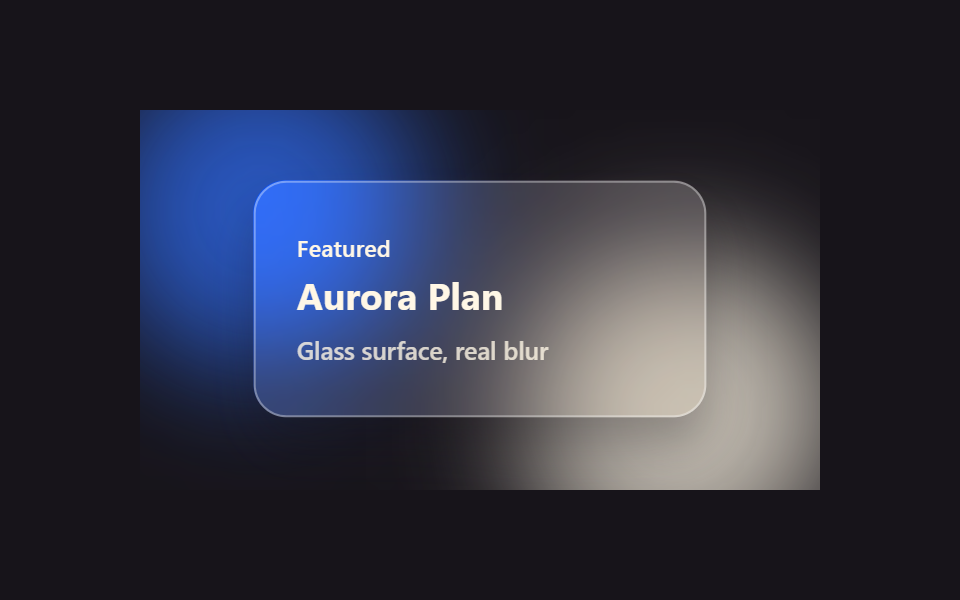 01 glassmorphism-effects-frosted-card
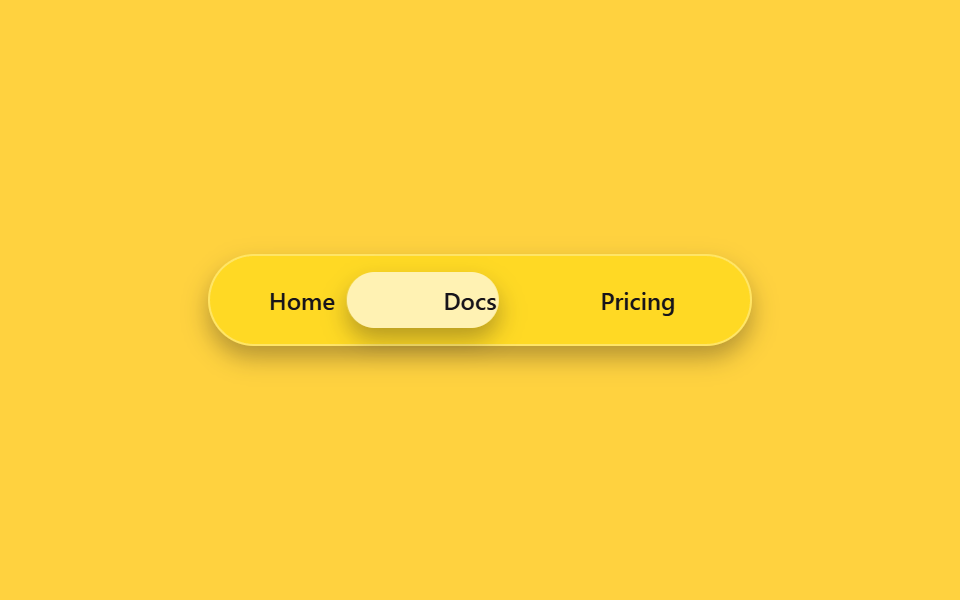 02 glassmorphism-effects-glass-nav
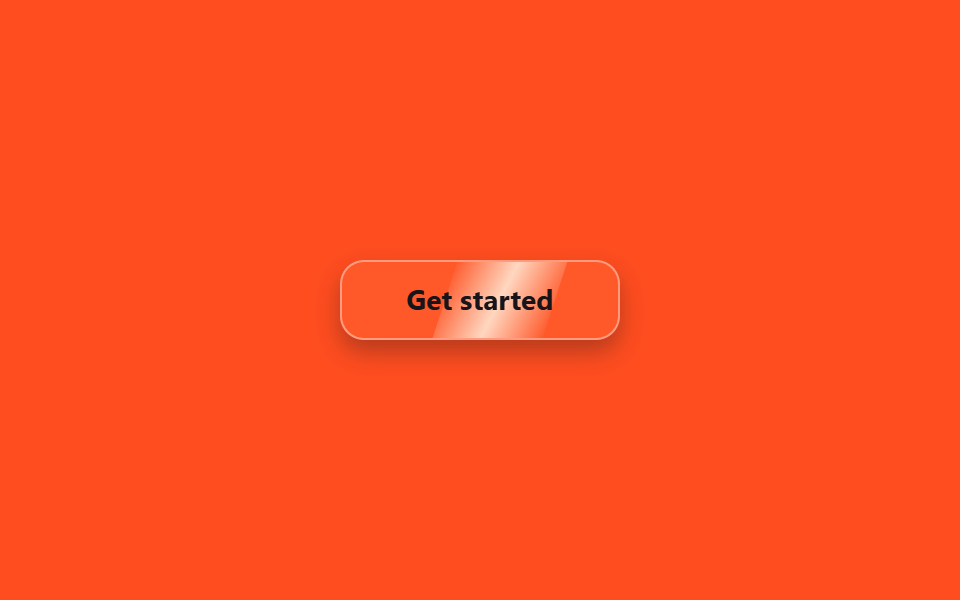 03 glassmorphism-effects-liquid-glass-btn
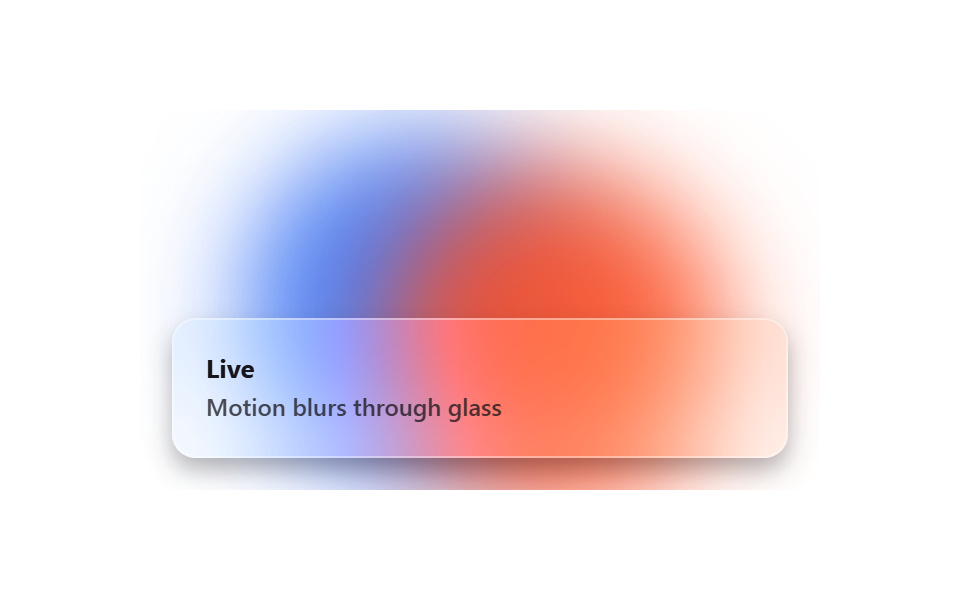 04 glassmorphism-effects-glass-blob-bg
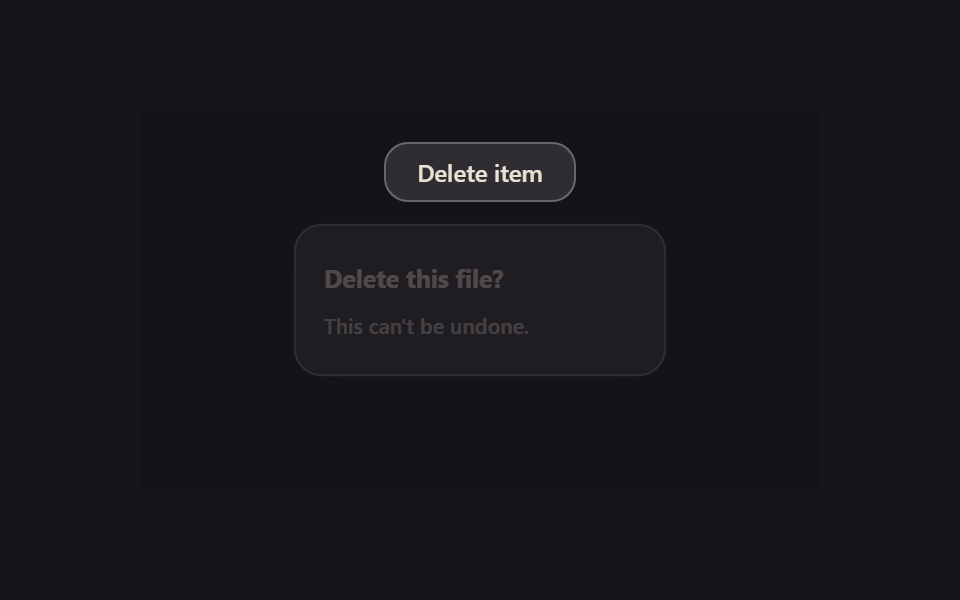 05 glassmorphism-effects-glass-modal
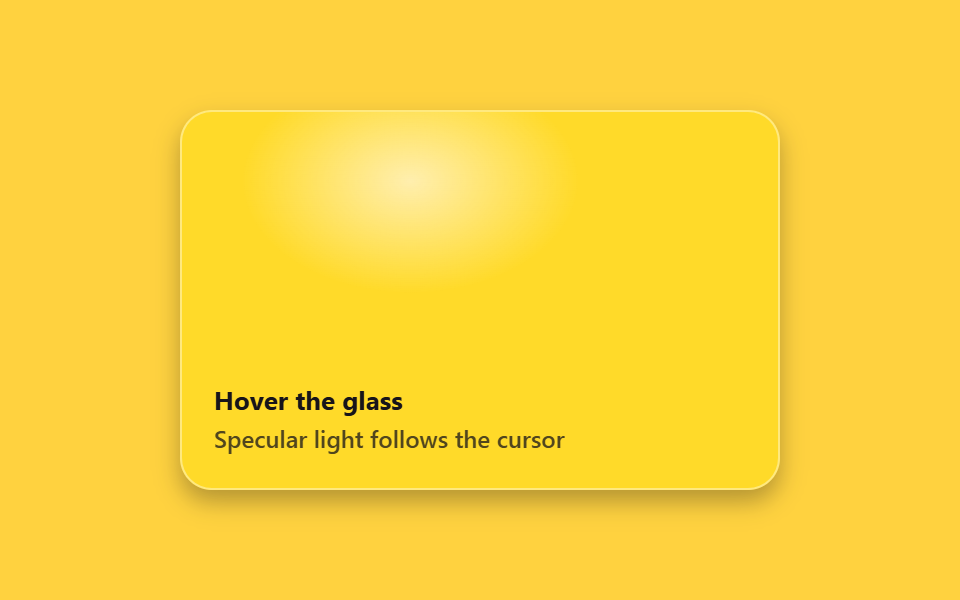 06 glassmorphism-effects-refraction-hover
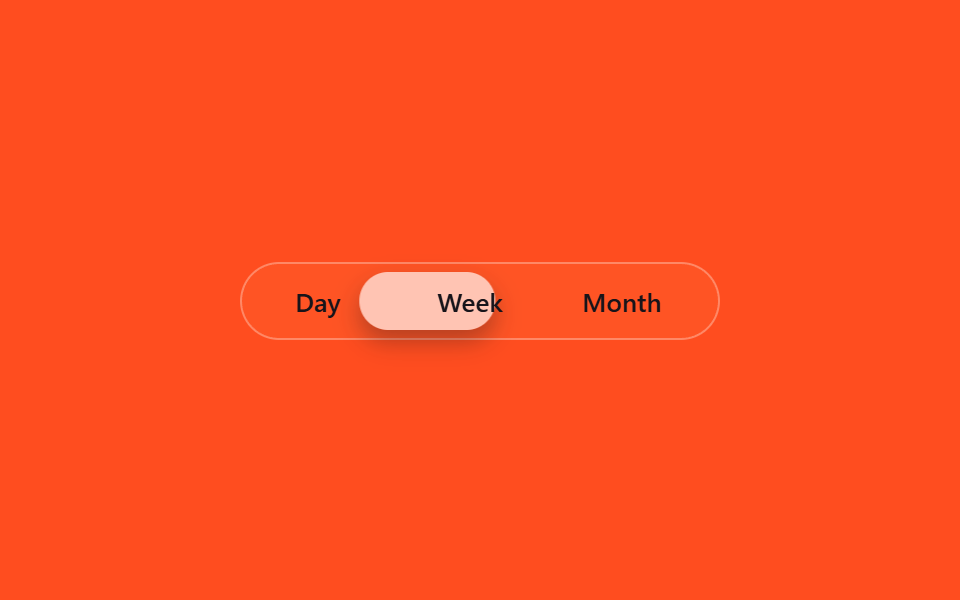 07 glassmorphism-effects-glass-tab
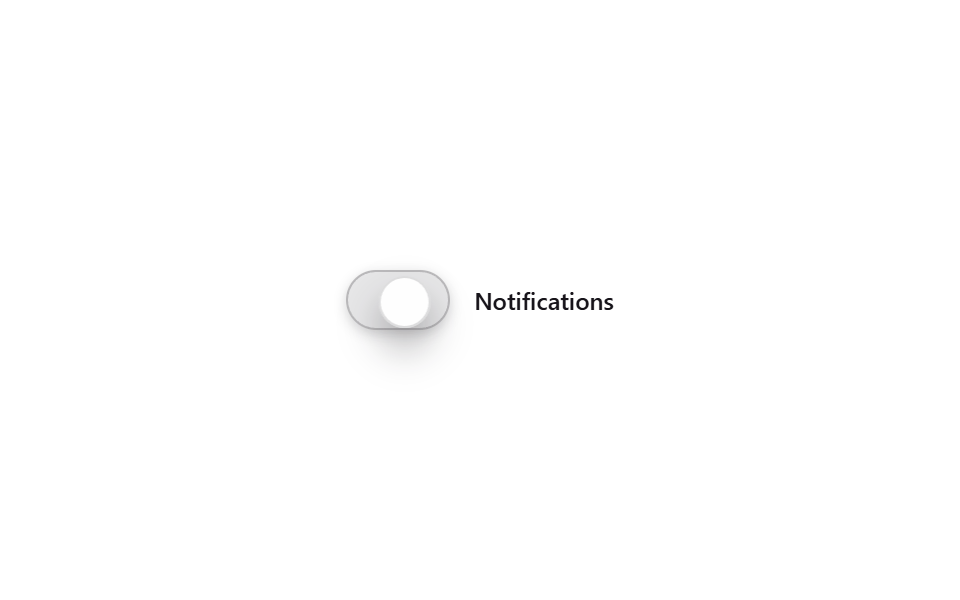 08 glassmorphism-effects-glass-toggle
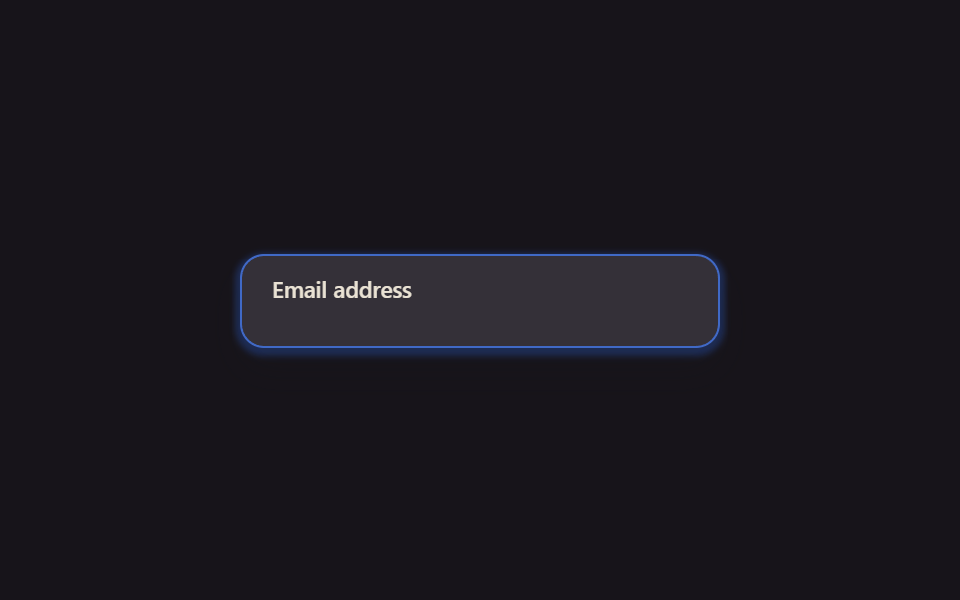 09 glassmorphism-effects-glass-input
자동 재생 · 눌러서 해당 항목으로 · 전부 한 zip
아홉 개는 인기 순이 아니라 화면에서 유리 재질을 마주치는 순서를 따라갑니다. 정지해 있어도 유리로 보이는 것(01 카드·02 내비게이션)에서 시작해, 누르거나 지나가야 반응하는 것(03 버튼·04 움직이는 배경)을 지나, 클릭으로 여닫는 것(05 모달)과 마우스를 얹어야 살아나는 것(06 커서 추적)을 거쳐, 마지막은 고르고 켜고 입력하는 컨트롤(07 탭·08 토글·09 인풋)로 끝납니다. 유리판 안에 사진을 넘겨 보여 준다면 CSS 이미지 슬라이드 애니메이션이 그 짝이고, 성공을 축하하는 파티를 열 거라면 컨페티 축하 애니메이션이 그 뒤를 따릅니다.
01프로스티드 카드
유리 느낌 디자인은 어디에 쓰나
포트폴리오나 랜딩 페이지의 소개 카드에 backdrop-filter: blur()와 반투명 배경을 올리면, 뒤에 있는 색이 흐릿하게 비치면서 카드가 유리판처럼 떠 보입니다.
<main class="stage">
  <div class="fc-scene is-demo">
    <span class="fc-blob fc-blob--a"></span>
    <span class="fc-blob fc-blob--b"></span>
    <div class="fc-card fc-focal">
      <span class="fc-card__eyebrow">Featured</span>
      <span class="fc-card__title">Aurora Plan</span>
      <span class="fc-card__desc">Glass surface, real blur</span>
    </div>
  </div>
</main>
@use "../../../../site/static/demo-tokens" as *;
// ── 변수 3개 ──────────────────────────────────────────
$duration: $dur-base;
$easing: $ease-spring;
$color: $subject-blue;
@include stage($stage-ink);
.fc-scene {
position: relative;
width: min(340px, 90vw);
aspect-ratio: 340 / 190;
display: grid;
place-items: center;
overflow: hidden; // 320px 에서 아래 블러 얼룩이 음수 offset 으로 장면 밖까지 번져 body.scrollHeight 를 넘겼다 (실측 2026-09-10)
}
// 유리 카드 뒤에서 블러될 색 얼룩 — .stage 배경은 그대로 단색, 이 레이어만 그라디언트 역할을 한다
.fc-blob {
position: absolute;
width: 160px;
height: 160px;
border-radius: 50%;
filter: blur(30px);
opacity: .75;
}
.fc-blob--a { background: $color; top: -30px; left: -20px; }
.fc-blob--b { background: $subject-cream; bottom: -40px; right: -10px; }
.fc-card {
position: relative;
z-index: 1;
box-sizing: border-box;
width: min(220px, 80%);
padding: $sp-6 $sp-5;
border-radius: $r-card;
background: rgba(255, 255, 255, .14);
border: 1px solid rgba(255, 255, 255, .35);
backdrop-filter: blur(16px) saturate(160%);
-webkit-backdrop-filter: blur(16px) saturate(160%);
box-shadow: $shadow-press;
display: flex;
flex-direction: column;
gap: $sp-1;
color: $subject-cream;
font: 600 13px/1.4 -apple-system, "Segoe UI", sans-serif;
transition: transform $duration $easing, box-shadow $duration $easing;
}
.fc-card__eyebrow { font-size: 11px; letter-spacing: .02em; } // opacity .75 는 파란 얼룩 위 3.31:1 이라 뺐다 — AA 4.5
.fc-card__title { font-size: 18px; font-weight: 700; }
.fc-card__desc { font-size: 12px; opacity: .8; font-weight: 500; }
// 실사용: 진짜 마우스 호버로 트랜지션
.fc-focal:hover {
transform: scale(1.03);
box-shadow: $shadow-raised;
}
// 데모 루프: is-demo 는 같은 모양을 keyframes 로 무한 재생 (헤드리스는 :hover 를 못 건다)
@keyframes fc-breathe {
0%, 100% { transform: scale(1); box-shadow: $shadow-press; }
50% { transform: scale(1.03); box-shadow: $shadow-raised; }
}
.fc-scene.is-demo .fc-focal { animation: fc-breathe $duration $easing infinite; }
@media (prefers-reduced-motion: reduce) {
.fc-focal:hover,
.fc-scene.is-demo .fc-focal { animation: none !important; transform: none !important; box-shadow: $shadow-press !important; }
}html, body {
margin: 0;
overflow: hidden;
}
.stage {
box-sizing: border-box;
min-height: 100vh;
display: grid;
place-items: center;
margin: 0;
background: #17141a;
font-family: -apple-system, "Segoe UI", "Noto Sans KR", sans-serif;
padding: clamp(8px, 4vw, 24px);
}
.fc-scene {
position: relative;
width: min(340px, 90vw);
aspect-ratio: 340/190;
display: grid;
place-items: center;
overflow: hidden;
}
.fc-blob {
position: absolute;
width: 160px;
height: 160px;
border-radius: 50%;
filter: blur(30px);
opacity: 0.75;
}
.fc-blob--a {
background: #2f6df6;
top: -30px;
left: -20px;
}
.fc-blob--b {
background: #fff7e6;
bottom: -40px;
right: -10px;
}
.fc-card {
position: relative;
z-index: 1;
box-sizing: border-box;
width: min(220px, 80%);
padding: 24px 20px;
border-radius: 16px;
background: rgba(255, 255, 255, 0.14);
border: 1px solid rgba(255, 255, 255, 0.35);
backdrop-filter: blur(16px) saturate(160%);
-webkit-backdrop-filter: blur(16px) saturate(160%);
box-shadow: 0 6px 12px rgba(23, 20, 26, 0.32);
display: flex;
flex-direction: column;
gap: 4px;
color: #fff7e6;
font: 600 13px/1.4 -apple-system, "Segoe UI", sans-serif;
transition: transform 300ms cubic-bezier(0.2, 0.8, 0.2, 1), box-shadow 300ms cubic-bezier(0.2, 0.8, 0.2, 1);
}
.fc-card__eyebrow {
font-size: 11px;
letter-spacing: 0.02em;
}
.fc-card__title {
font-size: 18px;
font-weight: 700;
}
.fc-card__desc {
font-size: 12px;
opacity: 0.8;
font-weight: 500;
}
.fc-focal:hover {
transform: scale(1.03);
box-shadow: 0 14px 24px rgba(23, 20, 26, 0.32);
}
@keyframes fc-breathe {
0%, 100% {
transform: scale(1);
box-shadow: 0 6px 12px rgba(23, 20, 26, 0.32);
}
50% {
transform: scale(1.03);
box-shadow: 0 14px 24px rgba(23, 20, 26, 0.32);
}
}
.fc-scene.is-demo .fc-focal {
animation: fc-breathe 300ms cubic-bezier(0.2, 0.8, 0.2, 1) infinite;
}
@media (prefers-reduced-motion: reduce) {
.fc-focal:hover,
.fc-scene.is-demo .fc-focal {
animation: none !important;
transform: none !important;
box-shadow: 0 6px 12px rgba(23, 20, 26, 0.32) !important;
}
}import { CSSProperties } from "react";
import styles from "./FrostedCard.module.scss";
type Vars = CSSProperties & {
"--duration"?: string;
"--easing"?: string;
"--color"?: string;
};
export interface FrostedCardProps {
duration?: string;
easing?: string;
color?: string;
}
export default function FrostedCard({
duration = "300ms",
easing = "cubic-bezier(.2, .8, .2, 1)",
color = "#2f6df6",
}: FrostedCardProps) {
const style: Vars = {
"--duration": duration,
"--easing": easing,
"--color": color,
};
return (
<div className={styles.scene} style={style}>
<span className={styles.blobA} />
<span className={styles.blobB} />
<div className={styles.card}>
<span className={styles.eyebrow}>Featured</span>
<span className={styles.title}>Aurora Plan</span>
<span className={styles.desc}>Glass surface, real blur</span>
</div>
</div>
);
}01 · 프로스티드 카드 — 측정 누적면적 4.222% · 움직인 프레임 23/23GODRICH 원작 · zip 에 SCSS·React 포함 · 비밀번호 보기
무엇이 핵심인가
마우스를 올리면 카드가 살짝 커지고 그림자가 깊어집니다.
.fc-card {
  background: rgba(255, 255, 255, .14);
  border: 1px solid rgba(255, 255, 255, .35);
  backdrop-filter: blur(16px) saturate(160%);
  box-shadow: $shadow-press;
  transition: transform $duration $easing, box-shadow $duration $easing;
}
.fc-focal:hover {
  transform: scale(1.03);
  box-shadow: $shadow-raised;
}
02유리 내비게이션
언제 쓰나
반투명 유리 재질 내비게이션 바 안에서 지금 선택된 메뉴 뒤로 흐릿한 유리 알약이 translateX로 옮겨 다닙니다.
<main class="stage">
  <nav class="gn-nav is-demo" aria-label="demo">
    <span class="gn-pill" aria-hidden="true"></span>
    <a class="gn-link" href="#">Home</a>
    <a class="gn-link" href="#">Docs</a>
    <a class="gn-link" href="#">Pricing</a>
  </nav>
</main>
@use "../../../../site/static/demo-tokens" as *;
// ── 변수 3개 ──────────────────────────────────────────
$duration: $dur-quick;
$easing: $ease-pop;
$color: $subject-blue;
@include stage($stage-yellow);
// 라벨 폭을 고정값으로 둔다 — translateX 만 쓰고 scaleX 는 안 쓰므로 BD19(flex 분배) 대상은 아니지만,
// 실제 폭이 흔들리면 필이 라벨 밖으로 걸리는 건 매한가지라 flex:0 0 auto + 고정 width 로 고정한다
$w: 76px;
.gn-nav {
position: relative;
box-sizing: border-box;
width: min(272px, 86vw);
display: flex;
gap: $sp-2;
padding: $sp-2;
border-radius: $r-pill;
background: rgba(255, 255, 255, .14);
border: 1px solid rgba(255, 255, 255, .3);
backdrop-filter: blur(14px) saturate(160%);
-webkit-backdrop-filter: blur(14px) saturate(160%);
box-shadow: $shadow-press;
}
.gn-link {
position: relative;
z-index: 1;
flex: 0 0 auto;
box-sizing: border-box;
width: $w;
text-align: center;
padding: $sp-2 0;
border-radius: $r-pill;
font: 600 12px/1 -apple-system, "Segoe UI", sans-serif;
color: $subject-ink;
text-decoration: none;
}
.gn-pill {
position: absolute;
top: $sp-2; left: $sp-2; bottom: $sp-2;
box-sizing: border-box;
width: $w;
border-radius: $r-pill;
background: rgba(255, 255, 255, .6);
backdrop-filter: blur(6px);
box-shadow: $shadow-press;
transform: translateX(0);
transition: transform $duration $easing;
}
// 실사용: 진짜 호버로 필이 그 링크 아래로 이동 (:has 로 형제 상태를 읽는다)
.gn-nav:has(.gn-link:nth-child(3):hover) .gn-pill { transform: translateX(calc(#{$w} + #{$sp-2})); }
.gn-nav:has(.gn-link:nth-child(4):hover) .gn-pill { transform: translateX(calc((#{$w} + #{$sp-2}) * 2)); }
// 데모 루프: is-demo 는 세 자리를 keyframes 로 오간다 (헤드리스는 :has(:hover) 를 못 건다)
@keyframes gn-loop {
0%, 15% { transform: translateX(0); }
33%, 48% { transform: translateX(calc(#{$w} + #{$sp-2})); }
66%, 81% { transform: translateX(calc((#{$w} + #{$sp-2}) * 2)); }
100% { transform: translateX(0); }
}
.gn-nav.is-demo .gn-pill { animation: gn-loop $dur-loop $easing infinite; }
@media (prefers-reduced-motion: reduce) {
.gn-pill { transition: none; }
.gn-nav.is-demo .gn-pill { animation: none !important; }
}html, body {
margin: 0;
overflow: hidden;
}
.stage {
box-sizing: border-box;
min-height: 100vh;
display: grid;
place-items: center;
margin: 0;
background: #ffd23f;
font-family: -apple-system, "Segoe UI", "Noto Sans KR", sans-serif;
padding: clamp(8px, 4vw, 24px);
}
.gn-nav {
position: relative;
box-sizing: border-box;
width: min(272px, 86vw);
display: flex;
gap: 8px;
padding: 8px;
border-radius: 999px;
background: rgba(255, 255, 255, 0.14);
border: 1px solid rgba(255, 255, 255, 0.3);
backdrop-filter: blur(14px) saturate(160%);
-webkit-backdrop-filter: blur(14px) saturate(160%);
box-shadow: 0 6px 12px rgba(23, 20, 26, 0.32);
}
.gn-link {
position: relative;
z-index: 1;
flex: 0 0 auto;
box-sizing: border-box;
width: 76px;
text-align: center;
padding: 8px 0;
border-radius: 999px;
font: 600 12px/1 -apple-system, "Segoe UI", sans-serif;
color: #17141a;
text-decoration: none;
}
.gn-pill {
position: absolute;
top: 8px;
left: 8px;
bottom: 8px;
box-sizing: border-box;
width: 76px;
border-radius: 999px;
background: rgba(255, 255, 255, 0.6);
backdrop-filter: blur(6px);
box-shadow: 0 6px 12px rgba(23, 20, 26, 0.32);
transform: translateX(0);
transition: transform 220ms cubic-bezier(0.2, 1.4, 0.4, 1);
}
.gn-nav:has(.gn-link:nth-child(3):hover) .gn-pill {
transform: translateX(calc(76px + 8px));
}
.gn-nav:has(.gn-link:nth-child(4):hover) .gn-pill {
transform: translateX(calc((76px + 8px) * 2));
}
@keyframes gn-loop {
0%, 15% {
transform: translateX(0);
}
33%, 48% {
transform: translateX(calc(76px + 8px));
}
66%, 81% {
transform: translateX(calc((76px + 8px) * 2));
}
100% {
transform: translateX(0);
}
}
.gn-nav.is-demo .gn-pill {
animation: gn-loop 2s cubic-bezier(0.2, 1.4, 0.4, 1) infinite;
}
@media (prefers-reduced-motion: reduce) {
.gn-pill {
transition: none;
}
.gn-nav.is-demo .gn-pill {
animation: none !important;
}
}import { CSSProperties } from "react";
import styles from "./GlassNavbar.module.scss";
type Vars = CSSProperties & {
"--duration"?: string;
"--easing"?: string;
};
export interface GlassNavbarProps {
duration?: string;
easing?: string;
}
const LINKS = ["Home", "Docs", "Pricing"];
export default function GlassNavbar({
duration = "220ms",
easing = "cubic-bezier(.2, 1.4, .4, 1)",
}: GlassNavbarProps) {
const style: Vars = { "--duration": duration, "--easing": easing };
return (
<nav className={styles.nav} style={style} aria-label="glass nav">
<span className={styles.pill} aria-hidden="true" />
{LINKS.map((label) => (
<a key={label} className={styles.link} href="#">
{label}
</a>
))}
</nav>
);
}02 · 유리 내비게이션 — 측정 누적면적 6.783% · 움직인 프레임 14/23GODRICH 원작 · zip 에 SCSS·React 포함 · 비밀번호 보기
짚어 둘 점
탭 폭을 고정값으로 둬서 어떤 메뉴를 눌러도 알약이 정확한 자리에 멈춥니다.
.gn-link { flex: 0 0 auto; width: $w; }
.gn-pill {
  position: absolute;
  width: $w;
  background: rgba(255, 255, 255, .6);
  transform: translateX(0);
  transition: transform $duration $easing;
}
.gn-nav:has(.gn-link:nth-child(3):hover) .gn-pill {
  transform: translateX(calc(#{$w} + #{$sp-2}));
}
03굴절 하이라이트 버튼
어떤 화면인가
버튼 표면에 좁은 빛줄기 레이어를 올려 두고, 마우스를 올리면 그 빛줄기가 버튼을 가로질러 한 번 지나가 액체 유리가 굴절되듯 반짝입니다.
<main class="stage">
  <button class="lb-btn lb-focal is-demo" type="button">
    <span class="lb-btn__label">Get started</span>
  </button>
</main>
@use "../../../../site/static/demo-tokens" as *;
// ── 변수 3개 ──────────────────────────────────────────
$duration: $dur-enter;
$easing: $ease-out;
$color: $subject-cream;
@include stage($stage-orange);
.lb-btn {
position: relative;
overflow: hidden;
box-sizing: border-box;
padding: $sp-3 $sp-8;
border: 1px solid rgba(255, 255, 255, .4);
border-radius: $r-control;
background: rgba(255, 255, 255, .16);
backdrop-filter: blur(12px) saturate(160%);
-webkit-backdrop-filter: blur(12px) saturate(160%);
box-shadow: $shadow-press;
color: $subject-ink;
font: 700 14px/1 -apple-system, "Segoe UI", sans-serif;
cursor: pointer;
}
.lb-btn__label { position: relative; z-index: 1; }
// 굴절 하이라이트 — 좁은 빛줄기 레이어. transform 만 움직인다 (top/left 는 고정)
.lb-btn::before {
content: "";
position: absolute;
top: -20%; left: -40%;
width: 40%; height: 140%;
background: linear-gradient(100deg, transparent, $color, transparent);
opacity: .8;
transform: translateX(-40%) skewX(-18deg);
transition: transform $duration $easing;
}
// 실사용: 진짜 마우스 호버로 빛줄기가 한 번 지나간다
.lb-focal:hover::before { transform: translateX(340%) skewX(-18deg); }
// 데모 루프: is-demo 는 같은 이동을 keyframes 로 반복
@keyframes lb-sweep {
0%, 20% { transform: translateX(-40%) skewX(-18deg); }
60%, 100% { transform: translateX(340%) skewX(-18deg); }
}
.lb-btn.is-demo::before { animation: lb-sweep $dur-loop $easing infinite; }
@media (prefers-reduced-motion: reduce) {
.lb-focal:hover::before,
.lb-btn.is-demo::before { animation: none !important; transition: none !important; transform: translateX(-40%) skewX(-18deg) !important; }
}html, body {
margin: 0;
overflow: hidden;
}
.stage {
box-sizing: border-box;
min-height: 100vh;
display: grid;
place-items: center;
margin: 0;
background: #ff4d1f;
font-family: -apple-system, "Segoe UI", "Noto Sans KR", sans-serif;
padding: clamp(8px, 4vw, 24px);
}
.lb-btn {
position: relative;
overflow: hidden;
box-sizing: border-box;
padding: 12px 32px;
border: 1px solid rgba(255, 255, 255, 0.4);
border-radius: 12px;
background: rgba(255, 255, 255, 0.16);
backdrop-filter: blur(12px) saturate(160%);
-webkit-backdrop-filter: blur(12px) saturate(160%);
box-shadow: 0 6px 12px rgba(23, 20, 26, 0.32);
color: #17141a;
font: 700 14px/1 -apple-system, "Segoe UI", sans-serif;
cursor: pointer;
}
.lb-btn__label {
position: relative;
z-index: 1;
}
.lb-btn::before {
content: "";
position: absolute;
top: -20%;
left: -40%;
width: 40%;
height: 140%;
background: linear-gradient(100deg, transparent, #fff7e6, transparent);
opacity: 0.8;
transform: translateX(-40%) skewX(-18deg);
transition: transform 600ms ease-out;
}
.lb-focal:hover::before {
transform: translateX(340%) skewX(-18deg);
}
@keyframes lb-sweep {
0%, 20% {
transform: translateX(-40%) skewX(-18deg);
}
60%, 100% {
transform: translateX(340%) skewX(-18deg);
}
}
.lb-btn.is-demo::before {
animation: lb-sweep 2s ease-out infinite;
}
@media (prefers-reduced-motion: reduce) {
.lb-focal:hover::before,
.lb-btn.is-demo::before {
animation: none !important;
transition: none !important;
transform: translateX(-40%) skewX(-18deg) !important;
}
}import { CSSProperties } from "react";
import styles from "./LiquidGlassButton.module.scss";
type Vars = CSSProperties & {
"--duration"?: string;
"--easing"?: string;
"--color"?: string;
};
export interface LiquidGlassButtonProps {
duration?: string;
easing?: string;
color?: string;
}
export default function LiquidGlassButton({
duration = "600ms",
easing = "ease-out",
color = "#fff7e6",
}: LiquidGlassButtonProps) {
const style: Vars = {
"--duration": duration,
"--easing": easing,
"--color": color,
};
return (
<button className={styles.btn} style={style} type="button">
<span className={styles.label}>Get started</span>
</button>
);
}03 · 굴절 하이라이트 버튼 — 측정 누적면적 3.422% · 움직인 프레임 10/23GODRICH 원작 · zip 에 SCSS·React 포함 · 비밀번호 보기
어떻게 만들었나
.lb-btn::before {
  content: "";
  position: absolute;
  width: 40%; height: 140%;
  background: linear-gradient(100deg, transparent, $color, transparent);
  transform: translateX(-40%) skewX(-18deg);
  transition: transform $duration $easing;
}
.lb-focal:hover::before {
  transform: translateX(340%) skewX(-18deg);
}
04움직이는 블롭 배경
무엇이 움직이나
유리 패널 뒤에서 색이 다른 흐린 블롭 두 개가 transform으로 천천히 자리를 바꾸며 떠다니고, 패널의 backdrop-filter가 그 움직임을 흐릿하게 비춥니다.
<main class="stage">
  <div class="bb-scene">
    <span class="bb-blob bb-blob--a"></span>
    <span class="bb-blob bb-blob--b"></span>
    <div class="bb-panel">
      <span class="bb-panel__title">Live</span>
      <span class="bb-panel__desc">Motion blurs through glass</span>
    </div>
  </div>
</main>
@use "../../../../site/static/demo-tokens" as *;
// ── 변수 3개 ──────────────────────────────────────────
$duration: $dur-loop;
$easing: linear;
$color: $subject-blue;
@include stage($stage-paper);
.bb-scene {
position: relative;
width: min(340px, 90vw);
aspect-ratio: 340 / 190;
overflow: hidden;
border-radius: $r-card;
}
// 블롭 두 개는 배경(무대)이 아니라 이 안의 장식 레이어다 — .stage 자체 배경은 여전히 단색
// blur(40px) 는 인접 프레임 간 픽셀차를 문턱(12) 바로 아래로 뭉갰다(실측: 모든 프레임 쌍이 11~12) —
// 블러를 26px 로 낮추고 이동 폭을 키워 프레임마다 확실히 문턱을 넘게 했다
.bb-blob {
position: absolute;
width: 170px;
height: 170px;
border-radius: 50%;
filter: blur(26px);
opacity: .88;
}
.bb-blob--a { background: $color; top: -40px; left: -30px; animation: bb-drift-a $duration $easing infinite; }
.bb-blob--b { background: $stage-orange; bottom: -50px; right: -20px; animation: bb-drift-b $duration $easing infinite; }
@keyframes bb-drift-a {
0%, 100% { transform: translate(0, 0); }
50% { transform: translate(110px, 70px); }
}
@keyframes bb-drift-b {
0%, 100% { transform: translate(0, 0); }
50% { transform: translate(-90px, -55px); }
}
.bb-panel {
position: absolute;
inset: auto $sp-4 $sp-4 $sp-4;
box-sizing: border-box;
padding: $sp-4;
border-radius: $r-control;
background: rgba(255, 255, 255, .22);
border: 1px solid rgba(255, 255, 255, .4);
backdrop-filter: blur(18px) saturate(160%);
-webkit-backdrop-filter: blur(18px) saturate(160%);
box-shadow: $shadow-press;
display: flex;
flex-direction: column;
gap: $sp-1;
color: $subject-ink;
font: 600 12px/1.3 -apple-system, "Segoe UI", sans-serif;
}
.bb-panel__title { font-weight: 700; font-size: 13px; }
.bb-panel__desc { opacity: .75; }
@media (prefers-reduced-motion: reduce) {
.bb-blob { animation: none !important; }
}html, body {
margin: 0;
overflow: hidden;
}
.stage {
box-sizing: border-box;
min-height: 100vh;
display: grid;
place-items: center;
margin: 0;
background: #ffffff;
font-family: -apple-system, "Segoe UI", "Noto Sans KR", sans-serif;
padding: clamp(8px, 4vw, 24px);
}
.bb-scene {
position: relative;
width: min(340px, 90vw);
aspect-ratio: 340/190;
overflow: hidden;
border-radius: 16px;
}
.bb-blob {
position: absolute;
width: 170px;
height: 170px;
border-radius: 50%;
filter: blur(26px);
opacity: 0.88;
}
.bb-blob--a {
background: #2f6df6;
top: -40px;
left: -30px;
animation: bb-drift-a 2s linear infinite;
}
.bb-blob--b {
background: #ff4d1f;
bottom: -50px;
right: -20px;
animation: bb-drift-b 2s linear infinite;
}
@keyframes bb-drift-a {
0%, 100% {
transform: translate(0, 0);
}
50% {
transform: translate(110px, 70px);
}
}
@keyframes bb-drift-b {
0%, 100% {
transform: translate(0, 0);
}
50% {
transform: translate(-90px, -55px);
}
}
.bb-panel {
position: absolute;
inset: auto 16px 16px 16px;
box-sizing: border-box;
padding: 16px;
border-radius: 12px;
background: rgba(255, 255, 255, 0.22);
border: 1px solid rgba(255, 255, 255, 0.4);
backdrop-filter: blur(18px) saturate(160%);
-webkit-backdrop-filter: blur(18px) saturate(160%);
box-shadow: 0 6px 12px rgba(23, 20, 26, 0.32);
display: flex;
flex-direction: column;
gap: 4px;
color: #17141a;
font: 600 12px/1.3 -apple-system, "Segoe UI", sans-serif;
}
.bb-panel__title {
font-weight: 700;
font-size: 13px;
}
.bb-panel__desc {
opacity: 0.75;
}
@media (prefers-reduced-motion: reduce) {
.bb-blob {
animation: none !important;
}
}import { CSSProperties } from "react";
import styles from "./GlassBlobBackground.module.scss";
type Vars = CSSProperties & {
"--duration"?: string;
"--color"?: string;
};
export interface GlassBlobBackgroundProps {
duration?: string;
color?: string;
}
export default function GlassBlobBackground({
duration = "2000ms",
color = "#2f6df6",
}: GlassBlobBackgroundProps) {
const style: Vars = { "--duration": duration, "--color": color };
return (
<div className={styles.scene} style={style}>
<span className={`${styles.blob} ${styles.blobA}`} />
<span className={`${styles.blob} ${styles.blobB}`} />
<div className={styles.panel}>
<span className={styles.panelTitle}>Live</span>
<span className={styles.panelDesc}>Motion blurs through glass</span>
</div>
</div>
);
}04 · 움직이는 블롭 배경 — 측정 누적면적 41.944% · 움직인 프레임 23/23GODRICH 원작 · zip 에 SCSS·React 포함 · 비밀번호 보기
코드 읽는 법
.bb-blob { border-radius: 50%; filter: blur(26px); }
.bb-blob--a { animation: bb-drift-a $duration $easing infinite; }
@keyframes bb-drift-a {
  0%, 100% { transform: translate(0, 0); }
  50%      { transform: translate(110px, 70px); }
}
05유리 모달
어디에 쓰나
확인 버튼을 누르면 유리 재질 모달 패널이 opacity와 scale로 작게 접혀 있다가 커지며 나타나고, 뒤 화면은 흐릿하게 비칩니다.
<main class="stage">
  <div class="gm-scene is-demo">
    <input type="checkbox" id="gm-open" class="gm-check">
    <label class="gm-trigger" for="gm-open">Delete item</label>
    <div class="gm-overlay"></div>
    <div class="gm-modal gm-focal">
      <span class="gm-modal__title">Delete this file?</span>
      <span class="gm-modal__desc">This can't be undone.</span>
    </div>
  </div>
</main>
@use "../../../../site/static/demo-tokens" as *;
// ── 변수 3개 ──────────────────────────────────────────
$duration: $dur-enter;
$easing: $ease-spring;
$color: $subject-blue;
@include stage($stage-ink);
// 트리거는 위쪽에, 모달은 장면 전체를 덮는 오버레이 안에서 따로 중앙 정렬한다 —
// 처음엔 둘 다 grid place-items:center 로 같은 자리에 겹쳐 렌더됐다 (실측: poster.png 에서 글자가 포개짐)
.gm-scene {
position: relative;
box-sizing: border-box;
width: min(340px, 90vw);
aspect-ratio: 340 / 190;
display: flex;
justify-content: center;
padding-top: $sp-4;
}
.gm-check { position: absolute; opacity: 0; pointer-events: none; }
.gm-trigger {
position: relative;
z-index: 0;
align-self: flex-start;
box-sizing: border-box;
padding: $sp-2 $sp-4;
border-radius: $r-control;
background: rgba(255, 255, 255, .12);
border: 1px solid rgba(255, 255, 255, .3);
color: $subject-cream;
font: 600 12px/1 -apple-system, "Segoe UI", sans-serif;
cursor: pointer;
}
.gm-overlay {
position: absolute;
inset: 0;
background: rgba(0, 0, 0, .35);
opacity: 0;
transition: opacity $duration $easing;
pointer-events: none;
}
.gm-modal {
position: absolute;
inset: 0;
margin: auto;
z-index: 2;
box-sizing: border-box;
width: min(210px, 74%);
height: fit-content;
padding: $sp-5 $sp-4;
border-radius: $r-card;
background: rgba(255, 255, 255, .18);
border: 1px solid rgba(255, 255, 255, .38);
backdrop-filter: blur(18px) saturate(160%);
-webkit-backdrop-filter: blur(18px) saturate(160%);
box-shadow: $shadow-raised;
display: flex;
flex-direction: column;
gap: $sp-2;
color: $subject-cream;
font: 600 12px/1.4 -apple-system, "Segoe UI", sans-serif;
opacity: 0;
transform: scale(.85);
transition: opacity $duration $easing, transform $duration $easing;
pointer-events: none;
}
.gm-modal__title { font-size: 14px; font-weight: 700; }
.gm-modal__desc { opacity: .8; font-weight: 500; }
// 실사용: 체크박스 상태만으로 오버레이 + 모달이 열린다
.gm-check:checked ~ .gm-overlay { opacity: 1; }
.gm-check:checked ~ .gm-modal { opacity: 1; transform: scale(1); }
// 데모 루프: is-demo 는 열림·닫힘을 keyframes 로 반복 (체크박스 상태와 무관한 별도 경로)
@keyframes gm-overlay-loop {
0%, 12% { opacity: 0; }
35%, 78% { opacity: 1; }
100% { opacity: 0; }
}
@keyframes gm-modal-loop {
0%, 12% { opacity: 0; transform: scale(.85); }
35%, 78% { opacity: 1; transform: scale(1); }
100% { opacity: 0; transform: scale(.85); }
}
.gm-scene.is-demo .gm-overlay { animation: gm-overlay-loop $dur-loop $easing infinite; }
.gm-scene.is-demo .gm-modal { animation: gm-modal-loop $dur-loop $easing infinite; }
@media (prefers-reduced-motion: reduce) {
.gm-overlay, .gm-modal { transition: none; }
.gm-scene.is-demo .gm-overlay,
.gm-scene.is-demo .gm-modal { animation: none !important; }
}html, body {
margin: 0;
overflow: hidden;
}
.stage {
box-sizing: border-box;
min-height: 100vh;
display: grid;
place-items: center;
margin: 0;
background: #17141a;
font-family: -apple-system, "Segoe UI", "Noto Sans KR", sans-serif;
padding: clamp(8px, 4vw, 24px);
}
.gm-scene {
position: relative;
box-sizing: border-box;
width: min(340px, 90vw);
aspect-ratio: 340/190;
display: flex;
justify-content: center;
padding-top: 16px;
}
.gm-check {
position: absolute;
opacity: 0;
pointer-events: none;
}
.gm-trigger {
position: relative;
z-index: 0;
align-self: flex-start;
box-sizing: border-box;
padding: 8px 16px;
border-radius: 12px;
background: rgba(255, 255, 255, 0.12);
border: 1px solid rgba(255, 255, 255, 0.3);
color: #fff7e6;
font: 600 12px/1 -apple-system, "Segoe UI", sans-serif;
cursor: pointer;
}
.gm-overlay {
position: absolute;
inset: 0;
background: rgba(0, 0, 0, 0.35);
opacity: 0;
transition: opacity 600ms cubic-bezier(0.2, 0.8, 0.2, 1);
pointer-events: none;
}
.gm-modal {
position: absolute;
inset: 0;
margin: auto;
z-index: 2;
box-sizing: border-box;
width: min(210px, 74%);
height: fit-content;
padding: 20px 16px;
border-radius: 16px;
background: rgba(255, 255, 255, 0.18);
border: 1px solid rgba(255, 255, 255, 0.38);
backdrop-filter: blur(18px) saturate(160%);
-webkit-backdrop-filter: blur(18px) saturate(160%);
box-shadow: 0 14px 24px rgba(23, 20, 26, 0.32);
display: flex;
flex-direction: column;
gap: 8px;
color: #fff7e6;
font: 600 12px/1.4 -apple-system, "Segoe UI", sans-serif;
opacity: 0;
transform: scale(0.85);
transition: opacity 600ms cubic-bezier(0.2, 0.8, 0.2, 1), transform 600ms cubic-bezier(0.2, 0.8, 0.2, 1);
pointer-events: none;
}
.gm-modal__title {
font-size: 14px;
font-weight: 700;
}
.gm-modal__desc {
opacity: 0.8;
font-weight: 500;
}
.gm-check:checked ~ .gm-overlay {
opacity: 1;
}
.gm-check:checked ~ .gm-modal {
opacity: 1;
transform: scale(1);
}
@keyframes gm-overlay-loop {
0%, 12% {
opacity: 0;
}
35%, 78% {
opacity: 1;
}
100% {
opacity: 0;
}
}
@keyframes gm-modal-loop {
0%, 12% {
opacity: 0;
transform: scale(0.85);
}
35%, 78% {
opacity: 1;
transform: scale(1);
}
100% {
opacity: 0;
transform: scale(0.85);
}
}
.gm-scene.is-demo .gm-overlay {
animation: gm-overlay-loop 2s cubic-bezier(0.2, 0.8, 0.2, 1) infinite;
}
.gm-scene.is-demo .gm-modal {
animation: gm-modal-loop 2s cubic-bezier(0.2, 0.8, 0.2, 1) infinite;
}
@media (prefers-reduced-motion: reduce) {
.gm-overlay, .gm-modal {
transition: none;
}
.gm-scene.is-demo .gm-overlay,
.gm-scene.is-demo .gm-modal {
animation: none !important;
}
}// 체크박스가 진짜 열림·닫힘을 낸다. 실제로 누르면 데모 루프(.is-demo)만 뗀다.
document.querySelector('.gm-check').addEventListener('change', function () {
document.querySelector('.gm-scene').classList.remove('is-demo');
});import { CSSProperties, useState } from "react";
import styles from "./GlassModal.module.scss";
type Vars = CSSProperties & {
"--duration"?: string;
"--easing"?: string;
};
export interface GlassModalProps {
duration?: string;
easing?: string;
}
export default function GlassModal({
duration = "600ms",
easing = "cubic-bezier(.2, .8, .2, 1)",
}: GlassModalProps) {
const [open, setOpen] = useState(false);
const style: Vars = { "--duration": duration, "--easing": easing };
return (
<div className={styles.scene} style={style}>
<button className={styles.trigger} type="button" onClick={() => setOpen(true)}>
Delete item
</button>
<div
className={`${styles.overlay} ${open ? styles.isOpen : ""}`}
onClick={() => setOpen(false)}
/>
<div className={`${styles.modal} ${open ? styles.isOpen : ""}`}>
<span className={styles.title}>Delete this file?</span>
<span className={styles.desc}>This can't be undone.</span>
</div>
</div>
);
}05 · 유리 모달 — 측정 누적면적 14.35% · 움직인 프레임 10/23GODRICH 원작 · zip 에 SCSS·React 포함 · 비밀번호 보기
코드의 요점
.gm-modal {
  opacity: 0;
  transform: scale(.85);
  transition: opacity $duration $easing, transform $duration $easing;
}
.gm-check:checked ~ .gm-modal {
  opacity: 1;
  transform: scale(1);
}
06마우스 따라 광택
눈에 보이는 것
커다란 유리 패널 위에서 마우스를 움직이면 좌표를 저장한 --mx·--my 커스텀 속성을 따라 타원형 광택이 실시간으로 따라다녀, 유리 표면을 문지르는 듯한 반사가 생깁니다.
<main class="stage">
  <div class="rh-panel rh-focal is-demo">
    <span class="rh-panel__title">Hover the glass</span>
    <span class="rh-panel__desc">Specular light follows the cursor</span>
  </div>
</main>
@use "../../../../site/static/demo-tokens" as *;
// ── 변수 3개 ──────────────────────────────────────────
$duration: $dur-loop;
$easing: linear;
$color: $subject-cream;
// 커서 좌표 — 퍼센트로 등록해야 is-demo 의 키프레임이 값을 보간한다
@property --mx { syntax: '<percentage>'; inherits: true; initial-value: 50%; }
@property --my { syntax: '<percentage>'; inherits: true; initial-value: 50%; }
@include stage($stage-yellow);
.rh-panel {
position: relative;
overflow: hidden;
box-sizing: border-box;
width: min(300px, 86vw);
aspect-ratio: 300 / 190;
border-radius: $r-card;
background: rgba(255, 255, 255, .16);
border: 1px solid rgba(255, 255, 255, .4);
backdrop-filter: blur(14px) saturate(160%);
-webkit-backdrop-filter: blur(14px) saturate(160%);
box-shadow: $shadow-press;
display: flex;
flex-direction: column;
justify-content: flex-end;
gap: $sp-1;
padding: $sp-4;
color: $subject-ink;
font: 600 12px/1.3 -apple-system, "Segoe UI", sans-serif;
--mx: 50%;
--my: 35%;
}
.rh-panel__title { position: relative; z-index: 1; font-size: 13px; font-weight: 700; }
.rh-panel__desc { position: relative; z-index: 1; opacity: .75; font-weight: 500; }
// 실사용: 진짜 pointermove 가 --mx·--my 를 갱신한다(위 <script>)
.rh-panel::before {
content: "";
position: absolute;
inset: 0;
background: radial-gradient(120px 80px at var(--mx) var(--my), $color 0%, transparent 70%);
opacity: .7;
pointer-events: none;
}
// 데모 루프: is-demo 는 --mx·--my 를 keyframes 로 원을 그리며 돌려 캡처 (실 JS 와 별개 경로, 공존 가능)
@keyframes rh-drift {
0% { --mx: 15%; --my: 20%; }
25% { --mx: 85%; --my: 15%; }
50% { --mx: 85%; --my: 85%; }
75% { --mx: 15%; --my: 80%; }
100% { --mx: 15%; --my: 20%; }
}
.rh-panel.is-demo { animation: rh-drift $duration $easing infinite; }
@media (prefers-reduced-motion: reduce) {
.rh-panel.is-demo { animation: none !important; }
}@property --mx {
syntax: "<percentage>";
inherits: true;
initial-value: 50%;
}
@property --my {
syntax: "<percentage>";
inherits: true;
initial-value: 50%;
}
html, body {
margin: 0;
overflow: hidden;
}
.stage {
box-sizing: border-box;
min-height: 100vh;
display: grid;
place-items: center;
margin: 0;
background: #ffd23f;
font-family: -apple-system, "Segoe UI", "Noto Sans KR", sans-serif;
padding: clamp(8px, 4vw, 24px);
}
.rh-panel {
position: relative;
overflow: hidden;
box-sizing: border-box;
width: min(300px, 86vw);
aspect-ratio: 300/190;
border-radius: 16px;
background: rgba(255, 255, 255, 0.16);
border: 1px solid rgba(255, 255, 255, 0.4);
backdrop-filter: blur(14px) saturate(160%);
-webkit-backdrop-filter: blur(14px) saturate(160%);
box-shadow: 0 6px 12px rgba(23, 20, 26, 0.32);
display: flex;
flex-direction: column;
justify-content: flex-end;
gap: 4px;
padding: 16px;
color: #17141a;
font: 600 12px/1.3 -apple-system, "Segoe UI", sans-serif;
--mx: 50%;
--my: 35%;
}
.rh-panel__title {
position: relative;
z-index: 1;
font-size: 13px;
font-weight: 700;
}
.rh-panel__desc {
position: relative;
z-index: 1;
opacity: 0.75;
font-weight: 500;
}
.rh-panel::before {
content: "";
position: absolute;
inset: 0;
background: radial-gradient(120px 80px at var(--mx) var(--my), #fff7e6 0%, transparent 70%);
opacity: 0.7;
pointer-events: none;
}
@keyframes rh-drift {
0% {
--mx: 15%;
--my: 20%;
}
25% {
--mx: 85%;
--my: 15%;
}
50% {
--mx: 85%;
--my: 85%;
}
75% {
--mx: 15%;
--my: 80%;
}
100% {
--mx: 15%;
--my: 20%;
}
}
.rh-panel.is-demo {
animation: rh-drift 2s linear infinite;
}
@media (prefers-reduced-motion: reduce) {
.rh-panel.is-demo {
animation: none !important;
}
}var panel = document.querySelector('.rh-panel');
panel.addEventListener('pointermove', function (e) {
var r = panel.getBoundingClientRect();
var x = ((e.clientX - r.left) / r.width * 100).toFixed(1) + '%';
var y = ((e.clientY - r.top) / r.height * 100).toFixed(1) + '%';
panel.style.setProperty('--mx', x);
panel.style.setProperty('--my', y);
});import { CSSProperties, PointerEvent, useCallback, useRef } from "react";
import styles from "./RefractionHover.module.scss";
type Vars = CSSProperties & {
"--color"?: string;
"--mx"?: string;
"--my"?: string;
};
export interface RefractionHoverProps {
color?: string;
}
// 실사용: 진짜 pointermove 가 --mx·--my 를 갱신한다. 하이라이트는 CSS 만으로 그 좌표를 그린다
export default function RefractionHover({ color = "#fff7e6" }: RefractionHoverProps) {
const panelRef = useRef<HTMLDivElement>(null);
const handleMove = useCallback((e: PointerEvent<HTMLDivElement>) => {
const el = panelRef.current;
if (!el) return;
const r = el.getBoundingClientRect();
const x = (((e.clientX - r.left) / r.width) * 100).toFixed(1) + "%";
const y = (((e.clientY - r.top) / r.height) * 100).toFixed(1) + "%";
el.style.setProperty("--mx", x);
el.style.setProperty("--my", y);
}, []);
const style: Vars = { "--color": color };
return (
<div className={styles.panel} style={style} ref={panelRef} onPointerMove={handleMove}>
<span className={styles.title}>Hover the glass</span>
<span className={styles.desc}>Specular light follows the cursor</span>
</div>
);
}06 · 마우스 따라 광택 — 측정 누적면적 37.717% · 움직인 프레임 23/23GODRICH 원작 · zip 에 SCSS·React 포함 · 비밀번호 보기
동작 원리
panel.addEventListener('pointermove', function (e) {
  var r = panel.getBoundingClientRect();
  var x = ((e.clientX - r.left) / r.width * 100) + '%';
  var y = ((e.clientY - r.top) / r.height * 100) + '%';
  panel.style.setProperty('--mx', x);
  panel.style.setProperty('--my', y);
});
.rh-panel::before {
  background: radial-gradient(120px 80px at var(--mx) var(--my), $color 0%, transparent 70%);
}
07유리 탭
어떤 상황인가
유리 재질 탭 그룹 안에서 탭을 고르면 반투명 유리 인디케이터가 고정 폭 그대로 translateX로 그 탭 아래로 옮겨 갑니다.
<main class="stage">
  <div class="gt is-demo">
    <input type="radio" name="gt-tab" id="gt-1" class="gt__radio" checked>
    <input type="radio" name="gt-tab" id="gt-2" class="gt__radio">
    <input type="radio" name="gt-tab" id="gt-3" class="gt__radio">
    <div class="gt__nav">
      <span class="gt__pill" aria-hidden="true"></span>
      <label class="gt__tab" for="gt-1">Day</label>
      <label class="gt__tab" for="gt-2">Week</label>
      <label class="gt__tab" for="gt-3">Month</label>
    </div>
  </div>
</main>
@use "../../../../site/static/demo-tokens" as *;
// ── 변수 3개 ──────────────────────────────────────────
$duration: $dur-quick;
$easing: $ease-pop;
$color: $subject-blue;
@include stage($stage-orange);
// 탭 폭을 고정값으로 둔다 — flex:0 0 auto(내용 폭)와 같이 써야 translateX 상수와 어긋나지 않는다 (BD19)
$w: 68px;
.gt { width: min(240px, 82vw); }
.gt__radio { position: absolute; opacity: 0; pointer-events: none; }
.gt__nav {
position: relative;
display: flex;
gap: $sp-2;
padding: $sp-1;
border-radius: $r-pill;
background: rgba(255, 255, 255, .14);
border: 1px solid rgba(255, 255, 255, .3);
backdrop-filter: blur(12px) saturate(160%);
-webkit-backdrop-filter: blur(12px) saturate(160%);
}
.gt__tab {
position: relative;
z-index: 1;
flex: 0 0 auto;
box-sizing: border-box;
width: $w;
text-align: center;
padding: $sp-2 0;
font: 600 clamp(11px, 3.2vw, 13px)/1 -apple-system, "Segoe UI", sans-serif;
color: $subject-ink;
cursor: pointer;
-webkit-tap-highlight-color: transparent;
}
.gt__pill {
position: absolute;
top: $sp-1; left: $sp-1; bottom: $sp-1;
box-sizing: border-box;
width: $w;
border-radius: $r-pill;
background: rgba(255, 255, 255, .6);
backdrop-filter: blur(6px);
box-shadow: $shadow-press;
transform: translateX(0);
transition: transform $duration $easing;
}
// 실사용: :checked 만으로 인디케이터가 이동한다
#gt-1:checked ~ .gt__nav .gt__pill { transform: translateX(0); }
#gt-2:checked ~ .gt__nav .gt__pill { transform: translateX(calc(#{$w} + #{$sp-2})); }
#gt-3:checked ~ .gt__nav .gt__pill { transform: translateX(calc((#{$w} + #{$sp-2}) * 2)); }
// 데모 루프: 클릭 전까지 세 자리를 스스로 오간다
.gt.is-demo .gt__pill { animation: gt-loop $dur-loop $easing infinite; }
@keyframes gt-loop {
0%, 15% { transform: translateX(0); }
33%, 48% { transform: translateX(calc(#{$w} + #{$sp-2})); }
66%, 81% { transform: translateX(calc((#{$w} + #{$sp-2}) * 2)); }
100% { transform: translateX(0); }
}
@media (prefers-reduced-motion: reduce) {
.gt__pill { transition: none; }
.gt.is-demo .gt__pill { animation: none !important; }
}html, body {
margin: 0;
overflow: hidden;
}
.stage {
box-sizing: border-box;
min-height: 100vh;
display: grid;
place-items: center;
margin: 0;
background: #ff4d1f;
font-family: -apple-system, "Segoe UI", "Noto Sans KR", sans-serif;
padding: clamp(8px, 4vw, 24px);
}
.gt {
width: min(240px, 82vw);
}
.gt__radio {
position: absolute;
opacity: 0;
pointer-events: none;
}
.gt__nav {
position: relative;
display: flex;
gap: 8px;
padding: 4px;
border-radius: 999px;
background: rgba(255, 255, 255, 0.14);
border: 1px solid rgba(255, 255, 255, 0.3);
backdrop-filter: blur(12px) saturate(160%);
-webkit-backdrop-filter: blur(12px) saturate(160%);
}
.gt__tab {
position: relative;
z-index: 1;
flex: 0 0 auto;
box-sizing: border-box;
width: 68px;
text-align: center;
padding: 8px 0;
font: 600 clamp(11px, 3.2vw, 13px)/1 -apple-system, "Segoe UI", sans-serif;
color: #17141a;
cursor: pointer;
-webkit-tap-highlight-color: transparent;
}
.gt__pill {
position: absolute;
top: 4px;
left: 4px;
bottom: 4px;
box-sizing: border-box;
width: 68px;
border-radius: 999px;
background: rgba(255, 255, 255, 0.6);
backdrop-filter: blur(6px);
box-shadow: 0 6px 12px rgba(23, 20, 26, 0.32);
transform: translateX(0);
transition: transform 220ms cubic-bezier(0.2, 1.4, 0.4, 1);
}
#gt-1:checked ~ .gt__nav .gt__pill {
transform: translateX(0);
}
#gt-2:checked ~ .gt__nav .gt__pill {
transform: translateX(calc(68px + 8px));
}
#gt-3:checked ~ .gt__nav .gt__pill {
transform: translateX(calc((68px + 8px) * 2));
}
.gt.is-demo .gt__pill {
animation: gt-loop 2s cubic-bezier(0.2, 1.4, 0.4, 1) infinite;
}
@keyframes gt-loop {
0%, 15% {
transform: translateX(0);
}
33%, 48% {
transform: translateX(calc(68px + 8px));
}
66%, 81% {
transform: translateX(calc((68px + 8px) * 2));
}
100% {
transform: translateX(0);
}
}
@media (prefers-reduced-motion: reduce) {
.gt__pill {
transition: none;
}
.gt.is-demo .gt__pill {
animation: none !important;
}
}// 인디케이터는 :checked 만으로 이동한다. 실제 클릭이 오면 데모 루프(.is-demo)만 뗀다.
document.querySelectorAll('.gt__radio').forEach(function (r) {
r.addEventListener('pointerdown', function () { document.querySelector('.gt').classList.remove('is-demo'); });
});import { CSSProperties, useState } from "react";
import styles from "./GlassTab.module.scss";
type Vars = CSSProperties & {
"--duration"?: string;
"--easing"?: string;
"--x"?: string;
};
export interface GlassTabProps {
duration?: string;
easing?: string;
}
const TABS = ["Day", "Week", "Month"];
const TAB_WIDTH = 68;
const GAP = 8;
export default function GlassTab({
duration = "220ms",
easing = "cubic-bezier(.2, 1.4, .4, 1)",
}: GlassTabProps) {
const [active, setActive] = useState(0);
const style: Vars = {
"--duration": duration,
"--easing": easing,
"--x": `${active * (TAB_WIDTH + GAP)}px`,
};
return (
<div className={styles.wrap} style={style}>
<div className={styles.nav}>
<span className={styles.pill} aria-hidden="true" />
{TABS.map((label, i) => (
<button
key={label}
type="button"
className={styles.tab}
aria-pressed={active === i}
onClick={() => setActive(i)}
>
{label}
</button>
))}
</div>
</div>
);
}07 · 유리 탭 — 측정 누적면적 6.422% · 움직인 프레임 14/23GODRICH 원작 · zip 에 SCSS·React 포함 · 비밀번호 보기
만드는 방식
.gt__tab { flex: 0 0 auto; width: $w; }
.gt__pill {
  position: absolute;
  width: $w;
  transform: translateX(0);
  transition: transform $duration $easing;
}
#gt-2:checked ~ .gt__nav .gt__pill {
  transform: translateX(calc(#{$w} + #{$sp-2}));
}
08유리 토글
무슨 일이 일어나나
유리 재질 트랙 안에서 손잡이가 켜짐·꺼짐 사이를 translateX로 미끄러지듯 오가고, 트랙 배경색도 함께 옅게 바뀝니다.
<main class="stage">
  <label class="sw is-demo">
    <input type="checkbox" class="sw__input">
    <span class="sw__track"><span class="sw__knob"></span></span>
    <span class="sw__label">Notifications</span>
  </label>
</main>
@use "../../../../site/static/demo-tokens" as *;
// ── 변수 3개 ──────────────────────────────────────────
$duration: $dur-base;
$easing: $ease-spring;
$color: $subject-blue;
@include stage($stage-paper);
.sw {
display: inline-flex;
align-items: center;
gap: $sp-3;
cursor: pointer;
}
.sw__input { position: absolute; opacity: 0; pointer-events: none; }
// 무대(paper, 흰색) 위에서 흰 유리 트랙은 대비가 거의 사라졌다 (실측: poster.png 가 거의 빈 화면으로 보임) —
// 트랙 색조를 잉크 쪽으로 옮기고 테두리·그림자를 짙게 해 흰 무대에서도 윤곽이 읽히게 했다
.sw__track {
position: relative;
flex: 0 0 auto;
width: 52px;
height: 30px;
box-sizing: border-box;
border-radius: $r-pill;
background: rgba($subject-ink, .1);
border: 1px solid rgba($subject-ink, .22);
backdrop-filter: blur(10px) saturate(160%);
-webkit-backdrop-filter: blur(10px) saturate(160%);
box-shadow: 0 2px 6px rgba($subject-ink, .18);
}
.sw__knob {
position: absolute;
top: 2px; left: 2px;
width: 24px; height: 24px;
border-radius: 50%;
background: rgba(255, 255, 255, .96);
border: 1px solid rgba($subject-ink, .14);
box-shadow: $shadow-press;
transform: translateX(0);
transition: transform $duration $easing, box-shadow $duration $easing;
}
.sw__label { color: $subject-ink; font: 600 12px/1 -apple-system, "Segoe UI", sans-serif; }
// 실사용: 체크박스 상태만으로 손잡이가 이동한다
.sw__input:checked ~ .sw__track .sw__knob {
transform: translateX(22px);
box-shadow: $shadow-raised;
}
.sw__input:checked ~ .sw__track { background: rgba($color, .55); }
// 데모 루프: 클릭 전까지 켜짐·꺼짐을 스스로 오간다
@keyframes sw-knob-loop {
0%, 20% { transform: translateX(0); box-shadow: $shadow-press; }
50%, 70% { transform: translateX(22px); box-shadow: $shadow-raised; }
100% { transform: translateX(0); box-shadow: $shadow-press; }
}
.sw.is-demo .sw__knob { animation: sw-knob-loop $dur-loop $easing infinite; }
@media (prefers-reduced-motion: reduce) {
.sw__knob { transition: none; }
.sw.is-demo .sw__knob { animation: none !important; }
}html, body {
margin: 0;
overflow: hidden;
}
.stage {
box-sizing: border-box;
min-height: 100vh;
display: grid;
place-items: center;
margin: 0;
background: #ffffff;
font-family: -apple-system, "Segoe UI", "Noto Sans KR", sans-serif;
padding: clamp(8px, 4vw, 24px);
}
.sw {
display: inline-flex;
align-items: center;
gap: 12px;
cursor: pointer;
}
.sw__input {
position: absolute;
opacity: 0;
pointer-events: none;
}
.sw__track {
position: relative;
flex: 0 0 auto;
width: 52px;
height: 30px;
box-sizing: border-box;
border-radius: 999px;
background: rgba(23, 20, 26, 0.1);
border: 1px solid rgba(23, 20, 26, 0.22);
backdrop-filter: blur(10px) saturate(160%);
-webkit-backdrop-filter: blur(10px) saturate(160%);
box-shadow: 0 2px 6px rgba(23, 20, 26, 0.18);
}
.sw__knob {
position: absolute;
top: 2px;
left: 2px;
width: 24px;
height: 24px;
border-radius: 50%;
background: rgba(255, 255, 255, 0.96);
border: 1px solid rgba(23, 20, 26, 0.14);
box-shadow: 0 6px 12px rgba(23, 20, 26, 0.32);
transform: translateX(0);
transition: transform 300ms cubic-bezier(0.2, 0.8, 0.2, 1), box-shadow 300ms cubic-bezier(0.2, 0.8, 0.2, 1);
}
.sw__label {
color: #17141a;
font: 600 12px/1 -apple-system, "Segoe UI", sans-serif;
}
.sw__input:checked ~ .sw__track .sw__knob {
transform: translateX(22px);
box-shadow: 0 14px 24px rgba(23, 20, 26, 0.32);
}
.sw__input:checked ~ .sw__track {
background: rgba(47, 109, 246, 0.55);
}
@keyframes sw-knob-loop {
0%, 20% {
transform: translateX(0);
box-shadow: 0 6px 12px rgba(23, 20, 26, 0.32);
}
50%, 70% {
transform: translateX(22px);
box-shadow: 0 14px 24px rgba(23, 20, 26, 0.32);
}
100% {
transform: translateX(0);
box-shadow: 0 6px 12px rgba(23, 20, 26, 0.32);
}
}
.sw.is-demo .sw__knob {
animation: sw-knob-loop 2s cubic-bezier(0.2, 0.8, 0.2, 1) infinite;
}
@media (prefers-reduced-motion: reduce) {
.sw__knob {
transition: none;
}
.sw.is-demo .sw__knob {
animation: none !important;
}
}// 체크박스가 진짜 켜짐·꺼짐을 낸다. 실제로 누르면 데모 루프(.is-demo)만 뗀다.
document.querySelector('.sw__input').addEventListener('pointerdown', function () {
document.querySelector('.sw').classList.remove('is-demo');
});import { CSSProperties, useState } from "react";
import styles from "./GlassToggle.module.scss";
type Vars = CSSProperties & {
"--duration"?: string;
"--easing"?: string;
"--color"?: string;
};
export interface GlassToggleProps {
duration?: string;
easing?: string;
color?: string;
}
export default function GlassToggle({
duration = "300ms",
easing = "cubic-bezier(.2, .8, .2, 1)",
color = "#2f6df6",
}: GlassToggleProps) {
const [on, setOn] = useState(false);
const style: Vars = { "--duration": duration, "--easing": easing, "--color": color };
return (
<button
type="button"
className={styles.sw}
style={style}
role="switch"
aria-checked={on}
onClick={() => setOn((v) => !v)}
>
<span className={`${styles.track} ${on ? styles.on : ""}`}>
<span className={`${styles.knob} ${on ? styles.on : ""}`} />
</span>
<span className={styles.label}>Notifications</span>
</button>
);
}08 · 유리 토글 — 측정 누적면적 1.328% · 움직인 프레임 12/23GODRICH 원작 · zip 에 SCSS·React 포함 · 비밀번호 보기
왜 이렇게 만들었나
.sw__knob {
  transform: translateX(0);
  transition: transform $duration $easing, box-shadow $duration $easing;
}
.sw__input:checked ~ .sw__track .sw__knob {
  transform: translateX(22px);
  box-shadow: $shadow-raised;
}
.sw__input:checked ~ .sw__track { background: rgba($color, .55); }
09유리 인풋
화면에서 벌어지는 일
유리 재질 입력창에 초점이 가면 테두리 빛이 밝아지고 위쪽 라벨이 translateY로 살짝 떠오르며 자리를 잡습니다.
<main class="stage">
  <div class="gi-field is-demo">
    <input class="gi-field__input gi-focal" type="email" placeholder=" ">
    <label class="gi-field__label">Email address</label>
  </div>
</main>
@use "../../../../site/static/demo-tokens" as *;
// ── 변수 3개 ──────────────────────────────────────────
$duration: $dur-quick;
$easing: $ease-out;
$color: $subject-blue;
@include stage($stage-ink);
.gi-field {
position: relative;
width: min(240px, 84vw);
}
.gi-field__input {
width: 100%;
box-sizing: border-box;
padding: $sp-5 $sp-4 $sp-2;
border-radius: $r-control;
background: rgba(255, 255, 255, .12);
border: 1px solid rgba(255, 255, 255, .3);
backdrop-filter: blur(14px) saturate(160%);
-webkit-backdrop-filter: blur(14px) saturate(160%);
box-shadow: $shadow-press;
color: $subject-cream;
font: 600 13px/1 -apple-system, "Segoe UI", sans-serif;
outline: none;
transition: border-color $duration $easing, box-shadow $duration $easing;
}
.gi-field__input::placeholder { color: transparent; }
// top·left 는 고정, 뜨는 움직임은 transform 만
.gi-field__label {
position: absolute;
left: $sp-4;
top: 50%;
transform: translateY(-50%) scale(1);
transform-origin: left center; // 규칙8: 좌측 패딩 붙은 라벨 뜸
color: rgba($subject-cream, .6);
font: 600 13px/1 -apple-system, "Segoe UI", sans-serif;
pointer-events: none;
transition: transform $duration $easing, color $duration $easing;
}
// 실사용: 진짜 포커스로 라벨이 뜨고 테두리 빛이 밝아진다
.gi-field:focus-within .gi-field__label { transform: translateY(-14px) scale(.82); color: $subject-cream; }
.gi-field:focus-within .gi-focal { border-color: rgba($color, .9); box-shadow: 0 0 0 3px rgba($color, .35), $shadow-raised; }
// 데모 루프: is-demo 는 같은 상태를 keyframes 로 반복 (헤드리스는 :focus-within 을 못 건다, .focus() 는 안 쓴다 — BD18)
@keyframes gi-label-loop {
0%, 20% { transform: translateY(-50%) scale(1); color: rgba($subject-cream, .6); }
50%, 70% { transform: translateY(-14px) scale(.82); color: $subject-cream; }
100% { transform: translateY(-50%) scale(1); color: rgba($subject-cream, .6); }
}
@keyframes gi-input-loop {
0%, 20% { border-color: rgba(255, 255, 255, .3); box-shadow: $shadow-press; }
50%, 70% { border-color: rgba($color, .9); box-shadow: 0 0 0 3px rgba($color, .35), $shadow-raised; }
100% { border-color: rgba(255, 255, 255, .3); box-shadow: $shadow-press; }
}
.gi-field.is-demo .gi-field__label { animation: gi-label-loop $dur-loop $easing infinite; }
.gi-field.is-demo .gi-focal { animation: gi-input-loop $dur-loop $easing infinite; }
@media (prefers-reduced-motion: reduce) {
.gi-field__label, .gi-focal { transition: none; }
.gi-field.is-demo .gi-field__label,
.gi-field.is-demo .gi-focal { animation: none !important; }
}html, body {
margin: 0;
overflow: hidden;
}
.stage {
box-sizing: border-box;
min-height: 100vh;
display: grid;
place-items: center;
margin: 0;
background: #17141a;
font-family: -apple-system, "Segoe UI", "Noto Sans KR", sans-serif;
padding: clamp(8px, 4vw, 24px);
}
.gi-field {
position: relative;
width: min(240px, 84vw);
}
.gi-field__input {
width: 100%;
box-sizing: border-box;
padding: 20px 16px 8px;
border-radius: 12px;
background: rgba(255, 255, 255, 0.12);
border: 1px solid rgba(255, 255, 255, 0.3);
backdrop-filter: blur(14px) saturate(160%);
-webkit-backdrop-filter: blur(14px) saturate(160%);
box-shadow: 0 6px 12px rgba(23, 20, 26, 0.32);
color: #fff7e6;
font: 600 13px/1 -apple-system, "Segoe UI", sans-serif;
outline: none;
transition: border-color 220ms ease-out, box-shadow 220ms ease-out;
}
.gi-field__input::placeholder {
color: transparent;
}
.gi-field__label {
position: absolute;
left: 16px;
top: 50%;
transform: translateY(-50%) scale(1);
transform-origin: left center;
color: rgba(255, 247, 230, 0.6);
font: 600 13px/1 -apple-system, "Segoe UI", sans-serif;
pointer-events: none;
transition: transform 220ms ease-out, color 220ms ease-out;
}
.gi-field:focus-within .gi-field__label {
transform: translateY(-14px) scale(0.82);
color: #fff7e6;
}
.gi-field:focus-within .gi-focal {
border-color: rgba(47, 109, 246, 0.9);
box-shadow: 0 0 0 3px rgba(47, 109, 246, 0.35), 0 14px 24px rgba(23, 20, 26, 0.32);
}
@keyframes gi-label-loop {
0%, 20% {
transform: translateY(-50%) scale(1);
color: rgba(255, 247, 230, 0.6);
}
50%, 70% {
transform: translateY(-14px) scale(0.82);
color: #fff7e6;
}
100% {
transform: translateY(-50%) scale(1);
color: rgba(255, 247, 230, 0.6);
}
}
@keyframes gi-input-loop {
0%, 20% {
border-color: rgba(255, 255, 255, 0.3);
box-shadow: 0 6px 12px rgba(23, 20, 26, 0.32);
}
50%, 70% {
border-color: rgba(47, 109, 246, 0.9);
box-shadow: 0 0 0 3px rgba(47, 109, 246, 0.35), 0 14px 24px rgba(23, 20, 26, 0.32);
}
100% {
border-color: rgba(255, 255, 255, 0.3);
box-shadow: 0 6px 12px rgba(23, 20, 26, 0.32);
}
}
.gi-field.is-demo .gi-field__label {
animation: gi-label-loop 2s ease-out infinite;
}
.gi-field.is-demo .gi-focal {
animation: gi-input-loop 2s ease-out infinite;
}
@media (prefers-reduced-motion: reduce) {
.gi-field__label, .gi-focal {
transition: none;
}
.gi-field.is-demo .gi-field__label,
.gi-field.is-demo .gi-focal {
animation: none !important;
}
}import { CSSProperties } from "react";
import styles from "./GlassInput.module.scss";
type Vars = CSSProperties & {
"--duration"?: string;
"--easing"?: string;
"--color"?: string;
};
export interface GlassInputProps {
duration?: string;
easing?: string;
color?: string;
}
export default function GlassInput({
duration = "220ms",
easing = "ease-out",
color = "#2f6df6",
}: GlassInputProps) {
const style: Vars = { "--duration": duration, "--easing": easing, "--color": color };
return (
<div className={styles.field} style={style}>
<input id="gi-email" className={styles.input} type="email" placeholder=" " />
<label className={styles.label} htmlFor="gi-email">Email address</label>
</div>
);
}09 · 유리 인풋 — 측정 누적면적 2.953% · 움직인 프레임 15/23GODRICH 원작 · zip 에 SCSS·React 포함 · 비밀번호 보기
구현의 핵심
.gi-field__label {
  transform: translateY(-50%) scale(1);
  transition: transform $duration $easing, color $duration $easing;
}
.gi-field:focus-within .gi-field__label {
  transform: translateY(-14px) scale(.82);
}
.gi-field:focus-within .gi-focal {
  border-color: rgba($color, .9);
  box-shadow: 0 0 0 3px rgba($color, .35), $shadow-raised;
}
글래스모피즘은 어디서 깨지는가
무엇이 문제인가
아이폰 리퀴드 글래스 효과를 흉내 낼 때도 마찬가지로, 아홉 개 중 가장 자주 걸려 넘어지는 지점은 backdrop-filter 자체입니다. 이 속성은 자기 뒤에 있는 실제 콘텐츠를 흐릿하게 비추는 방식이라, 뒤에 아무것도 없거나 배경이 통짜 단색이면 아무리 값을 키워도 "그냥 반투명한 상자"로만 보입니다. 04번처럼 흐린 블롭을 따로 깔아 두거나, 실제 페이지에서는 이미지·그라디언트·다른 콘텐츠가 카드 뒤로 지나가야 유리 느낌이 삽니다. 블러 값도 과하면 문제입니다 — 04번을 처음 만들 때 blur(40px)를 썼더니 인접한 두 프레임 사이의 색 차이가 너무 작아져 애니메이션 측정 도구가 "정지 화면"으로 오판했습니다.
어떻게 피하나
배경과 부품의 명도 차가 사라지면 형태가 녹아 없어지는데, 그림자 두 겹만으로 형태를 세우는 뉴모피즘 랜딩 UI에서는 이 대비 계산이 디자인 전부입니다.
08번처럼 무대 배경과 유리 색이 둘 다 밝으면(흰 바탕에 흰 유리) 테두리와 그림자를 더 진하게 줘야 윤곽이 살아남고, 그렇지 않으면 아예 안 보이는 상자가 됩니다. 이 아홉 개를 담은 압축 파일을 열려면 열쇠글이 하나 필요한데, vn8q8tgw 이 문단 뒷부분을 눈여겨보면 그 안에 그대로 섞여 있습니다. backdrop-filter는 Safari·Chrome·Edge·Firefox 최신 버전에서 널리 지원되지만, 오래된 브라우저에서는 그냥 반투명 배경만 보이므로 필수 정보를 블러 효과 하나에만 의존해서는 안 됩니다.
접근성 — 아홉 개가 reduced-motion에서 남기는 것
reduced-motion 에서 남는 것
시스템에서 동작 줄이기를 켜면 아홉 개 전부 prefers-reduced-motion: reduce에서 animation과 transition을 꺼서 움직임을 멈춥니다. 01·02·03·07·08·09처럼 호버·클릭에 반응하는 장식은 마지막 상태로 바로 전환되면 충분하지만, 04의 떠다니는 블롭과 06의 커서 추적 광택은 움직임 자체가 콘텐츠는 아니므로 정지해도 화면 정보가 전혀 줄지 않습니다. backdrop-filter는 저사양 기기에서 그리기 비용이 커서 항목 수가 많은 실제 페이지라면 동시에 적용되는 유리 패널 개수를 제한하는 것도 함께 고려할 만합니다.
이어서 볼 글
같은 CSS 유리 질감을 카드형 배경 대신 그리드 레이아웃에서 보고 싶다면 CSS 벤토 그리드 레이아웃 호버 애니메이션 9종 글도 참고할 만하고, 전체 목록은 CSS 애니메이션 카테고리에서 모아 볼 수 있습니다.
FAQ — 자주 묻는 질문
글래스모피즘에 꼭 backdrop-filter가 필요한가요?
네, 뒤 배경을 흐릿하게 비추는 핵심은 backdrop-filter: blur()입니다. background: rgba(255,255,255,.14)만으로는 반투명한 판만 될 뿐 뒤가 흐려지지 않아 유리 느낌이 나지 않습니다. 두 속성을 항상 같이 씁니다.
리퀴드 글라스 효과는 오래된 브라우저에서 어떻게 보이나요?
backdrop-filter를 지원하지 않으면 블러 없이 반투명 배경(rgba(255,255,255,.14) 같은 값)만 그대로 남습니다. 내용을 읽는 데는 지장이 없지만 유리 질감은 사라지므로, 대비가 너무 낮은 글자색은 피하는 게 안전합니다.
zip 안의 vanilla와 react 코드가 다른가요?
동작은 같습니다. vanilla는 체크박스·라디오처럼 순수 HTML 상태로 열림·선택을 표현하고, React 판은 같은 상태를 useState로 옮겼습니다. 05·07·08번이 이 차이가 가장 뚜렷한 항목입니다. 유리 카드에 커서를 얹었을 때의 반응까지 설계하고 싶으면 CSS 카드 호버 효과에 그 문법이 있습니다.
이런 글이랑 어울려요
 피드백CSS 이미지 호버 효과 9종 — 한 줄 복붙으로
 피드백CSS 카드 애니메이션 호버 효과 9종 — 한 줄 복붙으로
 피드백Tailwind 애니메이션 유틸 9종(v4) — 한 줄 복붙으로
 피드백CSS 텍스트 강조 애니메이션 9종 — 한 줄 복붙으로
 피드백cubic-bezier css 이징 커브·스프링 9종 — 복붙용 애니메이션 곡선
 피드백CSS 이미지 슬라이드 애니메이션 9종
 피드백CSS 카드 효과 9가지 — 호버 인터랙션 모음
 피드백CSS 다크모드 토글 애니메이션 9종 — 한 줄 복붙으로
 피드백바이브코딩 마이크로 인터랙션 9종 — 한 줄 복붙으로
 피드백CSS 툴팁 말풍선 9종 — 한 줄 복붙으로