パステル デザイン LPキット、キャンディカラーのセクション9選
パステル デザインは、クリーム色の地にバブルガムピンク・ピーチ・レモン・ミント・ラベンダーの淡い色を重ね、影までグレーではなく同系色のパステルで描いて、飴のようにやわらかく、さわやかに見せるスタイルです。名前がなくて検索できなかった、あのデザートショップの画面をそのまま再現できるキットです。
このスタイルで実際に組んだLPを下にまるごと埋め込みました。ナビゲーションからフッターまでスクロールして、コードを読む前に、全体の空気感をつかんでください。

その画面を形作る9つのパーツを1つずつ切り出して下のグリッドに並べました。訪問者の目が実際に巡る順番 — 目を引く、見回す、価格を見る、信頼する、行動を促す、登録させる — の並びです。うち4つ(グラデーションミストのヒーロー・キャンディアイコンリスト・CTA帯・スカラップのフッター)は、影の色をグレーからパステルに変えるだけで空気がまるごと変わるというこのスタイルの核心を、アニメーションで直接示します。
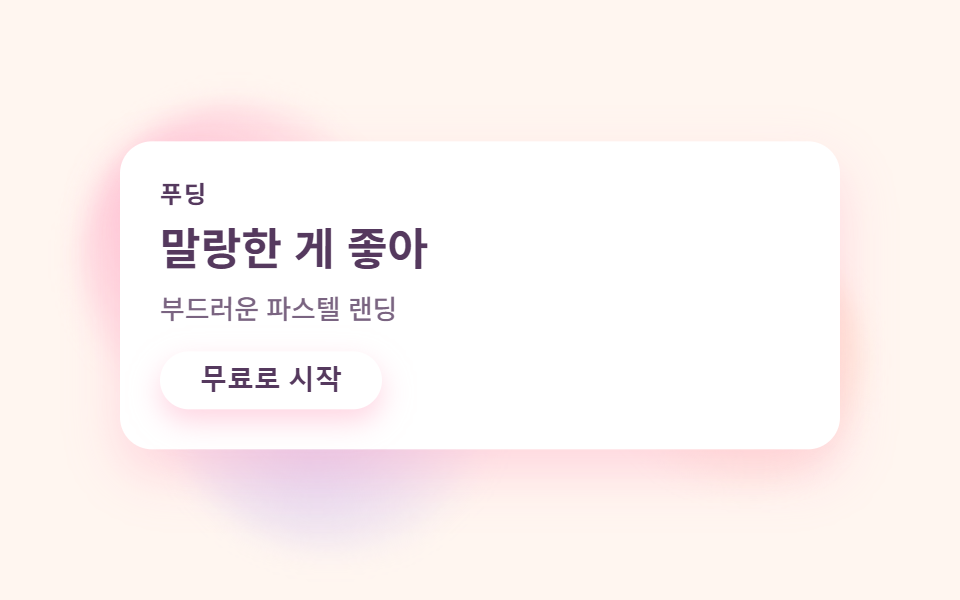 01 hero-candy
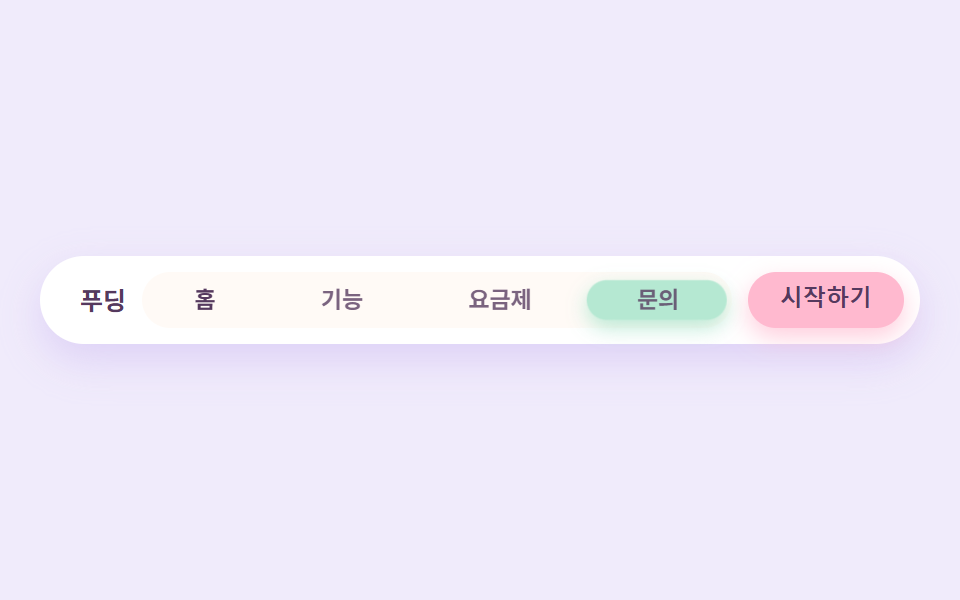 02 nav-candy
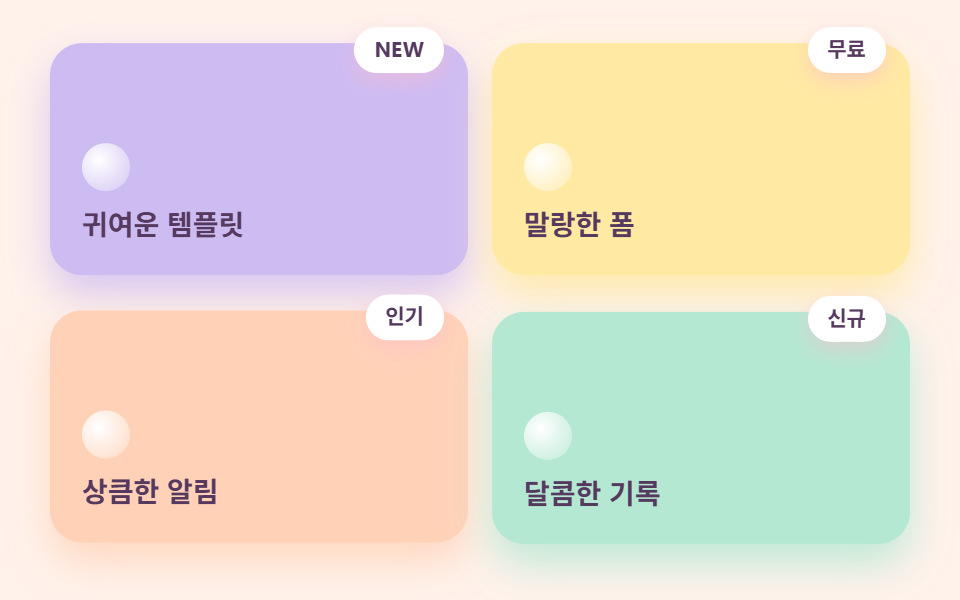 03 card-grid-candy
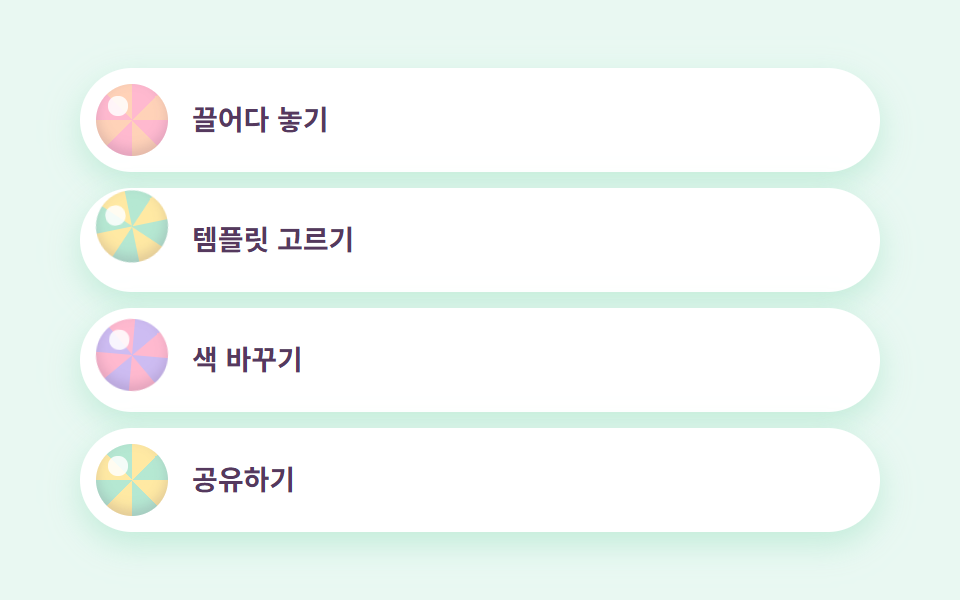 04 feature-list-candy
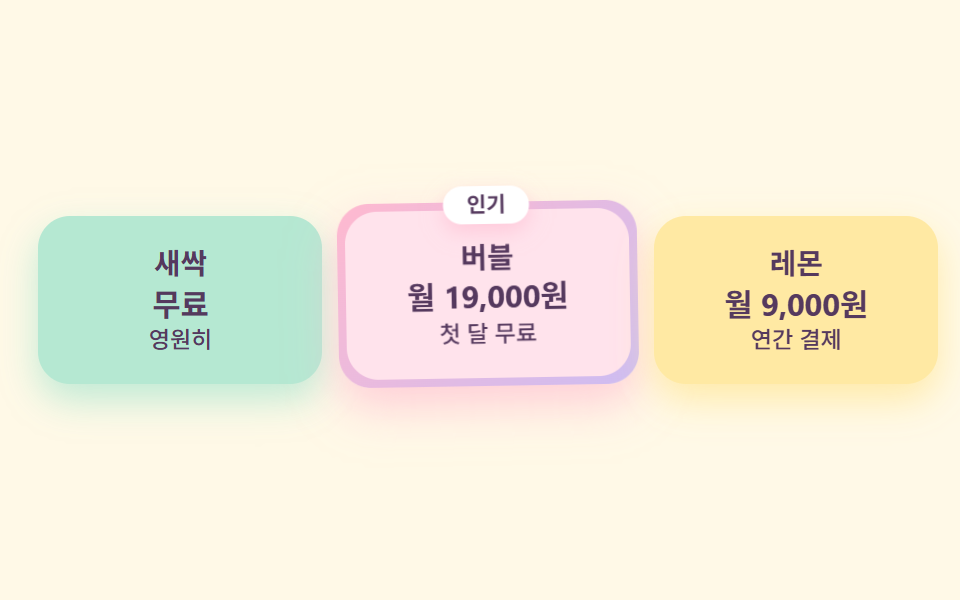 05 pricing-candy
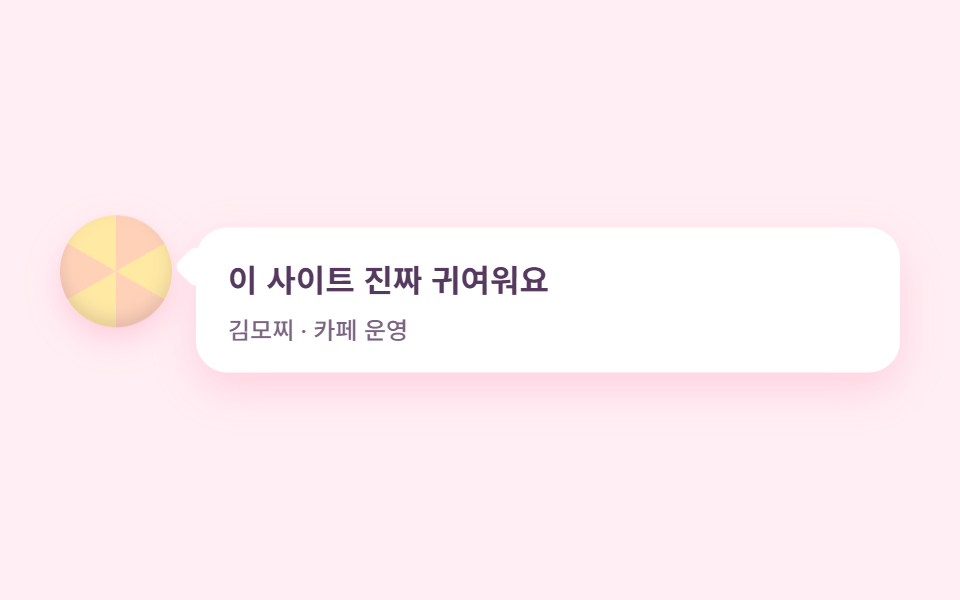 06 testimonial-candy
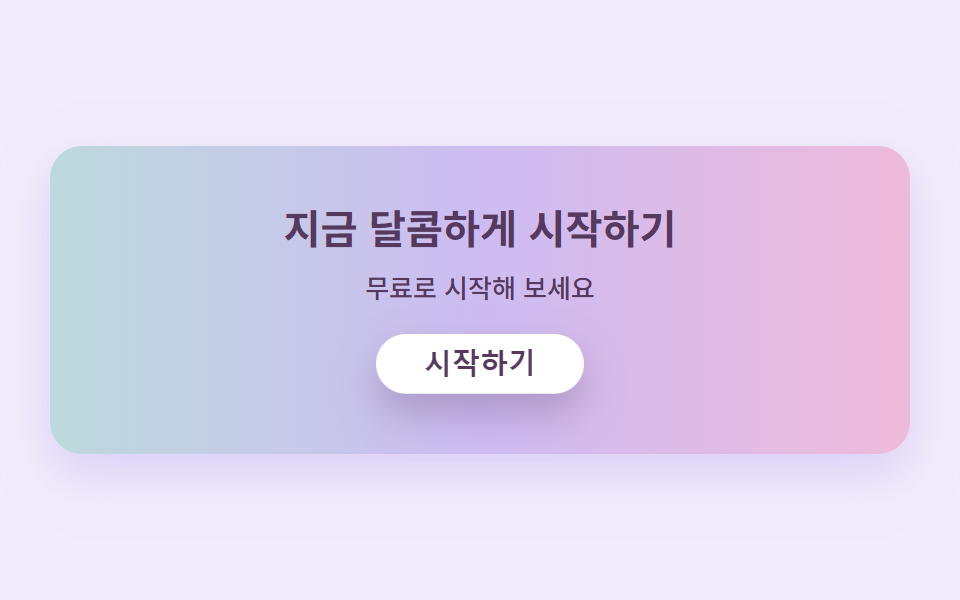 07 cta-band-candy
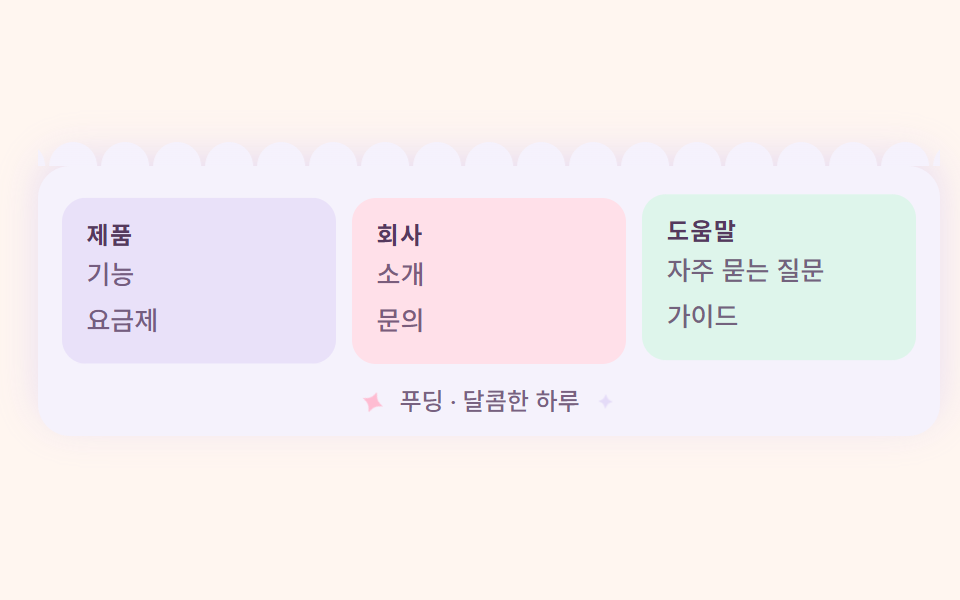 08 footer-candy
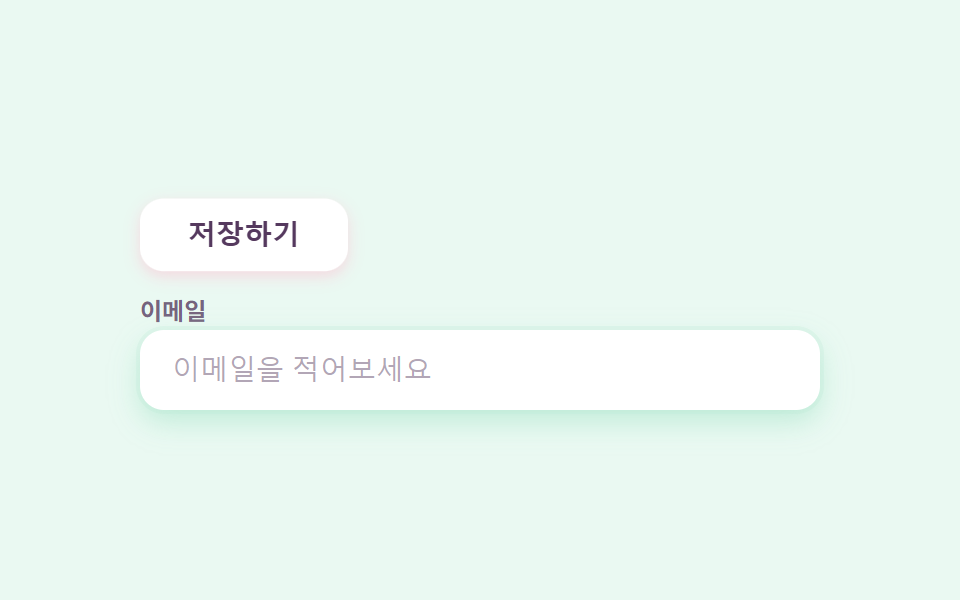 09 buttons-inputs-candy
自動再生 · タイルを押すとその項目へ · すべて1つのzip
- 01 グラデーションミストのヒーロー
- 02 ゼリーインジケーターナビ
- 03 ステッカーバッジのカードグリッド
- 04 キャンディアイコンリスト
- 05 マカロン料金プラン
- 06 吹き出しのレビュー
- 07 キャンディグラデーションCTA帯
- 08 スカラップのフッター
- 09 ふにふにボタン・入力欄
キット全体の色は、パステルカラー 配色パターンとして7色に収まります。文字は常に最下段のベリーインク1色に固定するのが、読めるパステルの条件です。同じdesign柱で、影をグレーではなくインク2枚で沈めた側がニューモーフィズム デザインのLPキット、筆の跡をそのまま残した側が手書き風 デザイン LPキットです。
| 役割 | 色 | 使う場所 |
|---|---|---|
| クリーム | #fff6f0 |
ページの背景全体 |
| バブルガムピンク | #ffb9cf |
主役色 — CTA・バッジ・強調 |
| ピーチ | #ffd2b8 |
カード・アバター |
| レモン | #ffe9a3 |
カード・料金プラン |
| ミント | #b5e8d2 |
ナビのインジケーター・入力欄のリング |
| ラベンダー | #cdbcf2 |
カード・グラデーションの中間色 |
| ベリーインク | #55395e |
すべての文字(コントラスト約5.7〜9:1) |
01グラデーションミストのヒーロー
可愛い サイト デザインとして何が見えるか
クリームの地にピンク・ピーチ・ラベンダーのぼかした円3つが霧のように漂い、手前の白いカードがふわっと浮かびます。
<main class="stage">
  <section class="herocandy">
    <span class="herocandy__mist herocandy__mist--a" aria-hidden="true"></span>
    <span class="herocandy__mist herocandy__mist--b" aria-hidden="true"></span>
    <span class="herocandy__mist herocandy__mist--c" aria-hidden="true"></span>
    <div class="herocandy__card">
      <p class="herocandy__eyebrow">プリン</p>
      <h1 class="herocandy__title">ふわふわがいい</h1>
      <p class="herocandy__desc">やわらかパステルのLP</p>
      <button class="herocandy__cta" type="button">無料で始める</button>
    </div>
  </section>
</main>
@use "../../../../site/static/demo-tokens" as *;
$duration: $dur-loop; // 안개가 한 바퀴 떠도는 주기
$easing: $ease-spring; // 통통하게 떠오르는 곡선
$color: $stage-ink; // 글자 색 기본값(토큰) — 아래 캔디 팔레트의 베리 잉크로 덮는다
// 캔디 팔레트 — 이 편의 역할 색. 값은 tailwind.config.js · tokens.css 와 같다
$candy-cream: #fff6f0; // 크림 바탕
$candy-bubble: #ffb9cf; // 버블검 핑크 — 주인공
$candy-peach: #ffd2b8; // 피치
$candy-lemon: #ffe9a3; // 레몬
$candy-mint: #b5e8d2; // 민트
$candy-lavender: #cdbcf2; // 라벤더
$candy-berry: #55395e; // 베리 잉크 — 글자는 항상 이 색(대비 9:1)
@include stage($candy-cream);
.herocandy {
position: relative;
width: clamp(220px, 76vw, 360px);
}
.herocandy__mist {
position: absolute;
width: clamp(96px, 36vw, 150px);
aspect-ratio: 1;
border-radius: 50%;
pointer-events: none;
filter: blur(6px);
}
.herocandy__mist--a {
top: -22px;
left: -20px;
background: radial-gradient(circle at 35% 35%, rgba($candy-bubble, .95), rgba($candy-bubble, 0) 70%);
animation: mistA $duration $easing infinite;
}
.herocandy__mist--b {
right: -24px;
top: 26%;
background: radial-gradient(circle at 60% 40%, rgba($candy-peach, .95), rgba($candy-peach, 0) 70%);
animation: mistB $duration $easing infinite;
animation-delay: -1s;
}
.herocandy__mist--c {
left: 6%;
bottom: -26px;
background: radial-gradient(circle at 45% 55%, rgba($candy-lavender, .9), rgba($candy-lavender, 0) 70%);
animation: mistA $duration $easing infinite;
animation-delay: -.5s;
}
.herocandy__card {
position: relative;
box-sizing: border-box;
width: 100%;
display: flex;
flex-direction: column;
align-items: flex-start;
gap: $sp-2;
padding: $sp-5;
border-radius: $r-card;
background: $stage-paper;
box-shadow: 0 10px 24px rgba($candy-bubble, .55);
animation: cardBob $duration $easing infinite;
}
.herocandy__eyebrow {
margin: 0;
color: $candy-berry;
font-weight: 700; font-size: clamp(10px, 2.6vw, 12px); line-height: 1;
letter-spacing: .08em;
text-transform: uppercase;
}
.herocandy__title {
margin: 0;
color: $candy-berry;
font-weight: 700; font-size: clamp(18px, 4.6vw, 24px); line-height: 1.2;
}
.herocandy__desc {
margin: 0;
color: rgba($candy-berry, .78);
font-weight: 500; font-size: clamp(12px, 2.8vw, 14px); line-height: 1.4;
}
.herocandy__cta {
margin-top: $sp-1;
border: 0;
border-radius: $r-pill;
background: $stage-paper;
color: $candy-berry;
padding: $sp-2 $sp-5;
font-weight: 700; font-size: clamp(12px, 2.8vw, 14px); line-height: 1;
box-shadow: 0 6px 14px rgba($candy-bubble, .6);
}
.herocandy__cta:focus-visible {
outline: 3px solid $candy-berry;
outline-offset: 2px;
}
// 데모: 안개 세 개가 각자 다른 위상으로 떠다니고, 카드는 살짝 들썩인다 (WAAPI 시계가 잡을 수 있게 keyframes)
@keyframes mistA {
0%, 100% { transform: translate(0, 0) scale(1); }
50% { transform: translate(7%, 9%) scale(1.14); }
}
@keyframes mistB {
0%, 100% { transform: translate(0, 0) scale(1); }
50% { transform: translate(-6%, -7%) scale(.88); }
}
@keyframes cardBob {
0%, 100% { transform: translateY(0); box-shadow: 0 10px 24px rgba($candy-bubble, .55); }
50% { transform: translateY(-7px); box-shadow: 0 16px 30px rgba($candy-bubble, .5); }
}
// 반응형: 320×200 처럼 세로가 짧은 화면에선 안개 번짐과 카드 속을 줄인다(BD9 — 219 크랙 편에서 실측한 방식)
@media (max-width: 340px), (max-height: 220px) {
.herocandy__mist { width: clamp(60px, 22vw, 86px); }
.herocandy__mist--a { top: -8px; left: -8px; }
.herocandy__mist--b { right: -8px; top: 12%; }
.herocandy__mist--c { left: 8%; bottom: -8px; }
.herocandy__card { padding: $sp-3 $sp-4; gap: $sp-1; }
.herocandy__eyebrow { display: none; }
}
@media (prefers-reduced-motion: reduce) {
.herocandy__mist, .herocandy__card { animation: none !important; transform: none; }
}html, body {
margin: 0;
overflow: hidden;
}
.stage {
box-sizing: border-box;
min-height: 100vh;
display: grid;
place-items: center;
margin: 0;
background: #fff6f0;
font-family: -apple-system, "Segoe UI", "Noto Sans KR", sans-serif;
padding: clamp(8px, 4vw, 24px);
}
.herocandy {
position: relative;
width: clamp(220px, 76vw, 360px);
}
.herocandy__mist {
position: absolute;
width: clamp(96px, 36vw, 150px);
aspect-ratio: 1;
border-radius: 50%;
pointer-events: none;
filter: blur(6px);
}
.herocandy__mist--a {
top: -22px;
left: -20px;
background: radial-gradient(circle at 35% 35%, rgba(255, 185, 207, 0.95), rgba(255, 185, 207, 0) 70%);
animation: mistA 2s cubic-bezier(0.2, 0.8, 0.2, 1) infinite;
}
.herocandy__mist--b {
right: -24px;
top: 26%;
background: radial-gradient(circle at 60% 40%, rgba(255, 210, 184, 0.95), rgba(255, 210, 184, 0) 70%);
animation: mistB 2s cubic-bezier(0.2, 0.8, 0.2, 1) infinite;
animation-delay: -1s;
}
.herocandy__mist--c {
left: 6%;
bottom: -26px;
background: radial-gradient(circle at 45% 55%, rgba(205, 188, 242, 0.9), rgba(205, 188, 242, 0) 70%);
animation: mistA 2s cubic-bezier(0.2, 0.8, 0.2, 1) infinite;
animation-delay: -0.5s;
}
.herocandy__card {
position: relative;
box-sizing: border-box;
width: 100%;
display: flex;
flex-direction: column;
align-items: flex-start;
gap: 8px;
padding: 20px;
border-radius: 16px;
background: #ffffff;
box-shadow: 0 10px 24px rgba(255, 185, 207, 0.55);
animation: cardBob 2s cubic-bezier(0.2, 0.8, 0.2, 1) infinite;
}
.herocandy__eyebrow {
margin: 0;
color: #55395e;
font-weight: 700;
font-size: clamp(10px, 2.6vw, 12px);
line-height: 1;
letter-spacing: 0.08em;
text-transform: uppercase;
}
.herocandy__title {
margin: 0;
color: #55395e;
font-weight: 700;
font-size: clamp(18px, 4.6vw, 24px);
line-height: 1.2;
}
.herocandy__desc {
margin: 0;
color: rgba(85, 57, 94, 0.78);
font-weight: 500;
font-size: clamp(12px, 2.8vw, 14px);
line-height: 1.4;
}
.herocandy__cta {
margin-top: 4px;
border: 0;
border-radius: 999px;
background: #ffffff;
color: #55395e;
padding: 8px 20px;
font-weight: 700;
font-size: clamp(12px, 2.8vw, 14px);
line-height: 1;
box-shadow: 0 6px 14px rgba(255, 185, 207, 0.6);
}
.herocandy__cta:focus-visible {
outline: 3px solid #55395e;
outline-offset: 2px;
}
@keyframes mistA {
0%, 100% {
transform: translate(0, 0) scale(1);
}
50% {
transform: translate(7%, 9%) scale(1.14);
}
}
@keyframes mistB {
0%, 100% {
transform: translate(0, 0) scale(1);
}
50% {
transform: translate(-6%, -7%) scale(0.88);
}
}
@keyframes cardBob {
0%, 100% {
transform: translateY(0);
box-shadow: 0 10px 24px rgba(255, 185, 207, 0.55);
}
50% {
transform: translateY(-7px);
box-shadow: 0 16px 30px rgba(255, 185, 207, 0.5);
}
}
@media (max-width: 340px), (max-height: 220px) {
.herocandy__mist {
width: clamp(60px, 22vw, 86px);
}
.herocandy__mist--a {
top: -8px;
left: -8px;
}
.herocandy__mist--b {
right: -8px;
top: 12%;
}
.herocandy__mist--c {
left: 8%;
bottom: -8px;
}
.herocandy__card {
padding: 12px 16px;
gap: 4px;
}
.herocandy__eyebrow {
display: none;
}
}
@media (prefers-reduced-motion: reduce) {
.herocandy__mist, .herocandy__card {
animation: none !important;
transform: none;
}
}import type { CSSProperties } from "react";
import styles from "./HeroCandy.module.scss";
export type HeroCandyProps = {
eyebrow?: string;
title?: string;
desc?: string;
cta?: string;
/** 한 주기(기본 2000ms) */
duration?: number;
easing?: string;
color?: string;
};
type Vars = CSSProperties & { "--duration"?: string; "--easing"?: string; "--color"?: string };
export default function HeroCandy({
eyebrow = "푸딩",
title = "말랑한 게 좋아",
desc = "부드러운 파스텔 랜딩",
cta = "무료로 시작",
duration = 2000,
easing = "cubic-bezier(.2,.8,.2,1)",
color = "#ffb9cf",
}: HeroCandyProps) {
const vars: Vars = { "--duration": `${duration}ms`, "--easing": easing, "--color": color };
return (
<section className={styles.herocandy} style={vars}>
<span className={`${styles.mist} ${styles.mistA}`} aria-hidden="true" />
<span className={`${styles.mist} ${styles.mistB}`} aria-hidden="true" />
<span className={`${styles.mist} ${styles.mistC}`} aria-hidden="true" />
<div className={styles.card}>
<p className={styles.eyebrow}>{eyebrow}</p>
<h1 className={styles.title}>{title}</h1>
<p className={styles.desc}>{desc}</p>
<button type="button" className={styles.cta}>{cta}</button>
</div>
</section>
);
}01 · グラデーションミストのヒーロー — 計測 累積面積 10.269% · 動いたフレーム 12/23GODRICH オリジナル · SCSS と React は zip に同梱 · パスワードを見る
コードのどこを見るか
カードの影がグレーではなくピンクであることが、このスタイルの最初の合図です。
<div class="relative mx-auto max-w-xl flex flex-col items-start gap-4
            rounded-candy bg-white p-10 shadow-candy-pink">
  <p class="text-xs font-bold uppercase tracking-widest text-berry/70">Pudding</p>
  <h1 class="text-4xl font-bold">ふわふわがいい</h1>
  <button class="rounded-pill bg-white px-6 py-3 text-sm font-bold
                 shadow-candy-berry">無料で始める</button>
</div>
02ゼリーインジケーターナビ
画面で起きること
アクティブなタブを示すミント色の pill が隣へ移るときに少し伸び、到着するとぷにっと縮みます。
<main class="stage">
  <nav class="navcandy" aria-label="メインメニュー">
    <span class="navcandy__brand">プリン</span>
    <div class="navcandy__track">
      <span class="navcandy__pill" aria-hidden="true"></span>
      <span class="navcandy__tab navcandy__tab--on">ホーム</span>
      <span class="navcandy__tab">機能</span>
      <span class="navcandy__tab">料金プラン</span>
      <span class="navcandy__tab">お問い合わせ</span>
    </div>
    <button class="navcandy__cta" type="button">はじめる</button>
  </nav>
</main>
@use "../../../../site/static/demo-tokens" as *;
$duration: $dur-loop; // 알약이 네 칸을 한 바퀴 도는 주기
$easing: $ease-spring; // 도착할 때 통통하게 줄어드는 곡선
$color: $stage-ink; // 글자 기본(토큰) — 아래 베리 잉크로 덮는다
// 캔디 팔레트 — 값은 tailwind.config.js · tokens.css 와 같다
$candy-cream: #fff6f0;
$candy-bubble: #ffb9cf;
$candy-lavender: #cdbcf2;
$candy-mint: #b5e8d2;
$candy-berry: #55395e;
// 무대 — 라벤더 물색
@include stage(mix($candy-lavender, $stage-paper, 30%));
.navcandy {
box-sizing: border-box;
width: clamp(280px, 92vw, 440px);
display: flex;
align-items: center;
gap: $sp-2;
padding: $sp-2;
border-radius: $r-pill;
background: $stage-paper;
box-shadow: 0 8px 20px rgba($candy-lavender, .55);
}
.navcandy__brand {
flex: 0 0 auto;
padding-left: $sp-3;
color: $candy-berry;
font-weight: 700; font-size: clamp(11px, 2.6vw, 13px); line-height: 1;
}
.navcandy__track {
position: relative;
flex: 1 1 auto;
min-width: 0;
display: flex;
border-radius: $r-pill;
background: mix($candy-cream, $stage-paper, 60%);
}
.navcandy__pill {
position: absolute;
top: $sp-1;
bottom: $sp-1;
left: $sp-1;
width: calc(25% - $sp-1);
box-sizing: border-box;
border-radius: $r-pill;
background: $candy-mint;
box-shadow: 0 4px 10px rgba($candy-mint, .9);
// 네 칸을 순서대로 옮겨 다니며 도착할 때마다 젤리처럼 세로로 살짝 눌린다
animation: pillWalk $duration $easing infinite;
}
.navcandy__tab {
position: relative;
z-index: 1;
flex: 1 1 auto;
min-width: 0;
padding: $sp-2 0;
text-align: center;
color: rgba($candy-berry, .78);
font-weight: 600; font-size: clamp(10px, 2.4vw, 12px); line-height: 1;
white-space: nowrap;
overflow: hidden;
text-overflow: ellipsis;
}
.navcandy__tab--on {
color: $candy-berry;
font-weight: 700;
}
.navcandy__cta {
flex: 0 0 auto;
border: 0;
border-radius: $r-pill;
background: $candy-bubble;
color: $candy-berry;
padding: $sp-2 $sp-4;
font-weight: 700; font-size: clamp(10px, 2.4vw, 12px); line-height: 1;
box-shadow: 0 5px 12px rgba($candy-bubble, .7);
}
.navcandy__cta:focus-visible {
outline: 3px solid $candy-berry;
outline-offset: 2px;
}
// 데모: 칸 폭은 25% — translateX(100%) 가 정확히 한 칸. 도착 순간 scaleY 로 눌렸다 펴진다
// 데모: % 이동은 이 요소 자기 폭 기준 — 폭이 calc(25% - 4px) 라 한 칸(트랙의 25%)보다 4px 모자라
// 이동량을 calc(100% + 4px) 씩 보정한다(보정 없으면 세 칸을 지나며 12px 밀린다 — 실측)
@keyframes pillWalk {
0%, 24% { transform: translateX(0) scaleY(1); }
30% { transform: translateX(0) scaleY(.82); }
36%, 49% { transform: translateX(calc(100% + 4px)) scaleY(1); }
55% { transform: translateX(calc(100% + 4px)) scaleY(.82); }
61%, 74% { transform: translateX(calc(200% + 8px)) scaleY(1); }
80% { transform: translateX(calc(200% + 8px)) scaleY(.82); }
86%, 100% { transform: translateX(calc(300% + 12px)) scaleY(1); }
}
@media (prefers-reduced-motion: reduce) {
.navcandy__pill { animation: none !important; transform: none; }
}html, body {
margin: 0;
overflow: hidden;
}
.stage {
box-sizing: border-box;
min-height: 100vh;
display: grid;
place-items: center;
margin: 0;
background: rgb(94.1176470588%, 92.1176470588%, 98.4705882353%);
font-family: -apple-system, "Segoe UI", "Noto Sans KR", sans-serif;
padding: clamp(8px, 4vw, 24px);
}
.navcandy {
box-sizing: border-box;
width: clamp(280px, 92vw, 440px);
display: flex;
align-items: center;
gap: 8px;
padding: 8px;
border-radius: 999px;
background: #ffffff;
box-shadow: 0 8px 20px rgba(205, 188, 242, 0.55);
}
.navcandy__brand {
flex: 0 0 auto;
padding-left: 12px;
color: #55395e;
font-weight: 700;
font-size: clamp(11px, 2.6vw, 13px);
line-height: 1;
}
.navcandy__track {
position: relative;
flex: 1 1 auto;
min-width: 0;
display: flex;
border-radius: 999px;
background: rgb(100%, 97.8823529412%, 96.4705882353%);
}
.navcandy__pill {
position: absolute;
top: 4px;
bottom: 4px;
left: 4px;
width: calc(25% - 4px);
box-sizing: border-box;
border-radius: 999px;
background: #b5e8d2;
box-shadow: 0 4px 10px rgba(181, 232, 210, 0.9);
animation: pillWalk 2s cubic-bezier(0.2, 0.8, 0.2, 1) infinite;
}
.navcandy__tab {
position: relative;
z-index: 1;
flex: 1 1 auto;
min-width: 0;
padding: 8px 0;
text-align: center;
color: rgba(85, 57, 94, 0.78);
font-weight: 600;
font-size: clamp(10px, 2.4vw, 12px);
line-height: 1;
white-space: nowrap;
overflow: hidden;
text-overflow: ellipsis;
}
.navcandy__tab--on {
color: #55395e;
font-weight: 700;
}
.navcandy__cta {
flex: 0 0 auto;
border: 0;
border-radius: 999px;
background: #ffb9cf;
color: #55395e;
padding: 8px 16px;
font-weight: 700;
font-size: clamp(10px, 2.4vw, 12px);
line-height: 1;
box-shadow: 0 5px 12px rgba(255, 185, 207, 0.7);
}
.navcandy__cta:focus-visible {
outline: 3px solid #55395e;
outline-offset: 2px;
}
@keyframes pillWalk {
0%, 24% {
transform: translateX(0) scaleY(1);
}
30% {
transform: translateX(0) scaleY(0.82);
}
36%, 49% {
transform: translateX(calc(100% + 4px)) scaleY(1);
}
55% {
transform: translateX(calc(100% + 4px)) scaleY(0.82);
}
61%, 74% {
transform: translateX(calc(200% + 8px)) scaleY(1);
}
80% {
transform: translateX(calc(200% + 8px)) scaleY(0.82);
}
86%, 100% {
transform: translateX(calc(300% + 12px)) scaleY(1);
}
}
@media (prefers-reduced-motion: reduce) {
.navcandy__pill {
animation: none !important;
transform: none;
}
}import type { CSSProperties } from "react";
import styles from "./NavCandy.module.scss";
export type NavCandyProps = {
brand?: string;
tabs?: string[];
cta?: string;
/** 한 주기(기본 2000ms) */
duration?: number;
easing?: string;
color?: string;
};
type Vars = CSSProperties & { "--duration"?: string; "--easing"?: string; "--color"?: string };
export default function NavCandy({
brand = "푸딩",
tabs = ["홈", "기능", "요금제", "문의"],
cta = "시작하기",
duration = 2000,
easing = "cubic-bezier(.2,.8,.2,1)",
color = "#b5e8d2",
}: NavCandyProps) {
const vars: Vars = { "--duration": `${duration}ms`, "--easing": easing, "--color": color };
return (
<nav className={styles.navcandy} aria-label="주요 메뉴" style={vars}>
<span className={styles.brand}>{brand}</span>
<div className={styles.track}>
<span className={styles.pill} aria-hidden="true" />
{tabs.map((t, i) => (
<span key={t} className={`${styles.tab} ${i === 0 ? styles.tabOn : ""}`}>{t}</span>
))}
</div>
<button type="button" className={styles.cta}>{cta}</button>
</nav>
);
}02 · ゼリーインジケーターナビ — 計測 累積面積 5.476% · 動いたフレーム 12/23GODRICH オリジナル · SCSS と React は zip に同梱 · パスワードを見る
コードの読み方
ゼリーをつまんだときのあの弾力を scaleY 1行で作れます。
<div class="relative flex flex-1 rounded-pill bg-cream/60 p-1">
  <span class="absolute inset-y-1 left-1 w-1/4 rounded-pill bg-mint
               shadow-candy-mint"></span>
  <span class="relative z-10 flex-1 text-center text-xs font-semibold py-2">ホーム</span>
</div>
03ステッカーバッジのカードグリッド
どんな動きか
カードごとにラベンダー・レモン・ピーチ・ミントそれぞれのパステル地に同系色の影を重ね、隅には破線枠のステッカーバッジを付けます。
<main class="stage">
  <div class="gridcandy">
    <div class="gridcandy__card gridcandy__card--lav">
      <span class="gridcandy__badge">NEW</span>
      <span class="gridcandy__dot" aria-hidden="true"></span>
      <p class="gridcandy__name">かわいいテンプレート</p>
    </div>
    <div class="gridcandy__card gridcandy__card--lem">
      <span class="gridcandy__badge">無料</span>
      <span class="gridcandy__dot" aria-hidden="true"></span>
      <p class="gridcandy__name">ふにふにフォーム</p>
    </div>
    <div class="gridcandy__card gridcandy__card--pea">
      <span class="gridcandy__badge">人気</span>
      <span class="gridcandy__dot" aria-hidden="true"></span>
      <p class="gridcandy__name">さわやか通知</p>
    </div>
    <div class="gridcandy__card gridcandy__card--min">
      <span class="gridcandy__badge">新着</span>
      <span class="gridcandy__dot" aria-hidden="true"></span>
      <p class="gridcandy__name">甘い記録</p>
    </div>
  </div>
</main>
@use "../../../../site/static/demo-tokens" as *;
$duration: $dur-loop; // 카드 네 장이 한 바퀴 들썩이는 주기
$easing: $ease-spring;
$color: $stage-ink; // 글자 기본(토큰) — 베리 잉크로 덮는다
// 캔디 팔레트 — 값은 tailwind.config.js · tokens.css 와 같다
$candy-cream: #fff6f0;
$candy-bubble: #ffb9cf;
$candy-peach: #ffd2b8;
$candy-lemon: #ffe9a3;
$candy-mint: #b5e8d2;
$candy-lavender: #cdbcf2;
$candy-berry: #55395e;
// 무대 — 피치 물색
@include stage(mix($candy-peach, $stage-paper, 28%));
.gridcandy {
box-sizing: border-box;
width: clamp(280px, 92vw, 430px);
display: grid;
grid-template-columns: repeat(auto-fit, minmax(clamp(120px, 40vw, 160px), 1fr));
gap: $sp-3;
}
.gridcandy__card {
position: relative;
box-sizing: border-box;
min-height: clamp(92px, 26vw, 116px);
display: flex;
flex-direction: column;
justify-content: flex-end;
gap: $sp-2;
padding: $sp-4;
border-radius: $r-card;
animation: cardWave $duration $easing infinite;
}
.gridcandy__card--lav {
background: $candy-lavender;
box-shadow: 0 10px 20px rgba($candy-lavender, .8);
}
.gridcandy__card--lem {
background: $candy-lemon;
box-shadow: 0 10px 20px rgba($candy-lemon, .85);
animation-delay: calc($duration / -4);
}
.gridcandy__card--pea {
background: $candy-peach;
box-shadow: 0 10px 20px rgba($candy-peach, .85);
animation-delay: calc($duration / -2);
}
.gridcandy__card--min {
background: $candy-mint;
box-shadow: 0 10px 20px rgba($candy-mint, .85);
animation-delay: calc($duration / -4 * 3);
}
.gridcandy__badge {
position: absolute;
top: calc($sp-2 * -1);
right: $sp-3;
padding: $sp-1 $sp-2;
border: 2px dashed $stage-paper;
border-radius: $r-pill;
background: $stage-paper;
color: $candy-berry;
font-weight: 700; font-size: clamp(9px, 2.2vw, 11px); line-height: 1;
box-shadow: 0 4px 10px rgba($candy-bubble, .5);
}
.gridcandy__dot {
width: $sp-6;
aspect-ratio: 1;
border-radius: 50%;
background: radial-gradient(circle at 35% 35%, $stage-paper, rgba($stage-paper, .35) 75%);
}
.gridcandy__name {
margin: 0;
color: $candy-berry;
font-weight: 700; font-size: clamp(12px, 3vw, 14px); line-height: 1.3;
}
// 데모: 네 카드가 시작 시각을 1/4 주기씩 어긋내 순서대로 들썩인다
@keyframes cardWave {
0%, 100% { transform: translateY(0); }
30% { transform: translateY(-8px); }
}
// 반응형: 320×200 처럼 세로가 짧은 화면에선 카드 속을 줄인다(BD9)
@media (max-width: 340px), (max-height: 220px) {
.gridcandy { gap: $sp-2; }
.gridcandy__card { min-height: 64px; padding: $sp-2 $sp-3; gap: $sp-1; }
.gridcandy__badge { display: none; }
.gridcandy__dot { width: $sp-4; }
.gridcandy__name { font-size: 11px; }
}
@media (prefers-reduced-motion: reduce) {
.gridcandy__card { animation: none !important; transform: none; }
}html, body {
margin: 0;
overflow: hidden;
}
.stage {
box-sizing: border-box;
min-height: 100vh;
display: grid;
place-items: center;
margin: 0;
background: rgb(100%, 95.0588235294%, 92.2039215686%);
font-family: -apple-system, "Segoe UI", "Noto Sans KR", sans-serif;
padding: clamp(8px, 4vw, 24px);
}
.gridcandy {
box-sizing: border-box;
width: clamp(280px, 92vw, 430px);
display: grid;
grid-template-columns: repeat(auto-fit, minmax(clamp(120px, 40vw, 160px), 1fr));
gap: 12px;
}
.gridcandy__card {
position: relative;
box-sizing: border-box;
min-height: clamp(92px, 26vw, 116px);
display: flex;
flex-direction: column;
justify-content: flex-end;
gap: 8px;
padding: 16px;
border-radius: 16px;
animation: cardWave 2s cubic-bezier(0.2, 0.8, 0.2, 1) infinite;
}
.gridcandy__card--lav {
background: #cdbcf2;
box-shadow: 0 10px 20px rgba(205, 188, 242, 0.8);
}
.gridcandy__card--lem {
background: #ffe9a3;
box-shadow: 0 10px 20px rgba(255, 233, 163, 0.85);
animation-delay: -0.5s;
}
.gridcandy__card--pea {
background: #ffd2b8;
box-shadow: 0 10px 20px rgba(255, 210, 184, 0.85);
animation-delay: -1s;
}
.gridcandy__card--min {
background: #b5e8d2;
box-shadow: 0 10px 20px rgba(181, 232, 210, 0.85);
animation-delay: -1.5s;
}
.gridcandy__badge {
position: absolute;
top: -8px;
right: 12px;
padding: 4px 8px;
border: 2px dashed #ffffff;
border-radius: 999px;
background: #ffffff;
color: #55395e;
font-weight: 700;
font-size: clamp(9px, 2.2vw, 11px);
line-height: 1;
box-shadow: 0 4px 10px rgba(255, 185, 207, 0.5);
}
.gridcandy__dot {
width: 24px;
aspect-ratio: 1;
border-radius: 50%;
background: radial-gradient(circle at 35% 35%, #ffffff, rgba(255, 255, 255, 0.35) 75%);
}
.gridcandy__name {
margin: 0;
color: #55395e;
font-weight: 700;
font-size: clamp(12px, 3vw, 14px);
line-height: 1.3;
}
@keyframes cardWave {
0%, 100% {
transform: translateY(0);
}
30% {
transform: translateY(-8px);
}
}
@media (max-width: 340px), (max-height: 220px) {
.gridcandy {
gap: 8px;
}
.gridcandy__card {
min-height: 64px;
padding: 8px 12px;
gap: 4px;
}
.gridcandy__badge {
display: none;
}
.gridcandy__dot {
width: 16px;
}
.gridcandy__name {
font-size: 11px;
}
}
@media (prefers-reduced-motion: reduce) {
.gridcandy__card {
animation: none !important;
transform: none;
}
}import type { CSSProperties } from "react";
import styles from "./CardGridCandy.module.scss";
export type CardGridCandyProps = {
cards?: { name: string; badge: string }[];
/** 한 주기(기본 2000ms) */
duration?: number;
easing?: string;
color?: string;
};
type Vars = CSSProperties & { "--duration"?: string; "--easing"?: string; "--color"?: string };
const TONE = ["lav", "lem", "pea", "min"] as const;
export default function CardGridCandy({
cards = [
{ name: "귀여운 템플릿", badge: "NEW" },
{ name: "말랑한 폼", badge: "무료" },
{ name: "상큼한 알림", badge: "인기" },
{ name: "달콤한 기록", badge: "신규" },
],
duration = 2000,
easing = "cubic-bezier(.2,.8,.2,1)",
color = "#ffb9cf",
}: CardGridCandyProps) {
const vars: Vars = { "--duration": `${duration}ms`, "--easing": easing, "--color": color };
return (
<div className={styles.gridcandy} style={vars}>
{cards.map((c, i) => (
<div key={c.name} className={`${styles.card} ${styles[TONE[i % 4]]}`}>
<span className={styles.badge}>{c.badge}</span>
<span className={styles.dot} aria-hidden="true" />
<p className={styles.name}>{c.name}</p>
</div>
))}
</div>
);
}03 · ステッカーバッジのカードグリッド — 計測 累積面積 18.565% · 動いたフレーム 23/23GODRICH オリジナル · SCSS と React は zip に同梱 · パスワードを見る
どこを変えるか
4枚のカードが開始時刻をずらして順番にふわふわ動きます。
<div class="relative flex min-h-32 flex-col justify-end gap-2
            rounded-candy bg-lavender p-5 shadow-candy-lavender">
  <span class="absolute -top-2 right-4 rounded-pill border-2 border-dashed
               border-white bg-white px-3 py-1 text-[11px] font-bold
               shadow-candy-pink">NEW</span>
  <p class="text-sm font-bold">かわいいテンプレート</p>
</div>
04キャンディアイコンリスト
何が見えるか
各行は白い pill カードで、中の丸いアイコンは repeating-conic-gradient 1つで描いたハードキャンディの模様です。
<main class="stage">
  <ul class="listcandy">
    <li class="listcandy__row">
      <span class="listcandy__candy listcandy__candy--a" aria-hidden="true"></span>
      <span class="listcandy__label">ドラッグ&ドロップ</span>
    </li>
    <li class="listcandy__row">
      <span class="listcandy__candy listcandy__candy--b" aria-hidden="true"></span>
      <span class="listcandy__label">テンプレートを選ぶ</span>
    </li>
    <li class="listcandy__row">
      <span class="listcandy__candy listcandy__candy--c" aria-hidden="true"></span>
      <span class="listcandy__label">色を変える</span>
    </li>
    <li class="listcandy__row">
      <span class="listcandy__candy listcandy__candy--d" aria-hidden="true"></span>
      <span class="listcandy__label">共有する</span>
    </li>
  </ul>
</main>
@use "../../../../site/static/demo-tokens" as *;
$duration: $dur-loop; // 사탕이 한 번 튀고 쉬는 주기
$easing: $ease-pop; // 튀어 오르는 감
$color: $stage-ink; // 글자 기본(토큰) — 베리 잉크로 덮는다
// 캔디 팔레트 — 값은 tailwind.config.js · tokens.css 와 같다
$candy-cream: #fff6f0;
$candy-bubble: #ffb9cf;
$candy-peach: #ffd2b8;
$candy-lemon: #ffe9a3;
$candy-mint: #b5e8d2;
$candy-lavender: #cdbcf2;
$candy-berry: #55395e;
// 무대 — 민트 물색
@include stage(mix($candy-mint, $stage-paper, 30%));
.listcandy {
box-sizing: border-box;
width: clamp(260px, 88vw, 400px);
margin: 0;
padding: 0;
list-style: none;
display: flex;
flex-direction: column;
gap: $sp-2;
}
.listcandy__row {
display: flex;
align-items: center;
gap: $sp-3;
padding: $sp-2 $sp-4 $sp-2 $sp-2;
border-radius: $r-pill;
background: $stage-paper;
box-shadow: 0 6px 16px rgba($candy-mint, .75);
}
// 단단한 사탕 무늬 — conic gradient 를 원으로 잘라 쓰고 하이라이트 점을 얹는다
.listcandy__candy {
flex: 0 0 auto;
width: clamp(28px, 8vw, 36px);
aspect-ratio: 1;
border-radius: 50%;
position: relative;
box-shadow: inset 0 -3px 6px rgba($candy-berry, .18);
}
.listcandy__candy::after {
content: "";
position: absolute;
top: 18%;
left: 18%;
width: 26%;
aspect-ratio: 1;
border-radius: 50%;
background: rgba($stage-paper, .85);
}
.listcandy__candy--a {
background: repeating-conic-gradient($candy-bubble 0deg 45deg, $candy-peach 45deg 90deg);
animation: candyBounce $duration $easing infinite;
}
.listcandy__candy--b {
background: repeating-conic-gradient($candy-mint 0deg 45deg, $candy-lemon 45deg 90deg);
animation: candyBounce $duration $easing infinite;
animation-delay: calc($duration / -4);
}
.listcandy__candy--c {
background: repeating-conic-gradient($candy-lavender 0deg 45deg, $candy-bubble 45deg 90deg);
animation: candyBounce $duration $easing infinite;
animation-delay: calc($duration / -2);
}
.listcandy__candy--d {
background: repeating-conic-gradient($candy-lemon 0deg 45deg, $candy-mint 45deg 90deg);
animation: candyBounce $duration $easing infinite;
animation-delay: calc($duration / -4 * 3);
}
.listcandy__label {
color: $candy-berry;
font-weight: 600; font-size: clamp(12px, 3vw, 14px); line-height: 1;
}
// 데모: 사탕 네 개가 시작 시각을 어긋내 각자 다른 박자로 통통 튄다
@keyframes candyBounce {
0%, 40%, 100% { transform: translateY(0) rotate(0deg); }
15% { transform: translateY(-7px) rotate(-12deg); }
28% { transform: translateY(0) rotate(0deg); }
34% { transform: translateY(-3px) rotate(6deg); }
}
// 반응형: 320×200 처럼 세로가 짧은 화면에선 행 속을 줄인다(BD9)
@media (max-width: 340px), (max-height: 220px) {
.listcandy { gap: $sp-1; }
.listcandy__row { padding: $sp-1 $sp-3 $sp-1 $sp-1; gap: $sp-2; }
.listcandy__candy { width: 20px; }
.listcandy__label { font-size: 11px; }
}
@media (prefers-reduced-motion: reduce) {
.listcandy__candy { animation: none !important; transform: none; }
}html, body {
margin: 0;
overflow: hidden;
}
.stage {
box-sizing: border-box;
min-height: 100vh;
display: grid;
place-items: center;
margin: 0;
background: rgb(91.2941176471%, 97.2941176471%, 94.7058823529%);
font-family: -apple-system, "Segoe UI", "Noto Sans KR", sans-serif;
padding: clamp(8px, 4vw, 24px);
}
.listcandy {
box-sizing: border-box;
width: clamp(260px, 88vw, 400px);
margin: 0;
padding: 0;
list-style: none;
display: flex;
flex-direction: column;
gap: 8px;
}
.listcandy__row {
display: flex;
align-items: center;
gap: 12px;
padding: 8px 16px 8px 8px;
border-radius: 999px;
background: #ffffff;
box-shadow: 0 6px 16px rgba(181, 232, 210, 0.75);
}
.listcandy__candy {
flex: 0 0 auto;
width: clamp(28px, 8vw, 36px);
aspect-ratio: 1;
border-radius: 50%;
position: relative;
box-shadow: inset 0 -3px 6px rgba(85, 57, 94, 0.18);
}
.listcandy__candy::after {
content: "";
position: absolute;
top: 18%;
left: 18%;
width: 26%;
aspect-ratio: 1;
border-radius: 50%;
background: rgba(255, 255, 255, 0.85);
}
.listcandy__candy--a {
background: repeating-conic-gradient(#ffb9cf 0deg 45deg, #ffd2b8 45deg 90deg);
animation: candyBounce 2s cubic-bezier(0.2, 1.4, 0.4, 1) infinite;
}
.listcandy__candy--b {
background: repeating-conic-gradient(#b5e8d2 0deg 45deg, #ffe9a3 45deg 90deg);
animation: candyBounce 2s cubic-bezier(0.2, 1.4, 0.4, 1) infinite;
animation-delay: -0.5s;
}
.listcandy__candy--c {
background: repeating-conic-gradient(#cdbcf2 0deg 45deg, #ffb9cf 45deg 90deg);
animation: candyBounce 2s cubic-bezier(0.2, 1.4, 0.4, 1) infinite;
animation-delay: -1s;
}
.listcandy__candy--d {
background: repeating-conic-gradient(#ffe9a3 0deg 45deg, #b5e8d2 45deg 90deg);
animation: candyBounce 2s cubic-bezier(0.2, 1.4, 0.4, 1) infinite;
animation-delay: -1.5s;
}
.listcandy__label {
color: #55395e;
font-weight: 600;
font-size: clamp(12px, 3vw, 14px);
line-height: 1;
}
@keyframes candyBounce {
0%, 40%, 100% {
transform: translateY(0) rotate(0deg);
}
15% {
transform: translateY(-7px) rotate(-12deg);
}
28% {
transform: translateY(0) rotate(0deg);
}
34% {
transform: translateY(-3px) rotate(6deg);
}
}
@media (max-width: 340px), (max-height: 220px) {
.listcandy {
gap: 4px;
}
.listcandy__row {
padding: 4px 12px 4px 4px;
gap: 8px;
}
.listcandy__candy {
width: 20px;
}
.listcandy__label {
font-size: 11px;
}
}
@media (prefers-reduced-motion: reduce) {
.listcandy__candy {
animation: none !important;
transform: none;
}
}import type { CSSProperties } from "react";
import styles from "./FeatureListCandy.module.scss";
export type FeatureListCandyProps = {
items?: string[];
/** 한 주기(기본 2000ms) */
duration?: number;
easing?: string;
color?: string;
};
type Vars = CSSProperties & { "--duration"?: string; "--easing"?: string; "--color"?: string };
const CANDY = ["a", "b", "c", "d"] as const;
export default function FeatureListCandy({
items = ["끌어다 놓기", "템플릿 고르기", "색 바꾸기", "공유하기"],
duration = 2000,
easing = "cubic-bezier(.2,1.4,.4,1)",
color = "#ffb9cf",
}: FeatureListCandyProps) {
const vars: Vars = { "--duration": `${duration}ms`, "--easing": easing, "--color": color };
return (
<ul className={styles.listcandy} style={vars}>
{items.map((label, i) => (
<li key={label} className={styles.row}>
<span className={`${styles.candy} ${styles[CANDY[i % 4]]}`} aria-hidden="true" />
<span className={styles.label}>{label}</span>
</li>
))}
</ul>
);
}04 · キャンディアイコンリスト — 計測 累積面積 3.528% · 動いたフレーム 23/23GODRICH オリジナル · SCSS と React は zip に同梱 · パスワードを見る
コードのどこを見るか
開始時刻をずらすとキャンディがそれぞれのリズムで弾みます。
<li class="flex items-center gap-3 rounded-pill bg-white p-2 pr-5
           shadow-candy-mint">
  <span class="h-9 w-9 shrink-0 rounded-full shadow-inner"
        style="background:repeating-conic-gradient(#ffb9cf 0deg 45deg,
               #ffd2b8 45deg 90deg)"></span>
  <span class="text-sm font-semibold">ドラッグ&ドロップ</span>
</li>
05マカロン料金プラン
画面で起きること
3つのプランをミント・バブルガムピンク・レモンのマカロンのように並べ、おすすめだけにグラデーションの枠とバッジを付けて少し大きくぷるぷるさせます。
<main class="stage">
  <div class="pricecandy">
    <div class="pricecandy__plan pricecandy__plan--mint">
      <p class="pricecandy__name">スプラウト</p>
      <p class="pricecandy__price">無料</p>
      <p class="pricecandy__per">ずっと無料</p>
    </div>
    <div class="pricecandy__plan pricecandy__plan--pick">
      <span class="pricecandy__badge">人気</span>
      <div class="pricecandy__inner">
        <p class="pricecandy__name">バブル</p>
        <p class="pricecandy__price">月19,000ウォン</p>
        <p class="pricecandy__per">初月無料</p>
      </div>
    </div>
    <div class="pricecandy__plan pricecandy__plan--lemon">
      <p class="pricecandy__name">レモン</p>
      <p class="pricecandy__price">月9,000ウォン</p>
      <p class="pricecandy__per">年間払い</p>
    </div>
  </div>
</main>
@use "../../../../site/static/demo-tokens" as *;
$duration: $dur-loop; // 추천 플랜이 한 번 통통거리는 주기
$easing: $ease-spring;
$color: $stage-ink; // 글자 기본(토큰) — 베리 잉크로 덮는다
// 캔디 팔레트 — 값은 tailwind.config.js · tokens.css 와 같다
$candy-cream: #fff6f0;
$candy-bubble: #ffb9cf;
$candy-lemon: #ffe9a3;
$candy-mint: #b5e8d2;
$candy-lavender: #cdbcf2;
$candy-berry: #55395e;
// 무대 — 레몬 물색
@include stage(mix($candy-lemon, $stage-paper, 26%));
.pricecandy {
box-sizing: border-box;
width: clamp(280px, 94vw, 450px);
display: flex;
align-items: center;
gap: $sp-2;
}
.pricecandy__plan {
position: relative;
box-sizing: border-box;
flex: 1 1 0;
min-width: 0;
display: flex;
flex-direction: column;
gap: $sp-1;
padding: $sp-4 $sp-3;
border-radius: $r-card;
text-align: center;
}
.pricecandy__plan--mint {
background: $candy-mint;
box-shadow: 0 8px 18px rgba($candy-mint, .85);
}
.pricecandy__plan--lemon {
background: $candy-lemon;
box-shadow: 0 8px 18px rgba($candy-lemon, .9);
}
// 추천 플랜 — 핑크 그라디언트 테두리(겉을 감싼 알약) + 살짝 크게
.pricecandy__plan--pick {
flex: 1.2 1 0;
padding: $sp-1;
background: linear-gradient(135deg, $candy-bubble, $candy-lavender);
box-shadow: 0 10px 22px rgba($candy-bubble, .65);
animation: pickJiggle $duration $easing infinite;
}
.pricecandy__inner {
display: flex;
flex-direction: column;
gap: $sp-1;
padding: $sp-4 $sp-3;
border-radius: $r-card;
background: mix($candy-bubble, $stage-paper, 40%);
}
.pricecandy__badge {
position: absolute;
top: calc($sp-2 * -1);
left: 50%;
transform: translateX(-50%);
z-index: 1;
padding: $sp-1 $sp-3;
border-radius: $r-pill;
background: $stage-paper;
color: $candy-berry;
font-weight: 700; font-size: clamp(9px, 2.2vw, 11px); line-height: 1;
box-shadow: 0 4px 10px rgba($candy-bubble, .6);
}
.pricecandy__name {
margin: 0;
color: $candy-berry;
font-weight: 700; font-size: clamp(12px, 3vw, 15px); line-height: 1;
}
.pricecandy__price {
margin: 0;
color: $candy-berry;
font-weight: 700; font-size: clamp(12px, 3.2vw, 16px); line-height: 1.15;
}
.pricecandy__per {
margin: 0;
color: $candy-berry;
font-weight: 500; font-size: clamp(10px, 2.4vw, 12px); line-height: 1;
}
// 데모: 추천 플랜만 살짝 흔들리며 통통거린다 — 색과 크기가 이미 주인공임을 움직임도 돕는다
@keyframes pickJiggle {
0%, 100% { transform: rotate(0deg) translateY(0); }
25% { transform: rotate(-1.6deg) translateY(-5px); }
50% { transform: rotate(0deg) translateY(0); }
75% { transform: rotate(1.6deg) translateY(-5px); }
}
@media (prefers-reduced-motion: reduce) {
.pricecandy__plan--pick { animation: none !important; transform: none; }
}html, body {
margin: 0;
overflow: hidden;
}
.stage {
box-sizing: border-box;
min-height: 100vh;
display: grid;
place-items: center;
margin: 0;
background: rgb(100%, 97.7568627451%, 90.6196078431%);
font-family: -apple-system, "Segoe UI", "Noto Sans KR", sans-serif;
padding: clamp(8px, 4vw, 24px);
}
.pricecandy {
box-sizing: border-box;
width: clamp(280px, 94vw, 450px);
display: flex;
align-items: center;
gap: 8px;
}
.pricecandy__plan {
position: relative;
box-sizing: border-box;
flex: 1 1 0;
min-width: 0;
display: flex;
flex-direction: column;
gap: 4px;
padding: 16px 12px;
border-radius: 16px;
text-align: center;
}
.pricecandy__plan--mint {
background: #b5e8d2;
box-shadow: 0 8px 18px rgba(181, 232, 210, 0.85);
}
.pricecandy__plan--lemon {
background: #ffe9a3;
box-shadow: 0 8px 18px rgba(255, 233, 163, 0.9);
}
.pricecandy__plan--pick {
flex: 1.2 1 0;
padding: 4px;
background: linear-gradient(135deg, #ffb9cf, #cdbcf2);
box-shadow: 0 10px 22px rgba(255, 185, 207, 0.65);
animation: pickJiggle 2s cubic-bezier(0.2, 0.8, 0.2, 1) infinite;
}
.pricecandy__inner {
display: flex;
flex-direction: column;
gap: 4px;
padding: 16px 12px;
border-radius: 16px;
background: rgb(100%, 89.0196078431%, 92.4705882353%);
}
.pricecandy__badge {
position: absolute;
top: -8px;
left: 50%;
transform: translateX(-50%);
z-index: 1;
padding: 4px 12px;
border-radius: 999px;
background: #ffffff;
color: #55395e;
font-weight: 700;
font-size: clamp(9px, 2.2vw, 11px);
line-height: 1;
box-shadow: 0 4px 10px rgba(255, 185, 207, 0.6);
}
.pricecandy__name {
margin: 0;
color: #55395e;
font-weight: 700;
font-size: clamp(12px, 3vw, 15px);
line-height: 1;
}
.pricecandy__price {
margin: 0;
color: #55395e;
font-weight: 700;
font-size: clamp(12px, 3.2vw, 16px);
line-height: 1.15;
}
.pricecandy__per {
margin: 0;
color: #55395e;
font-weight: 500;
font-size: clamp(10px, 2.4vw, 12px);
line-height: 1;
}
@keyframes pickJiggle {
0%, 100% {
transform: rotate(0deg) translateY(0);
}
25% {
transform: rotate(-1.6deg) translateY(-5px);
}
50% {
transform: rotate(0deg) translateY(0);
}
75% {
transform: rotate(1.6deg) translateY(-5px);
}
}
@media (prefers-reduced-motion: reduce) {
.pricecandy__plan--pick {
animation: none !important;
transform: none;
}
}import type { CSSProperties } from "react";
import styles from "./PricingCandy.module.scss";
export type PricingCandyProps = {
plans?: { name: string; price: string; per: string; pick?: boolean; badge?: string }[];
/** 한 주기(기본 2000ms) */
duration?: number;
easing?: string;
color?: string;
};
type Vars = CSSProperties & { "--duration"?: string; "--easing"?: string; "--color"?: string };
export default function PricingCandy({
plans = [
{ name: "새싹", price: "무료", per: "영원히" },
{ name: "버블", price: "월 19,000원", per: "첫 달 무료", pick: true, badge: "인기" },
{ name: "레몬", price: "월 9,000원", per: "연간 결제" },
],
duration = 2000,
easing = "cubic-bezier(.2,.8,.2,1)",
color = "#ffb9cf",
}: PricingCandyProps) {
const vars: Vars = { "--duration": `${duration}ms`, "--easing": easing, "--color": color };
return (
<div className={styles.pricecandy} style={vars}>
{plans.map((p, i) =>
p.pick ? (
<div key={p.name} className={`${styles.plan} ${styles.pick}`}>
{p.badge ? <span className={styles.badge}>{p.badge}</span> : null}
<div className={styles.inner}>
<p className={styles.name}>{p.name}</p>
<p className={styles.price}>{p.price}</p>
<p className={styles.per}>{p.per}</p>
</div>
</div>
) : (
<div key={p.name} className={`${styles.plan} ${i === 0 ? styles.mint : styles.lemon}`}>
<p className={styles.name}>{p.name}</p>
<p className={styles.price}>{p.price}</p>
<p className={styles.per}>{p.per}</p>
</div>
)
)}
</div>
);
}05 · マカロン料金プラン — 計測 累積面積 4.164% · 動いたフレーム 21/23GODRICH オリジナル · SCSS と React は zip に同梱 · パスワードを見る
コードの読み方
表なしで色だけで主役が分かります。
<div class="relative flex-[1.2] rounded-candy p-1 shadow-candy-pink"
     style="background:linear-gradient(135deg,#ffb9cf,#cdbcf2)">
  <span class="absolute -top-3 left-1/2 -translate-x-1/2 rounded-pill
               bg-white px-3 py-1 text-[11px] font-bold shadow-candy-pink">人気</span>
  <div class="flex flex-col gap-1 rounded-candy p-6 text-center"
       style="background:#ffd9e6">
    <p class="text-sm font-bold">バブル</p>
  </div>
</div>
06吹き出しのレビュー
どんな動きか
レビューはしっぽ付きの丸い吹き出しに入れ、隣のアバターはキャンディ模様の円です。
<main class="stage">
  <figure class="quotecandy">
    <span class="quotecandy__avatar" aria-hidden="true"></span>
    <div class="quotecandy__bubble">
      <blockquote class="quotecandy__text">
        <p class="quotecandy__line">このサイト、本当にかわいい</p>
      </blockquote>
      <figcaption class="quotecandy__who">キム・モチ・カフェ運営</figcaption>
    </div>
  </figure>
</main>
@use "../../../../site/static/demo-tokens" as *;
$duration: $dur-loop; // 말풍선이 한 번 눌렸다 펴지는 주기
$easing: $ease-spring;
$color: $stage-ink; // 글자 기본(토큰) — 베리 잉크로 덮는다
// 캔디 팔레트 — 값은 tailwind.config.js · tokens.css 와 같다
$candy-cream: #fff6f0;
$candy-bubble: #ffb9cf;
$candy-peach: #ffd2b8;
$candy-lemon: #ffe9a3;
$candy-lavender: #cdbcf2;
$candy-berry: #55395e;
// 무대 — 버블검 물색
@include stage(mix($candy-bubble, $stage-paper, 24%));
.quotecandy {
box-sizing: border-box;
width: clamp(280px, 90vw, 420px);
margin: 0;
display: flex;
align-items: flex-start;
gap: $sp-3;
}
// 사탕 무늬 아바타
.quotecandy__avatar {
flex: 0 0 auto;
width: clamp(44px, 12vw, 56px);
aspect-ratio: 1;
border-radius: 50%;
background: repeating-conic-gradient($candy-peach 0deg 60deg, $candy-lemon 60deg 120deg);
box-shadow: inset 0 -4px 8px rgba($candy-berry, .16), 0 6px 14px rgba($candy-bubble, .6);
animation: avatarBob $duration $easing infinite;
animation-delay: calc($duration / -2);
}
.quotecandy__bubble {
position: relative;
flex: 1 1 auto;
min-width: 0;
box-sizing: border-box;
padding: $sp-4;
border-radius: $r-card;
background: $stage-paper;
box-shadow: 0 8px 20px rgba($candy-bubble, .55);
animation: bubbleSquish $duration $easing infinite;
}
// 말풍선 꼬리 — 정사각형 하나를 45도 돌려 절반만 보이게
.quotecandy__bubble::before {
content: "";
position: absolute;
top: $sp-3;
left: calc($sp-2 * -1);
width: $sp-4;
aspect-ratio: 1;
border-radius: $r-xs;
background: $stage-paper;
transform: rotate(45deg);
}
.quotecandy__text {
margin: 0;
}
.quotecandy__line {
margin: 0;
color: $candy-berry;
font-weight: 700; font-size: clamp(13px, 3.4vw, 16px); line-height: 1.4;
}
.quotecandy__who {
margin: $sp-2 0 0;
color: rgba($candy-berry, .78);
font-weight: 500; font-size: clamp(10px, 2.6vw, 12px); line-height: 1;
}
// 데모: 말풍선은 젤리처럼 세로로 살짝 눌렸다 펴지고, 아바타는 반대 위상으로 떠오른다
@keyframes bubbleSquish {
0%, 100% { transform: scaleY(1); }
50% { transform: scaleY(.94); }
}
@keyframes avatarBob {
0%, 100% { transform: translateY(0); }
50% { transform: translateY(-8px); }
}
@media (prefers-reduced-motion: reduce) {
.quotecandy__bubble, .quotecandy__avatar { animation: none !important; transform: none; }
}html, body {
margin: 0;
overflow: hidden;
}
.stage {
box-sizing: border-box;
min-height: 100vh;
display: grid;
place-items: center;
margin: 0;
background: rgb(100%, 93.4117647059%, 95.4823529412%);
font-family: -apple-system, "Segoe UI", "Noto Sans KR", sans-serif;
padding: clamp(8px, 4vw, 24px);
}
.quotecandy {
box-sizing: border-box;
width: clamp(280px, 90vw, 420px);
margin: 0;
display: flex;
align-items: flex-start;
gap: 12px;
}
.quotecandy__avatar {
flex: 0 0 auto;
width: clamp(44px, 12vw, 56px);
aspect-ratio: 1;
border-radius: 50%;
background: repeating-conic-gradient(#ffd2b8 0deg 60deg, #ffe9a3 60deg 120deg);
box-shadow: inset 0 -4px 8px rgba(85, 57, 94, 0.16), 0 6px 14px rgba(255, 185, 207, 0.6);
animation: avatarBob 2s cubic-bezier(0.2, 0.8, 0.2, 1) infinite;
animation-delay: -1s;
}
.quotecandy__bubble {
position: relative;
flex: 1 1 auto;
min-width: 0;
box-sizing: border-box;
padding: 16px;
border-radius: 16px;
background: #ffffff;
box-shadow: 0 8px 20px rgba(255, 185, 207, 0.55);
animation: bubbleSquish 2s cubic-bezier(0.2, 0.8, 0.2, 1) infinite;
}
.quotecandy__bubble::before {
content: "";
position: absolute;
top: 12px;
left: -8px;
width: 16px;
aspect-ratio: 1;
border-radius: 4px;
background: #ffffff;
transform: rotate(45deg);
}
.quotecandy__text {
margin: 0;
}
.quotecandy__line {
margin: 0;
color: #55395e;
font-weight: 700;
font-size: clamp(13px, 3.4vw, 16px);
line-height: 1.4;
}
.quotecandy__who {
margin: 8px 0 0;
color: rgba(85, 57, 94, 0.78);
font-weight: 500;
font-size: clamp(10px, 2.6vw, 12px);
line-height: 1;
}
@keyframes bubbleSquish {
0%, 100% {
transform: scaleY(1);
}
50% {
transform: scaleY(0.94);
}
}
@keyframes avatarBob {
0%, 100% {
transform: translateY(0);
}
50% {
transform: translateY(-8px);
}
}
@media (prefers-reduced-motion: reduce) {
.quotecandy__bubble, .quotecandy__avatar {
animation: none !important;
transform: none;
}
}import type { CSSProperties } from "react";
import styles from "./TestimonialCandy.module.scss";
export type TestimonialCandyProps = {
quote?: string;
who?: string;
/** 한 주기(기본 2000ms) */
duration?: number;
easing?: string;
color?: string;
};
type Vars = CSSProperties & { "--duration"?: string; "--easing"?: string; "--color"?: string };
export default function TestimonialCandy({
quote = "이 사이트 진짜 귀여워요",
who = "김모찌 · 카페 운영",
duration = 2000,
easing = "cubic-bezier(.2,.8,.2,1)",
color = "#ffb9cf",
}: TestimonialCandyProps) {
const vars: Vars = { "--duration": `${duration}ms`, "--easing": easing, "--color": color };
return (
<figure className={styles.quotecandy} style={vars}>
<span className={styles.avatar} aria-hidden="true" />
<div className={styles.bubble}>
<blockquote className={styles.text}>
<p className={styles.line}>{quote}</p>
</blockquote>
<figcaption className={styles.who}>{who}</figcaption>
</div>
</figure>
);
}06 · 吹き出しのレビュー — 計測 累積面積 3.167% · 動いたフレーム 14/23GODRICH オリジナル · SCSS と React は zip に同梱 · パスワードを見る
どこを変えるか
吹き出しがゼリーのように縦に軽く潰れては戻りを繰り返し、ページ全体がやわらかく見えます。
<figure class="flex items-start gap-4">
  <span class="h-14 w-14 shrink-0 rounded-full shadow-candy-pink"
        style="background:repeating-conic-gradient(#ffd2b8 0deg 60deg,
               #ffe9a3 60deg 120deg)"></span>
  <div class="relative flex-1 rounded-candy bg-white p-5 shadow-candy-pink">
    <span class="absolute left-[-8px] top-3 h-4 w-4 rotate-45
                 rounded-sm bg-white"></span>
    <p class="text-sm font-bold">このサイト、本当にかわいい</p>
  </div>
</figure>
07キャンディグラデーションCTA帯
何が見えるか
帯1つにピンクからラベンダー、ミントへ抜けるグラデーションを敷き、その位置をゆっくり流します。
<main class="stage">
  <section class="ctacandy">
    <h2 class="ctacandy__title">今すぐ甘く始めよう</h2>
    <p class="ctacandy__sub">無料で試してみてください</p>
    <button class="ctacandy__btn" type="button">はじめる</button>
  </section>
</main>
@use "../../../../site/static/demo-tokens" as *;
$duration: $dur-loop; // 그라디언트가 한 바퀴 흐르는 주기
$easing: $ease-spring; // 버튼이 눌렸다 튕겨 돌아오는 곡선
$color: $stage-ink; // 글자 기본(토큰) — 베리 잉크로 덮는다
// 캔디 팔레트 — 값은 tailwind.config.js · tokens.css 와 같다
$candy-cream: #fff6f0;
$candy-bubble: #ffb9cf;
$candy-peach: #ffd2b8;
$candy-lemon: #ffe9a3;
$candy-mint: #b5e8d2;
$candy-lavender: #cdbcf2;
$candy-berry: #55395e;
// 무대 — 라벤더 물색
@include stage(mix($candy-lavender, $stage-paper, 28%));
.ctacandy {
box-sizing: border-box;
width: clamp(280px, 90vw, 430px);
display: flex;
flex-direction: column;
align-items: center;
gap: $sp-2;
padding: clamp($sp-5, 6vw, $sp-8) $sp-5;
border-radius: $r-card;
// 캔디 그라디언트 — 색이 이어지도록 양 끝을 같은 색으로 두고 300% 폭으로 깔아 위치를 흘린다
background: linear-gradient(90deg, $candy-bubble, $candy-lavender, $candy-mint, $candy-lavender, $candy-bubble);
background-size: 300% 100%;
box-shadow: 0 10px 24px rgba($candy-lavender, .6);
animation: gradFlow $duration linear infinite;
}
.ctacandy__title {
margin: 0;
color: $candy-berry;
font-weight: 700; font-size: clamp(16px, 4.2vw, 21px); line-height: 1.25;
text-align: center;
}
.ctacandy__sub {
margin: 0;
color: $candy-berry;
font-weight: 500; font-size: clamp(11px, 2.8vw, 13px); line-height: 1.4;
text-align: center;
}
.ctacandy__btn {
margin-top: $sp-2;
border: 0;
border-radius: $r-pill;
background: $stage-paper;
color: $candy-berry;
padding: $sp-2 $sp-6;
font-weight: 700; font-size: clamp(12px, 3vw, 14px); line-height: 1;
box-shadow: 0 8px 18px rgba($candy-berry, .28);
animation: btnPress $duration $easing infinite;
}
.ctacandy__btn:focus-visible {
outline: 3px solid $candy-berry;
outline-offset: 2px;
}
// 데모: 그라디언트는 왼쪽으로 천천히 흐르고, 버튼은 살짝 눌렸다 통통 튕겨 돌아온다
@keyframes gradFlow {
0% { background-position: 0% 50%; }
100% { background-position: -300% 50%; }
}
@keyframes btnPress {
0%, 55%, 100% { transform: translateY(0); box-shadow: 0 8px 18px rgba($candy-berry, .28); }
65% { transform: translateY(4px) scaleY(.96); box-shadow: 0 2px 6px rgba($candy-berry, .2); }
82% { transform: translateY(-3px); box-shadow: 0 11px 22px rgba($candy-berry, .3); }
}
@media (prefers-reduced-motion: reduce) {
.ctacandy, .ctacandy__btn { animation: none !important; transform: none; }
}html, body {
margin: 0;
overflow: hidden;
}
.stage {
box-sizing: border-box;
min-height: 100vh;
display: grid;
place-items: center;
margin: 0;
background: rgb(94.5098039216%, 92.6431372549%, 98.5725490196%);
font-family: -apple-system, "Segoe UI", "Noto Sans KR", sans-serif;
padding: clamp(8px, 4vw, 24px);
}
.ctacandy {
box-sizing: border-box;
width: clamp(280px, 90vw, 430px);
display: flex;
flex-direction: column;
align-items: center;
gap: 8px;
padding: clamp(20px, 6vw, 32px) 20px;
border-radius: 16px;
background: linear-gradient(90deg, #ffb9cf, #cdbcf2, #b5e8d2, #cdbcf2, #ffb9cf);
background-size: 300% 100%;
box-shadow: 0 10px 24px rgba(205, 188, 242, 0.6);
animation: gradFlow 2s linear infinite;
}
.ctacandy__title {
margin: 0;
color: #55395e;
font-weight: 700;
font-size: clamp(16px, 4.2vw, 21px);
line-height: 1.25;
text-align: center;
}
.ctacandy__sub {
margin: 0;
color: #55395e;
font-weight: 500;
font-size: clamp(11px, 2.8vw, 13px);
line-height: 1.4;
text-align: center;
}
.ctacandy__btn {
margin-top: 8px;
border: 0;
border-radius: 999px;
background: #ffffff;
color: #55395e;
padding: 8px 24px;
font-weight: 700;
font-size: clamp(12px, 3vw, 14px);
line-height: 1;
box-shadow: 0 8px 18px rgba(85, 57, 94, 0.28);
animation: btnPress 2s cubic-bezier(0.2, 0.8, 0.2, 1) infinite;
}
.ctacandy__btn:focus-visible {
outline: 3px solid #55395e;
outline-offset: 2px;
}
@keyframes gradFlow {
0% {
background-position: 0% 50%;
}
100% {
background-position: -300% 50%;
}
}
@keyframes btnPress {
0%, 55%, 100% {
transform: translateY(0);
box-shadow: 0 8px 18px rgba(85, 57, 94, 0.28);
}
65% {
transform: translateY(4px) scaleY(0.96);
box-shadow: 0 2px 6px rgba(85, 57, 94, 0.2);
}
82% {
transform: translateY(-3px);
box-shadow: 0 11px 22px rgba(85, 57, 94, 0.3);
}
}
@media (prefers-reduced-motion: reduce) {
.ctacandy, .ctacandy__btn {
animation: none !important;
transform: none;
}
}import type { CSSProperties } from "react";
import styles from "./CtaBandCandy.module.scss";
export type CtaBandCandyProps = {
title?: string;
sub?: string;
cta?: string;
/** 한 주기(기본 2000ms) */
duration?: number;
easing?: string;
color?: string;
};
type Vars = CSSProperties & { "--duration"?: string; "--easing"?: string; "--color"?: string };
export default function CtaBandCandy({
title = "지금 달콤하게 시작하기",
sub = "무료로 시작해 보세요",
cta = "시작하기",
duration = 2000,
easing = "cubic-bezier(.2,.8,.2,1)",
color = "#ffb9cf",
}: CtaBandCandyProps) {
const vars: Vars = { "--duration": `${duration}ms`, "--easing": easing, "--color": color };
return (
<section className={styles.ctacandy} style={vars}>
<h2 className={styles.title}>{title}</h2>
<p className={styles.sub}>{sub}</p>
<button type="button" className={styles.btn}>{cta}</button>
</section>
);
}07 · キャンディグラデーションCTA帯 — 計測 累積面積 44.037% · 動いたフレーム 23/23GODRICH オリジナル · SCSS と React は zip に同梱 · パスワードを見る
コードのどこを見るか
上の白いボタンは押し込まれては弾んで戻りを繰り返します。
<div class="relative overflow-hidden rounded-candy px-10 py-14
            shadow-candy-lavender"
     style="background:linear-gradient(90deg,#ffb9cf,#cdbcf2,#b5e8d2,
            #cdbcf2,#ffb9cf);background-size:300% 100%">
  <h3 class="text-3xl font-bold">今すぐ甘く始めよう</h3>
  <button class="rounded-pill bg-white px-8 py-3 text-sm font-bold
                 shadow-candy-berry">はじめる</button>
</div>
08スカラップのフッター
画面で起きること
フッターの上辺は半円が連なるスカラップ模様で、半円を1つずつ要素として置かず背景の繰り返し1つだけで描きます。
<main class="stage">
  <footer class="footercandy">
    <span class="footercandy__scallop" aria-hidden="true"></span>
    <div class="footercandy__cols">
      <div class="footercandy__col footercandy__col--lav">
        <p class="footercandy__head">プロダクト</p>
        <p class="footercandy__link">機能</p>
        <p class="footercandy__link">料金プラン</p>
      </div>
      <div class="footercandy__col footercandy__col--bub">
        <p class="footercandy__head">会社</p>
        <p class="footercandy__link">紹介</p>
        <p class="footercandy__link">お問い合わせ</p>
      </div>
      <div class="footercandy__col footercandy__col--min">
        <p class="footercandy__head">ヘルプ</p>
        <p class="footercandy__link">よくある質問</p>
        <p class="footercandy__link">ガイド</p>
      </div>
    </div>
    <p class="footercandy__copy"><span class="footercandy__spark" aria-hidden="true">✦</span> プリン・甘い一日 <span class="footercandy__spark footercandy__spark--b" aria-hidden="true">✦</span></p>
  </footer>
</main>
@use "../../../../site/static/demo-tokens" as *;
$duration: $dur-loop; // 별이 한 번 반짝이는 주기
$easing: $ease-out;
$color: $stage-ink; // 글자 기본(토큰) — 베리 잉크로 덮는다
// 캔디 팔레트 — 값은 tailwind.config.js · tokens.css 와 같다
$candy-cream: #fff6f0;
$candy-bubble: #ffb9cf;
$candy-lemon: #ffe9a3;
$candy-mint: #b5e8d2;
$candy-lavender: #cdbcf2;
$candy-berry: #55395e;
// 푸터 패널 색 — 크림보다 살짝 진한 베리 우유크림
$panel: mix($candy-lavender, $stage-paper, 20%);
@include stage($candy-cream);
.footercandy {
position: relative;
box-sizing: border-box;
width: clamp(300px, 94vw, 460px);
padding: $sp-4 $sp-3 $sp-3;
border-radius: $r-card;
background: $panel;
box-shadow: 0 -6px 20px rgba($candy-lavender, .45);
}
// 스캘럽 가장자리 — 반원 하나하나를 요소로 그리지 않고 배경 반복 하나로 그린다.
// 각 타일(26×13px) 아래변 중심에 반원을 그리면 윗반원만 남아 조개 껍질 가장자리가 된다
.footercandy__scallop {
position: absolute;
top: calc($sp-3 * -1);
left: 0;
width: 100%;
height: $sp-3;
background-image: radial-gradient(circle at 50% 100%, $panel 0 64%, transparent 66%);
background-size: 26px 13px;
background-repeat: repeat-x;
background-position: bottom center;
}
.footercandy__cols {
display: grid;
grid-template-columns: repeat(auto-fit, minmax(clamp(84px, 26vw, 120px), 1fr));
gap: $sp-2;
}
.footercandy__col {
box-sizing: border-box;
display: flex;
flex-direction: column;
gap: $sp-1;
padding: $sp-3;
border-radius: $r-control;
}
.footercandy__col--lav { background: mix($candy-lavender, $stage-paper, 45%); animation: colWave $duration $easing infinite; }
.footercandy__col--bub { background: mix($candy-bubble, $stage-paper, 45%); animation: colWave $duration $easing infinite; animation-delay: calc($duration / -3); }
.footercandy__col--min { background: mix($candy-mint, $stage-paper, 45%); animation: colWave $duration $easing infinite; animation-delay: calc($duration / -3 * 2); }
.footercandy__head {
margin: 0;
color: $candy-berry;
font-weight: 700; font-size: clamp(10px, 2.6vw, 12px); line-height: 1;
letter-spacing: .06em;
}
.footercandy__link {
margin: 0;
color: rgba($candy-berry, .78);
font-weight: 500; font-size: clamp(11px, 2.8vw, 13px); line-height: 1.5;
}
.footercandy__copy {
display: flex;
align-items: center;
justify-content: center;
gap: $sp-2;
margin: $sp-3 0 0;
color: rgba($candy-berry, .78);
font-weight: 500; font-size: clamp(10px, 2.6vw, 12px); line-height: 1;
}
.footercandy__spark {
color: $candy-bubble;
animation: sparkTwinkle $duration $easing infinite;
}
.footercandy__spark--b {
animation-delay: calc($duration / -2);
color: $candy-lavender;
}
// 데모: 세 칸이 순서대로 살짝 들썩이는 물결을 만들고, 별 두 개는 어긋나게 반짝인다
@keyframes colWave {
0%, 40%, 100% { transform: translateY(0); }
20% { transform: translateY(-6px); }
}
@keyframes sparkTwinkle {
0%, 100% { opacity: .35; transform: scale(.8) rotate(0deg); }
50% { opacity: 1; transform: scale(1.3) rotate(25deg); }
}
// 반응형: 320×200 처럼 세로가 짧은 화면에선 칸 속과 스캘럽 번짐을 줄인다(BD9)
@media (max-width: 340px), (max-height: 220px) {
.footercandy { padding: $sp-3 $sp-2 $sp-2; }
.footercandy__scallop { top: calc($sp-2 * -1); height: $sp-2; background-size: 20px 10px; }
.footercandy__cols { gap: $sp-1; }
.footercandy__col { padding: $sp-2; }
.footercandy__link { display: none; }
.footercandy__copy { margin-top: $sp-2; font-size: 9px; }
}
@media (prefers-reduced-motion: reduce) {
.footercandy__col, .footercandy__spark { animation: none !important; transform: none; }
.footercandy__spark { opacity: .8; }
}html, body {
margin: 0;
overflow: hidden;
}
.stage {
box-sizing: border-box;
min-height: 100vh;
display: grid;
place-items: center;
margin: 0;
background: #fff6f0;
font-family: -apple-system, "Segoe UI", "Noto Sans KR", sans-serif;
padding: clamp(8px, 4vw, 24px);
}
.footercandy {
position: relative;
box-sizing: border-box;
width: clamp(300px, 94vw, 460px);
padding: 16px 12px 12px;
border-radius: 16px;
background: rgb(96.0784313725%, 94.7450980392%, 98.9803921569%);
box-shadow: 0 -6px 20px rgba(205, 188, 242, 0.45);
}
.footercandy__scallop {
position: absolute;
top: -12px;
left: 0;
width: 100%;
height: 12px;
background-image: radial-gradient(circle at 50% 100%, rgb(96.0784313725%, 94.7450980392%, 98.9803921569%) 0 64%, transparent 66%);
background-size: 26px 13px;
background-repeat: repeat-x;
background-position: bottom center;
}
.footercandy__cols {
display: grid;
grid-template-columns: repeat(auto-fit, minmax(clamp(84px, 26vw, 120px), 1fr));
gap: 8px;
}
.footercandy__col {
box-sizing: border-box;
display: flex;
flex-direction: column;
gap: 4px;
padding: 12px;
border-radius: 12px;
}
.footercandy__col--lav {
background: rgb(91.1764705882%, 88.1764705882%, 97.7058823529%);
animation: colWave 2s ease-out infinite;
}
.footercandy__col--bub {
background: rgb(100%, 87.6470588235%, 91.5294117647%);
animation: colWave 2s ease-out infinite;
animation-delay: -0.6666666667s;
}
.footercandy__col--min {
background: rgb(86.9411764706%, 95.9411764706%, 92.0588235294%);
animation: colWave 2s ease-out infinite;
animation-delay: -1.3333333333s;
}
.footercandy__head {
margin: 0;
color: #55395e;
font-weight: 700;
font-size: clamp(10px, 2.6vw, 12px);
line-height: 1;
letter-spacing: 0.06em;
}
.footercandy__link {
margin: 0;
color: rgba(85, 57, 94, 0.78);
font-weight: 500;
font-size: clamp(11px, 2.8vw, 13px);
line-height: 1.5;
}
.footercandy__copy {
display: flex;
align-items: center;
justify-content: center;
gap: 8px;
margin: 12px 0 0;
color: rgba(85, 57, 94, 0.78);
font-weight: 500;
font-size: clamp(10px, 2.6vw, 12px);
line-height: 1;
}
.footercandy__spark {
color: #ffb9cf;
animation: sparkTwinkle 2s ease-out infinite;
}
.footercandy__spark--b {
animation-delay: -1s;
color: #cdbcf2;
}
@keyframes colWave {
0%, 40%, 100% {
transform: translateY(0);
}
20% {
transform: translateY(-6px);
}
}
@keyframes sparkTwinkle {
0%, 100% {
opacity: 0.35;
transform: scale(0.8) rotate(0deg);
}
50% {
opacity: 1;
transform: scale(1.3) rotate(25deg);
}
}
@media (max-width: 340px), (max-height: 220px) {
.footercandy {
padding: 12px 8px 8px;
}
.footercandy__scallop {
top: -8px;
height: 8px;
background-size: 20px 10px;
}
.footercandy__cols {
gap: 4px;
}
.footercandy__col {
padding: 8px;
}
.footercandy__link {
display: none;
}
.footercandy__copy {
margin-top: 8px;
font-size: 9px;
}
}
@media (prefers-reduced-motion: reduce) {
.footercandy__col, .footercandy__spark {
animation: none !important;
transform: none;
}
.footercandy__spark {
opacity: 0.8;
}
}import type { CSSProperties } from "react";
import styles from "./FooterCandy.module.scss";
export type FooterCandyProps = {
columns?: { head: string; links: string[] }[];
copy?: string;
/** 한 주기(기본 2000ms) */
duration?: number;
easing?: string;
color?: string;
};
type Vars = CSSProperties & { "--duration"?: string; "--easing"?: string; "--color"?: string };
const TONE = ["lav", "bub", "min"] as const;
export default function FooterCandy({
columns = [
{ head: "제품", links: ["기능", "요금제"] },
{ head: "회사", links: ["소개", "문의"] },
{ head: "도움말", links: ["자주 묻는 질문", "가이드"] },
],
copy = "푸딩 · 달콤한 하루",
duration = 2000,
easing = "ease-out",
color = "#ffb9cf",
}: FooterCandyProps) {
const vars: Vars = { "--duration": `${duration}ms`, "--easing": easing, "--color": color };
return (
<footer className={styles.footercandy} style={vars}>
<span className={styles.scallop} aria-hidden="true" />
<div className={styles.cols}>
{columns.map((c, i) => (
<div key={c.head} className={`${styles.col} ${styles[TONE[i % 3]]}`}>
<p className={styles.head}>{c.head}</p>
{c.links.map((l) => (
<p key={l} className={styles.link}>{l}</p>
))}
</div>
))}
</div>
<p className={styles.copy}>
<span className={styles.spark} aria-hidden="true">✦</span> {copy} <span className={`${styles.spark} ${styles.sparkB}`} aria-hidden="true">✦</span>
</p>
</footer>
);
}08 · スカラップのフッター — 計測 累積面積 6.003% · 動いたフレーム 23/23GODRICH オリジナル · SCSS と React は zip に同梱 · パスワードを見る
コードの読み方
中のカラムは薄いラベンダー・ピンク・ミントに分かれ、星が瞬きます。
.scallop {
  height: 13px;
  background-image: radial-gradient(circle at 50% 100%,
    #f0eaf9 0 64%, transparent 66%);
  background-size: 26px 13px;
  background-repeat: repeat-x;
}
09ふにふにボタン・入力欄
どんな動きか
ボタンは押すと体が少し沈み、ピンクの影も一緒に浅くなって手応えが出ます。入力欄はフォーカスでミントの ring がふわっと広がります。
<main class="stage">
  <div class="ctrlcandy">
    <button class="ctrlcandy__btn" type="button">保存する</button>
    <label class="ctrlcandy__field">
      <span class="ctrlcandy__label">メールアドレス</span>
      <input class="ctrlcandy__input" type="email" placeholder="メールアドレスを入力">
    </label>
  </div>
</main>
@use "../../../../site/static/demo-tokens" as *;
$duration: $dur-loop; // 버튼이 눌렸다 돌아오는 주기
$easing: $ease-spring;
$color: $stage-ink; // 글자 기본(토큰) — 베리 잉크로 덮는다
// 캔디 팔레트 — 값은 tailwind.config.js · tokens.css 와 같다
$candy-cream: #fff6f0;
$candy-bubble: #ffb9cf;
$candy-mint: #b5e8d2;
$candy-lavender: #cdbcf2;
$candy-berry: #55395e;
// 무대 — 민트 물색
@include stage(mix($candy-mint, $stage-paper, 28%));
.ctrlcandy {
box-sizing: border-box;
width: clamp(260px, 84vw, 340px);
display: flex;
flex-direction: column;
gap: $sp-4;
}
.ctrlcandy__btn {
align-self: flex-start;
border: 0;
border-radius: $r-control;
background: $stage-paper;
color: $candy-berry;
padding: $sp-3 $sp-6;
font-weight: 700; font-size: clamp(12px, 3vw, 14px); line-height: 1;
box-shadow: 0 8px 18px rgba($candy-bubble, .65);
// 데모에서는 눌림을 보여주기 위해 is-demo 로 루프를 건다
animation: candyPress $duration $easing infinite;
}
.ctrlcandy__btn:focus-visible {
outline: 3px solid $candy-berry;
outline-offset: 2px;
}
.ctrlcandy__field {
display: flex;
flex-direction: column;
gap: $sp-1;
}
.ctrlcandy__label {
color: rgba($candy-berry, .78);
font-weight: 600; font-size: clamp(10px, 2.6vw, 12px); line-height: 1;
}
.ctrlcandy__input {
box-sizing: border-box;
width: 100%;
border: 0;
border-radius: $r-control;
background: $stage-paper;
color: $candy-berry;
padding: $sp-3 $sp-4;
font-weight: 500; font-size: clamp(12px, 3vw, 14px); line-height: 1;
box-shadow: 0 6px 14px rgba($candy-mint, .8);
// 데모: 포커스를 받은 것처럼 민트 링이 부드럽게 퍼졌다 줄어들기를 반복
animation: ringPulse $duration $easing infinite;
}
.ctrlcandy__input::placeholder {
color: rgba($candy-berry, .45);
}
// 데모: 버튼은 몸과 그림자가 함께 눌렸다 튕기고, 입력창은 민트 링이 숨쉰다
@keyframes candyPress {
0%, 55%, 100% { transform: translateY(0) scaleY(1); box-shadow: 0 8px 18px rgba($candy-bubble, .65); }
65% { transform: translateY(4px) scaleY(.95); box-shadow: 0 2px 6px rgba($candy-bubble, .5); }
82% { transform: translateY(-3px); box-shadow: 0 12px 24px rgba($candy-bubble, .7); }
}
@keyframes ringPulse {
0%, 100% { box-shadow: 0 6px 14px rgba($candy-mint, .8); }
50% { box-shadow: 0 6px 14px rgba($candy-mint, .8), 0 0 0 5px rgba($candy-mint, .55); }
}
@media (prefers-reduced-motion: reduce) {
.ctrlcandy__btn, .ctrlcandy__input { animation: none !important; transform: none; }
}html, body {
margin: 0;
overflow: hidden;
}
.stage {
box-sizing: border-box;
min-height: 100vh;
display: grid;
place-items: center;
margin: 0;
background: rgb(91.8745098039%, 97.4745098039%, 95.0588235294%);
font-family: -apple-system, "Segoe UI", "Noto Sans KR", sans-serif;
padding: clamp(8px, 4vw, 24px);
}
.ctrlcandy {
box-sizing: border-box;
width: clamp(260px, 84vw, 340px);
display: flex;
flex-direction: column;
gap: 16px;
}
.ctrlcandy__btn {
align-self: flex-start;
border: 0;
border-radius: 12px;
background: #ffffff;
color: #55395e;
padding: 12px 24px;
font-weight: 700;
font-size: clamp(12px, 3vw, 14px);
line-height: 1;
box-shadow: 0 8px 18px rgba(255, 185, 207, 0.65);
animation: candyPress 2s cubic-bezier(0.2, 0.8, 0.2, 1) infinite;
}
.ctrlcandy__btn:focus-visible {
outline: 3px solid #55395e;
outline-offset: 2px;
}
.ctrlcandy__field {
display: flex;
flex-direction: column;
gap: 4px;
}
.ctrlcandy__label {
color: rgba(85, 57, 94, 0.78);
font-weight: 600;
font-size: clamp(10px, 2.6vw, 12px);
line-height: 1;
}
.ctrlcandy__input {
box-sizing: border-box;
width: 100%;
border: 0;
border-radius: 12px;
background: #ffffff;
color: #55395e;
padding: 12px 16px;
font-weight: 500;
font-size: clamp(12px, 3vw, 14px);
line-height: 1;
box-shadow: 0 6px 14px rgba(181, 232, 210, 0.8);
animation: ringPulse 2s cubic-bezier(0.2, 0.8, 0.2, 1) infinite;
}
.ctrlcandy__input::placeholder {
color: rgba(85, 57, 94, 0.45);
}
@keyframes candyPress {
0%, 55%, 100% {
transform: translateY(0) scaleY(1);
box-shadow: 0 8px 18px rgba(255, 185, 207, 0.65);
}
65% {
transform: translateY(4px) scaleY(0.95);
box-shadow: 0 2px 6px rgba(255, 185, 207, 0.5);
}
82% {
transform: translateY(-3px);
box-shadow: 0 12px 24px rgba(255, 185, 207, 0.7);
}
}
@keyframes ringPulse {
0%, 100% {
box-shadow: 0 6px 14px rgba(181, 232, 210, 0.8);
}
50% {
box-shadow: 0 6px 14px rgba(181, 232, 210, 0.8), 0 0 0 5px rgba(181, 232, 210, 0.55);
}
}
@media (prefers-reduced-motion: reduce) {
.ctrlcandy__btn, .ctrlcandy__input {
animation: none !important;
transform: none;
}
}import type { CSSProperties } from "react";
import styles from "./ButtonsInputsCandy.module.scss";
export type ButtonsInputsCandyProps = {
buttonLabel?: string;
inputLabel?: string;
placeholder?: string;
/** 한 주기(기본 2000ms) */
duration?: number;
easing?: string;
color?: string;
};
type Vars = CSSProperties & { "--duration"?: string; "--easing"?: string; "--color"?: string };
export default function ButtonsInputsCandy({
buttonLabel = "저장하기",
inputLabel = "이메일",
placeholder = "이메일을 적어보세요",
duration = 2000,
easing = "cubic-bezier(.2,.8,.2,1)",
color = "#ffb9cf",
}: ButtonsInputsCandyProps) {
const vars: Vars = { "--duration": `${duration}ms`, "--easing": easing, "--color": color };
return (
<div className={styles.ctrlcandy} style={vars}>
<button type="button" className={styles.btn}>{buttonLabel}</button>
<label className={styles.field}>
<span className={styles.label}>{inputLabel}</span>
<input className={styles.input} type="email" placeholder={placeholder} />
</label>
</div>
);
}09 · ふにふにボタン・入力欄 — 計測 累積面積 4.149% · 動いたフレーム 14/23GODRICH オリジナル · SCSS と React は zip に同梱 · パスワードを見る
どこを変えるか
パステルキットの手触りを1つにまとめた項目です。
<button class="rounded-control bg-white px-6 py-3 text-sm font-bold
               shadow-candy-pink">保存する</button>
<input class="w-full rounded-control bg-white px-4 py-3 text-sm
              shadow-candy-mint" type="email"
       placeholder="メールアドレスを入力">
tailwind.config カスタム
パステル7色とキャンディの影6種をこの1か所に書いておくと、LPと9つのパーツが全部同じ色の規則に従います。影を毎回手で書かず、shadow-candy-* の名前で呼びます。
theme: {
  extend: {
    colors: {
      cream: "#fff6f0", bubble: "#ffb9cf", peach: "#ffd2b8",
      lemon: "#ffe9a3", mint: "#b5e8d2", lavender: "#cdbcf2",
      berry: "#55395e",
    },
    borderRadius: { candy: "24px", control: "12px", pill: "999px" },
    boxShadow: {
      "candy-pink": "0 10px 24px rgba(255,185,207,.55)",
      "candy-mint": "0 10px 24px rgba(181,232,210,.85)",
      "candy-berry": "0 8px 18px rgba(85,57,94,.28)",
    },
  },
},
バイブコーディング プロンプト
config をプロジェクトに入れたら、Claude Code・Cursor に渡す言葉は下だけで足ります。5行で終わるのは、config が色と影をすでに決めているからです。指示文の全文は zip の prompt.md に入っています。
背景を cream(#fff6f0) に統一する。カードごとに bubble・peach・lemon・
mint・lavender のどれか1色を与える。影はグレーにしない — 同系統の
キャンディの影(shadow-candy-*)を使う。文字は常に berry(#55395e)。
パステルの上にパステルの文字はコントラストが出ない。角は
rounded-candy か rounded-pill に統一する。
この指示を page/index.html として実際に組み、1280px 画面の全体を撮ったのが下の図です。
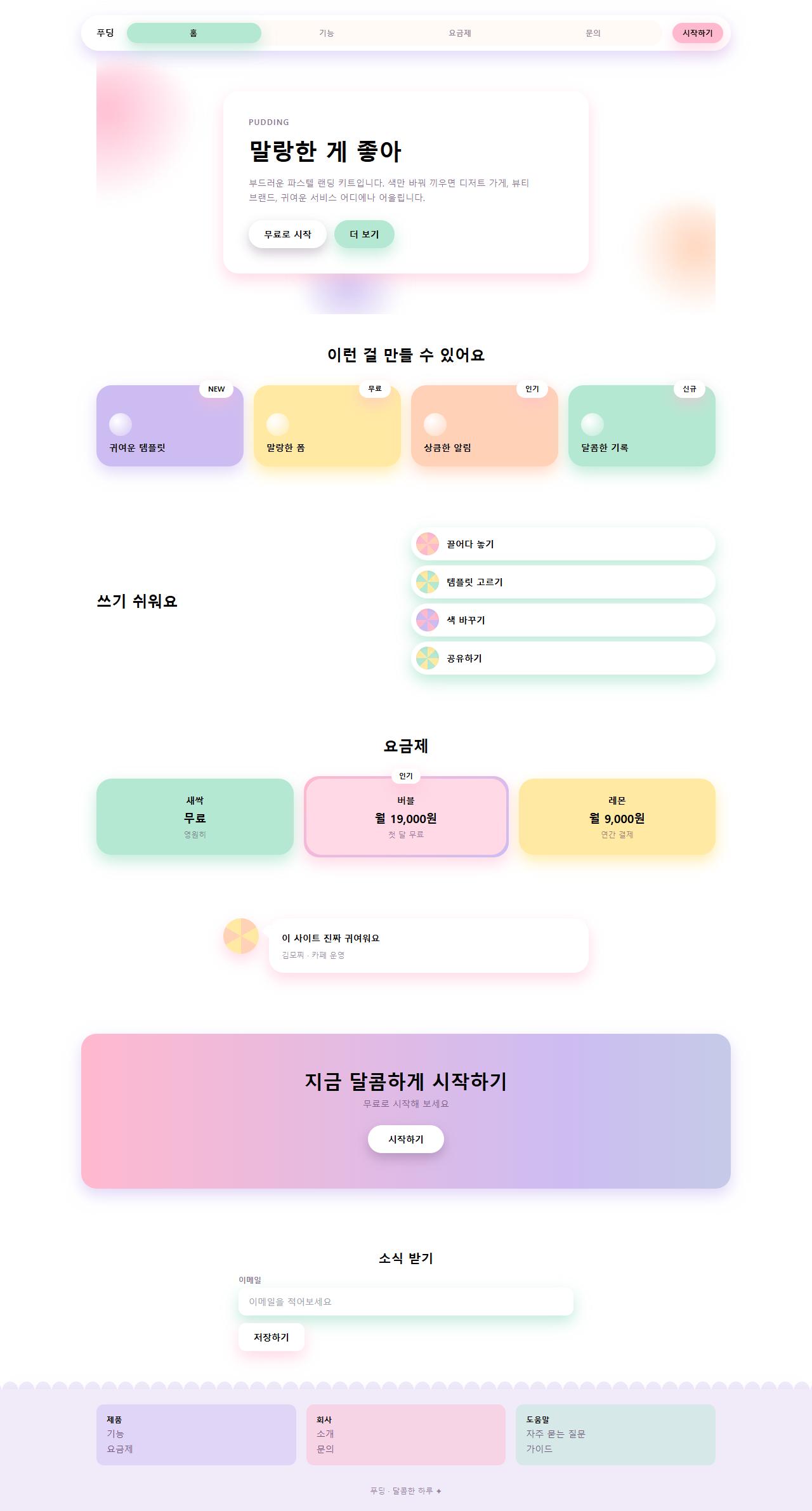
どこで壊れるか — 落とし穴
最初に実際に壊れたのはナビのインジケーターのずれでした。pill の幅を calc(25% - 4px) にして translateX(100%) で動かしたところ、パーセント移動は要素自身の幅が基準になるため、1マスごとに4px足りず、3マス進んだ時点で12px前のタブに食い込みました。描画結果を拡大して初めて分かり、移動量を calc(100% + 4px) ずつ補正して直しました。
2つ目はフッターがほとんど動いていなかった問題です。12px の星2個だけを瞬かせたところ、測った画面の変化面積は0.12%で、静止画と区別がつきませんでした。3つのカラムが順番に浮く波を足して6.91%まで上がりました。3つ目はグラデーションのつなぎ目です。流すグラデーションの両端を違う色にすると、background-position が一巡して戻る瞬間に色が飛びます。両端を同じ色(ピンク)にして background-size: 300% で広げておけば、つなぎ目なく流れ続けます。パステル7色がメールアプリでどこまで保つかはメールテンプレート デザイン9選で実測しました。3つとも直した完成版は、パスワード 42smbkak の zip を開けばそのまま確認できます。
9つのデモはすべて MDN の prefers-reduced-motion 解説が定義するメディアクエリを検知すると動きを止め、各要素をアニメーションが始まる前の静止状態(カードは動き出す前の位置、ボタンは押される前の状態)に戻して固定します。動きを減らしたい来訪者には霧が流れたりキャンディが跳ねたりするアニメーションが見えない代わりに、カード・ボタン・入力欄そのものは残り、情報は欠けません。
アクセシビリティ
パステルで最も多い失敗は文字のコントラストです。バブルガムピンク(#ffb9cf)の上に白い文字を置くと1.6:1で、WCAG 2.1 の最低基準である4.5:1に大きく届きません。そこでこのキットでは文字をすべて濃いベリーインク(#55395e)に固定しました。クリームの上で9.2:1、この中で一番濃いラベンダーの上でも5.7:1で本文の基準を通ります。パステルは面と飾りの担当で、文字の担当ではありません。色付きの影は MDN の box-shadow 解説と同じ書き方で不透明度を0.28〜0.9に抑えて枠線の代わりにならないようにし、キーボードのフォーカスは影に頼らず :focus-visible のベリーのアウトラインを別に描きました。
他のホームページの流行も見たい方はデザイントレンドのカテゴリを、このブログが全体で何を配布しているかは紹介ページにまとめてあります。
FAQ
クレイモーフィズムとは何が違いますか?
クレイモーフィズムは粘土のように膨らんだ立体感が主役で、太い枠と内側の影でかたまりを作ります。パステルキャンディは面は平らのままで、色と影の色で空気感を出します。立体感を強くするとクレイに、色だけを残すとキャンディになります。パステルの空気感でプロモ場面だけを切り出した構成はプロモ LP テンプレート9選にあります。
パステルカラー 配色 コードは明るいですが、ブランドが暗いトーンでも使えますか?
使えますが、7色をそのまま持ち込むとぶつかります。クリーム背景とベリーインクの構造は保ち、カードの色だけをブランドカラーを淡くしたパステルに置き換えると馴染みます。影も同じ系統に合わせるのが規則です。
文字サイズを小さくするとどうなりますか?
4.5:1 は本文サイズの基準で、18px 以上の太い文字は3:1で通ります。ベリーインクはどのパステルの上でも最低5.7:1あるので、サイズを下げても本文基準を維持します。逆に淡いパステルの文字は大きくしても通らないので、使わないのが正解です。
こんな記事もどうぞ
 デザイントレンドビタミンカラー デザイン LPキット、シトラスカラーのセクション9選
 デザイントレンドsaas サイト デザイン 信頼感キット、クリーンなセクション9選
 デザイントレンドスキューモーフィズムデザインの質感パーツ9選
 デザイントレンドai ランディングページ 光るオーブ デザインキット、セクション9選
 デザイントレンド【コピペOK】ベントグリッド 今どきのLPパーツ9選
 デザイントレンド現場で使う ダークモード デザインシステム LPパーツ9選
 デザイントレンドキネティックタイポグラフィをコードで分解してみた
 デザイントレンドクレイモーフィズムとは?丸くてぷっくりしたLPパーツ9選
 デザイントレンドメッシュグラデーションの上に、あえてグレインを残す
 デザイントレンドネオブルータリズム UI キット、影がにじまないLPパーツ9選