손그림 디자인 랜딩 UI 키트, 크레용 섹션 9개
손그림 디자인은 굵고 삐뚤빼뚤한 크레용 선으로 테두리를 그리고, 그 선만 SVG 필터로 살짝 흔들어 종이 위에 손으로 그은 낙서처럼 보이게 만드는 스타일입니다. 동네 미술학원이나 어린이 브랜드 사이트에서 본 그 느낌인데 이름을 몰라 검색을 못 했던 바로 그 화면입니다.
핀터레스트에 캡처로만 저장해 두던 이 화면을, 실제로 만든 원페이지로 아래에 그대로 올렸습니다. 내비게이션부터 푸터까지 스크롤하면서 전체 인상을 먼저 확인해 보세요.

이번엔 그 화면을 뜯어서 낱개 부품 아홉 종으로 다시 배열했습니다. 처음 랜딩을 열었을 때 시선이 흐르는 순서 — 둘러보기, 기능 확인, 가격, 신뢰, 행동 유도, 가입 — 를 그대로 따릅니다. 손으로 그린 줄 알았는데 사실 CSS였던 부분은 셋(낙서 히어로·이중선 카드·지그재그 푸터)이 전부 같은 원리로 돌아간다는 것입니다. 테두리나 윗변을 그리는 도형에만 흔들림 필터 또는 들쭉날쭉한 절단선을 걸고, 글자를 담은 요소는 건드리지 않습니다.
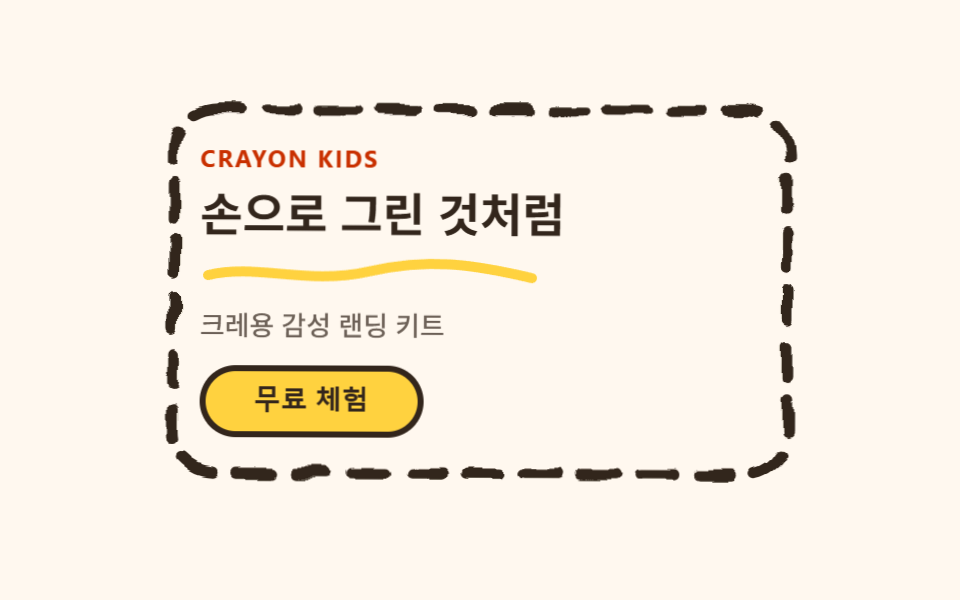 01 hero-crayon
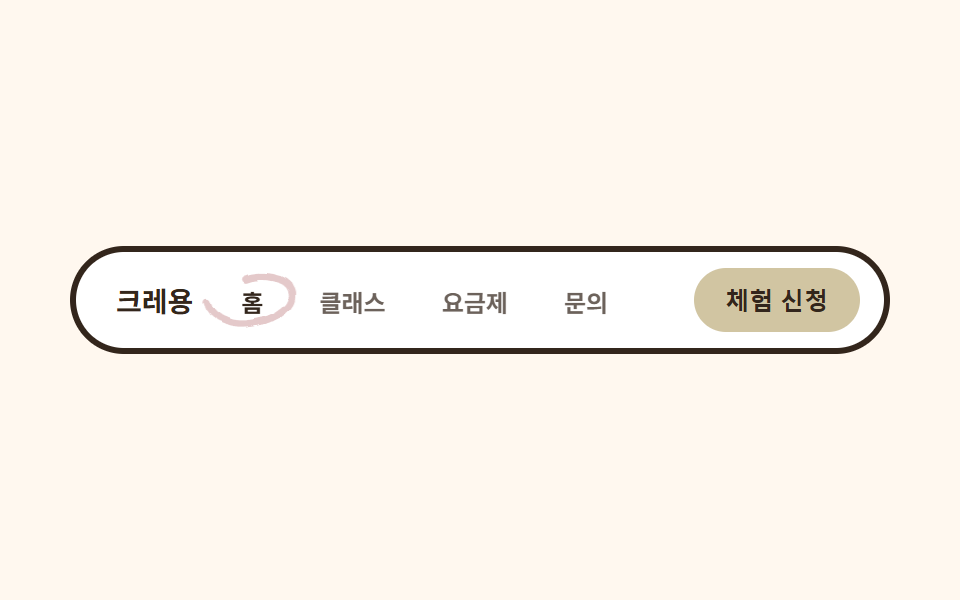 02 nav-crayon
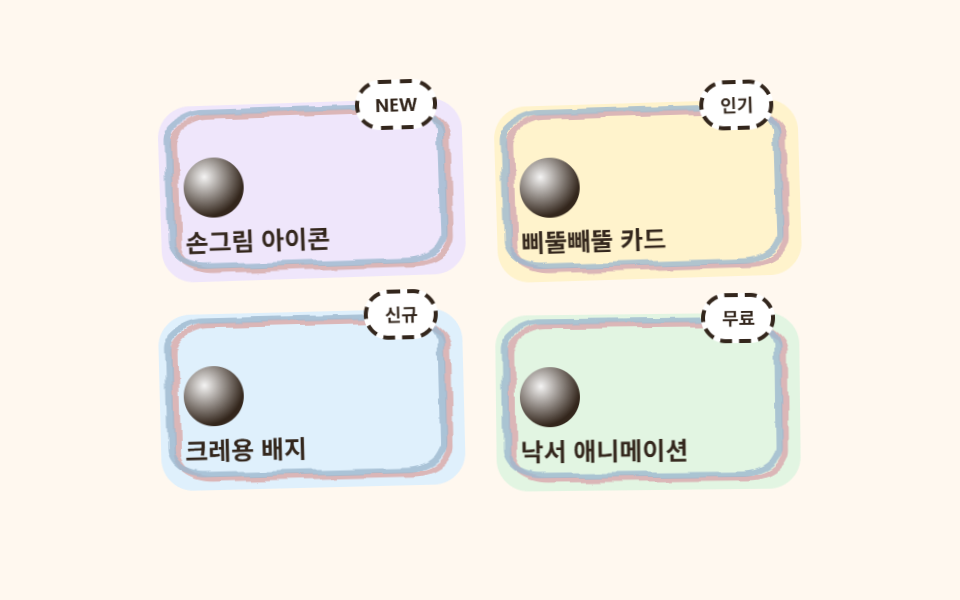 03 card-grid-crayon
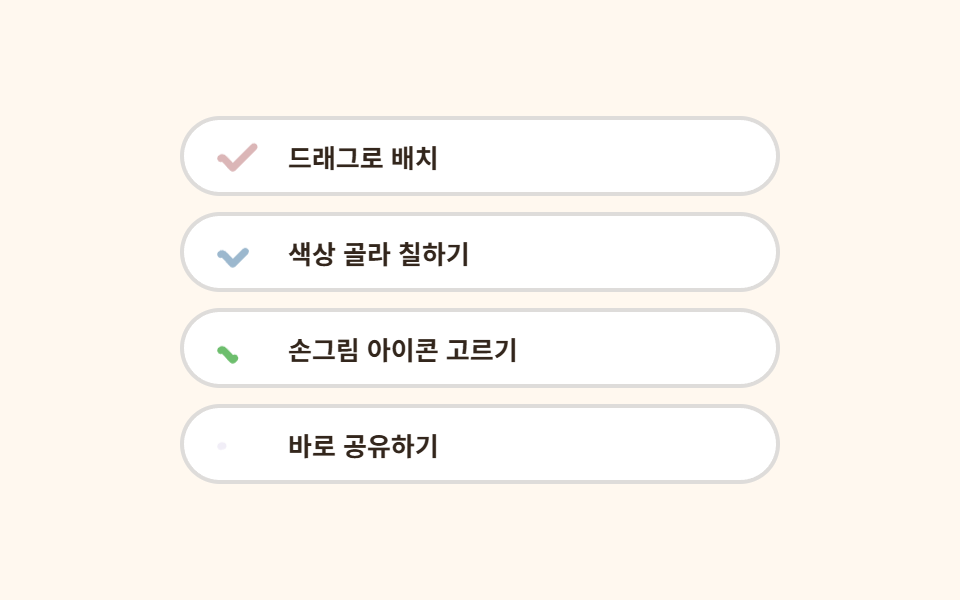 04 feature-list-crayon
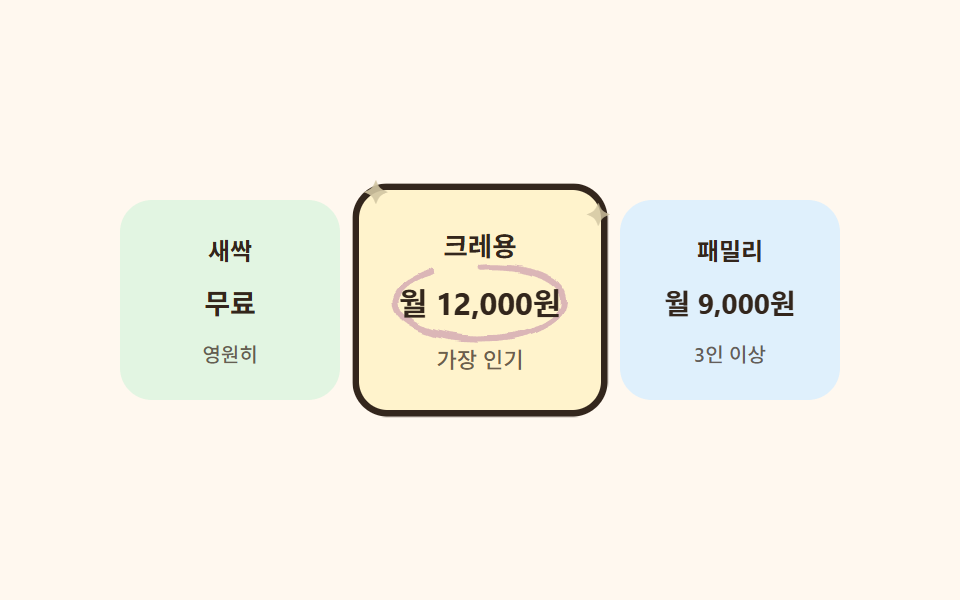 05 pricing-crayon
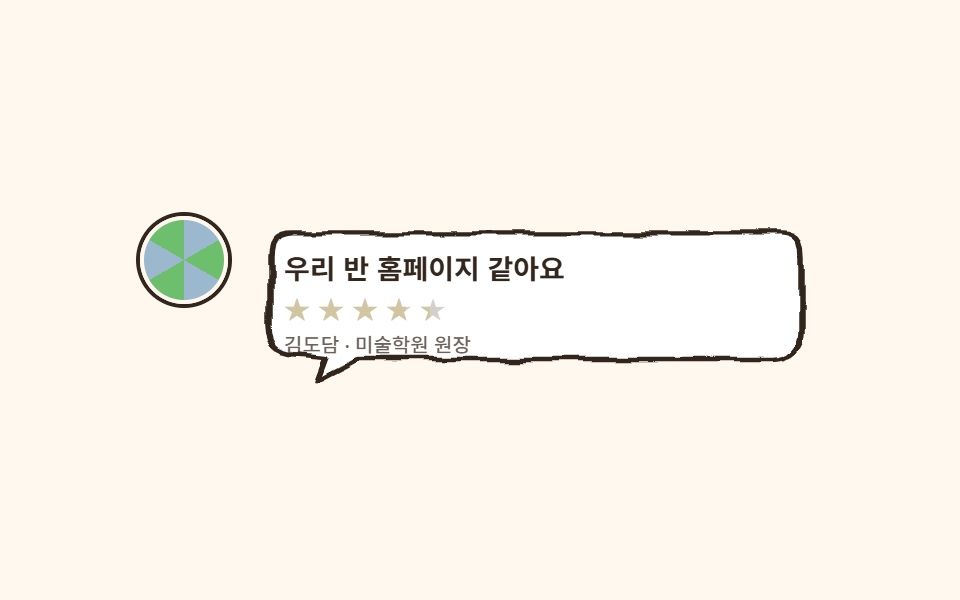 06 testimonial-crayon
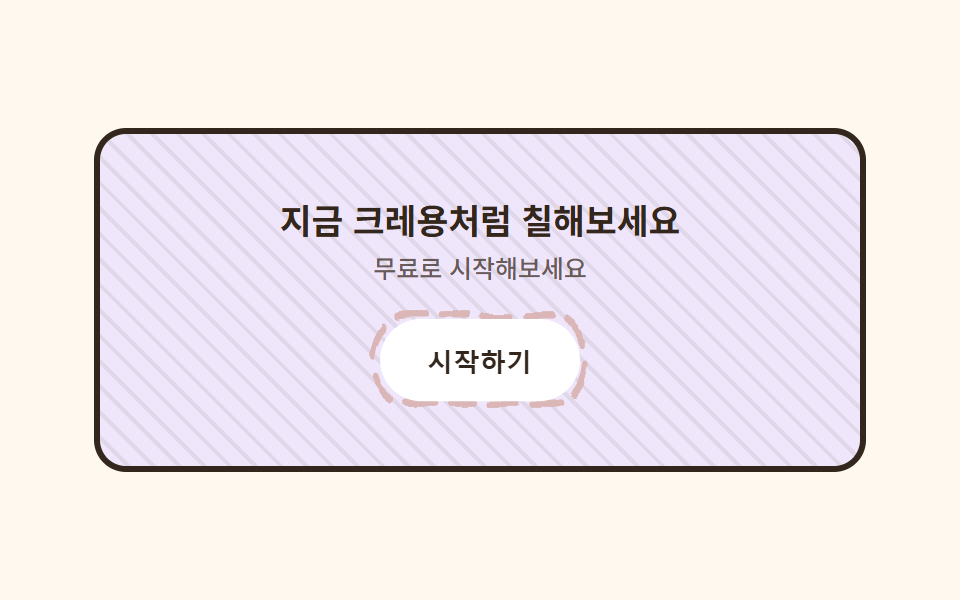 07 cta-band-crayon
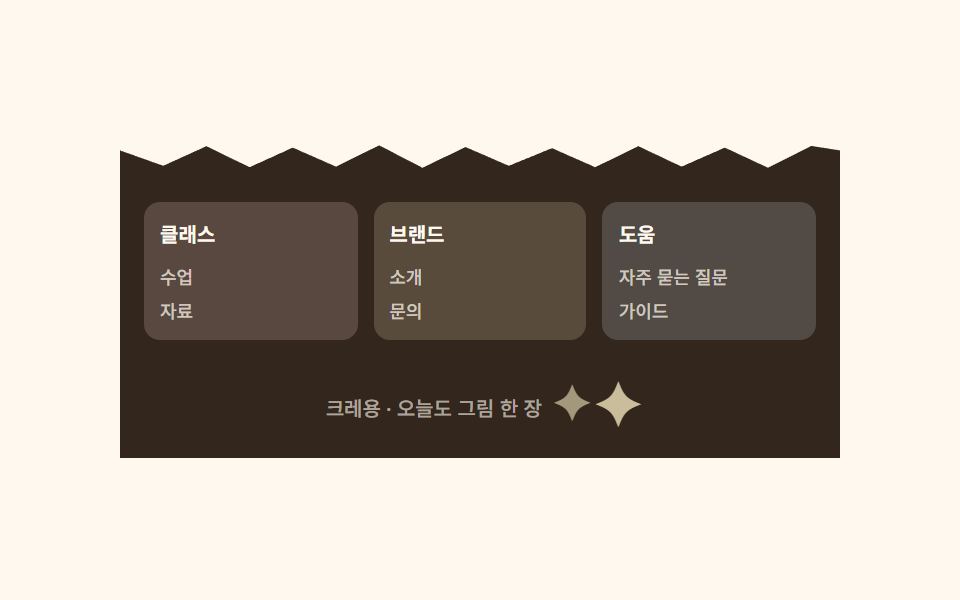 08 footer-crayon
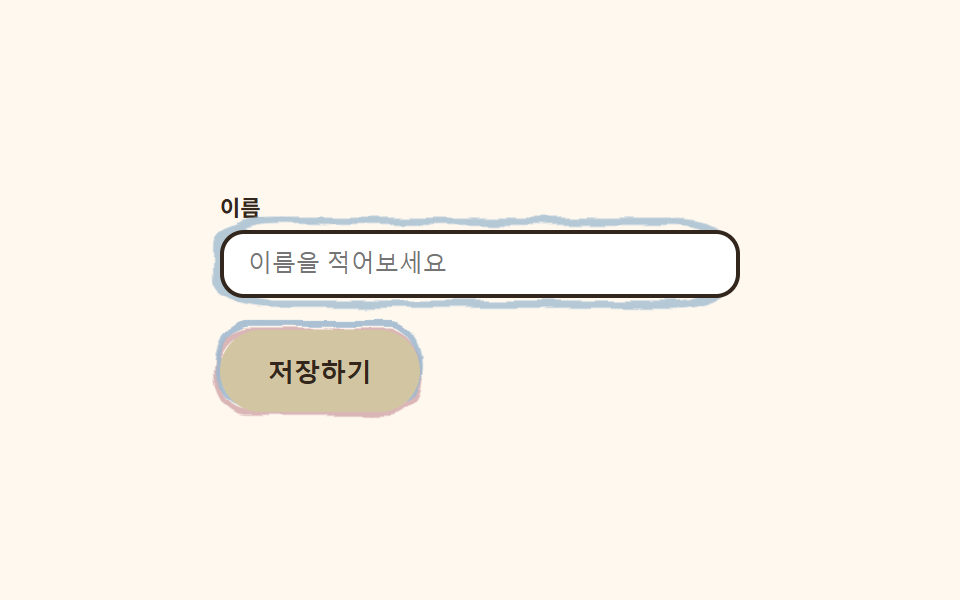 09 buttons-inputs-crayon
자동 재생 · 눌러서 해당 항목으로 · 전부 한 zip
- 01 크레용 낙서 히어로
- 02 손그림 동그라미 내비
- 03 삐뚤빼뚤 스티커 카드 격자
- 04 손그림 체크 목록
- 05 별표 동그라미 요금제
- 06 크레용 말풍선 후기
- 07 크레용 해칭 CTA 밴드
- 08 가위질 지그재그 푸터
- 09 이중선 크레용 버튼·인풋
이 키트의 색은 크레용 기초 디자인처럼 일곱 개로 끝납니다. 글자는 항상 잉크색 하나로 고정하는 것이 읽히는 손그림의 조건입니다. 같은 design 기둥에서 색을 사탕처럼 밝게 쓰는 쪽이 파스텔 톤 랜딩 UI 키트이고, 과일 색으로 청량하게 걷어 올린 쪽이 시트러스 컬러 랜딩 키트입니다.
| 역할 | 색 | 쓰는 곳 |
|---|---|---|
| 종이 | #fff8ef |
페이지 바탕 전체 |
| 잉크 | #33261c |
모든 글자 (대비 12.1~13.9:1) |
| 레드 크레용 | #ff5a5f |
손그림 선·강조 테두리 |
| 옐로 크레용 | #ffcd3c |
버튼·별·밑줄 |
| 블루 크레용 | #4fa3e3 |
이중선·포커스 링 |
| 그린 크레용 | #6dbe6d |
체크·아바타 |
| 퍼플 크레용 | #a685e2 |
CTA 배경 틴트 |
01크레용 낙서 히어로
크레용 디자인에서 무엇이 보이나
카드 테두리는 글자와 분리된 SVG 사각형 레이어이고, 그 레이어에만 feTurbulence 흔들림 필터를 걸어 굵은 점선이 손으로 그은 것처럼 삐뚤거립니다.
<main class="stage">
  <svg width="0" height="0" style="position:absolute" aria-hidden="true" focusable="false">
    <filter id="rough1" x="-30%" y="-30%" width="160%" height="160%">
      <feTurbulence type="fractalNoise" baseFrequency="0.045 0.06" numOctaves="2" seed="4" result="n"/>
      <feDisplacementMap in="SourceGraphic" in2="n" scale="7" xChannelSelector="R" yChannelSelector="G"/>
    </filter>
  </svg>
  <section class="herocrayon">
    <svg class="herocrayon__frame" viewBox="0 0 300 190" preserveAspectRatio="none" aria-hidden="true">
      <rect x="6" y="6" width="288" height="178" rx="20" class="herocrayon__frame-rect"/>
    </svg>
    <div class="herocrayon__card">
      <p class="herocrayon__eyebrow">CRAYON KIDS</p>
      <h1 class="herocrayon__title">손으로 그린 것처럼</h1>
      <svg class="herocrayon__underline" viewBox="0 0 170 16" aria-hidden="true">
        <path class="herocrayon__underline-path" d="M4 9 C 28 3, 54 14, 84 7 S 136 3, 166 10" />
      </svg>
      <p class="herocrayon__desc">크레용 감성 랜딩 키트</p>
      <button class="herocrayon__cta" type="button">무료 체험</button>
    </div>
  </section>
</main>
@use "../../../../site/static/demo-tokens" as *;
$duration: $dur-loop; // 테두리가 한 바퀴 다시 그려지는 주기
$easing: $ease-spring; // 카드가 들썩이는 곡선
$color: $stage-ink; // 글자 색 기본값(토큰) — 아래 크레용 잉크로 덮는다
// 크레용 팔레트 — 이 편의 역할 색. 값은 tailwind.config.js · tokens.css 와 같다
$crayon-paper: #fff8ef; // 종이 바탕
$crayon-ink: #33261c; // 크레용 잉크 — 글자는 항상 이 색(대비 12:1 이상)
$crayon-red: $stage-orange; // 레드 크레용 — 세련 패치: 토큰 정렬(#dbb6b7→#c89a8f, 휘도 0.29→0.27)
$crayon-yellow: $stage-yellow; // 옐로 크레용 — 세련 패치: 토큰 정렬(#d1c5a2→#d2c7a4, 휘도 0.65→0.68)
$crayon-blue: #9cb8ce; // 블루 크레용
$crayon-green: #6dbe6d; // 그린 크레용
$crayon-purple: #cbbfe0; // 퍼플 크레용
@include stage($crayon-paper);
.herocrayon {
position: relative;
width: clamp(230px, 76vw, 320px);
animation: cardBob $duration $easing infinite;
}
// 테두리는 글자와 분리된 SVG 레이어에만 흔들림 필터를 건다 — 글자에 걸면 읽기 어려워진다(접근성 섹션 참고)
.herocrayon__frame {
position: absolute;
inset: 0;
width: 100%;
height: 100%;
pointer-events: none;
}
.herocrayon__frame-rect {
fill: none;
stroke: $crayon-ink;
stroke-width: 5;
stroke-linecap: round;
stroke-dasharray: 16 11;
filter: url(#rough1);
animation: frameMarch $duration linear infinite;
}
.herocrayon__card {
position: relative;
box-sizing: border-box;
width: 100%;
display: flex;
flex-direction: column;
align-items: flex-start;
gap: $sp-2;
padding: $sp-6 $sp-5;
}
.herocrayon__eyebrow {
margin: 0;
color: $subject-orange-deep;
font-weight: 700;
font-size: clamp(10px, 2.6vw, 12px);
line-height: 1;
letter-spacing: .08em;
}
.herocrayon__title {
margin: 0;
color: $crayon-ink;
font-weight: 700;
font-size: clamp(19px, 4.8vw, 25px);
line-height: 1.2;
}
.herocrayon__underline {
width: clamp(120px, 42vw, 170px);
height: 16px;
overflow: visible;
}
.herocrayon__underline-path {
fill: none;
stroke: $crayon-yellow;
stroke-width: 5;
stroke-linecap: round;
stroke-dasharray: 210;
animation: underlineDraw $duration $ease-out infinite;
}
.herocrayon__desc {
margin: 0;
color: rgba($crayon-ink, .72);
font-weight: 500;
font-size: clamp(12px, 2.8vw, 14px);
line-height: 1.4;
}
.herocrayon__cta {
margin-top: $sp-1;
border: 3px solid $crayon-ink;
border-radius: $r-pill;
background: $crayon-yellow;
color: $crayon-ink;
padding: $sp-2 $sp-6;
font-weight: 700;
font-size: clamp(12px, 2.8vw, 14px);
line-height: 1;
}
.herocrayon__cta:focus-visible {
outline: 3px solid $crayon-ink;
outline-offset: 2px;
}
// 데모: 테두리가 크레용으로 계속 덧그리듯 행진하고, 밑줄이 그려졌다 지워지길 반복하며, 카드는 살짝 들썩인다
@keyframes frameMarch {
to { stroke-dashoffset: -540; }
}
@keyframes underlineDraw {
0% { stroke-dashoffset: 210; }
45% { stroke-dashoffset: 0; }
80% { stroke-dashoffset: 0; }
100% { stroke-dashoffset: -210; }
}
@keyframes cardBob {
0%, 100% { transform: translateY(0) rotate(-0.4deg); }
50% { transform: translateY(-6px) rotate(0.5deg); }
}
// 반응형: 320×200 처럼 세로가 짧은 화면에선 카드 속을 줄인다 (BD9)
@media (max-width: 340px), (max-height: 220px) {
.herocrayon__card { padding: $sp-4 $sp-4; gap: $sp-1; }
.herocrayon__eyebrow { display: none; }
.herocrayon__underline { width: clamp(90px, 32vw, 120px); }
}
@media (prefers-reduced-motion: reduce) {
.herocrayon,
.herocrayon__frame-rect,
.herocrayon__underline-path {
animation: none !important;
transform: none;
}
.herocrayon__underline-path { stroke-dashoffset: 0; }
}html, body {
margin: 0;
overflow: hidden;
}
.stage {
box-sizing: border-box;
min-height: 100vh;
display: grid;
place-items: center;
margin: 0;
background: #fff8ef;
font-family: -apple-system, "Segoe UI", "Noto Sans KR", sans-serif;
padding: clamp(8px, 4vw, 24px);
}
.herocrayon {
position: relative;
width: clamp(230px, 76vw, 320px);
animation: cardBob 2s cubic-bezier(0.2, 0.8, 0.2, 1) infinite;
}
.herocrayon__frame {
position: absolute;
inset: 0;
width: 100%;
height: 100%;
pointer-events: none;
}
.herocrayon__frame-rect {
fill: none;
stroke: #33261c;
stroke-width: 5;
stroke-linecap: round;
stroke-dasharray: 16 11;
filter: url(#rough1);
animation: frameMarch 2s linear infinite;
}
.herocrayon__card {
position: relative;
box-sizing: border-box;
width: 100%;
display: flex;
flex-direction: column;
align-items: flex-start;
gap: 8px;
padding: 24px 20px;
}
.herocrayon__eyebrow {
margin: 0;
color: #c93000;
font-weight: 700;
font-size: clamp(10px, 2.6vw, 12px);
line-height: 1;
letter-spacing: 0.08em;
}
.herocrayon__title {
margin: 0;
color: #33261c;
font-weight: 700;
font-size: clamp(19px, 4.8vw, 25px);
line-height: 1.2;
}
.herocrayon__underline {
width: clamp(120px, 42vw, 170px);
height: 16px;
overflow: visible;
}
.herocrayon__underline-path {
fill: none;
stroke: #ffd23f;
stroke-width: 5;
stroke-linecap: round;
stroke-dasharray: 210;
animation: underlineDraw 2s ease-out infinite;
}
.herocrayon__desc {
margin: 0;
color: rgba(51, 38, 28, 0.72);
font-weight: 500;
font-size: clamp(12px, 2.8vw, 14px);
line-height: 1.4;
}
.herocrayon__cta {
margin-top: 4px;
border: 3px solid #33261c;
border-radius: 999px;
background: #ffd23f;
color: #33261c;
padding: 8px 24px;
font-weight: 700;
font-size: clamp(12px, 2.8vw, 14px);
line-height: 1;
}
.herocrayon__cta:focus-visible {
outline: 3px solid #33261c;
outline-offset: 2px;
}
@keyframes frameMarch {
to {
stroke-dashoffset: -540;
}
}
@keyframes underlineDraw {
0% {
stroke-dashoffset: 210;
}
45% {
stroke-dashoffset: 0;
}
80% {
stroke-dashoffset: 0;
}
100% {
stroke-dashoffset: -210;
}
}
@keyframes cardBob {
0%, 100% {
transform: translateY(0) rotate(-0.4deg);
}
50% {
transform: translateY(-6px) rotate(0.5deg);
}
}
@media (max-width: 340px), (max-height: 220px) {
.herocrayon__card {
padding: 16px 16px;
gap: 4px;
}
.herocrayon__eyebrow {
display: none;
}
.herocrayon__underline {
width: clamp(90px, 32vw, 120px);
}
}
@media (prefers-reduced-motion: reduce) {
.herocrayon,
.herocrayon__frame-rect,
.herocrayon__underline-path {
animation: none !important;
transform: none;
}
.herocrayon__underline-path {
stroke-dashoffset: 0;
}
}import type { CSSProperties } from "react";
import styles from "./HeroCrayon.module.scss";
export type HeroCrayonProps = {
eyebrow?: string;
title?: string;
desc?: string;
cta?: string;
/** 한 주기(기본 2000ms) */
duration?: number;
easing?: string;
color?: string;
};
type Vars = CSSProperties & { "--duration"?: string; "--easing"?: string; "--color"?: string };
export default function HeroCrayon({
eyebrow = "CRAYON KIDS",
title = "손으로 그린 것처럼",
desc = "크레용 감성 랜딩 키트",
cta = "무료 체험",
duration = 2000,
easing = "cubic-bezier(.2,.8,.2,1)",
color = "#ff5a5f",
}: HeroCrayonProps) {
const vars: Vars = { "--duration": `${duration}ms`, "--easing": easing, "--color": color };
return (
<section className={styles.hero} style={vars}>
<svg width="0" height="0" style={{ position: "absolute" }} aria-hidden="true" focusable="false">
<filter id="hc-rough" x="-30%" y="-30%" width="160%" height="160%">
<feTurbulence type="fractalNoise" baseFrequency={0.045} numOctaves={2} seed={4} result="n" />
<feDisplacementMap in="SourceGraphic" in2="n" scale={7} xChannelSelector="R" yChannelSelector="G" />
</filter>
</svg>
<svg className={styles.frame} viewBox="0 0 300 190" preserveAspectRatio="none" aria-hidden="true">
<rect x={6} y={6} width={288} height={178} rx={20} className={styles.frameRect} />
</svg>
<div className={styles.card}>
<p className={styles.eyebrow}>{eyebrow}</p>
<h1 className={styles.title}>{title}</h1>
<svg className={styles.underline} viewBox="0 0 170 16" aria-hidden="true">
<path className={styles.underlinePath} d="M4 9 C 28 3, 54 14, 84 7 S 136 3, 166 10" />
</svg>
<p className={styles.desc}>{desc}</p>
<button type="button" className={styles.cta}>{cta}</button>
</div>
</section>
);
}01 · 크레용 낙서 히어로 — 측정 누적면적 16.178% · 움직인 프레임 23/23GODRICH 원작 · zip 에 SCSS·React 포함 · 비밀번호 보기
코드에서 볼 곳
제목 아래 노란 밑줄은 stroke-dashoffset으로 그려졌다 지워지길 반복합니다.
<svg width="0" height="0" style="position:absolute">
  <filter id="rough" x="-30%" y="-30%" width="160%" height="160%">
    <feTurbulence type="fractalNoise" baseFrequency="0.045" numOctaves="2" seed="4" result="n"/>
    <feDisplacementMap in="SourceGraphic" in2="n" scale="7"
      xChannelSelector="R" yChannelSelector="G"/>
  </filter>
</svg>
<svg class="frame" viewBox="0 0 300 190" preserveAspectRatio="none">
  <rect x="6" y="6" width="288" height="178" rx="20"
        stroke="#33261c" stroke-width="5" stroke-dasharray="16 11"
        fill="none" filter="url(#rough)" />
</svg>
02손그림 동그라미 내비
화면에서 일어나는 일
활성 탭 글자 둘레를 빨간 크레용 동그라미가 감싸는데, 완벽한 원이 아니라 한쪽 끝이 다른 쪽을 살짝 지나치는 이중 루프라 방금 그린 것처럼 보입니다.
<main class="stage">
  <svg width="0" height="0" style="position:absolute" aria-hidden="true" focusable="false">
    <filter id="rough2" x="-40%" y="-40%" width="180%" height="180%">
      <feTurbulence type="fractalNoise" baseFrequency="0.05 0.08" numOctaves="2" seed="9" result="n"/>
      <feDisplacementMap in="SourceGraphic" in2="n" scale="5" xChannelSelector="R" yChannelSelector="G"/>
    </filter>
  </svg>
  <nav class="navcrayon">
    <span class="navcrayon__brand">크레용</span>
    <ul class="navcrayon__list">
      <li class="navcrayon__item navcrayon__item--active">
        <span class="navcrayon__label">홈</span>
        <svg class="navcrayon__loop" viewBox="0 0 56 30" aria-hidden="true">
          <path class="navcrayon__loop-path" d="M28 4 C 13 2, 4 11, 7 17 C 9 25, 20 28, 29 26 C 41 24, 50 17, 47 10 C 45 4, 33 2, 25 5" />
        </svg>
      </li>
      <li class="navcrayon__item"><span class="navcrayon__label">클래스</span></li>
      <li class="navcrayon__item"><span class="navcrayon__label">요금제</span></li>
      <li class="navcrayon__item"><span class="navcrayon__label">문의</span></li>
    </ul>
    <button class="navcrayon__cta" type="button">체험 신청</button>
  </nav>
</main>
@use "../../../../site/static/demo-tokens" as *;
$duration: $dur-loop; // 동그라미가 한 번 그려지는 주기
$easing: $ease-out; // 선이 그려지는 곡선
$color: $stage-ink; // 글자 색 기본값(토큰) — 아래 크레용 잉크로 덮는다
$crayon-paper: #fff8ef;
$crayon-ink: #33261c;
$crayon-red: #dbb6b7;
$crayon-yellow: #d1c5a2;
$crayon-blue: #9cb8ce;
$crayon-green: #6dbe6d;
$crayon-purple: #cbbfe0;
@include stage($crayon-paper);
.navcrayon {
display: flex;
align-items: center;
gap: $sp-4;
width: clamp(260px, 88vw, 380px);
padding: $sp-2 $sp-3;
border-radius: $r-pill;
background: $stage-paper;
border: 3px solid $crayon-ink;
}
.navcrayon__brand {
flex-shrink: 0;
color: $crayon-ink;
font-weight: 700;
font-size: clamp(12px, 3vw, 14px);
padding-left: $sp-2;
}
.navcrayon__list {
margin: 0;
padding: 0;
list-style: none;
display: flex;
align-items: center;
gap: $sp-3;
min-width: 0;
flex: 1;
}
.navcrayon__item {
position: relative;
display: flex;
align-items: center;
justify-content: center;
padding: $sp-1 $sp-2;
}
.navcrayon__label {
position: relative;
z-index: 1;
color: rgba($crayon-ink, .72);
font-weight: 600;
font-size: clamp(10px, 2.6vw, 12px);
white-space: nowrap;
}
.navcrayon__item--active .navcrayon__label {
color: $crayon-ink;
}
.navcrayon__loop {
position: absolute;
left: 50%;
top: 50%;
width: 58px;
height: 32px;
transform: translate(-50%, -50%);
overflow: visible;
pointer-events: none;
filter: url(#rough2);
}
.navcrayon__loop-path {
fill: none;
stroke: $crayon-red;
stroke-width: 3.5;
stroke-linecap: round;
stroke-linejoin: round;
stroke-dasharray: 110;
animation: loopDraw $duration $easing infinite;
}
.navcrayon__cta {
flex-shrink: 0;
border: 0;
border-radius: $r-pill;
background: $crayon-yellow;
color: $crayon-ink;
padding: $sp-2 $sp-4;
font-weight: 700;
font-size: clamp(10px, 2.6vw, 12px);
white-space: nowrap;
}
.navcrayon__cta:focus-visible {
outline: 3px solid $crayon-ink;
outline-offset: 2px;
}
// 데모: 활성 탭 둘레를 크레용으로 감싸는 동그라미가 그려졌다 지워지길 반복한다
@keyframes loopDraw {
0% { stroke-dashoffset: 110; opacity: 0; }
8% { opacity: 1; }
55% { stroke-dashoffset: 0; opacity: 1; }
85% { stroke-dashoffset: 0; opacity: 1; }
100% { stroke-dashoffset: -110; opacity: 0; }
}
@media (max-width: 340px), (max-height: 220px) {
.navcrayon { gap: $sp-2; padding: $sp-1 $sp-2; }
.navcrayon__brand { display: none; }
.navcrayon__list { gap: $sp-1; }
.navcrayon__cta { padding: $sp-1 $sp-3; }
}
@media (prefers-reduced-motion: reduce) {
.navcrayon__loop-path {
animation: none !important;
stroke-dashoffset: 0;
opacity: 1;
}
}html, body {
margin: 0;
overflow: hidden;
}
.stage {
box-sizing: border-box;
min-height: 100vh;
display: grid;
place-items: center;
margin: 0;
background: #fff8ef;
font-family: -apple-system, "Segoe UI", "Noto Sans KR", sans-serif;
padding: clamp(8px, 4vw, 24px);
}
.navcrayon {
display: flex;
align-items: center;
gap: 16px;
width: clamp(260px, 88vw, 380px);
padding: 8px 12px;
border-radius: 999px;
background: #ffffff;
border: 3px solid #33261c;
}
.navcrayon__brand {
flex-shrink: 0;
color: #33261c;
font-weight: 700;
font-size: clamp(12px, 3vw, 14px);
padding-left: 8px;
}
.navcrayon__list {
margin: 0;
padding: 0;
list-style: none;
display: flex;
align-items: center;
gap: 12px;
min-width: 0;
flex: 1;
}
.navcrayon__item {
position: relative;
display: flex;
align-items: center;
justify-content: center;
padding: 4px 8px;
}
.navcrayon__label {
position: relative;
z-index: 1;
color: rgba(51, 38, 28, 0.72);
font-weight: 600;
font-size: clamp(10px, 2.6vw, 12px);
white-space: nowrap;
}
.navcrayon__item--active .navcrayon__label {
color: #33261c;
}
.navcrayon__loop {
position: absolute;
left: 50%;
top: 50%;
width: 58px;
height: 32px;
transform: translate(-50%, -50%);
overflow: visible;
pointer-events: none;
filter: url(#rough2);
}
.navcrayon__loop-path {
fill: none;
stroke: #dbb6b7;
stroke-width: 3.5;
stroke-linecap: round;
stroke-linejoin: round;
stroke-dasharray: 110;
animation: loopDraw 2s ease-out infinite;
}
.navcrayon__cta {
flex-shrink: 0;
border: 0;
border-radius: 999px;
background: #d1c5a2;
color: #33261c;
padding: 8px 16px;
font-weight: 700;
font-size: clamp(10px, 2.6vw, 12px);
white-space: nowrap;
}
.navcrayon__cta:focus-visible {
outline: 3px solid #33261c;
outline-offset: 2px;
}
@keyframes loopDraw {
0% {
stroke-dashoffset: 110;
opacity: 0;
}
8% {
opacity: 1;
}
55% {
stroke-dashoffset: 0;
opacity: 1;
}
85% {
stroke-dashoffset: 0;
opacity: 1;
}
100% {
stroke-dashoffset: -110;
opacity: 0;
}
}
@media (max-width: 340px), (max-height: 220px) {
.navcrayon {
gap: 8px;
padding: 4px 8px;
}
.navcrayon__brand {
display: none;
}
.navcrayon__list {
gap: 4px;
}
.navcrayon__cta {
padding: 4px 12px;
}
}
@media (prefers-reduced-motion: reduce) {
.navcrayon__loop-path {
animation: none !important;
stroke-dashoffset: 0;
opacity: 1;
}
}import type { CSSProperties } from "react";
import styles from "./NavCrayon.module.scss";
export type NavCrayonProps = {
brand?: string;
tabs?: string[];
active?: number;
cta?: string;
duration?: number;
easing?: string;
color?: string;
};
type Vars = CSSProperties & { "--duration"?: string; "--easing"?: string; "--color"?: string };
export default function NavCrayon({
brand = "크레용",
tabs = ["홈", "클래스", "요금제", "문의"],
active = 0,
cta = "체험 신청",
duration = 2000,
easing = "ease-out",
color = "#ff5a5f",
}: NavCrayonProps) {
const vars: Vars = { "--duration": `${duration}ms`, "--easing": easing, "--color": color };
return (
<nav className={styles.nav} style={vars}>
<svg width="0" height="0" style={{ position: "absolute" }} aria-hidden="true" focusable="false">
<filter id="nc-rough" x="-40%" y="-40%" width="180%" height="180%">
<feTurbulence type="fractalNoise" baseFrequency={0.06} numOctaves={2} seed={9} result="n" />
<feDisplacementMap in="SourceGraphic" in2="n" scale={5} xChannelSelector="R" yChannelSelector="G" />
</filter>
</svg>
<span className={styles.brand}>{brand}</span>
<ul className={styles.list}>
{tabs.map((t, i) => (
<li key={t} className={styles.item}>
<span className={i === active ? `${styles.label} ${styles.labelActive}` : styles.label}>{t}</span>
{i === active && (
<svg className={styles.loop} viewBox="0 0 56 30" aria-hidden="true">
<path className={styles.loopPath} d="M28 4 C 13 2, 4 11, 7 17 C 9 25, 20 28, 29 26 C 41 24, 50 17, 47 10 C 45 4, 33 2, 25 5" />
</svg>
)}
</li>
))}
</ul>
<button type="button" className={styles.cta}>{cta}</button>
</nav>
);
}02 · 손그림 동그라미 내비 — 측정 누적면적 0.344% · 움직인 프레임 15/23GODRICH 원작 · zip 에 SCSS·React 포함 · 비밀번호 보기
코드 읽는 법
stroke-dasharray를 다 그렸다가 반대 방향으로 지웁니다.
<li class="relative px-2 py-1">
  <span class="relative z-10 text-xs font-semibold">홈</span>
  <svg class="loop" viewBox="0 0 56 30">
    <path fill="none" stroke="#ff5a5f" stroke-width="3.5"
          stroke-linecap="round" stroke-linejoin="round"
          stroke-dasharray="110"
          d="M28 4 C 13 2, 4 11, 7 17 C 9 25, 20 28, 29 26
             C 41 24, 50 17, 47 10 C 45 4, 33 2, 25 5" />
  </svg>
</li>
03삐뚤빼뚤 스티커 카드 격자
어떤 움직임인가
카드마다 빨강·파랑 두 선을 1~2px 어긋나게 겹쳐 크레용으로 두 번 그은 흔적을 냅니다.
<main class="stage">
  <svg width="0" height="0" style="position:absolute" aria-hidden="true" focusable="false">
    <filter id="rough3" x="-30%" y="-30%" width="160%" height="160%">
      <feTurbulence type="fractalNoise" baseFrequency="0.05 0.07" numOctaves="2" seed="12" result="n"/>
      <feDisplacementMap in="SourceGraphic" in2="n" scale="5" xChannelSelector="R" yChannelSelector="G"/>
    </filter>
  </svg>
  <div class="cardcrayon">
    <article class="cardcrayon__card cardcrayon__card--1">
      <svg class="cardcrayon__frame" viewBox="0 0 100 78" preserveAspectRatio="none" aria-hidden="true">
        <rect x="5" y="5" width="90" height="68" rx="12" class="cardcrayon__frame-rect cardcrayon__frame-rect--a" />
        <rect x="3" y="3" width="90" height="68" rx="12" class="cardcrayon__frame-rect cardcrayon__frame-rect--b" />
      </svg>
      <span class="cardcrayon__badge">NEW</span>
      <span class="cardcrayon__dot"></span>
      <p class="cardcrayon__label">손그림 아이콘</p>
    </article>
    <article class="cardcrayon__card cardcrayon__card--2">
      <svg class="cardcrayon__frame" viewBox="0 0 100 78" preserveAspectRatio="none" aria-hidden="true">
        <rect x="5" y="5" width="90" height="68" rx="12" class="cardcrayon__frame-rect cardcrayon__frame-rect--a" />
        <rect x="3" y="3" width="90" height="68" rx="12" class="cardcrayon__frame-rect cardcrayon__frame-rect--b" />
      </svg>
      <span class="cardcrayon__badge">인기</span>
      <span class="cardcrayon__dot"></span>
      <p class="cardcrayon__label">삐뚤빼뚤 카드</p>
    </article>
    <article class="cardcrayon__card cardcrayon__card--3">
      <svg class="cardcrayon__frame" viewBox="0 0 100 78" preserveAspectRatio="none" aria-hidden="true">
        <rect x="5" y="5" width="90" height="68" rx="12" class="cardcrayon__frame-rect cardcrayon__frame-rect--a" />
        <rect x="3" y="3" width="90" height="68" rx="12" class="cardcrayon__frame-rect cardcrayon__frame-rect--b" />
      </svg>
      <span class="cardcrayon__badge">신규</span>
      <span class="cardcrayon__dot"></span>
      <p class="cardcrayon__label">크레용 배지</p>
    </article>
    <article class="cardcrayon__card cardcrayon__card--4">
      <svg class="cardcrayon__frame" viewBox="0 0 100 78" preserveAspectRatio="none" aria-hidden="true">
        <rect x="5" y="5" width="90" height="68" rx="12" class="cardcrayon__frame-rect cardcrayon__frame-rect--a" />
        <rect x="3" y="3" width="90" height="68" rx="12" class="cardcrayon__frame-rect cardcrayon__frame-rect--b" />
      </svg>
      <span class="cardcrayon__badge">무료</span>
      <span class="cardcrayon__dot"></span>
      <p class="cardcrayon__label">낙서 애니메이션</p>
    </article>
  </div>
</main>@use "../../../../site/static/demo-tokens" as *;
$duration: $dur-loop; // 카드가 한 번 기우는 주기
$easing: $ease-spring; // 기우는 곡선
$color: $stage-ink; // 글자 색 기본값(토큰) — 아래 크레용 잉크로 덮는다
$crayon-paper: #fff8ef;
$crayon-ink: #33261c;
$crayon-red: #dbb6b7;
$crayon-yellow: #d1c5a2;
$crayon-blue: #9cb8ce;
$crayon-green: #6dbe6d;
$crayon-purple: #cbbfe0;
$crayon-purple-tint: #efe6fb;
$crayon-yellow-tint: #fff3cc;
$crayon-blue-tint: #dff0fc;
$crayon-green-tint: #e2f5e2;
@include stage($crayon-paper);
.cardcrayon {
display: grid;
grid-template-columns: repeat(2, minmax(0, 1fr));
gap: $sp-4;
width: clamp(220px, 80vw, 320px);
}
.cardcrayon__card {
position: relative;
box-sizing: border-box;
min-height: 88px;
display: flex;
flex-direction: column;
justify-content: flex-end;
gap: $sp-1;
padding: $sp-3;
border-radius: $r-card;
animation: cardTilt $duration $easing infinite;
}
.cardcrayon__card--1 { background: $crayon-purple-tint; animation-delay: 0ms; }
.cardcrayon__card--2 { background: $crayon-yellow-tint; animation-delay: 140ms; }
.cardcrayon__card--3 { background: $crayon-blue-tint; animation-delay: 280ms; }
.cardcrayon__card--4 { background: $crayon-green-tint; animation-delay: 420ms; }
// 테두리는 글자를 감싸지 않는 별도 SVG 레이어 — 빨강·파랑 두 선을 살짝 어긋나게 겹쳐 크레용 두 번 그은 느낌을 낸다
.cardcrayon__frame {
position: absolute;
inset: 0;
width: 100%;
height: 100%;
pointer-events: none;
filter: url(#rough3);
}
.cardcrayon__frame-rect {
fill: none;
stroke-width: 2.4;
}
.cardcrayon__frame-rect--a { stroke: $crayon-red; }
.cardcrayon__frame-rect--b { stroke: $crayon-blue; opacity: .8; }
.cardcrayon__badge {
position: absolute;
top: -10px;
right: $sp-3;
border: 2px dashed $crayon-ink;
border-radius: $r-pill;
background: $stage-paper;
color: $crayon-ink;
padding: $sp-1 $sp-2;
font-weight: 700;
font-size: 9px;
line-height: 1.4;
}
.cardcrayon__dot {
width: 30px;
height: 30px;
border-radius: 50%;
background: radial-gradient(circle at 35% 32%, rgba(255, 255, 255, .95), rgba(255, 255, 255, 0) 70%), $crayon-ink;
}
.cardcrayon__label {
margin: 0;
color: $crayon-ink;
font-weight: 700;
font-size: clamp(11px, 2.6vw, 13px);
line-height: 1.3;
}
// 데모: 카드 네 장이 순서대로 살짝씩 기운다
@keyframes cardTilt {
0%, 100% { transform: rotate(0deg) translateY(0); }
50% { transform: rotate(-2deg) translateY(-3px); }
}
@media (max-width: 340px), (max-height: 220px) {
.cardcrayon { gap: $sp-2; }
.cardcrayon__card { min-height: 68px; padding: $sp-2; }
.cardcrayon__dot { width: 22px; height: 22px; }
}
@media (prefers-reduced-motion: reduce) {
.cardcrayon__card { animation: none !important; transform: none; }
}html, body {
margin: 0;
overflow: hidden;
}
.stage {
box-sizing: border-box;
min-height: 100vh;
display: grid;
place-items: center;
margin: 0;
background: #fff8ef;
font-family: -apple-system, "Segoe UI", "Noto Sans KR", sans-serif;
padding: clamp(8px, 4vw, 24px);
}
.cardcrayon {
display: grid;
grid-template-columns: repeat(2, minmax(0, 1fr));
gap: 16px;
width: clamp(220px, 80vw, 320px);
}
.cardcrayon__card {
position: relative;
box-sizing: border-box;
min-height: 88px;
display: flex;
flex-direction: column;
justify-content: flex-end;
gap: 4px;
padding: 12px;
border-radius: 16px;
animation: cardTilt 2s cubic-bezier(0.2, 0.8, 0.2, 1) infinite;
}
.cardcrayon__card--1 {
background: #efe6fb;
animation-delay: 0ms;
}
.cardcrayon__card--2 {
background: #fff3cc;
animation-delay: 140ms;
}
.cardcrayon__card--3 {
background: #dff0fc;
animation-delay: 280ms;
}
.cardcrayon__card--4 {
background: #e2f5e2;
animation-delay: 420ms;
}
.cardcrayon__frame {
position: absolute;
inset: 0;
width: 100%;
height: 100%;
pointer-events: none;
filter: url(#rough3);
}
.cardcrayon__frame-rect {
fill: none;
stroke-width: 2.4;
}
.cardcrayon__frame-rect--a {
stroke: #dbb6b7;
}
.cardcrayon__frame-rect--b {
stroke: #9cb8ce;
opacity: 0.8;
}
.cardcrayon__badge {
position: absolute;
top: -10px;
right: 12px;
border: 2px dashed #33261c;
border-radius: 999px;
background: #ffffff;
color: #33261c;
padding: 4px 8px;
font-weight: 700;
font-size: 9px;
line-height: 1.4;
}
.cardcrayon__dot {
width: 30px;
height: 30px;
border-radius: 50%;
background: radial-gradient(circle at 35% 32%, rgba(255, 255, 255, 0.95), rgba(255, 255, 255, 0) 70%), #33261c;
}
.cardcrayon__label {
margin: 0;
color: #33261c;
font-weight: 700;
font-size: clamp(11px, 2.6vw, 13px);
line-height: 1.3;
}
@keyframes cardTilt {
0%, 100% {
transform: rotate(0deg) translateY(0);
}
50% {
transform: rotate(-2deg) translateY(-3px);
}
}
@media (max-width: 340px), (max-height: 220px) {
.cardcrayon {
gap: 8px;
}
.cardcrayon__card {
min-height: 68px;
padding: 8px;
}
.cardcrayon__dot {
width: 22px;
height: 22px;
}
}
@media (prefers-reduced-motion: reduce) {
.cardcrayon__card {
animation: none !important;
transform: none;
}
}import type { CSSProperties } from "react";
import styles from "./CardGridCrayon.module.scss";
export type CardGridCrayonItem = { label: string; badge: string; tint: "purple" | "yellow" | "blue" | "green" };
export type CardGridCrayonProps = {
items?: CardGridCrayonItem[];
duration?: number;
easing?: string;
color?: string;
};
type Vars = CSSProperties & { "--duration"?: string; "--easing"?: string; "--color"?: string };
const DEFAULT_ITEMS: CardGridCrayonItem[] = [
{ label: "손그림 아이콘", badge: "NEW", tint: "purple" },
{ label: "삐뚤빼뚤 카드", badge: "인기", tint: "yellow" },
{ label: "크레용 배지", badge: "신규", tint: "blue" },
{ label: "낙서 애니메이션", badge: "무료", tint: "green" },
];
export default function CardGridCrayon({
items = DEFAULT_ITEMS,
duration = 2000,
easing = "cubic-bezier(.2,.8,.2,1)",
color = "#ff5a5f",
}: CardGridCrayonProps) {
const vars: Vars = { "--duration": `${duration}ms`, "--easing": easing, "--color": color };
return (
<div className={styles.grid} style={vars}>
<svg width="0" height="0" style={{ position: "absolute" }} aria-hidden="true" focusable="false">
<filter id="cg-rough" x="-30%" y="-30%" width="160%" height="160%">
<feTurbulence type="fractalNoise" baseFrequency={0.06} numOctaves={2} seed={12} result="n" />
<feDisplacementMap in="SourceGraphic" in2="n" scale={5} xChannelSelector="R" yChannelSelector="G" />
</filter>
</svg>
{items.map((it, i) => (
<article key={it.label} className={`${styles.card} ${styles[`tint_${it.tint}`]}`} style={{ animationDelay: `${i * 140}ms` }}>
<svg className={styles.frame} viewBox="0 0 100 78" preserveAspectRatio="none" aria-hidden="true">
<rect x={5} y={5} width={90} height={68} rx={12} className={`${styles.frameRect} ${styles.frameRectA}`} />
<rect x={3} y={3} width={90} height={68} rx={12} className={`${styles.frameRect} ${styles.frameRectB}`} />
</svg>
<span className={styles.badge}>{it.badge}</span>
<span className={styles.dot} />
<p className={styles.label}>{it.label}</p>
</article>
))}
</div>
);
}03 · 삐뚤빼뚤 스티커 카드 격자 — 측정 누적면적 13.402% · 움직인 프레임 23/23GODRICH 원작 · zip 에 SCSS·React 포함 · 비밀번호 보기
어디를 바꾸면 되나
카드 네 장은 시작 시각을 140ms씩 어긋내 순서대로 살짝 기웁니다.
<svg class="frame" viewBox="0 0 100 78" preserveAspectRatio="none">
  <rect x="5" y="5" width="90" height="68" rx="12"
        fill="none" stroke="#ff5a5f" stroke-width="2.4" />
  <rect x="3" y="3" width="90" height="68" rx="12"
        fill="none" stroke="#4fa3e3" stroke-width="2.4" opacity=".8" />
</svg>
04손그림 체크 목록
무엇이 보이나
체크 표시는 아이콘 폰트가 아니라 획 하나짜리 SVG 경로가 왼쪽부터 오른쪽까지 그려지는 애니메이션입니다.
<main class="stage">
  <ul class="listcrayon">
    <li class="listcrayon__row listcrayon__row--1">
      <svg class="listcrayon__check" viewBox="0 0 20 16" aria-hidden="true">
        <path class="listcrayon__check-path" d="M2 9 C 3 8, 4 10, 7 13 C 10 10, 14 6, 18 2" />
      </svg>
      <span class="listcrayon__text">드래그로 배치</span>
    </li>
    <li class="listcrayon__row listcrayon__row--2">
      <svg class="listcrayon__check" viewBox="0 0 20 16" aria-hidden="true">
        <path class="listcrayon__check-path" d="M2 9 C 3 8, 4 10, 7 13 C 10 10, 14 6, 18 2" />
      </svg>
      <span class="listcrayon__text">색상 골라 칠하기</span>
    </li>
    <li class="listcrayon__row listcrayon__row--3">
      <svg class="listcrayon__check" viewBox="0 0 20 16" aria-hidden="true">
        <path class="listcrayon__check-path" d="M2 9 C 3 8, 4 10, 7 13 C 10 10, 14 6, 18 2" />
      </svg>
      <span class="listcrayon__text">손그림 아이콘 고르기</span>
    </li>
    <li class="listcrayon__row listcrayon__row--4">
      <svg class="listcrayon__check" viewBox="0 0 20 16" aria-hidden="true">
        <path class="listcrayon__check-path" d="M2 9 C 3 8, 4 10, 7 13 C 10 10, 14 6, 18 2" />
      </svg>
      <span class="listcrayon__text">바로 공유하기</span>
    </li>
  </ul>
</main>@use "../../../../site/static/demo-tokens" as *;
$duration: $dur-loop; // 체크가 한 번 그려지는 주기
$easing: $ease-out; // 선이 그려지는 곡선
$color: $stage-ink; // 글자 색 기본값(토큰) — 아래 크레용 잉크로 덮는다
$crayon-paper: #fff8ef;
$crayon-ink: #33261c;
$crayon-red: #dbb6b7;
$crayon-yellow: #d1c5a2;
$crayon-blue: #9cb8ce;
$crayon-green: #6dbe6d;
$crayon-purple: #cbbfe0;
@include stage($crayon-paper);
.listcrayon {
margin: 0;
padding: 0;
list-style: none;
display: flex;
flex-direction: column;
gap: $sp-2;
width: clamp(220px, 80vw, 300px);
}
.listcrayon__row {
display: flex;
align-items: center;
gap: $sp-3;
border-radius: $r-pill;
background: $stage-paper;
border: 2px solid rgba($crayon-ink, .16);
padding: $sp-2 $sp-4;
}
.listcrayon__check {
flex-shrink: 0;
width: 24px;
height: 20px;
overflow: visible;
}
.listcrayon__check-path {
fill: none;
stroke-width: 3;
stroke-linecap: round;
stroke-linejoin: round;
stroke-dasharray: 26;
animation: checkDraw $duration $easing infinite;
}
.listcrayon__row--1 .listcrayon__check-path { stroke: $crayon-red; animation-delay: 0ms; }
.listcrayon__row--2 .listcrayon__check-path { stroke: $crayon-blue; animation-delay: 160ms; }
.listcrayon__row--3 .listcrayon__check-path { stroke: $crayon-green; animation-delay: 320ms; }
.listcrayon__row--4 .listcrayon__check-path { stroke: $crayon-purple; animation-delay: 480ms; }
.listcrayon__text {
color: $crayon-ink;
font-weight: 600;
font-size: clamp(11px, 2.8vw, 13px);
}
// 데모: 체크 표시가 왼쪽부터 오른쪽까지 한 획으로 그려졌다 지워지길 반복하며, 행마다 시작이 어긋난다
@keyframes checkDraw {
0% { stroke-dashoffset: 26; opacity: 0; }
6% { opacity: 1; }
45% { stroke-dashoffset: 0; opacity: 1; }
80% { stroke-dashoffset: 0; opacity: 1; }
100% { stroke-dashoffset: -26; opacity: 0; }
}
@media (max-width: 340px), (max-height: 220px) {
.listcrayon { gap: $sp-1; }
.listcrayon__row { padding: $sp-1 $sp-3; gap: $sp-2; }
}
@media (prefers-reduced-motion: reduce) {
.listcrayon__check-path {
animation: none !important;
stroke-dashoffset: 0;
opacity: 1;
}
}html, body {
margin: 0;
overflow: hidden;
}
.stage {
box-sizing: border-box;
min-height: 100vh;
display: grid;
place-items: center;
margin: 0;
background: #fff8ef;
font-family: -apple-system, "Segoe UI", "Noto Sans KR", sans-serif;
padding: clamp(8px, 4vw, 24px);
}
.listcrayon {
margin: 0;
padding: 0;
list-style: none;
display: flex;
flex-direction: column;
gap: 8px;
width: clamp(220px, 80vw, 300px);
}
.listcrayon__row {
display: flex;
align-items: center;
gap: 12px;
border-radius: 999px;
background: #ffffff;
border: 2px solid rgba(51, 38, 28, 0.16);
padding: 8px 16px;
}
.listcrayon__check {
flex-shrink: 0;
width: 24px;
height: 20px;
overflow: visible;
}
.listcrayon__check-path {
fill: none;
stroke-width: 3;
stroke-linecap: round;
stroke-linejoin: round;
stroke-dasharray: 26;
animation: checkDraw 2s ease-out infinite;
}
.listcrayon__row--1 .listcrayon__check-path {
stroke: #dbb6b7;
animation-delay: 0ms;
}
.listcrayon__row--2 .listcrayon__check-path {
stroke: #9cb8ce;
animation-delay: 160ms;
}
.listcrayon__row--3 .listcrayon__check-path {
stroke: #6dbe6d;
animation-delay: 320ms;
}
.listcrayon__row--4 .listcrayon__check-path {
stroke: #cbbfe0;
animation-delay: 480ms;
}
.listcrayon__text {
color: #33261c;
font-weight: 600;
font-size: clamp(11px, 2.8vw, 13px);
}
@keyframes checkDraw {
0% {
stroke-dashoffset: 26;
opacity: 0;
}
6% {
opacity: 1;
}
45% {
stroke-dashoffset: 0;
opacity: 1;
}
80% {
stroke-dashoffset: 0;
opacity: 1;
}
100% {
stroke-dashoffset: -26;
opacity: 0;
}
}
@media (max-width: 340px), (max-height: 220px) {
.listcrayon {
gap: 4px;
}
.listcrayon__row {
padding: 4px 12px;
gap: 8px;
}
}
@media (prefers-reduced-motion: reduce) {
.listcrayon__check-path {
animation: none !important;
stroke-dashoffset: 0;
opacity: 1;
}
}import type { CSSProperties } from "react";
import styles from "./FeatureListCrayon.module.scss";
export type FeatureListCrayonProps = {
items?: string[];
duration?: number;
easing?: string;
color?: string;
};
type Vars = CSSProperties & { "--duration"?: string; "--easing"?: string; "--color"?: string };
const DEFAULT_ITEMS = ["드래그로 배치", "색상 골라 칠하기", "손그림 아이콘 고르기", "바로 공유하기"];
const COLORS = ["#ff5a5f", "#4fa3e3", "#6dbe6d", "#a685e2"];
export default function FeatureListCrayon({
items = DEFAULT_ITEMS,
duration = 2000,
easing = "ease-out",
color = "#ff5a5f",
}: FeatureListCrayonProps) {
const vars: Vars = { "--duration": `${duration}ms`, "--easing": easing, "--color": color };
return (
<ul className={styles.list} style={vars}>
{items.map((text, i) => (
<li key={text} className={styles.row}>
<svg className={styles.check} viewBox="0 0 20 16" aria-hidden="true">
<path
className={styles.checkPath}
style={{ stroke: COLORS[i % COLORS.length], animationDelay: `${i * 160}ms` }}
d="M2 9 C 3 8, 4 10, 7 13 C 10 10, 14 6, 18 2"
/>
</svg>
<span className={styles.text}>{text}</span>
</li>
))}
</ul>
);
}04 · 손그림 체크 목록 — 측정 누적면적 0.372% · 움직인 프레임 18/23GODRICH 원작 · zip 에 SCSS·React 포함 · 비밀번호 보기
코드에서 볼 곳
행마다 색과 시작 시각이 달라 체크가 제 박자로 완성됩니다.
<svg class="check" viewBox="0 0 20 16">
  <path fill="none" stroke="#ff5a5f" stroke-width="3"
        stroke-linecap="round" stroke-linejoin="round"
        stroke-dasharray="26"
        d="M2 9 C 3 8, 4 10, 7 13 C 10 10, 14 6, 18 2" />
</svg>
<style>
  .check path { animation: checkDraw 2s ease-out infinite; }
  @keyframes checkDraw {
    0%   { stroke-dashoffset: 26; opacity: 0; }
    45%  { stroke-dashoffset: 0; opacity: 1; }
    100% { stroke-dashoffset: -26; opacity: 0; }
  }
</style>
05별표 동그라미 요금제
화면에서 일어나는 일
세 요금제 카드는 저마다 다른 크레용 톤이고, 추천 플랜의 가격 숫자만 손그림 동그라미가 스스로 둘러 그려지며 옆에 작은 별 두 개가 다른 박자로 반짝입니다.
<main class="stage">
  <svg width="0" height="0" style="position:absolute" aria-hidden="true" focusable="false">
    <filter id="rough5" x="-40%" y="-40%" width="180%" height="180%">
      <feTurbulence type="fractalNoise" baseFrequency="0.05 0.08" numOctaves="2" seed="21" result="n"/>
      <feDisplacementMap in="SourceGraphic" in2="n" scale="5" xChannelSelector="R" yChannelSelector="G"/>
    </filter>
  </svg>
  <div class="pricecrayon">
    <div class="pricecrayon__card">
      <p class="pricecrayon__name">새싹</p>
      <p class="pricecrayon__price">무료</p>
      <p class="pricecrayon__note">영원히</p>
    </div>
    <div class="pricecrayon__card pricecrayon__card--main">
      <span class="pricecrayon__star pricecrayon__star--a" aria-hidden="true">✦</span>
      <span class="pricecrayon__star pricecrayon__star--b" aria-hidden="true">✦</span>
      <p class="pricecrayon__name">크레용</p>
      <span class="pricecrayon__price-wrap">
        <svg class="pricecrayon__ring" viewBox="0 0 100 46" aria-hidden="true">
          <path class="pricecrayon__ring-path" d="M50 4 C 22 3, 5 14, 6 23 C 7 34, 26 42, 50 42 C 74 42, 93 34, 94 23 C 95 13, 78 3, 50 5" />
        </svg>
        <p class="pricecrayon__price">월 12,000원</p>
      </span>
      <p class="pricecrayon__note">가장 인기</p>
    </div>
    <div class="pricecrayon__card">
      <p class="pricecrayon__name">패밀리</p>
      <p class="pricecrayon__price">월 9,000원</p>
      <p class="pricecrayon__note">3인 이상</p>
    </div>
  </div>
</main>@use "../../../../site/static/demo-tokens" as *;
$duration: $dur-loop; // 동그라미가 한 번 그려지는 주기
$easing: $ease-out; // 선이 그려지는 곡선
$color: $stage-ink; // 글자 색 기본값(토큰) — 아래 크레용 잉크로 덮는다
$crayon-paper: #fff8ef;
$crayon-ink: #33261c;
$crayon-red: #dbb6b7;
$crayon-yellow: #d1c5a2;
$crayon-blue: #9cb8ce;
$crayon-green: #6dbe6d;
$crayon-purple: #cbbfe0;
$crayon-yellow-tint: #fff3cc;
$crayon-blue-tint: #dff0fc;
$crayon-green-tint: #e2f5e2;
@include stage($crayon-paper);
.pricecrayon {
display: flex;
align-items: center;
gap: $sp-3;
width: clamp(240px, 86vw, 360px);
}
.pricecrayon__card {
position: relative;
flex: 1;
display: flex;
flex-direction: column;
align-items: center;
gap: $sp-1;
border-radius: $r-card;
padding: $sp-4 $sp-2;
text-align: center;
background: $crayon-blue-tint;
}
.pricecrayon__card:first-child { background: $crayon-green-tint; }
.pricecrayon__card:last-child { background: $crayon-blue-tint; }
.pricecrayon__card--main {
background: $crayon-yellow-tint;
border: 3px solid $crayon-ink;
transform: scale(1.1);
z-index: 1;
}
.pricecrayon__name {
margin: 0;
color: $crayon-ink;
font-weight: 700;
font-size: clamp(10px, 2.6vw, 12px);
}
.pricecrayon__price-wrap {
position: relative;
display: inline-flex;
}
.pricecrayon__price {
margin: 0;
position: relative;
z-index: 1;
color: $crayon-ink;
font-weight: 700;
font-size: clamp(12px, 3vw, 14px);
padding: $sp-1 $sp-1;
}
.pricecrayon__note {
margin: 0;
color: rgba($crayon-ink, .72);
font-weight: 500;
font-size: 10px;
}
.pricecrayon__ring {
position: absolute;
inset: -6px -10px;
width: calc(100% + 20px);
height: calc(100% + 12px);
pointer-events: none;
filter: url(#rough5);
}
.pricecrayon__ring-path {
fill: none;
stroke: $crayon-red;
stroke-width: 3.2;
stroke-linecap: round;
stroke-dasharray: 190;
animation: ringDraw $duration $easing infinite;
}
.pricecrayon__star {
position: absolute;
color: $crayon-yellow;
font-size: 14px;
line-height: 1;
animation: starTwinkle $duration $easing infinite;
}
.pricecrayon__star--a { top: -6px; left: 2px; animation-delay: 0ms; }
.pricecrayon__star--b { top: 4px; right: -4px; animation-delay: 520ms; }
// 데모: 추천 플랜 가격을 손그림 동그라미가 둘러 그렸다 지우기를 반복하고, 옆의 별이 번갈아 반짝인다
@keyframes ringDraw {
0% { stroke-dashoffset: 190; }
50% { stroke-dashoffset: 0; }
100% { stroke-dashoffset: -190; }
}
@keyframes starTwinkle {
0%, 100% { opacity: .25; transform: scale(.8); }
50% { opacity: 1; transform: scale(1.15); }
}
@media (max-width: 340px), (max-height: 220px) {
.pricecrayon { gap: $sp-1; }
.pricecrayon__card { padding: $sp-2 $sp-1; }
.pricecrayon__card--main { transform: scale(1.05); }
.pricecrayon__note { display: none; }
}
@media (prefers-reduced-motion: reduce) {
.pricecrayon__ring-path, .pricecrayon__star {
animation: none !important;
}
.pricecrayon__ring-path { stroke-dashoffset: 0; }
.pricecrayon__star { opacity: 1; transform: none; }
}html, body {
margin: 0;
overflow: hidden;
}
.stage {
box-sizing: border-box;
min-height: 100vh;
display: grid;
place-items: center;
margin: 0;
background: #fff8ef;
font-family: -apple-system, "Segoe UI", "Noto Sans KR", sans-serif;
padding: clamp(8px, 4vw, 24px);
}
.pricecrayon {
display: flex;
align-items: center;
gap: 12px;
width: clamp(240px, 86vw, 360px);
}
.pricecrayon__card {
position: relative;
flex: 1;
display: flex;
flex-direction: column;
align-items: center;
gap: 4px;
border-radius: 16px;
padding: 16px 8px;
text-align: center;
background: #dff0fc;
}
.pricecrayon__card:first-child {
background: #e2f5e2;
}
.pricecrayon__card:last-child {
background: #dff0fc;
}
.pricecrayon__card--main {
background: #fff3cc;
border: 3px solid #33261c;
transform: scale(1.1);
z-index: 1;
}
.pricecrayon__name {
margin: 0;
color: #33261c;
font-weight: 700;
font-size: clamp(10px, 2.6vw, 12px);
}
.pricecrayon__price-wrap {
position: relative;
display: inline-flex;
}
.pricecrayon__price {
margin: 0;
position: relative;
z-index: 1;
color: #33261c;
font-weight: 700;
font-size: clamp(12px, 3vw, 14px);
padding: 4px 4px;
}
.pricecrayon__note {
margin: 0;
color: rgba(51, 38, 28, 0.72);
font-weight: 500;
font-size: 10px;
}
.pricecrayon__ring {
position: absolute;
inset: -6px -10px;
width: calc(100% + 20px);
height: calc(100% + 12px);
pointer-events: none;
filter: url(#rough5);
}
.pricecrayon__ring-path {
fill: none;
stroke: #dbb6b7;
stroke-width: 3.2;
stroke-linecap: round;
stroke-dasharray: 190;
animation: ringDraw 2s ease-out infinite;
}
.pricecrayon__star {
position: absolute;
color: #d1c5a2;
font-size: 14px;
line-height: 1;
animation: starTwinkle 2s ease-out infinite;
}
.pricecrayon__star--a {
top: -6px;
left: 2px;
animation-delay: 0ms;
}
.pricecrayon__star--b {
top: 4px;
right: -4px;
animation-delay: 520ms;
}
@keyframes ringDraw {
0% {
stroke-dashoffset: 190;
}
50% {
stroke-dashoffset: 0;
}
100% {
stroke-dashoffset: -190;
}
}
@keyframes starTwinkle {
0%, 100% {
opacity: 0.25;
transform: scale(0.8);
}
50% {
opacity: 1;
transform: scale(1.15);
}
}
@media (max-width: 340px), (max-height: 220px) {
.pricecrayon {
gap: 4px;
}
.pricecrayon__card {
padding: 8px 4px;
}
.pricecrayon__card--main {
transform: scale(1.05);
}
.pricecrayon__note {
display: none;
}
}
@media (prefers-reduced-motion: reduce) {
.pricecrayon__ring-path, .pricecrayon__star {
animation: none !important;
}
.pricecrayon__ring-path {
stroke-dashoffset: 0;
}
.pricecrayon__star {
opacity: 1;
transform: none;
}
}import type { CSSProperties } from "react";
import styles from "./PricingCrayon.module.scss";
export type PricingCrayonProps = {
duration?: number;
easing?: string;
color?: string;
};
type Vars = CSSProperties & { "--duration"?: string; "--easing"?: string; "--color"?: string };
export default function PricingCrayon({
duration = 2000,
easing = "ease-out",
color = "#ff5a5f",
}: PricingCrayonProps) {
const vars: Vars = { "--duration": `${duration}ms`, "--easing": easing, "--color": color };
return (
<div className={styles.wrap} style={vars}>
<svg width="0" height="0" style={{ position: "absolute" }} aria-hidden="true" focusable="false">
<filter id="pc-rough" x="-40%" y="-40%" width="180%" height="180%">
<feTurbulence type="fractalNoise" baseFrequency={0.06} numOctaves={2} seed={21} result="n" />
<feDisplacementMap in="SourceGraphic" in2="n" scale={5} xChannelSelector="R" yChannelSelector="G" />
</filter>
</svg>
<div className={`${styles.card} ${styles.green}`}>
<p className={styles.name}>새싹</p>
<p className={styles.price}>무료</p>
<p className={styles.note}>영원히</p>
</div>
<div className={`${styles.card} ${styles.main}`}>
<span className={`${styles.star} ${styles.starA}`} aria-hidden="true">✦</span>
<span className={`${styles.star} ${styles.starB}`} aria-hidden="true">✦</span>
<p className={styles.name}>크레용</p>
<span className={styles.priceWrap}>
<svg className={styles.ring} viewBox="0 0 100 46" aria-hidden="true">
<path className={styles.ringPath} d="M50 4 C 22 3, 5 14, 6 23 C 7 34, 26 42, 50 42 C 74 42, 93 34, 94 23 C 95 13, 78 3, 50 5" />
</svg>
<p className={styles.price}>월 12,000원</p>
</span>
<p className={styles.note}>가장 인기</p>
</div>
<div className={`${styles.card} ${styles.blue}`}>
<p className={styles.name}>패밀리</p>
<p className={styles.price}>월 9,000원</p>
<p className={styles.note}>3인 이상</p>
</div>
</div>
);
}05 · 별표 동그라미 요금제 — 측정 누적면적 0.613% · 움직인 프레임 23/23GODRICH 원작 · zip 에 SCSS·React 포함 · 비밀번호 보기
코드 읽는 법
표 없이 색과 동그라미만으로 눈이 갑니다.
.ring-path {
  fill: none;
  stroke: #ff5a5f;
  stroke-width: 3.2;
  stroke-dasharray: 190;
  animation: ringDraw 2s ease-out infinite;
}
@keyframes ringDraw {
  0%   { stroke-dashoffset: 190; }
  50%  { stroke-dashoffset: 0; }
  100% { stroke-dashoffset: -190; }
}
06크레용 말풍선 후기
어떤 움직임인가
말풍선은 반듯한 사각형이 아니라 윤곽선이 울퉁불퉁한 SVG 패스이고, 꼬리도 매끈한 삼각형 대신 꺾인 선 두 개로 그립니다.
<main class="stage">
  <svg width="0" height="0" style="position:absolute" aria-hidden="true" focusable="false">
    <filter id="rough6" x="-30%" y="-30%" width="160%" height="160%">
      <feTurbulence type="fractalNoise" baseFrequency="0.045 0.06" numOctaves="2" seed="33" result="n"/>
      <feDisplacementMap in="SourceGraphic" in2="n" scale="6" xChannelSelector="R" yChannelSelector="G"/>
    </filter>
  </svg>
  <figure class="testicrayon">
    <span class="testicrayon__avatar" aria-hidden="true"></span>
    <div class="testicrayon__bubble">
      <svg class="testicrayon__frame" viewBox="0 0 260 110" preserveAspectRatio="none" aria-hidden="true">
        <path class="testicrayon__frame-path" d="M18 10 L242 10 C 250 10 252 18 252 26 L252 78 C 252 88 248 96 238 96 L48 96 L30 110 L34 94 L18 92 C 10 90 8 82 8 74 L8 26 C 8 16 10 10 18 10 Z" />
      </svg>
      <blockquote class="testicrayon__quote">우리 반 홈페이지 같아요</blockquote>
      <div class="testicrayon__stars" aria-hidden="true">
        <span class="testicrayon__star" aria-hidden="true" style="--fill:100%">★</span>
        <span class="testicrayon__star" aria-hidden="true" style="--fill:100%">★</span>
        <span class="testicrayon__star" aria-hidden="true" style="--fill:100%">★</span>
        <span class="testicrayon__star" aria-hidden="true" style="--fill:80%">★</span>
        <span class="testicrayon__star" aria-hidden="true" style="--fill:40%">★</span>
      </div>
      <figcaption class="testicrayon__caption">김도담 · 미술학원 원장</figcaption>
    </div>
  </figure>
</main>@use "../../../../site/static/demo-tokens" as *;
$duration: $dur-loop; // 말풍선이 한 번 눌렸다 펴지는 주기
$easing: $ease-spring; // 눌림 곡선
$color: $stage-ink; // 글자 색 기본값(토큰) — 아래 크레용 잉크로 덮는다
$crayon-paper: #fff8ef;
$crayon-ink: #33261c;
$crayon-red: #dbb6b7;
$crayon-yellow: #d1c5a2;
$crayon-blue: #9cb8ce;
$crayon-green: #6dbe6d;
$crayon-purple: #cbbfe0;
@include stage($crayon-paper);
.testicrayon {
margin: 0;
display: flex;
align-items: flex-start;
gap: $sp-3;
width: clamp(230px, 84vw, 340px);
}
.testicrayon__avatar {
flex-shrink: 0;
width: 40px;
height: 40px;
border-radius: 50%;
background: repeating-conic-gradient($crayon-blue 0deg 60deg, $crayon-green 60deg 120deg);
border: 2px solid $crayon-paper;
box-shadow: 0 0 0 2px $crayon-ink;
}
.testicrayon__bubble {
position: relative;
flex: 1;
padding: $sp-4 $sp-4 $sp-3;
animation: bubbleSquish $duration $easing infinite;
}
.testicrayon__frame {
position: absolute;
inset: 0;
width: 100%;
height: 100%;
pointer-events: none;
filter: url(#rough6);
}
.testicrayon__frame-path {
fill: $stage-paper;
stroke: $crayon-ink;
stroke-width: 3;
stroke-linejoin: round;
}
.testicrayon__quote {
position: relative;
margin: 0;
color: $crayon-ink;
font-weight: 700;
font-size: clamp(12px, 3vw, 14px);
line-height: 1.4;
}
.testicrayon__stars {
position: relative;
display: flex;
gap: $sp-1;
margin-top: $sp-1;
}
.testicrayon__star {
position: relative;
display: inline-block;
color: rgba($crayon-ink, .22);
font-size: 13px;
line-height: 1;
}
.testicrayon__star::after {
content: "★";
position: absolute;
inset: 0;
width: var(--fill);
overflow: hidden;
white-space: nowrap;
color: $crayon-yellow;
}
.testicrayon__caption {
position: relative;
margin: $sp-1 0 0;
color: rgba($crayon-ink, .72);
font-weight: 500;
font-size: 10px;
}
// 데모: 말풍선이 젤리처럼 세로로 눌렸다 펴지길 반복한다
@keyframes bubbleSquish {
0%, 100% { transform: scaleY(1); }
50% { transform: scaleY(.92); }
}
@media (max-width: 340px), (max-height: 220px) {
.testicrayon { gap: $sp-2; }
.testicrayon__avatar { width: 32px; height: 32px; }
.testicrayon__bubble { padding: $sp-3 $sp-3 $sp-2; }
.testicrayon__caption { display: none; }
}
@media (prefers-reduced-motion: reduce) {
.testicrayon__bubble { animation: none !important; transform: none; }
}@charset "UTF-8";
html, body {
margin: 0;
overflow: hidden;
}
.stage {
box-sizing: border-box;
min-height: 100vh;
display: grid;
place-items: center;
margin: 0;
background: #fff8ef;
font-family: -apple-system, "Segoe UI", "Noto Sans KR", sans-serif;
padding: clamp(8px, 4vw, 24px);
}
.testicrayon {
margin: 0;
display: flex;
align-items: flex-start;
gap: 12px;
width: clamp(230px, 84vw, 340px);
}
.testicrayon__avatar {
flex-shrink: 0;
width: 40px;
height: 40px;
border-radius: 50%;
background: repeating-conic-gradient(#9cb8ce 0deg 60deg, #6dbe6d 60deg 120deg);
border: 2px solid #fff8ef;
box-shadow: 0 0 0 2px #33261c;
}
.testicrayon__bubble {
position: relative;
flex: 1;
padding: 16px 16px 12px;
animation: bubbleSquish 2s cubic-bezier(0.2, 0.8, 0.2, 1) infinite;
}
.testicrayon__frame {
position: absolute;
inset: 0;
width: 100%;
height: 100%;
pointer-events: none;
filter: url(#rough6);
}
.testicrayon__frame-path {
fill: #ffffff;
stroke: #33261c;
stroke-width: 3;
stroke-linejoin: round;
}
.testicrayon__quote {
position: relative;
margin: 0;
color: #33261c;
font-weight: 700;
font-size: clamp(12px, 3vw, 14px);
line-height: 1.4;
}
.testicrayon__stars {
position: relative;
display: flex;
gap: 4px;
margin-top: 4px;
}
.testicrayon__star {
position: relative;
display: inline-block;
color: rgba(51, 38, 28, 0.22);
font-size: 13px;
line-height: 1;
}
.testicrayon__star::after {
content: "★";
position: absolute;
inset: 0;
width: var(--fill);
overflow: hidden;
white-space: nowrap;
color: #d1c5a2;
}
.testicrayon__caption {
position: relative;
margin: 4px 0 0;
color: rgba(51, 38, 28, 0.72);
font-weight: 500;
font-size: 10px;
}
@keyframes bubbleSquish {
0%, 100% {
transform: scaleY(1);
}
50% {
transform: scaleY(0.92);
}
}
@media (max-width: 340px), (max-height: 220px) {
.testicrayon {
gap: 8px;
}
.testicrayon__avatar {
width: 32px;
height: 32px;
}
.testicrayon__bubble {
padding: 12px 12px 8px;
}
.testicrayon__caption {
display: none;
}
}
@media (prefers-reduced-motion: reduce) {
.testicrayon__bubble {
animation: none !important;
transform: none;
}
}import type { CSSProperties } from "react";
import styles from "./TestimonialCrayon.module.scss";
export type TestimonialCrayonProps = {
quote?: string;
name?: string;
stars?: number[];
duration?: number;
easing?: string;
color?: string;
};
type Vars = CSSProperties & { "--duration"?: string; "--easing"?: string; "--color"?: string };
export default function TestimonialCrayon({
quote = "우리 반 홈페이지 같아요",
name = "김도담 · 미술학원 원장",
stars = [100, 100, 100, 80, 40],
duration = 2000,
easing = "cubic-bezier(.2,.8,.2,1)",
color = "#ff5a5f",
}: TestimonialCrayonProps) {
const vars: Vars = { "--duration": `${duration}ms`, "--easing": easing, "--color": color };
return (
<figure className={styles.figure} style={vars}>
<svg width="0" height="0" style={{ position: "absolute" }} aria-hidden="true" focusable="false">
<filter id="tc-rough" x="-30%" y="-30%" width="160%" height="160%">
<feTurbulence type="fractalNoise" baseFrequency={0.05} numOctaves={2} seed={33} result="n" />
<feDisplacementMap in="SourceGraphic" in2="n" scale={6} xChannelSelector="R" yChannelSelector="G" />
</filter>
</svg>
<span className={styles.avatar} aria-hidden="true" />
<div className={styles.bubble}>
<svg className={styles.frame} viewBox="0 0 260 110" preserveAspectRatio="none" aria-hidden="true">
<path
className={styles.framePath}
d="M18 10 L242 10 C 250 10 252 18 252 26 L252 78 C 252 88 248 96 238 96 L48 96 L30 110 L34 94 L18 92 C 10 90 8 82 8 74 L8 26 C 8 16 10 10 18 10 Z"
/>
</svg>
<blockquote className={styles.quote}>{quote}</blockquote>
<div className={styles.stars} aria-hidden="true">
{stars.map((fill, i) => (
<span key={i} className={styles.star} aria-hidden="true" style={{ "--fill": `${fill}%` } as CSSProperties}>★</span>
))}
</div>
<figcaption className={styles.caption}>{name}</figcaption>
</div>
</figure>
);
}06 · 크레용 말풍선 후기 — 측정 누적면적 3.608% · 움직인 프레임 14/23GODRICH 원작 · zip 에 SCSS·React 포함 · 비밀번호 보기
어디를 바꾸면 되나
별점은 다섯 개 폭을 100·100·100·80·40%로 다르게 채워 진짜 후기처럼 보이게 했습니다.
<svg class="frame" viewBox="0 0 260 110" preserveAspectRatio="none">
  <path fill="#fff8ef" stroke="#33261c" stroke-width="3" stroke-linejoin="round"
    d="M18 10 L242 10 C250 10 252 18 252 26 L252 78 C252 88 248 96 238 96
       L48 96 L30 110 L34 94 L18 92 C10 90 8 82 8 74
       L8 26 C8 16 10 10 18 10 Z" />
</svg>
07크레용 해칭 CTA 밴드
무엇이 보이나
밴드 배경은 이미지 없이 repeating-linear-gradient 한 줄로 그린 빗금 해칭이고, 그 위 버튼은 빨간 점선 테두리가 계속 행진하듯 다시 그려집니다.
<main class="stage">
  <svg width="0" height="0" style="position:absolute" aria-hidden="true" focusable="false">
    <filter id="rough7" x="-30%" y="-30%" width="160%" height="160%">
      <feTurbulence type="fractalNoise" baseFrequency="0.05 0.07" numOctaves="2" seed="44" result="n"/>
      <feDisplacementMap in="SourceGraphic" in2="n" scale="5" xChannelSelector="R" yChannelSelector="G"/>
    </filter>
  </svg>
  <section class="ctacrayon">
    <h2 class="ctacrayon__title">지금 크레용처럼 칠해보세요</h2>
    <p class="ctacrayon__desc">무료로 시작해보세요</p>
    <span class="ctacrayon__btn-wrap">
      <svg class="ctacrayon__btn-frame" viewBox="0 0 120 44" preserveAspectRatio="none" aria-hidden="true">
        <rect x="4" y="4" width="112" height="36" rx="18" class="ctacrayon__btn-rect" />
      </svg>
      <button class="ctacrayon__btn" type="button">시작하기</button>
    </span>
  </section>
</main>
@use "../../../../site/static/demo-tokens" as *;
$duration: $dur-loop; // 버튼 테두리가 한 번 다시 그려지는 주기
$easing: $ease-spring; // 눌림 곡선
$color: $stage-ink; // 글자 색 기본값(토큰) — 아래 크레용 잉크로 덮는다
$crayon-paper: #fff8ef;
$crayon-ink: #33261c;
$crayon-red: #dbb6b7;
$crayon-yellow: #d1c5a2;
$crayon-blue: #9cb8ce;
$crayon-green: #6dbe6d;
$crayon-purple: #cbbfe0;
$crayon-purple-tint: #efe6fb;
@include stage($crayon-paper);
.ctacrayon {
position: relative;
width: clamp(230px, 86vw, 340px);
border-radius: $r-card;
padding: $sp-8 $sp-5;
text-align: center;
overflow: hidden;
background:
repeating-linear-gradient(45deg, rgba($crayon-ink, .08) 0 2px, transparent 2px 9px),
$crayon-purple-tint;
border: 3px solid $crayon-ink;
}
.ctacrayon__title {
margin: 0 0 $sp-1;
color: $crayon-ink;
font-weight: 700;
font-size: clamp(15px, 3.6vw, 19px);
line-height: 1.3;
}
.ctacrayon__desc {
margin: 0 0 $sp-4;
color: rgba($crayon-ink, .72);
font-weight: 500;
font-size: clamp(11px, 2.6vw, 13px);
}
.ctacrayon__btn-wrap {
position: relative;
display: inline-block;
}
.ctacrayon__btn-frame {
position: absolute;
inset: -6px;
width: calc(100% + 12px);
height: calc(100% + 12px);
pointer-events: none;
filter: url(#rough7);
}
.ctacrayon__btn-rect {
fill: none;
stroke: $crayon-red;
stroke-width: 3;
stroke-linecap: round;
stroke-dasharray: 14 8;
animation: btnFrameMarch $duration linear infinite;
}
.ctacrayon__btn {
position: relative;
border: 0;
border-radius: $r-pill;
background: $stage-paper;
color: $crayon-ink;
padding: $sp-3 $sp-6;
font-weight: 700;
font-size: clamp(12px, 2.8vw, 14px);
animation: btnPress $duration $easing infinite;
}
.ctacrayon__btn:focus-visible {
outline: 3px solid $crayon-ink;
outline-offset: 2px;
}
// 데모: 버튼 테두리가 크레용으로 계속 덧그려지고, 버튼 자체는 눌렸다 돌아오길 반복한다
@keyframes btnFrameMarch {
to { stroke-dashoffset: -440; }
}
@keyframes btnPress {
0%, 100% { transform: scale(1); }
50% { transform: scale(.94); }
}
@media (max-width: 340px), (max-height: 220px) {
.ctacrayon { padding: $sp-4 $sp-3; }
.ctacrayon__title { font-size: 13px; }
.ctacrayon__desc { display: none; }
}
@media (prefers-reduced-motion: reduce) {
.ctacrayon__btn-rect, .ctacrayon__btn {
animation: none !important;
transform: none;
}
}html, body {
margin: 0;
overflow: hidden;
}
.stage {
box-sizing: border-box;
min-height: 100vh;
display: grid;
place-items: center;
margin: 0;
background: #fff8ef;
font-family: -apple-system, "Segoe UI", "Noto Sans KR", sans-serif;
padding: clamp(8px, 4vw, 24px);
}
.ctacrayon {
position: relative;
width: clamp(230px, 86vw, 340px);
border-radius: 16px;
padding: 32px 20px;
text-align: center;
overflow: hidden;
background: repeating-linear-gradient(45deg, rgba(51, 38, 28, 0.08) 0 2px, transparent 2px 9px), #efe6fb;
border: 3px solid #33261c;
}
.ctacrayon__title {
margin: 0 0 4px;
color: #33261c;
font-weight: 700;
font-size: clamp(15px, 3.6vw, 19px);
line-height: 1.3;
}
.ctacrayon__desc {
margin: 0 0 16px;
color: rgba(51, 38, 28, 0.72);
font-weight: 500;
font-size: clamp(11px, 2.6vw, 13px);
}
.ctacrayon__btn-wrap {
position: relative;
display: inline-block;
}
.ctacrayon__btn-frame {
position: absolute;
inset: -6px;
width: calc(100% + 12px);
height: calc(100% + 12px);
pointer-events: none;
filter: url(#rough7);
}
.ctacrayon__btn-rect {
fill: none;
stroke: #dbb6b7;
stroke-width: 3;
stroke-linecap: round;
stroke-dasharray: 14 8;
animation: btnFrameMarch 2s linear infinite;
}
.ctacrayon__btn {
position: relative;
border: 0;
border-radius: 999px;
background: #ffffff;
color: #33261c;
padding: 12px 24px;
font-weight: 700;
font-size: clamp(12px, 2.8vw, 14px);
animation: btnPress 2s cubic-bezier(0.2, 0.8, 0.2, 1) infinite;
}
.ctacrayon__btn:focus-visible {
outline: 3px solid #33261c;
outline-offset: 2px;
}
@keyframes btnFrameMarch {
to {
stroke-dashoffset: -440;
}
}
@keyframes btnPress {
0%, 100% {
transform: scale(1);
}
50% {
transform: scale(0.94);
}
}
@media (max-width: 340px), (max-height: 220px) {
.ctacrayon {
padding: 16px 12px;
}
.ctacrayon__title {
font-size: 13px;
}
.ctacrayon__desc {
display: none;
}
}
@media (prefers-reduced-motion: reduce) {
.ctacrayon__btn-rect, .ctacrayon__btn {
animation: none !important;
transform: none;
}
}import type { CSSProperties } from "react";
import styles from "./CtaBandCrayon.module.scss";
export type CtaBandCrayonProps = {
title?: string;
desc?: string;
cta?: string;
duration?: number;
easing?: string;
color?: string;
};
type Vars = CSSProperties & { "--duration"?: string; "--easing"?: string; "--color"?: string };
export default function CtaBandCrayon({
title = "지금 크레용처럼 칠해보세요",
desc = "무료로 시작해보세요",
cta = "시작하기",
duration = 2000,
easing = "cubic-bezier(.2,.8,.2,1)",
color = "#ff5a5f",
}: CtaBandCrayonProps) {
const vars: Vars = { "--duration": `${duration}ms`, "--easing": easing, "--color": color };
return (
<section className={styles.band} style={vars}>
<svg width="0" height="0" style={{ position: "absolute" }} aria-hidden="true" focusable="false">
<filter id="cb-rough" x="-30%" y="-30%" width="160%" height="160%">
<feTurbulence type="fractalNoise" baseFrequency={0.06} numOctaves={2} seed={44} result="n" />
<feDisplacementMap in="SourceGraphic" in2="n" scale={5} xChannelSelector="R" yChannelSelector="G" />
</filter>
</svg>
<h2 className={styles.title}>{title}</h2>
<p className={styles.desc}>{desc}</p>
<span className={styles.btnWrap}>
<svg className={styles.btnFrame} viewBox="0 0 120 44" preserveAspectRatio="none" aria-hidden="true">
<rect x={4} y={4} width={112} height={36} rx={18} className={styles.btnRect} />
</svg>
<button type="button" className={styles.btn}>{cta}</button>
</span>
</section>
);
}07 · 크레용 해칭 CTA 밴드 — 측정 누적면적 1.203% · 움직인 프레임 23/23GODRICH 원작 · zip 에 SCSS·React 포함 · 비밀번호 보기
코드에서 볼 곳
색칠북 한 페이지에 놓인 버튼 같습니다.
.band {
  background:
    repeating-linear-gradient(45deg, rgba(51,38,28,.08) 0 2px, transparent 2px 9px),
    #efe6fb;
}
.btn-rect {
  fill: none; stroke: #ff5a5f; stroke-width: 3;
  stroke-dasharray: 14 8;
  animation: march 2s linear infinite;
}
@keyframes march { to { stroke-dashoffset: -440; } }
08가위질 지그재그 푸터
화면에서 일어나는 일
푸터 윗변은 조각마다 요소를 하나씩 두지 않고 clip-path: polygon() 하나로 높낮이가 들쭉날쭉한 톱니를 그려 아이가 가위로 대충 오린 것처럼 보이게 합니다.
<main class="stage">
  <div class="footcrayon">
    <div class="footcrayon__zigzag" aria-hidden="true"></div>
    <footer class="footcrayon__panel">
      <div class="footcrayon__col footcrayon__col--a">
        <p class="footcrayon__head">클래스</p>
        <p class="footcrayon__link">수업</p>
        <p class="footcrayon__link">자료</p>
      </div>
      <div class="footcrayon__col footcrayon__col--b">
        <p class="footcrayon__head">브랜드</p>
        <p class="footcrayon__link">소개</p>
        <p class="footcrayon__link">문의</p>
      </div>
      <div class="footcrayon__col footcrayon__col--c">
        <p class="footcrayon__head">도움</p>
        <p class="footcrayon__link">자주 묻는 질문</p>
        <p class="footcrayon__link">가이드</p>
      </div>
      <p class="footcrayon__bottom">
        크레용 · 오늘도 그림 한 장
        <span class="footcrayon__star footcrayon__star--a" aria-hidden="true">✦</span>
        <span class="footcrayon__star footcrayon__star--b" aria-hidden="true">✦</span>
      </p>
    </footer>
  </div>
</main>@use "../../../../site/static/demo-tokens" as *;
$duration: $dur-loop; // 별이 한 번 반짝이는 주기
$easing: $ease-spring; // 반짝임 곡선
$color: $stage-ink; // 글자 색 기본값(토큰) — 아래 크레용 잉크로 덮는다
$crayon-paper: #fff8ef;
$crayon-ink: #33261c;
$crayon-red: #dbb6b7;
$crayon-yellow: #d1c5a2;
$crayon-blue: #9cb8ce;
$crayon-green: #6dbe6d;
$crayon-purple: #cbbfe0;
$crayon-red-tint: #ffe1e1;
$crayon-yellow-tint: #fff3cc;
$crayon-blue-tint: #dff0fc;
@include stage($crayon-paper);
.footcrayon {
width: clamp(240px, 90vw, 360px);
}
// 가위로 대충 오린 듯한 지그재그 윗변 — 조각마다 요소를 두지 않고 clip-path 하나로 그린다
.footcrayon__zigzag {
height: 14px;
background: $crayon-ink;
clip-path: polygon(
0% 100%, 0% 30%, 6% 85%, 12% 15%, 18% 90%, 24% 20%, 30% 88%,
36% 12%, 42% 92%, 48% 18%, 54% 85%, 60% 22%, 66% 90%, 72% 15%,
78% 88%, 84% 20%, 90% 92%, 96% 14%, 100% 30%, 100% 100%
);
}
.footcrayon__panel {
display: grid;
grid-template-columns: repeat(3, 1fr);
gap: $sp-2;
padding: $sp-4 $sp-3;
background: $crayon-ink;
}
.footcrayon__col {
display: flex;
flex-direction: column;
gap: $sp-1;
border-radius: $r-sm;
padding: $sp-2;
}
.footcrayon__col--a { background: rgba($crayon-red-tint, .18); }
.footcrayon__col--b { background: rgba($crayon-yellow-tint, .18); }
.footcrayon__col--c { background: rgba($crayon-blue-tint, .18); }
.footcrayon__head {
margin: 0 0 $sp-1;
color: $crayon-paper;
font-weight: 700;
font-size: 10px;
}
.footcrayon__link {
margin: 0;
color: rgba($crayon-paper, .72);
font-weight: 500;
font-size: 9px;
}
.footcrayon__bottom {
position: relative;
grid-column: 1 / -1;
margin: $sp-2 0 0;
text-align: center;
color: rgba($crayon-paper, .72);
font-weight: 500;
font-size: 10px;
}
.footcrayon__star {
display: inline-block;
color: $crayon-yellow;
margin-left: 4px;
font-size: 20px;
animation: starBlink $duration $easing infinite;
}
.footcrayon__star--a { animation-delay: 0ms; }
.footcrayon__star--b { animation-delay: 600ms; margin-left: $sp-1; }
// 데모: 작은 별 두 개가 서로 다른 박자로 반짝인다
@keyframes starBlink {
0%, 100% { opacity: .15; transform: scale(.5); }
50% { opacity: 1; transform: scale(1.7); }
}
@media (max-width: 340px), (max-height: 220px) {
.footcrayon__panel { grid-template-columns: repeat(3, 1fr); gap: $sp-1; padding: $sp-2; }
.footcrayon__link { display: none; }
}
@media (prefers-reduced-motion: reduce) {
.footcrayon__star { animation: none !important; opacity: 1; transform: none; }
}html, body {
margin: 0;
overflow: hidden;
}
.stage {
box-sizing: border-box;
min-height: 100vh;
display: grid;
place-items: center;
margin: 0;
background: #fff8ef;
font-family: -apple-system, "Segoe UI", "Noto Sans KR", sans-serif;
padding: clamp(8px, 4vw, 24px);
}
.footcrayon {
width: clamp(240px, 90vw, 360px);
}
.footcrayon__zigzag {
height: 14px;
background: #33261c;
clip-path: polygon(0% 100%, 0% 30%, 6% 85%, 12% 15%, 18% 90%, 24% 20%, 30% 88%, 36% 12%, 42% 92%, 48% 18%, 54% 85%, 60% 22%, 66% 90%, 72% 15%, 78% 88%, 84% 20%, 90% 92%, 96% 14%, 100% 30%, 100% 100%);
}
.footcrayon__panel {
display: grid;
grid-template-columns: repeat(3, 1fr);
gap: 8px;
padding: 16px 12px;
background: #33261c;
}
.footcrayon__col {
display: flex;
flex-direction: column;
gap: 4px;
border-radius: 8px;
padding: 8px;
}
.footcrayon__col--a {
background: rgba(255, 225, 225, 0.18);
}
.footcrayon__col--b {
background: rgba(255, 243, 204, 0.18);
}
.footcrayon__col--c {
background: rgba(223, 240, 252, 0.18);
}
.footcrayon__head {
margin: 0 0 4px;
color: #fff8ef;
font-weight: 700;
font-size: 10px;
}
.footcrayon__link {
margin: 0;
color: rgba(255, 248, 239, 0.72);
font-weight: 500;
font-size: 9px;
}
.footcrayon__bottom {
position: relative;
grid-column: 1/-1;
margin: 8px 0 0;
text-align: center;
color: rgba(255, 248, 239, 0.6);
font-weight: 500;
font-size: 10px;
}
.footcrayon__star {
display: inline-block;
color: #d1c5a2;
margin-left: 4px;
font-size: 20px;
animation: starBlink 2s cubic-bezier(0.2, 0.8, 0.2, 1) infinite;
}
.footcrayon__star--a {
animation-delay: 0ms;
}
.footcrayon__star--b {
animation-delay: 600ms;
margin-left: 4px;
}
@keyframes starBlink {
0%, 100% {
opacity: 0.15;
transform: scale(0.5);
}
50% {
opacity: 1;
transform: scale(1.7);
}
}
@media (max-width: 340px), (max-height: 220px) {
.footcrayon__panel {
grid-template-columns: repeat(3, 1fr);
gap: 4px;
padding: 8px;
}
.footcrayon__link {
display: none;
}
}
@media (prefers-reduced-motion: reduce) {
.footcrayon__star {
animation: none !important;
opacity: 1;
transform: none;
}
}import type { CSSProperties } from "react";
import styles from "./FooterCrayon.module.scss";
export type FooterCrayonProps = {
bottom?: string;
duration?: number;
easing?: string;
color?: string;
};
type Vars = CSSProperties & { "--duration"?: string; "--easing"?: string; "--color"?: string };
export default function FooterCrayon({
bottom = "크레용 · 오늘도 그림 한 장",
duration = 2000,
easing = "cubic-bezier(.2,.8,.2,1)",
color = "#ffcd3c",
}: FooterCrayonProps) {
const vars: Vars = { "--duration": `${duration}ms`, "--easing": easing, "--color": color };
return (
<div className={styles.wrap} style={vars}>
<div className={styles.zigzag} aria-hidden="true" />
<footer className={styles.panel}>
<div className={`${styles.col} ${styles.colA}`}>
<p className={styles.head}>클래스</p>
<p className={styles.link}>수업</p>
<p className={styles.link}>자료</p>
</div>
<div className={`${styles.col} ${styles.colB}`}>
<p className={styles.head}>브랜드</p>
<p className={styles.link}>소개</p>
<p className={styles.link}>문의</p>
</div>
<div className={`${styles.col} ${styles.colC}`}>
<p className={styles.head}>도움</p>
<p className={styles.link}>자주 묻는 질문</p>
<p className={styles.link}>가이드</p>
</div>
<p className={styles.bottom}>
{bottom}
<span className={`${styles.star} ${styles.starA}`} aria-hidden="true">✦</span>
<span className={`${styles.star} ${styles.starB}`} aria-hidden="true">✦</span>
</p>
</footer>
</div>
);
}08 · 가위질 지그재그 푸터 — 측정 누적면적 0.346% · 움직인 프레임 22/23GODRICH 원작 · zip 에 SCSS·React 포함 · 비밀번호 보기
코드 읽는 법
균일한 지그재그가 아니라 점마다 높이가 다른 게 핵심입니다.
.zigzag {
  height: 14px;
  background: #33261c;
  clip-path: polygon(
    0% 100%, 0% 30%, 6% 85%, 12% 15%, 18% 90%, 24% 20%,
    30% 88%, 36% 12%, 42% 92%, 48% 18%, 54% 85%, 60% 22%,
    66% 90%, 72% 15%, 78% 88%, 84% 20%, 90% 92%, 96% 14%,
    100% 30%, 100% 100%
  );
}
09이중선 크레용 버튼·인풋
어떤 움직임인가
버튼은 빨강·파랑 두 선이 살짝 어긋났다 돌아오길 반복해 손맛을 내고, 입력창은 손으로 두른 파란 동그라미가 계속 번지듯 커졌다 사라지길 반복합니다.
<main class="stage">
  <svg width="0" height="0" style="position:absolute" aria-hidden="true" focusable="false">
    <filter id="rough9" x="-40%" y="-40%" width="180%" height="180%">
      <feTurbulence type="fractalNoise" baseFrequency="0.05 0.07" numOctaves="2" seed="51" result="n"/>
      <feDisplacementMap in="SourceGraphic" in2="n" scale="5" xChannelSelector="R" yChannelSelector="G"/>
    </filter>
  </svg>
  <form class="formcrayon">
    <label class="formcrayon__field">
      <span class="formcrayon__label">이름</span>
      <span class="formcrayon__input-wrap">
        <svg class="formcrayon__ring" viewBox="0 0 100 40" preserveAspectRatio="none" aria-hidden="true">
          <rect x="3" y="3" width="94" height="34" rx="10" class="formcrayon__ring-rect" />
        </svg>
        <input class="formcrayon__input" type="text" placeholder="이름을 적어보세요" readonly>
      </span>
    </label>
    <span class="formcrayon__btn-wrap">
      <svg class="formcrayon__btn-frame" viewBox="0 0 110 40" preserveAspectRatio="none" aria-hidden="true">
        <rect x="5" y="5" width="100" height="30" rx="15" class="formcrayon__btn-rect formcrayon__btn-rect--a" />
        <rect x="3" y="3" width="100" height="30" rx="15" class="formcrayon__btn-rect formcrayon__btn-rect--b" />
      </svg>
      <button class="formcrayon__btn" type="button">저장하기</button>
    </span>
  </form>
</main>@use "../../../../site/static/demo-tokens" as *;
$duration: $dur-loop; // 이중선이 한 번 어긋났다 돌아오는 주기
$easing: $ease-spring; // 어긋남 곡선
$color: $stage-ink; // 글자 색 기본값(토큰) — 아래 크레용 잉크로 덮는다
$crayon-paper: #fff8ef;
$crayon-ink: #33261c;
$crayon-red: #dbb6b7;
$crayon-yellow: #d1c5a2;
$crayon-blue: #9cb8ce;
$crayon-green: #6dbe6d;
$crayon-purple: #cbbfe0;
@include stage($crayon-paper);
.formcrayon {
display: flex;
flex-direction: column;
align-items: flex-start;
gap: $sp-4;
width: clamp(210px, 74vw, 260px);
}
.formcrayon__field {
display: flex;
flex-direction: column;
gap: $sp-1;
width: 100%;
}
.formcrayon__label {
color: $crayon-ink;
font-weight: 700;
font-size: 11px;
}
.formcrayon__input-wrap {
position: relative;
display: block;
}
.formcrayon__ring {
position: absolute;
inset: -8px;
width: calc(100% + 16px);
height: calc(100% + 16px);
pointer-events: none;
filter: url(#rough9);
}
.formcrayon__ring-rect {
fill: none;
stroke: $crayon-blue;
stroke-width: 3;
stroke-linecap: round;
animation: ringBloom $duration $easing infinite;
}
.formcrayon__input {
position: relative;
box-sizing: border-box;
width: 100%;
border: 2px solid $crayon-ink;
border-radius: $r-control;
background: $stage-paper;
color: $crayon-ink;
padding: $sp-2 $sp-3;
font-weight: 500;
font-size: 12px;
}
.formcrayon__input:focus-visible {
outline: 3px solid $crayon-blue;
outline-offset: 2px;
}
.formcrayon__btn-wrap {
position: relative;
display: inline-block;
}
.formcrayon__btn-frame {
position: absolute;
inset: -6px;
width: calc(100% + 12px);
height: calc(100% + 12px);
pointer-events: none;
filter: url(#rough9);
}
.formcrayon__btn-rect {
fill: none;
stroke-width: 2.6;
}
.formcrayon__btn-rect--a { stroke: $crayon-red; animation: lineShiftA $duration $easing infinite; }
.formcrayon__btn-rect--b { stroke: $crayon-blue; opacity: .85; animation: lineShiftB $duration $easing infinite; }
.formcrayon__btn {
position: relative;
border: 0;
border-radius: $r-pill;
background: $crayon-yellow;
color: $crayon-ink;
padding: $sp-3 $sp-6;
font-weight: 700;
font-size: 13px;
}
.formcrayon__btn:focus-visible {
outline: 3px solid $crayon-ink;
outline-offset: 2px;
}
// 데모: 인풋은 손으로 두른 동그라미가 번지듯 피어났다 사라지고, 버튼은 두 선이 살짝 어긋났다 돌아온다
@keyframes ringBloom {
0% { opacity: 0; transform: scale(.9); }
35% { opacity: 1; transform: scale(1); }
70% { opacity: 1; transform: scale(1.03); }
100% { opacity: 0; transform: scale(1.06); }
}
@keyframes lineShiftA {
0%, 100% { transform: translate(0, 0); }
50% { transform: translate(-2px, 1px); }
}
@keyframes lineShiftB {
0%, 100% { transform: translate(0, 0); }
50% { transform: translate(2px, -1px); }
}
@media (max-width: 340px), (max-height: 220px) {
.formcrayon { gap: $sp-2; }
.formcrayon__btn { padding: $sp-2 $sp-4; }
}
@media (prefers-reduced-motion: reduce) {
.formcrayon__ring-rect, .formcrayon__btn-rect {
animation: none !important;
transform: none;
}
.formcrayon__ring-rect { opacity: .8; }
}html, body {
margin: 0;
overflow: hidden;
}
.stage {
box-sizing: border-box;
min-height: 100vh;
display: grid;
place-items: center;
margin: 0;
background: #fff8ef;
font-family: -apple-system, "Segoe UI", "Noto Sans KR", sans-serif;
padding: clamp(8px, 4vw, 24px);
}
.formcrayon {
display: flex;
flex-direction: column;
align-items: flex-start;
gap: 16px;
width: clamp(210px, 74vw, 260px);
}
.formcrayon__field {
display: flex;
flex-direction: column;
gap: 4px;
width: 100%;
}
.formcrayon__label {
color: #33261c;
font-weight: 700;
font-size: 11px;
}
.formcrayon__input-wrap {
position: relative;
display: block;
}
.formcrayon__ring {
position: absolute;
inset: -8px;
width: calc(100% + 16px);
height: calc(100% + 16px);
pointer-events: none;
filter: url(#rough9);
}
.formcrayon__ring-rect {
fill: none;
stroke: #9cb8ce;
stroke-width: 3;
stroke-linecap: round;
animation: ringBloom 2s cubic-bezier(0.2, 0.8, 0.2, 1) infinite;
}
.formcrayon__input {
position: relative;
box-sizing: border-box;
width: 100%;
border: 2px solid #33261c;
border-radius: 12px;
background: #ffffff;
color: #33261c;
padding: 8px 12px;
font-weight: 500;
font-size: 12px;
}
.formcrayon__input:focus-visible {
outline: 3px solid #9cb8ce;
outline-offset: 2px;
}
.formcrayon__btn-wrap {
position: relative;
display: inline-block;
}
.formcrayon__btn-frame {
position: absolute;
inset: -6px;
width: calc(100% + 12px);
height: calc(100% + 12px);
pointer-events: none;
filter: url(#rough9);
}
.formcrayon__btn-rect {
fill: none;
stroke-width: 2.6;
}
.formcrayon__btn-rect--a {
stroke: #dbb6b7;
animation: lineShiftA 2s cubic-bezier(0.2, 0.8, 0.2, 1) infinite;
}
.formcrayon__btn-rect--b {
stroke: #9cb8ce;
opacity: 0.85;
animation: lineShiftB 2s cubic-bezier(0.2, 0.8, 0.2, 1) infinite;
}
.formcrayon__btn {
position: relative;
border: 0;
border-radius: 999px;
background: #d1c5a2;
color: #33261c;
padding: 12px 24px;
font-weight: 700;
font-size: 13px;
}
.formcrayon__btn:focus-visible {
outline: 3px solid #33261c;
outline-offset: 2px;
}
@keyframes ringBloom {
0% {
opacity: 0;
transform: scale(0.9);
}
35% {
opacity: 1;
transform: scale(1);
}
70% {
opacity: 1;
transform: scale(1.03);
}
100% {
opacity: 0;
transform: scale(1.06);
}
}
@keyframes lineShiftA {
0%, 100% {
transform: translate(0, 0);
}
50% {
transform: translate(-2px, 1px);
}
}
@keyframes lineShiftB {
0%, 100% {
transform: translate(0, 0);
}
50% {
transform: translate(2px, -1px);
}
}
@media (max-width: 340px), (max-height: 220px) {
.formcrayon {
gap: 8px;
}
.formcrayon__btn {
padding: 8px 16px;
}
}
@media (prefers-reduced-motion: reduce) {
.formcrayon__ring-rect, .formcrayon__btn-rect {
animation: none !important;
transform: none;
}
.formcrayon__ring-rect {
opacity: 0.8;
}
}import type { CSSProperties } from "react";
import styles from "./ButtonsInputsCrayon.module.scss";
export type ButtonsInputsCrayonProps = {
label?: string;
placeholder?: string;
cta?: string;
duration?: number;
easing?: string;
color?: string;
};
type Vars = CSSProperties & { "--duration"?: string; "--easing"?: string; "--color"?: string };
export default function ButtonsInputsCrayon({
label = "이름",
placeholder = "이름을 적어보세요",
cta = "저장하기",
duration = 2000,
easing = "cubic-bezier(.2,.8,.2,1)",
color = "#4fa3e3",
}: ButtonsInputsCrayonProps) {
const vars: Vars = { "--duration": `${duration}ms`, "--easing": easing, "--color": color };
return (
<form className={styles.form} style={vars}>
<svg width="0" height="0" style={{ position: "absolute" }} aria-hidden="true" focusable="false">
<filter id="bi-rough" x="-40%" y="-40%" width="180%" height="180%">
<feTurbulence type="fractalNoise" baseFrequency={0.06} numOctaves={2} seed={51} result="n" />
<feDisplacementMap in="SourceGraphic" in2="n" scale={5} xChannelSelector="R" yChannelSelector="G" />
</filter>
</svg>
<label className={styles.field}>
<span className={styles.label}>{label}</span>
<span className={styles.inputWrap}>
<svg className={styles.ring} viewBox="0 0 100 40" preserveAspectRatio="none" aria-hidden="true">
<rect x={3} y={3} width={94} height={34} rx={10} className={styles.ringRect} />
</svg>
<input className={styles.input} type="text" placeholder={placeholder} />
</span>
</label>
<span className={styles.btnWrap}>
<svg className={styles.btnFrame} viewBox="0 0 110 40" preserveAspectRatio="none" aria-hidden="true">
<rect x={5} y={5} width={100} height={30} rx={15} className={`${styles.btnRect} ${styles.btnRectA}`} />
<rect x={3} y={3} width={100} height={30} rx={15} className={`${styles.btnRect} ${styles.btnRectB}`} />
</svg>
<button type="button" className={styles.btn}>{cta}</button>
</span>
</form>
);
}09 · 이중선 크레용 버튼·인풋 — 측정 누적면적 3.212% · 움직인 프레임 18/23GODRICH 원작 · zip 에 SCSS·React 포함 · 비밀번호 보기
어디를 바꾸면 되나
키보드로 초점을 옮기면 버튼과 입력창 둘 다 별도의 :focus-visible 윤곽선이 뜹니다.
.btn-rect-a { stroke: #ff5a5f; animation: shiftA 2s infinite; }
.btn-rect-b { stroke: #4fa3e3; opacity: .85; animation: shiftB 2s infinite; }
@keyframes shiftA { 50% { transform: translate(-2px, 1px); } }
@keyframes shiftB { 50% { transform: translate(2px, -1px); } }
.ring-rect { animation: bloom 2s infinite; }
@keyframes bloom {
  0%, 100% { opacity: 0; transform: scale(.9); }
  50%      { opacity: 1; transform: scale(1); }
}
tailwind.config 커스텀
크레용 일곱 색과 반경 세 종을 이 한 곳에 적어 두면 원페이지와 부품 아홉 개가 전부 같은 규칙을 따라갑니다. 흔들림 필터의 id는 부품마다 rough1·rough2처럼 번호를 따로 붙여 겹치지 않게 하고, 전체를 모은 원페이지에서만 rough 하나로 합칩니다.
theme: {
  extend: {
    colors: {
      paper: "#fff8ef", ink: "#33261c", red: "#ff5a5f",
      yellow: "#ffcd3c", blue: "#4fa3e3", green: "#6dbe6d", purple: "#a685e2",
    },
    borderRadius: { crayon: "20px", control: "12px", pill: "999px" },
    spacing: { gutter: "16px" },
  },
},
바이브코딩 프롬프트
config를 프로젝트에 넣은 뒤 Claude Code·Cursor에 건네는 말은 SVG 필터를 어디에 걸고 어디에 걸지 않는지가 핵심입니다. 지시문 전문은 zip의 prompt.md에 담겨 있습니다.
배경은 paper(#fff8ef) 하나로 통일한다. 테두리가 있는 박스마다 흔들리는 손그림
테두리(SVG feTurbulence + feDisplacementMap)를 별도 레이어로 건다 — 글자를
감싸는 요소 전체에는 절대 걸지 않는다. 카드 모서리는 rounded-crayon 또는
rounded-pill로 통일한다. 이중선을 쓸 땐 빨강과 파랑을 1~2px 어긋나게 겹친다.
이 지시문을 page/index.html로 실제로 구현해 1280px 화면 전체를 찍은 것이 아래 그림입니다.
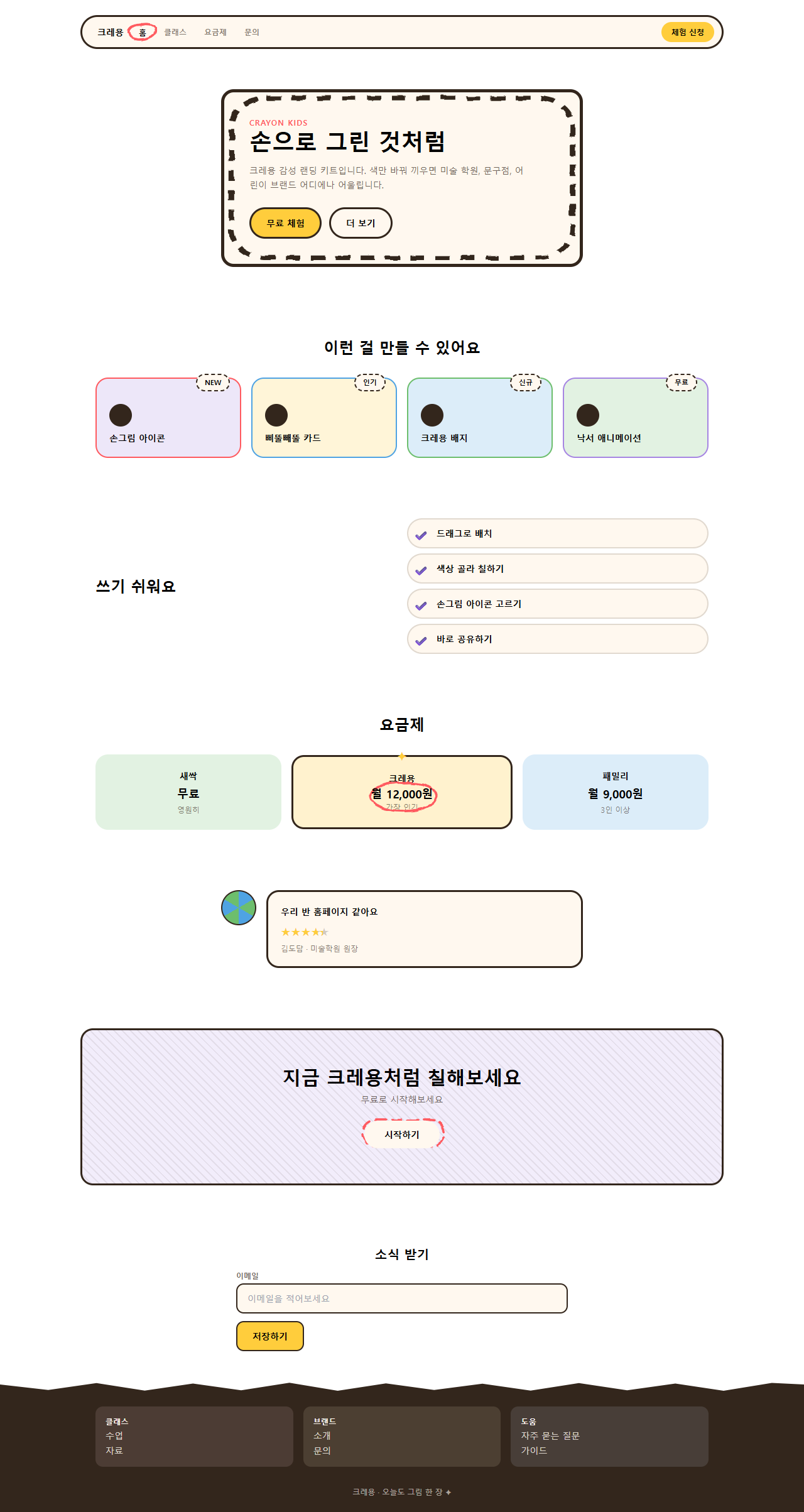
어디서 깨지는가 — 함정
가장 먼저 겪은 함정은 흔들림 필터를 어디에 거느냐입니다. 처음엔 카드 전체(테두리 더하기 글자)를 통째로 filter: url(#rough)로 감쌌더니 feDisplacementMap이 픽셀을 전부 같은 규칙으로 밀어내는 바람에 제목 글자까지 삐뚤빼뚤 번져 읽기 어려워졌습니다. 테두리를 그리는 SVG rect·path만 별도 레이어로 떼어 놓고 그 레이어에만 필터를 걸자 글자는 또렷하게 남고 테두리만 흔들렸습니다.
두 번째는 실측으로 잡은 숫자입니다. 푸터의 별 두 개 반짝임만으로 움직임을 재니 누적면적이 0.07%로 설정 하한(0.08%)에 못 미쳐 정지 화면과 구분이 안 됐습니다. 별 크기를 14px에서 20px로, 확대 범위를 0.7~1.2배에서 0.5~1.7배로 넓히자 0.35%로 올라가 통과했습니다. 세 번째는 활성 탭을 두르는 동그라미의 크기였습니다. 뷰박스를 92×50으로 처음 그렸더니 렌더된 화면에서 원이 옆 탭 글자까지 침범했고, 56×30으로 줄이고 나서야 "홈" 글자만 정확히 감쌌습니다. 크레용 선이 메일 앱의 어디까지 살아남는지는 뉴스레터 디자인 9종에서 재봤습니다. 이 세 가지를 다 잡은 완성본을, 이 비밀번호 r6qyfm69이 걸린 zip을 받아 그대로 열어 확인할 수 있습니다.
아홉 개 데모 전부 MDN prefers-reduced-motion 문서가 정의한 미디어 쿼리를 감지하면 선이 그려지는 애니메이션과 카드가 기우는 움직임을 멈추고, 각 요소를 다 그려진 상태(체크는 완성된 모양, 동그라미는 닫힌 원)로 고정합니다.
접근성
손그림 스타일의 가장 흔한 실패는 흔들림 필터를 글자에까지 거는 것입니다. feDisplacementMap은 소스 그래픽의 모든 픽셀을 노이즈 맵 값만큼 밀어내는데, 이건 글자 획도 예외가 아니라서 작은 크기에서는 자모가 뭉개져 읽기 어려워집니다. 이 키트는 그래서 필터를 항상 테두리 전용 SVG 레이어에만 걸고 글자 요소는 건드리지 않습니다. 글자색은 전부 짙은 잉크(#33261c)로 고정해 종이 바탕 위에서 13.9:1, 카드에 쓰는 가장 어두운 틴트(퍼플 틴트) 위에서도 12.1:1로 WCAG 2.1 최소 대비 기준 4.5:1을 넉넉히 넘습니다. 빨강·파랑 강조선은 장식용 테두리라 텍스트 대비 기준 대상이 아니지만, 버튼·입력창의 키보드 초점은 색선에 기대지 않고 :focus-visible 아웃라인을 잉크색으로 별도 그렸습니다.
크레용 말고 다른 밝은 톤 홈페이지 유행이 궁금하면 파스텔 캔디 랜딩도 함께 보시고, 디자인 트렌드 카테고리 전체와 이 블로그 소개는 소개 페이지에 정리해 뒀습니다.
FAQ
손그림 디자인이랑 그냥 스케치 폰트 쓰는 건 뭐가 달라요?
스케치 폰트는 글자 모양 자체를 손글씨처럼 바꾸는 것이고, 이 키트는 글자는 반듯한 서체 그대로 두고 테두리·밑줄·체크 같은 장식 선만 SVG 필터로 흔듭니다. 글자를 흔들면 가독성이 떨어지지만 테두리만 흔들면 귀여움은 살고 읽기는 그대로입니다. 같은 신뢰의 자리를 깔끔한 방향으로 푼 키트는 saas 랜딩 신뢰감 디자인 키트입니다.
귀여운 웹디자인인데 어두운 톤 브랜드에도 쓸 수 있나요?
쓸 수 있지만 paper(#fff8ef) 대신 짙은 바탕을 쓰려면 잉크 글자색도 밝은색으로 뒤집어야 대비가 유지됩니다. 크레용 선 색 일곱 개 중 빨강·노랑처럼 채도가 높은 색은 어두운 바탕에서도 그대로 써도 되지만, 카드 틴트는 어두운 버전으로 다시 잡아야 합니다.
feTurbulence 필터가 느리진 않나요?
이 키트의 필터는 테두리를 그리는 작은 SVG 레이어 하나에만 걸리고 값이 고정돼 있어(애니메이션 자체는 stroke-dashoffset·transform이 담당) 매 프레임 다시 계산하지 않습니다. 카드 전체나 페이지 전체에 필터를 걸면 느려지니, 항상 테두리 레이어처럼 작은 요소에만 국한해서 씁니다.
이런 글이랑 어울려요
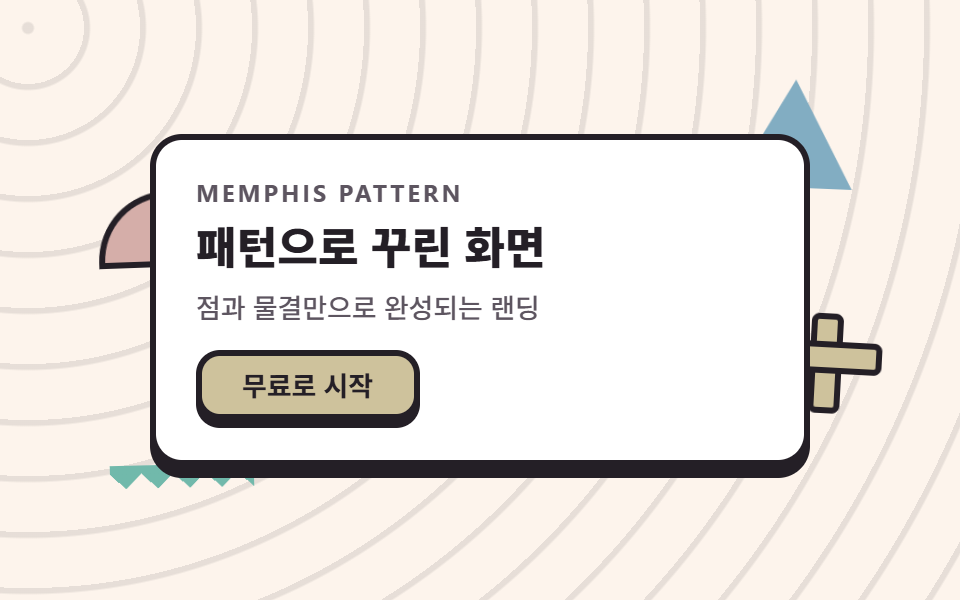 디자인 트렌드멤피스 디자인 패턴 랜딩 키트, 점·물결 섹션 9개
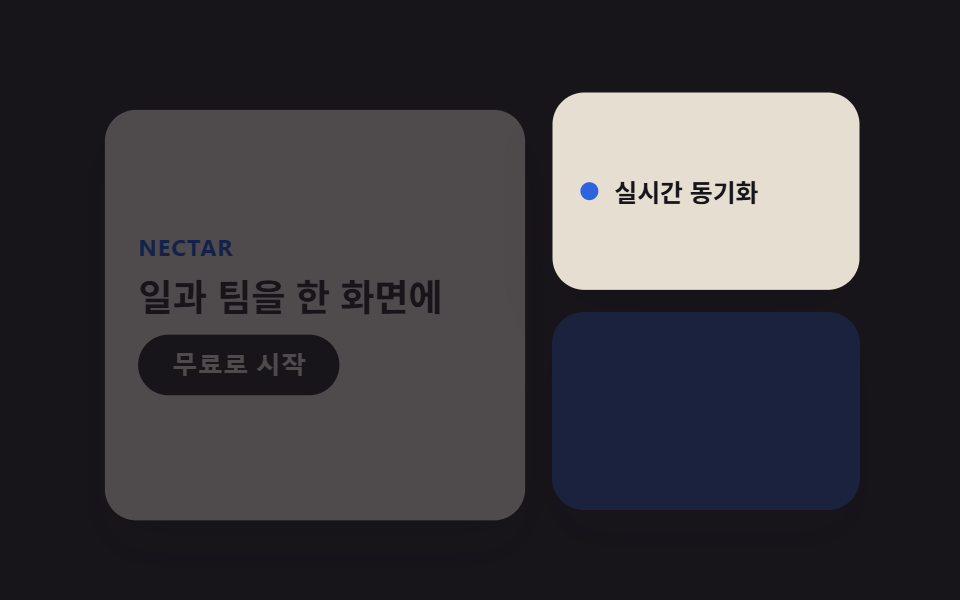 디자인 트렌드벤토 그리드 디자인 — 요즘 핀터레스트에서 유행하는 부품 9개
 디자인 트렌드다크 SaaS 랜딩에 스며든 리니어 디자인 시스템 9종
 디자인 트렌드키네틱 타이포그래피 랜딩페이지, 코드로 뜯어봤다
 디자인 트렌드클레이모피즘 랜딩 UI 키트, 통통한 섹션 9개
 디자인 트렌드그레인 얹은 오로라 그라디언트 랜딩 부품 9개
 디자인 트렌드네오브루탈리즘 UI 랜딩 부품 9개, 그림자는 안 번진다
 디자인 트렌드번쩍이는 Y2K 웹 디자인, 크롬·홀로그램 부품 9개
 디자인 트렌드HUD 디자인, 화면이 나를 겨누는 랜딩 부품 9개
 디자인 트렌드뉴모피즘 디자인 랜딩 UI 키트, 그림자 두 겹 섹션 9개